

Thread
hey B M O W ! :-) Apple IIgs support - Floppy Emu?
Wait, what? It works? That's awesome!
What does the daisy chain board do in a normal IIgs system, and where does it go in the chain?
It's possible that's due to a problem with the floppy emulation not being totally IIgs-compatible, if clicking on a control panel item causes some disk access. What happens if you run this IIgs with a real floppy disk?
What does the daisy chain board do in a normal IIgs system, and where does it go in the chain?
lol i can try, i don't have much space so i have to take the IIgs off my shelf and it takes up my whole desk.
but yeah it works!!! pretty awesome!
but yeah it works!!! pretty awesome!
Does the IIgs need an eject button? Sorry for the dumb questions - I've never used or even seen a IIgs. But if it doesn't do disk eject in software like the Mac, then Floppy Emu would need an eject button added to make it play nice with the IIgs, right?
Now I'm confused. Is the daisy chain board part of the 800k IIgs floppy drive, or is it something different? If it's part of the drive, then why didn't Floppy Emu work when you first tried connecting it to the drive's pass-through port?
maybe because there is the known and the unknown… they know what is connected inside…and make adjustments accordingly on the out side its just a raw pass through?
yeah the apple® 800k 3.5 disk drive has a eject button on it.
not sure if the iigs needs it?
I am like you i know almost nothing about the IIGS
I had it on the shelf for a year and a half and never even turned it on to test it. LOL
i have used more in the last week then the whole time i'v owned it
lastnight with the floppy emu and that Disk one install of gos 6.0.1 was the first time i have physically seen it
yeah i know its bad.
mcdermd said its ok though because i'm a mac dude. not apple II guy
i used disk copy to make a 800k gos 6.0.1 disk
and tried to boot it normal and it said something about cannot boot pro dos…
so looks like the Floppy emu is working better then the normal floppy drive…
not sure if the iigs needs it?
I am like you i know almost nothing about the IIGS
I had it on the shelf for a year and a half and never even turned it on to test it. LOL
i have used more in the last week then the whole time i'v owned it
lastnight with the floppy emu and that Disk one install of gos 6.0.1 was the first time i have physically seen it
yeah i know its bad.
mcdermd said its ok though because i'm a mac dude. not apple II guy
i used disk copy to make a 800k gos 6.0.1 disk
and tried to boot it normal and it said something about cannot boot pro dos…
so looks like the Floppy emu is working better then the normal floppy drive…
I wonder if the eject button will "eject" the mounted disk image if pressed. Does the drive activity light work with the emulator? Both the light and the eject button connect to the daisy chain board. The eject button is software controlled, although unlike a Mac, you can arbitrarily eject a disk while its mounted on the GS/OS desktop. It basically does the equivalent of a "Command-Shift-3" although when connected to a Mac, the eject button doesn't function at all. The button is needed to change disks in ProDOS as some software doesn't software auto eject floppies when requesting another disk be inserted. GS/OS is similar to MacOS and even uses the same dialogs when it wants another disk inserted. The machine has full software eject like the Mac, but you can eject on command by pushing the button if you wish.
Uniserver's crashing problem is likely related to the bad capacitors causing system stability problems. If GS/OS had a problem accessing the disk, it would have crashed well before reaching the installer as the boot process loads quite a few files from disk (a real drive seeks A LOT on boot). It would have also kicked back a system error regarding reading disks with the sliding Apple. Dumping to monitor usually means memory is getting trashed.
Inside the drive is a raw Sony DSDD floppy drive, the same as found in period Macs. It is connected to a board that holds the DB-19 pass-through to connect another drive and the cable that goes to the computer. This board also seems to handle the eject button in addition to interpreting the "3.5DISK" signal on pin 4 and the Drive Select Signals. On a Mac, its just dead weight.
Uniserver's crashing problem is likely related to the bad capacitors causing system stability problems. If GS/OS had a problem accessing the disk, it would have crashed well before reaching the installer as the boot process loads quite a few files from disk (a real drive seeks A LOT on boot). It would have also kicked back a system error regarding reading disks with the sliding Apple. Dumping to monitor usually means memory is getting trashed.
I think I get it. This board has a cable to the IIgs, an IDC-20 connector for the floppy drive, and a DB-19 pass-through so you can optionally daisy-chain a second floppy drive, right? So Floppy Emu didn't work when connected to that DB-19 pass-through, but did work when connected to the IDC-20, replacing the real drive mechanism. Makes sense.
Given what you've told me, I'd guess it does. I can also add an eject feature to the firmware, that's pretty easy. It might be a little confusing for Mac users to see an "eject" option, though.
So yeah, I'm very interested in what modifications to Floppy Emu would be necessary to make it work on the IIgs without requiring that daisy-chain board. Ideally while still maintaining interoperability with other real 3.5 drives in the chain. Does anyone have a high-res photo of the daisy chain board? Does it have any ICs on it, or is it just a bunch of passive components?
Unfourtunatly this board is far from simple in design. It has a ton of passives, plus a Sony CXD1085B IC. Also the later Apple FDHD external drive (G7287) has a slightly different board that lacks the pass through DB-19. This drive was mostly intended for the Mac, but works with the Apple FDHD controller card for the Apple II as well.
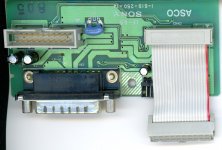
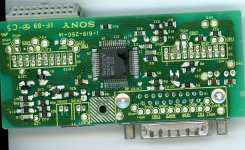
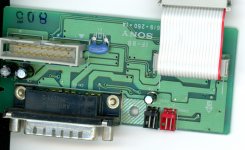
well, ah… chances are pretty good if you have a iigs, you probably have one of these 800k drives yes?
Yes, usually the drive is paired with a IIgs. It is VERY common.
Hmm, it seems kind of lame to say you need a real floppy drive in order to use the floppy emulator. But if virtually every IIgs owner has one already, I guess it would be OK. It still beats keeping a collection of slowly-decaying 3.5 inch floppies in a box somewhere!
But if virtually every IIgs owner has one already, I guess it would be OK. It still beats keeping a collection of slowly-decaying 3.5 inch floppies in a box somewhere!
lol yeah man
should i try it with pin 4 disabled?
should i try it with pin 4 disabled?
I say give it a shot if you are comfortable with making the change to the board.
ok ill try.
ok so i heated up pin 4 and lifted it. i guess ill try it and see what happens
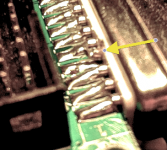
nope, pin 4 open
doesn't boot.
connected directly
hey i just thought of something
there is this guy that makes a IIgs UNIDISK EMU
and he talks about having to special set of buttons on the EMU in order to enable the unidisk mode
for it to boot…
http://tulip-house.ddo.jp/DIGITAL/UNISDISK/english.html
doesn't boot.
connected directly
hey i just thought of something
there is this guy that makes a IIgs UNIDISK EMU
and he talks about having to special set of buttons on the EMU in order to enable the unidisk mode
for it to boot…
http://tulip-house.ddo.jp/DIGITAL/UNISDISK/english.html
That unit emulates 5.25" drives. Strange as it may sound, Apple made two slightly different 5.25" drives with DB-19 connectors on them.
-The UniDisk 5.25" Drive (A9M0104)
-The Apple 5.25" Drive (A9M0107)
Both look the same aside from the label on the bottom. The difference is the Unidisk 5.25" requires the -12v power line on the floppy port. This is why this drive won't work with the Apple IIe Card for the LC PDS.
Too bad the pin 4 thing didn't work. I guess there is other logic at play with that daisy chain board. Thing is, most solid state disk needs on the Apple II can be handled by the CFFA3000. The number of programs that require a 3.5" drive because they directly drive the IWM is very small (mostly demoscene stuff). The Apple IIe/c/gs is blessed with a device independent block storage interface in ROM called "SmartPort", which makes emulating storage devices a cinch. Most major emulators take advantage of this feature too.
-The UniDisk 5.25" Drive (A9M0104)
-The Apple 5.25" Drive (A9M0107)
Both look the same aside from the label on the bottom. The difference is the Unidisk 5.25" requires the -12v power line on the floppy port. This is why this drive won't work with the Apple IIe Card for the LC PDS.
Too bad the pin 4 thing didn't work. I guess there is other logic at play with that daisy chain board. Thing is, most solid state disk needs on the Apple II can be handled by the CFFA3000. The number of programs that require a 3.5" drive because they directly drive the IWM is very small (mostly demoscene stuff). The Apple IIe/c/gs is blessed with a device independent block storage interface in ROM called "SmartPort", which makes emulating storage devices a cinch. Most major emulators take advantage of this feature too.
i guess the next thing to do is figure out what that SONY I/C does on the 800k bridge board…...
I just noticed the schematics for the Unidisk 3.5 drive are online here: http://bitsavers.trailing-edge.com/pdf/apple/disk/sony/Unidisk_Schematic.pdf I didn't really look at it in detail, but it can probably answer a lot of questions.
ok sir i will look at it !
i know you don't want one… i think i am going to send you a IIgs man.
wholy crap. Thats the wholy grail right there. internal schematics of the GLU. Too bad we dont have that for SE/30s or other things.
At least now that its out there, a duplicate can be built.
At least now that its out there, a duplicate can be built.
Reading the blurry text on page 3, its the schematic for the Sony CXD1085. The 2nd page is interesting as it looks like an earlier/simplier design. I'll have to look at the inside of the Unidisk 3.5" I have. Its an older drive, but I don't think you can daisy chain 5.25" drives behind it on the IIgs.
Actually you can daisey-chain a 5.25" drive to a 3.5" Unidisk on the IIgs. Done it a few times.
Though Apple says you shouldn't, I've temporarily had 2 3.5" IIgs drives as well as 4 3.5" Unidisks connected. Was installing system software and hated the floppy shuffle
Though Apple says you shouldn't, I've temporarily had 2 3.5" IIgs drives as well as 4 3.5" Unidisks connected. Was installing system software and hated the floppy shuffle