

Thread
Macintosh Portable Hard Drive
(Tried posting earlier and I don't think it went through. If it did, oops!)
I have been trying to resurrect a Macintosh Portable I acquired not too long ago. Uniserver did a great job recapping it and Techknight found and repaired a broken trace and a broken reset button.
When the machine would try to start up previously, the hard drive would spin up, then stop, then spin up, then stop, continually. It would never get past the smiling mac.
Apparently this is not an uncommon problem and Techknight told me about the gooing gaskets. I will confirm that the hard drive is dead once I get the board back, but I decided to open up the hard drive and clean it out. There was some goo on the edges of the hard drive, which I cleaned off, but the platter itself seemed clean.
I was surprised that inside the hard drive was a small bag of something. It was wet/greasy so I guess it could be lubricant of some kind (see attached picture).
I have been told that there is a 50 pin adapter I can get that would allow me to use a normal SCSI drive inside this machine. Does anyone have any recommendation where I can get such a drive? Are there any issues (such as power) with putting a standard SCSI drive in this?
Thanks!
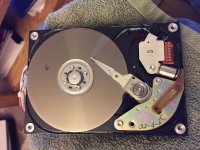
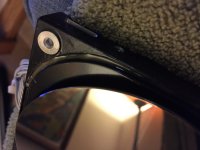
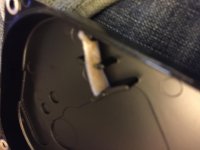
I have been trying to resurrect a Macintosh Portable I acquired not too long ago. Uniserver did a great job recapping it and Techknight found and repaired a broken trace and a broken reset button.
When the machine would try to start up previously, the hard drive would spin up, then stop, then spin up, then stop, continually. It would never get past the smiling mac.
Apparently this is not an uncommon problem and Techknight told me about the gooing gaskets. I will confirm that the hard drive is dead once I get the board back, but I decided to open up the hard drive and clean it out. There was some goo on the edges of the hard drive, which I cleaned off, but the platter itself seemed clean.
I was surprised that inside the hard drive was a small bag of something. It was wet/greasy so I guess it could be lubricant of some kind (see attached picture).
I have been told that there is a 50 pin adapter I can get that would allow me to use a normal SCSI drive inside this machine. Does anyone have any recommendation where I can get such a drive? Are there any issues (such as power) with putting a standard SCSI drive in this?
Thanks!
I think Uniserver sells the adapters on ebay… You could also PM him...
Yup, that drive is junk! All mine are...
Notice the filter pad is full of that goo. that means the platter was picking it up and throwing it off.
Which is what happens.... and it accumulates underneath the platter, and causes a head crash. Once the head crashes, its spins up down up down up down.
Notice the filter pad is full of that goo. that means the platter was picking it up and throwing it off.
Which is what happens.... and it accumulates underneath the platter, and causes a head crash. Once the head crashes, its spins up down up down up down.
How weird!
So where is a good source for a compatible SCSI drive (once I obtain the 50 pin adapter)?
So where is a good source for a compatible SCSI drive (once I obtain the 50 pin adapter)?
Uniserver sells some compatible 50-pin HDs
However
I have a Mac Portable too, and it won't even start now.
I'm going to ship it to Uni next week-end.
My Conner doesn't work and I think I have the same problem. It seems to be a plage, all HDs are dying and the Conner 3045 in the Portable is one of the worst.
I will buy a SCSI2SD for mine. Coupled with the 34-pin to 50-pin adapter Uni provides it should work very well AND since it draws less power than a conventional HD, the battery life will be better than it ever was! I personally recommend this solution.
Check this out http://shop.codesrc.com/index.php?route=product/product&product_id=58
It's a bit expensive okay but HDs aren't cheap either!
NOT affiliated with the seller
However
I have a Mac Portable too, and it won't even start now.
I'm going to ship it to Uni next week-end.
My Conner doesn't work and I think I have the same problem. It seems to be a plage, all HDs are dying and the Conner 3045 in the Portable is one of the worst.
I will buy a SCSI2SD for mine. Coupled with the 34-pin to 50-pin adapter Uni provides it should work very well AND since it draws less power than a conventional HD, the battery life will be better than it ever was! I personally recommend this solution.
Check this out http://shop.codesrc.com/index.php?route=product/product&product_id=58
It's a bit expensive okay but HDs aren't cheap either!
NOT affiliated with the seller
Those SCSI2SDs look interesting. How do you plan on mounting it in the Portable?Uniserver sells some compatible 50-pin HDs
However
I have a Mac Portable too, and it won't even start now.
I'm going to ship it to Uni next week-end.
My Conner doesn't work and I think I have the same problem. It seems to be a plage, all HDs are dying and the Conner 3045 in the Portable is one of the worst.
I will buy a SCSI2SD for mine. Coupled with the 34-pin to 50-pin adapter Uni provides it should work very well AND since it draws less power than a conventional HD, the battery life will be better than it ever was! I personally recommend this solution.
Check this out http://shop.codesrc.com/index.php?route=product/product&product_id=58
It's a bit expensive okay but HDs aren't cheap either!
NOT affiliated with the seller
That's the difficult part of the installation. The converter and the scsi2sd have no bespoke brackets.
I was thinking of maybe... Velcro ?
ESD aren't that important with a scsi2sd I think.
I recall seeing velcro on extension cards of some old dells.
And the bottom of the SCSI2SD Rev5 and the bracket from the conner hd are really flat. Velcro would work quite well on those surfaces.
The only thing bothering me at the moment is heat: does the scsi2sd heat a lot when used a couple of hours? I dunno, never owned one for now.
I was thinking of maybe... Velcro ?
ESD aren't that important with a scsi2sd I think.
I recall seeing velcro on extension cards of some old dells.
And the bottom of the SCSI2SD Rev5 and the bracket from the conner hd are really flat. Velcro would work quite well on those surfaces.
The only thing bothering me at the moment is heat: does the scsi2sd heat a lot when used a couple of hours? I dunno, never owned one for now.
The Conner CP3045 and CP3040 are the same hardware and platter with different controller boards.
In other words, take the board off your broken drive and buy one of these for a OEM looking replacement
http://www.ebay.com/itm/Conner-CP3040A-GLD02-40MB-Apple-50-Pin-SCSI-Hard-Drive-/291619718308?hash=item43e5e3c4a4:g:GzkAAOSwA4dWJZAW
In other words, take the board off your broken drive and buy one of these for a OEM looking replacement
http://www.ebay.com/itm/Conner-CP3040A-GLD02-40MB-Apple-50-Pin-SCSI-Hard-Drive-/291619718308?hash=item43e5e3c4a4:g:GzkAAOSwA4dWJZAW
Yeah that could be an option. I contemplated this method.
The only problem is that the hard drive could potentially get bad soon. Yours dead, mine's dead, all of techknight's are dead.
I know someone tried to swap the controller boards. Don't remember who but it didn't work. Apparently some controller boards can get bad as well?
If you want originality though, this is the best thing for your computer.
I'm planning to use this Portable as my main System 6 machine. And with a boot time of less than 5 seconds with the SCSI2SD I can't resist
It all depends on what you want to do with it.
The only problem is that the hard drive could potentially get bad soon. Yours dead, mine's dead, all of techknight's are dead.
I know someone tried to swap the controller boards. Don't remember who but it didn't work. Apparently some controller boards can get bad as well?
If you want originality though, this is the best thing for your computer.
I'm planning to use this Portable as my main System 6 machine. And with a boot time of less than 5 seconds with the SCSI2SD I can't resist
It all depends on what you want to do with it.
The only fix is to permetex a new seal and pull the old one out before it goes bad. If you get a good one...
Mr. BadGoldEagleYeah that could be an option. I contemplated this method.
The only problem is that the hard drive could potentially get bad soon. Yours dead, mine's dead, all of techknight's are dead.
I know someone tried to swap the controller boards. Don't remember who but it didn't work. Apparently some controller boards can get bad as well?
If you want originality though, this is the best thing for your computer.
I'm planning to use this Portable as my main System 6 machine. And with a boot time of less than 5 seconds with the SCSI2SD I can't resist
It all depends on what you want to do with it.
Have you found a good description on how to format the SCSI2SD so it will work with a Portable? I am... technically illiterate so easy instructions would be terrific!
Nope, the edge. the part that gooed up. its a big o-ring that seals the lid to the body, before it melts....
pretty sure the sealant melts due to Fumes from the 9v or Lead Acid battery. because they use those same HD's in Classic and LC, they never goo up like that... only the portable.
Does the seal actually need to be replaced with anything, really? What happens if you just take out the bad seal and close it back up?
And last question: I removed the platter on my goo-ed up hard drive to take a look at the bottom. There was a spot of dried goo on the outer part rings of the platter. Has anyone ever had luck removing the platter, goo, cleaning the platter, and reassembling?
try it
I did, but that goo seems to have bonded itself to the platter. When I finally got it off, it looks like it took a layer of the platter with it, so I am sure the drive is still dead as a door post.
That is quite possible. Those old type of batteries had "vents" to release gases if the reaction went bad or they started to get old and started out gassing from inappropriate reactions that take place when they just sit there without being used.
I have found when that goo leaks onto any of the plastics of the machine it does something to the plastic to weaken it.. I've always noticed when I find cracks in any part of the plastics it was where goo is or was.... So it's best to get that goo out of the rest of the machine's plastics after it leaks to prevent damage to the plastic casing. Just a side note... lol
I've also seen it leak downwards onto the IC's.... and screws up traces!!!! I think it may be worse than the leaking capacitor goo.... (unconfirmed of course)
I've also seen it leak downwards onto the IC's.... and screws up traces!!!! I think it may be worse than the leaking capacitor goo.... (unconfirmed of course)
@ khannonnd
I think the installation of the SCSI2SD is standard for any machine. It's not that more difficult with the portable, you just need the 34-pin to 50-pin converter.
I think it's plug and play but don't quote me on this. I have never owned one.
Here's the User Manual if you want. There are specific instructions on how to update the firmware. But I think the boards come with firmware pre-installed.
The boards are pretty advanced now, version 5, so you don't really need to update the firmware anyway, IMO
I think the installation of the SCSI2SD is standard for any machine. It's not that more difficult with the portable, you just need the 34-pin to 50-pin converter.
I think it's plug and play but don't quote me on this. I have never owned one.
Here's the User Manual if you want. There are specific instructions on how to update the firmware. But I think the boards come with firmware pre-installed.
The boards are pretty advanced now, version 5, so you don't really need to update the firmware anyway, IMO
Hey techknight... I just degooed a Connor... LOTS of q-tips and 91% alcohol... It boots up fine... Got the goo before it went into the little filter.. so it's good.. Now what the heck would I get to replace that gasket?? Where can I find such an animal??
And one that won't turn into goo 20 years from now... lol!
And one that won't turn into goo 20 years from now... lol!
You know what I'll give that a try this week-end.
I think mine's really dead. The head spins up and down. It probably means the heads have crashed or something...
I was feeling guilty of removing the "warranty void" labels but it's either trash or mendable.
I think mine's really dead. The head spins up and down. It probably means the heads have crashed or something...
I was feeling guilty of removing the "warranty void" labels but it's either trash or mendable.
Well if you have a working one, and to keep it working... removal of the warranty stickers is necessary.. I'm sure someone will chime in saying "but it's way out of warranty".. but I know where you are coming from.. to keep it original.. The problem is that goo needs to be removed as techknight has said and tried himself on drives... before it starts spitting all across the platter... If you can catch it before it does you should be in good shape.. I think the goo issue is the main reason these drives fail.
And the drive should be removed from the machine if you don't do it.. I really have seen boards with it dripped on it and have ruined traces.. It plops right down on the solder joints of one particular chip... Also then it get's on the plastic and slowly destroys the integrity and strength of the plastic...
I haven't really screwed with the drives till now but now I have to do all the portables I have... before it kills the original drives... I do have a machine with the scsi to cf adapter but again to try to keep machines in as original condition as possible it is cool to have the original drives working..
And the drive should be removed from the machine if you don't do it.. I really have seen boards with it dripped on it and have ruined traces.. It plops right down on the solder joints of one particular chip... Also then it get's on the plastic and slowly destroys the integrity and strength of the plastic...
I haven't really screwed with the drives till now but now I have to do all the portables I have... before it kills the original drives... I do have a machine with the scsi to cf adapter but again to try to keep machines in as original condition as possible it is cool to have the original drives working..
You can probably just take a gasket off of a modern drive, they are still used. As far as one that will be there in 20 years that is not goo, you'd need one that is 100% synthetic material, and only one material, the gooification is a result of how the rubber is made.
well you probably wont find a seal thats exactly the same type, size, or fits well.
A really really thin bead of silicone/permetex and seal it up.
And yes, you need the seal otherwise it messes with the drives filtration system so dust gets in there. will eventually crash the head.
A really really thin bead of silicone/permetex and seal it up.
And yes, you need the seal otherwise it messes with the drives filtration system so dust gets in there. will eventually crash the head.
And if that little filter thingy gets all gooey is it cool if it's just removed??? You know I find this head and platter a lot more forgiving than modern day drives.. For example I have a syquest external drive with cartridges.. It's not really air tight.. but is almost the same.. a metal platter and similar heads..
I could only assume they made it really air tight in case the machine is brought in real unique environments.. I think since the machine is not being used as a real everyday machine the dust it will be exposed to will not be in large amounts...
But I understand that it should be sealed just the same... I think I may use a liquid silicone to seal it..
BTW I just did like 5 working drives... after cleaning I tested all of them.. all worked fine.. did block tests and didn't pick up any bad ones.. one had a little spot of goo on the side of the platter.. may have dripped onto it as I lifted the cover.. a little 91% alcohol and q-tip got it off right away.. she worked fine after... removed before it ran!
Oh and a few of them had these like black rubber separators on the head arm assembly.. when I briefly just touched it with the q-tip it was like gum.. black crap.. I left them alone but I can't see those lasting very long.. those are breaking down.. One drive had clear ones and didn't have the same issue..
I could only assume they made it really air tight in case the machine is brought in real unique environments.. I think since the machine is not being used as a real everyday machine the dust it will be exposed to will not be in large amounts...
But I understand that it should be sealed just the same...
I think I may use a liquid silicone to seal it.. BTW I just did like 5 working drives... after cleaning I tested all of them.. all worked fine.. did block tests and didn't pick up any bad ones.. one had a little spot of goo on the side of the platter.. may have dripped onto it as I lifted the cover.. a little 91% alcohol and q-tip got it off right away.. she worked fine after... removed before it ran!
Oh and a few of them had these like black rubber separators on the head arm assembly.. when I briefly just touched it with the q-tip it was like gum.. black crap.. I left them alone but I can't see those lasting very long.. those are breaking down.. One drive had clear ones and didn't have the same issue..
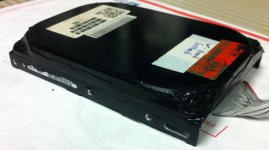
these babes are great with the 34/50 pin adaptor in the portable ( notice the power draw ) its lower then the stock hd!. and these things are fast.
*** oh well not this exact HD *** this one is IDE… but the SCSI version if you can ever find one for a decent price.
http://www.ebay.com/itm/Quantum-Internal-Hard-Drive-800MB-Trailblazer-for-Mac-Performa-Power-Mac-Mac-LC-/272003537597?hash=item3f54ac9abd:g:vXQAAOSwVL1WDaoA

*** oh well not this exact HD *** this one is IDE… but the SCSI version if you can ever find one for a decent price.
http://www.ebay.com/itm/Quantum-Internal-Hard-Drive-800MB-Trailblazer-for-Mac-Performa-Power-Mac-Mac-LC-/272003537597?hash=item3f54ac9abd:g:vXQAAOSwVL1WDaoA
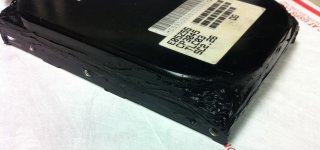
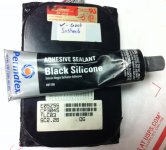
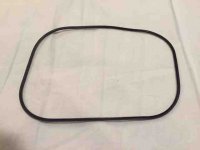
Well I couldn't believe it but one of my portables had a hard drive with an intact rubber gasket!!!! It wasn't gooey at all!!! First time I have ever seen this!! I removed it anyway.. no reason to take a chance!!! I am using clear silicone liquid and along with a syringe am squirting it in where the gasket used to be and then re-attaching the cover nice and tight!!!
On a side note I have seen all over the place to not use the newer Apple hard disk drivers to format the drive.. And it is true.. The drive has difficulty waking up when it re-spins back up after falling asleep. You receive error messages.. It just doesn't remount from a sleep state. So it is said that this will ruin the hard drive... well that's not true.. I've used a 3rd party APS Powertools software and re-initialized along with the APS Powertools driver... Working like a charm... So those rumors that it ruins the drive is just not true.. You just can't use the new Apple drivers... there is a bug when it comes to the portable and the Connor drives..
On a side note I have seen all over the place to not use the newer Apple hard disk drivers to format the drive.. And it is true.. The drive has difficulty waking up when it re-spins back up after falling asleep. You receive error messages.. It just doesn't remount from a sleep state. So it is said that this will ruin the hard drive... well that's not true.. I've used a 3rd party APS Powertools software and re-initialized along with the APS Powertools driver... Working like a charm... So those rumors that it ruins the drive is just not true.. You just can't use the new Apple drivers... there is a bug when it comes to the portable and the Connor drives..