
Thread
Kendall's Collection and Finds!
It seems I have started to have enough Apple stuff to warrant my own thread!
My current collection consists of:
(1) Macintosh Portable 5120 (which Uniserver, Techknight, and Canby have been instrumental in helping me bring back to life)
(2) Two Macintosh Pluses
(3) Powerbook 180
(4) Powerbook 540c
(5) Powerbook G3 Wallstreet "PDQ"
(6) Graphite iBook SE 466mhz
(7) 450mhz Cube
( Macbook (2008 aluminum unibody)
(9) 15" Macbook Pro (2.4ghz i5)
(10) 13" Macbook Pro (Late 2013)
(11) eMate 300
(12) Newton MessagePad 130
(13) 10GB scroll wheel iPod
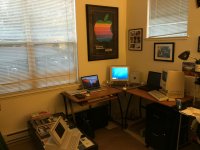
This is my current set up (the other machines are either in cases or in my closet) The Apple poster is a 1980 dealer foam board advertisement. I got it from my local dealer several years ago when it was cleaning out its back. Also seen are my mid-late 1990s MacAddicts/MacHomes/MacWorlds and the "Iconic" book of pictures of Apple products.
My current collection consists of:
(1) Macintosh Portable 5120 (which Uniserver, Techknight, and Canby have been instrumental in helping me bring back to life)
(2) Two Macintosh Pluses
(3) Powerbook 180
(4) Powerbook 540c
(5) Powerbook G3 Wallstreet "PDQ"
(6) Graphite iBook SE 466mhz
(7) 450mhz Cube
(
Macbook (2008 aluminum unibody) (9) 15" Macbook Pro (2.4ghz i5)
(10) 13" Macbook Pro (Late 2013)
(11) eMate 300
(12) Newton MessagePad 130
(13) 10GB scroll wheel iPod
This is my current set up (the other machines are either in cases or in my closet) The Apple poster is a 1980 dealer foam board advertisement. I got it from my local dealer several years ago when it was cleaning out its back. Also seen are my mid-late 1990s MacAddicts/MacHomes/MacWorlds and the "Iconic" book of pictures of Apple products.
Nice set up.
That poster is super sweet! Now you need a 128k to keep the pluses company 
I am hoping I may have a bead on a special (and super affordable) 128k. I will know for sure this weekend. Fingers crossed.That poster is super sweet! Now you need a 128k to keep the pluses company
I feel bad for keeping my second Mac Plus in the closet since it is in great physical shape and works perfectly. I am keeping it and a third Mac Plus motherboard as parts machines should the one I have on display ever need help.
I also forgot to include my two iPads (one first gen and one retina mini iPad) in my collection!
Also, I guess I should mention my biggest collection fail ever. Once when I was in eighth grade my computer teacher gave me an SE/30 she "found" in some closet at the school and had no use for. This was in 1998. The thing was in impeccable shape and had some accelerator card in it. I don't recall what it was exactly, but at the time my family had a Performa 575 (with a 33mhz 680CL040) and I remember that the accelerator card was faster than that. Well one day I was carrying the machine across the home and dropped it smack on the solid wood floors. Both the case and the CRT screen cracked. Being all of 14, I figured it was now worthless so I just put the machine out in the garbage. I wish I had (1) not dropped it and (2) after I dropped it been smart enough to salvage the motherboard and other parts...
Today was an EPIC day for me and Craigslist.
First, I responded to a Craigslist ad advertising a "1985 Mac 512." for $45. Comes with the Apple carrying bag, keyboard, mouse, and software. I go and buy it. Get it home. Its an original 128k Mac. He assumed it was a 512k mac because he got it for free from his employer in 1985. I felt bad, so I called him back and offered to give it back to him since he didn't know what he had. He declines but says he would accept a small "nominal" amount in addition. So I go back and give him an extra $160 to make it around $200. It works perfectly except for the internal drive is likely toast. The mechanism for ejecting seems to get stuck even after lubrication and it doesn't want to read disks even when it accepts them. I have removed the drive and tested the machine off of an external 800k drive.
It also came with some nice software.
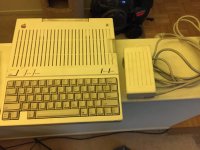
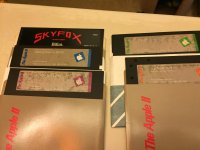
Second, I received an Apple IIc, with software and power supply, for $40! It came with Four Apple branded disks: (1) Getting down to BASIC; (2) An Introduction; (3) Exploring Apple Logo; and (4) The Apple at Work It also came with an EA disk "Skyfox"
Pictures attached! I'm pretty excited!
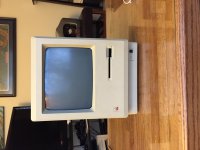
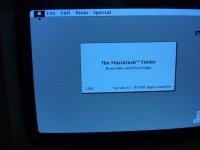
First, I responded to a Craigslist ad advertising a "1985 Mac 512." for $45. Comes with the Apple carrying bag, keyboard, mouse, and software. I go and buy it. Get it home. Its an original 128k Mac. He assumed it was a 512k mac because he got it for free from his employer in 1985. I felt bad, so I called him back and offered to give it back to him since he didn't know what he had. He declines but says he would accept a small "nominal" amount in addition. So I go back and give him an extra $160 to make it around $200. It works perfectly except for the internal drive is likely toast. The mechanism for ejecting seems to get stuck even after lubrication and it doesn't want to read disks even when it accepts them. I have removed the drive and tested the machine off of an external 800k drive.
It also came with some nice software.
Second, I received an Apple IIc, with software and power supply, for $40! It came with Four Apple branded disks: (1) Getting down to BASIC; (2) An Introduction; (3) Exploring Apple Logo; and (4) The Apple at Work It also came with an EA disk "Skyfox"
Pictures attached! I'm pretty excited!
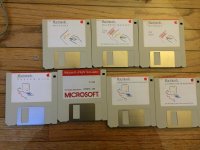
And the Software that came with the Mac. I have no idea what a Flight Simulator would look like on this thing, but I guess I will find out.
It might be a good idea to try to make extra copies of the Mac diskettes in a later model of working twin floppy (or internal + external combination) Mac with two good diskette drives, before you do anything else with those diskettes.
Also, you might try using something like a pencil in the cavity in the metal hub of the media to manually rotate the diskette media until they stop squeaking and turn freely (if they don't turn freely now).
Also, you might try using something like a pencil in the cavity in the metal hub of the media to manually rotate the diskette media until they stop squeaking and turn freely (if they don't turn freely now).
GREAT idea. I am going to go do that right now. I am trying to find a way to find a replacement, working internal 400k drive for this guy. The external drives work, but I can only plug one of them in at a time at all! I guess I will go use my Mac Plus to make these disks. If I do this on a Mac Plus, will I be able to format the disks to be 400k so they can work with the original mac?
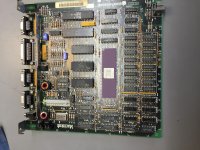
I am also confused by the serial number on the motherboard. It starts with "LB." None of the websites I have gone to has been able to decode the number. I thought the letters at the beginning said where the machine was made, and I am not familiar with where "LB" machines came from...
It should work on a Mac Plus with an old enough configuration of the disk operating system, but at some point with later models or upgraded operating systems the support for 400KB single sided diskettes was ended. If you take a blank new 800K diskette to begin with, and initialise that as a 400K, somewhere in the disk initialisation process the dialog box will give you a choice of formats: 400K versus 800K. If you do not reach this dialog box there is something changed from the original Mac Plus, and you need to solve that problem before attempting copying the 400K original software (I think).
I suggest you try to find and buy a box of brand new double density (720K or 800K) 3.5" diskettes of high quality, if they are still being made.
I suggested you use a system with two diskette drives to avoid having to reload each of the source and destination diskettes several times into the one drive during the copy process, because a 128K Mac cannot copy a (full) disk of 400K size in one pass. I do not know how much RAM a Mac Plus needs before it can copy a 400K diskette with only one pass.
You are also better off doing this in a system with two external diskette drives or some other combination that avoids a situation where a defective source disk gums up your systems boot 3.5" diskette drive (if any).
I suggest you try to find and buy a box of brand new double density (720K or 800K) 3.5" diskettes of high quality, if they are still being made.
I suggested you use a system with two diskette drives to avoid having to reload each of the source and destination diskettes several times into the one drive during the copy process, because a 128K Mac cannot copy a (full) disk of 400K size in one pass. I do not know how much RAM a Mac Plus needs before it can copy a 400K diskette with only one pass.
You are also better off doing this in a system with two external diskette drives or some other combination that avoids a situation where a defective source disk gums up your systems boot 3.5" diskette drive (if any).
Interesting, I looked up the Serial Number under the screen, and it does list the Model as M0001W. However, the motherboard is, in fact, a 128k and the back plate says it is Model M0001. Odd.
probably replacement front from a broken 512. It has been over 30 years.
That's an awesome find (on both counts). It was cool of you to call up the seller and offer a bit more money for it. Enjoy!
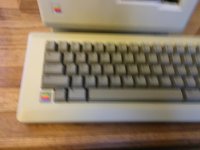
When did Apple start making the M0110 keyboards with colored Apples in the bottom left corner? I have never seen that before...
Isnt it just a badge put there?
Hm, I dunno. I don't want to try prying it off. The owner said he didn't put it there.
Re: the questions about making floppies, Disk Copy 4.2 will run on a Plus with System 6 and is capable of imaging and restoring 400k disks. It's what I used to make floppies for my 512k. (I even have a Localtalk->Ethernet bridge set up so I can drop downloaded disk images into a file share on a linux server and directly image them from there. One of these days I'd like to find a 9 pin phonenet adapter so I can try putting the 512k directly on the network and skip the Plus intermediary, though.)
Do you have a clearer picture of the keyboard?
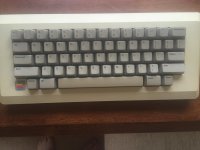
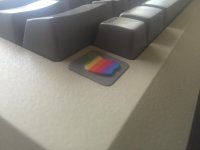
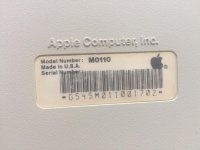
Interesting. Now my internal debate is whether to remove it for "originality" sake or not!
I read last night that to format a 3.5" double density diskette to 400K single sided in an 800K double sided drive or to format a 3.5" double density disketter to 400K in a 1440K double sided drive, hold down the <Option> key (while inserting a blank, unformatted / uninitialised diskette in the drive). You will need to using a sufficiently old release of the operating system on a sufficiently old Macintosh at the time.
Hm. Yesterday I just used my Mac Plus to format some disks. They are double density disks. When I inserted the blank ones it gave me the option to format them either single sided or double sided. I chose single side and they formatted to just under 400k. Those will work in a 400k drive, right?
Correct.
Also, in the old manual I was reading last night, it warned not to format / initialise High Density 1440KB diskettes to anything other than 1440KB. It is possible, but unwise, to initialise a 1440KB diskette as either a 400KB or an 800KB diskette when using a 400KB or an 800KB drive, because (from what I remember of what I read), if you ever put a 1440-formatted-as-400 or a 1440-formatted-as-800 into a 1440KB drive, the operating system will report the diskette is unreadable and ask you to initialise it, again.
Also, in the old manual I was reading last night, it warned not to format / initialise High Density 1440KB diskettes to anything other than 1440KB. It is possible, but unwise, to initialise a 1440KB diskette as either a 400KB or an 800KB diskette when using a 400KB or an 800KB drive, because (from what I remember of what I read), if you ever put a 1440-formatted-as-400 or a 1440-formatted-as-800 into a 1440KB drive, the operating system will report the diskette is unreadable and ask you to initialise it, again.
Yes. The "400k" drive is 400K because it only used one side (vs. both in an 800k drive), and by default MacOS always formats 400k disks as MFS. (IE, the original 128k-compatible Mac filesystem.)
You can get around that by putting a piece of tape over the density detect hole. (That's the hole in an HD disk opposite of the write protect switch.) The real problem with using 1.44mb floppies as low density is they're just not particularly reliable when formatted like that. *How* reliable depends on the media, the drives, the phase of the moon... etc. In my experience my M0106 drive seems to "mostly work" with HD disks, but the internal 400k drive on my 400k is much more skeptical of them.
Fair warning also: The original 400k drives, or at least the one in my machine, seems to have a "disk-present" sensor that shines right through the density select hole, so the internal drive doesn't see an HD disk *unless* there's tape over that hole.
That could also be a back badge of a 128/512k, the front badge apple is case color and the back badge is the color of the background of the back "Macintosh" / "Macintosh 512K" badge which it brown.
My setup, now newly revised in light of my recent acquisitions and repair (and with fake Christmas tree spirit).
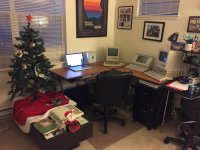
That is an awesome setup - I need less clutter... or a display area. Yours looks so nice!
I am going to need to find a place for my Appel IIc. I don't want to replace the Mac Plus because its such a nice complete system with the HD20. I could put it where my Macbook Pro is right now, but then I would have nowhere to use my internet capable modern machine, lol
What machines do you have? I have found that my corner desk is very versatile for displaying the machines.
Just got my Apple IIc screen, so I was finally able to confirm that the machine (including the disk drive) works!
Does anyone have any useful primers on how to use an Apple II? I haven't used one since I was in elementary school, and even then it was only to play Oregon trail.
When I turn the machine on, it just says "Check Disk Drive," even if I put a disk in it. If I have a disk in it before I turn it on, it loads the disk. Is there a command/button combo to get it to read a disk I insert AFTER I turn it on?
Any list of key combos/commands would be useful and appreciated
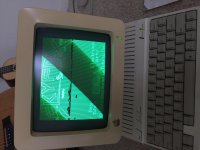
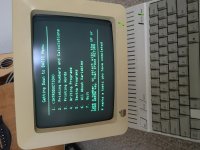
Does anyone have any useful primers on how to use an Apple II? I haven't used one since I was in elementary school, and even then it was only to play Oregon trail.
When I turn the machine on, it just says "Check Disk Drive," even if I put a disk in it. If I have a disk in it before I turn it on, it loads the disk. Is there a command/button combo to get it to read a disk I insert AFTER I turn it on?
Any list of key combos/commands would be useful and appreciated
Congratulations! Great finds so far!
heres mine for ya - irish style - weh hey - - -- the more time that passes... the more i want to be back there....feck! im getting old!!!!!!!!
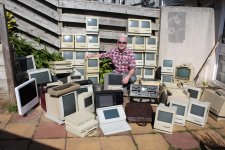
Oh my goodness! Want! All of them. You are from Ireland or you live there now?
At the BASIC prompt (which from memory looked like either ] or >When I turn the machine on, it just says "Check Disk Drive," even if I put a disk in it. If I have a disk in it before I turn it on, it loads the disk. Is there a command/button combo to get it to read a disk I insert AFTER I turn it on?
Any list of key combos/commands would be useful and appreciated
 type PR#6 Enter to boot from 5.25" internal drive, or PR#5 to boot from external 3.5" Unidisk (if it has the updated MON ROM, the original ROM in earlier //c shipped did not have the intelligence to recognise and use 3.5" diskette drives).
All this is from memory, without checking, I could be wrong.
If you do not see the BASIC prompt, press reset (if it has a reset key) as then I think the BASIC prompt should appear. Another possibility might be Control-C or Control-C Enter
Apple IIc: very nice! I wish I could advise you. I have my family's old Apple IIe in the basement (it was working last I tried some 15 years ago) but I have next to no memory of how to run it. One of these days, if I can get the mac collection corralled, I'll try to get the Apple IIe up and running again.
Picked up an Apple II plus, green screen monitor, and Disk II on Craigslist.
I am new to the Apple II world -- can someone identify the two cards and third "add on" I found inside the machine? (See pictures attached).
I also have a question -- when I tried to load a couple of games, it said that it could not run them because the diskette required 64k of RAM. I was confused by this because this Apple II plus has the language card in it and therefore HAS 64k of RAM. Also one of the games (Oregon Trail) is one that I see all sorts of Apple II plus-es running on Youtube..
Also, sometimes when I turn on the power to the machine, the disk II's red light turns on and it sounds like it is working (whether there is a disk in there or not) and it never does anything....
Thanks!
I am new to the Apple II world -- can someone identify the two cards and third "add on" I found inside the machine? (See pictures attached).
I also have a question -- when I tried to load a couple of games, it said that it could not run them because the diskette required 64k of RAM. I was confused by this because this Apple II plus has the language card in it and therefore HAS 64k of RAM. Also one of the games (Oregon Trail) is one that I see all sorts of Apple II plus-es running on Youtube..
Also, sometimes when I turn on the power to the machine, the disk II's red light turns on and it sounds like it is working (whether there is a disk in there or not) and it never does anything....
Thanks!
Picked up an Apple II plus, green screen monitor, and Disk II on Craigslist.
I am new to the Apple II world -- can someone identify the two cards and third "add on" I found inside the machine? (See pictures attached).
I also have a question -- when I tried to load a couple of games, it said that it could not run them because the diskette required 64k of RAM. I was confused by this because this Apple II plus has the language card in it and therefore HAS 64k of RAM. Also one of the games (Oregon Trail) is one that I see all sorts of Apple II plus-es running on Youtube..
Also, sometimes when I turn on the power to the machine, the disk II's red light turns on and it sounds like it is working (whether there is a disk in there or not) and it never does anything....
Thanks!
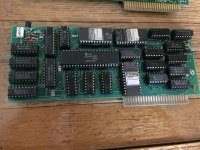
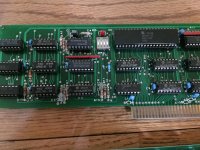
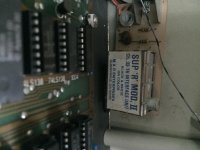
I am new to the Apple II world -- can someone identify the two cards and third "add on" I found inside the machine? (See pictures attached).
I also have a question -- when I tried to load a couple of games, it said that it could not run them because the diskette required 64k of RAM. I was confused by this because this Apple II plus has the language card in it and therefore HAS 64k of RAM. Also one of the games (Oregon Trail) is one that I see all sorts of Apple II plus-es running on Youtube..
Also, sometimes when I turn on the power to the machine, the disk II's red light turns on and it sounds like it is working (whether there is a disk in there or not) and it never does anything....
Thanks!
I don't see any identifying marks to tell the manufacturer but the card with the chip labeled "HD6845R" is almost certainly an 80 column video card. It's a different layout from my Videx Videoterm but it has essentially the same components. Likewise I see no useful identifying marks on the other card but since it has a Z-80 CPU on it it's undoubtedly for running CP/M. It looks suspiciously like the Unitron Z80 card here, but I also see poking around that what looks like the same card was sold under other names with different silkscreens. So maybe it's a "Wacky Bob's House Of Computers Z-80-o-tronic" house brand.
(There's also a directory for 80 column cards on the same site, you can probably match your card there.)
The last dingus, the Sup-R-Mod, is an RF Modulator for hooking up to a TV on channel 33 UHF instead of a composite monitor. Guessing you probably don't need that.
So what happens when you boot a plain old DOS 3.3 MASTER disk from cold? The first thing that should come up on the screen if the system is working is a message telling you it's loading Integer basic into the language card. I'm sort of wondering if maybe the language card has some issue that's preventing it from being detected? (In which case your system is acting like an-Applesoft-only 48k Plus?)
Actually, I stand corrected; your card is almost identical to a Videx Videoterm, it's just missing the silkscreen in the corner and there are a few component changes. I wonder if it's some kind of knockoff. (Such things were not rare in the Apple II Plus' day; in fact, my Apple II Plus is a real Apple motherboard in the case of a clone; the original Clone board is alas lost to history but it was nearly trace-for-trace identical to the real one.)

Thanks for the info!
Unfortunately, I know *nothing* about Apple II's so I have no idea what booting from a DOS 3.3 MASTER disk from cold means, haha.
I have an Apple IIc which I configured to do ADTPro stuff (making disks and the like), so if there is a disk I should make let me know.
What is weird is sometimes I get it to load those programs that it says requires 64k -- for example, with Oregon Trail, I can get it to START loading, but the first few screens have a series of anomalies and then it eventually freezes. Another game will just get to the loading screen. No rhyme or reason as to why it will try to load sometimes and say it needs 64k RAM other times.
Unfortunately, I know *nothing* about Apple II's so I have no idea what booting from a DOS 3.3 MASTER disk from cold means, haha.
I have an Apple IIc which I configured to do ADTPro stuff (making disks and the like), so if there is a disk I should make let me know.
What is weird is sometimes I get it to load those programs that it says requires 64k -- for example, with Oregon Trail, I can get it to START loading, but the first few screens have a series of anomalies and then it eventually freezes. Another game will just get to the loading screen. No rhyme or reason as to why it will try to load sometimes and say it needs 64k RAM other times.
Interesting. Seems like this one is missing the cables coming off the board. Im guessing this board is pretty worthless then and I can probably remove it from the machine?Actually, I stand corrected; your card is almost identical to a Videx Videoterm, it's just missing the silkscreen in the corner and there are a few component changes. I wonder if it's some kind of knockoff. (Such things were not rare in the Apple II Plus' day; in fact, my Apple II Plus is a real Apple motherboard in the case of a clone; the original Clone board is alas lost to history but it was nearly trace-for-trace identical to the real one.)
If you want to use the board I can probably give you the pinout of an output cable from my board and it'll no doubt work. (That board really does look like a straight-up clone.) Mine doesn't have the back panel thing, it just has a cable that plugs into that header. (Mine actually came with a *different* setup to allow switching between the 80 and 40 column modes on the same monitor, but the card will also work simply as a "second head" inside the system.) I would recommend removing it during any troubleshooting you're trying to do, though. Same for the Z-80 card for that matter.
(If you really aren't interested in either board I could possibly be willing to take them off your hands. Heck, if you decide the whole computer is a loss I could probably use a spare. I mention this because based on your location it'd probably be a local transaction.)
I use the Apple II disk server to make disks for my Plus; the one you'd want would be the DOS 3.3 image on the top there, but given you don't trust your Plus definitely make your DOS 3.3 disk with ADTPro on the IIc instead. (I'm sure you'll have no problems finding the one in the usual places.)
Just for a sanity check, could you post a picture of the interior of the system with the language card in place? Since you're missing at least the one cable I've vaguely wondering if there could be a problem with how your language card is set up. Just for sanity's sake: There should be a 16 pin jumper cable running from the card to the motherboard, plugged in in place of one of the 24 16k RAM chips. That all looks good, everything's seated properly?
For Christmas, someone got me an Apple I schematic printed on aluminum and signed by Steve Wozniak. Will go nice above my little "museum."
That's awesome!!!
That is awesome. I had no idea something like that existed.