

Thread
Beige Macintosh Plus Screen/Flyback Transformer Issue
I have a Beige Macintosh Plus, likely converted from a 128k/512k, and it has been working fine for the past several months. Just today, however, I was using MacTerminal, trying to get my Apple Personal Modem to work with it and connect to a BBS, when all of the sudden, everything on the screen seemed to collapse into itself, and I heard a high pitched static noise, accompanied by the smell of electronic smoke. I turned it off in a panic. Turning it back on, The high pitch noise returned, and the screen lit up, but it was distorted. I could not see anything, but some curved patterns. As I continued to troubleshoot, the screen would light up more and more dimly, until it wouldn't light up at all! Now, when I turn it on, I don't even hear the startup chime, just the disk drive moving one step. If I leave it on for too long, the analog board starts to smoke, I believe coming from the flyback transformer. I have tried adjusting all of the pots on the side, to no avail. Even adjusting the screen cutoff doesn't fix anything. I believe that the problem lies in the flyback transformer, and the way it provides voltage to the screen. Does anybody here know if the problem is in the flyback transformer, or if it has to do with something else entirely. If the flyback transformer is the problem, what can I do to replace it? Where could I get a new flyback transformer?
Yeah, it definitely blew it's flyback. This happened to me a few years ago, but since I wasn't in the room when it happened, I missed the firework display.
When the flyback goes, it usually takes Q3(?) with it, along with C1 possibly, so you'll have to replace those as well (and possibly patch up any burnt out traces or pads).
I'm not sure where new parts can be found, but you can try asking around on here? Chances are, someone will have some spares.
Good luck!
c
When the flyback goes, it usually takes Q3(?) with it, along with C1 possibly, so you'll have to replace those as well (and possibly patch up any burnt out traces or pads).
I'm not sure where new parts can be found, but you can try asking around on here? Chances are, someone will have some spares.
Good luck!
c
I looked at the analog board, and there does not seem to be any apparent damage. C1 looks perfectly normal. None of the capacitors seem to be broken, although the damage might be internal. Is there anyway I can tell? Does anybody here know where I could buy a replacement flyback transformer as well as a replacement for C1 and Q3?
Also, why did you write a ? next to Q3? I want to make sure that I replace the right ones.
Also, why did you write a ? next to Q3? I want to make sure that I replace the right ones.
I'm going by memory, and I couldn't remember for sure uf that was the proper designation.
c
c
Anyway, if C1 or any other capacitors were damaged, how could I tell? Once again, they all look normal, no bulging, none are blown, and the tracers/connections on the other side of the board are not cracked.
Another question, how exactly do I measure the voltage coming from the voltage adjustment pot? I messed with it earlier, and I want to make sure it is adjusted properly before I install the new flyback transformer that I ordered. I already desoldered the old one.
Another question, how exactly do I measure the voltage coming from the voltage adjustment pot? I messed with it earlier, and I want to make sure it is adjusted properly before I install the new flyback transformer that I ordered. I already desoldered the old one.
Kindly let us know where you get the new C1 (C15 ?). I suggest you replace Q3 before you go live with kilovolts through the new flyback transformer, otherwise you could be up for a second new flyback transformer.
You might also look for black marks or stains or charring on the PCB side of the white vinyl sheet attached to the analog board.
You can find this same information in Larry Pina's book, Macintosh Repair and Upgrade Secrets.
You might also look for black marks or stains or charring on the PCB side of the white vinyl sheet attached to the analog board.
You can find this same information in Larry Pina's book, Macintosh Repair and Upgrade Secrets.
I do not know where to get capacitor replacements from. Could you provide any links? I've heard stories of wrong capacitors exploding.
I have uploaded some photos of the analog board below. Based off of the pictures, can you tell what needs to be replaced? As you can see, I have already desoldered the flyback transformer. There is one scratch on the tracers, but that has always been there. Nothing appears to be burned.


I have uploaded some photos of the analog board below. Based off of the pictures, can you tell what needs to be replaced? As you can see, I have already desoldered the flyback transformer. There is one scratch on the tracers, but that has always been there. Nothing appears to be burned.
It doesn't look too bad to me, although J1 (the big connector with 4 pins) looks a bit discolored, possibly due to overheating.
The area around CR1 (just above where the flyback lives) seems rather crispy looking as well (you should test that out, as it likely got overheated).
c
The area around CR1 (just above where the flyback lives) seems rather crispy looking as well (you should test that out, as it likely got overheated).
c
So, do I still need to replace C1 or any other capacitors? Do I need to replace Q3?
Ideally, it'd probably be a good idea to replace ALL the caps, including C1, while you're at it, but I'd concentrate first on the flyback, Q3, and maybe CR1 first. Get if functional again and go from there.
Not sure if it's good to post here, but here's a link to a PDF version of Larry Pina's Mac Repair and Upgrade Secrets. This book will tell you everything you need to know.
c
Not sure if it's good to post here, but here's a link to a PDF version of Larry Pina's Mac Repair and Upgrade Secrets. This book will tell you everything you need to know.
c
Does anybody here know where I can find replacements for said parts? I really don't want to get the wrong one, and have it blow up. So I guess I don't absolutely have to replace C1? Just Q3, CR1, and the flyback?
Yes. C1 *should* be replaced eventually, but there's no rush right now.
You can get the parts from Mouser or Digikey, though you may have to do some searching on the Q3, which is a BU-406 (not exactly easy to find, but not impossible). I think I tracked down a suitable replacement at one point, but I can't remember where I found it or what it was.
Starting at page 99 (p114 of the PDF), there's also a procedure for testing Q3 which may be helpful.
c
You can get the parts from Mouser or Digikey, though you may have to do some searching on the Q3, which is a BU-406 (not exactly easy to find, but not impossible). I think I tracked down a suitable replacement at one point, but I can't remember where I found it or what it was.
Starting at page 99 (p114 of the PDF), there's also a procedure for testing Q3 which may be helpful.
c
Would these be appropriate replacements for:
Q3: http://www.mouser.com/ProductDetail/Fairchild-Semiconductor/BU406/?qs=Zd4VdJDrgZ3Fn82mibHPDA%3d%3d&gclid=CNOP77i_z8kCFYhffgodiAgJ8w
CR1: http://www.vetco.net/catalog/product_info.php?products_id=4813
T1: http://www.ebay.com/itm/157-0026B-Flyback-1570026B-Replaces-Apple-HR-42031-/400922654856(I already bought this one)
C1: http://www.digikey.com/product-search/en?WT.z_header=search_go&lang=en&keywords=ECW-F2395JB&x=0&y=0&cur=USD
???
Q3: http://www.mouser.com/ProductDetail/Fairchild-Semiconductor/BU406/?qs=Zd4VdJDrgZ3Fn82mibHPDA%3d%3d&gclid=CNOP77i_z8kCFYhffgodiAgJ8w
CR1: http://www.vetco.net/catalog/product_info.php?products_id=4813
T1: http://www.ebay.com/itm/157-0026B-Flyback-1570026B-Replaces-Apple-HR-42031-/400922654856(I already bought this one)
C1: http://www.digikey.com/product-search/en?WT.z_header=search_go&lang=en&keywords=ECW-F2395JB&x=0&y=0&cur=USD
???
http://maccaps.com/MacCaps/Repair_books.html --- main link
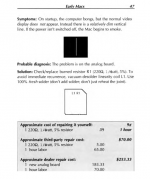
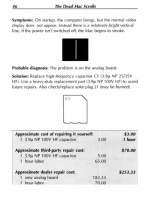
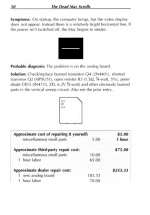
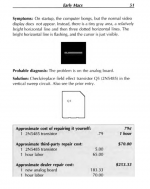
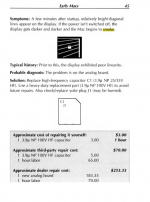
- change all caps first.
- I doubt your flyback is what was smoking.
- Usually the cause of smoke is Q3 or the Rectifier.
- doubt your flyback is bad, it may be warn... but... don't think that is the cause of your issue.
the direct cause of your issue i think was C1 Burnt out.
i'v been using a Plus AB when C1 completely gives out, the screen collapses into a horizontal line. and noises etc....
- change all caps first.
- I doubt your flyback is what was smoking.
- Usually the cause of smoke is Q3 or the Rectifier.
- doubt your flyback is bad, it may be warn... but... don't think that is the cause of your issue.
the direct cause of your issue i think was C1 Burnt out.
i'v been using a Plus AB when C1 completely gives out, the screen collapses into a horizontal line. and noises etc....
It's probably worth noting that I never had any horizontal or vertical lines. Also, the computer no longer bongs on startup, and the fly back transformer has a broken epoxy seal. C1 looks fine, but I wish to replace it anyway. I am certain that Q3 needs to be replaced. Are the links that I posted above suitable replacements?
If you just remove Q3, the machine should fire up without the picture on the monitor.
Unfortunately, I already bought a replacement flyback transformer. Are the replacements in the links above suitable?
Dalbani has replacement Q3s or did the last time I checked. In fact they had four or five different makes of BU406, leaving me mystified as to which would be the best choice. I think I got one of each but have never done that test.
I have found some possibly better links here:
CR1 Replacement: http://www.digikey.com/product-detail/en/FR604-T/FR604DICT-ND/190554
C1 Replacement: http://www.digikey.com/product-detail/en/ECW-F2395JB/PF2395-ND/248841
Q3 Replacement: http://www.digikey.com/product-detail/en/BU406/BU406FS-ND/976573
I already purchased the flyback transformer (T1) from this link: http://www.ebay.com/itm/157-0026B-Flyback-1570026B-Replaces-Apple-HR-42031-/400922654856
Is this a good flyback transformer replacement? I have received it, and it looks slightly different, with a black anode cap, but has the exact same part number.
Are the other three links above good replacements? Judging from the photos of the analog board above, do any other parts absolutely need to be replaced?
CR1 Replacement: http://www.digikey.com/product-detail/en/FR604-T/FR604DICT-ND/190554
C1 Replacement: http://www.digikey.com/product-detail/en/ECW-F2395JB/PF2395-ND/248841
Q3 Replacement: http://www.digikey.com/product-detail/en/BU406/BU406FS-ND/976573
I already purchased the flyback transformer (T1) from this link: http://www.ebay.com/itm/157-0026B-Flyback-1570026B-Replaces-Apple-HR-42031-/400922654856
Is this a good flyback transformer replacement? I have received it, and it looks slightly different, with a black anode cap, but has the exact same part number.
Are the other three links above good replacements? Judging from the photos of the analog board above, do any other parts absolutely need to be replaced?
It actually turns out that the CR1 replacement is sold out, so would this be a good substitute?
http://www.digikey.com/product-detail/en/PR6004-T/PR6004-TDITR-ND/1935264
http://www.digikey.com/product-detail/en/PR6004-T/PR6004-TDITR-ND/1935264
Compare the datasheets. The damper diode needs to be of a fast recovery, high voltage device.
You cant substitute parts without comparing datasheets.
You cant substitute parts without comparing datasheets.
I compared the data sheets for the CR1 replacements, and they seem similar enough so that it wouldn't make much of a difference. However, I have trouble finding data sheets for the original parts used on the computer. How can I be sure that my replacements for C1 and Q3 are correct?
They *should* be fine. Q3 seems to be actually the same component (BU406), while the replacement you found for CR1 is an upgrade of the original component, with response time of 150 ns instead of the original 200 ns and similar current/voltage specs.
If you want to go with a component which is as close as possible to the original one, digikey is still selling the GI824 (which is the original CR1), or you could buy this one which is even faster.
As others have already told you, try replacing Q3, CR1 and the flyback first and go from there: be prepared to what could be a rather long trial & error process, though!
If you want to go with a component which is as close as possible to the original one, digikey is still selling the GI824 (which is the original CR1), or you could buy this one which is even faster.
As others have already told you, try replacing Q3, CR1 and the flyback first and go from there: be prepared to what could be a rather long trial & error process, though!
Well, after a week of waiting the parts finally arrived. With some help, I desoldered the old Flyback Transformer, C1, Q3, and CR1. I installed the new parts from Digikey, and this is the final result after some screen and voltage adjustments:

The Old Parts:

There also used to be a faint clicking sound when the ? Floppy Disk screen would appear, but there isn't anymore. The new flyback transformer appears to be working perfectly, and I have had no screen problems since. The speaker works perfectly.
The Old Parts:
There also used to be a faint clicking sound when the ? Floppy Disk screen would appear, but there isn't anymore. The new flyback transformer appears to be working perfectly, and I have had no screen problems since. The speaker works perfectly.
Congratulations! I performed the same repairs on my 512k last night so I know how proud you must be. :beige:
Keep an eye on J1. The browning of the connector is the result of a poor connection. The socket delivers signals to the deflection yoke and when the connection gets really poor or intermittant the horizontal/vertical can start to jitter or completely collapse.
The J1 connector has brown plastic, but the metal part seems fine. If I needed to replace J1, where would I get such a replacement? Also, I was wrong about the faint clicking sound. It's still there, and I remembered that it was coming from the speaker, since I could still here the sound when I plugged in headphones.
did you change all the caps? if not you should. they can fry inside and lose connection, and can still look nice on the out side. at least all of the 1000uf's 2200uf's 220uf.s 470uf's at a bare minim, also the AC filter caps… those are known explode at random times and give smoke off like a smoke bomb, can be really nasty. So changing those X2 Caps is a good idea.