
Thread
DOS Compatibility Card
The best finds are certainly always the expected ones.
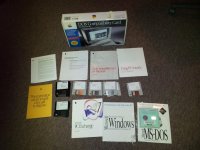
I was looking at my eBay feed on my iPad and stumbled upon a boxed DOS Compatibility Card for the 6100 series, in box! No software (which I already have) but the card itself and all of the manuals and software licenses. Cool! Put in a bid (I think I might have been the second bidder) and it was mine for $20.
I haven't gotten a chance to test it out, as I need to go get my 6116 out of storage (climate controlled, of course) and see what I can do with it. I was going through another box a couple of weeks ago and found a 32MB SIMM, so I'll be able to install that on the card - the RAM slot is currently empty. The card itself smells new, even looks new.
Does anyone have much experience with these? I know they'll run up to Windows 98 without much fuss, even though Apple never supported it. I love the pizza box Macs, and this way I can play some with old DOS games on "real" hardware without needing a PC... though I've got on in storage. The Mac just looks nicer.
Box photo attached!
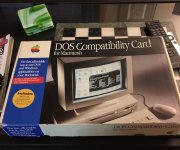
I was looking at my eBay feed on my iPad and stumbled upon a boxed DOS Compatibility Card for the 6100 series, in box! No software (which I already have) but the card itself and all of the manuals and software licenses. Cool! Put in a bid (I think I might have been the second bidder) and it was mine for $20.
I haven't gotten a chance to test it out, as I need to go get my 6116 out of storage (climate controlled, of course) and see what I can do with it. I was going through another box a couple of weeks ago and found a 32MB SIMM, so I'll be able to install that on the card - the RAM slot is currently empty. The card itself smells new, even looks new.
Does anyone have much experience with these? I know they'll run up to Windows 98 without much fuss, even though Apple never supported it. I love the pizza box Macs, and this way I can play some with old DOS games on "real" hardware without needing a PC... though I've got on in storage. The Mac just looks nicer.
Box photo attached!
These interfaces were created between 1990-1999 and are only usable by those who have a mac with a serial port. they came built in on older beige colored g3 or lower macs! In order to use them on a g3 or g4 mac you need a serial adapter such as the stealth port, g4port, or megawolf pci card, keyspan sx pro pci card, or keyspan usa-28x usb adapter!
is usb too slow for midi?
http://www.soundonsound.com/sos/Oct04/articles/qa1004-7.htm
MOTU serial MIDI interfaces with Logic, Cubase, Finale and other OMS compatible software on B-W G3s and G4s
http://www.motu.com/techsupport/technotes/document.2000-04-14.9182637522
mac midi interfaces
http://www.soundonsound.com/sos/1997_articles/jul97/midiinterfaces.html
oms + etc
http://www.soundonsound.com/sos/1995_articles/jul95/applenotes.html
emagic unitor8 MK I (1998) (mk1=no usb, mk2=usb)




specs: http://web.archive.org/web/20020602002002/http://www.emagic.de/english/products/hardware/u8mk2.html
osx preference pane: http://www.potm.org/software/Unitor/
DRIVERS HERE: http://web.archive.org/web/20020603152527/http://www.emagic.de/english/support/download/toolsmac.html
as per manual; units can be stacked up to 8 daisy chained via the mac serial connection!!!
article http://www.soundonsound.com/sos/apr98/articles/unitor8.html
http://web.archive.org/web/19981203014746/http://www.emagic.de/english/products/hardware/unitor8.html
X REQUIRES WALLWART PSU
ebay search: http://www.ebay.com/sch/i.html?_trksid=p2050601.m570.l1313.TR4.TRC0.A0.Xunitor8&_nkw=unitor8&_sacat=0&_from=R40
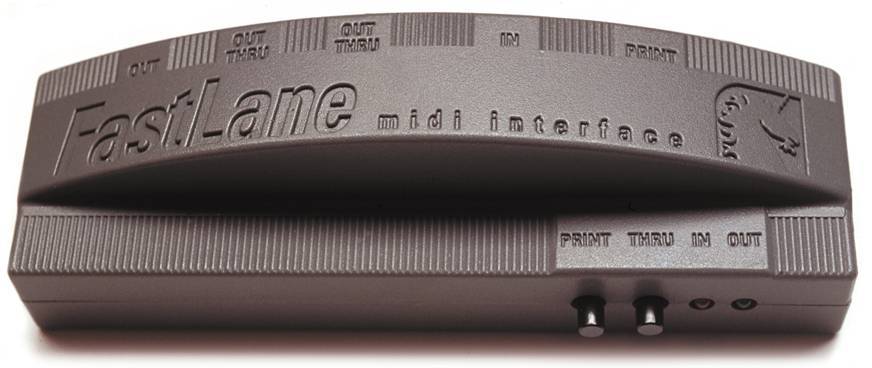
Motu Fastlane Serial (1994)
1 in 3 out
http://www.motu.com/products/midi/fastlane
ebay search: http://www.ebay.com/sch/i.html?_odkw=fastlane&_osacat=0&_from=R40&_trksid=p2045573.m570.l1313.TR10.TRC2.A0.Xfastlane+midi&_nkw=fastlane+midi&_sacat=0
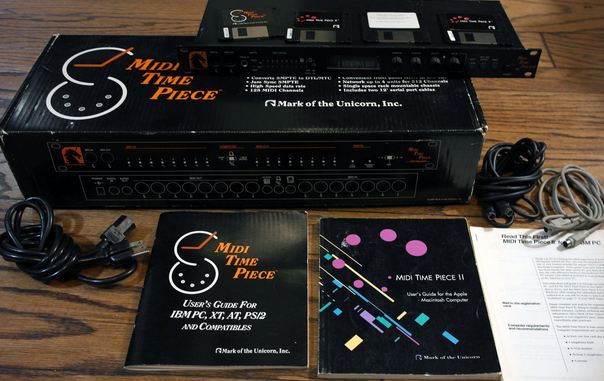
Motu Midi Time Piece I (1990)


http://cid-6f2ce1aec0191d74.skydrive.live.com/browse.aspx/MOTU_MTPII
driver: http://web.archive.org/web/20000712142446/http://www1.motu.com/english/download/autodown/action.lasso?-database=dldb&-layout=main&-response=searchresults.html&-op=eq&product=MIDI+Timepiece&-op=eq&platform=Macintosh&-maxRecords=all&-sortfield=description&-sortorder=ascending&-search
X REQUIRES WALLWART PSU
http://www.motu.com/techsupport/technotes/document.2000-04-07.3892261088
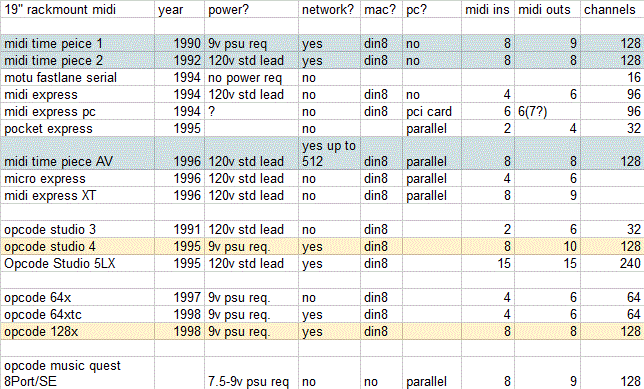
The MOTU MIDI Timepiece I, the MIDI Timepiece II and the MIDI Timepiece AV all have networking capabilities. You can network or daisy-chain (daisy chain) any two of the above interfaces for a total of 256 MIDI channels.The Express line of interface (the MIDI Express, the Micro Express and MIDI Express XT) do not have a networking feature.
how to network: http://web.archive.org/web/19991127201302/http://motu.com/english/hardware/mtpav/net.html
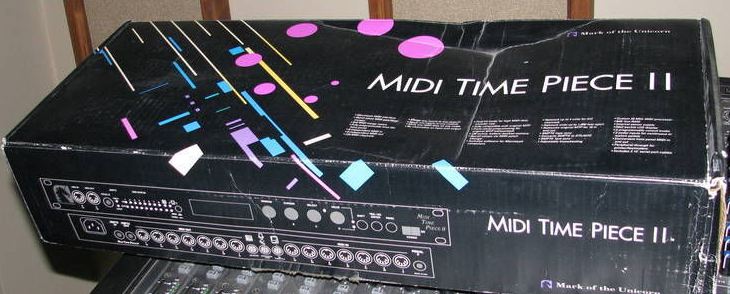
Motu Midi Time Piece II (1992)


windows drivers: http://web.archive.org/web/20000516161717/http://www1.motu.com/english/download/autodown/action.lasso?-database=dldb&-layout=main&-response=searchresults.html&-op=eq&product=MIDI+Timepiece+II&-op=eq&platform=Windows&-maxRecords=all&-sortfield=description&-sortorder=ascending&-search
partial manual:
http://www.macos9lives.com/downloads/_img/MTP_II_ManualChapter12.pdf (using front panel controls)
http://www.macos9lives.com/downloads/_img/MTP_II_ManualChapter02.pdf (illustrates networking possibilities)
* Uses standard power lead!
The MOTU MIDI Timepiece I, the MIDI Timepiece II and the MIDI Timepiece AV all have networking capabilities. You can network or daisy-chain (daisy chain) any two of the above interfaces for a total of 256 MIDI channels.The Express line of interface (the MIDI Express, the Micro Express and MIDI Express XT) do not have a networking feature.
how to network: http://web.archive.org/web/19991127201302/http://motu.com/english/hardware/mtpav/net.html
motu midi express (1994) mac version 4in 6out 96 channels

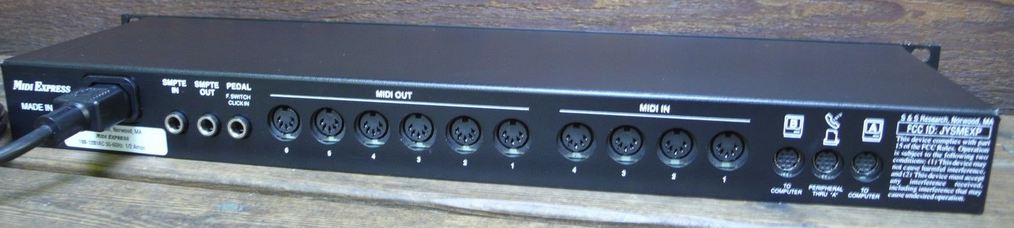
* uses standard power lead
http://www.soundonsound.com/sos/1994_articles/mar94/motuexpress.html
http://web.archive.org/web/19970113175327/http://motu.com/pages/MXP.html
Motu Pocket Express (1995?)
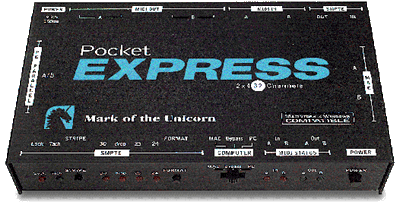
Pocket Express is a 2-in, 4-out, 32-channel MIDI/SMPTE interface.
midi timepiece av (1996) (original "AV" version, the usb revision was produced later in 2000, )


http://web.archive.org/web/19991127184611/http://motu.com/english/hardware/mtpav/mtpav.html
http://web.archive.org/web/19970113172637/http://motu.com/pages/MTPAV.html
http://www.sweetwater.com/sweetcare/articles/motu-parallel-midi-interface-work-windows-xp-updated-1/
http://www.soundonsound.com/sos/1997_articles/jan97/motumtpav.html
* uses standard power lead
ebay search: http://www.ebay.co.uk/sch/?_nkw=midi%20timepiece%20av&clk_rvr_id=556590854922&mfe=search
The MIDI Time Piece AV provides eight discrete MIDI cables (in and out) for your computer. This allows you to use 128 independent MIDI channels. To expand beyond this, you can network up to four MTPs for a total of 512 MIDI channels. You can even connect two computers to an MTP AV network.
how to network: http://web.archive.org/web/19991127201302/http://motu.com/english/hardware/mtpav/net.html
Motu Micro Express (1996?) (original serial/parallel version)

Motu Midi Express XT (1996) (not to be confused with the orange midi express mac, midi express pc, from 1994)


* uses standard power lead
driver: http://web.archive.org/web/20000304022057/http://www1.motu.com/english/download/autodown/action.lasso?-database=dldb&-layout=main&-response=searchresults.html&-op=eq&product=MIDI+Express+XT&-op=eq&platform=Macintosh&-maxRecords=all&-sortfield=description&-sortorder=ascending&-search
opcode Studio 3 (1992)
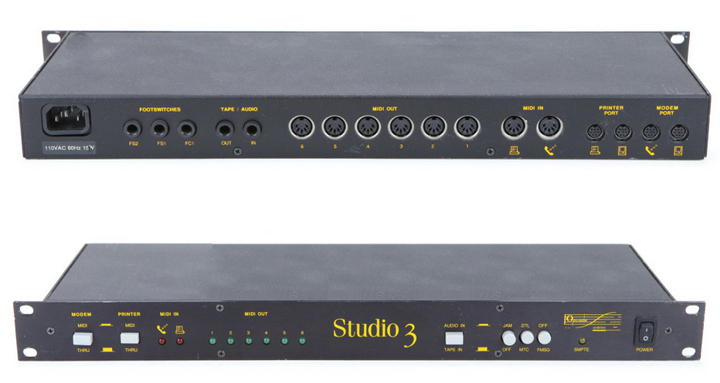
2 ports, 2 In, 6 Out
Each MIDI Out is assignable to either the printer or the modem port
reads and writes SMPTE and sends MIDI Time Code(MTC) to the Mac for synchronization.
* uses standard power lead

the studio 3 can be connected to a studio 4 or studio 5 interface (or any other opcode interface that features A/B pairs of ports on the back.
opcode Studio 4 (1992-1998?) 8x8 MIDI Interface w/SMPTE I/O


8 ports, 8 In, 10 Out
http://archive.cassiel.com/space/Gearhead/Opcode+Studio+4
http://archive.org/stream/OpcodeStudio4/studio_4_manual_djvu.txt
X REQUIRES WALLWART PSU requires 9vdc @ 1500ma(1.5a) or 2000ma (2a)
manual: www.houseofsynth.com/hos-downloads/manuals/Opcode/Opcode-Studio-4-Manual-1995.pdf
read&writes SMPTE all formats incl. 29.97 non-drop
when using a Mac, (OMS) has extended functionality including:
filtering, channelization, note range splitting, controller mapping, velocity and control value modification, and other processing.
8 MIDI INs/OUTs 128 MIDI Channels
**Networkable / Daisy chainable - Up to four Studio 4s can be used together for 512 MIDI channels**
2 Peripheral Thru Switches
2 pairs of MIDI INs/OUTs on front panel
Full MIDI Time Piece emulation

the studio 4 has lots of networking potential to expand... its A/B ports allow u to connect to an additional serial midi interface. the 1in/3out interface in the diagram above looks like it could be a motu fastlane but this is just for illustration purposes, literally any other serial midi interface can be connected in this way. visit this link to learn more: http://macos9lives.com/smforum/index.php?topic=473.0
opcode Studio 5 (1992)
15 ports, 15 In, 15 Out
manual : http://www.houseofsynth.com/hos-downloads/manuals/Opcode/Opcode-Studio-5-Manual-1997.pdf
Opcode Studio 5LX Multi-port MIDI Interface/Patchbay (1996)

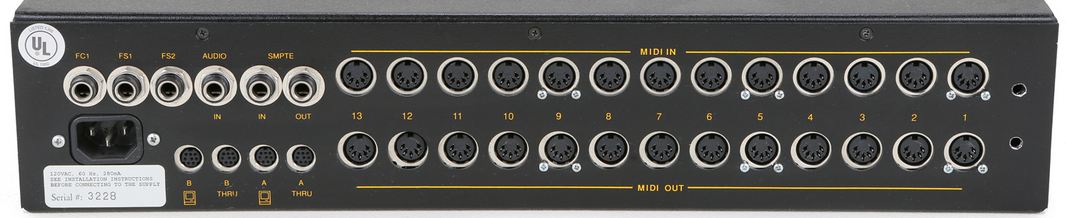
15-in/15-out 240-channel compatibility | MIDI interface with synchronization and patchbay
* uses standard power lead
**Networkable / Daisy chainable up to 6 Studio 5LXs together for 1440 MIDI channels
http://web.archive.org/web/19990428221402/http://www.opcode.com/products/machardware/studio5.html
http://www.soundonsound.com/sos/1996_articles/oct96/opcode5lxpt1.html
http://www.soundonsound.com/sos/1996_articles/nov96/opcodestudio5lx2.html
Opcode studio 64x (1997)


http://web.archive.org/web/19980212074626/http://www.opcode.com/products/cross_plat_hardware/studio64x.html
windows drivers: http://harryaxten.webs.com/opcodestudio64x.htm
pc drivers: http://web.archive.org/web/19980212062017/http://www.opcode.com/downloads/pc_hardware/
manual: http://harrypagerubbish.webs.com/studio64x/Studio64xManual.pdf
http://www.soundonsound.com/sos/1997_articles/may97/opcode64x.html
win xp driver: http://members.driverguide.com/driver/detail.php?driverid=121455
X REQUIRES WALLWART PSU
possible to make a 1->3 merge by wiring 1BOut to 2in & using 1A+2A+2B to control 3 units from 1Ain
Opcode studio 64xtc (1998)


http://web.archive.org/web/19980212060207/http://www.opcode.com/products/cross_plat_hardware/64xtc/
pc driveR: http://web.archive.org/web/19980212062017/http://www.opcode.com/downloads/pc_hardware/
connects via serial | 4 in 4 out (the 2 extra outputs for the first 2 ports, allow this box to send the same midi notes to 2 devices (1 source, 2 destination) this is usefull for layering synths or possibly layering drums if using a GM kit.
http://www.popeye-x.com/tech/review_of_opcode_studio_64_xtc.htm
http://web.archive.org/web/19980212060207/http://www.opcode.com/products/cross_plat_hardware/64xtc/
http://www.soundonsound.com/sos/apr98/articles/studio64xtc.html
manual: http://www.audioschematics.dk/downloads/manuals/midi/Studio64XTC_Manual.pdf
re: network port featured on the 64xtc (and not the 64x)
This RS-422 serial port lets the Studio 64 XTC network to an Opcode
Studio 4, thereby allowing both interfaces to share the same computer port
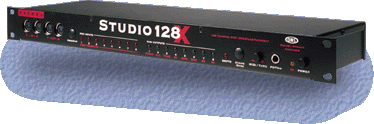
Opcode studio 128X (1998)


http://web.archive.org/web/19980624093713/http://www.opcode.com/products/cross_plat_hardware/studio128x/
X REQUIRES WALLWART PSU
Opcode-Studio-128x features smtpe i/o rs422 mac, thru, 8x8
http://web.archive.org/web/19980624093713/http://www.opcode.com/products/cross_plat_hardware/studio128x/
http://www.soundonsound.com/sos/sep98/articles/opcode.html
manual: http://www.scribd.com/doc/60805228/Opcode-Studio-128x
xp driver: http://www.gearslutz.com/board/so-much-gear-so-little-time/43986-opcode-midi-interface-xp-driver-here.html
opcode translator II

http://web.archive.org/web/19980624105341/http://www.opcode.com/products/machardware/midi2.html
http://www.ebay.com/itm/Midi-Translator-II-Opcode-Mac-Apple-New-Old-Stock-/370980299662
1 port, 1 In, 3 Out £58.
http://web.archive.org/web/19990427022122/http://www.opcode.com/products/machardware/midi2.html
Opcode Translator pro

http://web.archive.org/web/19980212063848/http://www.opcode.com/products/machardware/transpro.html

2 ports, 2 In, 6 Out £105.
http://web.archive.org/web/19990428223109/http://www.opcode.com/products/machardware/transpro.html
2 ports, 2 In, 6 Out
opcode hardware:
http://web.archive.org/web/19990508143913/http://www.opcode.com/products/
is usb too slow for midi?
http://www.soundonsound.com/sos/Oct04/articles/qa1004-7.htm
MOTU serial MIDI interfaces with Logic, Cubase, Finale and other OMS compatible software on B-W G3s and G4s
http://www.motu.com/techsupport/technotes/document.2000-04-14.9182637522
mac midi interfaces
http://www.soundonsound.com/sos/1997_articles/jul97/midiinterfaces.html
oms + etc
http://www.soundonsound.com/sos/1995_articles/jul95/applenotes.html
Quote
Unitor 8 is a synchronizer and MIDI Interface in one sturdy 19" rack unit (1HE) for Windows 9x (prepared for Windows NT) or Mac OS computers. It is designed from the outset to perfectly complement the Logic System and offers a high level of seamless functionality. Each unit provides 8 MIDI inputs and 8 individually addressable MIDI outputs. Unitor8 reads and writes SMPTE as LTC and VITC. The advanced system design allows for accurate reading of LTC within a tape speed range from 25% to 400%, and VITC is even read correctly during reverse and single frame operations. Using the built-in S-Video In/Output, the time code display can be shown on the video monitor, even during LTC mode. In conjunction with Audiowerk8 and Logic Audio 3.0 Unitor8 allows a continuous synchronisation of audio to LTC or VITC master, meaning that even the longest audio regions remain perfectly in sync with the video. The Click Input allows synchronization to external, percussive audio signals.
emagic unitor8 MK I (1998) (mk1=no usb, mk2=usb)
specs: http://web.archive.org/web/20020602002002/http://www.emagic.de/english/products/hardware/u8mk2.html
osx preference pane: http://www.potm.org/software/Unitor/
DRIVERS HERE: http://web.archive.org/web/20020603152527/http://www.emagic.de/english/support/download/toolsmac.html
as per manual; units can be stacked up to 8 daisy chained via the mac serial connection!!!
article http://www.soundonsound.com/sos/apr98/articles/unitor8.html
http://web.archive.org/web/19981203014746/http://www.emagic.de/english/products/hardware/unitor8.html
X REQUIRES WALLWART PSU
ebay search: http://www.ebay.com/sch/i.html?_trksid=p2050601.m570.l1313.TR4.TRC0.A0.Xunitor8&_nkw=unitor8&_sacat=0&_from=R40
Motu Fastlane Serial (1994)
1 in 3 out
http://www.motu.com/products/midi/fastlane
ebay search: http://www.ebay.com/sch/i.html?_odkw=fastlane&_osacat=0&_from=R40&_trksid=p2045573.m570.l1313.TR10.TRC2.A0.Xfastlane+midi&_nkw=fastlane+midi&_sacat=0
Quote
- FastLane's "MIDI split" feature can split an incoming signal to two outputs.
- No power supply or batteries required!
- Includes serial cable.
Motu Midi Time Piece I (1990)
http://cid-6f2ce1aec0191d74.skydrive.live.com/browse.aspx/MOTU_MTPII
driver: http://web.archive.org/web/20000712142446/http://www1.motu.com/english/download/autodown/action.lasso?-database=dldb&-layout=main&-response=searchresults.html&-op=eq&product=MIDI+Timepiece&-op=eq&platform=Macintosh&-maxRecords=all&-sortfield=description&-sortorder=ascending&-search
X REQUIRES WALLWART PSU
http://www.motu.com/techsupport/technotes/document.2000-04-07.3892261088
The MOTU MIDI Timepiece I, the MIDI Timepiece II and the MIDI Timepiece AV all have networking capabilities. You can network or daisy-chain (daisy chain) any two of the above interfaces for a total of 256 MIDI channels.
how to network: http://web.archive.org/web/19991127201302/http://motu.com/english/hardware/mtpav/net.html
Motu Midi Time Piece II (1992)
windows drivers: http://web.archive.org/web/20000516161717/http://www1.motu.com/english/download/autodown/action.lasso?-database=dldb&-layout=main&-response=searchresults.html&-op=eq&product=MIDI+Timepiece+II&-op=eq&platform=Windows&-maxRecords=all&-sortfield=description&-sortorder=ascending&-search
partial manual:
http://www.macos9lives.com/downloads/_img/MTP_II_ManualChapter12.pdf (using front panel controls)
http://www.macos9lives.com/downloads/_img/MTP_II_ManualChapter02.pdf (illustrates networking possibilities)
* Uses standard power lead!
The MOTU MIDI Timepiece I, the MIDI Timepiece II and the MIDI Timepiece AV all have networking capabilities. You can network or daisy-chain (daisy chain) any two of the above interfaces for a total of 256 MIDI channels.
how to network: http://web.archive.org/web/19991127201302/http://motu.com/english/hardware/mtpav/net.html
motu midi express (1994) mac version 4in 6out 96 channels
* uses standard power lead
http://www.soundonsound.com/sos/1994_articles/mar94/motuexpress.html
http://web.archive.org/web/19970113175327/http://motu.com/pages/MXP.html
Motu Pocket Express (1995?)
Pocket Express is a 2-in, 4-out, 32-channel MIDI/SMPTE interface.
midi timepiece av (1996) (original "AV" version, the usb revision was produced later in 2000, )
http://web.archive.org/web/19991127184611/http://motu.com/english/hardware/mtpav/mtpav.html
http://web.archive.org/web/19970113172637/http://motu.com/pages/MTPAV.html
http://www.sweetwater.com/sweetcare/articles/motu-parallel-midi-interface-work-windows-xp-updated-1/
http://www.soundonsound.com/sos/1997_articles/jan97/motumtpav.html
* uses standard power lead
ebay search: http://www.ebay.co.uk/sch/?_nkw=midi%20timepiece%20av&clk_rvr_id=556590854922&mfe=search
The MIDI Time Piece AV provides eight discrete MIDI cables (in and out) for your computer. This allows you to use 128 independent MIDI channels. To expand beyond this, you can network up to four MTPs for a total of 512 MIDI channels. You can even connect two computers to an MTP AV network.
how to network: http://web.archive.org/web/19991127201302/http://motu.com/english/hardware/mtpav/net.html
Quote
NETWORKING
For those of you with larger MIDI rigs, the MTP AV's Network serial port can be used to connect a second MTP AV to provide connections 9-16, or even to link up to a standard 16-channel MIDI interface. It can also serve as a second connection to the Macintosh, although this is not normally necessary with most applications which can use the multi-port capabilities of the unit. This capability is provided for compatibility with software which does not support the multi-port MTP standard.
It's actually possible to connect up to four MTP devices to your Mac, using two on each serial port -- modem and printer. In this case, there would be a free Mac port on each box providing connections 9-16, as the pairs of MTPs are connected using the network socket. You could use these to hook up a second Mac, which would then have equal access to the complete MIDI system. You can even connect both a Macintosh and a PC to the MTP AV at the same time, connecting the PC to the parallel port and the Mac to the network port; with this setup, the computers can even send data to each other.
Motu Micro Express (1996?) (original serial/parallel version)
Motu Midi Express XT (1996) (not to be confused with the orange midi express mac, midi express pc, from 1994)
* uses standard power lead
driver: http://web.archive.org/web/20000304022057/http://www1.motu.com/english/download/autodown/action.lasso?-database=dldb&-layout=main&-response=searchresults.html&-op=eq&product=MIDI+Express+XT&-op=eq&platform=Macintosh&-maxRecords=all&-sortfield=description&-sortorder=ascending&-search
opcode Studio 3 (1992)
2 ports, 2 In, 6 Out
Each MIDI Out is assignable to either the printer or the modem port
reads and writes SMPTE and sends MIDI Time Code(MTC) to the Mac for synchronization.
* uses standard power lead
the studio 3 can be connected to a studio 4 or studio 5 interface (or any other opcode interface that features A/B pairs of ports on the back.
opcode Studio 4 (1992-1998?) 8x8 MIDI Interface w/SMPTE I/O
8 ports, 8 In, 10 Out
http://archive.cassiel.com/space/Gearhead/Opcode+Studio+4
http://archive.org/stream/OpcodeStudio4/studio_4_manual_djvu.txt
X REQUIRES WALLWART PSU requires 9vdc @ 1500ma(1.5a) or 2000ma (2a)
manual: www.houseofsynth.com/hos-downloads/manuals/Opcode/Opcode-Studio-4-Manual-1995.pdf
read&writes SMPTE all formats incl. 29.97 non-drop
when using a Mac, (OMS) has extended functionality including:
filtering, channelization, note range splitting, controller mapping, velocity and control value modification, and other processing.
8 MIDI INs/OUTs 128 MIDI Channels
**Networkable / Daisy chainable - Up to four Studio 4s can be used together for 512 MIDI channels**
2 Peripheral Thru Switches
2 pairs of MIDI INs/OUTs on front panel
Full MIDI Time Piece emulation
the studio 4 has lots of networking potential to expand... its A/B ports allow u to connect to an additional serial midi interface. the 1in/3out interface in the diagram above looks like it could be a motu fastlane but this is just for illustration purposes, literally any other serial midi interface can be connected in this way. visit this link to learn more: http://macos9lives.com/smforum/index.php?topic=473.0
opcode Studio 5 (1992)
15 ports, 15 In, 15 Out
manual : http://www.houseofsynth.com/hos-downloads/manuals/Opcode/Opcode-Studio-5-Manual-1997.pdf
Opcode Studio 5LX Multi-port MIDI Interface/Patchbay (1996)
15-in/15-out 240-channel compatibility | MIDI interface with synchronization and patchbay
* uses standard power lead
**Networkable / Daisy chainable up to 6 Studio 5LXs together for 1440 MIDI channels
http://web.archive.org/web/19990428221402/http://www.opcode.com/products/machardware/studio5.html
http://www.soundonsound.com/sos/1996_articles/oct96/opcode5lxpt1.html
http://www.soundonsound.com/sos/1996_articles/nov96/opcodestudio5lx2.html
- Fifteen independently addressable
MIDI inputs and outputs—this allows
access to 240 separate MIDI channels
with programs that support either
OMS or Mark of the Unicorn’s MIDI
Time Piece™ - OMS Studio Patches support—the
Studio 5 has a built-in 16MHz 68000
microprocessor for processing Studio
Patches. Studio Patches allow MIDI
data to be split, transposed, modified
and mapped in many useful ways - Storage for up to 128 OMS Studio
Patches—the Studio 5 has 256K of
RAM for storing Studio Patches - Networking—connect up to six
Studio 5’s for 1,440 separate MIDI
channels - Standard (1MHz) and Fast communi-
cation speeds - Emulates either a standard MIDI
interface or a MIDI Time Piece - A pair of MIDI activity indicators for
each MIDI port; - Patch number display and program
change buttons - Front panel MIDI/Thru switches—
these let you use external peripherals
(such as printers or modems) without
changing cables - Two assignable footswitch inputs and
a foot controller input
Opcode studio 64x (1997)
http://web.archive.org/web/19980212074626/http://www.opcode.com/products/cross_plat_hardware/studio64x.html
windows drivers: http://harryaxten.webs.com/opcodestudio64x.htm
pc drivers: http://web.archive.org/web/19980212062017/http://www.opcode.com/downloads/pc_hardware/
manual: http://harrypagerubbish.webs.com/studio64x/Studio64xManual.pdf
http://www.soundonsound.com/sos/1997_articles/may97/opcode64x.html
win xp driver: http://members.driverguide.com/driver/detail.php?driverid=121455
X REQUIRES WALLWART PSU
possible to make a 1->3 merge by wiring 1BOut to 2in & using 1A+2A+2B to control 3 units from 1Ain
Opcode studio 64xtc (1998)
http://web.archive.org/web/19980212060207/http://www.opcode.com/products/cross_plat_hardware/64xtc/
pc driveR: http://web.archive.org/web/19980212062017/http://www.opcode.com/downloads/pc_hardware/
connects via serial | 4 in 4 out (the 2 extra outputs for the first 2 ports, allow this box to send the same midi notes to 2 devices (1 source, 2 destination) this is usefull for layering synths or possibly layering drums if using a GM kit.
http://www.popeye-x.com/tech/review_of_opcode_studio_64_xtc.htm
http://web.archive.org/web/19980212060207/http://www.opcode.com/products/cross_plat_hardware/64xtc/
http://www.soundonsound.com/sos/apr98/articles/studio64xtc.html
manual: http://www.audioschematics.dk/downloads/manuals/midi/Studio64XTC_Manual.pdf
re: network port featured on the 64xtc (and not the 64x)
This RS-422 serial port lets the Studio 64 XTC network to an Opcode
Studio 4, thereby allowing both interfaces to share the same computer port
Opcode studio 128X (1998)
http://web.archive.org/web/19980624093713/http://www.opcode.com/products/cross_plat_hardware/studio128x/
X REQUIRES WALLWART PSU
Opcode-Studio-128x features smtpe i/o rs422 mac, thru, 8x8
http://web.archive.org/web/19980624093713/http://www.opcode.com/products/cross_plat_hardware/studio128x/
http://www.soundonsound.com/sos/sep98/articles/opcode.html
manual: http://www.scribd.com/doc/60805228/Opcode-Studio-128x
xp driver: http://www.gearslutz.com/board/so-much-gear-so-little-time/43986-opcode-midi-interface-xp-driver-here.html
opcode translator II
http://web.archive.org/web/19980624105341/http://www.opcode.com/products/machardware/midi2.html
http://www.ebay.com/itm/Midi-Translator-II-Opcode-Mac-Apple-New-Old-Stock-/370980299662
1 port, 1 In, 3 Out £58.
http://web.archive.org/web/19990427022122/http://www.opcode.com/products/machardware/midi2.html
Opcode Translator pro
http://web.archive.org/web/19980212063848/http://www.opcode.com/products/machardware/transpro.html
2 ports, 2 In, 6 Out £105.
http://web.archive.org/web/19990428223109/http://www.opcode.com/products/machardware/transpro.html
2 ports, 2 In, 6 Out
opcode hardware:
http://web.archive.org/web/19990508143913/http://www.opcode.com/products/
Found a bunch 604e processor cards. 2 are 120mhz and 2 are 200mhz. Probably pulled from some 7300s my company had back in the day.
Here's the interesting bit:
One has a sticker on it that reads "engineering sample" and has a motorola logo on it. Is this rare or just commonplace?
_________________
ppc macs:
eMac 1.25, 2gb, 60gb, 10.5.8 Video Server
iMac Snow G3 600, 512mb, 40gb, 9.2.2
Powerbook G3 14" 233, 192mb, 10gb, 9.2.2
Powerbook 3400c 200, 80mb, 2gb, 8.6
Powerbook 3400c 240, 48mb, 2gb, 8.6
Here's the interesting bit:
One has a sticker on it that reads "engineering sample" and has a motorola logo on it. Is this rare or just commonplace?
_________________
ppc macs:
eMac 1.25, 2gb, 60gb, 10.5.8 Video Server
iMac Snow G3 600, 512mb, 40gb, 9.2.2
Powerbook G3 14" 233, 192mb, 10gb, 9.2.2
Powerbook 3400c 200, 80mb, 2gb, 8.6
Powerbook 3400c 240, 48mb, 2gb, 8.6
Nice score!
ok after checking http://www.macos9lives.com/downloads/_img/MTP_II_ManualChapter02.pdf
i see that the motu mtps actually get connected by 1 cable that connects the network port to the oter units same network port.
so my questions about networking were way offf because it doesnt get used the way i thought where u would plug 1 side in network port and the other unit into the regular port it would use as if it was connected to a pc.. it doesnt work that way from the documentation so its only possible to use two fo these if u have two mtp units after all..
i see that the motu mtps actually get connected by 1 cable that connects the network port to the oter units same network port.
so my questions about networking were way offf because it doesnt get used the way i thought where u would plug 1 side in network port and the other unit into the regular port it would use as if it was connected to a pc.. it doesnt work that way from the documentation so its only possible to use two fo these if u have two mtp units after all..
Engineering Sample should be exactly what it sounds like - a sample part from Motorola so you could build up a prototype machine. These aren't very common. I've seen a handful pop up on eBay every now and then. Usually accompanied with the obligatory "RARE!!!11 OMG! APPLE PROTOTYPE!!!111". They aren't common, but they aren't that rare or precious, either.
Sounds interesting. If you decide to part with it, I'd be happy to take it off your hands. I'm not quite certain what a fair market price would be, though.
Peace,
Drew
_________________
Power to the PowerPC!
Sounds interesting. If you decide to part with it, I'd be happy to take it off your hands. I'm not quite certain what a fair market price would be, though.
Peace,
Drew
_________________
Power to the PowerPC!
Agree with Alk. A lot of things that are pushed on ebay as rare to drive the price up really aren't. Apple was known for never letting anything in their parts bins go to waste so it only makes sense that any prototypes or engineering samples they had laying around the place would be put into machines for retail sale because what use would they be once the model they were meant for was discontinued?
it is possible to network Opcode -> Motu units as per the opcode manuals for the studio 4 + 5.
i have added this content to their own threads, visit them for detailed info + to learn how
these interfaces can be used in combination to have a large number of midi i/o available
to one or two macs at a time!

opcode studio 4:
http://macos9lives.com/smforum/index.php?topic=473.0
opcode studio 5:
http://macos9lives.com/smforum/index.php?topic=474.0
i have added this content to their own threads, visit them for detailed info + to learn how
these interfaces can be used in combination to have a large number of midi i/o available
to one or two macs at a time!
opcode studio 4:
http://macos9lives.com/smforum/index.php?topic=473.0
opcode studio 5:
http://macos9lives.com/smforum/index.php?topic=474.0
I was the other bidder on this lol. Did it include the video cable?
LOL, I wondered if the other bidder was someone from the 68kMLA. Awkward? :lol:
It did not come with the cable, which isn't much of an issue unless I want to do dual displays... and really, I don't need to.
I have the MOTU micro express ( 4-input, 6-output MIDI interface MIDI patch bay and SMPTE-to-MIDI synchronizer for Macintosh. The micro express connects to a Macintosh serial port (modem or printer).
Have not used this MIDI interface for several years having switched to USB MIDI gear.
According to my user's guide for Macintosh it came with one micro express Macintosh software disk.
Can't find it: it's lost according to MR MAGOO.
Any here share the micro express Macintosh software disk with me please so that I can use it with my G4 and legacy MIDI keyboards ?
Thanks guys.
Have not used this MIDI interface for several years having switched to USB MIDI gear.
According to my user's guide for Macintosh it came with one micro express Macintosh software disk.
Can't find it: it's lost according to MR MAGOO.
Any here share the micro express Macintosh software disk with me please so that I can use it with my G4 and legacy MIDI keyboards ?
Thanks guys.
It's not all that bad to outbid, or be outbid, by another member in my experience.  Just once a member complained to me in PM that I'd outbid him by a only buck for a lot of NuBus Cards. I guess he didn't realize that I might have bid a LOT more ( I had
  ) than eBay showed him. Machs nichts, I never mentioned it, he's long since banned for lots of other things.
.
Just once a member complained to me in PM that I'd outbid him by a only buck for a lot of NuBus Cards. I guess he didn't realize that I might have bid a LOT more ( I had ) than eBay showed him. Machs nichts, I never mentioned it, he's long since banned for lots of other things..
re: griffin g4port
translation frm german to english
https://translate.google.com/translate?hl=en&sl=de&tl=en&u=http%3A%2F%2Fwww.musicfarm.org%2Finput%2Ftest%2Ft4-g4port.html
translation frm german to english
https://translate.google.com/translate?hl=en&sl=de&tl=en&u=http%3A%2F%2Fwww.musicfarm.org%2Finput%2Ftest%2Ft4-g4port.html
Don't you need the cable to display any video at all? Mine is wired as a single monitor pass-thru setup, that and you get a DB-15 joystick port off the SB16.
no biggie, just shows the world is a small place
Hi,
Have someone tried this? :
"OMS installed; serial connection (no usb) -> stacking Unitor8 with Opcode Studio4, via rs422"
I haven't gotten my Mac out of storage to test, but a cable showed up in my eBay feed last evening. I made an offer and the seller accepted it, so soon I'll have a proper setup!
interesting, didnt know the original 1990 MTP & 1993 MTPII supported IBM PC, XT, AT, PS2 and Compatibles
MTPIBM REV-A (1991) FOR USE WITH MIDI TIME PIECE (8-bit)
MIDI EXPRESS CARD REV-2 - EXPRESS PC & MTP CARD (1993) - without MPU401 near DIP switch
MIDI EXPRESS CARD REV-3 - EXPRESS PC & MTP CARD (1993) - with MPU401 near DIP switch
PC Link ISA Card
this is the isa card that can use MTPI&II and Express PC interfaces *and* supports MPU401. this card is the most rare card ever. priceless.
this also means that the above chart is wrong as Midi Time Piece I & II should say PC yes
MTPIBM REV-A (1991) FOR USE WITH MIDI TIME PIECE (8-bit)
MIDI EXPRESS CARD REV-2 - EXPRESS PC & MTP CARD (1993) - without MPU401 near DIP switch
MIDI EXPRESS CARD REV-3 - EXPRESS PC & MTP CARD (1993) - with MPU401 near DIP switch
PC Link ISA Card
this is the isa card that can use MTPI&II and Express PC interfaces *and* supports MPU401. this card is the most rare card ever. priceless.
this also means that the above chart is wrong as Midi Time Piece I & II should say PC yes
The text on the card says "Express PC and MTP Card" and there is a jumper to select "PC EXP" or "MTP" mode.
Since the MIDI Timepiece has its own S&S MIDI Processor (in addition to the one on the card), the MTP mode must work mostly as a passthru to pass data over the RS422 port. The DB25 port likely becomes inoperative in MTP mode.
However, I don't know if the MPU401 emulation is available in MTP mode.
Since the MIDI Timepiece has its own S&S MIDI Processor (in addition to the one on the card), the MTP mode must work mostly as a passthru to pass data over the RS422 port. The DB25 port likely becomes inoperative in MTP mode.
However, I don't know if the MPU401 emulation is available in MTP mode.
if you can make images of all the disks included, I would be a very very happy man.
I too have myself one of these cards, but I know it as the Houdini II (I think there was also a Houdini I?) and it's quite the card as I have it set up now, in storage. Mine went into my Quadra 700, since it had a compatible PDS slot-- works great, albeit silly looking since the Y cable went out the back of one of the NuBus slots.
in my trials and tribulations over the years, I lost the disks that came with this card, and although I can probably get them somewhere else online, I'd love to have an actual disk image of the files that are on the actual original disks and not upgrade files.
Mine's set up with a 32MB RAM stick and an SX-33, but I once had a DX2-66 on it which I stole for an actual 486 in need of an upgrade. I have a AND 5x86-133ADZ on the side with voltage regulator ready to go on it once I have the media, the Y cable, and the card all in one place... and the Quadra 700 out of storage. and of course, the acquisition of the hard drive caddy for such. mine's missing.
Note, if you're going to drop anything more than an SX-25 or SX-33 on it, the DX2+ NEED a heatsink. it also helps to have active cooling, so a small 40mm fan wired in someplace on a 5v rail will NOT hurt. in fact, it'll prolong the life of the CPU in use.
I too have myself one of these cards, but I know it as the Houdini II (I think there was also a Houdini I?) and it's quite the card as I have it set up now, in storage. Mine went into my Quadra 700, since it had a compatible PDS slot-- works great, albeit silly looking since the Y cable went out the back of one of the NuBus slots.
in my trials and tribulations over the years, I lost the disks that came with this card, and although I can probably get them somewhere else online, I'd love to have an actual disk image of the files that are on the actual original disks and not upgrade files.
Mine's set up with a 32MB RAM stick and an SX-33, but I once had a DX2-66 on it which I stole for an actual 486 in need of an upgrade. I have a AND 5x86-133ADZ on the side with voltage regulator ready to go on it once I have the media, the Y cable, and the card all in one place... and the Quadra 700 out of storage. and of course, the acquisition of the hard drive caddy for such. mine's missing.
Note, if you're going to drop anything more than an SX-25 or SX-33 on it, the DX2+ NEED a heatsink. it also helps to have active cooling, so a small 40mm fan wired in someplace on a 5v rail will NOT hurt. in fact, it'll prolong the life of the CPU in use.
This card has the 486DX2, 66MHz. I have heard it can get a little toasty on its own so I may end up adding a fan. I might have a Cyrix 586 in my box 'o crap but I doubt I'll mess with changing it out. The stock should be totally fine for me.
It didn't come with the software but I think the original disk images are on one of the Service Source CDs I have.
It didn't come with the software but I think the original disk images are on one of the Service Source CDs I have.
if you're going to drop a cyrix 586 on it, I think you need the voltage regulator module that goes under the CPU. else, it should be a simple drop and run. Yes, you will want a fan. the DX2-66 runs HOT.
Does yours also have the Vibra 16 daughtercard? mine's missing.
If you ever get Windows 3.1 or 95 running on it (not impossible, I've done it.) I'd love to hear some recordings of the vibra doing MIDI. onestop.mid and canyon.mid come to mind, but onestop is pretty much the de-facto standard when it comes to gauging the capabilities of what a sound card can do for MIDI sequencing. the Vibra likely doesn't have an OPL3 onboard the card or has a very rudimentary sounding softsynth-- but there's no recordings of the Houdini Vibra card's MIDI capabilities on Youtube for all I know, and it'd make a great addition to the other obscure cards and devices able to play the file.
Does yours also have the Vibra 16 daughtercard? mine's missing.
If you ever get Windows 3.1 or 95 running on it (not impossible, I've done it.) I'd love to hear some recordings of the vibra doing MIDI. onestop.mid and canyon.mid come to mind, but onestop is pretty much the de-facto standard when it comes to gauging the capabilities of what a sound card can do for MIDI sequencing. the Vibra likely doesn't have an OPL3 onboard the card or has a very rudimentary sounding softsynth-- but there's no recordings of the Houdini Vibra card's MIDI capabilities on Youtube for all I know, and it'd make a great addition to the other obscure cards and devices able to play the file.
If you are overclocking your 6100, better get it back to running the stock 60 or 66 Mhz. The card's 486 sits right on top of the 601 and heat is a big problem.
Download PC Setup 1.6.4 from Apple and install it. Then upgrade it to PC Setup 2.0 if you are running Windows 95. My card has the Vibra daughtercard, all Houdini IIs came with it. It does FM synth like any other SB16 card does, I don't recall it having a separate OPL3 though, so its likely the Creative Music Synthesizer clone chip. There is nothing obscure about it, just a miniaturized SB16. Also, install RAM on the card, it massively improves performance.
As for the original floppies, my card came with the following in the box.
-MS-DOS 6.22
-Windows 3.1
-Apple PC Setup
-Creative Labs Soundblaster 16 drivers
-DOS Drivers (CD-ROM, clipboard sharing, and Networking)
-Video card drivers (Chips and Technologies 65XXX series)
Download PC Setup 1.6.4 from Apple and install it. Then upgrade it to PC Setup 2.0 if you are running Windows 95. My card has the Vibra daughtercard, all Houdini IIs came with it. It does FM synth like any other SB16 card does, I don't recall it having a separate OPL3 though, so its likely the Creative Music Synthesizer clone chip. There is nothing obscure about it, just a miniaturized SB16. Also, install RAM on the card, it massively improves performance.
As for the original floppies, my card came with the following in the box.
-MS-DOS 6.22
-Windows 3.1
-Apple PC Setup
-Creative Labs Soundblaster 16 drivers
-DOS Drivers (CD-ROM, clipboard sharing, and Networking)
-Video card drivers (Chips and Technologies 65XXX series)
i have a 6100/w dos i run 128 mbs in mine sharing 64 with the card
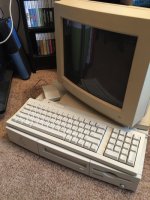
I picked up the Power Mac last week and finally got around to putting everything together. As of today, it's fully up and running with sound and all! (Powered off in the attached pic, though.) The case does get warm to the touch but not alarmingly so.
I upgraded the Mac to OS 8.1... it was still running a very barebones 8 install when I powered it on. I don't think it has been turned on since 2011, the hard disk protested a bit (I took some interesting video of the horrible noises) but once it got going, it has been quiet as a mouse (relatively speaking) ever since! I acquired this one from another forum member a few years ago and it really is one of my favorites.
Current configuration?
Performa 6116CD/60, 40MB RAM, 700MB hard disk, Mac OS 8.1.
PC Card
486DX2/66Mhz, 16MB SIMM (I opted not to use my spare 32MB for now), 40MB disk, MS-DOS 6.21 and Windows for Workgroups 3.11.
Now, if I could just find appropriate cache for this machine it would be a dream of a system. Still is, really, but I could go for squeezing a little more performance out of it!
I upgraded the Mac to OS 8.1... it was still running a very barebones 8 install when I powered it on. I don't think it has been turned on since 2011, the hard disk protested a bit (I took some interesting video of the horrible noises) but once it got going, it has been quiet as a mouse (relatively speaking) ever since! I acquired this one from another forum member a few years ago and it really is one of my favorites.
Current configuration?
Performa 6116CD/60, 40MB RAM, 700MB hard disk, Mac OS 8.1.
PC Card
486DX2/66Mhz, 16MB SIMM (I opted not to use my spare 32MB for now), 40MB disk, MS-DOS 6.21 and Windows for Workgroups 3.11.
Now, if I could just find appropriate cache for this machine it would be a dream of a system. Still is, really, but I could go for squeezing a little more performance out of it!
For anyone who might be interested, I have a DOS Compatibility Card in new condition for sale.
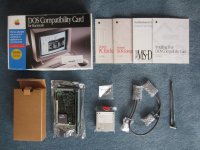
too many macs - where are you based and how much are you asking?
I'm in CT. Still need to do some research on the price. Offers welcome.
If anyone is interested please let me know before I put it up on eBay.
you know whats funny, I have that exact same monitor they are using in the box photo. Funny thing is, it doesnt work with the dos card! has to have a multiplescan 15 or better. at least the one I have anyway.
Wonder why that would be? They all use the same connection. Seems odd. I don't recall which model I used with mine but it definitely wasn't my Multiple Scan 15.
I have the color plus 14. the DOS control panel recognizes it, but its "grayed out"
Its funny though, the screen will fade out, but nothing ever comes up. Maybe the DOS card is shot, who knows.
Its funny though, the screen will fade out, but nothing ever comes up. Maybe the DOS card is shot, who knows.
For anyone that's interested, I finally got around to putting this on eBay today.
Nice! I've just dragged my 6100/66 DOS out of the stack recently and am waiting on finding my HDI-45 adapter or buying another to plug it in and see what it does now. It used to run, but I never played with the DOS side of it.
Would be great if somebody with the boxed software were to make an image of all it entails, or at least the card specific stuff such as the DOS drivers and the PC Setup disks if they havent already. I guess for what its worth, DOS and 3.1 are easily enough obtainable and technically we can't be seen to be condoning "piracy" of such things so yes...
Would be great if somebody with the boxed software were to make an image of all it entails, or at least the card specific stuff such as the DOS drivers and the PC Setup disks if they havent already. I guess for what its worth, DOS and 3.1 are easily enough obtainable and technically we can't be seen to be condoning "piracy" of such things so yes...
I have the book for the full pci card. Ill try and look and see if i have the book for the 6100.