
Thread
Problem? I don't have a problem!
OS9 POWERMAC G4 CHART
(excluding fw800 models that were previously thought not able to boot os9)

*agp macs below the digital audio model feature AGP 2x / digital audio and up feature AGP 4x
*As noted later in the thread there is a mistake in this chart (Based on a mistake int he info of everymac.com)
the 1.25 mdd single processor model does not feature 2MB backside cache
the 5 models that feature the 256k on chip L2/2mb backside L3 cache are:
1.25 DP MDD, 1.0 DP QS 2002, 800mhz DP QS, 933mhz QS, 867mhz QS
http://www.everymac.com/systems/apple/powermac_g4/specs/powermac_g4_1.25_dp_mdd.html
http://www.everymac.com/systems/apple/powermac_g4/specs/powermac_g4_1ghz_dp_qs.html
http://www.everymac.com/systems/apple/powermac_g4/specs/powermac_g4_800_dp_qs.html
http://www.everymac.com/systems/apple/powermac_g4/specs/powermac_g4_933_qs.html
http://www.everymac.com/systems/apple/powermac_g4/specs/powermac_g4_867_qs.html
450 DP, 500 DP, 533 DA feature no "on chip" cache
while the 733 QS, 800 QS feature no "backside" cache
the 3 macs with 167mhz bus are:
1.25 SP MDD (2003), 1.0ghz DP MDD (2002), 1.25 DP MDD (2002)
grey horizontal lines dont mean anything other then those are the particular models that i acquired
(excluding fw800 models that were previously thought not able to boot os9)
*agp macs below the digital audio model feature AGP 2x / digital audio and up feature AGP 4x
*As noted later in the thread there is a mistake in this chart (Based on a mistake int he info of everymac.com)
the 1.25 mdd single processor model does not feature 2MB backside cache
the 5 models that feature the 256k on chip L2/2mb backside L3 cache are:
1.25 DP MDD, 1.0 DP QS 2002, 800mhz DP QS, 933mhz QS, 867mhz QS
http://www.everymac.com/systems/apple/powermac_g4/specs/powermac_g4_1.25_dp_mdd.html
http://www.everymac.com/systems/apple/powermac_g4/specs/powermac_g4_1ghz_dp_qs.html
http://www.everymac.com/systems/apple/powermac_g4/specs/powermac_g4_800_dp_qs.html
http://www.everymac.com/systems/apple/powermac_g4/specs/powermac_g4_933_qs.html
http://www.everymac.com/systems/apple/powermac_g4/specs/powermac_g4_867_qs.html
450 DP, 500 DP, 533 DA feature no "on chip" cache
while the 733 QS, 800 QS feature no "backside" cache
the 3 macs with 167mhz bus are:
1.25 SP MDD (2003), 1.0ghz DP MDD (2002), 1.25 DP MDD (2002)
grey horizontal lines dont mean anything other then those are the particular models that i acquired
Face twitching...
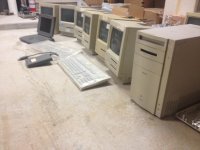
I hope these Macs are not gathering to conspire!
I visited my electronics surplus shop again today for vintage Macs. I started picking through the shelves of vintage Mac and PC gear, and found some things I didn't know were there last time, since I looked more thoroughly. $150 later and I came back with three Mac Classic IIs, a Mac Classic, two SEs, a PowerMac 8100/110, a PowerBook 520 (no charger), a SCSI floppy drive for the PowerBook, and two Apple keyboards. I saw a Quadra 950 in some state of needed repair, but passed it up. I regret this because I don't see too many on eBay, and they go for a lot on eBay. With the weight of the thing, it would be more worthwhile to drive back to the place, pay the $40 for it, then come back home, than to have it shipped.
This seems fair and unethical at the same time: Since I come in frequently wanting a lot of stuff, they work great deals with me. They wanted $15 each for some compacts, but $40 if I turned them on and they worked. Fair enough, just put em in the car and take my money!
What works? Everything but one Classic. The SEs just need boot disks, one Classic clicks rapidly (probably PSU caps), and all the other Classics boot fine or need caps (big surprise there). I haven't tested the PowerBook or the PowerMac, but I did find something on one of the Classics.
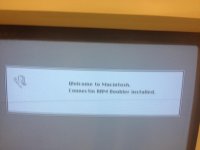
What is this? Is this a physical piece of rare hardware? I don't know.
Half the lot, looks like one of these was rack mounted at some point:
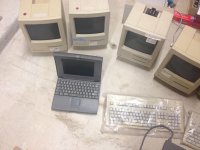
Other half:
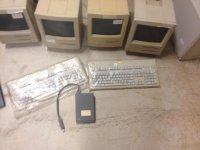
I hope these Macs are not gathering to conspire!
I visited my electronics surplus shop again today for vintage Macs. I started picking through the shelves of vintage Mac and PC gear, and found some things I didn't know were there last time, since I looked more thoroughly. $150 later and I came back with three Mac Classic IIs, a Mac Classic, two SEs, a PowerMac 8100/110, a PowerBook 520 (no charger), a SCSI floppy drive for the PowerBook, and two Apple keyboards. I saw a Quadra 950 in some state of needed repair, but passed it up. I regret this because I don't see too many on eBay, and they go for a lot on eBay. With the weight of the thing, it would be more worthwhile to drive back to the place, pay the $40 for it, then come back home, than to have it shipped.
This seems fair and unethical at the same time: Since I come in frequently wanting a lot of stuff, they work great deals with me. They wanted $15 each for some compacts, but $40 if I turned them on and they worked. Fair enough, just put em in the car and take my money!
What works? Everything but one Classic. The SEs just need boot disks, one Classic clicks rapidly (probably PSU caps), and all the other Classics boot fine or need caps (big surprise there). I haven't tested the PowerBook or the PowerMac, but I did find something on one of the Classics.
What is this? Is this a physical piece of rare hardware? I don't know.
Half the lot, looks like one of these was rack mounted at some point:
Other half:
A rack-mounted compact would be neat to see, and an SE would be a good one to rack up because it has a fan.
Connectix RAM Doubler was software available in the '90s that did some combination of compression, virtual memory, and one or two other tricks in order to maximize the amount of RAM you had available to use. It would be neat to look at, but given that you can probably inexpensively max the memory on most of these machines using parts you may already have on hand, it may not be something you want to bother with.
Connectix RAM Doubler was software available in the '90s that did some combination of compression, virtual memory, and one or two other tricks in order to maximize the amount of RAM you had available to use. It would be neat to look at, but given that you can probably inexpensively max the memory on most of these machines using parts you may already have on hand, it may not be something you want to bother with.
A great find and retrieve there, Nurd! Now go back and get that 950! (lol!)
Welcome to the 500 club as I just got a 520c from a fellow member here, it came in yesterday! Now, for me, to open it up and put in a CF-based Drive in it if it's IDE Based. (SMH - I think it's SCSI)
Connectix RAM Doubler has its Pluses and Minuses. On a Machine like a Classic/Classic II, it runs slow though it doubles the amount of RAM in the machine Virtually. Connectix RAM Doubler runs best on a '040 machine, and even then with a minimum of 16megs. You're better off with the System's own Virtual Memory in the Control Panel if its not a '040 machine. Like Cory5412 said, it would be easier to buy RAM for the machines.
Welcome to the 500 club as I just got a 520c from a fellow member here, it came in yesterday! Now, for me, to open it up and put in a CF-based Drive in it if it's IDE Based. (SMH - I think it's SCSI)
Connectix RAM Doubler has its Pluses and Minuses. On a Machine like a Classic/Classic II, it runs slow though it doubles the amount of RAM in the machine Virtually. Connectix RAM Doubler runs best on a '040 machine, and even then with a minimum of 16megs. You're better off with the System's own Virtual Memory in the Control Panel if its not a '040 machine. Like Cory5412 said, it would be easier to buy RAM for the machines.
so..
in retrospect 5 models only..
the only g4 macs that had 2MB L3 CACHE:
ranked from slowest to fastest cpu power:
single cpus:
-G4 867 (QS) (2001) 133mhz bus >>> 487
-G4 933 (QS) (2002) 133mhz bus >>> 550
dual cpus:
-G4 800 DP (QS) (2001) 133mhz bus >>> 670 (335 per?)
-G4 1.0 DP (QS) (2002) 133mhz bus >>> 854 (427 per?)
-G4 1.25 DP (MDD) (2002) 167mhz bus >>> 1078 (539 per?)
so in conclusion the 2002 1.25ghz dual processor MDD is the fastest stock os9 computer ever made
the only 167mhz bus + only one with both 2MB L3 Cache as well as ATA-100 disk speed access
on the main IDE bus
addendum:
ive just rechecked the fact that the Sonnet Encore (Single) CPUs feature level 3 cache up to the 1.4ghz models
here are the infos / part numbers from the pdf:
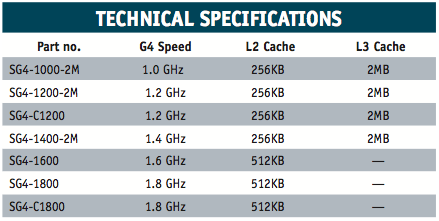
SG4-1000-2M 1.0 GHz 256KB 2MB
SG4-1200-2M 1.2 GHz 256KB 2MB
SG4-C1200 1.2 GHz 256KB 2MB
G4-1400-2M 1.4 GHz 256KB 2MB
not sure what the diff is between the two 1.2ghz models
with this new (old) information.. does this mean the 1.4ghz sonnet is the fastest single g4 cpu that also has 2MB L3 Cache?
perhaps.
**** remember these SONNET cpu upgrades being compatible with 100mhz + 133mhz fsb g4s EXCLUDING the MDD of course:
Power Mac G4 (AGP Graphics)
Power Mac G4 (Gigabit Ethernet)
Power Mac G4 (Digital Audio)
Power Mac G4 (QuickSilver 2001)
Power Mac G4 (QuickSilver 2002)
Power Mac G4 Cube*
Macintosh Server G4
perhaps this whole "Cube" enthusiast movement relies heavily on the fact that the g4 cube could be upgraded to 1.4ghz sonnet cpu with 2mb l3 cache
in retrospect 5 models only..
the only g4 macs that had 2MB L3 CACHE:
ranked from slowest to fastest cpu power:
single cpus:
-G4 867 (QS) (2001) 133mhz bus >>> 487
-G4 933 (QS) (2002) 133mhz bus >>> 550
dual cpus:
-G4 800 DP (QS) (2001) 133mhz bus >>> 670 (335 per?)
-G4 1.0 DP (QS) (2002) 133mhz bus >>> 854 (427 per?)
-G4 1.25 DP (MDD) (2002) 167mhz bus >>> 1078 (539 per?)
so in conclusion the 2002 1.25ghz dual processor MDD is the fastest stock os9 computer ever made
the only 167mhz bus + only one with both 2MB L3 Cache as well as ATA-100 disk speed access
on the main IDE bus
addendum:
ive just rechecked the fact that the Sonnet Encore (Single) CPUs feature level 3 cache up to the 1.4ghz models
here are the infos / part numbers from the pdf:
SG4-1000-2M 1.0 GHz 256KB 2MB
SG4-1200-2M 1.2 GHz 256KB 2MB
SG4-C1200 1.2 GHz 256KB 2MB
G4-1400-2M 1.4 GHz 256KB 2MB
not sure what the diff is between the two 1.2ghz models
with this new (old) information.. does this mean the 1.4ghz sonnet is the fastest single g4 cpu that also has 2MB L3 Cache?
perhaps.
**** remember these SONNET cpu upgrades being compatible with 100mhz + 133mhz fsb g4s EXCLUDING the MDD of course:
Power Mac G4 (AGP Graphics)
Power Mac G4 (Gigabit Ethernet)
Power Mac G4 (Digital Audio)
Power Mac G4 (QuickSilver 2001)
Power Mac G4 (QuickSilver 2002)
Power Mac G4 Cube*
Macintosh Server G4
perhaps this whole "Cube" enthusiast movement relies heavily on the fact that the g4 cube could be upgraded to 1.4ghz sonnet cpu with 2mb l3 cache
I have RAM Doubler on my SE/30, its on my Q700 as well but all the recent installs seems to have broken it. Doesn't matter anyway as I plan to max the machine to 68MB.
It would help on something with expensive RAM, like a IIfx.
Nice find on the AEK's as well, I want to get one for my Quadra.
It would help on something with expensive RAM, like a IIfx.
Nice find on the AEK's as well, I want to get one for my Quadra.
The 520 is SCSI, not IDE.
wouldnt this double pci bus be on the other mdd's aswell tho? (ie: any MDD that has ATA100 as well as ATA 66?)
I wish I had a recycling place like that around here.
Sometimes I joke about hanging out near the electronics recycling area at the county dump but get the feeling that that would be both creepy and the staff would probably chase me away. Seriously, rich people here throw out electronics at the first sign of trouble.
Sometimes I joke about hanging out near the electronics recycling area at the county dump but get the feeling that that would be both creepy and the staff would probably chase me away. Seriously, rich people here throw out electronics at the first sign of trouble.
just a note: the 2003 1.25ghz mdd (1mb L3 cache, incorrectly reffered to as 2MB) is noted as achieving a score of 727 on the above chart.
i have acquired one of these machines and just silenced the fans in the psu and u can check its score
on my geekbench account: http://browser.primatelabs.com/user/chrisnova777/geekbench2
(click geekbench2 scores tab) and you will see this machine scores 779 and 780 consistantly when i test it.
i have acquired one of these machines and just silenced the fans in the psu
and u can check its scoreon my geekbench account: http://browser.primatelabs.com/user/chrisnova777/geekbench2
(click geekbench2 scores tab) and you will see this machine scores 779 and 780 consistantly when i test it.
I ran into the same thing back in the day. I thought it was funny because it was one of my friends at Tekserve who'd offered me a $20/$40:untested/tested_good deal. I grabbed it at the generous bargain price and all but held my breath for the excitement of having found a Macintosh Portrait Display at long last!
I'd think of it as an annoyance tax. They're in the habit of giving you great deals, that would put the transaction in the "Never look a gift horse in the mouth" category in my book.

per your question on what QS models have the 128GB HDD limit:
there was once one page on this site, which listed the part numbers of the logicboards and the specific models in which it was put in.
I remember that page had all info one need at first to get started with OS 9 installation. It had a picture of a coffin and a HDD with an orange 9 on it and other nice icons.
I don't know, where that site has gone, but there you would find the answer.
Also, the reintroduced Single 1,25GHz MDD of 2003 was available BTO with DP 1,25GHz and still OS 9 bootable, would that very last DP model (without FW800! Though 2003) have the L3 cache, too?
Edit: found it differently and in another place:
QuickSilver 733, QuickSilver 800, QuickSilver DP 800, QuickSilver 867, QuickSilver 933, QuickSilver Dual 1 GHz with logic board 820-1342-B (QS logic board 820-1276-A will NOT work and peak out at 128 GB),
there was once one page on this site, which listed the part numbers of the logicboards and the specific models in which it was put in.
I remember that page had all info one need at first to get started with OS 9 installation. It had a picture of a coffin and a HDD with an orange 9 on it and other nice icons.
I don't know, where that site has gone, but there you would find the answer.
Also, the reintroduced Single 1,25GHz MDD of 2003 was available BTO with DP 1,25GHz and still OS 9 bootable, would that very last DP model (without FW800! Though 2003) have the L3 cache, too?
Edit: found it differently and in another place:
QuickSilver 733, QuickSilver 800, QuickSilver DP 800, QuickSilver 867, QuickSilver 933, QuickSilver Dual 1 GHz with logic board 820-1342-B (QS logic board 820-1276-A will NOT work and peak out at 128 GB),
The keyword here is "bribe". A little money goes a long way towards people at junkyards/dumps being friendly.
Thanks!
I didn't mean that it doesn't have L3 cache at all, but if the 2003 MDD Dual 1,25GHz reissue BTO version had the 2MB L3 per CPU, i.e. 2x2MB L3.
Let us see, if I understand, what you are saying:
We have (all ever built):
August 2002
1. Power Mac G4 867 DP MDD, 133Mhz FSB, 1MB L3 per Core
2. Power Mac G4 1.0 DP MDD , 167MHz FSB, "
3. Power Mac G4 1.25 DP MDD, 167MHz FSB, 2MB L3 per Core
January 2003
4. Power Mac G4 1.0 FW800, 133Mhz FSB, 1MB L3 per Core
5. Power Mac G4 1.25 DP FW800, 167MHz FSB, "
6. Power Mac G4 1.42 DP FW800, 167MHz FSB, 2MB L3 per Core
June 2003
7. Power Mac G4 1.25 MDD ("reissue"), 167MHz FSB, 1MB L3 per Core
8. Power Mac G4 1.25 DP MDD BTO ("reissue"), 167MHz FSB, 1MB L3 per Core
Xserve
9. Xserve G4 lower than 1.33GHz, 133MHz FSB, 2MB L3 per core
10. Xserve G4 1.33GHz Dual and Single, 167MHz FSB, 2MB L3 per core
So, if I want to have the best OS 9 machine:
a) get "7" = 1,25GHz G4 single, 167MHz cache, 1MB L3 cache and overclock to 1,5GHz (to get highest CPU clock + highest FSB)
b) get "7" and put in "10" = Single 1,33GHz G4 Xserve CPU, 167MHz FSB, 2MB L3 per core (to get highest CPU clock + highest FSB + biggest L3 cache)
So, if I want the best OS X + OS 9 bootable machine:
a) take CPU from "6" and put in 2, 3, 7 or 8
b) second best, take CPU 1,33GHz Dual out of Xserve and put in 2, 3, 7 or 8 (but will run cooler.
The Xserve CPU runs cooler at a similar clock speed, is it not slower? if we can trust Geekbench, I mean a 2x1,8GHz 7447 is just as fast as a 1.42GHz DP 7455...:
Looking at geekbench (all Dual CPU):
Xserve 1.33: 1200
PM 1.25: 1074
PM 1.42: 1224
-> Hm, seems not, if we can trust geekbench.
I didn't mean that it doesn't have L3 cache at all, but if the 2003 MDD Dual 1,25GHz reissue BTO version had the 2MB L3 per CPU, i.e. 2x2MB L3.
...
Users that are OS9 only may choose a single CPU; depending on the DAW host application, a single will run both cooler and more stable (with some OS 9 based applications), so the optimal CPU (without overclocking) is the fastest single with the most cache...
http://www.everymac.com/systems/apple/xserve/specs/xserve_g4_1.33.html
Rip one out of an Xserve G4 1.33 and BAM... single cool CPU, runs at 1.33 Ghz. and has 2 MB Cache
Or overclock a stock single CPU to 1.5 Ghz
...While users that use both OS X and OS 9 will opt to rip a Dual 1.42 Processor board out of a FW 800 and put it in their 2003 MDD
and BAM, Dual 1.42 Ghz monster with 2 MB cache per CPU
Let us see, if I understand, what you are saying:
We have (all ever built):
August 2002
1. Power Mac G4 867 DP MDD, 133Mhz FSB, 1MB L3 per Core
2. Power Mac G4 1.0 DP MDD , 167MHz FSB, "
3. Power Mac G4 1.25 DP MDD, 167MHz FSB, 2MB L3 per Core
January 2003
4. Power Mac G4 1.0 FW800, 133Mhz FSB, 1MB L3 per Core
5. Power Mac G4 1.25 DP FW800, 167MHz FSB, "
6. Power Mac G4 1.42 DP FW800, 167MHz FSB, 2MB L3 per Core
June 2003
7. Power Mac G4 1.25 MDD ("reissue"), 167MHz FSB, 1MB L3 per Core
8. Power Mac G4 1.25 DP MDD BTO ("reissue"), 167MHz FSB, 1MB L3 per Core
Xserve
9. Xserve G4 lower than 1.33GHz, 133MHz FSB, 2MB L3 per core
10. Xserve G4 1.33GHz Dual and Single, 167MHz FSB, 2MB L3 per core
So, if I want to have the best OS 9 machine:
a) get "7" = 1,25GHz G4 single, 167MHz cache, 1MB L3 cache and overclock to 1,5GHz (to get highest CPU clock + highest FSB)
b) get "7" and put in "10" = Single 1,33GHz G4 Xserve CPU, 167MHz FSB, 2MB L3 per core (to get highest CPU clock + highest FSB + biggest L3 cache)
So, if I want the best OS X + OS 9 bootable machine:
a) take CPU from "6" and put in 2, 3, 7 or 8
b) second best, take CPU 1,33GHz Dual out of Xserve and put in 2, 3, 7 or 8 (but will run cooler.
The Xserve CPU runs cooler at a similar clock speed, is it not slower? if we can trust Geekbench, I mean a 2x1,8GHz 7447 is just as fast as a 1.42GHz DP 7455...:
Looking at geekbench (all Dual CPU):
Xserve 1.33: 1200
PM 1.25: 1074
PM 1.42: 1224
-> Hm, seems not, if we can trust geekbench.
I asked someone at the local landfill's recycling center, and he said that if I see anything of interest, I can actually take it, if I bring something of my own to replace it (which seems quite fair).
I full intend to give that a try at some point }
I don't see Macs very often (especially pre-iMac ones), but there's often plenty of PC stuff that will work just fine with most recent PPC Macs (G3 and newer), so it's not a total loss.
c
I full intend to give that a try at some point }
I don't see Macs very often (especially pre-iMac ones), but there's often plenty of PC stuff that will work just fine with most recent PPC Macs (G3 and newer), so it's not a total loss.
c
Quote
I do not understand. Why are you excluding all DP machines for OS 9 completely? OK the system isn´t using the 2nd CPU but some applications like Photoshop can.Because DieHard said
Quote
Users that are OS9 only may choose a single CPU; depending on the DAW host application, a single will run both cooler and more stable (with some OS 9 based applications), so the optimal CPU (without overclocking) is the fastest single with the most cache...and I was assuming that the OSX+OS9 reccomendation by DieHard can be used for OS9 Dual CPU usage, too - i.e. the recommendation for OS-X + OS 9 would be the same as for a User who e.g. uses Photoshop in OS 9, only.
(is it "was assuming" or "assumed"?)