

Thread
Proper way to GROUND when discharging CRT of compact mac?
I know there are numerous discussion on the topic of discharging CRTs for compact Macs. however, I have found conflicting information regardin the propwer grounding LOCATION. On a Mac 512Ke, is it OK to ground the discharge wire to the ground (same as chassis) of the computer? I think I read in one thread that this could fry the logic board which is also grounded to the chassis. I'm not sure if it was refering to this particular Mac model though.
Another thread mentioned grounding to the 'grounded connection' of an electrical wall socket, which seems a safer bet to me -- but one needs to be sure that the electrical plate is wired correctly at the wall.
Another method I have tried is to disconnect the Mac from the wall while at full brightness, but I see no guarentee that this would effectively discharge the monitor.
Any advice?
Another thread mentioned grounding to the 'grounded connection' of an electrical wall socket, which seems a safer bet to me -- but one needs to be sure that the electrical plate is wired correctly at the wall.
Another method I have tried is to disconnect the Mac from the wall while at full brightness, but I see no guarentee that this would effectively discharge the monitor.
Any advice?
I have done it this way in my 512 and Plus:
Easy first step: "disconnect the Mac from the wall while at full brightness"
And then as a followup: "ground the discharge wire to the ground (same as chassis) of the computer"
I am still alive
And never been zapped either. knock on wood for next time.
Easy first step: "disconnect the Mac from the wall while at full brightness"
And then as a followup: "ground the discharge wire to the ground (same as chassis) of the computer"
I am still alive
And never been zapped either. knock on wood for next time.
Ya, you could use a wall outlet, etc. But its really about balancing out the electrons. Grounding to the metal frame is the recommend method by Apple.
I read just now that one must discharge to the grounding lug only. Which may not be the same as the frame from what I can tell. Anyway, I will follow the process of discharging.
Do you normally hear a ZAP when you followup with the ground discharge ? (considering that you first disconnected at full brightness..)
I have done it this way in my 512 and Plus:
Easy first step: "disconnect the Mac from the wall while at full brightness"
And then as a followup: "ground the discharge wire to the ground (same as chassis) of the computer"
I am still alive
And never been zapped either. knock on wood for next time.
If you are really worried, the mobo comes out in 30 seconds. Just remove it.
Yeah, I took the motherboard out already. I need to discharge the CRT to get everything out and remove the front plastic faceplate for de yellowing
As long as you don't stick your tongue up under the red suction-cup looking thing on the back, you should be fine.
To be perfectly sure, you could find the metal pipe that brings water into your home and ground to that. It will definitely be "to earth."
Get a socket tester and see if your outlets are grounded properly. It'd be good to know anyway.
To be perfectly sure, you could find the metal pipe that brings water into your home and ground to that. It will definitely be "to earth."
Get a socket tester and see if your outlets are grounded properly. It'd be good to know anyway.
Funny... I hear you say that, but I also hear numerous stories from people that have gotten SHOCKED.... and I'm pretty sure they weren't screwing around with the anode!
The only time I've been shocked while working on a compact Mac was in the process of grounding the anode. When I've just left it alone, I've been fine. The shock is startling, but unless you have some condition that makes you especially vulnerable, it's not dangerous. Then again, I've been electrocuted many times by wall current without learning better, so maybe I'm just amperage tolerant.
How did you manage to shock yourself grounding the anode?! Were you doing something wrong? Seems like a safe procedure if you have a properly built 'tool', ground one side correctly, and and poke correctly on the anode. Please explain?
lol
Seems reasonable.
Seems reasonable.
Took me a minute to figure out what that photo was… "ground". Very nice. I'm sure that setup worked great and was totally safe!
Well just for completeness, I wanted to point out what I have learned after successfully taking apart the CRT:
1) You must GROUND the discharge tool to the GROUNDING LUG ON THE CORNER OF THE MONITOR. Do NOT ground to the chassis at any other place... it can (and likely WILL) kill your logic board. This is true on early Macs as far as I can tell... grounding points are different.
2) I did the 'max brightness and pull the chord' procedure.
3) I also let the Mac sit for about a week
4) I attempted to discharge the CRT after a week passed, and there was absolutely no sign of remaining charge on the tube.
Net, I conclude that the combination of PULL THE CORD plus Waiting 1 week is sufficient on ealry Macs. I will (and would advice) to discharge the CRT regardless to be 100% sure.
1) You must GROUND the discharge tool to the GROUNDING LUG ON THE CORNER OF THE MONITOR. Do NOT ground to the chassis at any other place... it can (and likely WILL) kill your logic board. This is true on early Macs as far as I can tell... grounding points are different.
2) I did the 'max brightness and pull the chord' procedure.
3) I also let the Mac sit for about a week
4) I attempted to discharge the CRT after a week passed, and there was absolutely no sign of remaining charge on the tube.
Net, I conclude that the combination of PULL THE CORD plus Waiting 1 week is sufficient on ealry Macs. I will (and would advice) to discharge the CRT regardless to be 100% sure.
It drives me insane how many misconceptions there are to discharging a CRT and I've heard a lot of them. The brightness setting does not matter when discharging the anode because when the power is off, that whole circuit is dead anyways. You can wait a week if you want but believe me there's a much better alternative. Here, have a guide.

Thanks. I read multiple sources stating to ground to GROUND LUG ONLY. Not chassis.
yes please ground to the lug only …. the ground lug only. you will cook shit in the A/B otherwise.
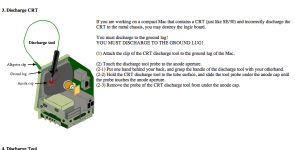
Another good source stating GROUND LUG ONLY. I guess if you are using a 10Mohm resistor in your discharge tool it doesn't matter.
http://www.peachpit.com/articles/article.aspx?p=759704&seqNum=2
http://www.peachpit.com/articles/article.aspx?p=759704&seqNum=2
Celgen: The brightness setting matters if you pretend to discharge the CRT by just pulling the power plug while Mac is on. It's irekevant for any other aspect.
no, regardless the, HV has to get dumped to the ground wire at the lug… otherwise the HV will make its way back through an undesirable path. With this old stuff, you have no idea what is making a good electrical contact or not.
Sorry I am just getting back to all this. I never heard a zap... I think the CRT was probably all discharged. And to be clear, I grounded to the ground lug following Uniserver's instructions (as that was my reference to begin with). I should have re-read what I wrote and been more clear and said:
Easy first step: "disconnect the Mac from the wall while at full brightness"
And then as a followup: "ground the discharge wire to the ground lug of the computer"
It makes no point to only attach to the ground lug. It attaches to the same chassis. You're just confusing people by being specific. It does not matter. We are not talking a modern set.
Why would you pretend to discharge it? I've never heard of that before.
I meant INTEND not pretend!
AHHHHHHHH!
That has to be the single most dangerous thing I have ever heard someone recommend to discharge the high voltage in a monitor.
NEVER EVER try to discharge the high voltage like this if you value your life.
That has to be the single most dangerous thing I have ever heard someone recommend to discharge the high voltage in a monitor.
NEVER EVER try to discharge the high voltage like this if you value your life.
Celgen:
Could you please edit your post to clarify exactly what of everything that has been said here is so dangerous?
Could you please edit your post to clarify exactly what of everything that has been said here is so dangerous?
Isn't the ground lug the actual 0 V ground reference point? Anything else is just something connected to ground by a wire or the chassis frame, which *should* be at the same potential, but might not be if there's a loose wire or crack/rust in the frame or other unexpected issue. So discharging to the actual ground lug should be safest.
This is NOT a safe way to discharge the high voltage. You're on the full assumption that the voltage will instantly drain through a number of reasons, including a switched bleeder circuit. If this was the case then just flipping the power switch would achieve the exact same result.
Here's an experiment for all of you. Follow what he described you do, then pop the anode cap off and touch it with your finger. You WILL get electrocuted and it will not be an enjoyable experience.
Just follow my instructions on the last page. This is not a modern TV set. This is a monochrome monitor in a computer from the mid 80's and doesn't have isolated grounding/logic ground or anything of the matter.
You're grasping straws here. Look at how the analog board is attached inside a compact mac. There's multiple points where a strong link is established, some of them screwed together. Apple didn't mandate this. It's required for CSA approval among other certifications. For a failure to occur where the grounds on the analog board and the chassis become isloated, a LOT of places need to be physically not touching eachother.
I WILL refer you to the source. People read this FIRST, then comment !
"The other one is the older version of the Apple CRT Discharge Tool (Part No. 076-0243). The older version has a copper alligator clip but no hand guard. It has a built-in 100-megohm resistor, which means you will not hear an electrostatic crack when the CRT discharges, even if the monitor has no bleeder resistor. This older tool was designed for the original Macintosh or Macintosh Plus logic board. A resistor was installed to diminish the impact of the electrostatic discharge if a technician accidentally discharged the CRT to the metal chassis instead of to the ground lug. (The Macintosh logic board circuitry is grounded to the chassis.) This older tool is safer for use on the Macintosh or Macintosh Plus CRT."
http://www.biwa.ne.jp/~shamada/fullmac/repairEng.html
"The other one is the older version of the Apple CRT Discharge Tool (Part No. 076-0243). The older version has a copper alligator clip but no hand guard. It has a built-in 100-megohm resistor, which means you will not hear an electrostatic crack when the CRT discharges, even if the monitor has no bleeder resistor. This older tool was designed for the original Macintosh or Macintosh Plus logic board. A resistor was installed to diminish the impact of the electrostatic discharge if a technician accidentally discharged the CRT to the metal chassis instead of to the ground lug. (The Macintosh logic board circuitry is grounded to the chassis.) This older tool is safer for use on the Macintosh or Macintosh Plus CRT."
http://www.biwa.ne.jp/~shamada/fullmac/repairEng.html
I agree with celgen. I would never count on 'full brightness and pull power plug' method alone. Nor was I advocating this. Like I said, Always discharge. And do it to the Grounding lug ONLY. Good day!