
Thread
Mac 512k HyperDrive 20 can't see hard disk
I acquired two 512K Macintoshes with HyperDrives in this Conquest thread but the later HyperDrive 20 unit needs work so I'm creating a thread to help document what I'm doing.
The original 512k Mac that he HyperDrive 20 came in had a leaky battery and I needed to deal with some rust/corrosion issues. The analog board, as a result, suffered. When I took it apart, I cleaned the floppy drive because it was so stuck, it wouldn't even injest a floppy. After a good cleaning, I reinstalled the floppy drive (it's not as easy as a non-HyperDrive because of the extra electronics) and fired it up. The floppy drive didn't spin up when I inserted a floppy. I took an external sloppy drive and plugged it in. When I did so and tried to boot with that, the computer did not start up and I had some twitching random patterns on the screen.
In addition to this, I noticed that the hard drive produced a flashing LED pattern that indicated an error. I got two errors, in total and decided to spin around the stepper motor. It was firmly in place but moving it around freed it up. I could hear the drive spinning, so that was not an issue. After several hard boots, the drive mostly comes up with the drive LED on and staying on. Once or twice I got the drive LED to flicker once and extinquish which, I think, is what it should be doing. Since it would not boot from the hard drive and I couldn't boot from a floppy disk, I had no option but to transplant the electronics to another Mac 512k.
I transplanted the HyperDrive 20 parts including the hard drive power supply, the old motherboard with HyperDrive daughterboard, the hard drive and associated electronics and got the Mac 512k running. I was a little worried because I had read that the analog board in these HyperDrive Macs were then tweaked for voltage and adjusted because of the additional power supply. The new Mac 512k fired right up with no visible issues. I had even plugged in a second floppy drive which I would assume would take extra power but this worked well too. I had the system disk and the HyperDrive drivers disk in separate drives.
The HyperDrive drivers disk has a utility called "Manager V3R1". This looks like it will format a HyperDrive disk but I'm not sure if it will from a drive that needs to be low-level formatted. When I run it, it pops up a dialog that says "Needs to run on a HyperDrive system" or something similar, and then exits when you click OK. I tried this on my other HyperDrive. When I run it, it adds an additional option to the default menu to manipulate drawers. Of course, I didn't try any of the options but I did boot this computer from the same floppy that I booted the other system and used the HyperDriver driver disk as well so that all things were equal.
So now I'm left with two options. Either the daughterboard is not working properly or the hard drive is bad or needs some form of low-level format perhaps. After some research, it looks like Symantec Utilities for Macintosh (SUM) version 1.1 might help? From Wikipedia http://en.wikipedia.org/wiki/Norton_Utilities#v1.1 it states it supports HyperDrive disks. I'm not sure if it does formatting but it's worth a shot if I can find it. I tried Mac Garden but couldn't find that version. SUM II was there but not 1.1. If anyone has any pointers to this version, I'd like to, at least, try it.
Since the HyperDrive utilties don't see the drive (or maybe the daughtercard), I'm wondering if the drive needs to be pre-formatted for them to see it. Since the formatting utility doesn't work I guess I could low-level format it in a PC but I'm not sure if that will make it work in the Mac or cause more damage. If the drives were the same in the two HyperDrives, I could attach the new disk to the old HyperDrive but the old one has a 10mb drive as opposed to the 20mb and I would assume the drive geometry is hard coded into the card,
Sadly, this is not a run-of-the-mill question because of it's scarcity. Does anyone else know where I might ask about this issue? Any help is always appreciated. I will check the daughterboard tonight and take it from there.
The original 512k Mac that he HyperDrive 20 came in had a leaky battery and I needed to deal with some rust/corrosion issues. The analog board, as a result, suffered. When I took it apart, I cleaned the floppy drive because it was so stuck, it wouldn't even injest a floppy. After a good cleaning, I reinstalled the floppy drive (it's not as easy as a non-HyperDrive because of the extra electronics) and fired it up. The floppy drive didn't spin up when I inserted a floppy. I took an external sloppy drive and plugged it in. When I did so and tried to boot with that, the computer did not start up and I had some twitching random patterns on the screen.
In addition to this, I noticed that the hard drive produced a flashing LED pattern that indicated an error. I got two errors, in total and decided to spin around the stepper motor. It was firmly in place but moving it around freed it up. I could hear the drive spinning, so that was not an issue. After several hard boots, the drive mostly comes up with the drive LED on and staying on. Once or twice I got the drive LED to flicker once and extinquish which, I think, is what it should be doing. Since it would not boot from the hard drive and I couldn't boot from a floppy disk, I had no option but to transplant the electronics to another Mac 512k.
I transplanted the HyperDrive 20 parts including the hard drive power supply, the old motherboard with HyperDrive daughterboard, the hard drive and associated electronics and got the Mac 512k running. I was a little worried because I had read that the analog board in these HyperDrive Macs were then tweaked for voltage and adjusted because of the additional power supply. The new Mac 512k fired right up with no visible issues. I had even plugged in a second floppy drive which I would assume would take extra power but this worked well too. I had the system disk and the HyperDrive drivers disk in separate drives.
The HyperDrive drivers disk has a utility called "Manager V3R1". This looks like it will format a HyperDrive disk but I'm not sure if it will from a drive that needs to be low-level formatted. When I run it, it pops up a dialog that says "Needs to run on a HyperDrive system" or something similar, and then exits when you click OK. I tried this on my other HyperDrive. When I run it, it adds an additional option to the default menu to manipulate drawers. Of course, I didn't try any of the options but I did boot this computer from the same floppy that I booted the other system and used the HyperDriver driver disk as well so that all things were equal.
So now I'm left with two options. Either the daughterboard is not working properly or the hard drive is bad or needs some form of low-level format perhaps. After some research, it looks like Symantec Utilities for Macintosh (SUM) version 1.1 might help? From Wikipedia http://en.wikipedia.org/wiki/Norton_Utilities#v1.1 it states it supports HyperDrive disks. I'm not sure if it does formatting but it's worth a shot if I can find it. I tried Mac Garden but couldn't find that version. SUM II was there but not 1.1. If anyone has any pointers to this version, I'd like to, at least, try it.
Since the HyperDrive utilties don't see the drive (or maybe the daughtercard), I'm wondering if the drive needs to be pre-formatted for them to see it. Since the formatting utility doesn't work I guess I could low-level format it in a PC but I'm not sure if that will make it work in the Mac or cause more damage. If the drives were the same in the two HyperDrives, I could attach the new disk to the old HyperDrive but the old one has a 10mb drive as opposed to the 20mb and I would assume the drive geometry is hard coded into the card,
Sadly, this is not a run-of-the-mill question because of it's scarcity. Does anyone else know where I might ask about this issue? Any help is always appreciated. I will check the daughterboard tonight and take it from there.
So for all those that were unaware, i recently did a trip to Sydney. (the trip was excellent btw  ) Anyway, after arriving at the hostel and settling in and everything, i decided that the first place i should go to, although is not very touristy (
 ) is Microseconds, to try and get parts for my iMac. I had to wait for about half an hour, (i found a seedy lil netcafe with "31337" on all these riced up PCs which i killed time at), but they came through BIG TIME, and i ended up picking up an entire, complete logicboard/mass storage tray assembly (minus CD-ROM/HDD) and 2 128MB SODIMMs for $110.
Anyway, fast forward to last week, when i started work on the iMac. I put my iMac's CD-ROM and a 80GB 7200rpm Western Digital that i got from a free PC in the new subassembly and put it in my iMac. Booted perfectly off an OS 9 CD. So i decided to do a OS 9 install followed by an OS X install, so that i could dual boot both OS's, like i could before it died. The OS 9 install was uneventful, and the Mac booted up perfectly (and VERY quickly!!!!!!) into OS 9. In OS 9 the iMac is just perfect. Its very fast, and reliable. So then i decided to try Jaguar.
I put the Jaguar CD in, and it booted off the Jag CD. The install went uneventful, but then after the install, i rebooted into Jaguar off the hard drive. Which is where my problem is.
When i install Jaguar on the HD, no matter what i do, it always KPs. The Apple logo comes up, and then the screen gets all distorted and stuff. I've booted it up in verbose mode, and when it gets to this stage, its KPing. I've reseated and switched around my RAM. i've run it through TTP 3, and it passed with flying colours. I've put the original RAM in, i've done all sorts of stuff. But no matter what i do, when i boot off the HD, it always KPs. I've also tried another HDD. The RAM i am using in it are both 128MB PC100 SO-DIMMs, one's a Micron CL2 module, and one's a Hyundai CL3. I'm a bit curious about the CL3. Is it ok to mix both CL2 and CL3, and also, does CL3 RAM work ok with OS X? I'm just curious, as from what i've heard, CL2 is always the best to use. I've tried with just the CL2 in and the other slot empty, but to no avail.
The only thing i can think of is this: IIRC, i've had this problem before, and i managed to fix it by doing a 10.1 install, and then updating that to 10.2. I'm going to try that tomorrow, and i hope it works, because if it doesn't, and unless you guys can come up with something, i'm out of ideas.
Thanks in advance for your help and for reading this post
_________________
"I mean, how hard can it be?" - Jeremy Clarkson
The Infamous LCGuy - Now back with Amazing Working iMac Action!
) Anyway, after arriving at the hostel and settling in and everything, i decided that the first place i should go to, although is not very touristy () is Microseconds, to try and get parts for my iMac. I had to wait for about half an hour, (i found a seedy lil netcafe with "31337" on all these riced up PCs which i killed time at), but they came through BIG TIME, and i ended up picking up an entire, complete logicboard/mass storage tray assembly (minus CD-ROM/HDD) and 2 128MB SODIMMs for $110.
Anyway, fast forward to last week, when i started work on the iMac. I put my iMac's CD-ROM and a 80GB 7200rpm Western Digital that i got from a free PC in the new subassembly and put it in my iMac. Booted perfectly off an OS 9 CD. So i decided to do a OS 9 install followed by an OS X install, so that i could dual boot both OS's, like i could before it died. The OS 9 install was uneventful, and the Mac booted up perfectly (and VERY quickly!!!!!!) into OS 9. In OS 9 the iMac is just perfect. Its very fast, and reliable. So then i decided to try Jaguar.
I put the Jaguar CD in, and it booted off the Jag CD. The install went uneventful, but then after the install, i rebooted into Jaguar off the hard drive. Which is where my problem is.
When i install Jaguar on the HD, no matter what i do, it always KPs. The Apple logo comes up, and then the screen gets all distorted and stuff. I've booted it up in verbose mode, and when it gets to this stage, its KPing. I've reseated and switched around my RAM. i've run it through TTP 3, and it passed with flying colours. I've put the original RAM in, i've done all sorts of stuff. But no matter what i do, when i boot off the HD, it always KPs. I've also tried another HDD. The RAM i am using in it are both 128MB PC100 SO-DIMMs, one's a Micron CL2 module, and one's a Hyundai CL3. I'm a bit curious about the CL3. Is it ok to mix both CL2 and CL3, and also, does CL3 RAM work ok with OS X? I'm just curious, as from what i've heard, CL2 is always the best to use. I've tried with just the CL2 in and the other slot empty, but to no avail.
The only thing i can think of is this: IIRC, i've had this problem before, and i managed to fix it by doing a 10.1 install, and then updating that to 10.2. I'm going to try that tomorrow, and i hope it works, because if it doesn't, and unless you guys can come up with something, i'm out of ideas.
Thanks in advance for your help and for reading this post
_________________
"I mean, how hard can it be?" - Jeremy Clarkson
The Infamous LCGuy - Now back with Amazing Working iMac Action!
Just to check, you have updated the firmware on it? (I know that's pretty obvious but I thought I'd check as you didn't mention doing it)
_________________
Main system: custom C2D 2.66GHz tower/4GB RAM/2600XT 512 MB/500GB HD/XP Pro x86+Vista Business x64
Main Mac: Beige G3 minitower (Sonnet G4 500MHz/640 MB DVD/USB/Radeon 32 MB/OS 9.2.2+10.4.11)
_________________
Main system: custom C2D 2.66GHz tower/4GB RAM/2600XT 512 MB/500GB HD/XP Pro x86+Vista Business x64
Main Mac: Beige G3 minitower (Sonnet G4 500MHz/640 MB DVD/USB/Radeon 32 MB/OS 9.2.2+10.4.11)
Well, I did some more exploring on this and I decided I wold remove the 64 pin "killy clip". It's the socket that fits over the 68000 CPU that then connects to the HyperDrive 20 daughterboard. Looks like some of the pins got in contact with some of the corrosion because 7 pins on each side of one end came off or were loose to the point that touching them made them fall off.
So, does anyone have a spare 64 in Killy clip or a HyperDrive 20 board with 68000 CPU clip for sale? PM me. I'd like to try to get this going. I know some accelerators also used clips like this so one of those might be of interest too.
Thank you
So, does anyone have a spare 64 in Killy clip or a HyperDrive 20 board with 68000 CPU clip for sale? PM me. I'd like to try to get this going. I know some accelerators also used clips like this so one of those might be of interest too.
Thank you
Believe it or not, I found the the 64 pin "killy clip" on eBay for $8 plus shipping. It should be the same so I ordered that and it's on it's way. More to come when I get it and try it out. It might be possible that the drive is good. Otherwise, I'll be looking for a 20mb MFM drive soon 
Does anyone know how to take a rear case label off without damaging it? I also need to move this label to the new 512k Mac. I am referring to the HyperDrive rear label below. Any ideas that would be appreciated.
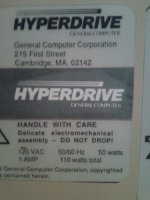
Does anyone know how to take a rear case label off without damaging it? I also need to move this label to the new 512k Mac. I am referring to the HyperDrive rear label below. Any ideas that would be appreciated.
Cool  While I was coercing Tiger on to my G3, I got KPs during the installation when it tried to boot from the hard drive for the first time. It turned out to be being caused by both the hard drive I was installing to and a kext - I found this page quite helpful as deleting the BootCache kext solved the problem (but only when trying with a second hard drive, the first drive I tried KPed it no matter what).
Good luck, hope you get it going soon Sorry I'm not much help!
_________________
Main system: custom C2D 2.66GHz tower/4GB RAM/2600XT 512 MB/500GB HD/XP Pro x86+Vista Business x64
Main Mac: Beige G3 minitower (Sonnet G4 500MHz/640 MB DVD/USB/Radeon 32 MB/OS 9.2.2+10.4.11)
While I was coercing Tiger on to my G3, I got KPs during the installation when it tried to boot from the hard drive for the first time. It turned out to be being caused by both the hard drive I was installing to and a kext - I found this page quite helpful as deleting the BootCache kext solved the problem (but only when trying with a second hard drive, the first drive I tried KPed it no matter what).
Good luck, hope you get it going soon
Sorry I'm not much help! _________________
Main system: custom C2D 2.66GHz tower/4GB RAM/2600XT 512 MB/500GB HD/XP Pro x86+Vista Business x64
Main Mac: Beige G3 minitower (Sonnet G4 500MHz/640 MB DVD/USB/Radeon 32 MB/OS 9.2.2+10.4.11)
Just an update.
After transplanting the Hyperdrive kit from one Mac 512k that had some corrosion to another and replacing the killy clip that connects the HyperDrive board to the motherboard (the clip goes over top of the 68000 cpu), I am now abl to see the drive.
I replaced the killy clip (the clip that goes over the CPU) because some of the ins had corroded in the original 512k. No matter what, I couldn't get the HyperDrive going with the old board. Even after replacing the original killy clip with a good one, I couldn't get the Mac to come up properly. The drive mechanism, extra board, ribbon cables and both power plugs are a #$@^ to remove and put back but I must have done this 20 or 30 times. I would either get a sad mac or garbage on screen. Today I tried one last time. What do you know, it's working. The killy clip is very touchy and if all pins aren't making contact over the 68000 all sorts of weirdness occurs.
I am now in the process of formatting the Hyperdrive (and it's taking forever). At least it can see the drive. Hope it works.
On a similar note:
Between my first attempts and now, I was able to pick up an external HyperDrive FX/20 It's a strange beast. While it connects to a Mac Plus via SCSI, the normal SCSI utilities don't work. You need the HyperDrive utilities to format it and make it work even though it's got a Seagate ST-225N drive in it.
After transplanting the Hyperdrive kit from one Mac 512k that had some corrosion to another and replacing the killy clip that connects the HyperDrive board to the motherboard (the clip goes over top of the 68000 cpu), I am now abl to see the drive.
I replaced the killy clip (the clip that goes over the CPU) because some of the ins had corroded in the original 512k. No matter what, I couldn't get the HyperDrive going with the old board. Even after replacing the original killy clip with a good one, I couldn't get the Mac to come up properly. The drive mechanism, extra board, ribbon cables and both power plugs are a #$@^ to remove and put back but I must have done this 20 or 30 times. I would either get a sad mac or garbage on screen. Today I tried one last time. What do you know, it's working. The killy clip is very touchy and if all pins aren't making contact over the 68000 all sorts of weirdness occurs.
I am now in the process of formatting the Hyperdrive (and it's taking forever). At least it can see the drive. Hope it works.
On a similar note:
Between my first attempts and now, I was able to pick up an external HyperDrive FX/20 It's a strange beast. While it connects to a Mac Plus via SCSI, the normal SCSI utilities don't work. You need the HyperDrive utilities to format it and make it work even though it's got a Seagate ST-225N drive in it.
First, some reading for your quiet pleasure in quiet moments.
Second, in four of my slotloading iMacs I have from 128 to 512MB cards. PC133-333 SDRAM paired in one (Tiger); PC133-333/PC100-322 (Panther); PC133-333 paired (Panther), and PC133-333/PC100-222 (Panther). In another, under Jaguar, ASP is not analytical enough to tell me what speed the two 512MB cards are. Neither do I remember what the only trayloader (Panther) has, and ASP cannot divine it. No KPs, not never ever in nearly seven years.
Nonetheless, I commend to you the thought that chip density on the RAM cards is more likely to give you tummy-ache than is access speed. Make sure that on no card are the chips denser than 128Mb (yes, megabits) for 128 and 256MB. This means 16 chips on a 256MB card. Only with 128MB and below can you get away with only 8 chips, of not more than 64Mb each. Cards with four or two chips only on one or both sides have to be looked at with a jaundiced eye.
de
_________________
(60x) 13DT + 3PB + PTPro; (G3) 7DT/MT; (G4) 3T + PB. System 8.1 to OS 10.5.8
Second, in four of my slotloading iMacs I have from 128 to 512MB cards. PC133-333 SDRAM paired in one (Tiger); PC133-333/PC100-322 (Panther); PC133-333 paired (Panther), and PC133-333/PC100-222 (Panther). In another, under Jaguar, ASP is not analytical enough to tell me what speed the two 512MB cards are. Neither do I remember what the only trayloader (Panther) has, and ASP cannot divine it. No KPs, not never ever in nearly seven years.
Nonetheless, I commend to you the thought that chip density on the RAM cards is more likely to give you tummy-ache than is access speed. Make sure that on no card are the chips denser than 128Mb (yes, megabits) for 128 and 256MB. This means 16 chips on a 256MB card. Only with 128MB and below can you get away with only 8 chips, of not more than 64Mb each. Cards with four or two chips only on one or both sides have to be looked at with a jaundiced eye.
de
_________________
(60x) 13DT + 3PB + PTPro; (G3) 7DT/MT; (G4) 3T + PB. System 8.1 to OS 10.5.8
Thank you for your help, equill. For the record, i forgot to add that i've also done a CUDA reset, a PRAM zap and an NVRAM reset, to no avail. I'm pretty sure that both of the SODIMMs are 8 chip ones, i can confirm that they are both 128MB PC100 SODIMMs. Sadly i won't be able to get to the computer tomorrow, but i'll take a look then.
_________________
"I mean, how hard can it be?" - Jeremy Clarkson
The Infamous LCGuy - Now back with Amazing Working iMac Action!
For the record, i forgot to add that i've also done a CUDA reset, a PRAM zap and an NVRAM reset, to no avail. I'm pretty sure that both of the SODIMMs are 8 chip ones, i can confirm that they are both 128MB PC100 SODIMMs. Sadly i won't be able to get to the computer tomorrow, but i'll take a look then._________________
"I mean, how hard can it be?" - Jeremy Clarkson
The Infamous LCGuy - Now back with Amazing Working iMac Action!
Is this a machine with a reseatable processor? I remember a while back, about a month afater my dad got his pismo, it would kernel panic very early in boot up, in almost every boot up. I reaseated the processor card and its been happy for more than a year now. So, you might want to try making sure its well seated, and that all the contacts look clean.
If its not a reseatable one, I would guess RAM problems.
_________________
iMac G5, Powerbook G3/333, Beige G3MT, PM 6200CD, RS/6000
If its not a reseatable one, I would guess RAM problems.
_________________
iMac G5, Powerbook G3/333, Beige G3MT, PM 6200CD, RS/6000
Well i've abandoned the reinstall idea for the time being. I put the ol' 40 gigger in and tried it, and lo and behold it booted straight into Jaguar without a hitch. In fact the iMac is working just great now, and as a matter of fact, i'm actually typing this very post from said iMac, running Firefox 2 on 10.2.8. Oh well, thanks for your help everyone.
Btw, equill, if you're still curious, i looked over the SODIMMs today, they're all 8 chip SODIMMs.
_________________
"I mean, how hard can it be?" - Jeremy Clarkson
The Infamous LCGuy - Now back with Amazing Working iMac Action!
Oh well, thanks for your help everyone.
Btw, equill, if you're still curious, i looked over the SODIMMs today, they're all 8 chip SODIMMs.
_________________
"I mean, how hard can it be?" - Jeremy Clarkson
The Infamous LCGuy - Now back with Amazing Working iMac Action!
Congrats on getting it working!
Also, Firefox 2 works on 10.2.8? I thought they'd actually bumped the req to 10.3, that's cool to know. (sure enough - I checked their site and it does say 10.2... now I feel compelled to put 10.2 on the Pismo just to try it.)
_________________
[Insert Cool Signature here!]
Also, Firefox 2 works on 10.2.8? I thought they'd actually bumped the req to 10.3, that's cool to know. (sure enough - I checked their site and it does say 10.2... now I feel compelled to put 10.2 on the Pismo just to try it.
)_________________
[Insert Cool Signature here!]
Indeed, there's nothing wrong with the computer at all, as this install of Jaguar seems to be working perfectly. I've used it extensively for the past 24 hours and as yet it hasn't had one hiccup. I haven't tried making a copy of the CD yet, and won't be able to do it till next weekend, but i'll give it a try anyway...IIRC i have a Jaguar ISO on my PC which is good. Another thing i may try, now that you've bought it up, is plugging in a different CD drive and running the installer. Sadly this is the only Mac i have thats anywhere near capable of running OS X, so i can't try it on any others, as easy as it would be to try that.
I haven't tried the bootcache thing yet, although i have tried doing an upgrade install from 10.1, and that has fixed things somewhat. The bad news is that it still doesn't boot properly. The good news though is that now, instead of KPing, it goes to a bash prompt. This further supports my theory of a borked install CD.
_________________
"I mean, how hard can it be?" - Jeremy Clarkson
The Infamous LCGuy - Now back with Amazing Working iMac Action!
I haven't tried the bootcache thing yet, although i have tried doing an upgrade install from 10.1, and that has fixed things somewhat. The bad news is that it still doesn't boot properly. The good news though is that now, instead of KPing, it goes to a bash prompt. This further supports my theory of a borked install CD.
_________________
"I mean, how hard can it be?" - Jeremy Clarkson
The Infamous LCGuy - Now back with Amazing Working iMac Action!