

Thread
So let's see some Konfab-ulous desktop shots
Post your Konfabulator screengrabs, showing off your widg-alicious new desktop environments...

Currently displaying: Calendar, To Do, News Ticker, Homeland Status, Stopwatch v0.2 (My widget, in development), and System Monitor v0.1 (Also mine, also in development).

I don't use Konfabulator....everything I need I already have in my menubar...as for the iTunes Remote, iTunes minimized will do. I just used Konfabulator for this screenshot.
Could you please tell me where you got that wonderful desktop picture??
Quote:
|
Originally posted by Macanoid: Could you please tell me where you got that wonderful desktop picture?? |
My desktop is a modification of Macalicious' "Play" desktop:
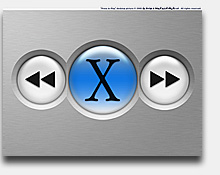
If you want my version...email me.
Thanks for the quick reply dace! I'm going for the original graphite version.
Quote:
|
Originally posted by MacAgent: Currently displaying: Calendar, To Do, News Ticker, Homeland Status, Stopwatch v0.2 (My widget, in development), and System Monitor v0.1 (Also mine, also in development). |
I can't believe someone would want to have a "Homeland Security" widget on their desktop . . .
Heh, I don't keep it there, I just had it there at the moment. Mostly downloaded it to see how it works.
How do you grab a screen shot in JPG format? I can only seem to do it as a PDF. I know this is new in 10.2, but I'd rather have the JPG. Any help?
Quote:
|
Originally posted by Dace: My desktop is a modification of Macalicious' "Play" desktop: If you want my version...email me. |
Oh man, I must be out of it. I thought that was a really really big KONFABULATOR iTunes remote...that would be really nifty if someone made a widget that big....
Quote:
|
Originally posted by Nebagakid: Oh man, I must be out of it. I thought that was a really really big KONFABULATOR iTunes remote...that would be really nifty if someone made a widget that big.... |
rofl!

I'm glad I can keep Audion and the Terminal hidden now. Space is getting cleaner!

Quote:
|
Originally posted by SomeToast: I'm glad I can keep Audion and the Terminal hidden now. Space is getting cleaner!
|
The little dots underneath your Audion widget, what are those from?
Also, where did you score the desktop image?
B.
Quote:
|
Originally posted by Brooks Seymore: The little dots underneath your Audion widget, what are those from? Also, where did you score the desktop image? |
The dots show the number of people connected to the SHOUTcast server on the machine. When the widget's launched, it gets the max listener count from the server and creates instances of the graphic on the fly. Every time the track changes, it gets the current listener count from the server and lights up the appropriate number. (it's only a hobbyist server running off my cable modem, which is why the listener max is so abysmally low
)The dot graphics themselves were made in Photoshop. The desktop is a PDF file I made in Illustrator.
Hi I'm Mike,
What theme are you using in your screen shot?
Thanks,
Liz
What theme are you using in your screen shot?
Thanks,
Liz
why does one want a clock on thier desktop as well as in the menubar?
Quote:
|
Originally posted by fetopher: How do you grab a screen shot in JPG format? I can only seem to do it as a PDF. I know this is new in 10.2, but I'd rather have the JPG. Any help? |
You can open up the screenshot in Preview and export it as a jpg.
Quote:
|
Originally posted by iamnotmad: why does one want a clock on thier desktop as well as in the menubar? |
I'm wondering that myself. Too much real estate lost for something redundant.
Mike
Quote:
|
Originally posted by sweatervest: Hi I'm Mike, What theme are you using in your screen shot? Thanks, Liz |
Hi Liz,
It is called Monk and I don't think I will ever finish it cause I have no ambition. but you should see the buttons wow! awesome! alrighty thanks for asking.
Quote:
|
Originally posted by Hi I'm Mike: Hi Liz, It is called Monk and I don't think I will ever finish it cause I have no ambition. but you should see the buttons wow! awesome! alrighty thanks for asking. |
hehe that is so not fair, you have to finish it!
it's ugly. i'm working on and off on like 3 themes right now and i just don't have the push to do them. they will sit until i feel like i would like to do them. i hate doing things that make me feel like i have to do it. i want to do them but dont.

Mac Guru
MGuru: What is the Mac OS X style disk widget in the bottom left corner?
That's my Airport widget, it's brand new in the Konfab Gallery, it's called AirPort Platters.
Mac Guru
Mac Guru
Heh, my new widget, the Keychain one, is just out as well,
I like the silver coin platters (sorta look like watch batteries)....
I like the look, too bad I do not have an active AirPort card....
Oh yeah, check out my new widget, Keychain, at http://konfabulator.deskmod.com/?sh...n&skin_id=25968"

I like the silver coin platters (sorta look like watch batteries)....
I like the look, too bad I do not have an active AirPort card....
Oh yeah, check out my new widget, Keychain, at http://konfabulator.deskmod.com/?sh...n&skin_id=25968"
They're ACTUALLY the same platters used under several OS X Server icons. I redrew it to use with other stuff like this.
Mac Guru
Mac Guru
Quote:
|
Originally posted by Mac Guru: They're ACTUALLY the same platters used under several OS X Server icons. I redrew it to use with other stuff like this. Mac Guru |
well, they are spiffy... i hope to see more KONFABULATOR widgets from you, but no clocks... too many clocks already

my screenshot
http://www.deskmod.com/core.mod?sho...n&skin_id=25982
displaying a couple of my custom modifications to some existing widgets...
pending permission from Arlo my custom Memory.widget will be posted soon (permission already granted from the original creator of the Memory.widget, Jorge Salvador Caffarena).
//Carbon
http://www.deskmod.com/core.mod?sho...n&skin_id=25982
displaying a couple of my custom modifications to some existing widgets...
pending permission from Arlo my custom Memory.widget will be posted soon (permission already granted from the original creator of the Memory.widget, Jorge Salvador Caffarena).
//Carbon
Quote:
|
Originally posted by fetopher: How do you grab a screen shot in JPG format? I can only seem to do it as a PDF. I know this is new in 10.2, but I'd rather have the JPG. Any help? |
You have to covert the pdf after the grab. I drop it on 'Drop JPEG' which is always in my dock and instantly have a jpg copy of my latest grab.
Quote:
|
Originally posted by iamnotmad: why does one want a clock on thier desktop as well as in the menubar? |
The menubar clock is for when I am working at my computer and everything on the desktop is covered up, and the Kondesktopwidgetfabulatorclock is for when I am crashing my HP at work and am just listening to iTunes on my Mac and can see the clock from 3 feet away. Basically my Mac is a $3000 iPod/Clock when I am getting paid.
Quote:
|
Originally posted by CarbonG4: pending permission from Arlo my custom Memory.widget will be posted soon (permission already granted from the original creator of the Memory.widget, Jorge Salvador Caffarena). |
Hey man I am Jorge Salvador Caffarena!
BTW I just posted an update to my Memory widget, go to the Konfabulator Gallery and search for it.
So, here is my Konfabulous screenshot using the following widgets:
- Calendario, a personal tweaked version of the original Calendar, in Spanish
- Picture Frame Plus, another personal modification, this time for selecting a subfolder inside the Pictures folder
- The Weather
- Uptime
- Memory
- OnlyFinder
- MiniTunes
Quote:
|
Originally posted by fireside: rofl! |
You laughed then, but how about now:

Quote:
|
Originally posted by Mac Guru: Mac Guru |
Hehe, cool. Someone's using my redrawn RedHat icons
I went through a shitload of work with them, and 2 days after I was finnished, I got tired of the whole look, and haven't used them since

I'd post my screenshot here, but I don't use Kon, so..
Quote:
|
Originally posted by Nebagakid: You laughed then, but how about now: |
PNG! For the love of god, use PNG!
why do you want a PNG? It was originally a PNG, but more people (those who use IE) can view JPGs, meh, wait!
eevyl -- very nice update to your Memory.widget... I've actually lost interest in my LCD mod for it as I like the Graphite RAM module now available in the skin prefs.
Sooo.... I'm thinking about just dropping the idea since other's are already working on similiar LCD-look system monitors and what not.
//Carbon
Sooo.... I'm thinking about just dropping the idea since other's are already working on similiar LCD-look system monitors and what not.
//Carbon
Quote:
|
Originally posted by Nebagakid: why do you want a PNG? It was originally a PNG, but more people (those who use IE) can view JPGs, meh, wait! |
No, no... I meant PNG for the play button in the widget. Something to antialias that wicked jagged edge.


Here's mine:

tonton,
Link to that wallpaper, please?
Mike
Link to that wallpaper, please?
Mike

Jeez... maybe its just me, but i can't stand to have all that stuff on my desktop. i like it CLEAN.
to me, Konfabulator just feels like some kid who refuses to clean up his room. I like things nice and organized....
that's just me...
to me, Konfabulator just feels like some kid who refuses to clean up his room. I like things nice and organized....
that's just me...
Quote:
|
Originally posted by codywalton: Jeez... maybe its just me, but i can't stand to have all that stuff on my desktop. i like it CLEAN. to me, Konfabulator just feels like some kid who refuses to clean up his room. I like things nice and organized.... that's just me...
|
how's this for clean?

(nb: i have the homeland security widget for the purpose of irony.
)My turn!

Click here for a larger view (300k).
I just read today that I need to buy a dell laptop for the college I'm going to be attending, come August. My parents aren't going to be happy, . They though my $3k Powerbook I got in December as an Xmas gift would be fine... coming from a school with half imacs and powermacs this is rather odd. Oh well! Another toy.
Click here for a larger view (300k).
I just read today that I need to buy a dell laptop for the college I'm going to be attending, come August. My parents aren't going to be happy,
. They though my $3k Powerbook I got in December as an Xmas gift would be fine... coming from a school with half imacs and powermacs this is rather odd. Oh well! Another toy.Here's mine:
Click Here
Click Here
Quote:
|
Originally posted by starman: tonton, Link to that wallpaper, please? Mike |
I used my 2 megpixel digital camera to reproduce part of an ad for a Lanc�me skincare product, then gave it an artistic quality with Photoshop's Median filter.
1152x768
I have a 1st gen TiBook. You'll probably need to resize the image yourself.
Quote:
|
Originally posted by SwarmyCurve: My turn! I just read today that I need to buy a dell laptop for the college I'm going to be attending, come August. My parents aren't going to be happy, . They though my $3k Powerbook I got in December as an Xmas gift would be fine... coming from a school with half imacs and powermacs this is rather odd. Oh well! Another toy.
|
A bit off topic, but I read that webpage of your college, and I call BULL$HIT. The "requirement" seems predicated on "custom software" for the college...wtf could that be? Do some research; I bet you can do 90% of what you need to with the tbook. And the penalty for not buing a Dell seems only to be that they won't support your Mac...which is a plus, in my book
I like what I see of your background image; where did you get it and could you post a link?
Cheers,
BlackMacX
Cheers,
BlackMacX
woot:

Click for bigger screenie. I'm not sure if I am going to keep the DiskSpace widget... eh. The weather widget is just gorgeous, though, now I wish it would snow so here so I could get that lovely snow image.
Post #1000... woohoo

Click for bigger screenie. I'm not sure if I am going to keep the DiskSpace widget... eh. The weather widget is just gorgeous, though, now I wish it would snow so here so I could get that lovely snow image.
Post #1000... woohoo
Quote:
|
Originally posted by SwarmyCurve: I just read today that I need to buy a dell laptop for the college I'm going to be attending, come August. My parents aren't going to be happy, . They though my $3k Powerbook I got in December as an Xmas gift would be fine... coming from a school with half imacs and powermacs this is rather odd. Oh well! Another toy.
|
Two words: Virtual PC