Home Forums PowerBook 3400c Repair Stories
PowerBook 3400c Repair Stories
· Troubleshooting · 139 posts · Mar 6, 2015 — Apr 7, 2026 View original thread ↗
The Kanga power boards are the same and the motherboards are mostly the same.  I'm not 100% sure why those noises but I think it's a capacitor issue.  As you've noted, when you leave it plugged in for a while it's more likely to do this.  When I recapped the one cylindrical cap on my motherboard and the two on the power board, it mostly stopped.  I mostly use a non-recapped power board so I forget if it totally stopped.  But I have noticed it sometimes recurs on the non-recapped power board only when the PRAM battery or the battery are plugged in.  So I think it's definitely an electrical issue, and probably with the capacitors on the motherboard - but it may be the result of electrical issues with the power board (and possibly its capacitors).  It's also possible there's something wrong with the speakers.  Or there may be multiple problems that yield similar symptoms.

No, I never plugged in or unplugged anything from this ADB port while the computer had power to it.  I used to do that all the time (15 years ago) and never had a problem.  Actually I did that a few months ago between my SE and PM 7100, before I was aware of the warning against that.  But short-term, in my experience, hot plugging/unplugging wouldn't yield this symptom.  In the long-term?  Maybe.  I don't know what happens to ADB over time with hot-plugging.  And I wasn't the original owner of this computer so it's possible - though it seems a little odd someone would be using the ADB port on a 1997- laptop a lot.  Who knows?

Brief follow-up.  I got a Kanga from Uniserver which is mostly great, but it also has speaker buzz issues.  Kanga and 3400c - despite having the same manual which lists cross-compatible hardware part numbers (APNs) - isn't actually the same.  I can't speak too much on that but I tried to replace the two side ... things - that cover the hinges and go up to the trackpad panel.  Those are different.  The heatsink is different.  I haven't poked around inside the Kanga much more yet.

As for the speaker buzz...  I don't know.  Someone in an article about a totally different model mentioned grounding issues...  I replaced the speaker/brightness panel to no effect.  The bottom side of the panel is actually different so I had to swap that out.  I have one more speaker panel to test.  I also just tried headphones for the first time and there's no buzz through the speaker port - suggesting it's an issue with the panel - either the speakers themselves or the connection or the board's circuitry specific to that panel.

** (Good illustration; I was about to swap out the Kanga's power board for one of the 3400c's...  but they have different listed part numbers (3400c: 820-0748-A; Kanga: 820-0949-A))

[Recapping the power board (on the Kanga) did not affect the speaker buzz - neither did swapping out the speakers.  The ... I don't know what it is 'board' inside the speaker panel looked dirty but not damaged.  I guess I could clean one of my spares and swap it in eventually to see if that helps.]

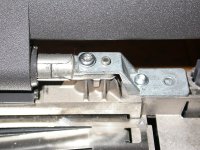
yeah the hinges have been reinforced by two metal pieces on the kanga, so the two plastic pieces that cover the hinges must cover a bigger volume compare to the 3400c. Must have been modified too. Good thing is that palmrest and trackpad are interchangeable, did it recently.

You mention a board inside the screen panel,behind the lcd on a metal frame if I remember right, isn't this the inverter ?

As for the noise, as I mentioned before, noticed it appeared after the PB being plugged to power for while. So I thought maybe it as to do with a bad battery charged... I placed some tape on the battery contacts so now it can't charge. Will see if there is any change.

The board inside the speaker panel, not the inverter. The battery shouldn't make a difference. If anything you should test the symptoms just on AC adapter and just on battery. Mine came with the battery contacts taped.

(Good info on the trackpad/palmrest being replaceable, by the way.  The keyboard, as far as I can tell, is also replaceable (swapped it out last night).  The keyboard that came with the Kanga had a bad caps lock light and faulty "=" and "[" keys.  The speaker panel is likely also replaceable with the earlier 3400c one [632-0072-00] - but I think the later 3400c one uses the same one as Kanga [632-0072-A].

[it's crazy that the manual makes no mention of any of this.  I guess I would infer either a) it was released after all 3400c's were switched to the parts that would be used in Kanga (so that nothing in stock with Apple at the time would have been for the older 3400c's without specific request, maybe) or B) the electronics components are actually all compatible.  The only thing it'd scare me to test that on is the power board, because the bus speeds are different.  I don't know if that matters.])

The plastic pieces, I'm not sure if they're actually a different size, but on the 3400c, there are like cross/plus plastic bits around the dowel that goes into the hinges; on the Kanga it's just the dowel, so the 3400c's plus/cross thing won't fit.  I thought about cutting them off (since I have two sets) but then you're right they may not actually be the right size.

Probably unlikely... anyone have a 3400c logic board out that they'd be willing to take a picture of?  Specifically the underside right below the power adapter port and next to the ADB port.

I'm waiting for the next sequel. :)

I have a defective Kanga. :(

Define defective

MikeatOSX, what is the problem with  your Kanga?

Probably unlikely... anyone have a 3400c logic board out that they'd be willing to take a picture of?  Specifically the underside right below the power adapter port and next to the ADB port.
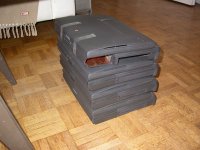
Ok, So I pulled out my non-working 3400s stack :

Stack.jpg

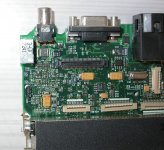
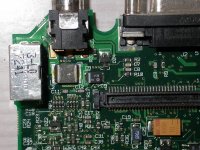
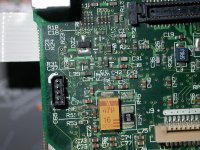
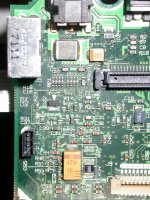
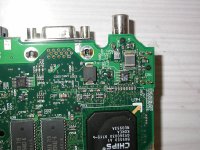
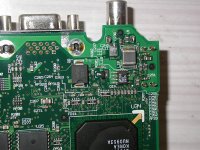
Prepare for an all album of 240Mhz boards ,the part you've asked on the board ,

First two picts is one that would boot only to the chime, although it looks relatively clean.

From the third pict it's one very corroded , but the machine would boot to a grey screen only.

Top:

240-5.jpg

240-6.jpg

240-2.jpg

240-1.jpg

Under:

240-3.jpg

240-4.jpg

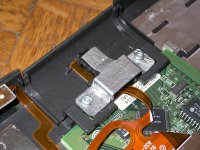
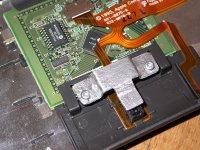
And this is a repair I've done on a trackpad button, just a piece of aluminum :

Repair-1.jpg

Repair-2.jpg

This is the added consolidation piece added to the hinges on the Kanga, that I was mentioning earlier. Shouldn't be too difficult to do in aluminum too :

Kangahinges.jpg

Hi,

I got the Kanga as non working: black screen, no start chime, but HD spinning a while (using known good power adapter).

And: when I put in a PC formated empty disk, it's ejected after a while as normal.

A known good PMCIA-CF adapter card doesn't start it.

As I have a working 3400, I changed display, speaker panel and keyboard for a test: nothing but silent noise from the speakers.

PMU reset: same noise.

I also used the PRAM battery from the 3400, but meanwhile it could have been empty.

So I changed these parts back and the 3400 still works (thanks to Apple!). :)

What I saw: the little PMCIA board inside (for ejecting) lied on the logic board, pins broken.

Next I tested the Kanga's HD with an IDE-USB adapter on my current Mac:

the HD spinned very slow and only short and in this case I always use a two-way USB cable, for getting more power to the HD.

And boing! The HD bombed my Mac! :(

It's definitely defective.

So I supposed, the harddisk also may have damaged the PMU board.

Now I got a NOS PMU board for the Kanga in UK. I'm living in Austria, the Kanga is from New York. :)

Today evening I plan to use the new PMU board and I'll know more, I hope.

So I'm praying, that the logic board is still alive!

Yes I did it:

I swapped the PMU board, but that didn't help. :( Wasted money! :( :(

I tested with a known good PowerBook harddisk with system (and a CF-IDE adapter afterwards), disconnected PRAM battery, fan, keyboard and Trackpad.

I forget to mention, that I always have a clear good startup chime.

So the chime comes, when I connect the AC adapter and I can hear the harddisk spinning for 2 seconds, silence for 3 seconds and so on many times, but after a while the PowerBook shuts down and I have to start it again.

What next to test? Logic board looks good, but maybe that little broken PMCIA board did anything cruel to the logic board?

Or should I wait for the next Kanga?

Hmm...

Galgot - thank you very much!  I have to start working on my /200 board again; getting the solder off has proven pretty challenging.  I'm assuming none of those boards specifically have ADB problems, btw?  Nice job on the trackpad repair, also.

MikeatOSX, if you leave it on long enough with the fan disconnected it'll probably overheat and shut itself down.  If it's definitely not that, what exactly happens if you just leave it on with the flashing disk?  The broken PCMCIA board probably didn't do anything to the board, although if the 4-pronged connector is still connected to the board you might remove it; I guess there's a very small chance of a short, but I don't think it matters.  Are you just tossing HDs in or are you trying to install to them through the Kanga?  What happens when you boot from an install CD/disk tools floppy and just leave it on?  Does it still shut itself down?  It's also possible I'm misunderstanding your issues - the above was a somewhat diffuse description.

I don' t think ADB is completely broken on these. The first one , non-corroded nice looking, was from a 3400c with a broken screen that i managed to boot with another screen before the board itself failed. Mouse was fine.

Second one , very corroded, i never managed to boot it completely. It chimes, goes to the grey screen, and sometime it can start to boot on pc card, then fails. When it does, a plugged mouse would move the cursor very erraticaly.

Interesting.  Random thought.  I think with the second problem I know what you mean - sometimes my broken board (when it worked) would boot to gray screen and sometimes to HD (past gray screen) seemingly at random.  I eventually noticed that the HD would boot it every time if I connected something to the SCSI port in the back.  I can't remember if I actually put a CD drive/HD in the enclosure I'd connect or if it's just the act of connecting something to the port.  If you ever have time I'd be very curious if you find something similar.

Are you just tossing HDs in or are you trying to install to them through the Kanga? What happens when you boot from an install CD/disk tools floppy and just leave it on? Does it still shut itself down?
HD and CF-Card were installed on a PB3400c - no way to install it on the Kanga, which is showing a black screen only.The fan was disconnected for a short time only for testing purposes.

The Kanga is reading a Mac boot disc several times and then stops, same as with the HD, with CF-IDE adapter I can hear or see anything of course - this adapter has no led.

PMCIA CF Adapter Boot-CF also don't do anything. So I cleaned contacts with special computer contact spray, waited the necessary time and put all things together.

The only new thing is the sleeping led, which appears sometimes, when I do a PMU reset.

And the starting chime always appears as if the Kanga were ok.

Yeah and the bottom gets warm! :D

Sorry, English is not my native language. ;)

Nor worries on the English.

* If you're going to leave the replacement screen in whatever - it's just useful for debugging to see some screen.  VGA out?

* (Ok on fan; I didn't think that was the reason it would shut down, just wanted to make sure; mine never shut down with fan disconnected - for like hours)

* Don't worry about the sleep LED (for now).

* The boot disk (floppy/CD? both?) makes the computer stop responding (freezes/crashes?)?  Do you have a) a different floppy module, b ) a different CD module, c) an external SCSI enclosure/CD/HD?

-  It's actually possible what I said to Galgot might work a little for you - try booting anything when you have a SCSI device/enclosure/cable (maybe) plugged into the port in the back.  **

If it cannot boot from any floppies or CDs then you need to start going through normal debugging - http://tim.id.au/laptops/apple/powerbook/powerbook_3400c.g3.pdf- starting where it says "Troubleshooting".  I apologize I could not find a German (German?) manual quickly.  Basically RAM reseating, various cable issues - but based on what you've said I don't think that's the problem with any of this.

** The best analogy, albeit imperfect, for my observation is that it's kind of like 'jumpstarting.'  Or, to steal from Amiga, Kickstarting.

Yes I have absolutely everything to test. :)  I‘m a Mac user since 1992 and didn't give away anything.

And yes, I have all service sources for all Macs, but the Kanga / 3400 service source didn‘t help me.

I‘ve already tested with a PB 3400 display for several hours, no success.

Hmm.  :-/

Wait.  The 3400c display does not work with the Kanga?  I thought that it did.  If it doesn't then there are some more basic problems.  I assume you have taken the logic board out (not just looked at it)?

No I didn't take it out as I don't have anything to swap.

I cleaned a battery leaking PB 5300 logic board some weeks ago - which is working now, but I can't see anything wrong with this Kanga lb (on the upper side). It looks like new.

I don't want to suggest you do anything that will harm the Kanga - particularly because I think it'll be difficult to find a new logic board - but at this point I would take the board out, put it back in with nothing but the PMU and try to start it.  If/when that doesn't work I would (personally) start to clean the board.  I don't know what you used for the 5300 cleanup but I (at Unity's suggestion) have started usually with Rubbing Alcohol (Isopropyl) and Vinegar, and then something called Scrubbing Bubbles (http://www.amazon.com/Scrubbing-Bubbles-Fresh-Scent-Aerosol/dp/B00HY51IIM/) and then distilled water and then thorough drying.  I forget what caused my 3400c to start powering on the display but I think it was a journey to the center of the dishwasher.  However, these are also considered  extreme options.

Oops, dishwasher is not really my choice. :)

Or baking a logic board, as some guys do...

But yes, I'll take out the lb but not today. :)

You could try reassembling the all thing , and leave it unpowered but plugged to power brick for a night.

My Kanga was not booting one time, I think it was after changing the HD, no chime, nothing. Just the green light on top of the screen.

Left it a night plugged to power, next morning it booted. Go figure...

Maybe the PMU needs to powered for a while to be completely resetted .

What you could try too, see if it's booting on openfirmware (alt-cmd-o-f), then if so type "reset-all" and see if it boot normally.

Edit: will try that trick of plugging a SCSI device to boot tomorow...

I'll give it a try, but I'll wait for my new ordered PRAM battery.

BTW: did anyone test a PB 5300ce display (800x600 active matrix) with a Kanga or PB 3400c?

For test purpose only.

The connectors won't fit.  So no.  There are probably also a slew of other incompatibilities.

But also if both VGA and a working 3400c screen don't work (I'm not sure actually about the 3400c screen compatibility but I would bet they are compatible), then it's probably not a screen/display issue.

Progress : Just tried that SCSI trick, now the corroded 240Mhz board boots on a Zip. But unfortunately no ADB nor trackpad control, nothing. 

So I get on the desktop and can do nothing ;/ Note the internal drive doesn't show up on the desktop too...

Tried the same thing with the non-corroded but non-working 240Mhz board. No joy. I still get the chime, but nothing else, just black screen.

Looks live you have a couple of weeks work on all those 3400  :beige: Gaël !!

Yeah :D I've already "worked" on these enough time. In that stack there are ,

- a 200Mhz working fine but no ADB, so i don't care much about it cause i already have two fully working 3400c/200s.

- a dead 200Mhz with no screen.

- a 240Mhz , booting only on a Zip, and with no ADB and trackpad.

- a 240Mhz, non booting at all, just the chime.

Tried swapping boards, PMUs, all that… to get a working 240Mhz, no joy.

So they are my spare parts store now .

mp.ls