Home Forums Widget drive
Widget drive
· Hardware · 66 posts · Mar 7, 2015 — Mar 5, 2018 View original thread ↗
I own a "former Macintosh XL". Just a case and monitor. I would like to restore it. Now it looks like mission impossible ...... but I just started.

This week I bought a Widget HD. It arrived and I realized .... where to begin.

First the disk.

I would like to know if the disk is working.

Is it possible to connect it to the motherboard of a 128k or a 512k?

Or is it possible just to power it up?

Does anyone have some kind of instruction what to do?

"Just a case and monitor" - no logic board then? It's just an empty case?

From what I understand, the Wiget is a parallel hard drive, so it's not usable on a Mac. 

You might want to ask on the LisaList, where most of the knowledgable Lisa people seem to hang out: https://groups.google.com/forum/#!forum/lisalist

You can't use it on any other computer other than a Lisa 2/10.  You could power it up but be prepared for the sound of  jet engine taking off.  Other than seeing if it spins up, there's no real reason to test it unless you have all of the other parts including the logic board/CPU/memory and I/O board in place.  That will be the true test of the hard drive.

So..... It could work on a Macintosh XL

So..... It could work on a Macintosh XL
Yes.  A Macintosh XL is a Lisa 2/10 with a square pixel video mod.  If it doesn't have the video mod, it is still could be called a Macintosh XL depending on when it was sold and what software came with it. 

I've powered up a Widget standalone to ensure that it was passing its internal tests (there's a video on youtube) but beyond that you require ALL of the guts of a Lisa to do much else. My 2/5 will recognize it as a hard drive but either because of a ROM incompatibility or additional problems with my own drive, if the bus pokes at it the drive simply resets.

Formatting until recently was only possible through the LOS/Macworks installer. More recently however the Basic Lisa Utility also added support for formatting and disk exercising functions.

I have the movies on Youtube, but I miss instructions how to do it. So how do I connect power to de HD without having the correct power unit. Could one use a generic one with some intermediate cords with "crocodile" connectors?

Durr, I totally never uploaded the pinout anywhere. Anyways, yeah. Even in a Lisa 2/5 all the voltage pins you need are present on the power supply. You just need to break them out. Failing that you can power the drive as-is with a regular ATX power supply.

Widget_PWR.png.a271f66924a613fa313354c166a70046.png


CGS_0374.jpg.a25079c953689a52db70458338081fb3.jpg


CGS_0375.jpg.0fe9ebb8a44742aeb2fe8e99155ddcb8.jpg


CGS_0376.jpg.901b7def6333c94931fe58e85811e3cc.jpg


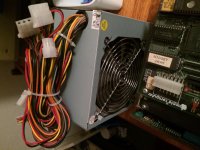
Super! Thanks very much for the power information. I will try to get an ATX power unit.

Bought myself an ATX power unit! Now studying the way to connect it.

atx.jpg

Very carefully. With extra ductape

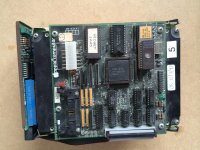
BIZARRE. From the corner of your photo the PCB layout is different from all the ones I have seen so far. You have a Z8 chip with the EPROM piggybacked.

OK. I will make some more pictures.

You pick that up from baybob60? He's the man

BIZARRE. From the corner of your photo the PCB layout is different from all the ones I have seen so far. You have a Z8 chip with the EPROM piggybacked.
When I was looking for my piggyback Z8, an early Widget drive was indicated as one of the sources to look. I don't recall the reference any more but none of mine had one.  The piggyback Z8 is interchangeable with the right code on it.

Have tested it today. Disk doesn't seem to spin up. Currents are ok. See:

https://youtu.be/ZxKsA2q0vOI

Only a green light blinks and becomes green

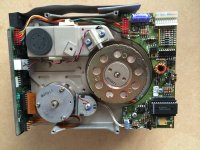
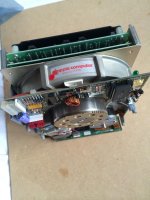
As promised  pictures of the Widget drive:

widget1.JPG

widget2.JPG

widget3.JPG

I like to add to the current state that after a time the green light op top will burn continually. If you then switch of power you will hear a hard click. 

My borrowed widget drive also makes loud click-clack sounds when powered on and off. I assume that's normal?

The guy who I borrowed the Lisa from said initially the drive didn't spin at all. But he physically turned the disk a few times with some tool (sorry, I don't know the details), and after that it started working.

I wouldn't assume your widget is broken, until you've connected it to an actual Lisa. Maybe the brake isn't supposed to deactivate until it sees a certain signal from the computer, which it's not getting with your power rig?

I tried the "stuck brake" solution, but no succes. Any other ideas?

Does the drive spindle spin freely by hand?  It's possible that stiction is the issue.  If it's stuck, try forcing it to turn.  You've got nothing to lose because your stuck anyway.. literally.  

If it's not that than you either don't have power to the motor connected properly or your motor is gone, unfortunately.  

The other issue I've had with Widgets is the internal lens has come loose.  I had to open my drive and try to glue it back in place.  The drive was a write-off after that.

@snuci

Thanks again for your advises! The disk can spin but not lightly... Not sure if this should be the case.

I will look into the motor connection. Maybe I can find documentation about currents, etc to find if something is wrong there.

the spindle motor may have hardened grease in the bearings. 

I just recently ran into this problem with a pair of 5 1/4 floppy drives on my IBM 5155. I had to press-out the hubs and clean/repack the bearings. 

Mine had the same problem. Many years of no use meant the bearings were stiff. You applied power and quickly gave the spindle a little twist before the motor drivers burned out. I left my drive sitting for a few hours to work the grease around the bearings again and it hasn't had issues starting up since.

While you have an earlier revision drive and I have no idea how its startup differs, here's what you should be expecting out of a Widget.

https://www.youtube.com/watch?v=9_tuvrEtdfU

Also, I would put a piece of electrical tape over the quartz window on that EPROM. All you need is a good shot of direct sunlight or a camera flash to scramble a bit or two.

OK i will try to help the disk spin. Should I turn clockwise or counter clockwise?

Some improvement!

I disconnected the power to the engine and reconnected. Now the disk will try to spin. It moves 0.1 inch and stops(counterclockwise).

I have turned the engine some times by hand counterclockwise also.

Any ideas what to try next?

Keep turning it by hand until that old sticky grease has softened enough for the drive to turn on its own?

First BIG Success!!!! I got it spinning!

Just by rotating it counterclockwise for some time. I could feel it rolling better and better. Then I switched on power and it started running. Even the brake came lose after 15 seconds, just like it should.

But... I'm not there.. No luck in trying this again. It remains still... :'(  Just one time.......but I made video's.

Maybe it should try to clean the inner side of the motor, but I didn't see any documentation about this.

See  my  movies on YouTube:

Lisa Widget drive started for the first time in years

http://youtu.be/v-OR4VrnNbU

Lisa widget starting up part 2

https://youtu.be/5MeaBP2g37U

Lisa Widget starting up part 3

http://youtu.be/23Aw2moTSuA

mp.ls