Home Forums First boot of a new IIgs - help!
First boot of a new IIgs - help!
· Troubleshooting · 70 posts · Mar 21, 2015 — Apr 14, 2015 View original thread ↗
So I got an Apple IIgs from Uniserver - thanks! This is my first ever Apple II system. Now I just need to figure out how the heck this thing works.

When I first power it on, there's a short, robotic-sounding beep. Is this normal? Initially I thought it was some kind of diagnostic error sound, but now I'm thinking maybe it's normal. But it certainly doesn't sound like a "happy" sound.

I'm unable to get any video out of this machine. I hooked the composite output to a Dell monitor that I've used for other composite video projects, but it just shows a black image. Then I used a Mac monitor to VGA adapter, but the Dell monitor always shows "video signal out of range". I tried three different VGA adapters with the same results. Is the IIgs monitor output different from a Mac II series monitor output?

If I daisy chain a couple of floppy drives, I can see the IIgs try to access one, then the other, then it plays the robot-beep sound again and stops. I don't have any IIgs disks I can test it with, unfortunately.

Is this weird down-chord beep normal, or an indicator of a problem? Any suggestions for getting video going?

Is the IIgs monitor output different from a Mac II series monitor output? / Any suggestions for getting video going?
Yes.  It's analog RGB, but at TV scan rates (15MHz?).  Your options are to use the composite out to a TV, or one of those arcade CGA/EGA converters to VGA.

I have a couple of LCD TVs here that have VGA inputs (as well as composite etc) and I'm hoping that one of them will sync to a IIGS via the VGA in, but I haven't tested this theory yet.

Some old NEC Multisync monitors can get down to 15MHz, but IIRC, mostly the CRT ones.

After watching some YouTube video, it seems that weird sound is normal. So I guess I just need to figure out the video...

I think the beep is the IIgs version of the startup chime.

OK, it seems the composite video input on this Dell 2007WFP LCD is broken. Which is weird, because I've used it before with other composite video projects. In fact, it's the only reason I've kept this monitor around.

When I connect the IIgs to the composite video input on the large TV in the living room, I can see the image just fine (Apple IIgs ROM revision 01, check startup disk…) But on the Dell monitor there's nothing. So unless I'm missing something obvious, I need to hunt down another composite-capable LCD. I wonder what went wrong with this one?

Yup, that "weird sound" is the startup chime. :) I am not too smart sometimes.

Hmm, this is getting weirder. I hooked up a Nintendo Wii to the Dell monitor's composite video input, and the image shows up fine. So maybe there's something specific to the video signal from the IIgs that the Dell monitor doesn't like. Maybe it's not quite within the NTSC spec?

yup that boot tone is normal :)

sounds just like this one.

https://www.youtube.com/watch?v=XrAdW1jCH5s

once you get your hands deeper into it, you will realize its got a pretty nice sound system in it.

https://support.apple.com/kb/TA36236?locale=en_US&viewlocale=en_US

Ensoniq Digital Oscillator Chip


The Ensoniq chip contains 32 oscillators, two of which are reserved for use
by the Apple IIGS itself. The remaining 30 oscillators are used in pairs to
produce 15 sound voices. Each oscillator uses seven DOC registers which
contain such parameters as the frequency rate at which the oscillator steps
through its wavetable, the size and starting address of the wavetable, data
obtained from the wavetable, and the volume and mode of the oscillator.

Sound RAM

64K of RAM is provided for the exclusive use of the Ensoniq DOC. It contains
wavetables, which are digitized waveforms, for each of the oscillators.
Dang Dell… after doing more reading, it seems that lots of people have problems using classic computers and video game systems with the Dell 2007WFP. It must not be tolerant of composite video signals that aren't 100% in spec. 

I really don't want to get a CRT, and I've heard scan converters have fairly poor quality with Apple II video. But the 4:3 Dell 2001FP is supposed to work nicely with the Apple II and IIgs. I think I'll probably go with that, but unfortunately that means a few more days before I can do much playing around with this new system. :)  

Do you have any other TVs or monitors with a composite input? The Dell probably expects a perfect RS-170a broadcast spec NTSC signal, meaning it likely screws up when connected to a VCR too. Old computers and game consoles output non-interlaced "240p" video which is certainly not broadcast spec, but CRTs didn't care and you got smooth flicker free 59.94fps video albeit with half the vertical resolution.

There are a handful of LCDs that can take 15khz RGB video via their VGA port too.

It works on the composite video input of my living room TV, a large Samsung HDTV. But using the IIgs in the living room on a 50" screen wasn't what I had in mind. :)

As luck would have it, a local person just posted a Dell 2001FP for sale on Craigslist yesterday. According to reviews I read, that model is much more tolerant of out-of-spec composite video from classic computers and game systems. So I met up with the guy this morning and bought it. Works great!

Now to find/make some startup disks, so I can do something other than look at the "check startup disk" test. I have an Apple 3.5 drive, so I think I can make IIgs startup disks using Disk Copy 4.2 on the Mac. A couple people have also had success using the Floppy Emu with the Apple 3.5 drive's daisy chain board, connected to the IIgs, so I'll try that too.

yup you are on the right track there.!

The 2001FP can likely work with the RGB output too going by the reports of Amiga users. Use a Mac to VGA adapter in "multisync mode" (the sense pins aren't used by the IIgs). Sometimes you have to fiddle with the composite,H+V,SoG switches on those adapters. The IIgs outputs composite sync.

For boot disks, check out ADTPro: http://adtpro.sourceforge.net/

It can zip over 800K 2IMG images of software to real disks in seconds. Heck, I find it easier then using Disk Copy in many cases.

Can anyone with a IIgs describe what the self-test display is supposed to look like, in terms of color? When I hold open-apple + option at startup, it puts the IIgs into a self-test routine. At first it draws lots of different hi-res patterns, which appear on the LCD in color. Then after a while, it shows some numbers at the bottom of the screen, and a solid border around it. The solid border is always some shade of gray (it changes depending on the number displayed). I'm guessing that border is supposed to be colored, but that's not how it appears.

Also, when I go into the IIgs control panel, display settings, and change the background color and border color, it just changes them to different shades of gray. Same behavior on the Dell 2001FP as well as my Samsung HDTV. It seems like maybe the composite video circuitry in both displays can handle color info from some IIgs video modes, but others only appear as grayscale. Both LCDs show colors during the initial parts of the IIgs self-test routine, but not anywhere else that I've noticed.

Cool, I'll try the RGB output with an adapter on the 2001FP. That would be nice! And ADTPro too, as soon as I can build an appropriate serial cable.

What you are seeing is normal from the composite output. The VGC kills the color signal in text modes (only!) on the composite output in an attempt to make the text less blurry.

Ah, so it *is* supposed to be color, but not seeing the color on a composite video output is normal? I guess I can live with that. I didn't have any success with the 2001FP's VGA input and adapter set to multisync mode, so I'll stick with the composite input for now.

Last night I stopped by Jameco just before they closed, to buy an Imagewriter II cable, with the intent of cutting it up and making a custom PC to IIgs serial cable. Well, I forgot about the other half of the cable. I have a USB-to-DB9 serial adapter that works on the PC, but I don't have any kind of DB9 cable that I can cut up and solder to the wires from the Imagewriter II cable. That means building a working cable for ADTPro will have to wait a while, until I have a chance to pick up a DB9 cable somewhere.

I got a copy of "The New Apple II User's Guide", and I plan to spend some time reading through it this afternoon, so I can post fewer dumb questions about robotic beep sounds and video modes. :)

ask all the questions you want,  iT will just help the indexing of 68kmla in google searches :)

and might get you to a 68000 after not too long :)

I discovered I can hit control+reset on the IIgs and get a BASIC prompt. Who needs startup disks?!

Wow, I wish the Mac had as much useful stuff built into ROM.

The Classic does!

OK, I'm a bit confused how to get GS/OS 6.0.1 onto this machine. Looking at the Apple mirror here: http://asa.max1zzz.co.uk/English-North_American/Apple_II/Apple_IIGS_System_6.0.1/

For a system with no hard drive, do I want Disk_2_of_7-System.Disk.sea.bin or Disk_3_of_7-SystemTools1.sea.bin? And these disks are MacBinary self-extracting archives -- not sure if they're IIgs self-extracting or Mac self-extracting. If IIgs, that creates a chicken-and-egg problem. Use a IIgs emulator to run the self-extractor?

Looking at this alternate download source: http://apple2.info/downloads

It has GS/OS 6.0.1 uncompressed, but the images are all 1.44MB disk images. I thought the IIgs only used 800K floppies? How do you mount a 1.44MB disk on the IIgs?

All the original files from Apple are 800k Disk Copy 4.2 images in self extracting archives. To install on a HD you need all 6 disks. Disk 7 is used for AppleShare servers only. Disk 2 is a basic boot disk, so try and get that one on an actual disk. Its really bare bones install though, System 6.0.1 ideally needs a hard drive or one of those exotic (for the Apple II anyway!) 1.4MB floppies.

Thanks. So I'm thinking I need to do this:

1. Install a IIgs emulator

2. Import the Apple SEA archive into the IIgs emulator

3. Run the SEA to uncompress it into an uncompressed Disk Copy 4.2 file

4. Export the DC42 file from the IIgs emulator

5. Copy the DC42 file to a vintage Mac somehow (Floppy Emu, network, etc)

6. Use Disk Copy 4.2 on the Mac to create an actual 800K disk from the DC42 file

Then I should be able to boot the real IIgs with that 800K floppy.

Neither of the two sources I linked has any version of GS/OS older than 6.0.1. So is GS/OS basically not really usable on a IIgs without a hard drive? Rats.

Possibly a long shot, but do you happen to have lying around from your Mac-hacking a Localtalk-to-Ethernet bridge? If you can lay your hands on one you can use the project files for "A2SERVER", a custom server package built around Netatalk for Linux to boot GS/OS over the network. I happen to have one and it's is why I've never gotten around to building an ADTpro cable. (The A2SERVER distribution includes a program able to write disk images hosted on a network share to a drive connected to your IIgs after you've booted it from the network.) AppleTalk is *somewhat* slow compared to a dedicated hard disk (although it's honestly in about the same ballpark as a SmartPort-based device) but from what I can tell it's a pretty workable solution and LocalTalk bridges tend to be cheaper than any IIgs hard disk unless you already have a SCSI card.

If you're in the area, you can borrow my CCFA.  That'll get you going at least.  From there you can make floppies.

No LocalTalk-to-Ethernet bridge, unfortunately. Thanks for the offer of the CFFA, but I don't think I'll need it. Hopefully I can use the chain of tools I described above to make a GS/OS boot disk on the Mac. If that fails, I'll finish building the ADTPro serial cable that I started but never finished.

For a IIgs with no hard disk, would I be better off using an older version of GS/OS? Which version would you recommend?

Progress - almost there! I used CiderPress to convert GS/OS 6.0.1 Disk 2 from 2MG format to DiskCopy 4.2 format. I then copied the the DC42 file over to a Mac SE and made an 800K disk. The IIgs boots from this disk - I get the "Welcome to the IIgs" screen and the progress bar fills all the way, but then I get a system error $0201. If I tell the IIgs to return from the error, then it continues to a dialog box asking "select the application you'd like to use". The only choice I can make from this list is BASIC.SYSTEM, but when I choose that I get system error $1104.

Error $0201 appears to be "could not allocate enough memory". I think this IIgs has 512K, is that not enough? $1104 is "file is not a load file", which is some kind of segment loader error.

The appearance of the GS/OS desktop with the composite video input on my Dell 2001FP LCD is really bad. If my only goal is to work on floppy emulation then I guess it's OK, but it would be nice to have something better. I'd really rather not get a CRT, though. Someone mentioned that a CGA to VGA adapter might work - have a link to any specific ones? Or any other recommended way of viewing the IIgs video without having a CRT?

I plug my Apple II / Amiga stuff into my PM7500 composite in, using apple video player, always seems to work nice for me.

The 7500 has a Dell 19" LCD hooked up to it.

I think the only way to get a proper video out is to get a Monitor for your IIgs.

I have one that matches your IIgs, plugs into the RGB port. if you pay the shipping you can have er.

its a little yellow but works.

I assume your IIgs is a ROM01 with the standard 1MB-capacity card? (And it's only partially-populated?) It's possible you have some bad RAM. I don't remember what error number I was getting, but when I first got my *second* free Apple IIgs (the first had a bad keyboard controller) I had trouble doing the network boot thing into GS/OS, with the machine bombing out during the second phase of the boot. Swapping the RAM card from the dead-keyboard GS made the issue going away.

If your machine really is only 512k, well... this has two conflicting numbers in it but it sort of implies that you need at least 1MB to run 6.0. Can you make a plain ProDos disk with no GUI and see if the machine behaves? It should be able to run that even if you yank the RAM card out.

Re: the bad-looking desktop, well... I have one of those cheap "CGA to VGA" (note, they're not really according-to-Hoyle "CGA") scaler boards and it works "Okay"; it's certainly miles better than composite, but the GS desktop honestly looks pretty terrible under the best of circumstances. The guy I got it from packaged the board inside an old modem so I'd have to take it apart to get a model number off it, but I'm sure all those ones you see on TehBay are all based on the same guts.

yep,  pretty sure it only has 256k on the ram card,  lots of sockets for more ram chips though.

So pretty sure it has 512k ram total right now.

Once Steve gets this all figured out ... I am going to definitely buy the loaded SD card option :)

Then (one) won't have to go through all this...  haha The floppy emu will save the day.

Pretty sure Steve is due for another interview at RMC!! :)  

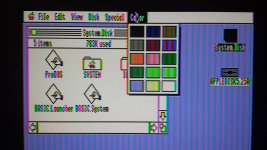
I tried again with GS/OS 5.0.4 and it works! So yes, it seems 6.0.1 requires at least 1 MB. This is a ROM01 GS, and it appears to have 256K on the logic board and another 256K on a memory expansion card. Is that normal? I have no idea.

I guess the composite video input on the Dell 2001FP is usable, even if it is ugly. I wish it looked anywhere near as nice as those screenshots you linked! :) Here's what I'm seeing:

20150323_143027.jpg

One thing I can't figure out is how to format another disk from within the GS. I'm guessing it requires some kind of disk utility program, which is probably on 5.0.4 disk #2 that I didn't make.

Now to figure out this disk emulation business...

mp.ls