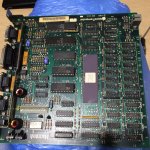
please look at this sadmac error code!!
RAM failure, location F-11.
Or a trap error depending on the site one reads I guess... lol
Are you trying to boot from a floppy? You dont say you do.
Or a trap error depending on the site one reads I guess... lol
Are you trying to boot from a floppy? You dont say you do.
IT needs a re-ram. i offer this service... its a big nasty job. i did 2 over the weekend.
Just FYI my ram was swapped with new chips and no change. If you have video artifacts with the error code another chip may be at fault. I have yet to figure it out. Now that I am a grandpa it's defiantly on the side burner.
video artifacts and sadmac code is all bad ram. who swapped your ram chips for no charge grandpa?
i found some trace on the back side of board.
that looks like someone had tryed to resoldering or replace ram.
but every ram has thext "4264" with apple mark.
so i thought someone had tried to resoldering every ram.
1. back side of the board.
2. screen with sadmac
that looks like someone had tryed to resoldering or replace ram.
but every ram has thext "4264" with apple mark.
so i thought someone had tried to resoldering every ram.
1. back side of the board.
2. screen with sadmac
thanks for comment.
as i know f11 ram failue code is "040040" right? this is same with "04006c"?
and i can't boot with floppy because the sadmac !
thanks for reading.
all bad ram?? you mean i have to replace all of them?
i can replace the ram with new one, but i don't have enought to replace all of them.
no charge grandpa? <--- i can't understand this sentence.
thanks
The "006c" is the chip location, so changes are its F11 + the one next to it.
A"4264" is a 4164 DRAM Chip. Back then they were sensitive to static and heat (compared to today's chips, they are quite robust), so chances are I'm guessing that who ever soldered the board left too much heat to the chip.
But since you say somebody soldered the board, check to see if traces are shorted with a magnifying glass. One hair-thick sliver crossing 2 pads will will a board.
When I replace RAM on a board, I usually replace the whole set.
A"4264" is a 4164 DRAM Chip. Back then they were sensitive to static and heat (compared to today's chips, they are quite robust), so chances are I'm guessing that who ever soldered the board left too much heat to the chip.
But since you say somebody soldered the board, check to see if traces are shorted with a magnifying glass. One hair-thick sliver crossing 2 pads will will a board.
When I replace RAM on a board, I usually replace the whole set.
thanks for your comment.
ok. first thing i have to do is replace "F11" and "F12" with new one?
I looked at your pics (it did not load the first time I posted but that is on my end).
Sad news. Looking at the bottom board, I saw several of the solder joints from the capacitors and RAM with a dull grey ring on them. That means that the solder joint is cracking (similar on the Analog board but a lot smaller because of the joints being smaller). Its an intensive job to do on ALL of the chips/connections of the area- Desolder And Clean All The Joints AND THEN Put In Fresh Solder And Flux! Reheating the joint will only work for a short time and the board will go bad again months down the road.
And like Uniserver said, Artifacts on the screen means that all the RAM is bad. Chances are I'm guessing is that the cracked solder joints on the board are affecting all the RAM on the board. It is better to let an expert look at it. Like I said, giving the chips too much heat while the board being resoldered will kill a RAM Chip. I suggest letting Uniserver to look at it. He knows his Mac repair well.
That board is an early Mac 128K as is has a Ceramic 68000 and not a plastic one.
Sad news. Looking at the bottom board, I saw several of the solder joints from the capacitors and RAM with a dull grey ring on them. That means that the solder joint is cracking (similar on the Analog board but a lot smaller because of the joints being smaller). Its an intensive job to do on ALL of the chips/connections of the area- Desolder And Clean All The Joints AND THEN Put In Fresh Solder And Flux! Reheating the joint will only work for a short time and the board will go bad again months down the road.
And like Uniserver said, Artifacts on the screen means that all the RAM is bad. Chances are I'm guessing is that the cracked solder joints on the board are affecting all the RAM on the board. It is better to let an expert look at it. Like I said, giving the chips too much heat while the board being resoldered will kill a RAM Chip. I suggest letting Uniserver to look at it. He knows his Mac repair well.
That board is an early Mac 128K as is has a Ceramic 68000 and not a plastic one.
yes all of the ram is bad… its all no good.… you can screw around and replace one or 2… only 6 months later to have another one or two go bad...
that ram is is the worst. the apple logo'd micron is bad… and yes, that board has already had some ram replaced, but with the same junk that goes bad.
i go through and replace all the ram with good Samsung ram.. and problem wold be permanently solved.
as i said its a big nasty job, i have recently lowered my price for this job.. and its a big nasty job.. but has to be done… there really is no other viable solution.
that ram is is the worst. the apple logo'd micron is bad… and yes, that board has already had some ram replaced, but with the same junk that goes bad.
i go through and replace all the ram with good Samsung ram.. and problem wold be permanently solved.
as i said its a big nasty job, i have recently lowered my price for this job.. and its a big nasty job.. but has to be done… there really is no other viable solution.
McD replaced my ram and it changed nothing then changed it back since it was the apple branded ram for me, which as a 128 is kinda cool for me. I have 2 working 128's but both upgraded to 512 on true 128 boards. Was just trying to get a good 128 board together and it matches one case I have.
Im not gonna hijack the thread but nothing has been done or changed since my thread on it. Just wanted to fyi the issue as those artifacts were the factor that did not change as ram was replaced.
yep. its very nasty job. right.
i replasced 4 ram F11, F12, G11, G12.
i did use new HM4864P-3 ram. it had worked before on my another 128k board.
and nothing was changed. it still show me "04006c".
as your comment all of them need to be replaced to clean things.
i hope you see this board but i live in sought korea and it may be expesive. (shipping cost.)
but if you tell me the cost for replacing or fixing cost, i'll consider it positively.
thanks for your kind again.
it could also be the 74ls244's all the ram is connected to, When i assembled and installed a MacGusto II upgrade board onto one of my 512k boards i got something similar and the install guide pointed to one of the 74ls244's being bad (in my case this turned out not to be the problem, it turned out i had a short under one of the ram ic's) So if replacing the ram doesn't fix it try swapping the 74ls244's
Should be , I have a donor 512 but have not found them since moving.
Since the 128 and 512 were same board when the 512 was introduced I would think so.
yep. there are not floppydisk in the drive.
so maybe its not reason for bad floppy disk.
thanks.
Yes those ICs are compatible from the 512 K , The ram is also compatible if you change it all and of course you will only see 128k of it.
I did replace the 74ls244 and then errorcode was chaged "020002".
so i also replaced the F6 Ram.
now it show the errcode "04FFFE".
so i also replaced the F6 Ram.
now it show the errcode "04FFFE".
I did replace the 74ls244 and then errorcode was chaged to "020002".
(i guess your comment was right, it was broken 74ls244.)
so i also replaced the F6 Ram.
now it show the errcode "04FFFE".
did you replace both 74s244's or just one?
just one i replaced. which was near the cpu.
i have to replace one more ?
thanks for reading.
Just tossing this out there, I'd say that I have re-Ram'd at least 14 128k's. and every single one of them had artifacts on the screen and A sad Mac. and every single one of them, re: ram was all that was needed, which in itself is insane amount of work that has to be done right and It has to be done carefully, it's very easy to cause yourself problems on changing those ram chips, got to be super careful, One board I took in a guy had already removed three ram chips and ripped out like four portholes it was very difficult for me to recover from that I had to run lines.
I think maxes suggestion was more for Macdrone not really for The thread op
It was for both of them
However it was aimed as a "if replacing all the ram fails" solution
yes there are 2, iirc they are the two chips immediately to the right of the CPU (assuming you have the side of the board with the ram closest to you)
But i would do what uniserver says first, replace all the ram.
However it was aimed as a "if replacing all the ram fails" solutionyes there are 2, iirc they are the two chips immediately to the right of the CPU (assuming you have the side of the board with the ram closest to you)
But i would do what uniserver says first, replace all the ram.
yah sometimes the sad mac codes can send you on a wild goose chase. is best to just replace it all.
Or just throw it out the window...