Home Documents Macintosh 030 0786 A AUX Programming Languages And Tools Volume 1
030 0786 A AUX Programming Languages And Tools Volume 1

030 0786 A AUX Programming Languages And Tools Volume 1
Macintosh · 1990 · PDF
Filename030-0786-A_AUX_Programming_Languages_And_Tools_Volume_1_1990.pdf
Size13.20 MB
Year1990
Subsection a_ux / aux_2.0
Downloads11
Enjoying MacTrove? Anonymous downloads are free and unlimited. Create a free account to track favorites, contribute metadata corrections, and join the community chat.
Reader
030 0786 A AUX Programming Languages And Tools Volume 1
/
Loading…
OCR / Text contents
A/UX® Programming Languages and Tools, Volume 1 030-07S6-A It APPLE COMPUTER, INC. © 1990, Apple Computer, Inc., and UniSoft Corporation. All rights reserved. Portions of this document have been previously copyrighted by AT&T Information Systems and the Regents of the University of California, and are reproduced with permission. Under the copyright laws, this manual may not be copied, in whole or part, without the written consent of Apple or UniSoft. The same proprietary and copyright notices must be affIXed to any permitted copies as were affIXed to the original. Under the law, copying includes translating into another language or format. The Apple logo is a registered trademark of Apple Computer, Inc. Use of the "keyboard" Apple logo (Option-Shift-K) for commercial purposes without the prior written consent of Apple may constitute trademark infringement and unfair competition in violation of federal and state laws. Apple Computer, Inc. 20525 Mariani Ave. Cupertino, California 95014 (408) 996-1010 Apple, the Apple logo, A/UX, ImageWriter, LaserWriter, and Macintosh are registered trademarks of Apple Computer, Inc. APDA and EtherTalk are trademarks of Apple Computer, Inc. MacPaint is a registered trademark of Claris Corporation. UNIX is a registered trademark of AT&T Information Systems. VAX is a trademark of Digital Equipment Corporation. 030-0786-A 3B20 is a trademark of AT&T Information Systems. Simultaneously published in the United States and Canada. LIMITED WARRANTY ON MEDIA AND REPLACEMENT If you discover physical defects in the manual or in the media on which a software product is distributed, Apple will replace the media or manual at no charge to you provided you return the item to be replaced with proof of purchase to Apple or an authorized Apple dealer during the 90-day period after you purchased the software. In addition, Apple will replace damaged software media and manuals for as long as the software product is included in Apple's Media Exchange Program. While not an upgrade or update method, this program offers additional protection for up to two years or more from the date of your original purchase. See your authorized Apple dealer for program coverage and details. In some countries the replacement period may be different; check with your authorized Apple dealer. AU. IMPLIED WARRANTIES ON TInS MANUAL, INCLUDING IMPLIED WARRANTIES OF MERCHANTABIllTY AND FITNESS FOR A PARTICULAR PURPOSE, ARE LIMITED IN DURATION TO NINETY (90) DAYS FROM THE DATE OF THE ORIGINAL RETAIL PURCHASE OF TInS PRODUCf. Even though Apple has reviewed this manual, APPLE MAKES NO WARRANTY OR REPRESENTATION, EITHER EXPRESS OR IMPLIED, WITH RESPECf TO TInS MANUAL, ITS QUAUTY, ACCURACY, MERCHANTABIIJTY, OR FITNESS FOR A PARTICULAR PURPOSE. AS A RESULT, TIllS MANUAL IS SOlD "AS IS," AND YOU, THE PURCHASER, ARE ASSUMING THE ENTIRE RISK AS TO ITS QUAUTY AND ACCURACY. IN NO EVENT WILL APPLE BE UABLE FOR DIRECf, INDIRECT, SPECIAL, INCIDENTAL, OR ' CONSEQUENTI…

Showing first 3,000 characters of 500,000 total. Open the full document →
Home Documents Macintosh PPDV ES001 DM The 66 Most Asked Questions Regarding Pippin Mar95
PPDV ES001 DM The 66 Most Asked Questions Regarding Pippin Mar95

PPDV ES001 DM The 66 Most Asked Questions Regarding Pippin Mar95

Macintosh · 1995 · PDF
FilenamePPDV-ES001-DM_The_66_Most_Asked_Questions_Regarding_Pippin_Mar95.pdf
Size2.16 MB
Year1995
Subsection pippin
Downloads14
Enjoying MacTrove? Anonymous downloads are free and unlimited. Create a free account to track favorites, contribute metadata corrections, and join the community chat.
Reader
PPDV ES001 DM The 66 Most Asked Questions Regarding Pippin Mar95
/
Loading…
OCR / Text contents
©1995 Apple Computer Inc. Pippin Q & A PPDV-ES001-DM vl.O The 66 Most Asked Questions Regarding Pippin (and their answers!) March 2, 1995 E. R. Sirkin p. lof21 ©1995 Apple Computer Inc. Pippin Q & A PPDV-ESOOI-DM vl.O Table of Contents Background What is Pippin? What events led to the introduction of Pippin? How will Pippin be positioned in the market? What is the difference between a Macintosh and Pippin? If there is no hard disk, how is the system software distributed? Why is Apple doing this? Why now? How did Apple choose the name Pippin? What type of CD-ROM titles will work on Pippin? How many Pippins will be shipped in the first year? What division of Apple is driving the Pippin effort? What is Apple's role in all this, short term and long term? 4 4 4 4 5 5 5 5 6 6 6 6 7 Customers What is in this for the customer? With the price of home computers declining why would someone buy a Pippin? Will Pippin reduce the system configuration problems faced in the personal computer market? How will Pippin be sold? In what channels? What is the retail price for Pippin? Can customers upgrade their Pippins? Will customers upgrade Pippin to a Macintosh? Wouldn't customers rather view their titles on a computer screen? 7 7 7 Pippin Manufacturers Will Apple ship a Pippin under its own brand? Will Apple be the only hardware/software supplier for the platform? How many companies will be shipping Pippins? What is in it for the Pippin manufacturer? How will the Pippin manufacturers differentiate their products? What is the approximate OEM price of Pippin? 8 8 8 9 9 9 9 DeveloperlPublisher Issues Why should a developer support Pippin rather than the myriad of new video game systems? Why should a publisher support Pippin? What should developers do if they prefer to approach Pippin cautiously? Will Apple charge the publishers a royalty per title? What type of contract will be required of developers? What is the business model? Will CD-ROM titles created for Pippin run on future Pippin systems like in the personal computer market or will they only survive single generations of systems like the proprietary video game market? When can a developer secure a development system? How easy/hard is it for a developer to create a title? What do you mean by "choice for the developer"? 9 March 2, 1995 E. R. Sirkin 7 8 8 8 8 8 9 10 11 11 11 11 12 12 12 p.2of21 ,I © 1995 Apple Computer Inc. Pippin Q & A PPDV-ES001-DM vl.O How many titles will be available at intro? What kind of developer/publisher endorsement for the project is Apple experiencing? What about marketing and trademarks? What about censorship? Are there features in Pippin that don't exist in the Macintosh? 12 12 12 13 13 Technical Issues Will Pippin titles play on a Macintosh? Will Macintosh Titles play on a Pippin? Will DOSlWindows Titles play on a Pippin? Can Pippin be turned into a Macintosh? What must an experienced Macintosh title developer do in order to port a title to Pippin? Sho…

Showing first 3,000 characters of 56,670 total. Open the full document →

Home Documents NuBus Apple Serial NB Card Installation Guide Draft
Apple Serial NB Card Installation Guide Draft

Apple Serial NB Card Installation Guide Draft

NuBus · 1989 · PDF
FilenameApple_Serial_NB_card_Installation_Guide_draft_19890517.pdf
Size1.24 MB
Year1989
Subsection apple / multiportSerial
Downloads5
Enjoying MacTrove? Anonymous downloads are free and unlimited. Create a free account to track favorites, contribute metadata corrections, and join the community chat.
Reader
Apple Serial NB Card Installation Guide Draft
/
Loading…
OCR / Text contents
I. ( ti. Apple® Serial NB card Installation Guide Serial Connection for a NuBus™ Production Draft ( May 17, 1989 Networking & Communications Publications AppleTalk Documentation Apple Confidential (J S APPLE COMPUTER, INC. This lll2!lual is copyrig}:led by Apple or by Apple's suppliers, with all rights reserved. UD:ier the copyrighI laws, this manual may 00! be copied, in whole or in pan, without the written consent ci Apple Computer, Inc. ~ exception does not allow copies to be made for others, whether or not sold, but all of the material purchased may be sold, gilten, or lent to another perscn Under the law, copying roudes translating into another language. The Apple logo is a registered trademark of Apple ~ter. Inc. Use of the "keyboard" Apple logo (Option-Shift-I{) for commercial purposes without the prior written consent of Apple may consttute trademark infringement and unfair competition in violatbn of federal and state laws. © Apple Computer, Inc., 1989 20525 Mariani Avenue Cupertino, CA 95014-6299 (408) 996-1010 Apple, the Apple logo, AppleTalk, and Macintosh are registered trademarks of Apple Computer, Inc. MacAPPC and Macintosh Coprocessor Platform are trademarks of Apple Computer, Inc. Motorola is a registered trademark of Motorola Corporation. NuBus is a trademark of Texas Instruments. Simultaneously published in the United Stales and Canada. ( LIMrrED W A.IUlANTY ON MEDIA AND REPUCEMENT If you discover physia.J defects in the manuals ~tribuled with an Apple product or in the media on which a software product is distributed, Apple will replace the media or !Il21luals at no charge to you, provided you rerum the iiem to be replaced wilh proof of purchase to Apple or an authoriled Apple dealer during the 90-<!ay period after you purchased the software. In addition, Apple will replace damaged aoftwarc media and manuals for as long as the software product is included in Apple'& Media Exchange Prcpm. While not an upgndc or update method, dlia program offers additional protection for up to two years or more from the date r:l your original purdwe. See your authorized Apple dealer for program cover.age and detailJ. In some countries the replacement period may be different; check with your authoriz:ed Apple dealer. AU IMPUED WAUANTIES ON THE MEDIA AND MANUAIS, INat!DING IMPUED WAJUlANTIIS OF .MUOL\NTABIUTY AND Frl'NW FOi A PA.II'IClJLAI. PURPOSE, AllE LIMITED IN DUIATION TO NINETY (90) DAYS FIOM THE DATE OF THE OllGINAL llTAIL PUl.OIASE OF DDS PRODUCT. Even though Apple lw tested the software and reviewed the documentation, APPU: MAKES NO WAJlllM'TY 01. .REPWENTATION, EITHEll EXP.RW 01. Jl1PLIED, wrrH WPECT TO SOFTIVAIE, rrs QUAUI'Y, Pf.IFOIMANCE, MEIOIANTABIUI'Y, OR FrrNESS FOi A PAmClJLAI. PUl.POSL AS A IESULT, 1lllS SOFTWARE IS SOlD •AS IS," AND YOU, THE PllllOIASEll, AIE ASSUMING THE ENTlllE llSK AS TO rrs QUAllI'Y AND PERFORMANCE. ( IN NO EVENT WILL APPU: BE llABU: FOil DIRECT, INDIRECT, SPEClAL, INODEJ'.l'TAL, OR CONSEQUENT…

Showing first 3,000 characters of 34,289 total. Open the full document →

Home Documents Lisa 050 4012 H 10
050 4012 H 10

050 4012 H 10

Lisa · PDF
Filename050-4012-H-10.pdf
Size0.44 MB
Subsection hardware / Lisa_CPU
Downloads9
Enjoying MacTrove? Anonymous downloads are free and unlimited. Create a free account to track favorites, contribute metadata corrections, and join the community chat.
Reader
050 4012 H 10
/
Loading…
OCR / Text contents
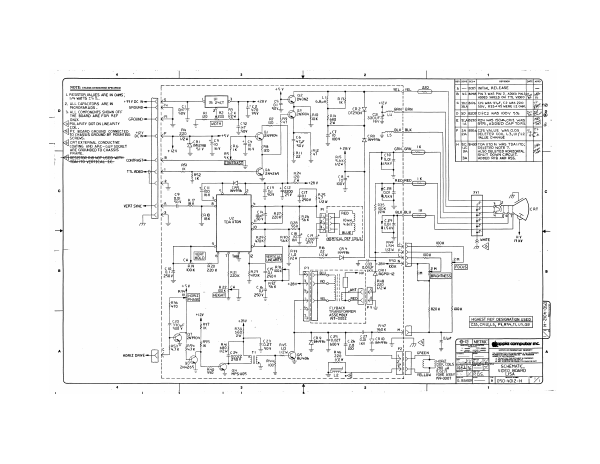
° ( ss row] sor Terson eo NOTE: uwusss orwenwse srecineD Yeu hve. _-220 1 [—|eces|iniriat RELEASE = v B [4C |6096| PIN 3 waS PIN 2, ADDED PING, | RESISTOR VALUES ARE IN OHMS, vec u fboed seco on! I viDeo pes | 2, ALLCAPACITORS AREIN — * Bu K € [a0.ja176[ci4 was 476F, C2 was 220 MICROFARADS « GROUND=— cay BAN H BRN Bal (Sov, R3324S WERE 1.2 OMM, LD 3. ALL COMPONENTS SHOWN OFF a t pe BN, ; EE THE BOARD ARE FOR REF RIO 4 OTZ30H'T cai fe Lu > po |ezoscric2 was cov 5% [as leeelB ot Ce 18V & cazsolRz4 was ison,criz was] [el G]POLARITY DOT ON LINEARITY TAL |RSS ADDED CAP TORS] [%8| 5 C F |2a |b354C25 VALUE WAS 0.03 PC BOARD GROUND CONNECTED TO CHASSIS GROUND BY MOUNTING 5¢4am aay JogLETED Cone L3,UifL2 SCREWS. VALUE ¢ CRT EXTERNAL CONDUCTIVE COATING AND ARC—GAP SOCKET ARE GROUNDED TO CHASSIS FRAME. H Bc [pyoqroan7oN was TpAUTO:| |e] uc} DELETED NOTE 7. 3A) [ALSO DELETED HORIZONTAL | Bite |— SHUT DOWN CIRCUIT. 3a] _ [ADDED Ris AND RSS. FRAHEVERTCAE EE, CONTRAST Tm mF VERT SYNC <j RIB a) u2 A = TDA li70N + CAS = og Sf INOS xl DZS = x LF cy Lx ey Lx w look A < Ee 22 1N4936 . 7 iz VERT Mew [ae o o 10 _ 3 2m Mee ae Ral A236 P00 8 220K 470K ]250v B32 Sek FLYBACK = TRANSFORMER bal val! ASSEMBLY 0002 [HiGHEST REF DESIGNATION USED] R47 C33, CRI2,L5, P3,R54, TI, U3,08 F 360K M av 25 27 ike 0.027 |c24 0.01 te fry eoov ASD Kv is | T (pp ic computer inc. f = ROOT |p SCHEMATIC, VIDEO_BOARD LISA HORIZ one fx] YELLOW YOKE ASSY 159-0007 Hl GREEN ae ! HORIZ [ic | DEF. COILS Fae \ 280 4A i 0.62. 7 is. Baxe]—— [o]oso-4oi2-H | 1
Home Documents Macintosh 030 0782 AUX Command Reference Sections 1 M Z And 6
030 0782 AUX Command Reference Sections 1 M Z And 6

030 0782 AUX Command Reference Sections 1 M Z And 6

Macintosh · 1990 · PDF
Filename030-0782_AUX_Command_Reference_Sections_1_M-Z_and_6_1990.pdf
Size14.04 MB
Year1990
Subsection a_ux / aux_2.0
Downloads11
Enjoying MacTrove? Anonymous downloads are free and unlimited. Create a free account to track favorites, contribute metadata corrections, and join the community chat.
Reader
030 0782 AUX Command Reference Sections 1 M Z And 6
/
Loading…
OCR / Text contents
A/UX®Command Reference Sections lCM-Z) and 6 A/UX® Command Reference Sections l(M-Z) and 6 030-0782 • APPLE COMPUTER, INC. © 1990, Apple Computer, Inc., and UniSoft Corporation. All rights reserved. Portions of this document have been previously copyrighted by AT&T Information Systems and the Regents of the University of California, and are reproduced with permission. Under the copyright laws, this manual may not be copied, in whole or part, without the written consent of Apple or UniSoft. The same proprietary and copyright notices must be affIxed to any permitted copies as were affIXed to the original. Under the law, copying includes translating into another language or format. The Apple logo is a registered trademark of Apple Computer, Inc. Use of the "keyboard" Apple logo (Option-Shift-K) for commercial purposes without the prior written consent of Apple may constitute trademark infringement and unfair competition in violation of federal and state laws. Apple Computer, Inc. 20525 Mariani Ave. Cupertino, California 95014 (408) 996-1010 Apple, the Apple logo, AppleTalk, AlUX, ImageWriter, LaserWriter, and Macintosh are registered trademarks of Apple Computer, Inc. APDA, Finder, and QuickDraw are trademarks of Apple Computer, Inc. APS-5 is a trademark of Autologic. B-NET is a registered trademark of UniSoft Corporation. DEC, VAX, VMS, and VT100 are trademarks of Digital Equipment Corporation. 030-0782 Diablo and Ethernet are registered trademarks of Xerox Corporation. Hewlett-Packard 2631 is a trademark of Hewlett-Packard. MacPaint is a registered trademark of Claris Corporation. POSTSCRIPT is a registered trademark, and TRANSCRIPT is a trademark, of Adobe Systems, Incorporated. Teletype is a registered trademark of AT&T. TermiNet is a trademark of General Electric. UNIX is a registered trademark of AT&T Information Systems. Versatec is a trademark of Versatec. Wang CIAIT is a trademark of Wang Laboratories. Simultaneously published in the United States and Canada. LIMITED WARRANTY ON MEDIA AND REPLACEMENT If you discover physical defects in the manual or in the media on which a software product is distributed, Apple will replace the media or manual at no charge to you provided you return the item to be replaced with proof of purchase to Apple or an authorized Apple dealer during the 90-day period after you purchased the software. In addition, Apple will replace damaged software media and manuals for as long as the software product is included in Apple's Media Exchange Program. While not an upgrade or update method, this program offers additional protection for up to two years or more from the date of your original purchase. See your authorized Apple dealer for program coverage and details. In some countries the replacement period may be different, check with your authorized Apple dealer. AU IMPLIED WARRANTIES ON THIS MANUAL, INCLUDING IMPLIED WARRANTIES OF MERCHANTABILI1Y AND FITNESS FOR A PARTICULAR PURPOSE, ARE LIMITED IN DURATION T…

Showing first 3,000 characters of 500,000 total. Open the full document →
Home Documents Macintosh 030 0762 A AUX Local System Administration
030 0762 A AUX Local System Administration

030 0762 A AUX Local System Administration

Macintosh · 1990 · PDF
Filename030-0762-A_AUX_Local_System_Administration_1990.pdf
Size13.81 MB
Year1990
Subsection a_ux / aux_2.0
Downloads10
Enjoying MacTrove? Anonymous downloads are free and unlimited. Create a free account to track favorites, contribute metadata corrections, and join the community chat.
Reader
030 0762 A AUX Local System Administration
/
Loading…
OCR / Text contents
A/UX®Local System Administration A/UX® Local System Administration 030-0762-A • APPLE COMPUTER, INC. © 1990, Apple Computer, Inc. All rights reserved. No part of this publication may be reproduced, stored in a retrieval system, or transmitted, in any form or by any means, mechanical, electrOnic, photocopying, recording, or otherwise, without prior written permission of Apple Computer, Inc. Printed in the United States of America. The Apple logo is a registered trademark of Apple Computer, Inc. Use of the "keyboard" logo (OptionSHIFT-K) for commercial purposes without the prior written consent of Apple may constitute trademark infringement and unfair competition in violation of federal and state laws. Apple Computer, Inc. 20525 Mariani Ave. Cupertino, California 95014 (408) 996-1010 Apple, the Apple logo, A/UX, Macintosh, Mac, AppieCD SC, MacTerminal, LaserWriter, ImageWriter, and AppleTalk are registered trademarks of Apple Computer,· Inc. Finder and EtherTalk are trademarks of Apple Computer, Inc. B-NET is a registered trademark of UniSoft Corporation. DEC, VAX, and VT100 are trademarks of Digital Equipment Corporation. Ethernet is a registered trademark of Xerox Corporation. NFS is a trademark of Sun MicroSystems Inc. Diablo is a registered trademark of Xerox Corporation. 030-0762-A ITC Zapf Dingbats are registered trademarks of International Typeface Corporation. Microsoft is a registered trademark of Microsoft Corporation. POSTSCRIPT is a registered trademark, and Illustrator is a trademark of Adobe Systems, Incorporated. UNIX is a registered trademark of AT&T Information Systems. Simultaneously published in the United States and Canada. LIMITED WARRAN1Y ON MEDIA AND REPLACEMENT If you discover physical defects in the manual or in the media on which a software product is distributed, Apple will replace the media or manual at no charge to you provided you return the item to be replaced with proof of purchase to Apple or an authorized Apple dealer during the 90-day period after you purchased the software. In addition, Apple will replace damaged software media and manuals for as long as the software product is included in Apple's Media Exchange Program. While not an upgrade or update method, this program offers additional protection for up to two years or more from the date of your original purchase. See your authorized Apple dealer for program coverage and details. In some countries the replacement period may be different; check with your authorized Apple dealer. AU IMPLIED WARRANTIES ON THIS MANUAL, INCLUDING IMPLIED WARRANTIES OF MERCHANTABllJTY AND FITNESS FOR A PARTICULAR PURPOSE, ARE LIMITED IN DURATION TO NINE1Y (90) DAYS FROM THE DATE OF THE ORIGINAL RETAIL PURCHASE OF THIS PRODUCf. Even though Apple has reviewed this manual, APPLE MAKES NO WARRANTY OR REPRESENTATION, EITHER EXPRESS OR IMPLIED, WITH RESPECf TO TInS MANUAL, ITS QUALITY, ACCURACY, MERCHANTABIUfY, OR FITNESS FOR A PARTICULAR PURPOSE. AS A RESULT, THIS MANUAL I…

Showing first 3,000 characters of 500,000 total. Open the full document →
Home Documents Apple I AppleI BasicMan
AppleI BasicMan

AppleI BasicMan

Apple I · 1976 · PDF
FilenameAppleI_BasicMan.pdf
Size1.12 MB
Year1976
Downloads10
Enjoying MacTrove? Anonymous downloads are free and unlimited. Create a free account to track favorites, contribute metadata corrections, and join the community chat.
Reader
AppleI BasicMan
/
Loading…
OCR / Text contents
PRELIMINARY APPLE BASIC USERS MANUAL OCTOBER 1976 Apple Computer Company ° 770 Welch Rd., Palo Alto, CA 94304 « (415) 326-4248 This is a PRELIMINARY manual. It will, most likley, contain errors, incorrect wordings, etc. Your effort in noting these areas of improvement will be greatly appreciated. If you find an error or can suggest an improvement, please write: APPLE COMPUTER COMPANY 770 WELCH RD. SUITE 154 PALO ALTO, CA 94304 (415) 326-4248 LOADING APPLE BASIC Apple BASIC is provided on a cassette tape which can be read into the "E" block of memory in about 30 seconds. To load BASIC from the tape do the following: Hit the "CLEAR SCREEN" button which will clear the screen and display only the cursor (a flashing @ sign) in the upper left corner of the screen. Hit the "RESET" button which will cause the computer to print a backslash (\) and move the cursor down a line. Place the BASIC cassette into the recorder, rewinding it if necessary. NOTE*** The symbol + means hit the "RETURN" key on the keyboard. The symbol + will not, of course, be printed on the screen. 1. ‘Type C1PGR + 2. Type _EGQP.EFFFR (don't hit + yet!) 3. Start the tape 4, Hit + 5. When BASIC is loaded (about 30 seconds) the computer will print a backslash (\). To enter BASIC type E@@PR+. The computer will print a few charac- ters, then, on the next line, print the prompt character >. This prompt character (>) is used throughout BASIC to signify that the BASIC is ready for additional commands or statements. To exit BASIC hit the "RESET" button. This will return control to the monitor. To re-enter BASIC from the monitor without losing the previous program, enter BASIC at E2B3+, instead of E@@fr. This is extremely useful when you have unintentionally hit the "RESET" button while in BASIC. Normally, you should enter BASIC at E@9P+, which clears any previous programs. It is advisable to make a duplicate copy of Apple BASIC on another cassette. Exit BASIC as described and: 1. Type C19GR+ 2. Type E@QO.EFFFW (don't hit + yet!) 3. Start the tape (Recording) 4. Hit +. 5. The computer will print a backslash (\) when finished. READING AND WRITING BASIC PROGRAMS ON TAPE It is possible to store and retrieve BASIC programs on/from a cassette tape. To write a BASIC program onto a tape: 1. Exit BASIC as described above. 2. ‘Type C1PPBRY 3. Type 4A. QOFFW8G0.FFFW (don't hit + yet!) 4. Start the tape (Recording) : Se Hit +. 6. . The computer will print a backslash (\) when completed. 7. §Enter BASIC at E2B3. To read a BASIC program from a tape, the same procedure is used except an R (for READ) is substituted for each W in line 3 above and the tape unit is playing instead of recording. Loading a BASIC program in this manner can be done either prior to loading BASIC or any time thereafter by first exiting BASIC, loading the program, and re-entering BASIC at E2B3. PROGRAM EXECUTION To review all of the program statements, the LIST command is used. To execute the progr…

Showing first 3,000 characters of 12,667 total. Open the full document →
Home Documents Macintosh 031 0117 A AUX 2.0 Release Notes
031 0117 A AUX 2.0 Release Notes

031 0117 A AUX 2.0 Release Notes

Macintosh · 1990 · PDF
Filename031-0117-A_AUX_2.0_Release_Notes_1990.pdf
Size4.53 MB
Year1990
Subsection a_ux / aux_2.0
Downloads11
Enjoying MacTrove? Anonymous downloads are free and unlimited. Create a free account to track favorites, contribute metadata corrections, and join the community chat.
Reader
031 0117 A AUX 2.0 Release Notes
/
Loading…
OCR / Text contents
A/UX® 2.0 Release Notes 031-0117 • APPLE COMPUTER, INC. © 1990, Apple Computer, Inc. All rights reserved. UNIX is a registered trademark of AT&T Information Systems. Portions of this document have been previously copyrighted by AT&T Information Systems and the Regents of the University of California, and are reproduced with permission. Under the copyright laws, this document may not be copied, in whole or part, without the written consent of Apple. The same proprietary and copyright notices must be afftxed to any permitted copies as were afftxed to the original. Under the law, copying includes translating into another language or format. Simultaneously published in the United States and Canada. The Apple logo is a registered trademark of Apple Computer, Inc. Use of the "keyboard" Apple logo (Option-Shift-K) for commercial purposes without the prior written consent of Apple may constitute trademark infringement and unfair competition in violation of federal and state laws. Apple Computer, Inc. 20525 Mariani Ave. Cupertino, California 95014 (408) 996-1010 Apple, the Apple logo, AppleShare, AppleTalk, A/UX, ImageWriter, LaserWriter, LocalTalk, Macintosh, Multifmder, and MacTCP are registered trademarks of Apple Computer, Inc. Apple Desktop Bus, EtherTalk, Finder, and MacX are trademarks of Apple Computer, Inc. Motorola is a registered trademark of Motorola, Inc. POSTSCRIPT is a registered trademark of Adobe Systems, Inc. 031-0117 UMITED WARRANTY ON MEDIA AND REPLACEMENT If you discover physical defects in the manual or in the media on which a software product is distributed, Apple will replace the media or manual at no charge to you provided you return the item to be replaced with proof of purchase to Apple or an authorized Apple dealer during the 90-day period after you purchased the software. In addition, Apple will replace damaged software media and manuals for as long as the software product is included in Apple's Media Exchange Program. While not an upgrade or update method, this program offers additional protection for up to two years or more from the date of your original purchase. See your authorized Apple dealer for program coverage and details. In some countries the replacement period may be different; check with your authorized Apple dealer. AIJ. IMPLIED WARRANTIES ON THIS MANUAL, INCLUDING IMPUED WARRANTIES OF MERCHANTABnITY AND FITNESS FOR A PARTICULAR PURPOSE, ARE LIMITED IN DURATION TO NINETY (90) DAYS FROM TIlE DATE OF TIlE ORIGINAL RETAIL PURCHASE OF THIS PRODUCI'. Even though Apple has reviewed this manual, APPLE MAKES NO WARRANTY OR REPRESENTATION, EITHER EXPRESS OR IMPLIED, WITH RESPECI' TO THIS MANUAL, ITS QUAll1Y, ACCURACY, MERCHANTABILITY, OR FITNESS FOR A PARTICULAR PURPOSE. AS A RESULT, THIS MANUAL IS SOlD "AS IS," AND YOU, THE PURCHASER, ARE ASSUMING THE ENTIRE RISK AS TO ITS QUALITY AND ACCURACY. IN NO EVENT WILL APPLE BE UABLE FOR DIRECT, INDIRECI', SPECIAL, INCIDENTAL, OR CONSEQUENTIAL DAMAGES RESULTING FRO…

Showing first 3,000 characters of 213,785 total. Open the full document →
Home Documents Lisa 07 Phrase File Document
07 Phrase File Document

07 Phrase File Document

Lisa · PDF
Filename07_Phrase_File_Document.pdf
Size0.56 MB
Subsection toolkit_3.0 / Package_2_Examples
Downloads4
Enjoying MacTrove? Anonymous downloads are free and unlimited. Create a free account to track favorites, contribute metadata corrections, and join the community chat.
Reader
07 Phrase File Document
/
Loading…
OCR / Text contents
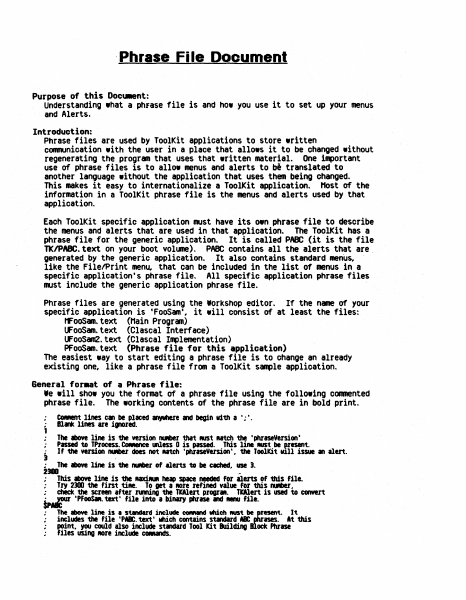
.Phrase Fi Ie Document Purpose of this Docu.ent: Understanding what a phfase file is and how you use it to set up your menus and Alerts. Introduction: Phrase files are used by ToolKit applications to store written communication with the user in a place that allows it to be changed without regenerating the program that uses that written material. One important use of phrase files is to allow menus and alerts to translated to another language without the application that uses them being changed. This makes it easy to internationalize a ToolKit application. Host of the information in a ToolKit phrase file is the menus and alerts used by that application. b' Each ToolKit specific application must have its own phrase file to describe the menus and alerts that are used in that application. The ToolKit has a phrase file for the generic application. It is called PABC (it is the file TKIPABC.text on your boot volume). PABC contains all the alerts that are. generated by the generic application. It also contains standard menus, like the FilelPrint men~ that can be included in the list of menus in a specific application's phrase file. All specific application phrase files must include the generic application phrase file. Phrase files are generated using the Workshop editor. If the name of your specific application is 'FooSam', it will consist of at least the files: MFoOSam.text (Main Program) UFooSam.text (Clascal Interface) UFooSam2.text (elascal Implementation) PFooSam.text (Phrase file for this application) The easiest way to start editing a phrase file is to change an already existing one, like a phrase file from a ToolKit sample application. General for.at of a Phrase file: Ie will show you the fonmat of a phrase file using the following commented phrase file. The working contents of the phrase file are in bold print. • CO_ent lines can be placed If¥'hele and begin vi'th a';'. • The above line is the version IUIber tha't MISt utch the 'phraseVersion' Passed to TProcess. CONIlnee &Ness 0 is passed. This line MISt be F-esent. If the version IUIber does not AItCh 'phraseVersion'. the Toolkit vl11 issue an alert. 1 Blank lines are i.,..red. • ; J : 2_ . The above line is the IUIber of alerts to be etched.. use 3. ~ This above line is the uxillUR heap space needed for alerts of this file. • Try 2300 the fint tile. To get a fIOre refined value for this fUIber .. ; chick the screen after nmina the TWert progrll.. TWert is used to convert tp~ ·PFooSM. text' file into a binary phrase and . . . file. • : • • # The above line is • s~d include COfIMnd wch RUSt be~esent. includes the file 'pa. text' web contains standard a point.. Y(KI could also include standard Tool Kit Building files using ROre include CCNands. It At this ock Phrase ISIS. 1. lisIIIIrftl ; , ; ; ; . . . The tbOYt two 11ntS should IIVIYS be '1000', theft the naM of your .,llCltlGn ., ~ Mnt it soelled in ~ to the user. Other applic.tion .lerts cen be 1ncluded below here, …

Showing first 3,000 characters of 20,667 total. Open the full document →

Home Documents Lisa 050 4009 H 4of5
050 4009 H 4of5

050 4009 H 4of5

Lisa · PDF
Filename050-4009-H-4of5.pdf
Size0.43 MB
Subsection hardware / Lisa_CPU
Downloads8
Enjoying MacTrove? Anonymous downloads are free and unlimited. Create a free account to track favorites, contribute metadata corrections, and join the community chat.
Reader
050 4009 H 4of5
/
Loading…
OCR / Text contents
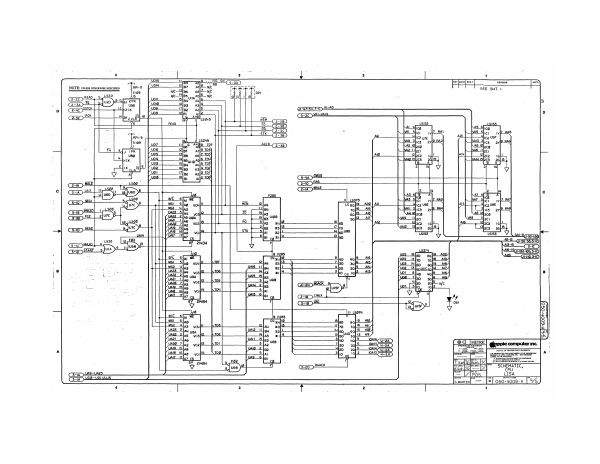
L 2 1 rr q Fool So oH Fa t By ERT HAAS > Gap waa, exe zak “I cous ath cm READ ees Lsis3. re) Ms hcg] = i : Laem) 5 pas slice yt mas ae 35) po ag hate Kpasstics aye 200 + iWect — ais ce acl Kha 2c mn 74 ul us373 LE pall2 Azo | an 7q}'S Ala ahs ae 2 ain Sal Al2 70 |u9D lo ate sor | Bs CT? ot 706 D og 1aj2—A pCa Pr 05 1 z 9 [used lng Tw =r 2 oi ae—eho alu Lau . ip [ise jual? Whar pais 61) Sais SMX a MH 7] 3p WAL = : lo F283 : 108 wala li Au : UAZs 3 wa tiley salt : [/vaze_2| 02 mi pemaeen juazt Nag its |o3 [/us20 7ha2 voo| Jo! Fei @heppiccomputerinc |: 19 Slag [waid2 too a i AIS I6}ag yo) [!¥_ _\ To. Star a MAI7 17 MAS 6 ta; sent oN es DORMER COMMCENTE Oa ae oe swe ee au) Gan es Vs CPU Soa wasn uaes P= LISA Sai) YOS— VOU = saonen TV L ewaaren! — [>| 050-4oo9-4 [4% )
Subscribe to PDF
mp.ls