Home Documents NuBus 65 2500 101 Avatar Coax Workstation Installation Guide
65 2500 101 Avatar Coax Workstation Installation Guide

65 2500 101 Avatar Coax Workstation Installation Guide
NuBus · 1990 · PDF
Filename65-2500-101_Avatar_Coax_Workstation_Installation_Guide_1990.pdf
Size3.00 MB
Year1990
Subsection avatar / MacMainframeII
Downloads6
Enjoying MacTrove? Anonymous downloads are free and unlimited. Create a free account to track favorites, contribute metadata corrections, and join the community chat.
Reader
65 2500 101 Avatar Coax Workstation Installation Guide
/
Loading…
OCR / Text contents
-- Avatar -- MacMainFrame™ Series Macintosh-to-Mainfame Link Coax Workstation Installation Guide ---- ---- MacMainFrame TM Series Macintosh to Mainframe Link Coax Workstation Installation Guide Avatar 65-2500-101 Copyright © 1990 Avatar Corporation 65 South Street Hopkinton, MA 017 48 (508) 435-3000 All Rights Reserved The information contained herein is the property of Avatar Corporation. It shall not be reproduced, disclosed, or used in whole or in part without written permission of Avatar Corporation. MacMainFrame and EasyKeys are trademarks of Avatar Corporation. Fiber Optic System is a trademark of Du Pont Electronics. IBM PC, CICS, TSO, CMS, and IND$FILE are trademarks of International Business Machines Corporation. MacLinkPlus is a trademark of Dataviz Corporation. Microsoft is a registered trademark, and Excel is a trademark of Microsoft Corporation. PageMaker is a registered trademark of Aldus Corporation. PhoneNet is a trademark ofFarallon Computing Inc. VAX is a trademark of Digital Equipment Corporation. The following are trademarks of Apple Computer, Incorporated: AppleTalk EtherTalk HyperCard HyperTalk Macintosh Macintosh II Macintosh Ilcx Macintosh Ilx Macintosh SE Macintosh SE/30 MacTerminal MacWorkstation MultiFinder TokenTalk WARNING: Tiris equipment generates, uses, and can radiate radio frequency energy; and if not installed and used in accordance with the instruction manual, may cause interference to radio communications. It has been tested and found to comply with the limits for a Class A computing device pursuant to Subpart J, Part 15 of FCC Rules, which are designed to provide reasonable protection against such interference when operated in a commercial environment. Operation of this equipment in a residential area is likely to cause interference; in which case the user must correct the interference at his/her own expense. WARNING: This equipment is a Class A digital apparatus which complies with the Radio Interference Regulations, CRC c. 1374. MacMainFrame Series Part# 65-2500-101-AA Printed in the United States of America Table of Contents Preface ................................................................................. v Audience ............................................................................ v How To Use This Book .......................................................... v Chapter 1 - What You Need First ........................................ 1 Experience .......................................................................... 1 Hardware .......................................................................... 3 Software ............................................................................ 5 Network Requirements ........................................................... 6 External Cables .................................................................... 6 Chapter 2 - Installing the Hardware ................................... 7 Introduction ........................…

Showing first 3,000 characters of 60,304 total. Open the full document →
Home Documents ADB Front Desk Bus Rev 2.1
Front Desk Bus Rev 2.1

Front Desk Bus Rev 2.1

ADB · 1984 · PDF
FilenameFront_Desk_Bus_Rev_2.1_19840926.pdf
Size0.39 MB
Year1984
Subsection fdb
Downloads6
Enjoying MacTrove? Anonymous downloads are free and unlimited. Create a free account to track favorites, contribute metadata corrections, and join the community chat.
Reader
Front Desk Bus Rev 2.1
/
Loading…
OCR / Text contents
To: Bob Bailey Date: Sept. 26, 198-4 Gary Butts - APG Dave Christensen - APG Mike Clark - APG Burrell Smith From: Peter Ashkin Subj: Front Desk Bus - Rev 2.1 To make the "Front Desk Bus" a more flexible and powerful interface, I believe that it should have the follo"'1ing properties: 1. restrictive .J The bus shall be bidirectional. [An input only bus is too 2. Each device on the bus has a unique address. For practical purposed the address range should be o - 14. Some or these addresses may be reserved for broadcasting universal messages. [This seems like a sane number or devices, particularly since there exists today only three devices; keyboard, keypad and mouse .J 3. All command transactions shall be eight bits long. All data transactions shall be 16 bits long. [This facilitates the decoding of commands by devices. of limited iiltelligence.J 4. The host shall be the undisputed bus master. [This removes any question of who's controlling the bus.J 5. There shall be a limited number of commands. Commands should be broken int.o two groups, basic commands (TALK and LI STIR) Which all devices on the bus shall understand; and advanced commands vvhich only intelligent devices (as appropriate) should understand. [This makes the command interpreter, be it hardv.1are or soft"'1'8.re, Simple. It also allo'NS more complex devices to used some of tl:te "fancier" features of the bus.] There shall be only one active talker on the bus at any time, this may be the host or an addressed device. [A device addressed to TALI ¥\Tith data to send "untalks" itself after it sends its 16 bits of data or if it has no data to send "untalks" itself immediately and allo'\AIS the bus to time-out.] 6. Front Desk Bus September 26, 1984 7. The bus prot:ocol must accept devices that talk at different speeds. The host, at a minimum, must be able to listen at various speeds. (This implies that the data on the bus must be "self-clocked". By not rigidly fixing the speed of transmission. the bus does not need to be crystal (etc.) controlled.] There shall be only one active listener on the bus at any time, this may be tlle host or an addressed device. [A device addressed to LI STIR "unlistens" itself-after it receives 16 bits of data or if it receives a new command before receiving 16 bits of data.] 8. 9. An interrupt mechanism must be available which circumvents the needs to poll devices that need service. [Since the bus is relatively slow. tlle interrupt latency time in a polled environment is long. The ability to interrupt the master for service is important.] 10. There shall exist a mechanism that sends a unique signal that puts all devices on the bus into the command (reset) mode. [This is important if for some reason the bus gets "hung".) 11. There should be a minimum number of "time-outs" needed on the bus. The only needed time out should be to time out a non-responsive talker. [Timers are ugly, but "'1aiting for a dead device is uglier. The length of this time-…

Showing first 3,000 characters of 11,453 total. Open the full document →

Home Documents Lisa 11 Dialog Building Block
11 Dialog Building Block

11 Dialog Building Block

Lisa · PDF
Filename11_Dialog_Building_Block.pdf
Size2.59 MB
Subsection toolkit_3.0 / Package_2_Examples
Downloads3
Enjoying MacTrove? Anonymous downloads are free and unlimited. Create a free account to track favorites, contribute metadata corrections, and join the community chat.
Reader
11 Dialog Building Block
/
Loading…
OCR / Text contents
Dialog Building Block Toolkit Dialog Building Block Dialog Boxes A Dialog Box on the lisa is a speclal window WhiCh, ,hen displayed, is as .ide as the screen, and hangs down right below the menu bar. D1alog boxes can be used as alternat1ves to menu commands when an application needs to gather more detail from 1ts user than can be conven1ently packaged 1n a menu. A ToolKit application can put up a Dlalog Box any time 1ts .1ndow is active. The D1alog Build1ng Block provides basic structures sufficient to define dialogs, to display them, to specify special behav10ur within them, and to interrogate them. Read No Further The intended audlence for th1s document is current or prospective direct users of the Dialog Building Block. A basic famil1ari ty .i th the 1deas behind the ToolKi t and the CLASCAL language is assumed. ToolKit jargon 15 unavoidable in a document such as thi s. Compalion Doclmentation The primary documentation for the Dialog Building Block consists Of three parts. I l1st them here 1n descending order of 1mportance and authori ty. (8] The source list1ng of the INTERFACE of uD1alog [b) The source lIstings Of the ToolK1t sample programs, USample and UsamD1alog. [c 1 Th1 s document, plus subsequent addenda/errata. How To Do It Simple use of the DIalog Build1ng BloCk involves allocatIng a TDialogwlndow, installing a TOialog, and add1ng dialog components (d1aloglmages) to the d1alog to define its display and behaviour. In a typical dialog Box., an Application and 1ts user aHree that Whatever the user does up In the dialog box Is not for real- until the OK button (or some other action button) 15 pressed. Each standard kind of dialog component carries .i ttl 1t some basic assumptions about mouse- and cursor-behaviour. It is Lisa Tooll1t Dlalog lul1d1ng 110Ck - 71 lIarCl\ 19M - pegt 1 or II Toolkit Dialog Building Block an inherent property of the TCluster component, for example, that one and only one Of its checkboxes is selected at anyone moment. You do not progralll this behaviour--you select It by the very act of Choosing to use a TCluster component. Thus, an application typically defines the for.. and behaviour of a d1alog box by the s1mple act of allocating its components. The real action, whereby the App1icatlon actually does something to 1ts data structures, 1s precipi tated by the user' s pr~sslng a Button in the dialog. The Application 15 able to capture control at button-pushing time In elther of two ways: [a] By redefining TD1alog.ButtonPushed, or [b) by assoclating a command number with a button, and then fielding that command in the Ne.Command methods of Its subclasses of el ther TSelection or Tllndow. Formally, a Dialog is an Object which resides In a Dla10gview, which in turn is installed in some panel of some lindow. Beginning users may think of the Dialog, the Dialogview, and the DialogWindow as confusingly overlapping In function. It Is hoped the explanations below, combined with the streamlined functlonality of the…

Showing first 3,000 characters of 110,618 total. Open the full document →

Home Documents Macintosh 072 0186 Apple Support Training Library Macintosh Vol I
072 0186 Apple Support Training Library Macintosh Vol I

072 0186 Apple Support Training Library Macintosh Vol I

Macintosh · 1986 · PDF
Filename072-0186_Apple_Support_Training_Library_Macintosh_Vol_I.pdf
Size38.38 MB
Year1986
Downloads11
Enjoying MacTrove? Anonymous downloads are free and unlimited. Create a free account to track favorites, contribute metadata corrections, and join the community chat.
Reader
072 0186 Apple Support Training Library Macintosh Vol I
/
Loading…
OCR / Text contents
Apple Support Training Library Apple Support Training Library . . . . ... . . . . ... . . . . ... . . . . .. . . . . ... ... . .. .. .. .. . . ······· .. .. . • • • . .. 072-0186 MACINTOSH VOL. I M A· C INT 0 S H V 0 L. I ( Welcome to the Apple Support Training Library The Apple Support Training Library is an example of Apple's commitment to helping you provide better support to users of Apple® products. The Library's modules allow for both quick reference and customized training. The modules contained in this binder are part of three series: :rv1acintosh, Apple II, and Peripherals. Training. Because the library's modules are self-paced, individuals can learn and practice by themselves. Or the modules can be combined with other modules as a course. If given as a course, the self-paced modules allow students to progress at their own pace, freeing the instructor to answer questions and help students with problems. Each module lists any prerequisites and equipment required. Reference Catalog. To facilitate your search for information on Apple products, we developed the Support Training Reference Catalog, available on AppleLink™. The catalog references manuals, publications, courses, and training modules that provide information and instruction on a wide range of computer skills. For each skill listed, the catalog identifies training resources and tells how to sign up for the training, how to acquire the materials, and what the prerequisites are. Update Subscription. This binder contains the modules which have been released to date for this series. Along with this binder you receive a subscription to all additional modules produced for the series this year. (Modules are released quarterly.) At the end of the year, you will receive a renewal letter that you can use to order a subscription for the modules to be released the following year. Change of Address. If you change your address, please notify your local Apple Support Center. ( Recommendations when using this Library: • • • Read the modules thoroughly . Contact your Apple support representative if you have any questions or need additional information not covered in the modules. Back up your files as you follow the practice exercises to avoid losing important data . Copyright ©1986 Apple Computer, Inc. All rights reserved. Apple Computer, Inc. 20525 Mariani Avenue Cupertino, CA 95014 Apple grants to its authorized dealers and other authorized customers the right to reproduce and distribute this material for use in training classes provided that there is no additionalfee charged for the material distributed in such classes, and that it is distributed only to bona fide participants of such classes. Apple does not endorse any of the third-party products mentioned in this module. They are included only to make you aware of their availability. Apple, the Apple logo, and the Macintosh logo are registered trademarks of Apple Computer, Inc. AppleLink is a trademark of Apple Computer, …

Showing first 3,000 characters of 500,000 total. Open the full document →

Home Documents Macintosh 030 0781 AUX Command Reference Section 1 A L
030 0781 AUX Command Reference Section 1 A L

030 0781 AUX Command Reference Section 1 A L

Macintosh · 1990 · PDF
Filename030-0781_AUX_Command_Reference_Section_1_A-L_1990.pdf
Size14.82 MB
Year1990
Subsection a_ux / aux_2.0
Downloads13
Enjoying MacTrove? Anonymous downloads are free and unlimited. Create a free account to track favorites, contribute metadata corrections, and join the community chat.
Reader
030 0781 AUX Command Reference Section 1 A L
/
Loading…
OCR / Text contents
A/UX®Command Reference Section lCA-L) .® A/UX® Command Reference Section leA-L) 030-0781 • APPLE COMPUTER, INC. © 1990, Apple Computer, Inc., and UniSoft Corporation. All rights reserved. Portions of this document have been previously copyrighted by AT&T Information Systems and the Regents of the University of California, and are reproduced with permission. Under the copyright laws, this manual may not be copied, in whole or part, without the written consent of Apple or UniSoft. The same proprietary and copyright notices must be affIXed to any permitted copies as were affIXed to the original. Under the law, copying includes translating into another language or format. The Apple logo is a registered trademark of Apple Computer, Inc. Use of the "keyboard" Apple logo (Option-Shift-K) for commercial purposes without the prior written consent of Apple may constitute trademark infringement and unfair competition in violation of federal and state laws. Apple Computer, Inc. 20525 Mariani Ave. Cupertino, California 95014 (408) 996-1010 Apple, the Apple logo, AppleTalk, AlUX, ImageWriter, LaserWriter, and Macintosh are registered trademarks of Apple Computer, Inc. APDA, Finder, and QuickDraw are trademarks of Apple Computer, Inc. APS-5 is a trademark of Autologic. B-NET is a registered trademark of UniSoft Corporation. DEC, VAX, VMS, and VT100 are trademarks of Digital Equipment Corporation. 030-0781 Diablo and Ethernet are registered trademarks of Xerox Corporation. Hewlett-Packard 2631 is a trademark of Hewlett-Packard. MacPaint is a registered trademark of Claris Corporation. POSTSCRIPT is a registered trademark, and TRANSCRIPT is a trademark, of Adobe Systems, Incorporated. Teletype is a registered trademark of AT&T. TermiNet is a trademark of General Electric. UNIX is a registered trademark of AT&T Information Systems. Versatec is a trademark of Versatec. Wang C/AlT is a trademark of Wang Laboratories. Simultaneously published in the United States and Canada. LIMITED WARRANTY ON MEDIA AND REPlACEMENT If you discover physical defects in the manual or in the media on which a software product is distributed, Apple will replace the media or manual at no charge to you provided you return the item to be replaced with proof of purchase to Apple or an authorized Apple dealer during the 90-day period after you purchased the software. In addition, Apple will replace damaged software media and manuals for as long as the software product is included in Apple's Media Exchange Program. While not an upgrade or update method, this program offers additional protection for up to two years or more from the date of your original purchase. See your authorized Apple dealer for program coverage and details. In some countries the replacement period may be different, check with your authorized Apple dealer. AU IMPLIED WARRANTIES ON THIS MANUAL, INCLUDING IMPLIED WARRANTIES OF MERCHANTABW1Y AND FITNESS FOR A PARTICUlAR PURPOSE, ARE LIMlTED IN DURATION TO NINETY (90)…

Showing first 3,000 characters of 500,000 total. Open the full document →

Home Documents Macintosh Apple Big Pink 3 Mar1990
Apple Big Pink 3 Mar1990

Apple Big Pink 3 Mar1990

Macintosh · 1990 · PDF
FilenameApple_Big_Pink_3_Mar1990.pdf
Size132.16 MB
Year1990
Subsection pink
Downloads4
Enjoying MacTrove? Anonymous downloads are free and unlimited. Create a free account to track favorites, contribute metadata corrections, and join the community chat.
Reader
Apple Big Pink 3 Mar1990
/
Loading…
OCR / Text contents
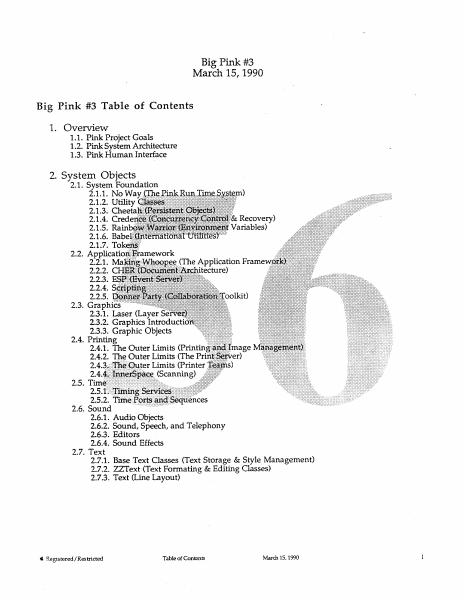
Big Pink #3 March 15, 1990 Big Pink #3 Table of Contents 1. Overview 1.1. Pink Project Goals 1.2. Pink System Architecture 1.3. Pink Human Interface 2. System Objects 2.1. System Foundation 2.1.1. No Way ( -& Recovery) Variables) P 2.3.1. Laser (Layer 2.3.2. Graphics Introduct 2.3.3. Graphic Objects . Printing 2.4.1. The Outer Limits (Printin; Quter Limits (Printer erSpace (Scanning) 2.6.1. Audio Objects 2.6.2. Sound, Speech, and Telephony 2.6.3. Editors 2.6.4. Sound Effects 2.7. Text 2.7.1. Base Text Classes (Text Storage & Style Management) 2.7.2. ZZText (Text Formating & Editing Classes) 2.7.3. Text (Line Layout) @ Registered /Restricted Table of Contents March 15, 1990 Big Pink #3 March 15, 1990 2.8. Files/Storage 2.8.1. Psychokiller (Data Management) 2.8.2. Pluto (File System) 2.8.3. Bluto (Pink Personal AppleShare) 2.9. OS Services 2.9.1. Opus/2 (Memory, Tasks, & IPC) 2.9.2. Elixir (The Pink I/O System) 2.9.2.1. Pink Booting Overview 2.9.2.2. KT-22(Mass Storage I/O) 2.9.2.3. Funnel of Love (NuBus I/O Framework) 2.9.2.4. Rob Lowe(Video Framework) eS ‘ish (The Network) (A/Rose) 3.2. Blue Adapter 3.2.1. Mood Indigo (The 3.2.2. Scorpion (N&C Blue 3.3. Jane (An Advanced Word Proces 3.4. Tuffy (Pink Graphing Applicatio: 3.5. - Hoops (A Human-Oriented Obj 3. Do 3. 4. Project Issues _ 4.1. Technical Documentation @ Registered /Restricted Table of Contents March 15, 1990 @ Registered/Restricted Pink System Architecture Monday, March 26, 1990 1.2-i © Registered/Restricted Pink System Architecture Monday, March 26, 1990 1.2-ii David Goldsmith @ Registered/Restricted Pink System Architecture Monday, March 26, 1990 1.2-4ii @ Registered/Restricted Pink System Architecture Monday, March 26, 1990 1.2-iv 1. Introduction. .............. ccc e ence cece cece eeeeene sce e cece eee eeeeeee seeeeel 2. Architectural Goals. ... 0... cc ccc cece ccc cece cece e cence eect e ees ceeeeee L 2.1, Flexibility and Expandability....... Seen e eee eee eee e ee eee ee eet e nese tenets e eens eeeeeenes 1 2.2. Portability. ........ 5. cece eee eee eee eee bce c eee e cece cece eee eeee eee e eee e cece eens seer l 2.3. Performance. ......- eee cece cece cece ree ceeee seeeee seeeeeee beeen cece cence cere nese eeeeenes 2 2.4. Robustness. .... emcee eee rersenerecseaceens tee eeeeeeee eS 2 2.5. Empower Developer: 2.6. Support the Interface. 2.7. A Global System. J265 0... cece ccc e cent e nese eeeeeeees detec eect eee sees 3 3. Architectural P: i eee ce eeee en 3 3.1. All Interfaces hee ee eeeeeeeee | ae 3 3.2. Manage Com: 3.3. Leverage Where Possible... .. oP Sek 0 EEE Sa eee. eee eee ‘ .4 3.4. Frameworks Protect Subsystems from ee eee . 5 3.5. Let Resources Find You............. A eee reese SD 4. Architectural O . 6 4.1. The Opus/2 Kernel... secuseenseeeseees . eee 6 4.2, The Run Time Environment........ se eeeees bocce eee ee eee ceeeeeeeeseutenseegseeeeegeeeueees 8 4.3. The Foundation Classes...... SS 9 4.4, “Operating System” Services. .…

Showing first 3,000 characters of 9,171 total. Open the full document →

Home Documents NuBus EtherTalk Preliminary Note
EtherTalk Preliminary Note

EtherTalk Preliminary Note

NuBus · 1987 · PDF
FilenameEtherTalk_Preliminary_Note_19871015.pdf
Size3.53 MB
Year1987
Subsection apple / 670-0205_3Com_Ethernet
Downloads4
Enjoying MacTrove? Anonymous downloads are free and unlimited. Create a free account to track favorites, contribute metadata corrections, and join the community chat.
Reader
EtherTalk Preliminary Note
/
Loading…
OCR / Text contents
EtherTalk' Preliminary Note Final Draft; Working Draft 3 - October 15, 1987 Communications & Networking Apple Technical Publications Engineering Part No. 6588279 Copyright© 1987 Apple Computer, Inc. All rights reserved. CONFIDENTIAL APPLE COMPUTER, INC. This manual is copyrighted by Apple, with all right reserved. Under the copyright laws, this manual may not be copied, in whole or in part, without the written consent of Apple Computer, Inc. This exception does not allow copies to be made for others, whether or not sold, but all of the material purchased may be sold, given or lent to another person. Under the law, copying includes translation into another language. ©Apple Computer, Inc., 1987 20525 Mariani A venue Cupertino, California 95014 (408) 996-1010 Apple and the Apple logo are registered trademarks of Apple Computer, Inc. AppleTalk is a registered trademark of Apple Computer, Inc. NuBus™ is a trademark of Texas Instruments. Ethernet® is a registered trademark of Xerox. Simultaneously published in the United States and Canada. Notice The information in this document reflects the current state of the product. Every effort has been made to verify the accuracy of this information; however, it is subject to change. Preliminary Notes are released in this form to provide the development community with essential information to work on compatible third-party products. EtherTalk Preliminary Note Apple Confidential Table of Contents Page Section Preface i i i You Should Know ... Document Contents Suggested Reading Chapter 1 1 2 2 2 3 AppleTalk AppleTalk Implementations LAP Functions Using EtherTalk Possible Applications Chapter 2 4 6 6 8 8 8 9 9 9 10 10 11 12 13 14 14 14 14 15 15 15 16 Introduction EtherTalk Overview Introduction Device Files 'adev' and 'cdev' Control Panel Device File AppleTalk Device File The 'adev' and 'atlk' Resources The LAP Manager INIT Resource Calls to the 'adev' Resource The GetADEV Call The SelectADEV Call Calls to the 'atlk' Resource The Alnstall and LWrtlnsert Calls The LWrtGet, AShutdown, and LWrtRemove Calls The LAP Manager AppleTalk Selection Installing the AppleTalk Selection Intranode Delivery Packet Reception AppleTalk Address Resolution Protocol (AARP) AARP Functions The Ethernet Driver Opening the Ethernet Driver Transmission and Reception Fina/Draft TOC-1 Table of Contents EtherTalk Preliminary Note Chapter 3 17 17 18 18 19 19 20 20 21 21 Calls to the LAP Manager Introduction Calling the LAP Manager LAP Manager Functions LWnlnsert (DO =2) LWnRemove (DO= 3) LWrtGet (DO= 4) LSetlnUse (DO= 5) LGetSelfSend (DO = 6) LRdDispatch (DO = 1) LGetATalklnfo (DO= 9) LAARPAttach (DO = 7) LAARPDetach (DO = 8) Chapter 5 27 27 28 28 28 28 28 28 29 29 29 29 30 30 30 32 33 33 35 Calls to the 'adev' File Introduction The 'adev' File Contents The 'adev' and 'atlk' Resources Calls to the 'adev' Resource The GetADEV Call (DO= 101) Status-flag Byte The SelectADEV Call (DO = 102) Calls to the 'atlk' Resource…

Showing first 3,000 characters of 86,706 total. Open the full document →

Home Documents Macintosh 5590334 NuKernel ERS
5590334 NuKernel ERS

5590334 NuKernel ERS

Macintosh · 1996 · PDF
Filename5590334_NuKernel_ERS_199403.pdf
Size6.05 MB
Year1996
Subsection developer / Copland
Downloads4
Enjoying MacTrove? Anonymous downloads are free and unlimited. Create a free account to track favorites, contribute metadata corrections, and join the community chat.
Reader
5590334 NuKernel ERS
/
Loading…
OCR / Text contents
111111111111111111111111111111111111111111111111111111111111111111111111111 US005590334A United States Patent [19J [lll Patent Number: 5,590,334 Saulpaugh et al. [45] Date of Patent: Dec. 31, 1996 [54] OBJECT ORIENTED MESSAGE PASSING SYSTEM AND METHOD [75] Inventors: Thomas E. Saulpaugh, San Jose; Bill M. Bruffey, Cupertino; Russen T. Williams, San Jose, all of Calif. [73] Assignee: Apple Computer, Inc, Cupertino, Calif. [21] Appl. No.: 618,404 [22] Filed: Mar. 19, 1996 Related U.S. Application Data [63] Continuation of Ser. No. 220,043, Mar. 30, 1994, abandoned. [51] [52] Int. Cl. 6 ...................................................... G06F 13/14 U.S. Cl. ....................... 395/683; 395/600; 395/200.1; 3951733 Field of Search ..................................... 395/200, 700, 3951775, 600, 200.1; 364/DIG. 1, 228.5, 228.8 [58] References Cited [56] U.S. PATENT DOCUMENTS 5,142,683 8/1992 Burkhardt et al ....................... 395n25 5,230,051 711993 Quan ....................................... 395noo 5,265,206 11/1993 Shackelford et al. .................. 395/200 5,305,461 4/1994 Feigenbaum et al. .................. 395n75 5,315,709 5/1994 Alston, Jr. et al ...................... 395/600 5,317,746 5/1994 Watanabe ................................ 395noo 5,329,619 7/1994 Page et al ............................... 395/200 5,333,269 7/1994 Calvignac et al. ...................... 395/200 5,371,850 12/1994 Beisan et al. ........................... 395/200 FOREIGN PATENT DOCUMENTS 0425420 0483036 5/1991 4/1992 European Pat. Off.. European Pat. Off. ..................... 9/44 OTHER PUBLICATIONS Tripathi, A. et al. "Type Management System In Tue Nexus Distributed Programming Environment," 5 Oct. 1988, pp. 170-177. Hong-Tai Chou et al. "Versions and Change Notification in an Object-Oriented Database System," 12 Jun. 1988, pp. 275-281. D. V. Pitts et al. "Object Memory and Storage Management in the Clouds Kernel," 13 Jun. 1988, pp. 10-17. D. C. Robinson et al. "Domain-Based Access Contra! for Distributed Computing Systems" in Software Engineering Journal, Sep. 1988, pp. 161-170, vol. 3, No. 5. U. Ramachandran et al. "A Measurement-Based Study of Hardware Support for Object lnvocation" in Software Practice & Experience, Sep. 1989, pp. 809-828, vol. 19, No. 9. M. Ancona. "Persistent Heaps," 21 Mar. 1990, pp. 324-331. G Pathak et al. "Object eXchange Service for an Object-0riented Database System," 6 Feb. 1989, pp. 27-34. Primary Examiner-Kevin A. Kriess Assistant Examiner-Majid A. Banankhah Attomey, Agent, or Finn-Carr, DeFilippo & Ferrell [57] ABSTRACT An object oriented message passing system for transferring messages between a client task and a server task comprises an object database, an object management unit, a message transaction unit, and a locking unit. Tue object management unit creates a port object and one or more associated message objects. Tue message transaction unit matches a send message request issue…

Showing first 3,000 characters of 435,254 total. Open the full document →
Home Documents Lisa Castro Lisa Boot ROM Manual V1.0
Castro Lisa Boot ROM Manual V1.0

Castro Lisa Boot ROM Manual V1.0

Lisa · 1983 · PDF
FilenameCastro_-_Lisa_Boot_ROM_Manual_V1.0_19830620.pdf
Size0.26 MB
Year1983
Subsection development_history / memos
Downloads5
Enjoying MacTrove? Anonymous downloads are free and unlimited. Create a free account to track favorites, contribute metadata corrections, and join the community chat.
Reader
Castro Lisa Boot ROM Manual V1.0
/
Loading…
OCR / Text contents
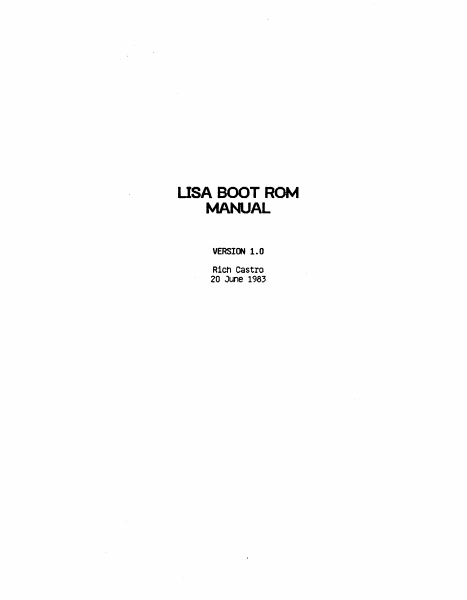
USA BOOT ROM MANUAL VERSICW 1.0 Rieh Castro 20 June 1983 Init Exception Vectors lnit Interrupt vectors Init .l.mp Tables ""'11 Handler Check ~ for warm or COid start (126) Warm - Set few "1'1l.J Colder - Check Mt-'1U (127) Set contrast, clear errors set some~ Tum Contrast off INlTl Start Olalp)StlCS Pass Read/Write test of MVllJ registers Pass AOOress test of MMJ registers Pass Pass setup r+tJ contexts 1.2.-3 and flag errors ln memory Pass Fail Flag errors in memory size memory, assume 128K increments, Cheek for low Pass Fail Check 1f IIO board there Size memory, asst.me 128K increments, Check for high Set M"1l.J according to addresses found Test first 2K of memory Pass save current tnformatlon ln low memory Initialize exception vectors in low memory Parallel Port VIA tests see lf Timer 1 ts tnere Pass see tf can access other register Pass Do test of timer register Pass Fail Fail Try access to sec Pass Test memory to be used for screen Pass TSTCt-1<. . Fail set fall flag, get new screen area If inverse vldeO, set last bits for no retrace Une Draw deSktop, CPU RQIV1 rev, set contrast to default Test of Keyboard VIA Test tlmer register Pass TSTCl-tK Enable COPS Pass Fail TSTCHK SCCll COF>S for proper reset cOdes Figure If Keyboard & mouse connected Pass TSTCl-t< Video Circuitry test Verify VTIR signal Pass Pass TSTCHK Parity Circuitry test, test 1 address by writing wrong part ty and then wrt Ung w1 th normal part ty Pass TSTCH< Full memory test wlpartty enabled Check if Warmstart or not Write/Read pattern test. Address test as second scan Pass Feil Address Uniqueness Test PlngPong Memory .Test Pass Fail TSTct-iK Pass RS232 / sec tests cnannel A interrupt vector r Pass fail TSTCH< Channel B internal loopback test Pass Fail TSTCHK I Test of disk interface Display ROM l.D. cnect< Of DSKDIAG bit Get disk ROM test status from shared memory Fail Poss --~~~~~---~~~~~~~~--TSTCt-K wrtte/Reaci test of 1 Iocatlon ln sharee2 memory Pass Issue dlsaole command to disk R~ Fail Pass TSTCH< Scan keyboard COPS for user commands Read COPS for current date and time Pass TSTCH< Read all expansion slots for I.D.s On cards with status programs, execute them. TSTCHK Clear desktop My fatal errors encolJ'ltered? Ho If...Q.~...~~~ ...~!!Q!!....~...~~~P.~~.Y..Jl Be 6t to Boot ROfV1 Monitor see If an Exception error occurrea No to Boot ROM Monitor No clOOI< data or RS232 error then & to Boot RQtv1 Mon tor See if keybOard error occurred No see if memory error occurred No M.Jst be 110 expaislon slot error If mouse unplugged then flag user. lnlt cursor and mouse. Alternate Boot device? No Boot menu aSkea for? No Yes Get boot device frcm parameter memory Invalid Yes Keyboard overrides all others Is there a bootable test card? Yes Is bootable card an AppleNet Gard? Ho Yes Boot from Applef\Jet Bootable Test card? Mo Ves Boot from Test card No override of default If Twiggy (871) ooo…

Showing first 3,000 characters of 3,722 total. Open the full document →
Home Documents Macintosh Apple Blue Book Vol1
Apple Blue Book Vol1

Apple Blue Book Vol1

Macintosh · 1989 · PDF
FilenameApple_Blue_Book_vol1_1989.pdf
Size60.94 MB
Year1989
Subsection blue
Downloads6
Enjoying MacTrove? Anonymous downloads are free and unlimited. Create a free account to track favorites, contribute metadata corrections, and join the community chat.
Reader
Apple Blue Book Vol1
/
Loading…
OCR / Text contents
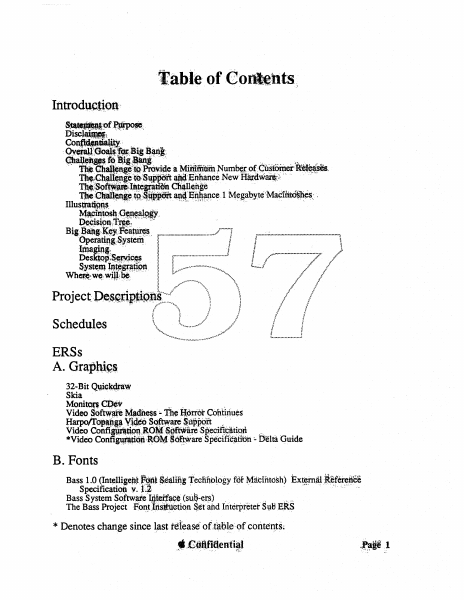
table of Contents; Schedules ERSs A. Grapni~.s 32..Bit Qwckdraw Skia ." .... MonitOf$ CJ!)ev .~" , Video S()ftwafe~a~ess ~ the HottOt' Continues HarpotrQI!-lig~Vl4to s,Qftw~ Support '.. ,. ", . Video Cortfi~ti~;~o~~gftW~Specif1~ltipd. ,:. *Video Confimp.Qn :~O~ ~~t\Vare·. Specific~tibn :. Delta Guide B. Fonts Bass 1.0 (Int~l1igetl,t .f~l$ialii1g Iedll1.blogy ror ~acihtd~h) Ext~~#itefer~#ee Specifieatiotl v· l.~ '. .' . . "...... Bass System Softw~e ijteff~c¢ (sul~-etsJ ,.' ,.,...' The Bass Project ·Font.lr.t~ttietion ~.¢tahd Iriterpreter Sl:iBE.RS . '. >" ". , * Denotes change since ~ast t~leas~f oftid);~e'-()'fconte~ts~ •.~C;Q8fitl~ntial ..... '.. . ' ',." • ,",'." • ~;\~. ". ·.C.,..,Printing LasweWriter 6.0 ERS Version 0.2 Ginsu Project ERS Version 0.1 Ginsu User Intetface ERS Version 0.3 The Ginsu Architecture Just-Poured-Concrete Version " Imaging Engine, Ginsu Project Proposal Version 1.Od8 GinsuApplication Interface January 13,1989 D. International Bofim (~k~a. Layout Manager) Everest (a.k.a. Language Manager) Script Manager 3.0 TextEdit 3.0 InfoWorld (a.k.a.Multiscript System) Script System Core UnicodeslUnifo11tl Character Codes "~.~./.:.".'.'.:';'.'.:':~-:o(O:O:-:.:O:': o.;.: ".: o:, .:.:.:.: .. E. Toolbox .. : . _. Toolbox Ovetview ~~= (ak.a SQL / ~J .::o(..O:o(o(O:O:.:O'; .. .;.:O:.:.:O:O';.;......,•••'.• :,•••.•"•••• ~::::;~.,?. •••,y.w ...: COru\eerl~;~-'\'''\ ESospuenfdanto (a.k.a. DDIF) /J.'."'\. .~. ) ) 'j., l MACE (Macirttosh AudiQComRressiqA1Expail'~ibh Help Manager Human Inieqace tRS"'" . :.. /',. Help Manager Programmer"g'TOOloox··lnlerface ERS // / /{ .. •.:, ., l i' . .? l ,;:/ / ~ { // .;.•. ~ /.. i ::{ : F. Finder" & Applications Finder Overview Multi-Disk Installer Furnishings 2000lNewFirtder ,,", " The Blue Intetf~ceGroup-'NewChooserDesign MacroMaker 1.1 Esprit Support PictWhap Pat CyberBash FontUtility 2.0 CloseView' 1.1 * Denotes change since last release of tableofcoriterits. • Confidential Page 2 G. CPUs & ROMs Esprit ROM Cobra WSpin ROM Jaws (a.k.a. Universal ROM) FourSquare/F19 ROM Remote Booting Gestalt H. OS Kernel File Systems Management MS-DOS External File System HFS Enhancements *MacVM, Virtual Memory for Macintosh MultiFinder 6.1 *MultiFinder 7.0 Interprocess Communication Facility System Segmentation I. :~ktop Manager f-~-=~·.'=~Jl ~gd'::~,=~~--"" Asynchronous SCSI Time Manager t ,f"·:· .\\ .\\ HDSC Setupl HDSC Driv~r.::: \ '~1 SCSI Bus Rover .i""· \. :1 Slot Manager f:l: .f l . lOP Manager \\. : ,,, ,. . . . . . . ~ :,,/'/ lOP SWIM Driver .;:. . . . . . . .., lOP ADB Driver ·..·,· ·,· ..· E-Disk Driver DebugUtil Device Manager Serial Driver .i w.w••·.·,,········ J. Networking & Communications *AppleShare 1989 - The Holy Grail 976 (Remote AppleTalk Network) Calvin and Hobbes AppleTalk 2.0 Serial lOP ERS * Denotes change since last release of table ofcontents. • Confidential Page 3 *Product Plan Notes Dependencies * Denotes change sinc…

Showing first 3,000 characters of 500,000 total. Open the full document →
Subscribe to PDF
mp.ls