

Thread
Performa 200

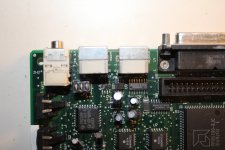
holy ghost me ar$e 360alaska...........which chip is the sound chip?? -
anybody know what U1, U2 and U3 are for as well
UB11 ?
U4 (DFAC) sorry
U1 U2 are AUDIO amplification. well i know U1 is for sure.
thanks uniserver.
-
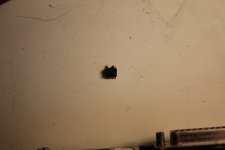
well...............U1 just caught fire...........and half of it exploded.........
-
even worse...........I was filming.
-
feck!!!
-
-
well...............U1 just caught fire...........and half of it exploded.........
-
even worse...........I was filming.
-
feck!!!
-
that will make a good video! do post i want to see  haha
haha
haha
Ive had plenty of things catch fire, but I have yet to see it happen on a logic board. Thats nuts.
well it sure as hell was a first for me.............still not in the better of it
You never know if it sat in a car in direct sunlight in the middle of summer or a metal container in an attic, it could get hot enough to melt things. Not knowing the total history its possible it could have been in an environmental situation where it got hot enough to cause this, its unlikely, but it is possible.
heres what happened earlier
you have to click ' Show all content ' at the bottom for my videos to appear..... (anybody know why.........do I have to do something with my profile or something)
you have to click ' Show all content ' at the bottom for my videos to appear..... (anybody know why.........do I have to do something with my profile or something)
U1 caught fire..or the flux did..as I forgot to wash off the flux before I started it. And there was allot of flux.
Uploading the full vids.
.
Uploading the full vids.
.
you can still run a wire from pin 22 of U4 to the negative pad of c4, removing the c4 cap. and you will still get audio out of the speaker and headphone jack but at about 50 percent of previous volume all the way up.
with u1 being gone. the computer will still work but you really want to remove U4 and inspect the pads and traces.
with u1 being gone. the computer will still work but you really want to remove U4 and inspect the pads and traces.
im up loading 2 videos....30 min each..........was at this all day.....had about 4 hours of fottage..edited it down to 1 hour.....2 parts.
-
wont spoil the outcome.............but was best laugh ive had in a while........with a happy ending
-
wont spoil the outcome.............but was best laugh ive had in a while........with a happy ending
how do I change my 'online status' ..........says im offline when im online!!!!!!!!!!!!
wow you have a happy ending... AWESOME... hopefully this is a family friendly video you dog... LOLOLOLOLOL!!
hopefully this is a family friendly video you dog... LOLOLOLOLOL!!
Well..........heres what happened today folks
-
this is part 1
-
again.....please excuse my French..........will have to start putting bleeps in my vids............but then again these vids are not for kids
-
yet again.you have to click 'Show All Content' on the bottom of the screen to see the vid............is this the same for all users here!!!!!
-
-
this is part 1
-
again.....please excuse my French..........will have to start putting bleeps in my vids............but then again these vids are not for kids
-
yet again.you have to click 'Show All Content' on the bottom of the screen to see the vid............is this the same for all users here!!!!!
-
I never have to click show all content. The vids always show up in the thread.
And your room is starting to look like mine! Mine are all slated to be sold or recycled.
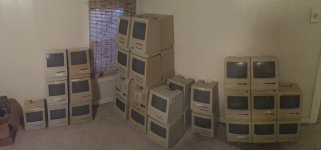
hey unity.all mine are up in the attic.Tried to count them yesterday while I was getting performa and classic's. I have over 30 macs (thought I had way more!)...........Im planning on taking everything down some day and setting them all up in 1 room, connect them all to 1 power supply, roll the camera and hit the power.would be cool.
I have apple ii's, Osborne 1's, oric atmos, commorode 64, spectrum 48k's..............basically all the stuff from my teens
-
is there a way to mail the admin of this forum............I cant find a way to change my online status......always says im offline even when im online!!
-
wonder is it because im in Ireland!
-
second vid is uploaded........processing away..takes another 10-15 min id say
I have apple ii's, Osborne 1's, oric atmos, commorode 64, spectrum 48k's..............basically all the stuff from my teens
-
is there a way to mail the admin of this forum............I cant find a way to change my online status......always says im offline even when im online!!
-
wonder is it because im in Ireland!
-
second vid is uploaded........processing away..takes another 10-15 min id say
I can not see a way to go "online" when logged in, but try this. Log out then log back in making sure are you are not signed in anonymously (not checked).
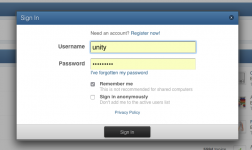
so video 2 you get it working !!???
heres part 2
-
you have to watch it....
-
-
you have to watch it....
-
by the way, there is no "show all content" ANYWHERE on my screen???
I don't know techknight............
-
not only do my vids not show, but I cant past anything into a post. I have to use the replace command in the tool bar to paste links.
-
maybey that's why it happens.
-
I logged out tonight and back in and now I appear as online!.
-
will try paste a link in the following line
nothing appeared for me
-
but ill post it to see
-
not only do my vids not show, but I cant past anything into a post. I have to use the replace command in the tool bar to paste links.
-
maybey that's why it happens.
-
I logged out tonight and back in and now I appear as online!.
-
will try paste a link in the following line
nothing appeared for me
-
but ill post it to see
That "sound" when you power up the hard drive in the first vid, is crap on the head scratching your platter.
no link!!!!!!!!
-
I have no idea why I cant paste links into the posts except for using the replace command. ( I type xxx where I want the link, then I goto replace....it asks for what you want to replace (xxx) then the second box asks 'with what'... that's where I paste the link. That gets the link to appear. Why cant I paste links here??
-
do me a favour............use the replace command above ( its left of the binoculars......and post a link the same way......see if it comes up the same.
-
anyway.......................
-
will have to get onto the site admin and ask him to check my user status
-
I have no idea why I cant paste links into the posts except for using the replace command. ( I type xxx where I want the link, then I goto replace....it asks for what you want to replace (xxx) then the second box asks 'with what'... that's where I paste the link. That gets the link to appear. Why cant I paste links here??
-
do me a favour............use the replace command above ( its left of the binoculars......and post a link the same way......see if it comes up the same.
-
anyway.......................
-
will have to get onto the site admin and ask him to check my user status
Just paste. What he heck are you using for this forum anyway, a tablet or something?
the high frequency sound ? ........I thought the same........as it is not right..........
-
I havnt opened it up yet...but looks like I will have to...........the drive is dieing..........and it was full of software.
-
any suggestions?...........it is either a particle trapped between the head and the platter of a mark on the platter. But even if I open it.....what can I do
-
feck...........chances are that allot of my drives will be the same.
-
I plan on taking down each machine in the next week or so and removing every drive.............all I can do is keep them in a room with a more stable temprature
-
-
I havnt opened it up yet...but looks like I will have to...........the drive is dieing..........and it was full of software.
-
any suggestions?...........it is either a particle trapped between the head and the platter of a mark on the platter. But even if I open it.....what can I do
-
feck...........chances are that allot of my drives will be the same.
-
I plan on taking down each machine in the next week or so and removing every drive.............all I can do is keep them in a room with a more stable temprature
-