
Thread
Sil3112 flashing (SATA)
Protocol7 and I traded quite a few PMs on this one.
Summary:
** There is macbootable Sil3112 firmware. FirmTek SeriTek/1s2 is the card. aka Sonnet Tempo SATA (TSATA). These cards can boot pre-G3 PowerMacs and boot 7.6.1.
See here:
http://www.sonnettech.com/support/kb/kb.php?cat=343&expand=_a2_b37&action=b206#b206
Either need to find a bigger chip to solder onto the card or reduce the size of the firmware or find a card that has a bigger chip already. Protocol tried multiple times to reduce 5.13 it but no luck yet. Not sure if he tried with 5.11 since then though.
(The Silicon Image updates are 128k, Weibetech's are only 64k, but we need the FirmTek one)
** There was an OS9 flasher mentioned in a MacGuru article. It has not been located yet.(hoping that it might come with a smaller fimware file)
Props to Protocol7 for his legwork searching the vast internet and editing the ROMs.
And RIP to the new-in-box 3.5" floppy disk I seem to have killed with all the flashing activity.
Protocol7, if I have missed anything or if you have updates please post it.
To others, if you want to try to reduce a firmware or have a card that can take a full-size FirmTek firmware please let it be known.
Summary:
** There is macbootable Sil3112 firmware. FirmTek SeriTek/1s2 is the card. aka Sonnet Tempo SATA (TSATA). These cards can boot pre-G3 PowerMacs and boot 7.6.1.
See here:
http://www.sonnettech.com/support/kb/kb.php?cat=343&expand=_a2_b37&action=b206#b206
** newest recommended FirmTek firmware (5.13) is 136k. This is too big to fit on any Sil3112 card currently tested and also a crossflashed Sil3512 based card. FirmTek firmware 5.11 is 131k, still too big.
Either need to find a bigger chip to solder onto the card or reduce the size of the firmware or find a card that has a bigger chip already. Protocol tried multiple times to reduce 5.13 it but no luck yet.
Not sure if he tried with 5.11 since then though.(The Silicon Image updates are 128k, Weibetech's are only 64k, but we need the FirmTek one)
** There was an OS9 flasher mentioned in a MacGuru article. It has not been located yet.(hoping that it might come with a smaller fimware file)
Props to Protocol7 for his legwork searching the vast internet and editing the ROMs.
And RIP to the new-in-box 3.5" floppy disk I seem to have killed with all the flashing activity.
Protocol7, if I have missed anything or if you have updates please post it.
To others, if you want to try to reduce a firmware or have a card that can take a full-size FirmTek firmware please let it be known.
There's also a Japanese card that uses the Sil3112 and appears to only have a 512kbit eeprom (64kB firmware file). Finding a firmware from that would be immensely helpful. I can't say with any degree of certainty that the Mac cards are otherwise identical to the PC ones. It'll take a suitable firmware file to find out for sure.
What is the Flash on these cards? Is the flash chip distinct from the main controller chip? If so, is it a tiny little serial flash (eight pin SOIC) or is it a larger parallel flash chip? What are the markings on the cards with too small capacity? On the stock card where it works?
Get me that info and I bet I can find a replacement flash easily enough. That might not be enough to make it work, but it might and if it is a serial flash, those things really aren't that hard to remove and replace.
Get me that info and I bet I can find a replacement flash easily enough. That might not be enough to make it work, but it might and if it is a serial flash, those things really aren't that hard to remove and replace.
I just picked up this card on Ebay for about $9:
http://www.ebay.com/itm/290674393057?ssPageName=STRK:MEWNX:IT&_trksid=p3984.m1497.l2649
I haven't tried any conversions on it yet, but it has its Flash chip in a socket and the capacity of the chip is 4Mbits or 512Kilobytes.
Unless there's some gotcha in the boards wiring, this should be ideal for experimenting. The flash is four times as large as some others, and it's in a socket.
http://www.ebay.com/itm/290674393057?ssPageName=STRK:MEWNX:IT&_trksid=p3984.m1497.l2649
I haven't tried any conversions on it yet, but it has its Flash chip in a socket and the capacity of the chip is 4Mbits or 512Kilobytes.
Unless there's some gotcha in the boards wiring, this should be ideal for experimenting. The flash is four times as large as some others, and it's in a socket.
I bought a few cards as well and couldn't wait to give these a try.
I flashed the SeriTek/1s2 v5.13 firmware to one card using the DOS utility
It returned the 0 code, which means successfull flashing.
I then installed that card in my QuickSilver.
The QS boots* but...
The flashed card is listed as a SCSI controller with the name "Athena_3112" but as you can see below, no driver is loaded.

For comparison, here's how system profiler shows an unflashed card:

*(it won't boot with a flashed Sil3512 variant)
I flashed the SeriTek/1s2 v5.13 firmware to one card using the DOS utility
It returned the 0 code, which means successfull flashing.
I then installed that card in my QuickSilver.
The QS boots* but...
The flashed card is listed as a SCSI controller with the name "Athena_3112" but as you can see below, no driver is loaded.
For comparison, here's how system profiler shows an unflashed card:
*(it won't boot with a flashed Sil3512 variant)
Could someone who has bought the large flash Sil3112 try using the http://www.wiebetech.com/webtech.php?sfid=133&pcode=TC-PCI firmware?
Could you let me know if it works?
Could you let me know if it works?
Wiebtech's flasher refuses to flash that card because of the "unsupported eeprom".
Should be possible to flash wiebtech firmware using UPDFLASH.EXE on a PC, but I don't see the point in trying that.
Any Sil3112 based card theoretically works with this small fimware.
Should be possible to flash wiebtech firmware using UPDFLASH.EXE on a PC, but I don't see the point in trying that.
Any Sil3112 based card theoretically works with this small fimware.
Using a hex editor, I paged through the TSATA firmware file which can be extracted from one of the updaters and it looks like every ninth byte is a blank which needs to be removed. Except the pattern is not that simple.
My guess is that when the updater software writes the firmware file to the TSATA card, it removes the extraneous material from the firmware file during the process. However, simply copying the firmware file to a Flash chip doesn't look like it is going to work.
The firmware needs to be obtained directly from a flash chip on the TSATA card, not from the updating software package.
My guess is that when the updater software writes the firmware file to the TSATA card, it removes the extraneous material from the firmware file during the process. However, simply copying the firmware file to a Flash chip doesn't look like it is going to work.
The firmware needs to be obtained directly from a flash chip on the TSATA card, not from the updating software package.
Just brought a dirt cheap sil3112 card (http://cgi.ebay.co.uk/ws/eBayISAPI.dll?ViewItem&item=180796383734) my plan is to try and put a bigger (2mbit or bigger) chip on the card, my only worry is weather the card will work without a firmware on the chip? since i have no external programmer i need to program it in place (or possibly if the chips are compatible with those on a old dual bios gigabit board i have solder the chip on there and hope the bios flasher on there has no integrity checks)

Bumping this thread because I plan on testing this on my Sil3112 card. I've had this card for ages and am gonna try it in a G4. I googled the flash chip and apparently it has a 1 Mbit capacity.

Google always leads me back here!
I have made a mistake, and I'm trying to fix it.
I downloaded the wiebetech flash utility, which supports my card (supposedly), but it keeps producing a bus error.
Are there any command arguments I can enter which would allow flashing to proceed?
Also, once I flash the card with this firmware, would I be able to reflash properly using the proper (SeriTek) firmware for this card?
c
p.s. I'm sorry for hijacking this thread!
I have made a mistake, and I'm trying to fix it.
I downloaded the wiebetech flash utility, which supports my card (supposedly), but it keeps producing a bus error.
Are there any command arguments I can enter which would allow flashing to proceed?
Also, once I flash the card with this firmware, would I be able to reflash properly using the proper (SeriTek) firmware for this card?
c
p.s. I'm sorry for hijacking this thread!
intresting that it throws a error, never seen the wibie flasher do that
what i would do is replace the firmware file in the webie flasher with the SeriTek firmware, i have done that to flash sil3112 cards with the SeriTek firmware before
if it fails you will just have to try the dos flasher (i personally have never done this, so can't help you there)
what i would do is replace the firmware file in the webie flasher with the SeriTek firmware, i have done that to flash sil3112 cards with the SeriTek firmware before
if it fails you will just have to try the dos flasher (i personally have never done this, so can't help you there)
I figured it out -- Unsupported EEPROM.
Anyway, I guess I'll try taking the firmware from the updater, and use a DOS flasher in a PC to put it on the card.
Does anyone have this very same card (Sonnet Tempo SATA)? If so, perhaps one could kindly "lend" me the firmware (off the forums, of course).
c
Anyway, I guess I'll try taking the firmware from the updater, and use a DOS flasher in a PC to put it on the card.
Does anyone have this very same card (Sonnet Tempo SATA)? If so, perhaps one could kindly "lend" me the firmware (off the forums, of course).
c
I'm pretty sure that the TSATA ROM is munged in some way so that simply lifting a copy and programming a chip with just won't work.
I don't know whether the Sonnet programmer has a little routine built in to decode/demunge the ROM code as it programs the TSATA chip, or whether the Flash on the TSATA actually has some of its pins swapped around in odd ways.
In either case, I'd be surprised if a simple programming job gets it working again.
Ultimately, one of us needs to desolder the flash from a working TSATA card, compare the contents to the resource used from programming the card, and check the connections between the Flash and controller chip on the circuit board to see if it matches reference designs.
I have it on my list, but that list has only gotten longer in the last four years and never shorter.
I don't know whether the Sonnet programmer has a little routine built in to decode/demunge the ROM code as it programs the TSATA chip, or whether the Flash on the TSATA actually has some of its pins swapped around in odd ways.
In either case, I'd be surprised if a simple programming job gets it working again.
Ultimately, one of us needs to desolder the flash from a working TSATA card, compare the contents to the resource used from programming the card, and check the connections between the Flash and controller chip on the circuit board to see if it matches reference designs.
I have it on my list, but that list has only gotten longer in the last four years and never shorter.
I've been trying to help CC_333 with his missing firmware problem.
I see exactly what you're talking about with the weird "every 9 bytes" thing, trag. I can't figure out what's going on either. I've gone so far as to play around with debugging and disassembling the FirmTek 1S2 5.1.3 firmware update utility, but I haven't really gotten anywhere. I've found where it loads the firmware update file into RAM, but I can't find any decoding routine or anything. I was thinking maybe it could be compressed with something like LZSS compression, but I just don't know. Nothing jumps out as obvious. :-(
I found a FirmTek 1S2 card on eBay and bought it. I'll desolder and dump the chip to figure out what is actually flashed to it. This problem has me stumped enough that I have to figure out what's going on for real
I see exactly what you're talking about with the weird "every 9 bytes" thing, trag. I can't figure out what's going on either. I've gone so far as to play around with debugging and disassembling the FirmTek 1S2 5.1.3 firmware update utility, but I haven't really gotten anywhere. I've found where it loads the firmware update file into RAM, but I can't find any decoding routine or anything. I was thinking maybe it could be compressed with something like LZSS compression, but I just don't know. Nothing jumps out as obvious. :-(
I found a FirmTek 1S2 card on eBay and bought it. I'll desolder and dump the chip to figure out what is actually flashed to it. This problem has me stumped enough that I have to figure out what's going on for real
Thank you very much, dougg3!
Your help (and speculation) have been extremely useful, and I learn a lot just reading your posts!
Anyway, since my card's useless to me in its current state, would you like me to send it to you for experimentation?
It seems I have little to lose at this point...
So let me know via PM!
c
Your help (and speculation) have been extremely useful, and I learn a lot just reading your posts!
Anyway, since my card's useless to me in its current state, would you like me to send it to you for experimentation?
It seems I have little to lose at this point...
So let me know via PM!
c
I'd be glad to have you ship it to me to fix (if worse comes to worse I can simply copy the flash contents of a known working card to your card manually with my chip programmer).
Before we go that far though, let's wait until my eBay purchase arrives. I might be able to get the info needed to get you up and running with the Windows flasher tool. (Also see your other thread where I discovered there's an OS 9 version of the update program you might want to try)
Before we go that far though, let's wait until my eBay purchase arrives. I might be able to get the info needed to get you up and running with the Windows flasher tool. (Also see your other thread where I discovered there's an OS 9 version of the update program you might want to try)
Back onto here with my results. Here's the deal.
The FirmTek 5.1.3 updater contains a file called ROMFILE.1S2. It looks like it's compressed or something as trag pointed out. That's because somehow during the boot process, Mac OS X extracts two compressed kexts from it and installs them into /System/Library/Caches/com.apple.romextensions. However, it *is* the firmware file that needs to flashed onto the chip. No weird encodings, weird data line hookups, or anything like that.
The FirmTek updater will only update a card that already has FirmTek firmware on it, because it checks to see if its own driver is associated with the card. The WiebeTech updater can fail because it doesn't support all of the chips that FirmTek used. It may be possible, given a copy of the two kexts, to manually load them when a card has blank firmware and then get the FirmTek updater to work. Initial experimentation with that was successful for me...but you need the kext files first, so it's kind of a catch-22 unless you can figure out how to extract them from the firmware file or get them from someone else.
Silicon Image's DOS-based UPDFLASH.EXE utility seems to do the trick when booted from a FreeDOS boot floppy, but it is notoriously unreliable. I don't trust it. But if you give it enough tries, it should succeed. I had a TON of problems trying to run it direct from Windows 98 DOS mode though. I'd stick with the FreeDOS floppy. I would also make sure to put the firmware into it as a 256 KB file padded with 0xFF bytes at the end to make it a power of two. It appears maybe UPDFLASH won't correctly flash the end of the file otherwise.
Most importantly: the FirmTek firmware checks the ID of the flash chip on the card. It has a whitelist of allowed flash chips. If it's not a PMC Pm39LV040 or a Macronix MX29LV040, it won't load. There may be other possible chips, but I found the IDs of those two for sure, and I know the SST39VF040 is not supported.
The FirmTek 5.1.3 updater contains a file called ROMFILE.1S2. It looks like it's compressed or something as trag pointed out. That's because somehow during the boot process, Mac OS X extracts two compressed kexts from it and installs them into /System/Library/Caches/com.apple.romextensions. However, it *is* the firmware file that needs to flashed onto the chip. No weird encodings, weird data line hookups, or anything like that.
The FirmTek updater will only update a card that already has FirmTek firmware on it, because it checks to see if its own driver is associated with the card. The WiebeTech updater can fail because it doesn't support all of the chips that FirmTek used. It may be possible, given a copy of the two kexts, to manually load them when a card has blank firmware and then get the FirmTek updater to work. Initial experimentation with that was successful for me...but you need the kext files first, so it's kind of a catch-22 unless you can figure out how to extract them from the firmware file or get them from someone else.
Silicon Image's DOS-based UPDFLASH.EXE utility seems to do the trick when booted from a FreeDOS boot floppy, but it is notoriously unreliable. I don't trust it. But if you give it enough tries, it should succeed. I had a TON of problems trying to run it direct from Windows 98 DOS mode though. I'd stick with the FreeDOS floppy. I would also make sure to put the firmware into it as a 256 KB file padded with 0xFF bytes at the end to make it a power of two. It appears maybe UPDFLASH won't correctly flash the end of the file otherwise.
Most importantly: the FirmTek firmware checks the ID of the flash chip on the card. It has a whitelist of allowed flash chips. If it's not a PMC Pm39LV040 or a Macronix MX29LV040, it won't load. There may be other possible chips, but I found the IDs of those two for sure, and I know the SST39VF040 is not supported.
It might work if the partial flash was the ROMFILE.1S2 file...
Check your PMs, I'll set you up with the kexts in a minute.
P.S. in case anyone is interested it looks like the Am29LV040B is also supported by the firmware.
Edit: This project looks interesting too...it claims to support the Sil3112:
http://flashrom.org/Flashrom
Check your PMs, I'll set you up with the kexts in a minute.
P.S. in case anyone is interested it looks like the Am29LV040B is also supported by the firmware.
Edit: This project looks interesting too...it claims to support the Sil3112:
http://flashrom.org/Flashrom
Well, one last thing to share. I got some MX29LV040 chips and can confirm they work with the FirmTek firmware too, but since those chips are not compatible with the WiebeTech flasher you will need to use the DOS flasher and a FreeDOS boot disk to put the initial flash image onto them.
So again, for clarity: if you want to use the FirmTek firmware, you need one of these three chips that I know of:
The only one I can find readily available is the MX29LV040 which also happens to be the one not compatible with the WiebeTech flasher :-( Maybe my next task will be to figure out how to patch the WiebeTech flasher (if possible) to make it compatible with that chip. Dunno.
So again, for clarity: if you want to use the FirmTek firmware, you need one of these three chips that I know of:
- Pm39LV040
- MX29LV040
- Am29LV040B
The only one I can find readily available is the MX29LV040 which also happens to be the one not compatible with the WiebeTech flasher :-( Maybe my next task will be to figure out how to patch the WiebeTech flasher (if possible) to make it compatible with that chip. Dunno.
Hi,
I know this is a Sil3112 oriented thread, but what about the Sil3114?
The process should theoretically be identical, but I don't know what card to get.
Also, I was looking at FirmTek's offering[/i], but I can't figure out what chipset it uses. I do know that it probably uses either the Sil3114 or Sil3514, though I'm not totally sure what the differences are between the two are.
Thoughts?
c
p.s. Perhaps we should create a "Flashing Generic PCI SATA Cards For Macintosh" thread where we can collect all this information?
I know this is a Sil3112 oriented thread, but what about the Sil3114?
The process should theoretically be identical, but I don't know what card to get.
Also, I was looking at FirmTek's offering[/i], but I can't figure out what chipset it uses. I do know that it probably uses either the Sil3114 or Sil3514, though I'm not totally sure what the differences are between the two are.
Thoughts?
c
p.s. Perhaps we should create a "Flashing Generic PCI SATA Cards For Macintosh" thread where we can collect all this information?
Pretty sure the seritek 1v4 is based on the Vitesse VSC-7174. It is supposedly OS 9 and /possibly/ lower compatible but do not hold me to that.
And there is some other OS X-only card that I think was seritek 2se4 based on the SIL3124.
The reason I started different threads in the first place 3112/3512/0680/etc is because each chipset is going to have different stuff going on. Once everything is established and worked through then a single mega-thread should be made; until then mixing the chipsets might cause problems with people getting conversations mixed up.
As far as I remember I am not currently aware of a Mac compatible Sil3114 card.
And there is some other OS X-only card that I think was seritek 2se4 based on the SIL3124.
The reason I started different threads in the first place 3112/3512/0680/etc is because each chipset is going to have different stuff going on. Once everything is established and worked through then a single mega-thread should be made; until then mixing the chipsets might cause problems with people getting conversations mixed up.
As far as I remember I am not currently aware of a Mac compatible Sil3114 card.
Would it be difficult to modify the firmware to support other flash chips? just i'm having a huge amount of trouble finding a uk stockist of supported chips, the closest i found was a chip with a part number close to the Am29LV040B one, but it is Am29F040B so i guess it is no good.
if not i will just have to order some in from the US or China...
Edit, found one stockist on ebay, but £9 a chip... vs £1.50 form the US or china
if not i will just have to order some in from the US or China...
Edit, found one stockist on ebay, but £9 a chip... vs £1.50 form the US or china
ok, i have a question, you say the Am29F040B won't work as it is a 5v chip (which i don't for one second dispute on the seritek cards) but i just cheacked the original chip off my PC sil3112 card, and it is a Am29F010 which is a 5v chip
So would the Am29F040B work as i actually need a 5v chip and not a 3.3v one?
So would the Am29F040B work as i actually need a 5v chip and not a 3.3v one?
Hmm, that's an interesting discovery! If the original flash chip was a 5V chip I have no idea how it even worked. I guess it's possible that they added level shifting between the 5V flash chip and the 3.3V Sil3112 chip, but I find that unlikely...I would think it would be far easier for them to just use a 3.3V chip. If you want to check what the card wants for sure, I would put the card into a system, power it on, and measure the voltage on the VCC pin of the flash chip (pin 32, the one just to the right of the dot marking pin 1).
damn....
anyway, measured the voltage, and it's deffinatley 5v.
Edit, looking at the card, the traces from the flash chip seem to run straight to the sil chip, so it could just be as simple as the 5v varient of the chip will still work fine when the data lines are run at 3.3, and the solution for the PC cards would be to just use the 3.3v chip and put a regulator on the vcc pin of the flash chip
anyway, measured the voltage, and it's deffinatley 5v.
Edit, looking at the card, the traces from the flash chip seem to run straight to the sil chip, so it could just be as simple as the 5v varient of the chip will still work fine when the data lines are run at 3.3, and the solution for the PC cards would be to just use the 3.3v chip and put a regulator on the vcc pin of the flash chip
Uh oh. This may be a bigger stumbling block then. I can't find any 5V chips with equivalent chip IDs. Too weird! I wonder why they set it up to use a 5V chip. I wonder if the data and address pins are level shifted or just directly connected to the Sil3112 chip at 5V anyway. The pins might be 5V tolerant, but I don't know how good of an idea it is to only supply the flash chip pins with 3.3V when they're expecting 5V, especially when the chip is being programmed.
I would check to see if the flash chip's data and address pins go directly to pins on the Sil3112 (they do on my 3.3V card) or if they go through level shifting first. If they all go directly to the Sil3112 chip, it *might* be possible to hack your card to feed the flash chip a 3.3V supply instead of 5V by cutting traces and running wire. If they go through level shifting, it's probably still possible but a huge pain.
Firmware modification is starting to sound easier than all that though, lol...maybe if someone who's really experienced with Open Firmware stuff wants to do it, they might be able to patch the firmware. I suppose you could patch the kext and load it manually after startup, but that wouldn't make any attached drives bootable I think.
Edit: Oh, you're one step ahead of me! Yeah, if that's the case, the easiest thing to do would be to hack the card so that 3.3V goes into any pins that previously were hooked to 5V.
I would check to see if the flash chip's data and address pins go directly to pins on the Sil3112 (they do on my 3.3V card) or if they go through level shifting first. If they all go directly to the Sil3112 chip, it *might* be possible to hack your card to feed the flash chip a 3.3V supply instead of 5V by cutting traces and running wire. If they go through level shifting, it's probably still possible but a huge pain.
Firmware modification is starting to sound easier than all that though, lol...maybe if someone who's really experienced with Open Firmware stuff wants to do it, they might be able to patch the firmware. I suppose you could patch the kext and load it manually after startup, but that wouldn't make any attached drives bootable I think.
Edit: Oh, you're one step ahead of me! Yeah, if that's the case, the easiest thing to do would be to hack the card so that 3.3V goes into any pins that previously were hooked to 5V.
Good call! I would also check to make sure there aren't any other pins that are also hooked directly to 5V. Also if you hack the card, I would recommend doing it in a way such that the bypass capacitor near the 5V pin is now connected to 3.3V as well, that way you still get the benefits of that capacitor. If that's not possible I'd add another bypass capacitor for the new 3.3V supply near the chip's VCC pin.
Yep, seems there is no funny business going on between the flash chip and the sil chip, and there is a nice 3.3v regulator right below the flash chip for me to pull 3.3v from, just gotta track the 5v trace to a sutible point so i can switch it to 3.3v
found a ebay seller in france with the chips, still a little steep at £6 but not too bad for a one off buy, and it shouldn't take too long to get here
found a ebay seller in france with the chips, still a little steep at £6 but not too bad for a one off buy, and it shouldn't take too long to get here
well if yours are the same as mine there is a 3v3 regulator right under the flash chip which is the perfect place to pull 3v3 for the chip, let me know how it goes with the card 
still waiting for the damn flash chip, if it's not here tomorrow i think i'm gonna file a ebay case for a refund, can't see why it's taking so damn long...
still waiting for the damn flash chip, if it's not here tomorrow i think i'm gonna file a ebay case for a refund, can't see why it's taking so damn long...
Yep, I think it's the exact same one because there is a 3.3V regulator below the chip on mine too. Although I haven't completely verified that all the pins go directly to the Sil3112, it looks like they do and you said the same, so I'll probably just hack a board and try it out.
I do have to admit, R25 and R24 look suspiciously like supply voltage selection pads for the flash chip...I'm going to investigate them further. I'm wondering if maybe R25 populated with a 0-ohm resistor (as it is now) gives 5V, and R24 might give 3.3V. I'm going to trace it out later when I have some time, and I might be completely full of it, but it's an interesting thought anyway...
I do have to admit, R25 and R24 look suspiciously like supply voltage selection pads for the flash chip...I'm going to investigate them further. I'm wondering if maybe R25 populated with a 0-ohm resistor (as it is now) gives 5V, and R24 might give 3.3V. I'm going to trace it out later when I have some time, and I might be completely full of it, but it's an interesting thought anyway...
Yeah, I'm pretty sure that's what it's for. I can see the trace on the board (depicted in blue below) and verify it with my multimeter. It goes to R24, R25, the decoupling cap, and the the VCC pin of the flash chip. I don't know for sure if that's ALL it goes to, but it seems very likely. Here's a diagram I made of what's going on in that section of the board:

R25 supplies 5V and R24 supplies 3.3V. So you populate one of those two with a 0-ohm resistor (or a solder blob), leave the other unpopulated, and that brings the desired voltage to the flash chip. So for 3.3V flash compatibility I'm pretty sure all you have to do is move the 0 ohm resistor over to the 3.3V side (R24) instead of the 5V side (R25). I won't know for sure until I remove the 0 ohm resistor to make sure that completely isolates it from 5V, but that has to be what it's for.
R25 supplies 5V and R24 supplies 3.3V. So you populate one of those two with a 0-ohm resistor (or a solder blob), leave the other unpopulated, and that brings the desired voltage to the flash chip. So for 3.3V flash compatibility I'm pretty sure all you have to do is move the 0 ohm resistor over to the 3.3V side (R24) instead of the 5V side (R25). I won't know for sure until I remove the 0 ohm resistor to make sure that completely isolates it from 5V, but that has to be what it's for.
All right, here are my results (it works!).
I reconfigured the board for 3.3V flash instead of 5V by moving the 0 ohm resistor as described above (well, actually, I lost the resistor so I just used a solder blob). That *has* to be the purpose of those. After removing the resistor, the flash VCC pin was no longer connected to any supply voltage. So yes, at least my board can be configured for a 5V or 3.3V flash chip through those.
I changed out the included AM29F010 chip with an MX29LV040, and checked with the DOS flasher, it was definitely recognized and looks like all address pins are hooked up correctly. The chip I used already had the ROMFILE.1S2 contents flashed to it from my previous experiments. So I stuck it in my G3 Blue and White and it was recognized just like the original SeriTek card is recognized -- good sign!
Finally I shut down, hooked up a SATA drive (contains some Linux partitions) and booted the Mac again. It gave me a warning about the disk not being recognized (obviously, because Macs can't mount Linux partitions). I went into Disk Utility and sure enough, the disk was there! So I installed MacFUSE and fuse-ext2 for Linux disk support, rebooted, and the disk showed up and I can browse the contents! I haven't tested booting from it, but reading from the drive appears to work just fine.
So yes, the cheapo Sil3112 cards (well, the ones I have anyway) are compatible as long as they use a supported flash chip and you make sure they are configured to give 3.3V to the flash chip. Preliminary results look good anyway!
I reconfigured the board for 3.3V flash instead of 5V by moving the 0 ohm resistor as described above (well, actually, I lost the resistor so I just used a solder blob). That *has* to be the purpose of those. After removing the resistor, the flash VCC pin was no longer connected to any supply voltage. So yes, at least my board can be configured for a 5V or 3.3V flash chip through those.
I changed out the included AM29F010 chip with an MX29LV040, and checked with the DOS flasher, it was definitely recognized and looks like all address pins are hooked up correctly. The chip I used already had the ROMFILE.1S2 contents flashed to it from my previous experiments. So I stuck it in my G3 Blue and White and it was recognized just like the original SeriTek card is recognized -- good sign!
Finally I shut down, hooked up a SATA drive (contains some Linux partitions) and booted the Mac again. It gave me a warning about the disk not being recognized (obviously, because Macs can't mount Linux partitions). I went into Disk Utility and sure enough, the disk was there! So I installed MacFUSE and fuse-ext2 for Linux disk support, rebooted, and the disk showed up and I can browse the contents! I haven't tested booting from it, but reading from the drive appears to work just fine.
So yes, the cheapo Sil3112 cards (well, the ones I have anyway) are compatible as long as they use a supported flash chip and you make sure they are configured to give 3.3V to the flash chip. Preliminary results look good anyway!
Thanks max1zzz! And good luck getting your cards working! If you have the same card it should be a piece of cake. The hardest part was getting the old flash chip off. I hate removing PLCCs, and I hate using Chip-Quik. So I cut the leads off of two of the four sides, and then just heated up the other two sides with my iron alternating back and forth until the chip slid off. I bet a hot air station would make it a lot easier
Sadly, I don't think there's enough room to add a PLCC socket...
Sadly, I don't think there's enough room to add a PLCC socket...
Yeah I use hot air, and it's a piece of cake, 260C for 30 seconds and it just slides off the only thing with hot air is you have to be a little carefull of the caps, one of the 47uf cans on my card is looking a little battered, gonna replace that once I get my new flash chip.
the only thing with hot air is you have to be a little carefull of the caps, one of the 47uf cans on my card is looking a little battered, gonna replace that once I get my new flash chip.Nice! I definitely need to get one of those hot air things. And yes, those electrolytic caps are located in annoying places. I may have melted some of them a little bit. I just converted three more cards, and I figured I'd show off the result with all three of them plugged in:

ohh nice! just wish those damn chips where easier to find in the UK
You tried booting any of the cards yet?
Also, if you leave the computer powered up dose it run ok? my pc card with the webietech fw my B/W was always crashing...
EDIT: is the speed of the chip important? i can get the 120ns varient of the AM29LV040B for £3 from israel, which has pretty good shipping times to the uk in my experiance
You tried booting any of the cards yet?
Also, if you leave the computer powered up dose it run ok? my pc card with the webietech fw my B/W was always crashing...
EDIT: is the speed of the chip important? i can get the 120ns varient of the AM29LV040B for £3 from israel, which has pretty good shipping times to the uk in my experiance
I haven't tried booting yet because I don't have a spare SATA drive to play with. I haven't left the computer on for long periods of time but I haven't seen any kind of a crash yet...also since the PCB is different we can't be certain that everything will be fully compatible, but it seems OK so far.
The Sil3112 seems to be configurable for 120 ns or 240 ns flash chips according to its datasheet. I'd say 120 ns is safe to use...
The Sil3112 seems to be configurable for 120 ns or 240 ns flash chips according to its datasheet. I'd say 120 ns is safe to use...
ok, the chip actually arrived, did the 3.3v mod and swapped the chip
took several attempts but finally got dosflash to report code 0.
the card seems to be reporting it's self just like yours do.
however when i plugged a drive in i got nothing.... went to reboot and the b/w g3 has decided to start not booting again. hopefully it is just a bad sata cable (had this when testing cards before)
Edit: replaced the sata cable and it seems to be working cloneing my boot disk to it now... then we will see if it's bootable
took several attempts but finally got dosflash to report code 0.
the card seems to be reporting it's self just like yours do.
however when i plugged a drive in i got nothing.... went to reboot and the b/w g3 has decided to start not booting again. hopefully it is just a bad sata cable (had this when testing cards before)
Edit: replaced the sata cable and it seems to be working
cloneing my boot disk to it now... then we will see if it's bootableAnd i can confirm, the converted cards are bootable cloned my boot drive and booted right up from the card
might go stick this card into my 8600 and see if it works under os 8 or 9....
though, i am getting some compatibility problems, my B/W G3 keeps kping wth it in, and my 2001 QS just won't boot with it (though that is to do with the card, not the firmware did the same thing with the pc fw)
Edit, i can also confirm the card works under mac os 9, however it dosen't appear to be bootable under mac os 9
cloned my boot drive and booted right up from the cardmight go stick this card into my 8600 and see if it works under os 8 or 9....
though, i am getting some compatibility problems, my B/W G3 keeps kping wth it in, and my 2001 QS just won't boot with it (though that is to do with the card, not the firmware did the same thing with the pc fw)
Edit, i can also confirm the card works under mac os 9, however it dosen't appear to be bootable under mac os 9
Just to be clear...
It's not just the Firmtek updater which checks for a supported flash chip, but the actual firmware on the card checks for a supported flash chip and will not load itself during the boot process if the flash chip is not supported?
Is that correct?
It's not just the Firmtek updater which checks for a supported flash chip, but the actual firmware on the card checks for a supported flash chip and will not load itself during the boot process if the flash chip is not supported?
Is that correct?
Excellent, good work! Hmm, interesting that your B/W G3 is kernel panicing. I'll have to extensively test it with the card to see if I can make it happen...And i can confirm, the converted cards are bootable
Pretty much. Actually, as best as i can tell, the FirmTek updater doesn't check for a supported flash chip at all, it only checks for whether the flash chip already has FirmTek firmware on it.
The firmware extracts a couple of kexts into OS X, and one of the kexts checks for supported flash chips during the OS X boot process and fails to load if the board doesn't have a supported flash chip. (In fact, on a newer revision of the firmware that they don't have available on the website for download, it causes a kernel panic...)
Yes, there are two kexts that extract themselfs from the card at boot, if the flash I'd dosen't match it will stop them loading, this giving you a non working card
Dougg3 tried patching and manually loading these kexts, which gave him a working card with a 'unsupported' flash chip, but this gives you a non bootable card
Edit: Seems dougg3 beat me to it...
Edit2: I am wondering if the problems are more to do with my g3 than the card, it seems extremely picky about booting and staying stable. I tested it with a spare 2.5" SATA drive and it worked fine and was perfectly stable, but with a couple of 3.5 wd's it vary's from failing to get past the apple logo, to freezing to random kp's
With the sawtooth it is stable with whatever drive I seem to give it
Dougg3 tried patching and manually loading these kexts, which gave him a working card with a 'unsupported' flash chip, but this gives you a non bootable card
Edit: Seems dougg3 beat me to it...
Edit2: I am wondering if the problems are more to do with my g3 than the card, it seems extremely picky about booting and staying stable. I tested it with a spare 2.5" SATA drive and it worked fine and was perfectly stable, but with a couple of 3.5 wd's it vary's from failing to get past the apple logo, to freezing to random kp's
With the sawtooth it is stable with whatever drive I seem to give it
i'm beginning to think the problem is actually the ATA bus in my g3, after all i have a rev 1 logicboard, it seems the crashes mostly happen when copying data from the internal hdd to the sata one, copying no data, or installing from cd it seems to be fairly stable


Thanks to your discussion with Doug, it's a flashed one.
I bought a few of those cards with a 512KB chip last year when somebody told us about in this topic.
I had to use the UPDFLASH.EXE dos flasher to feed them with Firmtek's ROMFILE.1S2.

The red one is a genuine Ratoc (= Firmtek), the green one is the flashed one.
Here's the chip:

I bought a few of those cards with a 512KB chip last year when somebody told us about in this topic.
I had to use the UPDFLASH.EXE dos flasher to feed them with Firmtek's ROMFILE.1S2.

The red one is a genuine Ratoc (= Firmtek), the green one is the flashed one.
Here's the chip:

Glad to hear you got it working Renegade So what did you have to do differently if it came with the correct flash chip already? You said in your original post that you flashed the SeriTek firmware to it with the DOS utility but it wasn't recognized correctly. Just curious.
max1zzz, glad to hear you have it working on your Sawtooth now, so why wasn't it working before?
So what did you have to do differently if it came with the correct flash chip already? You said in your original post that you flashed the SeriTek firmware to it with the DOS utility but it wasn't recognized correctly. Just curious.max1zzz, glad to hear you have it working on your Sawtooth now, so why wasn't it working before?
Thank you Doug.Glad to hear you got it working Renegade
I don't understand why it failed last year... Could have been a problem with my Quicksilver, or with the PC mobo I used for flashing. :lol:
not entirely sure why it didn't work, the drive i installed os 9 onto didn't boot in the sawtooth either, so i copied the system folder to a different drive and it booted just fine.
Also wondering, anyone have any idea why my quicksilver won't boot with the card insalled? it chimes but gives no video and no disk activity, works with a flashed sil3512, but there not bootable
Also wondering, anyone have any idea why my quicksilver won't boot with the card insalled? it chimes but gives no video and no disk activity, works with a flashed sil3512, but there not bootable
Doh! Goes in the "Always try it yourself" file. I'm the one who suggested those cards, then after Renegade's posting where it didn't work, I put it aside and didn't try it myself, figuring it would take more effort.
I have a chip programmer. I could have lifted the socketed chip and installed the firmware and had a working card all this time. Possibly in time to purchase more of those nice socketed boards with the 4 Mb chips already installed. Just so I'm clear, I do not blame Renegade at all. He reported his experience. I just should have tried it myself.
Still, it's nice to have the explicitly explored information that Doug has generated. Now we know what will and won't work and why.
Low probability of success, but I PM'd the seller on Ebay to ask if they would or could offer any more of that card. I mentioned that the socket AM29LV040 chip makes them versatile and there's a group of us on a forum who are interested in more of them.
The good news is that I received a response already. The bad news is that this, in total, was the response:
"no"
The good news is that I received a response already. The bad news is that this, in total, was the response:
"no"
Maybe some people here could manufacture a few, i would be more than happy to make some mac os compatible cards, however i don't know how practical shipping them to places like the US would be
On another note, my g3 is much more stable running off just the sata card
On another note, my g3 is much more stable running off just the sata card
I would actually draw the line at selling them. I mean, if you want to toss the compatible EEPROM on a generic card and resell it with a PC firmware, fine. but selling these flashed with mac compatible fimware feels wrong. Same goes for GFX cards. If someone flashes it themselves then okay, but there are a couple people making a business out of flashing and then selling with an incredibly marked up price claiming they are some sort of god and that is not cool imho. :disapprove:
Fully agreed about not selling these with Mac firmware. The firmware is copyrighted, and it's not like it's a dead product--Sonnet still sells the actual card for $80. I'm with MacJunky, I think the limit would be soldering a new chip to the PC card and selling it with PC firmware on it.
Fair point, I didn't cosider the copywrite aspect, bad idea to sell them with the mac firmware then.
Anyway i'm gonna order a few more, interested to see if these work in my Xserve G4 (which can be very picky when it comes to pic cards)
Hmm... Seems 10.4.11 breaks boot ability of my G3, gets to the gray screen then gives the no access sign (still waiting for rot device...).Was booting fine with 10.4.6
Edit: still boots fine in safe mode
Anyway i'm gonna order a few more, interested to see if these work in my Xserve G4 (which can be very picky when it comes to pic cards)
Hmm... Seems 10.4.11 breaks boot ability of my G3, gets to the gray screen then gives the no access sign (still waiting for rot device...).Was booting fine with 10.4.6
Edit: still boots fine in safe mode
Yep, that got it
EDIT: seems I was jumping ahead of myself saying the crashes where down to the card, just found the last stick of ram was bad (oddly it passes memory tests, but fails in the real world). Noticed it would crash when it got down to the last 10mb of free ram
EDIT: seems I was jumping ahead of myself saying the crashes where down to the card, just found the last stick of ram was bad (oddly it passes memory tests, but fails in the real world). Noticed it would crash when it got down to the last 10mb of free ram
It was actually bad,
Yesterday i was haveing some boot troubles after a clean install of osx (no chime, nothing onscreen) i tried reseating the ram and ended up putting the first stick into the last slot, and that caused it to boot.
booted into single user and ran a 5 pass mem test, every test compleated just fine, so i thought no more of it
then it started crashing again, no kp's but just hard lockups whenever i got down to about 10mb free ram. so i pulled the last stick out and it booted just fine, no lockups.
At least it is just a 64Mb stick would have been gutted if it was one of my few 512mb sticks
Yesterday i was haveing some boot troubles after a clean install of osx (no chime, nothing onscreen) i tried reseating the ram and ended up putting the first stick into the last slot, and that caused it to boot.
booted into single user and ran a 5 pass mem test, every test compleated just fine, so i thought no more of it
then it started crashing again, no kp's but just hard lockups whenever i got down to about 10mb free ram. so i pulled the last stick out and it booted just fine, no lockups.
At least it is just a 64Mb stick
would have been gutted if it was one of my few 512mb sticks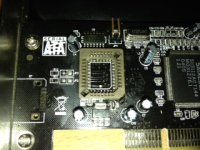
Sorry to bump an old thread, but I thought I'd share my experience flashing one of these cards.
I picked a fairly cheap SIL3112 card up off eBay for about £10 (http://www.ebay.co.uk/itm/400502065376). I could have spent less had I bought it directly from China, but I wanted it quickly. The flash-ROM chip on the card is 128k.
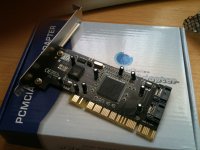
I used the WiebeTech 3112 PCI firmware to flash the card with, although I had to get it from the Internet Archive as the download is no longer listed on WiebeTech's site. (http://web.archive.org/web/20081205192504/http://www.wiebetech.com/download.php?id=120) The next hurdle I ran into was that the included firmware flashing utility didn't want to work for me. Instead, I used a hex editor to join the two 64k ROM images into one large 128k image. Having done this, I used the UPDFLASH.EXE utility on a DOS boot floppy and an old PC to flash the card with the new firmware.
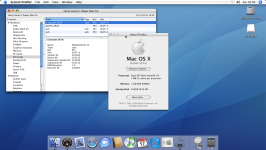
Once this was done, I tried it out in my FW800 G4 and it had worked perfectly, and I was able to boot from a SATA drive connected to the card:
The whole process was far simpler than I had imagined it might be - I didn't even have to turn on the soldering iron once!
I picked a fairly cheap SIL3112 card up off eBay for about £10 (http://www.ebay.co.uk/itm/400502065376). I could have spent less had I bought it directly from China, but I wanted it quickly. The flash-ROM chip on the card is 128k.
I used the WiebeTech 3112 PCI firmware to flash the card with, although I had to get it from the Internet Archive as the download is no longer listed on WiebeTech's site. (http://web.archive.org/web/20081205192504/http://www.wiebetech.com/download.php?id=120) The next hurdle I ran into was that the included firmware flashing utility didn't want to work for me. Instead, I used a hex editor to join the two 64k ROM images into one large 128k image. Having done this, I used the UPDFLASH.EXE utility on a DOS boot floppy and an old PC to flash the card with the new firmware.
Once this was done, I tried it out in my FW800 G4 and it had worked perfectly, and I was able to boot from a SATA drive connected to the card:
The whole process was far simpler than I had imagined it might be - I didn't even have to turn on the soldering iron once!
intresting....
You shouldn't need to join the two files, as one is the pc firmware and one is the mac one, just pad out the mac image
oh, and i don't know if this would work for you, but i found getting the webie flasher to write a blank 128k file and then haveing it write a padded out mac firmware got it to work (nothing else would get it to work)
You shouldn't need to join the two files, as one is the pc firmware and one is the mac one, just pad out the mac image
oh, and i don't know if this would work for you, but i found getting the webie flasher to write a blank 128k file and then haveing it write a padded out mac firmware got it to work (nothing else would get it to work)
Padding out the Wiebe firmware should be enough. If you look at the end of it in a hex editor you can see that it's already been padded out to 64k. Just add another 64k of Fs to it until the firmware is 128k (131072 bytes) in size and then flash with updflash from a DOS bootdisk.
I inserted the padding before the last line. I'm not exactly sure what that string at the end is for but all the SATA roms have the same value, regardless of the version. The RAID one I checked has two bytes changed so perhaps it's related to the device ID.
If only we could get a firmware from the Mathey MSATA-P02MAC. That supports OS9 booting and the eeprom is only 512k so it'll easily fit on most 3112s.
I inserted the padding before the last line. I'm not exactly sure what that string at the end is for but all the SATA roms have the same value, regardless of the version. The RAID one I checked has two bytes changed so perhaps it's related to the device ID.
If only we could get a firmware from the Mathey MSATA-P02MAC. That supports OS9 booting and the eeprom is only 512k so it'll easily fit on most 3112s.
The last 16 bytes of the flash chip contain some configuration values for the Sil3112 according to the Sil3112 datasheet. It sets stuff like the PCI ID and some register options in the chip. It reads backwards from the end of the chip looking for these bytes (very last byte first, then second to last byte, and so on...):
Code:
0xAA (data signature)
0x55 (data signature)
flash speed (0xAA = 120 ns, otherwise 240 ns)
0x55 (data signature)
PCI device ID bits 23:16
PCI device ID bits 31:24
PCI class code bits 15:8
PCI class code bits 23:16
PCI sub-system vendor ID bits 7:0
PCI sub-system vendor ID bits 15:8
PCI sub-system ID bits 23:16
PCI sub-system ID bits 31:24
SATA PHY config bits 7:0 (default: 0xF1)
SATA PHY config bits 15:8 (default: 0x80)
SATA PHY config bits 23:16 (default: 0x00)
SATA PHY config bits 31:24 (default: 0x00)