

Thread
400Mhz Pismo
Bit more expensive than I thought, but considering the local conquest I would have gotten, someone didn't know what they had when they posted it:
400Mhz G3/1MB L2/100Mhz FSB!
14.1" LCD
8MB VRAM (Yay!
6GB HDD
64MB RAM (could be more, the guy read the specs off the apple's site possibly)
DVD-ROM
Working battery (not sure how good), good physical condition, Power Adapter
I have an Airport wifi card already waiting for it. was going to throw it into my Power Mac G4 MDD, but it will go in this instead.
So yeah, the 100Mhz FSB gave it away. It was
$60 USD Shipped.
Just to be safe, I picked up a 512MB Low-Density PC-133Mhz RAM Module (guaranteed to work!) for $19.28 Shipped.
Can't wait. It was a bit more expensive, but I was looking at a lowly Clamshell BlueBerry 300Mhz for $50, and I think this will be a better use. Before anyone asks, this will be an OS 9 Only machine
Maybe at max 10.3, but that's pushing it. I can't wait for it to arrive
firewire, Wifi, USB, DVD, etc... I will probably pull the DVD-ROM drive and throw a slot-load SuperDrive in it instead so I have DVD burning. I have a spare ATAPI one from a MacBook 2006 somewhere around my house.
I am stoked!
btw, the last time I had a Pismo was back in 2003, and it broke the trackpad connector when I took it apart after spilling coffee into it for the 4th time (those #&@#ers are TOUGH!!!)
400Mhz G3/1MB L2/100Mhz FSB!
14.1" LCD
8MB VRAM (Yay!
6GB HDD
64MB RAM (could be more, the guy read the specs off the apple's site possibly)
DVD-ROM
Working battery (not sure how good), good physical condition, Power Adapter
I have an Airport wifi card already waiting for it. was going to throw it into my Power Mac G4 MDD, but it will go in this instead.
So yeah, the 100Mhz FSB gave it away. It was
$60 USD Shipped.
Just to be safe, I picked up a 512MB Low-Density PC-133Mhz RAM Module (guaranteed to work!) for $19.28 Shipped.
Can't wait. It was a bit more expensive, but I was looking at a lowly Clamshell BlueBerry 300Mhz for $50, and I think this will be a better use. Before anyone asks, this will be an OS 9 Only machine
Maybe at max 10.3, but that's pushing it. I can't wait for it to arrive
firewire, Wifi, USB, DVD, etc... I will probably pull the DVD-ROM drive and throw a slot-load SuperDrive in it instead so I have DVD burning. I have a spare ATAPI one from a MacBook 2006 somewhere around my house.
I am stoked!
btw, the last time I had a Pismo was back in 2003, and it broke the trackpad connector when I took it apart after spilling coffee into it for the 4th time (those #&@#ers are TOUGH!!!)
Even better idea. I just bought a LIF -> 44-pin IDE adapter. It will allow me to hook up my Transcend 16GB SSD LIF Drive (16GB SolidState) to the PowerBook.. Will give me ~ 15.37GB of usable space (formatted), super-fast speed (over 30MB/s sustained/Random) on the HDD bus. It will run very nicely.
i recently pulled it from my Netbook after upgrading the HP Mini NetBook (1030nr for those wondering [such as Trash80]) to a 30GB LIF 1.8" HDD. This little SSD will work very nicely in the Pismo. It cost $4.39 shipped from Hong Kong and I can wait for it to arrive by putting a spare 20GB HDD in the pismo in the meantime.
My mouth is drooling with what I can do with this!
i recently pulled it from my Netbook after upgrading the HP Mini NetBook (1030nr for those wondering [such as Trash80]) to a 30GB LIF 1.8" HDD. This little SSD will work very nicely in the Pismo. It cost $4.39 shipped from Hong Kong and I can wait for it to arrive by putting a spare 20GB HDD in the pismo in the meantime.
My mouth is drooling with what I can do with this!
 I'm not sure what the Spec are on my Pismo, but the guy who craigslisted it had hacked some kind of CD/DVD RW drive into it along with the software so it'll just stat playing a DVD Movie whenever I pop one in.
It had a WiFi card faster than any airport card that'd work inside the thing and it came bundled with a PDQ and a Bondi Toilet Seat for $150!
How do you like the 1030nr and what are you putting inside to replace the SSD?
The 1030nr is actually the second one I have owned. I bought one a few years ago, the Linux version, and I ended up selling it. My friend (which is disabled) bought one for school, but when he stopped going to school, I ended up buying it off of him and gave it to my dad. He used it for a year before I got it back when he bought a Dell Zino HD off me (net top) and I got it back. I then hit eBay and bought a 1.8" 4200RPM 30GB LIF/ZIF HDD that they used in the early iPods. Trash80, if you do the mod, you can use ANY hard drive that uses the LIF/ZIF 1.8" factor, keep in mind you might need the cable for it (Hitachi uses a different cable than the Toshiba) and you will need to take out that small USB port they shipped the 2GB Mini Flash drive in. You will also have to take out some other stuff including a plate, but once it's in, it runs like a top. it's faster than the SSD (mainly as the SSD is a Class 5 Flash drive, aka USB 2.0 Flash drive chips on a board with an IDE controller on it) so you would see an improvement. You can put all the way up to 250GB (I think it's the current highest sized 1.8" HDD) and it would give you a huge advantage.
I have run a variety of systems on it from Linux to windows. I prefer windows because I do NetFlix and Sliverlight doesn't work on Linux with NetFlix (the clone gets seen right through and netflix refuses to work).
Trash80, I dunno if you got the windows or linux version, but if you want instructions and help to do the mod, let me know and I will send you pictures of the inside (heck, I will post them here) and you can see what it looks like installed. It is very nice and the biggest advantage is the size. the 16GB SSD is small and my iTunes library takes up 14GB itself (no video) so it does help a lot.
I saw my time to load windows shorten by 3/4ths due to how long it takes for the SSD to initialize. the hard drive immediately initializes and did I mention it uses LESS[/b ] power than the SSD? yes, the SSD uses 500ma@ 5V and the LIF HDD uses 320ma@ 5v. Weird huh? yeah, well the hard drive gives me close to an hour of extra time. the advanced sleep states of the hard drive also help (the SSD never sleeps, it's pulling power 100% of the time whether it's accessed or not since it's not a true SSD)
As far as the Pismo, I just can't wait. it's gonna be very fun to use it
I have run a variety of systems on it from Linux to windows. I prefer windows because I do NetFlix and Sliverlight doesn't work on Linux with NetFlix (the clone gets seen right through and netflix refuses to work).
Trash80, I dunno if you got the windows or linux version, but if you want instructions and help to do the mod, let me know and I will send you pictures of the inside (heck, I will post them here) and you can see what it looks like installed. It is very nice and the biggest advantage is the size. the 16GB SSD is small and my iTunes library takes up 14GB itself (no video) so it does help a lot.
I saw my time to load windows shorten by 3/4ths due to how long it takes for the SSD to initialize. the hard drive immediately initializes and did I mention it uses LESS[/b ] power than the SSD? yes, the SSD uses 500ma@ 5V and the LIF HDD uses 320ma@ 5v. Weird huh? yeah, well the hard drive gives me close to an hour of extra time. the advanced sleep states of the hard drive also help (the SSD never sleeps, it's pulling power 100% of the time whether it's accessed or not since it's not a true SSD)
As far as the Pismo, I just can't wait. it's gonna be very fun to use it
Mine's ubuntu NetBook Re-Mix all the way! Shipped w/XPH3, which crashed so badly HP couldn't talk me through a re-install with the tools provided in the package. For 10 days all I could do is boot it from the full desktop version of ubuntu CD as a "live session" . . .
. . . and did HP ever PISS ME OFF!!!!

I made a call to the guy who ran my support group at church, and less than 4 hours later, (after over a week of waiting for HP support to grow a brain stem) I had a thumb drive delivered into my hands at work, I installed it when I got home and haven't looked back since!
Bought a 2 GB Ram Upgrade for it and I'm now on my third ReMix version and I LOVE IT!
I just got one of the 6 cell batteries for it and it's actually my main machine ATM!
I've got the full service manual, printed & bound the .PDF, but I'd love to see pics of how you did the hack!

. . . and did HP ever PISS ME OFF!!!!
I made a call to the guy who ran my support group at church, and less than 4 hours later, (after over a week of waiting for HP support to grow a brain stem) I had a thumb drive delivered into my hands at work, I installed it when I got home and haven't looked back since!
Bought a 2 GB Ram Upgrade for it and I'm now on my third ReMix version and I LOVE IT!
I just got one of the 6 cell batteries for it and it's actually my main machine ATM!
I've got the full service manual, printed & bound the .PDF, but I'd love to see pics of how you did the hack!
I got the hard drive on eBay, but this is the procedure/pics for the Hard Drive installed
You first start by removing the screws located under the battery (you have to remove the battery)
There are two screws, the lower:
once you remove the screws, you pull the keyboard back, then up and away (careful with the ribbon)
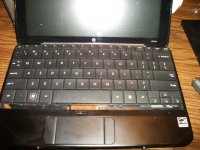
After that, you will have access to the hard drive.
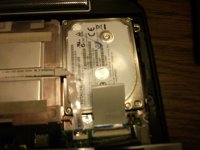
Keep in mind, you will have to remove the USB port prior to installing the drive. The SSD is actually smaller than a SoDIMM in a laptop.
but this is what it looks like externally without the USB port
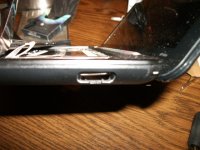
That's pretty much it!
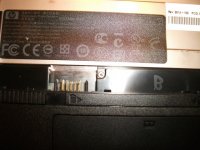
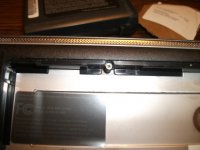
You first start by removing the screws located under the battery (you have to remove the battery)
There are two screws, the lower:
once you remove the screws, you pull the keyboard back, then up and away (careful with the ribbon)
After that, you will have access to the hard drive.
Keep in mind, you will have to remove the USB port prior to installing the drive. The SSD is actually smaller than a SoDIMM in a laptop.
but this is what it looks like externally without the USB port
That's pretty much it!
Thanks, c!
I downloaded the Service manual from a link over on the myhpmini forums so I could study it for hacking.
The main reason, aside from habituallly collecting the Service Manuals/DevNotes/Manuals for everything I own or have any desire at all to own, was to remove the SSD so that I could load the XPH3 that shipped with HP_Mini onto a KeyChain Drive. I never got around to it because I REALLY hate anything Windows "developed" since Win98 . . .
. . . the pinnacle of Redmond's achievements! :lol:
All I miss is MSWorks, as I've been running that cute lil' puppy since it was a DOS app. IIRC, I moved it over to my PB100 under SoftPC in lieu of Zedcor's Desk looong before the release of ClarisWorks. Having an app with a KBD shortcut for every command in an hierarchical menu on a laptop is da/ bomb! [] ]'>
I downloaded the Service manual from a link over on the myhpmini forums so I could study it for hacking.
The main reason, aside from habituallly collecting the Service Manuals/DevNotes/Manuals for everything I own or have any desire at all to own, was to remove the SSD so that I could load the XPH3 that shipped with HP_Mini onto a KeyChain Drive. I never got around to it because I REALLY hate anything Windows "developed" since Win98 . . .
. . . the pinnacle of Redmond's achievements! :lol:
All I miss is MSWorks, as I've been running that cute lil' puppy since it was a DOS app. IIRC, I moved it over to my PB100 under SoftPC in lieu of Zedcor's Desk looong before the release of ClarisWorks. Having an app with a KBD shortcut for every command in an hierarchical menu on a laptop is da/ bomb! [
] ]'>Supposedly the Pismo was going to be here today, but it looks like it will be here tomorrow. Talked to the guy and he said USPS told him it would be here by tomorrow the latest. I didn't see it on the porch, but I may not have looked hard enough. Oh well...
I will check when I get home and see if it arrived. If it did, the next post on this thread will hopefully be from that machine
The guy doesn't think it has been upgraded at all, so it might not even have wifi, but I have a card sitting just for that and will throw it in right away. I will have to wait for the memory ugprade, but I think I have a 128MB SODIMM module I can throw in it to bump up the RAM till the 512MB Module comes. That and I might have a 20 or 40GB IDE HDD I can throw in as well. I will get really good pics but it's supposed to be in excellent condition with a max of 2 months use. He said it was his wife's and it didn't get used much after she got it. so I may have a prime machine right here. I will get pics of it and post it the second I get it
I will check when I get home and see if it arrived. If it did, the next post on this thread will hopefully be from that machine
The guy doesn't think it has been upgraded at all, so it might not even have wifi, but I have a card sitting just for that and will throw it in right away. I will have to wait for the memory ugprade, but I think I have a 128MB SODIMM module I can throw in it to bump up the RAM till the 512MB Module comes. That and I might have a 20 or 40GB IDE HDD I can throw in as well. I will get really good pics but it's supposed to be in excellent condition with a max of 2 months use. He said it was his wife's and it didn't get used much after she got it. so I may have a prime machine right here. I will get pics of it and post it the second I get it
I snagged mine from the grlf's place tonight just to post the specs:
Beater_III
OSX 10.4.11
500 MHz G3
1 MB L2 Cache
768 MB SDRAM
PowerBook 3,1
Hitachi HDD 37.26 GB
Chipset ATI (0x1002)
ATY, Rage M3
Quartz Extreme Not Supported! [ ] ]'>
] ]'>
Firewire 400
DVD Player 4.6.5 Installed
Hacked into standard DVD ROM Case:
H-L Storage
CD-RW/DVD Drive
Model GCC-4241N
DVD Movies fire up automagically when inserted! :approve:
Dunno what the guy did to this lil' puppy . . .
. . . the two DVD-ROMS that he gave me won't even mount a Movie DVD! :disapprove:
TWO good batteries came with it along with 2 or 3 chargers, the 333 MHz Wallstreet (Beater_II) w/extras and a Bondi Blue Toilet Seat! [] ]'>
SOMEWHERE around here . . . :?: . . . there should be . . .
. . . a second Pismo that I craigslist-nabbed just to get the BookEndz Dock for Beater_III!
Good luck getting yours tomorrow, c!
Beater_III
OSX 10.4.11
500 MHz G3
1 MB L2 Cache
768 MB SDRAM
PowerBook 3,1
Hitachi HDD 37.26 GB
Chipset ATI (0x1002)
ATY, Rage M3
Quartz Extreme Not Supported! [
] ]'>Firewire 400
DVD Player 4.6.5 Installed
Hacked into standard DVD ROM Case:
H-L Storage
CD-RW/DVD Drive
Model GCC-4241N
DVD Movies fire up automagically when inserted! :approve:
Dunno what the guy did to this lil' puppy . . .
. . . the two DVD-ROMS that he gave me won't even mount a Movie DVD! :disapprove:
TWO good batteries came with it along with 2 or 3 chargers, the 333 MHz Wallstreet (Beater_II) w/extras and a Bondi Blue Toilet Seat! [
] ]'>SOMEWHERE around here . . . :?: . . . there should be . . .
. . . a second Pismo that I craigslist-nabbed just to get the BookEndz Dock for Beater_III!
Good luck getting yours tomorrow, c!
AAURRRGGGHH!!!!
The guy sent me a Lombard!
it has a SCSI port, not FireWire...
I am going to have to think about this. I don't think the guy realized that it was a Lombard, considering it was 400Mhz (higher end) with 8MB video. I should have asked if it had FireWire 400 on it.
Well the good news is that it has been upgraded "Somewhat"
it has a 256MB RAM Module. So that gives me some extra RAM. If the 512MB Low-Density Module works as 256MB I would be happy, but this kind of sucks.
While I am not that mad, I do realize after talking with the guy through ebay prior to even receiving it, he didn't know much about it, so I believe it was a genuine mistake, but I dunno if I am going to keep it or send it back...
The guy sent me a Lombard!
it has a SCSI port, not FireWire...
I am going to have to think about this. I don't think the guy realized that it was a Lombard, considering it was 400Mhz (higher end) with 8MB video. I should have asked if it had FireWire 400 on it.
Well the good news is that it has been upgraded "Somewhat"
it has a 256MB RAM Module. So that gives me some extra RAM. If the 512MB Low-Density Module works as 256MB I would be happy, but this kind of sucks.
While I am not that mad, I do realize after talking with the guy through ebay prior to even receiving it, he didn't know much about it, so I believe it was a genuine mistake, but I dunno if I am going to keep it or send it back...
Yep! More than likely an honest mistake by a MacNoob.
Sorry about your disappointment. Who pays the freight back? }
My vote: give him a lesson he'll remember by lightening his wallet! :approve:
Dunno about Lombards:
No ADB + No FireWire = Why bother?
IMHO, of course!
Sorry about your disappointment. Who pays the freight back? }
My vote: give him a lesson he'll remember by lightening his wallet! :approve:
Dunno about Lombards:
No ADB + No FireWire = Why bother?
IMHO, of course!
Actually, it's in extremely nice condition, and I have a Wifi card already. I bought upgrades and they would go to waste. Even if I put the 512MB SODIMM in it, it will still recognize half of it (256MB) which is fine, and the fact it has another 256MB Low-Density Low-Profile DIMM makes it better.
It's in super nice condition. I will just give him positive feedback and not mention it in the feedback about the mistake, and just keep it. I think it will serve nicely for my classic OS purposes
It's in super nice condition. I will just give him positive feedback and not mention it in the feedback about the mistake, and just keep it. I think it will serve nicely for my classic OS purposes
The only ADB Peripherals I have is mice (tear-drop) and ADB Keyboards. I would much rather have USB. I can do more with that.
I dug out an old WiFi card that I have a SN and app to make it work under OS 9. It will work great.
While it doesn't have FireWire, I probably don't need it. It would make things nicer, but seeing as this is going to be a classic OS machine, it will work nicely and also since it's a higher-end model, it makes it nice too (it will play DVDs as well!)
I think I will chalk it up to my stupidity. I didn't see that it says "Macintosh PowerBook G3" on the screen bezel. That should have tipped me off there (Pismo's just say "PowerBook G3" and I think the logo is flipped on the lid of the screen on the Pismo.
So it's partly my fault for not checking, but I think I will be happy.
I booted it up and I got an "Ilegal Trap" even when doing no extensions. I think the OS is bad. I am doing a "Zero" out on the drive, and will reinstall with Mac OS 9.2.2 and leave it at that.
EDIT: I just took the power adapter out of the package. It's the original one to the machine! It's incredible. Apple designed a pretty cool looking adapter (Jet black, textured with a small black apple logo in the center)
I dug out an old WiFi card that I have a SN and app to make it work under OS 9. It will work great.
While it doesn't have FireWire, I probably don't need it. It would make things nicer, but seeing as this is going to be a classic OS machine, it will work nicely and also since it's a higher-end model, it makes it nice too (it will play DVDs as well!)
I think I will chalk it up to my stupidity. I didn't see that it says "Macintosh PowerBook G3" on the screen bezel. That should have tipped me off there (Pismo's just say "PowerBook G3" and I think the logo is flipped on the lid of the screen on the Pismo.
So it's partly my fault for not checking, but I think I will be happy.
I booted it up and I got an "Ilegal Trap" even when doing no extensions. I think the OS is bad. I am doing a "Zero" out on the drive, and will reinstall with Mac OS 9.2.2 and leave it at that.
EDIT: I just took the power adapter out of the package. It's the original one to the machine! It's incredible. Apple designed a pretty cool looking adapter (Jet black, textured with a small black apple logo in the center)
Yeah, I pretty much only told him in a PM then left him Positive feedback with "Excellent seller, friendly and shipped quick!"
Btw, to show how fast this shipped, I bought this Sunday night, it was in my hands by 9AM this morning.
I am on it right now at a coffee shop. I had to buy the ioexpert's Wifi driver. Apparently the key I had was for another Lucent WaveAccess, which I think I gave away to a friend (I had two of them) So I had to buy it again.
Either way, I am surfing on it using Classilla, and it runs very nicely. I am currently running with 256MB RAM (I took out a spare 128MB I had in it when trying to troubleshoot an Illegal Trap message) and it runs pretty quick. It's got Mac OS 9.2.2 on the drive (I reinstalled after Zeroing out the drive) and can't wait for the other RAM and SSD to get here.
USB has already come in handy, I transfered files through a USB flash drive (16GB TransMemory Flash drive) and will probably include my USB Zip 100 (Bus-Powered) in the kit with it. The battery is acting wonky. gonna have to try to run it down and start over. It charged, then it worked, but I didn't realize the system wasn't plugged in right and when I I ran it off of battery, it ran for 10 minutes at almost no charge. So the battery is good, I just think it needs a full charge.
The battery might last quite a while
Btw, to show how fast this shipped, I bought this Sunday night, it was in my hands by 9AM this morning.
I am on it right now at a coffee shop. I had to buy the ioexpert's Wifi driver. Apparently the key I had was for another Lucent WaveAccess, which I think I gave away to a friend (I had two of them) So I had to buy it again.
Either way, I am surfing on it using Classilla, and it runs very nicely. I am currently running with 256MB RAM (I took out a spare 128MB I had in it when trying to troubleshoot an Illegal Trap message) and it runs pretty quick. It's got Mac OS 9.2.2 on the drive (I reinstalled after Zeroing out the drive) and can't wait for the other RAM and SSD to get here.
USB has already come in handy, I transfered files through a USB flash drive (16GB TransMemory Flash drive) and will probably include my USB Zip 100 (Bus-Powered) in the kit with it. The battery is acting wonky. gonna have to try to run it down and start over. It charged, then it worked, but I didn't realize the system wasn't plugged in right and when I I ran it off of battery, it ran for 10 minutes at almost no charge. So the battery is good, I just think it needs a full charge.
The battery might last quite a while
Easy enough to mistake the two. Not often you get a port shot indicating which model it is. The identifier is simple, as you stated, but to clarify:
Wallstreet: Rainbow Apple Below LCD. PowerPC above LCD. Macintosh PowerBook G3 printed to the left, below LCD.
Lombard: White Apple Above LCD. Macintosh PowerBook G3 printed direct center, below LCD.
Pismo: White Apple Above LCD. PowerBook printed direct center, below LCD.
In the market for a Pismo myself, and it's one thing i've had to look carefully for. Apart from that the machines are otherwise identical, apart from the ports of course (which aren't always pictured in auctions).
Oops, yeah, that's right. It's just "PowerBook"
Anyways, been a long time since I had a Pismo, so I forgot about that until I received the machine. I went on the fact that the guy listed it with a 100Mhz FSB. I know the Lombard had 66Mhz, so I thought I scored a really nice machine. Which I really did. DVD Decoder built-in, 400Mhz, 256MB + 64MB, DVD-ROM, 8MB VRAM, HDD was original, but the battery gives me 2-3 hours (almost like it's brand new!)
The original power adapter was included. Those were kind of neat. Wish apple went back to that kind. I can get pics if anyone wants. I will be posting pics of the machine in a bit, I have them I just forgot to post them
Anyways, been a long time since I had a Pismo, so I forgot about that until I received the machine. I went on the fact that the guy listed it with a 100Mhz FSB. I know the Lombard had 66Mhz, so I thought I scored a really nice machine. Which I really did. DVD Decoder built-in, 400Mhz, 256MB + 64MB, DVD-ROM, 8MB VRAM, HDD was original, but the battery gives me 2-3 hours (almost like it's brand new!)
The original power adapter was included. Those were kind of neat. Wish apple went back to that kind. I can get pics if anyone wants. I will be posting pics of the machine in a bit, I have them I just forgot to post them
These are the pics.
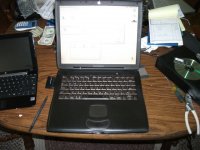
the machine is in really nice condition. It shipped with little to no scratches. Battery lasts 2-3 hour and charges all the way. Took 6 hours to charge initially
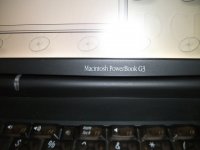
The logo. Should've noticed this as it was in the pic on eBay, but it wasn't a clear picture. Oh well. It's still a very nice machine. I only paid $60. It came out relatively cheap for a PowerBook G3 this nice.
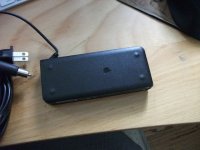
and the AC Adapter. Cool looking adapter, but the AC Cord comes out really easily. So just moving it can cause it to come out.
All in all I guess I am satisfied. the SCSI bus hit's 10MB/s consistently with an external 9GB Ultra2 SCSI drive (68-pin 40MB/s) on an adapter in an external case.
One issue I have is that the DVD-ROM drive, while it works on other discs, won't read either my Tiger disc, or DVD+R's (expected on the DVD+R)
It will play/read other DVDs and CDs very well. it's just not liking my Tiger Disc.
So I had to hit the net and source the CD version of Tiger to install it. Then with XPostFacto, it slipped right on.
the extra RAM is out in the mail right now. I will have it shortly (probably around noon when the post man comes) and I will install it.
Does anyone know if the video chip on this is on a 33Mhz or 66Mhz internal PCI bus? if it's 66Mhz, it would be a lot better and rival close to AGP 1x or 2x. That would make it faster than PCI 33Mhz/32-bit
the machine is in really nice condition. It shipped with little to no scratches. Battery lasts 2-3 hour and charges all the way. Took 6 hours to charge initially
The logo. Should've noticed this as it was in the pic on eBay, but it wasn't a clear picture. Oh well. It's still a very nice machine. I only paid $60. It came out relatively cheap for a PowerBook G3 this nice.
and the AC Adapter. Cool looking adapter, but the AC Cord comes out really easily. So just moving it can cause it to come out.
All in all I guess I am satisfied. the SCSI bus hit's 10MB/s consistently with an external 9GB Ultra2 SCSI drive (68-pin 40MB/s) on an adapter in an external case.
One issue I have is that the DVD-ROM drive, while it works on other discs, won't read either my Tiger disc, or DVD+R's (expected on the DVD+R)
It will play/read other DVDs and CDs very well. it's just not liking my Tiger Disc.
So I had to hit the net and source the CD version of Tiger to install it. Then with XPostFacto, it slipped right on.
the extra RAM is out in the mail right now. I will have it shortly (probably around noon when the post man comes) and I will install it.
Does anyone know if the video chip on this is on a 33Mhz or 66Mhz internal PCI bus? if it's 66Mhz, it would be a lot better and rival close to AGP 1x or 2x. That would make it faster than PCI 33Mhz/32-bit
you mean virtual memory?
not needed under OS 9. it would be more helpful under OS X really. I might bump it down to 10.3 since Tiger just CONSUMES RAM. Even with 512MB I am hitting swap shortly after booting.
Does anyone happen to know what the typical running RAM usage under Mac OS 10.3.9 is?
I don't want to do 10.2, but I could run Classilla under 10.3 TenFourFox is right out. It's too slow mainly due to the process/bus speed, but I think with 10.3, Classilla would work bettery. It might be significantly faster too.
I found 10.4 slow on even a G5. but 10.5 fixed that. So I think I will probably bump it down.
not needed under OS 9. it would be more helpful under OS X really. I might bump it down to 10.3 since Tiger just CONSUMES RAM. Even with 512MB I am hitting swap shortly after booting.
Does anyone happen to know what the typical running RAM usage under Mac OS 10.3.9 is?
I don't want to do 10.2, but I could run Classilla under 10.3 TenFourFox is right out. It's too slow mainly due to the process/bus speed, but I think with 10.3, Classilla would work bettery. It might be significantly faster too.
I found 10.4 slow on even a G5. but 10.5 fixed that. So I think I will probably bump it down.
From my experienced 512mb is the bare-bottom for 10.4 . For 10.4 to really be anything near "snappy" on 512mb you need a fast HDD(7200/SSD) and a dual-core of some sort. Otherwise, I would recommended 768+(but I don't think you can on a lombard). I believe 10.4 had a recommended 512 and 10.3 had a recommended 256mb.
One thing to consider when going down to 10.3 is the loss of wpa2 support. It isn't a big issue, but it is one of those make-or-break issues depending on your home network.(I have a nice netgear router that has a setting to accept both wpa and wpa2 at the same time)
I can't imagine the performance on the early iBooks that shipped with 10.4 and only 256mb of RAM. YUCK!
As for browsers, there is also camino you could try. Lastly, if it turns out to be unuseable take a look at Crux or MintPPC, I haven't used them myself except in emulators(on the school's iBooks.... ) but I've heard wonderful things about them.
One thing to consider when going down to 10.3 is the loss of wpa2 support. It isn't a big issue, but it is one of those make-or-break issues depending on your home network.(I have a nice netgear router that has a setting to accept both wpa and wpa2 at the same time)
I can't imagine the performance on the early iBooks that shipped with 10.4 and only 256mb of RAM. YUCK!
As for browsers, there is also camino you could try. Lastly, if it turns out to be unuseable take a look at Crux or MintPPC, I haven't used them myself except in emulators(on the school's iBooks....
) but I've heard wonderful things about them.Yes, Linux certainly is an option. Does anyone know if these are true New-World machines, or did that start with the Pismo. I mean, how similar is this to the Gossamer/Beige G3. It seems to carry the Gossamer chipset (as noted when starting OS X) but the question relates on how new this machine is in firmware.
The wallstreets aren't even something I would consider new-world due to being extemely close to the Beige G3 in hardware.
But I know that the Lombard has USB, and it has SCSI, but it also will boot 10.3 natively, something the Beige didn't do.
So can I just pop in a Linux CD, or do I have to use a Boot Loader like the older classic macs?
The wallstreets aren't even something I would consider new-world due to being extemely close to the Beige G3 in hardware.
But I know that the Lombard has USB, and it has SCSI, but it also will boot 10.3 natively, something the Beige didn't do.
So can I just pop in a Linux CD, or do I have to use a Boot Loader like the older classic macs?
Something doesn't add up. I see specs that it is ATA-2, but ATAPI Support didn't come out till ATA-3, which supports 33MB/s, and the DVD-ROM on this is ATAPI. Did apple modify their controller to do custom things?
Also I think this system reported SMART status on the hard drive I have in it. if that's true, it HAS to be ATA-3, as that was when it was introduced.
it's a bummer that Seagate won't RMA a drive I found that would otherwise be in warranty. They say I have to go through the OEM (which would be dell) but Dell won't warrant it. if it was sold specifically by Seagate, it would have been in warranty. Never had this issue on WD or Hitachi (Have replaced several OEM drives through them when they died. I usually came out with a spare drive when I swapped them out)
Also I think this system reported SMART status on the hard drive I have in it. if that's true, it HAS to be ATA-3, as that was when it was introduced.
it's a bummer that Seagate won't RMA a drive I found that would otherwise be in warranty. They say I have to go through the OEM (which would be dell) but Dell won't warrant it. if it was sold specifically by Seagate, it would have been in warranty. Never had this issue on WD or Hitachi (Have replaced several OEM drives through them when they died. I usually came out with a spare drive when I swapped them out)
Interesting, if inapplicable (?) lowendmac Pismo ATA warning.
Here's the referenced Road Warrior article.
edit: PBG3 series + ATA6 = borked . . . :-/
. . . so I guess it was applicable after all. :
Here's the referenced Road Warrior article.
edit: PBG3 series + ATA6 = borked . . . :-/
. . . so I guess it was applicable after all. :
ATAPI is a software/command syntax protocol that uses IDE as the physical transport medium. Technically it wasn't even developed by the same industry consortium that maintained the IDE/ATA standards until the two merged with *ATA/ATAPI-4*. With the appropriate driver you can speak to ATAPI devices over any controller adhering to the ATA-2 standard or better. (And it *may* work over some vendor-specific "EIDE" variations that were coming out prior to the ATA-2 standard being ratified.) And that said... ATA-3 and ATA-2 are essentially the same thing. ATA-3 was a minor revision that added SMART as a "standard feature" and changed some implementation requirements to solve some reliability issues with faster transfer modes. It didn't add any new modes so a controller designed for ATA-2 could be trivially made to behave as an ATA-3 controller with little more than a BIOS tweak or driver change. 33MB/s UDMA modes are ATA-4.
The Lombard uses essentially the same drive controller as the Beige G3. ATA-3 wasn't ratified until 1997 so that controller was undoubtedly designed under the ATA-2 specifications, which might explain why whatever specs you're looking at call it that. (It's very possible that it doesn't strictly meet some "letter of the law" ATA-3 requirement with regards to physical implementation.) But being "ATA-2" doesn't prevent it from doing "ATA-3" things.
So I installed Linux Mint PPC. thanks so much for suggesting it. it runs better than OS X, gives me a modern OS and it runs very nicely. Now I just gotta wait till that 44-pin IDE -> LIF/ZIF adapter gets here. Then I will be rocking with Solid State.
Btw, the battery in this is all screwed up. After using it the first time and it lasted 3 hours, I charged it up and when I went to use it, it was at 4 lights for 5 minutes, then it instantly went to 1 blinking light and the machine shut off. I think there is a shorted cell. Before you ask, yes I did try Battery Reset 2.0. It didn't do a darn thing for it.
I got a BRAND NEW 6500mah battery going for it. The cells are brand new, not NOS. So that will be nice. I bought it on eBay, but it cost like $45 + $10 shipping, so kind of expensive. I am just building this up to be a relatively decked-out laptop. I am trying to reduce my vintage computing bulk by moving to laptops rather than desktops. the SCSI port on this came in handy, but I would rather have had FireWire on a Pismo (And the ATA-66MB/s would have helped too!)
Linux Mint runs very nice. I am typing this under it right now in IceWeasel. Took me a bit to figure out how to get my bookmarks to show up on the toolbar. But I got it.
Question: trying to get the one button mouse to simulate two buttons. Is there a modifier I press? I also would like to turn off the tap-to-click. It's annoying as hell having it register clicks when I barely put my finger on the trackpad. I have the plug in for the moue emulation, but i can't access the feature or tune it rather.
Thanks guys! the laptop is turning out nicely (oh and wifi has been upgraded to a D-Link DWL-G650 802.11g PC Card that does WPA2 ) and it's plenty fast enough.
Btw, the battery in this is all screwed up. After using it the first time and it lasted 3 hours, I charged it up and when I went to use it, it was at 4 lights for 5 minutes, then it instantly went to 1 blinking light and the machine shut off. I think there is a shorted cell. Before you ask, yes I did try Battery Reset 2.0. It didn't do a darn thing for it.
I got a BRAND NEW 6500mah battery going for it. The cells are brand new, not NOS. So that will be nice. I bought it on eBay, but it cost like $45 + $10 shipping, so kind of expensive. I am just building this up to be a relatively decked-out laptop. I am trying to reduce my vintage computing bulk by moving to laptops rather than desktops. the SCSI port on this came in handy, but I would rather have had FireWire on a Pismo (And the ATA-66MB/s would have helped too!)
Linux Mint runs very nice. I am typing this under it right now in IceWeasel. Took me a bit to figure out how to get my bookmarks to show up on the toolbar. But I got it.
Question: trying to get the one button mouse to simulate two buttons. Is there a modifier I press? I also would like to turn off the tap-to-click. It's annoying as hell having it register clicks when I barely put my finger on the trackpad. I have the plug in for the moue emulation, but i can't access the feature or tune it rather.
Thanks guys! the laptop is turning out nicely (oh and wifi has been upgraded to a D-Link DWL-G650 802.11g PC Card that does WPA2
) and it's plenty fast enough.Now that's just curious (and wrong). The laptop has a 16.6MB/s bus on it, yet the drive they put in runs faster that than. ATA/33 and the internal transfer rate of the drive is up to 20MB/s. Why would Apple put a bus in a system that is slower than the drive, when the ATA/33 Specs were out, and so was the G3 Blue and white which had it. Why wouldn't they migrate it over (remember, the B&W came out in 1998, and the Lombard came out in 1999). So why would apple wait so long (2000) before putting ATA/xx on the system.
what's even more tragic, is if I had gotten the Pismo, Apple made the jump from ATA-2 up to ATA-5, which is 66MB/s. That's like a 6x increase. Doesn't make sense... If I had gotten the Pismo, I could have rocked out with that SSD I am going to put in the system a bit better.
Also, is it right to get consistantly only 10MB/s on a 16.6MB/s bus? usually from overhead there is a loss, but I didn't think it would be THAT much of a loss.
It might be my drive though. I am going to throw the old 6GB back in, and see what I get (I will do a test) and it will be interesting if the ATA-5 of the drive is causing that.
what's even more tragic, is if I had gotten the Pismo, Apple made the jump from ATA-2 up to ATA-5, which is 66MB/s. That's like a 6x increase. Doesn't make sense... If I had gotten the Pismo, I could have rocked out with that SSD I am going to put in the system a bit better.
Also, is it right to get consistantly only 10MB/s on a 16.6MB/s bus? usually from overhead there is a loss, but I didn't think it would be THAT much of a loss.
It might be my drive though. I am going to throw the old 6GB back in, and see what I get (I will do a test) and it will be interesting if the ATA-5 of the drive is causing that.
After seeing a SMART error coming up while trying to load data onto the 20GB drive I have in the laptop, I decided to replace the drive. I found a 30GB in my stash, and when I went to format it, it says "Cannot Format - Locked" in Disk Utility... Weird...
What happened is the laptop I took it out of, the previous owner put a security password on the drive. Unfortunately, this means the laptop drive is useless unless you have the password...
Well, enter HDD Unlock This tool, for $5, I was able to brute-force the drive and cracked it. So now I have a 30GB HDD, and I am installing Mint PPC onto the drive. I can't get the old 20GB cloned over, so I have to completely reinstall. Oh well... I got time. I just hope the power doesn't go out in the middle (we have storms). And my battery is shot (after the initial run, the battery went to crap, I think a cell is shorted).
I got a brand new replacement battery coming. It cost $45 for it, and with a wifi card, USB 2.0 card, etc.. this will be a fully decked-out machine. it runs really nice under Mint with 512MB RAM. the DVD Decoder hasn't been used yet, but I am unsure if Linux can access it. It might so I will try it and see...
Anyways, if anyone has a locked drive, and they want the drive back (but not the data) that tool will work great. I think the max is $35 for up to 1TB. You purchase a 1 drive license to unlock one drive. You need Windows 2k/XP/Vista/7 to do it, and I would recommend using a tower. You can't use a FireWire or USB case as it won't pass the instructions to the chip for the ATA Lock command.
Anyways, glad I have a new drive. The 20GB is going to get taken apart for the rare earth magnets and probably used in one of my dad's projects.
What happened is the laptop I took it out of, the previous owner put a security password on the drive. Unfortunately, this means the laptop drive is useless unless you have the password...
Well, enter HDD Unlock This tool, for $5, I was able to brute-force the drive and cracked it. So now I have a 30GB HDD, and I am installing Mint PPC onto the drive. I can't get the old 20GB cloned over, so I have to completely reinstall. Oh well... I got time. I just hope the power doesn't go out in the middle (we have storms). And my battery is shot (after the initial run, the battery went to crap, I think a cell is shorted).
I got a brand new replacement battery coming. It cost $45 for it, and with a wifi card, USB 2.0 card, etc.. this will be a fully decked-out machine. it runs really nice under Mint with 512MB RAM. the DVD Decoder hasn't been used yet, but I am unsure if Linux can access it. It might so I will try it and see...
Anyways, if anyone has a locked drive, and they want the drive back (but not the data) that tool will work great. I think the max is $35 for up to 1TB. You purchase a 1 drive license to unlock one drive. You need Windows 2k/XP/Vista/7 to do it, and I would recommend using a tower. You can't use a FireWire or USB case as it won't pass the instructions to the chip for the ATA Lock command.
Anyways, glad I have a new drive. The 20GB is going to get taken apart for the rare earth magnets and probably used in one of my dad's projects.
Apple's PowerPC chipsets were always a day late and a dollar short compared to the competition. For all of PowerPC's positive attributes Apple's sheer laziness/incompetence in designing system chipsets was a constant monkey on the platform's back.
Apple used the same motherboard chipset, the one designed for the Beige G3, for three years, with only one minor tweak. (The "Heathrow" IC was replaced with "Paddington", the difference being 10mbit vs. 100mb Ethernet PHY support.) It had an ATA2 controller and no USB. (Apple gets all this credit for being an "innovator" in USB, but the first Macs with USB technically didn't have built-in support for it. They used an accessory PCI controller chip.) By comparison the early 1997 Intel PIIX3 southbridge was fully ATA3 compliant and included a USB controller (although early versions were buggy and it was often disabled.) And by 1998 Intel boards shipped with the ATA4/USB equipped PIIX4 (which by that time was usually paired with an AGP-capable Northbridge), which was an excellent chip. (It was so well supported that VMware/Virtualbox emulate it by default to this day.)
That was a tough time for Apple. In an attempt to achieve "feature parity" with standard PCs the B&W G3 shipped with an (initially buggy) accessory ATA4 controller and an "overclocked" PCI slot for video, which goes a lot to explain why it's a notoriously buggy and unreliable computer. Apparently Apple decided in the case of the Lombard they could afford to squeeze a USB controller onto what's essentially same motherboard as the "Wallstreet" but an ATA controller was too much. So they just went with the "Paddington" IDE and hoped no one would notice. The Lombard is really just a stopgap machine, just like the trayload iMacs, B&W G3, "Original" (non-AGP) iBook, and "Yikes" G4s were. The Pismo is technically the first "Jobsian"-era Mac laptop in terms of chipsets.
(Which of course is full of its own sadness, such as *never* developing a chipset supporting G4s with a DDR frontside bus.)
I am scratching the Solid-State drive idea. I just got the adapter, and it doesn't work with my SSD (btw, you should see the specs on that SSD in your NetBook Trash80) and when I ran tests using another adapter, the maximum I got for data transfer was 7MB/s
the minimum was 50KB/s So much for a solid-state drive. The 30GB IDE HDD I have in the Lombard right now was testing between 5MB/s up to 39MB/s
That's sad when a desktop drive outperforms an SSD. The SSD was made in 2009, the 30GB was made in 2004. That's pretty sad...
Anyways, due to the fact the adapter doesn't like my SSD (but will work with a LIF 30GB Hard drive) and the slow speeds, I am going to scratch the idea and stay with the 30GB.
my opinion Trash80, is to ditch that SSD and get a LIF hard drive. You will thank me when you see the speed increase.
the minimum was 50KB/s So much for a solid-state drive. The 30GB IDE HDD I have in the Lombard right now was testing between 5MB/s up to 39MB/s
That's sad when a desktop drive outperforms an SSD. The SSD was made in 2009, the 30GB was made in 2004. That's pretty sad...
Anyways, due to the fact the adapter doesn't like my SSD (but will work with a LIF 30GB Hard drive) and the slow speeds, I am going to scratch the idea and stay with the 30GB.
my opinion Trash80, is to ditch that SSD and get a LIF hard drive. You will thank me when you see the speed increase.
Which probably goes a long way toward explaining why "His Jobsness" was in such a hurry to prune all pre-Intel Macs from the X-Tree . . .
. . . maybe that (brilliant huckster) ID10T's Designer TEES have grown a bit too tight around his stiff neck!

How badly did he manage to bork the G5 series in terms of chipsets he no longer felt were worth supporting . . .
. . . after shilling every iPoo offering that came down the pike during his "second coming" as THE NeXT BIG THING!?
Trash,
LIF is an IDE drive usually intended for small netbooks and notebooks. It uses a small flat ribbon with exposed ends. If you open your netbook, you will see what I mean. It's that little 1" ribbon that goes between your motherboard and the Solid State drive. iPods with hard drives use the same connector. Physically they are ribbon cables, electronically they are just IDE drives. Also, they mostly run at 3.3v. So my IDE->LIF adapter has a step-down that takes the 5v input to the drive and down converts it to 3.3v. This is the reason why NetBooks get (among other advances) much better battery life if they use LIF. The iPod drives and other 1.8" (Definition of LIF drives) use the LIF/ZIF Connector. They also use a small plastic clamp-down device to hold the ribbon in, vs the pin setup on most IDE HDD. If you looked at my pics of the netbook, that white cable that goes from the board in my netbook to that Hitachi drive is LIF
LIF is an IDE drive usually intended for small netbooks and notebooks. It uses a small flat ribbon with exposed ends. If you open your netbook, you will see what I mean. It's that little 1" ribbon that goes between your motherboard and the Solid State drive. iPods with hard drives use the same connector. Physically they are ribbon cables, electronically they are just IDE drives. Also, they mostly run at 3.3v. So my IDE->LIF adapter has a step-down that takes the 5v input to the drive and down converts it to 3.3v. This is the reason why NetBooks get (among other advances) much better battery life if they use LIF. The iPod drives and other 1.8" (Definition of LIF drives) use the LIF/ZIF Connector. They also use a small plastic clamp-down device to hold the ribbon in, vs the pin setup on most IDE HDD. If you looked at my pics of the netbook, that white cable that goes from the board in my netbook to that Hitachi drive is LIF