
Thread
CF AztecMonsters have landed
Some of us are eagerly waiting for Manabu Sakai's CF AztecMonster, a CF to 3.5" SCSI adapter. Well, after waiting several months for his shipment taking place and some kind of an adventure tour through customs I'm happy to report that I hold them in my hands actually.
To start with, here's the accompanying manual: http://dl.dropbox.com/u/2545101/20111012093742.pdf
Here's a photo Manabu has sent me in spring: http://dl.dropbox.com/u/2545101/CF%20AM%20r1.1%201.jpeg
And here's a photo I've shot using my iPhone, sorry for the picture quality. http://dl.dropbox.com/u/2545101/IMG_0159.jpg
To start with, here's the accompanying manual: http://dl.dropbox.com/u/2545101/20111012093742.pdf
Here's a photo Manabu has sent me in spring: http://dl.dropbox.com/u/2545101/CF%20AM%20r1.1%201.jpeg
And here's a photo I've shot using my iPhone, sorry for the picture quality. http://dl.dropbox.com/u/2545101/IMG_0159.jpg
Some questions...
• What Mac did you put it in?
• I assume it did not come with the screws, nuts or mounting bracket shown in the PDF manual, so how did you mount it in your Mac?
• What specific CF card did you use with it?
• What is performance like relative to a fast spinning platter hard drive? (Boot times, launching of apps, file duplicate, Benchmark utils, etc.)
• What Mac did you put it in?
• I assume it did not come with the screws, nuts or mounting bracket shown in the PDF manual, so how did you mount it in your Mac?
• What specific CF card did you use with it?
• What is performance like relative to a fast spinning platter hard drive? (Boot times, launching of apps, file duplicate, Benchmark utils, etc.)
More details on mounting:
• Screws and cubic nuts actually are included, together with some jumpers: http://dl.dropbox.com/u/2545101/IMG_0161.jpg
• Tho holes in the PCB seem to match exactly with those of a standard 3.5" disk drive: http://dl.dropbox.com/u/2545101/IMG_0163.jpg Thus, using vertical mounting screws is no problem at all. In order to use horizontal mounting screws, one has to use the cubic nuts that are included, as shown in figure 6 of his manual.
I intend to put them in my SE/30 and Quadra 700 next weekend and will report some performance numbers asap.
I'd love to see how well this works in your SE/30. Am I understanding his website correctly? He's developed a new PS and analog board as well for the SE/30? Is the CF AztecMonster an extremely limited run?
What program would be best for performing and reporting HD benchmarks?
Two more questions and a consideration...
• The manual mentions an AKAI Sampler, which apparently speaks of an onboard, active terminator. The question here is what does Manabu Sakai mean when he says you may need to disable the active terminator and use an external one? His manual status that his product may act strangely, but no specifics are given about what "strangely" means. Further, he says the cause of that "strangeness" would be some older SCSI chips (i.e., those that are not 100% compatible with the active termination in Manabu's product). But does anyone here know of old SCSI interface chips not working well with active terminators, forcing the use of external passive terminators? I am quite curious about this point.
• Continuing thoughts about performance, so long as the CF card is 128GB or smaller, the manual says it should work (as long as you partition it properly for the OS you intend to use). But can this product take advantage of all the speed boosting features of newer CF cards? And will there be a noticeable difference in performance between super fast cards like a SanDisk Extreme III and an older card with no speed boost features, when used in an SE/30 which has a rather slow implementation of SCSI to begin with?
• Perhaps one of the biggest considerations before buying these CF card solutions is endurance and lifespan. From what I see, there is no dedicated chip onboard this thing to endure data is written to different parts of the CF card constantly. As such, the CF card would go bad "in spots" much faster than any dedicated SSD like these:
http://eshop.macsales.com/item/Other+World+Computing/SSDMLP040/
As to TT's question, I most often use Norton Utilities' System Info for benchmarking my old Macs.
• The manual mentions an AKAI Sampler, which apparently speaks of an onboard, active terminator. The question here is what does Manabu Sakai mean when he says you may need to disable the active terminator and use an external one? His manual status that his product may act strangely, but no specifics are given about what "strangely" means. Further, he says the cause of that "strangeness" would be some older SCSI chips (i.e., those that are not 100% compatible with the active termination in Manabu's product). But does anyone here know of old SCSI interface chips not working well with active terminators, forcing the use of external passive terminators? I am quite curious about this point.
• Continuing thoughts about performance, so long as the CF card is 128GB or smaller, the manual says it should work (as long as you partition it properly for the OS you intend to use). But can this product take advantage of all the speed boosting features of newer CF cards? And will there be a noticeable difference in performance between super fast cards like a SanDisk Extreme III and an older card with no speed boost features, when used in an SE/30 which has a rather slow implementation of SCSI to begin with?
• Perhaps one of the biggest considerations before buying these CF card solutions is endurance and lifespan. From what I see, there is no dedicated chip onboard this thing to endure data is written to different parts of the CF card constantly. As such, the CF card would go bad "in spots" much faster than any dedicated SSD like these:
http://eshop.macsales.com/item/Other+World+Computing/SSDMLP040/
As to TT's question, I most often use Norton Utilities' System Info for benchmarking my old Macs.
One would think wear leveling would be handled by the controller in the CF card, not the CFAM.
Indeed, SanDisk mentions "wear leveling" on some of their high end cards like this one:
http://sandisk.com/microsites/compactflash/index.html
But I must assume such wear leveling is geared for video and photographic cameras, rather than computers. I don't have proof though. Furthermore, if it can be proved (and I hope someone among us can do that), then it could be said that there is no real advantage to paying OWC for their dedicated SSDs versus a CF card + AztecMonster Hardware (especially since OWC's SSDs are IDE, not SCSI).
I've actually been considering the purchase of an OWC SSD for use in an older PowerBook Wallstreet PDQ I picked up on EBAY recently. The computer cost me $15. But the OWC SSD, even in the smallest 40GB size, costs $140 plus shipping.
For me, if the performance and longevity is the same, and if I can get the drive to work in the vintage Mac of my choice (SCSI or IDE, 3.5" or 2.5" inch drive bay), then the final decision boils down to price alone.
http://sandisk.com/microsites/compactflash/index.html
But I must assume such wear leveling is geared for video and photographic cameras, rather than computers. I don't have proof though. Furthermore, if it can be proved (and I hope someone among us can do that), then it could be said that there is no real advantage to paying OWC for their dedicated SSDs versus a CF card + AztecMonster Hardware (especially since OWC's SSDs are IDE, not SCSI).
I've actually been considering the purchase of an OWC SSD for use in an older PowerBook Wallstreet PDQ I picked up on EBAY recently. The computer cost me $15. But the OWC SSD, even in the smallest 40GB size, costs $140 plus shipping.
For me, if the performance and longevity is the same, and if I can get the drive to work in the vintage Mac of my choice (SCSI or IDE, 3.5" or 2.5" inch drive bay), then the final decision boils down to price alone.
if only one would copy the contents out of that flash IC, this guy could be copied....
Edit: Nevermind, the ARC760 is ACards proprietary SCSI-IDE Bridge IC. of course, in limited production/if at all. maybe hes getting them from a broker in china? no idea.
Edit: Nevermind, the ARC760 is ACards proprietary SCSI-IDE Bridge IC. of course, in limited production/if at all. maybe hes getting them from a broker in china? no idea.
Good question. I have asked Manabu Sakai exactly the same, and in July he wrote to me: "AztecMonster and PowerMonster II are both available for newer CF PIO-6 UltraDMA 2".
According to a SanDisk information, PIO-6 means 25MB/s and UDMA-2 means 33.3MB/s. Both are far below the leading edge of e.g. SanDisk Extreme 60MB/s or SanDisk Extreme Pro 90MB/s.
For me, that's not a problem. The Macintosh SCSI bus performance will be the limiting factor anyway. I don't see CF as a performance feature, but mainly as a noise reduction feature. In addition, I hope it will help making backup copies easier in the future.
Again, I will report some performance numbers as soon as possible.
If possible, a performance number test with "the leading edge" Extreme Pro 90MB/s please! :b&w:
I believe the only performance increase would be the zero seek time of the CF -- the SE/30's SCSI bus throughput would be already maxed by a 'decent' (say, mid-90s) HDD.
Not that it isn't important, though... especially in a complex system like Mac OS, heavily dependant on frequent disk accesses in order to load resources, etc.
Not that it isn't important, though... especially in a complex system like Mac OS, heavily dependant on frequent disk accesses in order to load resources, etc.
So here are the very first numbers.
• I took a standard CF card, a Transcend 4GB 133x http://dl.dropbox.com/u/2545101/51A3lnhtUrL._SL500_AA300_.jpg and put it together with the AztecMonster into an external SCSI enclosure, the AztecMonster's internal active terminator is disabled in my setup.
• Connected it to my Quadra 800 running 7.1.1, fired up FWB HD Toolkit v2.5.3. HDT detected the new disk and I did an "Auto Initialize w/ Format Type: Quick".
• Here are the HDT benchmark numbers using the default settings: http://dl.dropbox.com/u/2545101/DSCN1936.JPG
• At the lower screen edge, in the background window you can see the disk (ID2) containing two volumes.
More details to follow tomorrow.
Thanks for posting the performance chart, but what is the frame of reference (i.e., the comparison with a normal, spinning-platter drive in the same computer)?
And, regardless of what the benchmark charts say, how fast does it FEEL to you?
Also, from what I looked up on that Transcend 133x card, it transfers between 15MB/s to 40MB/s, with 40MB/s being absolute max. And although that is theoretically faster than what your machine is capable of (and much faster than the rates shown in your benchmark graph), it would still be a worthwhile comparison to stick an even faster CF card in there and see how it performs, both for the benchmark and for the "FEEL" test. Ditto for a significantly slower card as well.
Theory doesn't always match the experimental, especially in cases where the theory was flawed in the first place because we overlooked something (which in this case could affect performance).
And, regardless of what the benchmark charts say, how fast does it FEEL to you?
Also, from what I looked up on that Transcend 133x card, it transfers between 15MB/s to 40MB/s, with 40MB/s being absolute max. And although that is theoretically faster than what your machine is capable of (and much faster than the rates shown in your benchmark graph), it would still be a worthwhile comparison to stick an even faster CF card in there and see how it performs, both for the benchmark and for the "FEEL" test. Ditto for a significantly slower card as well.
Theory doesn't always match the experimental, especially in cases where the theory was flawed in the first place because we overlooked something (which in this case could affect performance).
You are absolutely right, here is some reference data done with the same computer, the same cabling, the same external enclosure - but
• this time with a Quantum Fireball 1280S instead: http://dl.dropbox.com/u/2545101/DSCN1938.JPG
• same as above, this time with the Fireball internal write cache disabled: http://dl.dropbox.com/u/2545101/DSCN1950.JPG
• same as above, this time with the Fireball internal read cache disabled, write cache disabled: http://dl.dropbox.com/u/2545101/DSCN1952.JPG
Despite the performance numbers, it feels faster. In fact, it does not only feel faster, it IS faster.
• System boot time, measured from chime to desktop with all volume icons mounted, when started from the Fireball disk, is about 53s.
• I copied the whole system drive to the CF card, with all extensions, control panels, everything, changed the startup volume to the CF volume. Startup time is about 38s now.
Thank you for the comparison between the AZTEC Monster and a normal spinning-platter hard drive. The only thing left to test at this point would be another CF card, in order to determine if the specific features of the CF cards would impact performance further. For example, if you tested a significantly faster CF card, and if the benchmarks did not change much at all and if you could not "FEEL" any difference in speed among the cards, then such would prove that the AZTEC Monster hardware is incapable of taking advantage of the CF card features that otherwise would boost READ/WRITE performance when used in hardware specifically designed to use those features.
So it looks like the main advantage of the AztecMonster is the faster access and seek times which appears to enhance boot times slightly. How about timing something like copying a large file to the drives?
I don't understand what the bottleneck is for sustained reads and writes. The specs of the CF card are much higher than what the real hard disk is reporting. Is it the lack of cache?
For a system such as an SE/30, would the slower SCSI bus narrow the performance gap?
http://support.apple.com/kb/TA29470?viewlocale=en_US
I don't understand what the bottleneck is for sustained reads and writes. The specs of the CF card are much higher than what the real hard disk is reporting. Is it the lack of cache?
For a system such as an SE/30, would the slower SCSI bus narrow the performance gap?
http://support.apple.com/kb/TA29470?viewlocale=en_US
I wouldn't call a 35% increase "slightly faster". :
The main issue is the bus and overhead. An SE/30 or a Quadra wouldn't be able to get full speeds even if it had RAM Disk on the other end.
The main issue is the bus and overhead. An SE/30 or a Quadra wouldn't be able to get full speeds even if it had RAM Disk on the other end.
The fact remains that even with the cache disabled, the spinning platter hard drive is still significantly faster than the Aztec Monster (combined with that particular Transcend CF card). Hence, I don't see the "cache" as having much to do with it at all. Ditto for BUS and OVERHEAD. Again, if the BUS or OVERHEAD or CACHE were issues here, how can one explain why the spinning platter drive is so much faster (in terms of the benchmarks given) than the CF card solution?
The reason I have been asking all these questions is because I want to discover if the Aztec Monster hardware interface itself is the bottleneck here. And by testing with significantly faster CF card than the 133x Transcend, based on the test results, one can start to have a better idea of what's going on.
The reason I have been asking all these questions is because I want to discover if the Aztec Monster hardware interface itself is the bottleneck here. And by testing with significantly faster CF card than the 133x Transcend, based on the test results, one can start to have a better idea of what's going on.
My apologies, I missed that we were comparing slow as a relative term compared to the HDD. I thought we meant slow in general, meaning not reaching full CF speeds. [:I] ]'>
I just ordered a Kingston 266x card from newegg for my Wallstreet, so I'll have some benchmarks for a 266x card to compare to AztecMontster results with a 266x card.
I just ordered a Kingston 266x card from newegg for my Wallstreet, so I'll have some benchmarks for a 266x card to compare to AztecMontster results with a 266x card.
You have a PCMCIA CF Card adapter for the PB Wallstreet? If so, what brand? And can you boot the machine off it?
I ask because I just recently acquired a PDQ Wallstreet (266MHz) and have been evaluating the possibility of putting an OWC 40GB Legacy SSD in it. Curious if it wouldn't be just as fast AND much cheaper to go the PCMCIA route instead.
Actually, I have a generic IDE -> CF .
I believe it only has a 16.7 MB/s bus to begin with. The stock HDD gets 5MB/s on normal reads and about 7MB/s on large block reads / peak.
The card will arrive within the week and I'll post its results then.
I believe it only has a 16.7 MB/s bus to begin with. The stock HDD gets 5MB/s on normal reads and about 7MB/s on large block reads / peak.
The card will arrive within the week and I'll post its results then.
I was thinking about using the PCMCIA slot since it is a very speedy 32-bit, 33MHz Cardbus slot (with DMA), theoretically capable of booting the Wallstreet off a CF card (when inserted via a PCMCIA cardbus adapter). Theoretically, even in slower "byte mode" CardBus offers 33MB/s speeds. I just don't know if that is faster than internal IDE or not.
http://support.apple.com/kb/TA25359?viewlocale=en_US
http://support.apple.com/kb/TA25359?viewlocale=en_US
If we go by the just specs for the AztecMonster, not considering what machine it would be used for, what would be the max speed that would make sense to buy? 200x?
I have run a Pismo from a SanDisk CF adapter with an 8GB Memory Technology branded CF card (Taiwan), dated 2003. I have it here in front of me now. It was a cheapish eBay find, and was bought new. I do not have the specs, but a CF card shouldn't be dead slow at that size & date of manufacture, methinks. The internal 30GB Toshiba was faster, so the PCMCIA CF drive did not yield the speed increases that people using SSDs are reporting these days. That, I think, is just not going to happen with a PCMCIA-based setup.
There is, however, a small (better by 10-15% or so) impact on battery life when running from PCMCIA/ CF, which was also something I had particularly wanted to test. In the 68k powerbooks, I have seen battery life nearly double when running from a RAM disk and with energy settings adjusted properly, and I had wanted to see if the same thing could be achieved in later hardware. No, it seems that it can't.
Likewise, I can report that a 2400c (cardbus enabled) machine was also slower when running from the same card than from an older 3GB internal hard drive.
The System installed on the CF card was 8.6. I have since wiped the card. At the time, I did not do any actual benchmarking,as it was obvious that both machines were marginally slower than when running from the internal hard drives. That, and the smaller than hoped energy savings, limited the possibilities of the setup in my mind. So I did what I wanted and then wiped the thing.
There is, however, a small (better by 10-15% or so) impact on battery life when running from PCMCIA/ CF, which was also something I had particularly wanted to test. In the 68k powerbooks, I have seen battery life nearly double when running from a RAM disk and with energy settings adjusted properly, and I had wanted to see if the same thing could be achieved in later hardware. No, it seems that it can't.
Likewise, I can report that a 2400c (cardbus enabled) machine was also slower when running from the same card than from an older 3GB internal hard drive.
The System installed on the CF card was 8.6. I have since wiped the card. At the time, I did not do any actual benchmarking,as it was obvious that both machines were marginally slower than when running from the internal hard drives. That, and the smaller than hoped energy savings, limited the possibilities of the setup in my mind. So I did what I wanted and then wiped the thing.
Thanks for the info about the PCMCIA slot, Beachy. It's clear Apple must being dummying-down Cardbus in the PB G3s, especially since the CardBus spec is 33MB/s and faster.
Anyway, here is the OWC Legacy IDE SSD I was speaking about earlier in the thread:
http://eshop.macsales.com/item/OWC/SSDMLP040/
If it were around $70, I'd probably already have purchased it by now. But at well over $150 when you factor in shipping, it's a decision that I am still mulling. That's also why I find this thread of interest. Indeed, I believe everyone in this thread are here seeking a drive solution that is faster, cheaper, cooler, quieter, and lower power (with a long lifespan) compared with a spinning platter drive.
Anyway, here is the OWC Legacy IDE SSD I was speaking about earlier in the thread:
http://eshop.macsales.com/item/OWC/SSDMLP040/
If it were around $70, I'd probably already have purchased it by now. But at well over $150 when you factor in shipping, it's a decision that I am still mulling. That's also why I find this thread of interest. Indeed, I believe everyone in this thread are here seeking a drive solution that is faster, cheaper, cooler, quieter, and lower power (with a long lifespan) compared with a spinning platter drive.
I did some benchmarks of two drives I have with an SE/30 and HDT BenchTest:
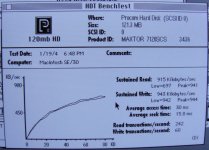
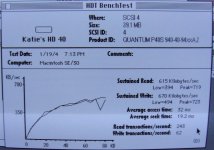
Just for reference...
Just for reference...
Friends have offered me their CF cards for testing, so we will get some other CF data for comparison soon. In addition, I plan to install the AztecMonster into my G3 next weekend, so we might estimate the SCSI bus performance influence.
JDW, are you thinking of taking that Legacy SSD and hooking it up via a IDE -> 50 pin SCSI adaptor?