
Thread
CF AztecMonsters have landed
I was thinking about putting one in my PB G3 PDQ, since it has IDE. And of course, I could test the SSD in other machines too, assuming I had the IDE to SCSI adapter you speak of. Which adapter would you recommend?
If you kind folk would be so good as to leave your reports here when you have a moment, it would be much appreciated:'
http://68kmla.org/wiki/Flash_Drive_Test_Results
http://68kmla.org/wiki/Flash_Drive_Test_Results
Since I lack write rights to the wiki, here are my collected CF AztecMonster benchmark results, including two MicroDrives: http://zombiegargle.com/cf/
Thanks for posting theodic. Do you have a benchmark for the internal 8GB disk to compare? What are the speed ratings for the CF cards in xxxX?
Since we have comrades contributing SE/30 related performance numbers now, I will use the same test environment now: SE/30, System 7.1.1 Pro, HDT v2.0.6.
CF card test candidates

Here is that CF card I benchmarked last week: Transcend 4GB CF 133x

This time it's a Transcend 8GB CF 400x

An old, boring Samsung 512MB CF card

An even older Toshiba 128MB CF card

And here as a reference, a real hard disk: Quantum FireBall 1280S

To summarize so far:
• The combination of AztecMonster, SE/30, and HDT 2 did work with all CF cards I have tested. No problems with device detection, initialization, and so on.
• Benchmark results with different CF cards are more or less the same.
• CF benchmark numbers are dramatically lower than real hard disk benchmark numbers.
But - it does not feel slow to me.
JDW,
I couldn't have the slightest clue. I would love to use something IDE because then file swapping in an emergency/recovery process could consist of just throwing the SSD into a generic USB -> IDE enclosure or hotswap bay.
Those figures for ~750KB/sec read and ~400KB/sec write is not encouraging compared to 1200KB/sec read and write.
I would love to test a SSD with a scsi adaptor but money is extra extra now and my SE/30 is 1600km away.
I couldn't have the slightest clue. I would love to use something IDE because then file swapping in an emergency/recovery process could consist of just throwing the SSD into a generic USB -> IDE enclosure or hotswap bay.
Those figures for ~750KB/sec read and ~400KB/sec write is not encouraging compared to 1200KB/sec read and write.
I would love to test a SSD with a scsi adaptor but money is extra extra now and my SE/30 is 1600km away.
Valid point. I've updated my page of benchmarks and included an HDD test at bottom (1591K read, 1266K write). http://zombiegargle.com/cf/
The Transcend Ultra is 100x
The Transcend CFR150 is 150x
The takeMS HyperSpeed is 120x
The Delkin Devices eFilm is unspecified
MicroDrives tend to max out at around 7MB/sec. I've achieved this on both using my USB reader.
Interesting that the results from two different machines are different, but within the population of each machine, the results are similar.
Udo.Keller
780KB/s read | 390KB/s write
theodric
500KB/s read | 500KB/s write
Since the type of CF card seems to not impact the test results very much, what could be causing the difference?
Udo.Keller
780KB/s read | 390KB/s write
theodric
500KB/s read | 500KB/s write
Since the type of CF card seems to not impact the test results very much, what could be causing the difference?
I now question if any of my previous benchmarks hold any validity. The 4GB Microdrive that previously posted around 500K/sec read/write, still in its external enclosure, but now bootable with a full copy of the internal drive (and the internal drive dismounted) is now almost square with the internal SCSI HDD, and actually beats it on write speeds. GALOTS: 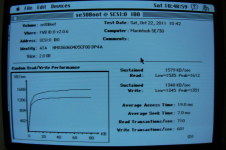
My butt dyno* says it doesn't feel any slower, either.
*http://www.urbandictionary.com/define.php?term=butt-dyno
My butt dyno* says it doesn't feel any slower, either.
*http://www.urbandictionary.com/define.php?term=butt-dyno
That's more like it. I bet if you use a solid-state CF card, it will perform even better.
Udo.Keller, than you for posting the results of your extensive CF card tests.
It should be clear to anyone read this thread that the CF card results, especially for WRITES is substantially less than a normally spinning platter hard drive. And consider well that the spinning platter hard drives we are comparing with are no speed demons! These are ancient hard drives that otherwise are painfully slow versus what we have today. In light of that, the CF card results, are indeed surprising and disappointing. Since the testers using these CF card solutions say the CF cards "feel" faster, would it be right to question if the benchmark utility use is in fact incapable of properly recording the READ/WRITE throughput of the CF card drive? Or is the benchmark correct and the only thing "feeling faster" is the lower Seek and Access times of the CF?
If we determine that the software benchmark utility itself is properly recording the throughput of the CF card drive, then I would like to suggest that the CF card interface itself is the bottleneck. Think about it. The CF cards themselves have DMA and WRITE acceleration, correct? What are those features there for? Answer, to make them about as fast as a normal spinning platter drive. Why then do the CF cards score 1/2 the READ speed and 1/4 the WRITE speed of an ANCIENT spinning platter drive????!!!! Again, if the CF card has features in it that boosts READ/WRITE speeds, then clearly the CF card adapter is either not taking advantage of those advanced features in the CF cards themselves, or if the adapter is taking advantage of those features, then clear the adapter is limiting the READ/WRITE throughput in another area.
Logically, one can only come to this conclusion.
Thoughts?
It should be clear to anyone read this thread that the CF card results, especially for WRITES is substantially less than a normally spinning platter hard drive. And consider well that the spinning platter hard drives we are comparing with are no speed demons! These are ancient hard drives that otherwise are painfully slow versus what we have today. In light of that, the CF card results, are indeed surprising and disappointing. Since the testers using these CF card solutions say the CF cards "feel" faster, would it be right to question if the benchmark utility use is in fact incapable of properly recording the READ/WRITE throughput of the CF card drive? Or is the benchmark correct and the only thing "feeling faster" is the lower Seek and Access times of the CF?
If we determine that the software benchmark utility itself is properly recording the throughput of the CF card drive, then I would like to suggest that the CF card interface itself is the bottleneck. Think about it. The CF cards themselves have DMA and WRITE acceleration, correct? What are those features there for? Answer, to make them about as fast as a normal spinning platter drive. Why then do the CF cards score 1/2 the READ speed and 1/4 the WRITE speed of an ANCIENT spinning platter drive????!!!! Again, if the CF card has features in it that boosts READ/WRITE speeds, then clearly the CF card adapter is either not taking advantage of those advanced features in the CF cards themselves, or if the adapter is taking advantage of those features, then clear the adapter is limiting the READ/WRITE throughput in another area.
Logically, one can only come to this conclusion.
Thoughts?
This is a flawed test because you are effectively defragmenting one drive and not the other. To test accurately, you must format the spinning hard drive and copy the contents back from the CF card.
In order to isolate the AztecMonster's influence I replaced it with an Acard ARS-2000SUP SCSI-SATA bridge and did some more benchmarks with the same SE/30, the same external SCSI enclosure, the same cabling, the same CF cards,
...and this time I took an SSD as well.

The test environment additions:
• Acard ARS-2000SUP SCSI-SATA bridge:

• Delock CF-SATA adapter:

Here is that CF card I started with: Trancend 4GB CF 133x

The Transcend 8GB CF 400x

And here is a real SSD: Kingston SSDnow 8GB

Findings:
• The combination of Acard ARS-2000SUP, SE/30, and HDT 2 did work with all CF cards I have tested. No problems with device detection, initialization, and so on.
• Benchmark results with different CF cards are more or less the same.
• Benchmark results are more or less equal to those made with the AztecMonster. In other words, more positively thinking : The AztecMonster is as fast the more expensive Acard ARS-2000SUP.

• CF benchmark numbers are dramatically lower than real hard disk benchmark numbers, and so are the SSD benchmarks numbers.
More and more I get the feeling that we're barking up the wrong tree. As JDW already said, maybe the benchmark numbers are wrong. More precisely, the spinning platter HDD numbers we took as a reference.
So, considering an optimal solution, and ignoring the spinning platter benchmark results for the moment, what performance numbers can we expect from the SE/30 at all?
Here's a snippet from lowendmac.com about the SE, having the same SCSI implementation as the SE/30 http://lowendmac.com/compact/macintosh-se.html
From that perspective, 780 KB/sec is not bad. But I'm not sure if these real world experiences are due to the HDD technology of that time. Vicious circle closed. }

Perhaps it would help to try another benchmark utility too.
Note that the "Kingston SSDnow 8GB" an Average Seek Time of 4295ms!!! Either something is wrong with that SSD, or something is wrong with its interface, or something is wrong with the FWB benchmarking software (i.e., not being optimized somehow for flash disks?). In any case, it would be good to use Norton System Info (benchmark utility) and/or another to verify if the FWB software is giving us the true story here.
Note that the "Kingston SSDnow 8GB" an Average Seek Time of 4295ms!!! Either something is wrong with that SSD, or something is wrong with its interface, or something is wrong with the FWB benchmarking software (i.e., not being optimized somehow for flash disks?). In any case, it would be good to use Norton System Info (benchmark utility) and/or another to verify if the FWB software is giving us the true story here.
The SE/30 offers somewhat limited SCSI performance in general. To evaluate the "CF as HDD replacement" idea and to further benchmark the CF AztecMonster against the Acard ARS-2000SUP, I took my fastest SCSI-enabled Macintosh and did some benchmarks.
Here are the results from my G3 running MacOS 9.2.2, using the built-in SCSI controller, and the same external SCSI enclosure I used before. This time I formatted all items with HDT 4.5.2 and put a HFS+ file system on them.
AztecMonster with Transcend 8GB CF 400x

Acard ARS-2000SUP w/ Transcend 8GB CF 400x

Acard ARS-2000SUP w/ Kingston SSD

Acard ARS-2000SUP w/ Hitachi 7K320-160, a 7200rpm spinning platter HDD

Findings:
• The combination of Acard ARS-2000SUP, G3, and HDT 4.5 did work with all CF cards I have tested. No problems with device detection, initialization, and so on.
• Benchmark results with different CF cards are more or less the same. Therefore, I have only listed one CF card above.
• CF benchmark results with ARS-2000SUP are more or less equal to those made with the AztecMonster.
• CF read performance is equal between CF card, SSD, HDD, when used with AztecMonster or with ARS-2000SUP.
• CF write performance is dramatically lower for CF cards, regardless if used with AztecMonster or with ARS-2000SUP.
And thus endeth the measurement. Now we have to think about the results.
Do you have a link to the specific software used for your benchmarks so others can reproduce your results or generate comparable results?
Just a thought: How about that disk cache in System 7? Is it only used for the boot disk or is it used for all available drives?
But that has nothing to do at all with the fact that a spinning platter hard drive got better results than any of the CF cards tested on that same SE/30! "Bad SCSI performance" clearly limits the data throughput of spinning platter drives on the SE/30 versus the SCSI performance on newer Macs. But the fact remains that the CF cards tested on that same SE/30 got far worse performance than a spinning platter drive. It is illogical to argue that those findings are the result of the SE/30 merely having "limited SCSI performance in general." I would logically expect the CF cards to perform about the same as a spinning platter drive, with their maximum throughput limited in accordance with the SE/30's SCSI controller specifications. But that is not what the benchmark results are showing. They are showing bad performance with the CF cards. And that is why in my previous post, I suggested a comparison with another benchmarking utility (such as Norton System Info), to see if the problem may be tied to something in the testing software itself, versus a problem in the CF cards or CF card interfaces. This is especially true when one reads user comments that say, "the CF card FEELS faster." If it feels faster, it probably is faster (faster than a spinning platter drive), and therefore we must cast the eye of suspicion on the results given by that FWB Benchmarking Utility and use a different benchmarking utility to get us another view of what's going on.
Consider well the 4.2 SECOND access time of the SSD versus 16ms for the spinning platter drive. Something is seriously wrong there. Again, I think it would be prudent to try a different benchmarking utility.
The benchmark I used is an integral part of the ancient FWB Hard Disk Toolkit. For details, you might look here: http://macintoshgarden.org/apps/fwb-hard-disk-toolkit-452
Understanding the benchmark:
For FWB 4.5.2, the sustained read and write numbers are generated using reads and writes of a fixed size. The default fixed size is 2000KB. This would most appropriately correspond to video accesses and possibly large file copies on more modern systems with ~2MB copy buffers.
Random read and write numbers are generated using access sizes starting at 5KB and incrementing in 5KB sizes up to 80KB. When looking at the random read/write graph it is important to remember the X axis is access size, not time.
This FWB 4.5.2 benchmark of a SanDisk UltraII card's random write graph highlights the importance of access sizes:
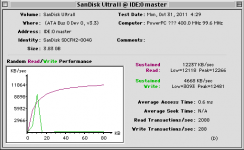
This seems to indicate the card prefers writes of about 10KB or so(+/- the 5KB resolution of the test). Although this doesn't necessarily tell the full story, since the writes are done continuously and wear leveling could be kicking in at some point and we wouldn't really know it.
The intended difference between the seek time and the access time is the seek time moves the head to the correct location, but since it doesn't perform a read operation, it doesn't have to wait for the plater to rotate the desired sector under the head. The access time performs a read, so it includes both the head movement and the rotational latency. For flash media, the only comparable result would be the access time.
IMO, the FWB benchmark is HDD biased (understandable since flash media was not common at the time it was released), and its results assume certain kinds of workloads. I second JDW's call for other benchmarks, if only for comparison. Norton's benchmarks perform sustained read & write tests using access sizes of 1KB, 4KB, 16KB, 64KB, 256KB, and randomized access sizes, for example. I have used this benchmark in the past, and it was interesting to note the SanDisk UltraII card under certain access sizes can out perform a 10k RPM Cheetah drive by as much as 2.5x, and the results can be inverted for other access sizes. I don't believe the FWB benchmarks are flawed, but they provide a limited view of what is going on.
It's also worth noting that the Transcend cards tested were all low end consumer level cards. The SanDisk Ultra & UltraII are only one step up from that, and perform noticeably better for writes. But, they're still relatively low end cards compared to the ExtremeIV series and others.
To demonstrate the importance of the quality of cards, first understand the speed rating systems. The 133x, 400x, etc. ratings are multiples of 150KB/s. So a 400x card should be approximately 60MB/s. Clearly that's not being realized in these benchmarks. The SanDisk Ultra cards are rated at 30MB/s, and the UltraII cards are rated at 15MB/s. However, the graph above is an UltraII card, and compare it to the Ultra card here:
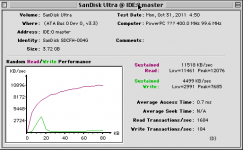
Both cards are significantly under performing their ratings in this benchmark. The Ultra card is rated twice as fast as the UltraII, yet is a noticeably worse performer in this benchmark. But, it also seems to do better at a 15KB write access than the UltraII, and worse at the UltraII's ideal 10KB write.
But, at the end of the day, your actual use should be your real benchmark. It doesn't really matter if your device performs great on an artificial benchmark, if it's terrible for your actual usage patterns.
For FWB 4.5.2, the sustained read and write numbers are generated using reads and writes of a fixed size. The default fixed size is 2000KB. This would most appropriately correspond to video accesses and possibly large file copies on more modern systems with ~2MB copy buffers.
Random read and write numbers are generated using access sizes starting at 5KB and incrementing in 5KB sizes up to 80KB. When looking at the random read/write graph it is important to remember the X axis is access size, not time.
This FWB 4.5.2 benchmark of a SanDisk UltraII card's random write graph highlights the importance of access sizes:
This seems to indicate the card prefers writes of about 10KB or so(+/- the 5KB resolution of the test). Although this doesn't necessarily tell the full story, since the writes are done continuously and wear leveling could be kicking in at some point and we wouldn't really know it.
Seek Time is an anachronism. The SCSI command is used to move the head of the drive without performing any reads or writes. The FWB seek time benchmark doesn't exist for IDE drives because the command doesn't exist in the ATA command set. The odd value here is probably related to interactions mapping the command in the controller. In the past, some SCSI-ATA command bridges have mapped it as doing multiple single block reads and discarding the results until the "head" has moved to the desired location. More recently, the SEEK command has been obsoleted and is defined to always immediately return success.
The intended difference between the seek time and the access time is the seek time moves the head to the correct location, but since it doesn't perform a read operation, it doesn't have to wait for the plater to rotate the desired sector under the head. The access time performs a read, so it includes both the head movement and the rotational latency. For flash media, the only comparable result would be the access time.
Mostly. It's worth remembering the Average Access Time of the CF card is 0.8s vs. the HDD's 9.3ms, which could go a long way towards explaining why it subjectively feels faster.
IMO, the FWB benchmark is HDD biased (understandable since flash media was not common at the time it was released), and its results assume certain kinds of workloads. I second JDW's call for other benchmarks, if only for comparison. Norton's benchmarks perform sustained read & write tests using access sizes of 1KB, 4KB, 16KB, 64KB, 256KB, and randomized access sizes, for example. I have used this benchmark in the past, and it was interesting to note the SanDisk UltraII card under certain access sizes can out perform a 10k RPM Cheetah drive by as much as 2.5x, and the results can be inverted for other access sizes. I don't believe the FWB benchmarks are flawed, but they provide a limited view of what is going on.
It's also worth noting that the Transcend cards tested were all low end consumer level cards. The SanDisk Ultra & UltraII are only one step up from that, and perform noticeably better for writes. But, they're still relatively low end cards compared to the ExtremeIV series and others.
To demonstrate the importance of the quality of cards, first understand the speed rating systems. The 133x, 400x, etc. ratings are multiples of 150KB/s. So a 400x card should be approximately 60MB/s. Clearly that's not being realized in these benchmarks. The SanDisk Ultra cards are rated at 30MB/s, and the UltraII cards are rated at 15MB/s. However, the graph above is an UltraII card, and compare it to the Ultra card here:
Both cards are significantly under performing their ratings in this benchmark. The Ultra card is rated twice as fast as the UltraII, yet is a noticeably worse performer in this benchmark. But, it also seems to do better at a 15KB write access than the UltraII, and worse at the UltraII's ideal 10KB write.
But, at the end of the day, your actual use should be your real benchmark. It doesn't really matter if your device performs great on an artificial benchmark, if it's terrible for your actual usage patterns.
There are several factors involved re. SCSI performance. I won't start posting everything yet, let's start with this one - have you tried ATTO Express Pro Tools benchmarking utility instead of FWB?
Here's a bit info on it and many pictures with examples how to interpret the data:
http://www.xlr8yourmac.com/ULTIMATE_MAC/SCSI_CARDS/index3.html
http://www.xlr8yourmac.com/SCSI/9600/index.html
Express Pro Tools used to be available free of charge on ATTO website. If you can't locate installers there, PM me. (I am using v. 2.3.2 on older machines and 2.8 on G4 OS8/9).
I quickly checked HD performance on my highly tuned 40MHz Q605 / 7.6.1 / Quantum Fireball 540 and got following numbers, for comparision:
Sustained read - 3.91 MB/s
Peak read - 4.44 MB/s
Sustained write - 3.53 MB/s
Peak write - 3.60 MB/s
Max transfer size - 2 MB (!)
This is as good as it gets for 40 MHz 68040 processor and more modern SCSI chip than that of SE/30.
Here's the Kingston USB stick on this same G4/1GHz Digital Audio I'm typing right now.
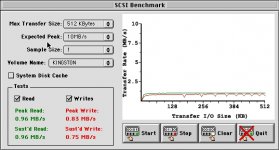
Here's a bit info on it and many pictures with examples how to interpret the data:
http://www.xlr8yourmac.com/ULTIMATE_MAC/SCSI_CARDS/index3.html
http://www.xlr8yourmac.com/SCSI/9600/index.html
Express Pro Tools used to be available free of charge on ATTO website. If you can't locate installers there, PM me. (I am using v. 2.3.2 on older machines and 2.8 on G4 OS8/9).
I quickly checked HD performance on my highly tuned 40MHz Q605 / 7.6.1 / Quantum Fireball 540 and got following numbers, for comparision:
Sustained read - 3.91 MB/s
Peak read - 4.44 MB/s
Sustained write - 3.53 MB/s
Peak write - 3.60 MB/s
Max transfer size - 2 MB (!)
This is as good as it gets for 40 MHz 68040 processor and more modern SCSI chip than that of SE/30.
Here's the Kingston USB stick on this same G4/1GHz Digital Audio I'm typing right now.
Some more food for thoughts...
1. Have you configured / optimised your driver?
2. How does Aztec monster behave? Like SCSI drive or like IDE drive?
When you go to Configure drive dialog in FWB, the window should look similar to these two.
(I took screenshots of 4.5.2 version, but, I think 3.0.2 and 2.5.3 must have similar functionality).
Does the window look like this one
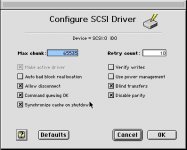
or does it look similar to that?
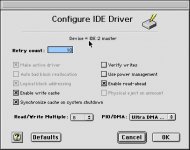
1. Have you configured / optimised your driver?
2. How does Aztec monster behave? Like SCSI drive or like IDE drive?
When you go to Configure drive dialog in FWB, the window should look similar to these two.
(I took screenshots of 4.5.2 version, but, I think 3.0.2 and 2.5.3 must have similar functionality).
Does the window look like this one
or does it look similar to that?
FYI, FWB Configure 3.0.2 looks nothing like that. I don't have an aztec, but my SE/30 CF card setup has similar performance, and is presented like a SCSI device, not IDE. Take a look-


I haven't tried editing any of the settings. Looks like it would be all too easy to fubar up my drive.
I haven't tried editing any of the settings. Looks like it would be all too easy to fubar up my drive.
Spartacus,
Please, DO NOT CONFUSE other readers and check your facts before posting. >
I was referring to Hard Disk Toolkit application's "Configure driver" window and NOT to application FWB Configure.
THIS ONE!
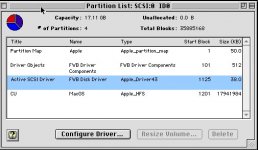
Please, DO NOT CONFUSE other readers and check your facts before posting. >
I was referring to Hard Disk Toolkit application's "Configure driver" window and NOT to application FWB Configure.
THIS ONE!
So how did Manabu get his performance curves? According to him the device is more than capable for an SE/30. Something just does not jive here.
Don't inherently trust the performance data published by Manabu Sakai of ARTMIX! I am not calling Manabu Sakai a liar, nor am I suggesting he is ripping people off. But I am suggesting that he may not have produced accurate data.
I once questioned him intensely about this, and he stopped talking to me. I then telephoned his parents home (he still lives with them, not uncommon in Japan), and he put his mother on the line and refused to talk to me, even though I was speaking Japanese!
Since then I have not been inclined to buy any CF card solution from ARTMIX *until* I see scientific evidence (not just "it FEELS faster" experiences) that proves his products do in fact offer the same or better performance than a spinning platter hard drive. And that is why I eagerly await seeing the results of your efforts here. For if it FEELS faster, then I am inclined to believe it must really be faster, and therefore there must be some scientific means of proving that as fact.
I once questioned him intensely about this, and he stopped talking to me. I then telephoned his parents home (he still lives with them, not uncommon in Japan), and he put his mother on the line and refused to talk to me, even though I was speaking Japanese!
Since then I have not been inclined to buy any CF card solution from ARTMIX *until* I see scientific evidence (not just "it FEELS faster" experiences) that proves his products do in fact offer the same or better performance than a spinning platter hard drive. And that is why I eagerly await seeing the results of your efforts here. For if it FEELS faster, then I am inclined to believe it must really be faster, and therefore there must be some scientific means of proving that as fact.
ojfd, HDT 3.0.2 has no such functionality outside the FWB configure app. Just volunteering info that may be relevant to the problem. Yell at someone else.
That is BULL, Spartacus, RTFM!
Do you have application called "Hard Disk Toolkit™" on your hard drive, no matter which version?
If answer is "Yes",
1. Start it
2. In main window, click on "Device view" tab
3. Double click on the line with your hard drive, or
4. from the menu "Devices" select "View partitions"
What do you see?
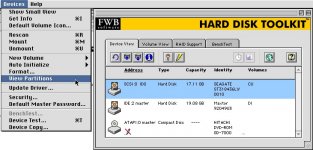
P.S. Don't let me go and pull out my Quadra with HTD 3.0.2 on it just to make screenshots and prove it that it has identical functionality.
Do you have application called "Hard Disk Toolkit™" on your hard drive, no matter which version?
If answer is "Yes",
1. Start it
2. In main window, click on "Device view" tab
3. Double click on the line with your hard drive, or
4. from the menu "Devices" select "View partitions"
What do you see?
P.S. Don't let me go and pull out my Quadra with HTD 3.0.2 on it just to make screenshots and prove it that it has identical functionality.
While you guys are faffing about with FWB junk I am quite looking forward to seeing benching being done with other programs.
Could someone please actually look into HDD results from MacBench and Norton Util's thingybenchyapp?
Also, Udo.Keller, I would like to ask that you please refrain from posting multiple images that are 1.5MB+ they add up way too fast considering that cmd+shift+3 takes a more readable and overall better looking shot of the screen and the files can be physically smaller as well.
*Edit
Actually, only two of the really big ones were of your screen, sorry. Either way, a sceenshot itself in the right format is still so much faster to load. I will not take issue with two large pictures of the hardware you are using, that is understandable. (thumbnails are winrar though)
Could someone please actually look into HDD results from MacBench and Norton Util's thingybenchyapp?
Also, Udo.Keller, I would like to ask that you please refrain from posting multiple images that are 1.5MB+ they add up way too fast considering that cmd+shift+3 takes a more readable and overall better looking shot of the screen and the files can be physically smaller as well.
*Edit
Actually, only two of the really big ones were of your screen, sorry. Either way, a sceenshot itself in the right format is still so much faster to load. I will not take issue with two large pictures of the hardware you are using, that is understandable. (thumbnails are winrar though)
ojfd, I stand corrected. I'd RTFM if I had a manual, but they're hard to find for 15 year old software. I don't want to take this thread too far off topic, but for what it's worth my flash setup displays a SCSI dialogue for the device driver, not IDE.