

Thread
Mac Portable, Dead Battery, Compatible AC Adapters
Most Mac Portables have dead batteries now, and we all know that the Portable won't start up from its AC Adapter without a good battery. However, it has been said that a PowerBook 100 AC Adapter would boot the Macintosh Portable even with a dead battery. I don't know this from personal experience though, just from what I have read on EBAY and in various online forums.
Here is a list of AC Adapters I found at Apple's website:
http://support.apple.com/kb/TA32393
Unfortunately, that web page doesn't mention the Mac Portable. The first AC adapter on that list is the M5140, which is for PowerBook 100. Would anyone know what the model number is for the Macintosh Portable's AC adapter?
Since it has been said that the PowerBook 100's AC Adapter works to boot the Macintosh Portable even if the Portable's battery is dead, but does anyone know if that AC adapter (which can boot the Portable with a dead battery) is the original model M5140 adapter or the replacement model M4662 adapter (or both)?
And what would happen if an M5651 or M5652 were connected to the Macintosh Portable? Would it fry the board? Apple's article says the M5652 would damage the PowerBook 100, so it makes one wonder what would happen to the Macintosh Portable.
I look forward to hearing your thoughts and experiences.
Thank you.
Here is a list of AC Adapters I found at Apple's website:
http://support.apple.com/kb/TA32393
Unfortunately, that web page doesn't mention the Mac Portable. The first AC adapter on that list is the M5140, which is for PowerBook 100. Would anyone know what the model number is for the Macintosh Portable's AC adapter?
Since it has been said that the PowerBook 100's AC Adapter works to boot the Macintosh Portable even if the Portable's battery is dead, but does anyone know if that AC adapter (which can boot the Portable with a dead battery) is the original model M5140 adapter or the replacement model M4662 adapter (or both)?
And what would happen if an M5651 or M5652 were connected to the Macintosh Portable? Would it fry the board? Apple's article says the M5652 would damage the PowerBook 100, so it makes one wonder what would happen to the Macintosh Portable.
I look forward to hearing your thoughts and experiences.
Thank you.
I've both the PB100 (grey) and Portable (white) adapters which I'll check on the model numbers for you today. I can confirm though, that the PB100 adapter on a Portable (with the dead, lead acid battery removed) does not fire up a Portable.
Some time ago, I posted a similar thread:
viewtopic.php?f=10&t=13918&p=134600&sid=380104df66fbfbcff3f353ee8d55b41c#p134600
... now I can't say I've tried the 9V/3A power adapter yet, but it sounds feasable. Keep in mind also that the caps will eventually need to be replaced with tantalum replacements. But, if you've not taken apart a Portable before, get ready for what is actually quite a pleasant experience - it pulls apart like a jigsaw puzzle, with no screws in sight. Just be careful to not snap off any tabs.
JB
Some time ago, I posted a similar thread:
viewtopic.php?f=10&t=13918&p=134600&sid=380104df66fbfbcff3f353ee8d55b41c#p134600
... now I can't say I've tried the 9V/3A power adapter yet, but it sounds feasable. Keep in mind also that the caps will eventually need to be replaced with tantalum replacements. But, if you've not taken apart a Portable before, get ready for what is actually quite a pleasant experience - it pulls apart like a jigsaw puzzle, with no screws in sight. Just be careful to not snap off any tabs.
JB
Byrd, thank you for your reply.
The inspiration for this thread is a conversation I am now having with one of our list members, off-list. He tried to boot the Portable with a 5651 adapter because he wanted to play it safe with a 2A adapter. However, he told me that did not work to boot the machine. He also said that when he originally acquired his Macintosh Portables, they came with a 5136 adapter, which I assume is the model number of the AC Adapter for the original Macintosh Portable. Even so, they will not boot off that adapter either -- no surprises there based on what I've read before about dead Portable batteries.
I did Google up this a few minutes ago.
http://idisk.mac.com/lefevere/Public/THE_PORTABLE_WILL_NOT_BOOT_UP.pdf
I guess there are a variety of things that could prevent booting, including bad capacitors that you spoke of.
The inspiration for this thread is a conversation I am now having with one of our list members, off-list. He tried to boot the Portable with a 5651 adapter because he wanted to play it safe with a 2A adapter. However, he told me that did not work to boot the machine. He also said that when he originally acquired his Macintosh Portables, they came with a 5136 adapter, which I assume is the model number of the AC Adapter for the original Macintosh Portable. Even so, they will not boot off that adapter either -- no surprises there based on what I've read before about dead Portable batteries.
I did Google up this a few minutes ago.
http://idisk.mac.com/lefevere/Public/THE_PORTABLE_WILL_NOT_BOOT_UP.pdf
I guess there are a variety of things that could prevent booting, including bad capacitors that you spoke of.
My Portable boots with a dead battery, but I am using a custom adaptor and I believe I had to crank the amps up. I can give you the V/A rating if you want me to dig it out of the closet.
If you don't mind the digging, I'd love to know the technical info.
For the record, the individual I am speaking to off-line about his non-bootable Mac Portables told me he has the following adapters:
5136, 1.5A (came with the Mac Portables he acquired, and fail to boot the Portable)
5651, 2A (failed to boot the Portable)
5652, 3A (never tried this one)
And to repeat my earlier post, the PowerBook 100 adapters (which he doesn't have) are:
5140 (original)
4662 (newer, replacement)
For the record, the individual I am speaking to off-line about his non-bootable Mac Portables told me he has the following adapters:
5136, 1.5A (came with the Mac Portables he acquired, and fail to boot the Portable)
5651, 2A (failed to boot the Portable)
5652, 3A (never tried this one)
And to repeat my earlier post, the PowerBook 100 adapters (which he doesn't have) are:
5140 (original)
4662 (newer, replacement)
I'll do it when I'm back in town. Ping me in a couple days if I forget.
Same as mine. As I recall, the 2A PowerBook adapter boots my Portable with a dead battery but the battery has to be installed (along with the 9v backup battery). I recelled the battery a while back so I can't test that at the moment.
mcdermd, the individual I am speaking to off-list provided more info:
• He says he just checked his 5651 adapter (2A version) with a DMM and it started out at 7.7v but then quickly dropped to 0.5v, which indicates that particular adapter may be dead.
• He asks if he can safely use the 5652 adapter (3A version)? He tested it and says it shows a steady 7.8v.
Thanks.
• He says he just checked his 5651 adapter (2A version) with a DMM and it started out at 7.7v but then quickly dropped to 0.5v, which indicates that particular adapter may be dead.
• He asks if he can safely use the 5652 adapter (3A version)? He tested it and says it shows a steady 7.8v.
Thanks.
Hi all,
After a quick look through my boxes of Mac stuff, here are the adapters I have that are relevant to the topic:
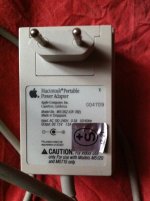
Macintosh Portable Power Adapter Model # M5136Z (output 7.5V / 1.5A)
This is the adapter that came with my Portable (original non-backlit). I bought this Portable second-hand from its original owner a couple of years ago. I confirm it won't allow the Portable to boot.
Apple Low-Power AC Adapter Model # ADP-17AB (output 7.5V / 2A)
This one came with my PowerBook 100, but the ©1994 year and the strange model number lead me to believe it certainly wasn't its original adapter. Maybe a later replacement?
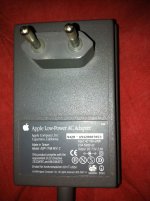
This one doesn't give my 100 enough power to boot anymore, though it still powers up its screen and allow it to make strange noises… So my 100 runs happily 24/7 for two months now from another 1xx adapter (see below). I can't remember for sure if it booted the Portable, but I don't think so.
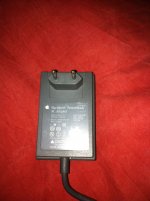
Macintosh PowerBook AC Adapter Model # 5140Z (output 7.5V / 2A)
I got one of those with each of my early 1xx PowerBooks (140 and 145B for sure, and I think also with my 150). So they weren't exclusive to the PowerBook 100. They easily boot my Portable. In my experience, for the Portable to boot it had to have its main battery taken out, and I had to try a couple of times (plug and unplug the adapter).
I don't have enough time today to check my later adapters' model numbers, sorry. But since I managed to boot the Portable with a M5140, I never tried anything else. Am I wrong to fear going beyond 2.0A?
After a quick look through my boxes of Mac stuff, here are the adapters I have that are relevant to the topic:
Macintosh Portable Power Adapter Model # M5136Z (output 7.5V / 1.5A)
This is the adapter that came with my Portable (original non-backlit). I bought this Portable second-hand from its original owner a couple of years ago. I confirm it won't allow the Portable to boot.
Looks like it is indeed M5136. I guess the Z in my adapter's model number is for Switzerland's specific connector.
Apple Low-Power AC Adapter Model # ADP-17AB (output 7.5V / 2A)
This one came with my PowerBook 100, but the ©1994 year and the strange model number lead me to believe it certainly wasn't its original adapter. Maybe a later replacement?
This one doesn't give my 100 enough power to boot anymore, though it still powers up its screen and allow it to make strange noises… So my 100 runs happily 24/7 for two months now from another 1xx adapter (see below). I can't remember for sure if it booted the Portable, but I don't think so.
Macintosh PowerBook AC Adapter Model # 5140Z (output 7.5V / 2A)
I got one of those with each of my early 1xx PowerBooks (140 and 145B for sure, and I think also with my 150). So they weren't exclusive to the PowerBook 100. They easily boot my Portable. In my experience, for the Portable to boot it had to have its main battery taken out, and I had to try a couple of times (plug and unplug the adapter).
I don't have enough time today to check my later adapters' model numbers, sorry. But since I managed to boot the Portable with a M5140, I never tried anything else. Am I wrong to fear going beyond 2.0A?
That is precisely what I wish to know. More specifically, will a 5652 adapter (3A version, 7.7v) cause harm to the Macintosh Portable or not?
I have always thought that maximum amperage output doesn't matter as long as you have enough. It's too much voltage that will kill things.
Okay, I have tested it here at my desk with my Portable (40MB conner drive, 2MB RAM, Modem). After each change in configuration, I waited ten seconds then briefly pressed both programmer and restart buttons simultaneously three times to reset the power manager before pressing a key on the keyboard to start the machine. My results are:
M5136 Macintosh Portable Adapter (1.5A, 7.5V):
Boots with good battery + 9v PRAM battery: YES
Boots with bad battery + 9v PRAM battery: NO (Starts but there is not enough power to spin the hard drive or the floppy drive)
Boots with no battery + 9v PRAM battery: NO (Starts but there is not enough power to spin the hard drive or the floppy drive)
Boots with no battery - 9v PRAM battery: NO (Starts but there is not enough power to spin the hard drive or the floppy drive)
M5651 PowerBook AC Adapter (2A, 7.5V):
Boots with good battery + 9v PRAM battery: YES
Boots with bad battery + 9v PRAM battery: YES
Boots with no battery + 9v PRAM battery: YES
Boots with no battery - 9v PRAM battery: YES
I should think that the 3A adapter should provide the same results as the 2A adapter.
M5136 Macintosh Portable Adapter (1.5A, 7.5V):
Boots with good battery + 9v PRAM battery: YES
Boots with bad battery + 9v PRAM battery: NO (Starts but there is not enough power to spin the hard drive or the floppy drive)
Boots with no battery + 9v PRAM battery: NO (Starts but there is not enough power to spin the hard drive or the floppy drive)
Boots with no battery - 9v PRAM battery: NO (Starts but there is not enough power to spin the hard drive or the floppy drive)
M5651 PowerBook AC Adapter (2A, 7.5V):
Boots with good battery + 9v PRAM battery: YES
Boots with bad battery + 9v PRAM battery: YES
Boots with no battery + 9v PRAM battery: YES
Boots with no battery - 9v PRAM battery: YES
I should think that the 3A adapter should provide the same results as the 2A adapter.
Logically, I agree. If you have a 7.7v PSU that can supply 1A and another 7.7v PSU that can supply 5A, either should work fine in most any situation because the device pulling power from the PSU will take as much electric current as it needs, and no more.
But it appears Apple is siding with Dr. McCoy on this, rather than Mr. Spock:
http://support.apple.com/kb/TA32393
Note that Apple says "Wattage" can destroy the circuit board of some PowerBooks! Their "Warning" says that anything above 19W would destroy a PB100 or PB150. But why? I can understand this if the voltage is too high, but it is really warning about excess voltage here? If so, why not put that instead of Wattage?
The individual with whom I am speaking off-list has a dead M5651 (which does him no good to test further) and a working M5652. Consider well how the 5651 & 5652 output the same voltage of about 7.7v. And yet, the 5651 is rated as 19W on Apple's site (2A), and the 5652 is rated as 24W on Apple's site (3A). The voltage is the same, yet the wattage is different (due to the current rating being different -- i.e., the 5652 supplies more current than the 5651). Now once again consider Apple's WARNING on that web page. If anything greater than 19W will destroy a PowerBook100 (i.e., the 5652 would destroy it), what then would the 5652 do to a Macintosh Portable???
The reason all this matters is because the main battery is dead, the individual who owns it doesn't have the means to get another, and we need to determine if his Portable is really working or not. The only way to determine if the Portable is fried somehow is to either get a working main battery (which is not possible right now), or test an AC adapter. But the only adapters currently in-hand that are working are the original Macintosh Portable adapter (which we all know WON'T boot the Portable that has a dead Main Battery), and the 5652 (7.7v, 24W, 3A). So does anyone have experience booting a Portable off an M5652 AC Adapter?
I've powered my Mac Portable from an M5651 2A adapter for years (ever since I realised that the original white wall wart was being yellowed by the heat from leaving it plugged in constantly) with no ill effects. However, as others have found, the M5651 will not reliably boot the Portable with the original 3.5" Conner hard drive.
With a compact flash drive, it's just a matter of hitting both the + buttons to reset the power manager and away it goes with or without the main battery present.
I don't know how sophisticated the charging circuit in the Mac Portable is, or how it will respond to a 3A charger if the main battery is dead (or worst case: if it has shorted cells). I suspect that the worst outcome from using a 3A charger would be that it might "blow" the pico fuse soldered to the Portable's main board. The fuse exists to protect the board from over current. I've only seen a Portable with an open-circuit fuse once and I have no idea what the user did to cause it.
@dcdermd: regarding testing with the 9v battery in / out, it won't make any difference - as long as the battery cover is on. The 9v backup battery is switched in mechanically by a micro-switch on the battery compartment door.
With a compact flash drive, it's just a matter of hitting both the + buttons to reset the power manager and away it goes with or without the main battery present.
I don't know how sophisticated the charging circuit in the Mac Portable is, or how it will respond to a 3A charger if the main battery is dead (or worst case: if it has shorted cells). I suspect that the worst outcome from using a 3A charger would be that it might "blow" the pico fuse soldered to the Portable's main board. The fuse exists to protect the board from over current. I've only seen a Portable with an open-circuit fuse once and I have no idea what the user did to cause it.
@dcdermd: regarding testing with the 9v battery in / out, it won't make any difference - as long as the battery cover is on. The 9v backup battery is switched in mechanically by a micro-switch on the battery compartment door.
The only reason why wattage matters, being too many watts kills powerbooks is because of 2 things really.
1 is poor circuit design.
2 is potential overload during a fault condition.
1: If the circuit is designed poorly, it uses the limiting in the power supply's current (wattage) to regulate proceeding voltages/amperages in cascading circuitry. So, if the wattage of a power supply was increased, in return the poorly designed circuit would regulate too "hot" and cause damage. (such as charging a battery).
2: If a fault occurs, such as a short in the battery, or elsewhere in the logic board, the lower current your supply can handle, the better the situation. Why? if the circuit shorts out, there is not as much current there to blow stuff up, maybe heat them up, but the power supply would crowbar before this would happen. If the amperage is higher, there is more current available to the short, which could cause ratings of semiconductors in cascading stages to be exceeded, in turn, cause failure in those stages. aka MAGIC SMOKE
Example of situation 2 would be a car audio amplifier. When bench testing damaged or possibly damaged/repaired car audio amplifiers, I run them at a current limited supply of 12v at 2amps. Why? if a short re-occurs or has occurred in the output stage, it will protect the power SMPS stage. If i supplied it with a high amperage power supply, such as 30amps, it would cause the SMPS stage to completely explode because of the short while attempting to supply voltage rails across nearly a 0 ohm resistance. MAGIC SMOKE
1 is poor circuit design.
2 is potential overload during a fault condition.
1: If the circuit is designed poorly, it uses the limiting in the power supply's current (wattage) to regulate proceeding voltages/amperages in cascading circuitry. So, if the wattage of a power supply was increased, in return the poorly designed circuit would regulate too "hot" and cause damage. (such as charging a battery).
2: If a fault occurs, such as a short in the battery, or elsewhere in the logic board, the lower current your supply can handle, the better the situation. Why? if the circuit shorts out, there is not as much current there to blow stuff up, maybe heat them up, but the power supply would crowbar before this would happen. If the amperage is higher, there is more current available to the short, which could cause ratings of semiconductors in cascading stages to be exceeded, in turn, cause failure in those stages. aka MAGIC SMOKE
Example of situation 2 would be a car audio amplifier. When bench testing damaged or possibly damaged/repaired car audio amplifiers, I run them at a current limited supply of 12v at 2amps. Why? if a short re-occurs or has occurred in the output stage, it will protect the power SMPS stage. If i supplied it with a high amperage power supply, such as 30amps, it would cause the SMPS stage to completely explode because of the short while attempting to supply voltage rails across nearly a 0 ohm resistance. MAGIC SMOKE
But, shred, your experience conflicts with that of mcdermd...
So who is right? Can Portables with the original 40MB Apple branded Conner drive be booted with the M5651 or not? One says yes, another no. But I would like to know who is correct and why. Is it, shred, that you didn't reset the power manager like mcdermd did?
What flash drive do you use, and where did you buy it?
Thanks!
Hi JDW,
Note that I said the M5651 doesn't "reliably" boot my Mac Portable with the Conner 3.5" hard drive. It worked sometimes, not others and I always reset the power manager before booting.
There's a thread I started called "Ah, it's the serenity" or something like that on getting compact flash to go in the Portable. I wired up my own cable to go from the Portable logic board to a 50 way SCSI adapter, then SCSI -> IDE > Compact Flash. It's not the neatest solution, but it goes well and the Portable is ultra quiet now.
[edit] My M5651 is running from 240v. It shouldn't make any difference to the output, but you never know.
Note that I said the M5651 doesn't "reliably" boot my Mac Portable with the Conner 3.5" hard drive. It worked sometimes, not others and I always reset the power manager before booting.
There's a thread I started called "Ah, it's the serenity" or something like that on getting compact flash to go in the Portable. I wired up my own cable to go from the Portable logic board to a 50 way SCSI adapter, then SCSI -> IDE > Compact Flash. It's not the neatest solution, but it goes well and the Portable is ultra quiet now.
[edit] My M5651 is running from 240v. It shouldn't make any difference to the output, but you never know.
Thanks for the tip on that other thread, shed. Here it is:
viewtopic.php?f=10&t=4477
Funny too, seeing that I actively participated in it! Ha ha. Totally forgot about it. And my closing post was to say that one of the links given resulted in a 404 error.
viewtopic.php?f=10&t=4477
Funny too, seeing that I actively participated in it! Ha ha. Totally forgot about it. And my closing post was to say that one of the links given resulted in a 404 error.
But when you speak of "Watts" you are talking about the combination of voltage and current, not just current alone. However, if an AC adapter puts out a steady voltage, then it would only be "too much current" that would increase the "wattage," which is what you mention kills the Mac Portable. But if we admit that "too much current kills," then how is it that the main 9v battery of the Portable wouldn't be a problem too? Because can't that lead acid battery supply more than 2 Amps of current? And as far as I know, the battery is just a normal battery, and nothing within the battery itself actively limits the current output.
I'm still trying to figure out what a rock solid 9.00v power supply (AC adapter, what have you) would be a problem if it has the upper potential of delivering more than 2 or so Amps of current. If the voltage of that supply isn't fluctuating, who case if it supplies a max of 3A or 4A or even 10A? Because again, even the main 9v battery of the Portable doesn't have built-in current limiting, does it?
Circuits only draw the required amperage from a power source. Once a circuit starts to fail, more current can be drawn in a quick surge or latch-up condition, which can lead to a cascading failure if the supply was able to deliver the current. From a service standpoint, lower wattages/current availability is preferred because if the supply cant push out the amount of current the "surge" is requesting, FAR less components are damaged.
Maybe i should have been more clear. I have a tendency not to be clear sometimes.
But all this babble is moot if your circuitry is operating perfectly. you can hook up a 7.5v at 400amps if you wanted to. it doesnt matter as the machine is only going to draw a certain amount as needed. Its when a failure begins to start, is when that current matters. so if a transistor shorts or a cap starts to short, and your supply can push 10 amps, it can cause some serious damage and cascading failure as the current availability is there.
think of it like a bomb or something, if the detonator false triggers, and its yeild is only 1 ton(available power), itll do far less damage than say if it had a 10 megaton supply. (maybe a bad example). So basically if your power supply is current limited, and a transistor shorts, it might get warm or something but thats it. If you had a crapload of available current, consumption would drastically increase and cause the motherboard or other failed hardware to explode/cause a fire.
But Wattage is Voltage x Current. But i am thinking of voltage as a steady supply yes. only variable current. as current increases, wattage increases, same way with voltage. But im thinking of a rock steady voltage in my explanations. But of course theres that whole factor if your power supply is only 2 amps, and a short is pulling a 4 amp load, your voltage will drop significantly preventing further damage because its a lower wattage power supply, than say, one that provides 4 or 6 amps.
Well anyway, I am a repair technician by trade so its kinda my train of thinking on that subject. Even though it may mean nothing by what others were saying. But hey....
Maybe i should have been more clear. I have a tendency not to be clear sometimes.
But all this babble is moot if your circuitry is operating perfectly. you can hook up a 7.5v at 400amps if you wanted to. it doesnt matter as the machine is only going to draw a certain amount as needed. Its when a failure begins to start, is when that current matters. so if a transistor shorts or a cap starts to short, and your supply can push 10 amps, it can cause some serious damage and cascading failure as the current availability is there.
think of it like a bomb or something, if the detonator false triggers, and its yeild is only 1 ton(available power), itll do far less damage than say if it had a 10 megaton supply. (maybe a bad example). So basically if your power supply is current limited, and a transistor shorts, it might get warm or something but thats it. If you had a crapload of available current, consumption would drastically increase and cause the motherboard or other failed hardware to explode/cause a fire.
But Wattage is Voltage x Current. But i am thinking of voltage as a steady supply yes. only variable current. as current increases, wattage increases, same way with voltage. But im thinking of a rock steady voltage in my explanations. But of course theres that whole factor if your power supply is only 2 amps, and a short is pulling a 4 amp load, your voltage will drop significantly preventing further damage because its a lower wattage power supply, than say, one that provides 4 or 6 amps.
Well anyway, I am a repair technician by trade so its kinda my train of thinking on that subject. Even though it may mean nothing by what others were saying. But hey....
Agreed. And that's why I want to know why there is all this talk, all over the web, about users needing to exercise caution about using AC Adapters that can supply much more than 2A. It makes no sense to me because I cannot imagine that every single Mac Portable out there has failing circuitry!
Now ponder this discussion, which warns about AC Adapters and talks about burned SMD resistors in the Portable's board:
http://www.applefritter.com/node/9864
(Note my own posts there back in 2006. I've been wondering about the technical details for YEARS! Still no clear-cut answers are forthcoming.)
What are your thoughts on this?
No, All I was doing was presenting a scenario where a higher wattage/current power supply would be a bad thing in the event of a circuit failure. thats it. nothing more.
if the circuits are perfectly fine, there is no issues that I can speak of. Now of course there could be issues in the charging circuitry that a higher current power supply will allow a lead acid battery to charge faster, IF and only IF the battery is demanding for it. but if not, it dont matter.
Edit: As far as the SMD resistors, id like to see or know where and what resistors. If i knew what part of the circuit they were in, i could explain why. hehe. SMD resistors burn up because the amount of current/voltage flowing through them has increased or other factors leading to the wattage the resistor can dissipate to be exceeded. But that is just a general "fill in the blank here" statement that means nothing, but at least i said it as it is true. I could be more specific if i knew what circuit.
if the circuits are perfectly fine, there is no issues that I can speak of. Now of course there could be issues in the charging circuitry that a higher current power supply will allow a lead acid battery to charge faster, IF and only IF the battery is demanding for it. but if not, it dont matter.
Edit: As far as the SMD resistors, id like to see or know where and what resistors. If i knew what part of the circuit they were in, i could explain why. hehe. SMD resistors burn up because the amount of current/voltage flowing through them has increased or other factors leading to the wattage the resistor can dissipate to be exceeded. But that is just a general "fill in the blank here" statement that means nothing, but at least i said it as it is true. I could be more specific if i knew what circuit.
Now i will say that if the power supply circuitry on the logic board is designed with components that are only meant to have a certain amperage flowing through it at any given time, and you allow more amperage to flow through it than rated, it will burn components up too. Again, the cascading failure scenario.
I havent see the schematic of a portable (if one exists) but if the battery is used to run the laptop at least partially before the AC adapter takes over, that means there are 2 power sources. If you remove the battery, that causes the entire load on the DC jack supply circuitry. if there are regulators in between, that means they have a heavier load. They burn up if they cant handle it.
So for example if the DC jack circuit is now pulling 1.78 amps becuase of the battery missing, when normally it would pull 1.25Amps, it can cause problems if the circuitry is designed "cheaply"
For example most 0805 SMD resistors can only hold a max of 1/8watt, and nowadays they are making 1/4watt SMD 0805 resistors, so that statement isnt true anymore at least today...
But say if they had 1/8 watt resistors and maybe there is a 82% power dissipation across those resistors under NORMAL circumstances, there is not a problem. Remove the battery and use a higher current power supply to run the unit, you just changed the entire power configuration in a way its not designed to run, it can push those resistors from say 82% to 130% power dissipation. What happens? they burn up over time. The more you push it past 100% the faster they burn up. (hotter they get).
as far as the macintosh portable and this being the cause, thats all still debatable and means nothing because i dunno what resistors burned up or which part of the circuit they are in.
But since I am going in blindfolded, I feel this: The macintosh portable battery is required becuase it can handle surge currents that the DC circuit supply cannot. So even though the power adapter charges the battery AND runs the machine, it actually has to be at a specific charge before the machine will run. because when it is running, the DC circuit will run the machine, but any peak surge currents are handled by the battery, once the load/demand goes down, it returns to charging and running from DC circuit/power adapter.
if the battery is missing/dead/gone and you force the DC circuit to run the entire machine, the surge currents arnt handled by the battery anymore. they are now handled by the power adapter/DC circuit. So guess what, certain circuitry can exceed thier ratings just by this alone IF the circuit is built cheaply with nearly underrated parts. This is probably the reason the portable is the way it is in the first place, because if the circuit was designed otherwise, it would run by itself without a charged batt in the first place from the factory.
Without seeing a schematic, my guess is the battery and DC power circuit, there are components in between that arnt rated for high surge currents. So the battery takes over for that type of conduct.
Best way to test this scenario is grab a digital ammeter. Run the machine and do idle and intensive work with the battery + charger. monitor current draw from DC jack. Do the same with a PB100 charger and NO battery. youll probably notice a huge difference. and that difference alone can blow stuff up if its not rated for that kind of demand.
I havent see the schematic of a portable (if one exists) but if the battery is used to run the laptop at least partially before the AC adapter takes over, that means there are 2 power sources. If you remove the battery, that causes the entire load on the DC jack supply circuitry. if there are regulators in between, that means they have a heavier load. They burn up if they cant handle it.
So for example if the DC jack circuit is now pulling 1.78 amps becuase of the battery missing, when normally it would pull 1.25Amps, it can cause problems if the circuitry is designed "cheaply"
For example most 0805 SMD resistors can only hold a max of 1/8watt, and nowadays they are making 1/4watt SMD 0805 resistors, so that statement isnt true anymore at least today...
But say if they had 1/8 watt resistors and maybe there is a 82% power dissipation across those resistors under NORMAL circumstances, there is not a problem. Remove the battery and use a higher current power supply to run the unit, you just changed the entire power configuration in a way its not designed to run, it can push those resistors from say 82% to 130% power dissipation. What happens? they burn up over time. The more you push it past 100% the faster they burn up. (hotter they get).
as far as the macintosh portable and this being the cause, thats all still debatable and means nothing because i dunno what resistors burned up or which part of the circuit they are in.
But since I am going in blindfolded, I feel this: The macintosh portable battery is required becuase it can handle surge currents that the DC circuit supply cannot. So even though the power adapter charges the battery AND runs the machine, it actually has to be at a specific charge before the machine will run. because when it is running, the DC circuit will run the machine, but any peak surge currents are handled by the battery, once the load/demand goes down, it returns to charging and running from DC circuit/power adapter.
if the battery is missing/dead/gone and you force the DC circuit to run the entire machine, the surge currents arnt handled by the battery anymore. they are now handled by the power adapter/DC circuit. So guess what, certain circuitry can exceed thier ratings just by this alone IF the circuit is built cheaply with nearly underrated parts. This is probably the reason the portable is the way it is in the first place, because if the circuit was designed otherwise, it would run by itself without a charged batt in the first place from the factory.
Without seeing a schematic, my guess is the battery and DC power circuit, there are components in between that arnt rated for high surge currents. So the battery takes over for that type of conduct.
Best way to test this scenario is grab a digital ammeter. Run the machine and do idle and intensive work with the battery + charger. monitor current draw from DC jack. Do the same with a PB100 charger and NO battery. youll probably notice a huge difference. and that difference alone can blow stuff up if its not rated for that kind of demand.
I got a backlit portable myself that i need to find time to finish restoring, maybe ill mess with it some.
We can safely exclude that scenario, I think, as most Portable owners for years have been trying to get their Portables to work without a battery, since the batteries are all dead now. So it seems those SMD resistors (as discussed in that other thread) were killed without the lead acid battery being connected.
And that's what all this is about really. It's a crying shame that the Portable cannot be used with an adapter only! It's a travesty of engineering that Apple engineers forced the user to have that huge 9v lead acid battery in there.
I know i can get it to run without a battery, without blowing up SMD resistors. just might take some circuit modifications, but ill do it. not a problem ;-)
Once i get mine restored, ill figure that out.
Once i get mine restored, ill figure that out.
The main battery is a 6v battery consisting of 3 x 2v, "Cyclon" 5.0Ah "Gates Cell". I think Gates changed hands some years ago and they are now made by Hawker Energy... no, wrong... it's now EnerSys http://www.enersysreservepower.com/!
I repacked my battery a couple of times last century and still have the original set of Gates cells from it (its surprising that they haven't corroded and spewed their innards by now).
I recall seeing a post somewhere (possibly on 68kMLA) where someone bought a small 6v gel battery and installed it in the Mac Portable. It wasn't the right shape and so they had used a battery with considerably less capacity to make it fit, but the computer booted reliably. I'm not sure how well this would function in the long term, since the Gates cells have slightly different chemistry and charging characteristics to regular lead acid batteries. I've started my PowerBook 100 on occasions with a pair of fly leads out to a regular lead acid gel battery and I guess this technique would also work on the Portable - as long as you have the battery door in place. If the battery door is removed from the Portable, the little micro-switch changes over to the 9v backup battery and you won't get very far at all with booting up.
I repacked my battery a couple of times last century and still have the original set of Gates cells from it (its surprising that they haven't corroded and spewed their innards by now).
I recall seeing a post somewhere (possibly on 68kMLA) where someone bought a small 6v gel battery and installed it in the Mac Portable. It wasn't the right shape and so they had used a battery with considerably less capacity to make it fit, but the computer booted reliably. I'm not sure how well this would function in the long term, since the Gates cells have slightly different chemistry and charging characteristics to regular lead acid batteries. I've started my PowerBook 100 on occasions with a pair of fly leads out to a regular lead acid gel battery and I guess this technique would also work on the Portable - as long as you have the battery door in place. If the battery door is removed from the Portable, the little micro-switch changes over to the 9v backup battery and you won't get very far at all with booting up.
According to Apple you can use a 9V AC adapter with all the batteries removed:
http://support.apple.com/kb/TA40602?viewlocale=en_US
It's the funniest thing I've ever read. It suggests that although technically you can power the Portable off the mains, why would you ever want to do this, since:
:lol:
Ahem.
-=DG=-
http://support.apple.com/kb/TA40602?viewlocale=en_US
It's the funniest thing I've ever read. It suggests that although technically you can power the Portable off the mains, why would you ever want to do this, since:
... size! ... weight! ... convenience factors! ... portable machine! ROFL
:lol:
Ahem.
-=DG=-
As you properly point out, that Apple article says you can power a Portable by removing the big lead acid battery, and also removing the small alkaline 9v PRAM battery, then connect a 9v AC adapter to the small 9v battery's contacts. But alas, not all the pertinent questions have yet been answered...
1) If this truly works, why then do we Google about it and find virtually no one using that method? Everyone on planet earth is instead still scratching their heads over how to rebuild lead acid batteries to get the Portable bootable again. And it's not like there is no such thing as a high-amperage 9v AC adapter either, so I am confounded to find such a dearth of end user feedback on that method. So if indeed the Apple article is correct, why then would not everyone be talking about that method? The lack of talk seems to cast doubts on the method. Or, if the method is correct, then such proves everyone on planet earth is a lazy bum for never having tried it! Agreed?
2) After some Googling, I was able to find one man on planet earth who claims to have tried a variation of Apple's advice. But in his case he claims that two AC adapters are required. Read his post here:
http://www.vintage-computer.com/vcforum/showthread.php?1957-Apple-laptop&p=30625#post30625
Therefore, would anyone care to comment on the soundness of his approach? And if it works, why then would Apple not have mentioned the need for 2 AC adapters in that TA40602 article?
3) Even in the utter absence of user feedback, let's assume for the moment the Apple article contains information on a feasible solution. What kind of 9v adapter then does one need to use in place of that tiny 9v alkaline PRAM battery? In other words, should it be a 9v AC adapter rated at 2 Amps? 3 Amps? 4 Amps? 5 Amps? And when you answer this question, please explain WHY you would recommend an adapter of such a current rating.
I look forward to your replies.
if i ever get a chance to restore mine, i could find out.