

Thread
SE/30 booting off CF success
FYI, the Acard aec7720u SCSI to IDE converter will work with an old mac flawlessly. I have system 7.5 installing on a flash card right now. The compact flash card is a Sandisk extreme IV, so I have high expectations for disk benchmarks. Will post numbers soon.

Bam. It was an ordeal getting HD Toolkit to run on this setup, as it requires 7.5.3. 500k a second is surprising, and quite a bit less than the SE/30 should be capable of. This same flash card setup did 5 megs/second on my 840av with 1500 operations. Still, the access time and seek time are quite nice, and it boots extremely fast.
Anybody have any tips as to how to speed the transfer speed up?.
It seems you haven't read through this recent discussion yet:
viewtopic.php?f=7&t=17047
Even though it's time consuming, you'll find a lot of info by going through most all the posts. And at the end, you will see my repeated call for benchmarks other than the FWB. I suggest you run the Norton System Info benchmark and then post the results.
viewtopic.php?f=7&t=17047
Even though it's time consuming, you'll find a lot of info by going through most all the posts. And at the end, you will see my repeated call for benchmarks other than the FWB. I suggest you run the Norton System Info benchmark and then post the results.
Cool. I would look into using another benchmarking software to see how the results can vary based on the methodology.
I found that thread this morning, very interesting. HDT is appealing as a benchmark because it gives absolute results, rather than numbers relative to a classic or 6100.
Pretty sure I have an old norton CD around. Will give it a try.
Pretty sure I have an old norton CD around. Will give it a try.

Norton corroborates the results. I've timed large file transfers, too. There's a very real and unexplained 530k/sec transfer limit.
None of the few jumper settings on the 7720u and CF adapter are relevant to this problem, either. Not sure where to take it from here.
Thank you for testing with Norton. Well, all I can say is that other claim "it FEELS faster" than a regular spinning platter hard drive. But if that is true, then I would expect to see scientific evidence of such in the form of drive benchmarks that reveal "why" it FEELS faster! Because all I see is evidence that shows CF cards to be MUCH SLOWER!
The random read test is quite good, so any task that accesses a lot of small scattered files would do well. But yeah, I have to agree with you. At this point the only solid advantage to the CF setup is its silent operation.
and not to mention, replace SCSI HDDs that are slowly disappearing from the market.
instead of CF, i think SCSI->ATA/SATA would be much better honestly.
instead of CF, i think SCSI->ATA/SATA would be much better honestly.
When I was working a lot on my SE/30 with a 7200RPM SCSI drive in it, I noticed a *large* gain in sequential transfer speed by upgrading to the 7.5.5 Drive Setup drivers instead of HD SC Setup. There might be some notes about that on my website, I'm not sure.
If you're running 7.5.5 on that SE/30, try updating the hard disk driver with patched Drive Setup and see if the figures improve.
If you're running 7.5.5 on that SE/30, try updating the hard disk driver with patched Drive Setup and see if the figures improve.
TylerEss, success! The CF card, when initialized with HDT was limited to 500k/sec. After I initialized it with the patched version of Apple HD SC Setup (located at ftp://grijan.cjb.net:21000/macintosh/Software/Utilities/hd_sc_setup_735-patched.sea.bin) and updated the disk driver, transfer speed jumped to 1700k/sec. Take a look:

I wonder if this would also work for the aztec monster drives in that other thread...
I wonder if this would also work for the aztec monster drives in that other thread...
Initializing the drive with a patched drive setup results in a very fast drive, but it's too unstable to use for anything besides benchmarks. Every time I've tried to install or copy anything, it spews bus errors. I've compared all the drive settings I could find in HDT for both slow and fast formatted volumes, and they're identical.
I'll take another swing at this in the morning.
I'll take another swing at this in the morning.
What errors, specifically?
Most recently, after formatting the flash drive with Apple HD SC setup and trying to copy ~3mb of Monkey Island to the drive:
Sorry, a system error occurred.
"Finder"
address error
After this the CF card is hosed, to the extent that it prevents booting. Then I stick it into my canon SLR, reformat it, reinsert it into the mac, and start over. Use of the apple driver seems to be fatal after few seconds of writing. The HDT driver is at least functional, if slow.
Sorry, a system error occurred.
"Finder"
address error
After this the CF card is hosed, to the extent that it prevents booting. Then I stick it into my canon SLR, reformat it, reinsert it into the mac, and start over. Use of the apple driver seems to be fatal after few seconds of writing. The HDT driver is at least functional, if slow.
Well, since Tyler recommended that driver, perhaps Tyler can provide the solution? :
I have two ideas, neither of which may be the right ones.
Did you switch to HD SC Setup (as you linked) or Drive Setup?
Drive Setup is the newer of the two, and is the driver that improved the disk access speed in my SE/30 with a 7200RPM SCSI drive.
If you tried with HD SC Setup, I'd try again with Drive Setup.
This and this may be of some help.
Cheers!
Did you switch to HD SC Setup (as you linked) or Drive Setup?
Drive Setup is the newer of the two, and is the driver that improved the disk access speed in my SE/30 with a 7200RPM SCSI drive.
If you tried with HD SC Setup, I'd try again with Drive Setup.
This and this may be of some help.
Cheers!
I've tried both Apple HD SC Setup and Drive Setup 1.6.
I'm much closer to solving this now. The issue is in how Drive Setup is patched with device settings so it recognizes the flash drive.
Using ResEdit, I would open Drive Setup and add a device entry called "SANDISK,*", which would then make DriveSetup recognize the device as compatible. This new entry is given a blob of hexadecimal gibberish that is usually borrowed from a different device in the list. I used the settings for a generic quantum scsi drive. This failed. Generic IBM settings failed. Generic seagate settings failed.
It wasn't until I used the drive settings for a generic ATA drive that my flash card could be used (even though it's connected to a SCSI bridge). However, the drive is now very slow again.
I then discovered that opening Drive Setup 2.X with Resedit allowed me to interpret what the hexadecimal blob means. Each drive definition has the following editable settings:
Driver ID - 48
AltDriver - 200
SCIC ID - 0
DrvrOptions - 0
TibType - 1
Blind Type - 0
Option Bits - 1024
Poll Byte - 0
HasPage30 - 0
Default - 0
Password Type - 0
Num Cmds - 7
The key settings seem to be Driver, Blind Type, Option Bits, and Num Cmds. "Option Bits" looks like multiple settings encoded into a single number.
I'm much closer to solving this now. The issue is in how Drive Setup is patched with device settings so it recognizes the flash drive.
Using ResEdit, I would open Drive Setup and add a device entry called "SANDISK,*", which would then make DriveSetup recognize the device as compatible. This new entry is given a blob of hexadecimal gibberish that is usually borrowed from a different device in the list. I used the settings for a generic quantum scsi drive. This failed. Generic IBM settings failed. Generic seagate settings failed.
It wasn't until I used the drive settings for a generic ATA drive that my flash card could be used (even though it's connected to a SCSI bridge). However, the drive is now very slow again.
I then discovered that opening Drive Setup 2.X with Resedit allowed me to interpret what the hexadecimal blob means. Each drive definition has the following editable settings:
Driver ID - 48
AltDriver - 200
SCIC ID - 0
DrvrOptions - 0
TibType - 1
Blind Type - 0
Option Bits - 1024
Poll Byte - 0
HasPage30 - 0
Default - 0
Password Type - 0
Num Cmds - 7
The key settings seem to be Driver, Blind Type, Option Bits, and Num Cmds. "Option Bits" looks like multiple settings encoded into a single number.
Spartacus,
What happens when you change
Option Bits
from 1024 to 512 ?
ojfd, I changed option bits to 512, and though the drive worked reliably transfers were still a half meg per second.
Spartacus,
When you open "FWB Configure" application and press on large "Control" button on the right and then go to "Edit Mode Pages" and open Parameter Nr. 2 window, what does it show?
See attached example below. Your parameters probably will be different, since mine is UW LVD drive on Adaptec.
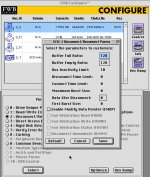
When you open "FWB Configure" application and press on large "Control" button on the right and then go to "Edit Mode Pages" and open Parameter Nr. 2 window, what does it show?
See attached example below. Your parameters probably will be different, since mine is UW LVD drive on Adaptec.
I just had a Chat session with Ben at OWC regarding their LEGACY series SSDs. I thought it would be relevant to our discussion here. Ben said that vintage Mac owners in the past have used this formatter/driver for use on their SSDs (for example, when used on a PowerBook G3 Wallstreet running OS 8 ), and have experienced a noticeable performance boost:
http://eshop.macsales.com/item/Intech%20Software/STCDHD/
However, he could not tell me if those customers ran any benchmarks, nor did he say how they rated that performance, other than to say "it feels faster than a spinning platter drive."
Since it is clear that the driver and driver settings have a bearing on performance, and seeing the default settings produce lackluster performance (as evidenced by your benchmark speed reports here), it may be worth trying SpeedTools to see what happens.
http://eshop.macsales.com/item/Intech%20Software/STCDHD/
However, he could not tell me if those customers ran any benchmarks, nor did he say how they rated that performance, other than to say "it feels faster than a spinning platter drive."
Since it is clear that the driver and driver settings have a bearing on performance, and seeing the default settings produce lackluster performance (as evidenced by your benchmark speed reports here), it may be worth trying SpeedTools to see what happens.
ojfd, it looks like this-

Oh, it doesn't allow to change anything there... :-/
Next step - I'd like to see settings on Mode Pages 1 (Read/Write error recovery) and 8 (Caching)
Next step - I'd like to see settings on Mode Pages 1 (Read/Write error recovery) and 8 (Caching)
Or just try this to see if it solves the performance problems, without needing to spend more time tweaking unknown settings:
http://www.intechusa.com/HDInfo.html
http://www.intechusa.com/HDInfo.html
Since this thread is focused on flash drive solutions for our vintage Macs, I felt this would be appropriate.
Last night I commented on OWC's blog about their Black Friday 2011 specials. I noticed that they had specials on all their SATA SSDs but none on their "Legacy" IDE/ATA edition SSDs that are for vintage Macs. Having recently acquired some old PB G3 Wallstreets, I also commented about discounts on batteries too. Today, Grant at OWC kindly replied that he would take my words under consideration.
So as to not let this chance die (for truly, I am only one man asking about this), I wanted to post here to encourage those of you interested to reply in kind. Specifically, if you've ever pondered putting a true SSD, not just a CF card, in your vintage Mac, now is the time to seek out a discount and do it! I would therefore strongly encourage you to post a comment on OWC's blog if you would be encouraged to buy an OWC SSD if they offered a good enough discount on them.
Here's the Black Friday Blog:
http://blog.macsales.com/12693-holiday-deals-from-owc/comment-page-1#comment-49219
And here are the 3 product pages I mentioned in my comment on the OWC blog...
40GB Legacy 2.5" SSD:
http://eshop.macsales.com/item/OWC/SSDMLP040/
PB G3 Wallstreet PRAM Battery:
http://eshop.macsales.com/item/NewerTech/PRAMPBG3WS/
PB G3 Wallstreet Main Battery:
http://eshop.macsales.com/item/NewerTech/BAPLLIWSRS/
And while pondering whether or not to post a comment there, keep in mind, "Ask and ye shall receive!"
Thanks!
Last night I commented on OWC's blog about their Black Friday 2011 specials. I noticed that they had specials on all their SATA SSDs but none on their "Legacy" IDE/ATA edition SSDs that are for vintage Macs. Having recently acquired some old PB G3 Wallstreets, I also commented about discounts on batteries too. Today, Grant at OWC kindly replied that he would take my words under consideration.
So as to not let this chance die (for truly, I am only one man asking about this), I wanted to post here to encourage those of you interested to reply in kind. Specifically, if you've ever pondered putting a true SSD, not just a CF card, in your vintage Mac, now is the time to seek out a discount and do it! I would therefore strongly encourage you to post a comment on OWC's blog if you would be encouraged to buy an OWC SSD if they offered a good enough discount on them.
Here's the Black Friday Blog:
http://blog.macsales.com/12693-holiday-deals-from-owc/comment-page-1#comment-49219
And here are the 3 product pages I mentioned in my comment on the OWC blog...
40GB Legacy 2.5" SSD:
http://eshop.macsales.com/item/OWC/SSDMLP040/
PB G3 Wallstreet PRAM Battery:
http://eshop.macsales.com/item/NewerTech/PRAMPBG3WS/
PB G3 Wallstreet Main Battery:
http://eshop.macsales.com/item/NewerTech/BAPLLIWSRS/
And while pondering whether or not to post a comment there, keep in mind, "Ask and ye shall receive!"
Thanks!
JDW, I didn't have time to try HD speed tools for a while, but it worked. Read speed is ~1700kb/sec, and stable. Thanks!
But, Spartacus, the write speed is still significantly slower than an old spinning platter hard drive. I read that part of your report and I am still quite curious as to the technical reason WHY. If one contends that such is the limitation of the CF card itself, then logically one would expect to see different throughput scores when you try different CF cards (some fast, some slow). But if you test various CF cards and if the WRITE performance remains locked at that unusually slow 500kB/s, then I would be led to suspect that even the HD Speed Tools driver is not tuned to accelerate Write speed, at least not on flash disks for some unknown reason.
In practical terms, you will probably get more benefits from the fast READ speeds anyway, so you can always tell yourself, "the slow Write Speed doesn't bother me much." Even so, I am still curious about that point and would like to hear the thoughts of other technically minded people as to why this may be the case, and what, if anything, could be done to fix it.
In practical terms, you will probably get more benefits from the fast READ speeds anyway, so you can always tell yourself, "the slow Write Speed doesn't bother me much." Even so, I am still curious about that point and would like to hear the thoughts of other technically minded people as to why this may be the case, and what, if anything, could be done to fix it.
The HDST driver, in combination with a CF card and an Acard SCSI-IDE bridge delivers more or less the same performance as a spinning platter HDD behind the same SCSI-IDE bridge. This is true for a G3 Powermac, but not for the SE/30: http://68kmla.org/forums/viewtopic.php?f=7&t=17047&start=82
The very same CF card with the very same HDST driver and the very same SCSI-IDE bridge shows better performance when used with a Macintosh that has a more performant SCSI bus. Both read and write performance reach the same level.
Summary:
(1) The bottleneck for write performance is not in the CF card itself. The very same card gives better results when combined with a faster Macintosh host.
(2) And it is not in the SCSI-IDE bridge itself, neither the AztecMonster nor the AEC-7720U. The very same bridges show better results when combined with a faster Macintosh host.
(3) The SE/30 SCSI bus itself is not the bottleneck, too. The very same SE/30 shows better results with a real spinning-platter SCSI HDD.
Do you agree so far?
Then, the limitation seems to be in the combination of Macintosh SCSI bus and SCSI-IDE bridge.
What do you think?
I've long thought it was the IDE-SCSI interface slowing things down. I just couldn't prove it. I still can't. But if we had a true SCSI SSD to test, that would give us much more evidence. But as far as I know, such drives don't exist. Even OWC's SSDs are either SATA or ATA/IDE.
From what I've observed, the four factors are the scsi-ide bridge, the scsi bus, the driver, and cpu speed. All other things being equal:
1) An IDE drive and an IDE CF card exhibited equal performance problems when used with the bridge
2) The choice of driver made a profound difference in speed.
3) Using a slow HDT driver, transfer speed jumped from 500k to 800k with the addition of a 50mhz daystar powercache.
4) A faster machine (quadra 840av, in my case) has fewer issues with the CF drive (the performance difference is still there, just smaller)
At this point I'm convinced it's just a matter of driver optimization for the nuances of a scsi-ide bridge. A poorly optimized driver would show the most symptoms with a narrow, slow SCSI bus and a slow CPU.
1) An IDE drive and an IDE CF card exhibited equal performance problems when used with the bridge
2) The choice of driver made a profound difference in speed.
3) Using a slow HDT driver, transfer speed jumped from 500k to 800k with the addition of a 50mhz daystar powercache.
4) A faster machine (quadra 840av, in my case) has fewer issues with the CF drive (the performance difference is still there, just smaller)
At this point I'm convinced it's just a matter of driver optimization for the nuances of a scsi-ide bridge. A poorly optimized driver would show the most symptoms with a narrow, slow SCSI bus and a slow CPU.