

Thread
Floppy Emu: an SD Card Floppy Emulator
After a lot of tinkering, my Macintosh 400K/800K floppy emulator is finally ready! Yesterday I got read-only floppy emulation working from an SD card, in a rough approximation of the originally intended design. That makes it possible to download disk images of classic Mac software from the web, copy them to an SD card, and load them onto a Mac Plus or other Macintosh using the Floppy Emu.
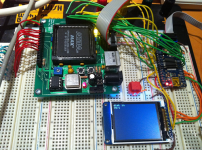
You can use the emulator to boot a Mac, or boot from a normal disk and then mount the emulated floppy to copy files from it. I even copied an emulated disk using Disk Copy 4.2 on a Mac Plus, and explored all the sectors using FEdit, so I'm pretty confident that it's working right.
Unlike other floppy emulators that I know of, Floppy Emu uses an on-the-fly sector retrieval technique instead of a track-at-a-time technique. This technique only requires a single 512 byte buffer, enough for one sector. After the data bytes from a sector have been sent to the Mac, the microcontroller loads the next sector from the SD card, which takes about 2 milliseconds. On a real floppy the sector-to-sector padding is only about 0.25 milliseconds, but it turns out that the Mac is tolerant of much longer inter-sector delays as long as you keep sending it $FF sync bytes between sectors.
In its current form, Floppy Emu appears 3x slower than a real floppy disk, but I think that's due to a bug rather than the SD card overhead. Using Disk Copy 4.2, I was able to read an entire 800K floppy in 41 seconds, and an emulated version of that same floppy in 2 minutes 10 seconds. As best as I can tell, the difference is due to some kind of bug that’s triggering the Mac’s retry mechanism. The display screen shows the emulated active track and side in real-time, so I can see that after every few tracks read during disk copying, the drive seeks down to track 0, then all the way back up to the track where it left off. This looks like some kind of mechanism for coping with unexpected data: the Mac concludes the drive isn’t where it thought it was, so it resyncs by returning to a known location (track 0) and then continuing.
My next steps are to pretty this up a little, add some basic UI for selecting disk images from the SD card, and fix the bug that's causing the retry slowdowns. After that, implementing write support for emulated floppies will be the next task. That will require a different micontroller and different technique than the one used currently.
More details are on my blog if anyone's interested.
/edit/ Also available: the development thread, Design ideas for a floppy drive emulator. - Bunsen /
Question to the 68kmla.org community? How important do you think write support is for something like this? I plan to implement it eventually, but it may be a big challenge. Is there enough value in a read-only floppy emulator?
You can use the emulator to boot a Mac, or boot from a normal disk and then mount the emulated floppy to copy files from it. I even copied an emulated disk using Disk Copy 4.2 on a Mac Plus, and explored all the sectors using FEdit, so I'm pretty confident that it's working right.
Unlike other floppy emulators that I know of, Floppy Emu uses an on-the-fly sector retrieval technique instead of a track-at-a-time technique. This technique only requires a single 512 byte buffer, enough for one sector. After the data bytes from a sector have been sent to the Mac, the microcontroller loads the next sector from the SD card, which takes about 2 milliseconds. On a real floppy the sector-to-sector padding is only about 0.25 milliseconds, but it turns out that the Mac is tolerant of much longer inter-sector delays as long as you keep sending it $FF sync bytes between sectors.
In its current form, Floppy Emu appears 3x slower than a real floppy disk, but I think that's due to a bug rather than the SD card overhead. Using Disk Copy 4.2, I was able to read an entire 800K floppy in 41 seconds, and an emulated version of that same floppy in 2 minutes 10 seconds. As best as I can tell, the difference is due to some kind of bug that’s triggering the Mac’s retry mechanism. The display screen shows the emulated active track and side in real-time, so I can see that after every few tracks read during disk copying, the drive seeks down to track 0, then all the way back up to the track where it left off. This looks like some kind of mechanism for coping with unexpected data: the Mac concludes the drive isn’t where it thought it was, so it resyncs by returning to a known location (track 0) and then continuing.
My next steps are to pretty this up a little, add some basic UI for selecting disk images from the SD card, and fix the bug that's causing the retry slowdowns. After that, implementing write support for emulated floppies will be the next task. That will require a different micontroller and different technique than the one used currently.
More details are on my blog if anyone's interested.
/edit/ Also available: the development thread, Design ideas for a floppy drive emulator. - Bunsen /
Question to the 68kmla.org community? How important do you think write support is for something like this? I plan to implement it eventually, but it may be a big challenge. Is there enough value in a read-only floppy emulator?
There is absolutely value in a read-only version to me! I enjoy older computers, but I have a special dislike of old media.
Woohoo! That is nifty, BMOW!
I agree with bbraun -- this device is very useful in its current read-only state. Anything that gets us farther away from the floppies and closer to modern storage accessible by a modern computer is definitely worth it!
I agree with bbraun -- this device is very useful in its current read-only state. Anything that gets us farther away from the floppies and closer to modern storage accessible by a modern computer is definitely worth it!
Man, I'm super jealous of you guys. You're just pumping out the coolest tech. Way to go!
If you finalize the design, would it be possible to build and sell an IDE adapter so people with, say, an LC or Mac II with a 2nd floppy drive could put an SD card in it?
If you finalize the design, would it be possible to build and sell an IDE adapter so people with, say, an LC or Mac II with a 2nd floppy drive could put an SD card in it?
Impressive! bigmessowires, I'm lurking your progress here and on your blog since the beginning of this project. All of this is awesome! Incredible!
But I must say that, imho, a read/write floppy emulator make more sense to me. Your read-only prototype is already unbelievable (as is all the Plus Too project), for sure! But a mean to get data easily out of our old Macs without having to mess with floppies / external hard disks / Zip / LocalTalk or whatever seems a must to me!
Again, I'm not the guy who'll design it. But if it's feasible, along the Plus Too, I would say go ahead with read/write!
But I must say that, imho, a read/write floppy emulator make more sense to me. Your read-only prototype is already unbelievable (as is all the Plus Too project), for sure! But a mean to get data easily out of our old Macs without having to mess with floppies / external hard disks / Zip / LocalTalk or whatever seems a must to me!
Again, I'm not the guy who'll design it. But if it's feasible, along the Plus Too, I would say go ahead with read/write!
Yup, I'll definitely keep working towards a read/write version. I was more wondering whether it was worth it to develop the read-only version as a separate device, since it might be easier to build or cheaper to make, and it could be ready pretty soon vs the unknown development time for a read/write version.
I'm not sure what you mean by an IDE adapter? Those Macs have SCSI ports that you could buy a SCSI to CF adapter for. The Mac II has an external floppy port so it could also use Floppy Emu, but I think the LC doesn't.
If you mean the internal floppy connector, then yes that should definitely be possible. It's the same interface, just with a different physical connector. I'm not sure how you'd run the cable outside the Mac's case, but you could probably rig up something.
.
I'm not sure what you mean by an IDE adapter? Those Macs have SCSI ports that you could buy a SCSI to CF adapter for. The Mac II has an external floppy port so it could also use Floppy Emu, but I think the LC doesn't.
If you mean the internal floppy connector, then yes that should definitely be possible. It's the same interface, just with a different physical connector. I'm not sure how you'd run the cable outside the Mac's case, but you could probably rig up something.
I'd gladly take a read-only device. #creditcardiswaiting
I assumed the CF card reader was IDE, and I meant going from the IDE CF card reader to floppy connector. Sorry, I'm not thinking too clearly.
It's SD, not CF.
Here's a possibly silly thought-
Would it be feasible to control the mcu from the host Mac via say zterm? That might make the LCD redundant, and allow an invisible "stealth" installation on the internal floppy connector. One would need to have zterm on the Mac already ...
or
have the FlopEmu default to the first image, and have a bootable system with zterm on there.
I note that you have a nice colour GLCD on your prototype. Is that just one you had handy? I was thinking the final could maybe use something cheaper, like those 1-bit mono Nokia knockoffs? Also suitably retro
Would it be feasible to control the mcu from the host Mac via say zterm? That might make the LCD redundant, and allow an invisible "stealth" installation on the internal floppy connector. One would need to have zterm on the Mac already ...
or
have the FlopEmu default to the first image, and have a bootable system with zterm on there.
I note that you have a nice colour GLCD on your prototype. Is that just one you had handy? I was thinking the final could maybe use something cheaper, like those 1-bit mono Nokia knockoffs? Also suitably retro
Yes, I only used that display for the prototype because it happens to have an SD card socket on the back, and I already had left over from another project. The 1-bit Nokia display clone was exactly what I had in mind. Actually I was thinking to make the display optional, with a couple of status LEDs or something for feedback if you don't want to pay for a display.
Probably not zterm, but some kind of custom software on the Mac could theoretically be used to view and select disk images. I think the HxC Floppy Emulator works that way, with a host-side control tool for the Amiga and Atari ST. Really there are a ton of cool things that could be done from the software end, like a custom disk driver to enable disks larger than a real floppy, or multiple disks from a single device. That's not really where my experience or interest lies though. I'm hoping that if I get some working hardware out there along with good documentation, somebody else might be interested in the software hacking part.
Probably not zterm, but some kind of custom software on the Mac could theoretically be used to view and select disk images. I think the HxC Floppy Emulator works that way, with a host-side control tool for the Amiga and Atari ST. Really there are a ton of cool things that could be done from the software end, like a custom disk driver to enable disks larger than a real floppy, or multiple disks from a single device. That's not really where my experience or interest lies though. I'm hoping that if I get some working hardware out there along with good documentation, somebody else might be interested in the software hacking part.
Well, the idea of using a terminal emulator just occurred to me as a way of avoiding writing custom Mac software. The mcu could just send and receive ASCII text for menus to display at the Mac end and user choices sent back.
OK, I think I've fixed the bug that was causing all the retries and reseeks to track zero, bloating the read times. Now it reads through an entire floppy image without any retries-- hooray! But it's still slower than a real floppy: 57 seconds to read a 800K disk, vs 41 for a real floppy in my most recent test.
I'm wondering if this has something to do with how the sectors are interleaved and organized on a real floppy. On my emulated floppy, the sectors in each track appear in consecutive ascending order, and every time the drive steps or switches sides, it jumps to the first sector on that track. I'm wondering if real floppies are formatted with a 2:1 interleave, so sectors appear in order like 0 4 1 5 2 6 3 7 instead of 0 1 2 3 4 5 6 7. I also seem to remember reading somewhere that a real floppy offsets the location of the first sector in each track from the location of the first sector in the previous track.
There are a bunch of tricks like that which can help reduce the number of times the disk must make a complete rotation before the Mac reads all the sectors from a track, basically trying to match the access pattern of the Mac with the organization of the sectors on the disk. In a perfect world, the Mac would always read all the sectors from a track in one pass, with the disk only making a single rotation. My debug info shows this does happen with my emulated floppy, but only rarely. With a real floppy this should be rare too, because it would require the lucky chance of a read operation beginning just as the first sector of the track approached the read head. With a random starting position, two rotations of the disk should always be enough to read the whole track, assuming the Mac is fast enough to keep up. But my debug info shows that most of the time, it takes about three "rotations" of the emulated disk to read a whole track. My measured disk read times of 57 vs 41 seconds make roughly a 3:2 ratio, so maybe there's something to that.
I'm wondering if this has something to do with how the sectors are interleaved and organized on a real floppy. On my emulated floppy, the sectors in each track appear in consecutive ascending order, and every time the drive steps or switches sides, it jumps to the first sector on that track. I'm wondering if real floppies are formatted with a 2:1 interleave, so sectors appear in order like 0 4 1 5 2 6 3 7 instead of 0 1 2 3 4 5 6 7. I also seem to remember reading somewhere that a real floppy offsets the location of the first sector in each track from the location of the first sector in the previous track.
There are a bunch of tricks like that which can help reduce the number of times the disk must make a complete rotation before the Mac reads all the sectors from a track, basically trying to match the access pattern of the Mac with the organization of the sectors on the disk. In a perfect world, the Mac would always read all the sectors from a track in one pass, with the disk only making a single rotation. My debug info shows this does happen with my emulated floppy, but only rarely. With a real floppy this should be rare too, because it would require the lucky chance of a read operation beginning just as the first sector of the track approached the read head. With a random starting position, two rotations of the disk should always be enough to read the whole track, assuming the Mac is fast enough to keep up. But my debug info shows that most of the time, it takes about three "rotations" of the emulated disk to read a whole track. My measured disk read times of 57 vs 41 seconds make roughly a 3:2 ratio, so maybe there's something to that.
Slightly slower read/access times to me are acceptable. I'd be more interested in the disk image management on the SD card, preferably through a display on the reader, to drill through to, then select the required disk image.
What are the chances this could expand to a HD20 (or any size disk image) emulator? Of course as disk image size increases, then access time improvements become important again. Ahhh, the vicious circle of development prototyping.
What are the chances this could expand to a HD20 (or any size disk image) emulator? Of course as disk image size increases, then access time improvements become important again. Ahhh, the vicious circle of development prototyping.
ya, maybe you can put it in a small style enclosure, with some buttons and a 2x20 line text LCD display, probably cheapest/easiest.
Surprisingly, the 84 x 48 Nokia LCDs are actually cheaper than your typical 2-line text LCD, and they require fewer pins to control too. http://www.sparkfun.com/products/10168 The only downside is they all seem to have problems getting the contrast right, as it somehow varies depending on the temperature and force between the LCD and the circuit board. I have two of them, and they both change contrast if you push on the LCD frame with your finger. But for a $10 serial graphical LCD, I can overlook that.
I've got it using the Nokia LCD now instead of the color TFT, and everything is working pretty nicely for read-only emulation. I'm only able to go up to a 4 MHz data rate with the SD card, but I think that's due to my messy breadboard wiring. Viewed on the oscilloscope, the clock signal looks pretty bad, so I'm not surprised it doesn't work at higher speeds.
I'm going to start work now on a custom circuit board for this thing, which should hopefully improve the signal quality too and make faster data rates possible.
I've got it using the Nokia LCD now instead of the color TFT, and everything is working pretty nicely for read-only emulation. I'm only able to go up to a 4 MHz data rate with the SD card, but I think that's due to my messy breadboard wiring. Viewed on the oscilloscope, the clock signal looks pretty bad, so I'm not surprised it doesn't work at higher speeds.
I'm going to start work now on a custom circuit board for this thing, which should hopefully improve the signal quality too and make faster data rates possible.
$10 is not bad, not bad at all. Well if you wanted fancy, could do a VFD
Well, just for giggles, how about aiming, size-wise, to fit the PCB into an Apple external 3.5" floppy drive case? Dead drives could be updated with the new SD drive. And it's about the same size as a small project box, so one of them could be used instead where the genuine article is not available.
Hm. Speaking of which, various people on the other thread were requesting a version for the Powerbook 100 and Duo floppy port, which uses a different connector. Others mentioned internal mounting - different connector again. Is it worth designing the board such that all three connection types can be accommodated? I would be happy to help chase up dimensions etc if you wish.
Giggle me not. Damn great suggestion!!
Yea, and the LCD/keypad/SD card could slide out of the "slot", well if you wanted it fancy, you could make a motorized slide rail so when the mac "ejects" the disk, the display/keypad/sd assembly slides out. When a image is selected to be mounted, it slides in. LOL ok now im getting all "hollywood"
I'm planning for several different methods for connecting the Floppy Emu board to the Mac. The board itself will be about 2 x 4 inches or a little smaller, so it should definitely fit inside an old external floppy drive enclosure.
The Floppy Emu board will have a male DB-19 connector as well as a male rectangular 20-pin IDC connector (the internal floppy connector on the motherboard). So you can:
1. Plug the board straight into the Mac's external DB19 floppy port. Then it will hang off the back like a dongle.
2. Use an Apple II Unidisk/DiskII DB19 to 20-pin IDC cable, like this one. These are still available from a few sources and on eBay. I ordered the one I linked, to confirm it works, but I'm 99% sure it will. Connect the DB19 end to the external floppy port, and the IDC end to the Floppy Emu board.
3. Use the DB19 to 20-pin IDC cable from an external Apple 3.5 inch floppy drive.
4. Unplug your internal floppy drive, and use the existing internal floppy cable to connect to the board's IDC connector. I'm not sure that cable is long enough to reach outside the case, though.
5. Same as above, but use a longer 20-pin IDC cable. You can use any generic IDC cable with straight-through wiring.
The Floppy Emu board will have a male DB-19 connector as well as a male rectangular 20-pin IDC connector (the internal floppy connector on the motherboard). So you can:
1. Plug the board straight into the Mac's external DB19 floppy port. Then it will hang off the back like a dongle.
2. Use an Apple II Unidisk/DiskII DB19 to 20-pin IDC cable, like this one. These are still available from a few sources and on eBay. I ordered the one I linked, to confirm it works, but I'm 99% sure it will. Connect the DB19 end to the external floppy port, and the IDC end to the Floppy Emu board.
3. Use the DB19 to 20-pin IDC cable from an external Apple 3.5 inch floppy drive.
4. Unplug your internal floppy drive, and use the existing internal floppy cable to connect to the board's IDC connector. I'm not sure that cable is long enough to reach outside the case, though.
5. Same as above, but use a longer 20-pin IDC cable. You can use any generic IDC cable with straight-through wiring.
I've stopped working on the custom circuit board for the moment, and instead I've turned to implementing write support, since I think I won't really know exactly what hardware I need until I have a firm plan for emulating writes to the floppy.
My first plan was to use a microcontroller with a large amount of RAM, and during writes, store a whole track's worth of written sectors in RAM. Then when the Mac stepped to a new track, the emulator would use the step delay (about 4 ms) to write the RAM track buffer back to the SD card. But I did some back of the envelope math, and that's just not going to work. The SD write will take longer than the maximum allowed step time.
My new plan is to use interrupts to do two things at once. The emulator will write track N data to the SD card at the same time that track N+1 data is being received from the Mac. This will be more complicated to get working, but it won't require a large RAM buffer. I can use a more common (and cheap) microcontroller with less RAM.
One thing I discovered that surprised me is that "writes" actually consist of a long series of alternating reads and writes, switching rapidly back and forth between the two modes. This will cause some difficulty for the emulator. If the Mac wants to overwrite sectors A and B, it begins by reading the floppy, waiting until the address section for sector A is read. Then BAM, it immediately switches to write mode, and splats down a new data section on top of the old one. Then it switches back to read mode, waits for the sector B address section to be read, and switches to write mode again to replace the data section. I think I can support this in the emulator, but it will require some changes.
All in all, this project is proving to be a lot more complicated than I expected!
My first plan was to use a microcontroller with a large amount of RAM, and during writes, store a whole track's worth of written sectors in RAM. Then when the Mac stepped to a new track, the emulator would use the step delay (about 4 ms) to write the RAM track buffer back to the SD card. But I did some back of the envelope math, and that's just not going to work. The SD write will take longer than the maximum allowed step time.
My new plan is to use interrupts to do two things at once. The emulator will write track N data to the SD card at the same time that track N+1 data is being received from the Mac. This will be more complicated to get working, but it won't require a large RAM buffer. I can use a more common (and cheap) microcontroller with less RAM.
One thing I discovered that surprised me is that "writes" actually consist of a long series of alternating reads and writes, switching rapidly back and forth between the two modes. This will cause some difficulty for the emulator. If the Mac wants to overwrite sectors A and B, it begins by reading the floppy, waiting until the address section for sector A is read. Then BAM, it immediately switches to write mode, and splats down a new data section on top of the old one. Then it switches back to read mode, waits for the sector B address section to be read, and switches to write mode again to replace the data section. I think I can support this in the emulator, but it will require some changes.
All in all, this project is proving to be a lot more complicated than I expected!
If that's the case, why bother with the onboard DB-19 at all? It's going to be a little hard to read the display if the device is plugged in round the back of the Mac, and having one connector rather than two would simplify the board a little. Now that the pinout is known, people could make up their own cables if you throw an optional DB-19 in the box.
Question, What about the use of just RAM alone for read/writing? dont write to the SD card until the floppy gets the eject command therefore the entire disk image gets written, plus saving the SD card write cycles. would this work? Of course i understand if a power failure occured or something it could be tragic, but what are the odds... Then there is the whole part of battery backed RAM so if a PF does occur, the FPGA can look and see that there was a disk image last mounted, to go ahead and do an emergency save function.
Yeah, that's a definite possibility. I still haven't yet received the Apple II cable from IEC to confirm that it actually works. Their cable is also $12 + $10 shipping, and I'm not sure how many they have in stock, so I don't really want to rely on it as the only solution.
That's an interesting thought. You'd need an external RAM, since no microcontroller has anything near 800K of RAM, and you'd need a lot of microcontroller pins to drive the RAM's address and data lines. But on the other hand, it would be a little faster, and a little simpler to design. Hmm. I still think I can get it working with my current approach, but if that doesn't work out, I'll definitely look at using an external RAM.
What about an AVR Softcore, and some memory interface logic in an FPGA? DDR is cheap and easy to obtain, and i found lots of DDR memory controller cores for FPGAs. I never really knew anything about FPGAs, but your use of FPGAs in other projects including this one kinda sparked my interest to do some research, and its insane what these puppies can do.
especially in projects where I am using multiple AVRs and lots of glue logic to get work done, and every bit of that can be thrown inside an FPGA including multiple softcores (assuming the FPGA is big enough)
especially in projects where I am using multiple AVRs and lots of glue logic to get work done, and every bit of that can be thrown inside an FPGA including multiple softcores (assuming the FPGA is big enough)
Putting it all in an FPGA would be cool, and I did look briefly into that option at the start. When I eventually get around to integrating the disk controller into Plus Too, I may do exactly that. For this project, though, I decided I was more confident in getting it working with a real AVR. The AVR softcore I looked at seemed like it was only an implementation of the AVR instruction set, but not all the AVR hardware peripherals. Also the FPGA would cost $20 or more, and you'd need a configuration ROM too, so it wouldn't be any fewer parts or lower cost than a real AVR with a small CPLD. For Plus Too it might make more sense, because the FPGA will already be there anyway.
Good news! I got the Apple II cable from IEC, and did a continuity test to verify that it has all the necessary connections between the DB-19 and IDC-20 ends. I was a little worried, since it seems there's one pair of connections required for the Mac that are just unused pins on the Apple II, but the cable has them connected as needed for the Mac. Woohoo! So now there are more good options for connecting the floppy emulator.
ok, so the softcore really doesnt help much by saving parts count, scratch that idea, hehe.
Hopefully youll figure out the timing limitations for writing.
Hopefully youll figure out the timing limitations for writing.
Another update: I have write emulation kind of mostly working! It turns out that a 2011 SD card has a lot of trouble matching the write speed of a 1984 floppy disk, at least with the type of access patterns seen during floppy emulation!
I had to use a "high speed" (class 10) SDHC card in order to get write emulation to work reliably. Even then, it only works in the case of what I call normal writes, which is what you're doing when copying files in the Finder, or saving documents. This kind of write is actually a pattern of read-write-read-write to the floppy, because the Mac has to look for the sector it wants to update, before it writes the new data. The alternative is what I call continuous writes, where the Mac just blasts out an entire track's worth of data in one pass. Continuous writes are performed when a floppy is initialized, and when you do a full-disk write using a disk copy program, and maybe in some other cases I don't know about. The emulator isn't fast enough to do full disk writes, even with the class 10 SD card.
If I were smarter, I could probably figure out some fancy buffering or something to make continuous writes work, or normal writes with slower SD cards, but I'm tired and my head hurts. The whole question of write support has mushroomed into a much bigger challenge than I ever imagined, and I'm getting eager to actually build the hardware instead of running a million more tests of various buffering and updating schemes. 
More boring details and commentary at http://www.bigmessowires.com/2011/12/07/floppy-vs-sd-card-write-speeds/
I had to use a "high speed" (class 10) SDHC card in order to get write emulation to work reliably. Even then, it only works in the case of what I call normal writes, which is what you're doing when copying files in the Finder, or saving documents. This kind of write is actually a pattern of read-write-read-write to the floppy, because the Mac has to look for the sector it wants to update, before it writes the new data. The alternative is what I call continuous writes, where the Mac just blasts out an entire track's worth of data in one pass. Continuous writes are performed when a floppy is initialized, and when you do a full-disk write using a disk copy program, and maybe in some other cases I don't know about. The emulator isn't fast enough to do full disk writes, even with the class 10 SD card.
If I were smarter, I could probably figure out some fancy buffering or something to make continuous writes work, or normal writes with slower SD cards, but I'm tired and my head hurts.
The whole question of write support has mushroomed into a much bigger challenge than I ever imagined, and I'm getting eager to actually build the hardware instead of running a million more tests of various buffering and updating schemes. More boring details and commentary at http://www.bigmessowires.com/2011/12/07/floppy-vs-sd-card-write-speeds/