

Thread
Floppy Emu: an SD Card Floppy Emulator
Looks like your site is down? I was able to read the post via Google cache. Sounds like you are so close for write support. Is there a way to stall the OS like with read operations? I looked up the HxC project...a mac version would be killer!!
The site seems to have some temporary glitches the past few days, but I'm not sure why. It's up now.
There's nothing I can really do to stall the OS, beyond things that a real floppy drive would do. I can take up to 12 ms when stepping between tracks, and up to 23 ms between sectors when doing a read operation. Exceed those times, and the Mac floppy driver will report an error. I think I can make it all work, but it's not a slam dunk.
The irony is that the high-level disk API would be perfect for SD card I/O, since it views the disk as one continuous 800K range and supports block reads and writes at any position and size. But then the floppy driver translates those requests into the arcane world of tracks and sides and sectors and GCR encoding, and my emulator hardware must do the reverse translation back to a simple linear unencoded API for SD card I/O. It's like translating a book from English to Chinese to English. But since the goal is to emulate a real floppy drive using stock Mac ROMs and no special drivers, that's how it has to be.
Anyway, sorry for grousing. I'll get it figured out.
There's nothing I can really do to stall the OS, beyond things that a real floppy drive would do. I can take up to 12 ms when stepping between tracks, and up to 23 ms between sectors when doing a read operation. Exceed those times, and the Mac floppy driver will report an error. I think I can make it all work, but it's not a slam dunk.
The irony is that the high-level disk API would be perfect for SD card I/O, since it views the disk as one continuous 800K range and supports block reads and writes at any position and size. But then the floppy driver translates those requests into the arcane world of tracks and sides and sectors and GCR encoding, and my emulator hardware must do the reverse translation back to a simple linear unencoded API for SD card I/O. It's like translating a book from English to Chinese to English. But since the goal is to emulate a real floppy drive using stock Mac ROMs and no special drivers, that's how it has to be.
Anyway, sorry for grousing. I'll get it figured out.
This is a completely ignorant suggestion, but... would there be any value in using SPI RAM chips like the 23K256 as a track buffer? You'd only need a few pins and it should be substantially faster than an SD card running at up to 20Mhz. (In particular I could see making use of the sequential mode, in which reads or writes can auto-increment through the entire chip starting from an arbitrary start address.) Using this device you could cache a track on the RAM chip in its raw GCR-encoded form and refresh/flush to SD during the track stepping interval. If my completely off the cuff math is correct it looks to me like you could easily read or write the entire chip several times in 12ms. If you can code a loop that can rapidly step through the RAM chip, un-GCR the data, and shove it out to the SD card in a large block transfer in that period of time then you should be able to handle full-speed blast-a-track writes without breaking a sweat. If that sounds too short...
At its fastest speed the Mac floppy drive turns at about 600 RPM, right? That's 100ms per rotation. Does the Mac really allow only 12ms for the first valid data sector to come up following a track step? The only way it could possibly do that is if the Mac "interleaves" the starting points of tracks in a spiral pattern around the disk, which I suppose is possible, but... what about the points at which the drives' rotational speed changes? Does the Mac not allow for at least one rotation for the drive speed to stabilize? I'm just curious how long you'd *actually* have to flush and refresh your buffer if you went to track-at-a-time instead of sector-at-a-time operation. "12 ms step" sounds to me like the delay per-track to expect when moving the head across multiple tracks, not necessarily the time window for the next data sector.
At its fastest speed the Mac floppy drive turns at about 600 RPM, right? That's 100ms per rotation. Does the Mac really allow only 12ms for the first valid data sector to come up following a track step? The only way it could possibly do that is if the Mac "interleaves" the starting points of tracks in a spiral pattern around the disk, which I suppose is possible, but... what about the points at which the drives' rotational speed changes? Does the Mac not allow for at least one rotation for the drive speed to stabilize? I'm just curious how long you'd *actually* have to flush and refresh your buffer if you went to track-at-a-time instead of sector-at-a-time operation. "12 ms step" sounds to me like the delay per-track to expect when moving the head across multiple tracks, not necessarily the time window for the next data sector.
Really great work...truly emulating a drive at the fundamental level will be of great use the whole vintage Mac community, especially as 1.44mb disks become more and more unreliable. I know that my "new" 3,5" floppies are a lot less reliable than the ones I bought in the 90s were.
Would you consider expanding your work to Apple II 3.5" and 5.25" drive emulation? I suspect that would be a significant amount of work, but they are based on the same lineage (IWM vs. SWIM, I know). And, the Apple II community would love you.
- Alex
Would you consider expanding your work to Apple II 3.5" and 5.25" drive emulation? I suspect that would be a significant amount of work, but they are based on the same lineage (IWM vs. SWIM, I know). And, the Apple II community would love you.
- Alex
Thanks for the ideas. The SPI RAM might be worth looking at, if the 16K RAM in the largest AVR (ATMEGA1284) isn't enough. I think the issue with a RAM track buffer (whether internal or external RAM) is that you still need to write it back to the SD card at some point. And if that takes too long relative to the timeout values for whatever other floppy operation is happening, then the Mac will report an I/O error. You can write the whole track buffer back to the SD card as one large block transfer, which will be faster, but still might not be fast enough to fit within the allowable track step window.
As for that 12 ms figure: the Mac sets the STEP register to 0, then waits for the value to change back to 1, indicating that the step is finished and the new track is ready to be read/written. In my tests, if the STEP value doesn't change within about 12 ms, then the Mac reports a "can't step" error -75. There's some amount of time after that before the Mac actually performs a read or write, I don't know how long that is, and theoretically it could be zero. There might be some time there for drive RPM stabilization, like you said.
Once it begins a read, the Mac will wait about 23 ms for a sector address mark, then if it doesn't see one, it reports a "no address mark" error -67. The sector it reads may not be the one it wanted, of course, and in that case it will keep reading for the next sector. The sector does need to be valid, though. I considered sending a fake sector just to avoid the timeout, but if the embedded track/sector number are invalid then it reports a seek error -80. And if the embedded track/sector *are* valid, then the Mac might actually use the fake data payload, if that was the sector if was looking for.
If it's doing a continuous write operation rather than a read, then the write could begin immediately after the conclusion of the track step. In reality there's probably some delay there too, but I'm not sure how long.
As for that 12 ms figure: the Mac sets the STEP register to 0, then waits for the value to change back to 1, indicating that the step is finished and the new track is ready to be read/written. In my tests, if the STEP value doesn't change within about 12 ms, then the Mac reports a "can't step" error -75. There's some amount of time after that before the Mac actually performs a read or write, I don't know how long that is, and theoretically it could be zero. There might be some time there for drive RPM stabilization, like you said.
Once it begins a read, the Mac will wait about 23 ms for a sector address mark, then if it doesn't see one, it reports a "no address mark" error -67. The sector it reads may not be the one it wanted, of course, and in that case it will keep reading for the next sector. The sector does need to be valid, though. I considered sending a fake sector just to avoid the timeout, but if the embedded track/sector number are invalid then it reports a seek error -80. And if the embedded track/sector *are* valid, then the Mac might actually use the fake data payload, if that was the sector if was looking for.
If it's doing a continuous write operation rather than a read, then the write could begin immediately after the conclusion of the track step. In reality there's probably some delay there too, but I'm not sure how long.
Maybe, or if I ever get this working, someone else could build off of it to add Apple II support. I think the Apple II 3.5" drive actually is the same as the Macintosh drive, isn't it? Or at least very similar? I thought there already was a hardware emulator for 5.25" Apple II floppies, but I could be wrong.
More ignorant blathering:
Regarding read/write performance to/from a track buffer: Worst case a Mac is going to have... what, 24 sectors in a "cylinder", IE, front/back on a 12 sector track? (The inner tracks go as low as... eight per side/16 total?) With 512 byte sectors that means a full cylinder will need 12k transferred to/from the SD card to fill/flush the buffer. (If the data were stored as "raw GCR" in the memory buffer then obviously it would use more than 12kbytes, but we're assuming it's not stored on the SD card in that format.) So, worst case, let's say our target is to be able to load or store 12k absolutely as fast as possible. To do 12k in 12 ms would require a transfer rate just about exactly 1MB/sec. It does look like that might be not be doable on an 8 bit ATMEGA (based on a quick Google) but it appears at least that people have that well or better with faster microcontrollers so you can't really say that *in bulk* an SD card is slower than the floppy mechanism. (Also keep in mind that, for instance, if we're able to add that 23ms "wait for a sector address mark" time to the 12ms step time that alone cuts our maximum required data transfer rate from 1MB/sec to closer to 350K/sec, which again might be hard for an ATMEGA, but...)
After all, looking at the problem from the IWM side: At its rated 490Kbps-ish data transfer speed with absolutely no overhead at all the IWM theoretically needs to be fed at 61.5K-bytes-per-second non-stop. 61.5Kbytes per second should be achievable by just about any SD card I'd think, even in SPI mode. (I believe the "490kbps" includes the GCR padding, since if were all data at this rate a 512 byte sector should be read in something like 8.2 ms, not 12. So in real "byte" terms you only really need something in the ballpark of 40K per second unless you're storing the disk images in GCR format. Actually it's even less than that, since it appears that the Mac uses 2:1 sector interleave. But we'll assume worst case that you're just smearing at top speed across the disk and that the step-to-sector read time really is less than the acceptable interleave gap.) It just intuitively seems like if you can milk any better than, I don't know, maybe 100K per second or so, out of your SD card interface this should be a problem amenable to caching.
Is there any way at all for you to "multitask" reading and writing, IE, if you started a track buffer fill at a track step but weren't finished before you absolutely had to output a byte can you keep reading the SD in the background while handling the IWM data stream? Or, in the case of something like a format or other diskcopy operation, where the Mac might just start blasting write sectors out blindly without bothering to read a sector first, could you possibly opt to write those sectors straight away into the buffer and keep them there until you're again ready to flush them in the background? Perhaps you could use two cache RAM chips, one handling the "current" track and the other flushing in the background? (or pre-reading the next track if the last is already flushed?)
The ultimate solution might be a faster CPU so you can run the SD card faster, but I could understand not wanting to go there. Doing per-sector writes might still screw you if the memory controller on the SD card induces some latency (which appears to be somewhat unavoidable when doing sector transactions, since internally most SD cards natively use larger memory block sizes), so you might need to cache and block your writes regardless.
Regarding read/write performance to/from a track buffer: Worst case a Mac is going to have... what, 24 sectors in a "cylinder", IE, front/back on a 12 sector track? (The inner tracks go as low as... eight per side/16 total?) With 512 byte sectors that means a full cylinder will need 12k transferred to/from the SD card to fill/flush the buffer. (If the data were stored as "raw GCR" in the memory buffer then obviously it would use more than 12kbytes, but we're assuming it's not stored on the SD card in that format.) So, worst case, let's say our target is to be able to load or store 12k absolutely as fast as possible. To do 12k in 12 ms would require a transfer rate just about exactly 1MB/sec. It does look like that might be not be doable on an 8 bit ATMEGA (based on a quick Google) but it appears at least that people have that well or better with faster microcontrollers so you can't really say that *in bulk* an SD card is slower than the floppy mechanism. (Also keep in mind that, for instance, if we're able to add that 23ms "wait for a sector address mark" time to the 12ms step time that alone cuts our maximum required data transfer rate from 1MB/sec to closer to 350K/sec, which again might be hard for an ATMEGA, but...)
After all, looking at the problem from the IWM side: At its rated 490Kbps-ish data transfer speed with absolutely no overhead at all the IWM theoretically needs to be fed at 61.5K-bytes-per-second non-stop. 61.5Kbytes per second should be achievable by just about any SD card I'd think, even in SPI mode. (I believe the "490kbps" includes the GCR padding, since if were all data at this rate a 512 byte sector should be read in something like 8.2 ms, not 12. So in real "byte" terms you only really need something in the ballpark of 40K per second unless you're storing the disk images in GCR format. Actually it's even less than that, since it appears that the Mac uses 2:1 sector interleave. But we'll assume worst case that you're just smearing at top speed across the disk and that the step-to-sector read time really is less than the acceptable interleave gap.) It just intuitively seems like if you can milk any better than, I don't know, maybe 100K per second or so, out of your SD card interface this should be a problem amenable to caching.
Is there any way at all for you to "multitask" reading and writing, IE, if you started a track buffer fill at a track step but weren't finished before you absolutely had to output a byte can you keep reading the SD in the background while handling the IWM data stream? Or, in the case of something like a format or other diskcopy operation, where the Mac might just start blasting write sectors out blindly without bothering to read a sector first, could you possibly opt to write those sectors straight away into the buffer and keep them there until you're again ready to flush them in the background? Perhaps you could use two cache RAM chips, one handling the "current" track and the other flushing in the background? (or pre-reading the next track if the last is already flushed?)
The ultimate solution might be a faster CPU so you can run the SD card faster, but I could understand not wanting to go there. Doing per-sector writes might still screw you if the memory controller on the SD card induces some latency (which appears to be somewhat unavoidable when doing sector transactions, since internally most SD cards natively use larger memory block sizes), so you might need to cache and block your writes regardless.
Not ignorant at all. I appreciate having somebody review my logic and point out things I may have missed, since I'm not really thinking straight anymore.
One thing that maybe wasn't clear is that the ATMEGA isn't the limiting factor for the most part. It's the write speed of the SD card that's the issue. The ATMEGA can send 512 bytes to the card, one bit at a time, in about 1.5 ms. (Theoretical speed would be 512 * 8 / 4 MHz, which is 1 ms, but it's not totally efficient). Then the ATMEGA polls the SD card until the card says the write has completed. That takes anywhere from 0 to 80 ms, depending on the card, the write mode, and some random chance. Most of the time it's about 3-6 ms, but sometimes it's much longer. It's actually the variability that's a problem more than anything else.
If I try to fit that 24 sector write into the 12 ms track step window, it clearly won't fit. Even if I could also use the 23ms "wait for address mark" time, it's still not enough. Furthermore, the numbers 12 and 23 are from the Mac Plus ROM, and other Macs might use different values.
One encouraging note is that there do appear to be some substantial extra delays during floppy writes, outside of those imposed by the disk itself. In some simple tests, after stepping to a new track, I saw about 45 ms delay before the Mac switched to the other side of the disk, then about 20 ms more delay before the first byte of the first sector to write arrived. Combined, that should be enough time to complete the 24 sector multi-block write with the class 10 card, assuming it doesn't do one of its 170 ms "burps". But the class 4 card would still be totally unusable for this case.
To handle the burps, and possibly get the class 4 card working, it could maybe do something like:
- When a step to a new track occurs, immediately read the first four sectors (2K) of the new track from the SD card, and store them in RAM (about 8 ms).
- Begin a multi-block SD write of the 24 sectors (12K) from the old track
- After 12+23+?? ms, begin sending the first of the new sectors in RAM to the Mac, even if the SD write is still in progress. This would require the multitasking changes mentioned above
- Once the SD write finishes, read the remaining sectors for the new track into RAM.
With four pre-loaded sectors from the new track, the 24 sector SD write could take as long as 12+23+12+23+12+23+12+23+12+23 = 175 ms. Actually a little less, since about 8 ms of that time would be needed to read those pre-loaded sectors, so about 167 could be used for the SD write. That's still not really long enough to cover the longest class 10 burp, and not even close to long enough for the class 4 card.
A related idea would be to use a 12 sector "side buffer" instead of a 24 sector track buffer. Then you wouldn't have the 12 ms track step time to work with, but there would be less data, and two entire sides could be loaded in RAM at once using the internal RAM of an ATMEGA1284 (the 8-bit AVR with the most RAM). So it would go something like:
- When a switch to a new side occurs, immediately read the first 8 sectors (4K) of the new track from the SD card, and store them in RAM (about 16 ms).
- Begin sending the first of the new sectors in RAM to the Mac, while simultaneously reading the remaining 4 new sectors into RAM (requires multitasking).
- After all the new sectors have been read, begin a 12 sector multi-block write of the old sectors to the SD card, while simultaneously sending the new sectors from RAM to the Mac.
So I think that would work, but I'm getting a little dizzy thinking through all the possible cases. Like what if the new side is being continuously written, without being read first? Or what if the Mac steps to yet another new side/track after a few ms, without reading or writing anything, because it's just seeking to a different area of the disk? Or in the worst case, what if the new side is completely written with data and another side/track change occurs before the old side's sectors have finished being saved to SD?
Now you can see why I've been getting dizzy just trying to think all this through! :O
I appreciate having somebody review my logic and point out things I may have missed, since I'm not really thinking straight anymore.One thing that maybe wasn't clear is that the ATMEGA isn't the limiting factor for the most part. It's the write speed of the SD card that's the issue. The ATMEGA can send 512 bytes to the card, one bit at a time, in about 1.5 ms. (Theoretical speed would be 512 * 8 / 4 MHz, which is 1 ms, but it's not totally efficient). Then the ATMEGA polls the SD card until the card says the write has completed. That takes anywhere from 0 to 80 ms, depending on the card, the write mode, and some random chance. Most of the time it's about 3-6 ms, but sometimes it's much longer. It's actually the variability that's a problem more than anything else.
Right. I did some tests of a 24 sector continuous multi-block write, like would be performed when flushing a track buffer back to the SD card. This should provide the best possible SD performance. On the class 10 card, the total time was normally about 40 ms, but three times out of twenty I saw times over 170 ms. With the slower class 4 card, almost all the times were over 300 ms. So the class 10 card time is pretty close to the theoretical minimum time, given the SPI transfer rate, and would probably improve with a faster ATMEGA or faster SPI clock. But the class 4 card... ouch.
If I try to fit that 24 sector write into the 12 ms track step window, it clearly won't fit. Even if I could also use the 23ms "wait for address mark" time, it's still not enough. Furthermore, the numbers 12 and 23 are from the Mac Plus ROM, and other Macs might use different values.
Yes, it already does this to some extent, and I think this is where further improvements can be made. Currently it can receive a sector from the Mac at the same time as reading or writing from the SD card, through the use of an interrupt routine. But it can't send a sector to the Mac while also doing an SD read or write. I think I could do that, but I need to look into it a little more.
One encouraging note is that there do appear to be some substantial extra delays during floppy writes, outside of those imposed by the disk itself. In some simple tests, after stepping to a new track, I saw about 45 ms delay before the Mac switched to the other side of the disk, then about 20 ms more delay before the first byte of the first sector to write arrived. Combined, that should be enough time to complete the 24 sector multi-block write with the class 10 card, assuming it doesn't do one of its 170 ms "burps". But the class 4 card would still be totally unusable for this case.
To handle the burps, and possibly get the class 4 card working, it could maybe do something like:
- When a step to a new track occurs, immediately read the first four sectors (2K) of the new track from the SD card, and store them in RAM (about 8 ms).
- Begin a multi-block SD write of the 24 sectors (12K) from the old track
- After 12+23+?? ms, begin sending the first of the new sectors in RAM to the Mac, even if the SD write is still in progress. This would require the multitasking changes mentioned above
- Once the SD write finishes, read the remaining sectors for the new track into RAM.
With four pre-loaded sectors from the new track, the 24 sector SD write could take as long as 12+23+12+23+12+23+12+23+12+23 = 175 ms. Actually a little less, since about 8 ms of that time would be needed to read those pre-loaded sectors, so about 167 could be used for the SD write. That's still not really long enough to cover the longest class 10 burp, and not even close to long enough for the class 4 card.
A related idea would be to use a 12 sector "side buffer" instead of a 24 sector track buffer. Then you wouldn't have the 12 ms track step time to work with, but there would be less data, and two entire sides could be loaded in RAM at once using the internal RAM of an ATMEGA1284 (the 8-bit AVR with the most RAM). So it would go something like:
- When a switch to a new side occurs, immediately read the first 8 sectors (4K) of the new track from the SD card, and store them in RAM (about 16 ms).
- Begin sending the first of the new sectors in RAM to the Mac, while simultaneously reading the remaining 4 new sectors into RAM (requires multitasking).
- After all the new sectors have been read, begin a 12 sector multi-block write of the old sectors to the SD card, while simultaneously sending the new sectors from RAM to the Mac.
So I think that would work, but I'm getting a little dizzy thinking through all the possible cases. Like what if the new side is being continuously written, without being read first? Or what if the Mac steps to yet another new side/track after a few ms, without reading or writing anything, because it's just seeking to a different area of the disk? Or in the worst case, what if the new side is completely written with data and another side/track change occurs before the old side's sectors have finished being saved to SD?
Now you can see why I've been getting dizzy just trying to think all this through! :O
I am no electrical/software engineer and this is all over my head.. but what happened with the suggestion someone had about loading the fakedisk into a ram chip and just editing that.. then writing RAM contents to the card at user's discretion or during inactivity or whatever?
Did you say you were out of pins or something? (someone who does not understand what is going on here half the time trying to read through this thread for that little snippet is like... HAHAHAHAHAHA NO)
Did you say you were out of pins or something? (someone who does not understand what is going on here half the time trying to read through this thread for that little snippet is like... HAHAHAHAHAHA NO)
thats what I mentioned before.
unfortunately, it really adds to the complexity of the circuit, but again, you may have no choice. some AVRs support XRAM, and thats limited to 64k. But, you could "page" it. using another 8bit port as a chip select line controller, so in theory you could have 8 64k chips and the chip enable line of each IC is hooked to a port pin. So that would require 4 8bit ports. 2 for the addressing, 1 for data, and 1 for paging.
This will give you 512k of 64k paged RAM. So you really need something that gives you more than 4 ports to go this avenue. of course, you could use external latches/bus transcievers if your limited to only 4 ports, so the ports can be redirected to do other things while not accessing RAM. But this again adds to the complexity and slows it down because of the more steps you have to take.
unfortunately, it really adds to the complexity of the circuit, but again, you may have no choice. some AVRs support XRAM, and thats limited to 64k. But, you could "page" it. using another 8bit port as a chip select line controller, so in theory you could have 8 64k chips and the chip enable line of each IC is hooked to a port pin. So that would require 4 8bit ports. 2 for the addressing, 1 for data, and 1 for paging.
This will give you 512k of 64k paged RAM. So you really need something that gives you more than 4 ports to go this avenue. of course, you could use external latches/bus transcievers if your limited to only 4 ports, so the ports can be redirected to do other things while not accessing RAM. But this again adds to the complexity and slows it down because of the more steps you have to take.
Now *that's* an interesting little tidbit worth bearing in mind for future possibilities.
OK, I think we're in business! I'm going to switch to the ATMEGA1284 to gain some additional RAM buffering space (though not as much as a 1MB external RAM to buffer the whole disk). That, plus some emulator code improvements, should be enough to support most types of writes on most SD cards, I think. The biggest challenge is still emulating initialization of a floppy disk when using a lower-speed SD card. During floppy initialization, the Mac continuously writes both sides of every track without stopping, so the write rate is the highest of any kind of write operation. Today I thought of a couple of ideas that I think will help with initialization emulation, and other cases where an entire side is written in one pass.
The first idea is to special case the handling of empty sectors. During floppy initialization, the Mac writes 1600 sectors very fast. What’s in those sectors? Zeroes. Instead of buffering a 512 byte sector full of zeroes, I could just set a flag that says “this sector is all zeroes”. Using a bitfield, I could buffer an entire disk’s worth of zero sectors using just 200 bytes of RAM. Those sectors could then be saved to the SD card whenever it was convenient, after the floppy initialization was finished. If a read request arrived before all those zero sectors were saved to the card, the emulator could check the flag first to see if an all-zero sector should be synthesized instead of actually loading the sector data from the SD card. This solution is short and simple, though its usefulness is limited to floppy initialization only.
The second idea is to intentionally create an error condition to slow down incoming data, by exploiting some code that measures the size of the gap between the last sector and the first sector on one side of a track. During initialization of a floppy, after the Mac finishes writing the last sector on a side, it immediately switches back to read mode to measure the gap before the next sector, and confirm that the next sector is sector 0.
From examining the ROM disassembly, I discovered that the disk initialization code uses some kind of progress counter that starts with a value of 7. Every successful side written increments the counter by 1. If the gap is the wrong size, the counter is decremented by 1. If the counter value is still greater than 4, it attempts to rewrite the side again, otherwise it aborts with an error.
By intentionally generating a bad gap size after a full side is written, I can force the side to be rewritten. If I also make the emulator smart enough to detect when data written to a sector is identical to what was already there, then it can ignore the second rewrite. That effectively doubles the amount of time available for saving the track data to the SD card, since every side will be written twice by the Mac.
The bad gap size trick can only be done once per side, or else the progress counter will decrease and the initialization process will eventually fail, so it can’t buy an indefinite amount of additional time. It’s also a little risky, because it means the progress counter will never increase above 7, and any 3 other errors occurring during the initialization will cause it to fail.
I did some simple tests of this idea that look promising. By disabling SD saves, I was able to perform floppy initialization to measure its write speed, even though the initialization ultimately failed during the verify phase. In my initial test, it took 34 seconds to complete the write phase when initializing a floppy. After I added emulator code to generate a bad gap after every other side write operation, the time increased to 59 seconds, with no obvious ill effects.
The first idea is to special case the handling of empty sectors. During floppy initialization, the Mac writes 1600 sectors very fast. What’s in those sectors? Zeroes. Instead of buffering a 512 byte sector full of zeroes, I could just set a flag that says “this sector is all zeroes”. Using a bitfield, I could buffer an entire disk’s worth of zero sectors using just 200 bytes of RAM. Those sectors could then be saved to the SD card whenever it was convenient, after the floppy initialization was finished. If a read request arrived before all those zero sectors were saved to the card, the emulator could check the flag first to see if an all-zero sector should be synthesized instead of actually loading the sector data from the SD card. This solution is short and simple, though its usefulness is limited to floppy initialization only.
The second idea is to intentionally create an error condition to slow down incoming data, by exploiting some code that measures the size of the gap between the last sector and the first sector on one side of a track. During initialization of a floppy, after the Mac finishes writing the last sector on a side, it immediately switches back to read mode to measure the gap before the next sector, and confirm that the next sector is sector 0.
From examining the ROM disassembly, I discovered that the disk initialization code uses some kind of progress counter that starts with a value of 7. Every successful side written increments the counter by 1. If the gap is the wrong size, the counter is decremented by 1. If the counter value is still greater than 4, it attempts to rewrite the side again, otherwise it aborts with an error.
By intentionally generating a bad gap size after a full side is written, I can force the side to be rewritten. If I also make the emulator smart enough to detect when data written to a sector is identical to what was already there, then it can ignore the second rewrite. That effectively doubles the amount of time available for saving the track data to the SD card, since every side will be written twice by the Mac.
The bad gap size trick can only be done once per side, or else the progress counter will decrease and the initialization process will eventually fail, so it can’t buy an indefinite amount of additional time. It’s also a little risky, because it means the progress counter will never increase above 7, and any 3 other errors occurring during the initialization will cause it to fail.
I did some simple tests of this idea that look promising. By disabling SD saves, I was able to perform floppy initialization to measure its write speed, even though the initialization ultimately failed during the verify phase. In my initial test, it took 34 seconds to complete the write phase when initializing a floppy. After I added emulator code to generate a bad gap after every other side write operation, the time increased to 59 seconds, with no obvious ill effects.
I think everything will be fine if you get some RAM to buffer what you need. Too bad the AVR is natively incapable to handle 1MB of RAM. would be nice, because then your read/write access could be as fast as realtime, and when disk input is idle, it gets written to SD card.
Whew! It took me a long time to do the board layout, but here it is! The board is about 4 x 1.75 inches, or roughly the size of an elongated credit card. The resistors, LEDs, and odd-sized capacitors are all labeled, so any other small rectangular surface-mount parts you see are 0.1 uF decoupling capacitors.
Anyone see any problems or have any suggestions for improvements, before I send this off to be manufactured?
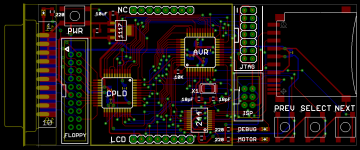
Anyone see any problems or have any suggestions for improvements, before I send this off to be manufactured?
whats the CPLD for?
If you look at the photo in this thread's first post, the CPLD replaces the Altera board shown at the left. Its main purpose is to decode the register select signals from the Mac, and handle reading/writing of disk registers, because the AVR isn't fast enough to do it. It also performs serial-to-parallel conversion in both directions, so the AVR can work a byte at a time, without having to worry about the serial data timing requirements.
I'm using the same Xilinx CPLD as this demo board: http://dangerousprototypes.com/2011/03/29/new-prototype-xc9572xl-cpld-development-board/
I thought of one more possible layout improvement- it might be handy to run the 4 unused CPLD pins to a header somewhere, in case I need them later for anything unexpected. I'm not sure there's still space for that though.
I'm using the same Xilinx CPLD as this demo board: http://dangerousprototypes.com/2011/03/29/new-prototype-xc9572xl-cpld-development-board/
I thought of one more possible layout improvement- it might be handy to run the 4 unused CPLD pins to a header somewhere, in case I need them later for anything unexpected. I'm not sure there's still space for that though.
That does sound worthwhile, if possible.
Congratulations on getting write working!
Congratulations on getting write working!
The chances are really good. As far as I am aware, this is all, or almost all of the hardware necessary to emulate an HD20. The biggest problem is cracking the code of the HD20 and figuring out how it works. From what I understand, it uses the same GCR encoding scheme as floppies, so even a lot of your code could probably be used for the HD20.
I'm in over my head at this level, but I know enough to be amazed at your incredible progress, Big.
Congrats! :approve:
Congrats! :approve:
That's awesome! What is that chip you labeled "244"?
74HC244 i believe.
Thanks! 244 is a 74LVC244, which is acting here as a 5V to 3.3V level converter.
I think something like HD20 behavior is possible in time, though it might be easier to write an all-new driver for it than to reverse engineer the undocumented HD20 behavior. But I'm intentionally not thinking about that stuff yet... I just want to get standard floppy emulation debugged and working on the new hardware.
I think something like HD20 behavior is possible in time, though it might be easier to write an all-new driver for it than to reverse engineer the undocumented HD20 behavior. But I'm intentionally not thinking about that stuff yet... I just want to get standard floppy emulation debugged and working on the new hardware.
I just discovered this thread and I'm quite interested the more I skim around in it.
How are you accessing the SD card, are you using the SPI mode, or are you using one of the other native SD modes? I had understood at one point that SPI is easier yet much slower. These cards are fast enough to benefit from a USB 2.0 reader as opposed to USB 1.1, so if reading/writing to the SD card is a bottleneck even for 800k floppy emulation, maybe there are things that we can look into here to improve the speed instead of adding RAM.
If you are indeed using SPI, and wish to continue using it, it is not too uncommon for microcontrollers to have a built-in SPI subsystem. This will take care of all of the SPI serial stuff in parallel with the code you have running. Basically, you will have an SPI interrupt whenever the SPI subsystem is ready, and in this interrupt, you read or write the next whole byte in a register and exit the interrupt, for example. Then your code goes back about its business as the SPI subsystem sends/receives more SPI data.
edit:
I just looked at the ATMEGA1284 feature summary document and it looks like it does have an SPI subsystem. This is a pretty nice microcontroller, and at 20MHz, I think there is a lot of potential and flexibility to make this quite an awesome, expandable-to-HD-20-via-firmware-update gadget.
It's kinda funny the way things are nowadays, this microcontroller is WAY more powerful than, say, a Mac Plus processor.
Do hit me up if you would like me to try to find ways to make your firmware more efficient with buffering, interrupts and using subsystems and such.
How are you accessing the SD card, are you using the SPI mode, or are you using one of the other native SD modes? I had understood at one point that SPI is easier yet much slower. These cards are fast enough to benefit from a USB 2.0 reader as opposed to USB 1.1, so if reading/writing to the SD card is a bottleneck even for 800k floppy emulation, maybe there are things that we can look into here to improve the speed instead of adding RAM.
If you are indeed using SPI, and wish to continue using it, it is not too uncommon for microcontrollers to have a built-in SPI subsystem. This will take care of all of the SPI serial stuff in parallel with the code you have running. Basically, you will have an SPI interrupt whenever the SPI subsystem is ready, and in this interrupt, you read or write the next whole byte in a register and exit the interrupt, for example. Then your code goes back about its business as the SPI subsystem sends/receives more SPI data.
edit:
I just looked at the ATMEGA1284 feature summary document and it looks like it does have an SPI subsystem. This is a pretty nice microcontroller, and at 20MHz, I think there is a lot of potential and flexibility to make this quite an awesome, expandable-to-HD-20-via-firmware-update gadget.
It's kinda funny the way things are nowadays, this microcontroller is WAY more powerful than, say, a Mac Plus processor.
Do hit me up if you would like me to try to find ways to make your firmware more efficient with buffering, interrupts and using subsystems and such.
Good thoughts. Yes, it's using SPI to access the SD card. The native SD interface (4-wire) is supposed to be faster, assuming large data transfers to sequential addresses. But it requires money to license, and the protocol is reportedly pretty complex. I don't know of any low-end microcontrollers that support it in hardware. Unfortunately, I don't think it's a realistic option for hobbyists. But I think the SPI interface can be made fast enough to work.
The floppy emulator is using hardware SPI support in the AVR, but it doesn't help so much. There's no buffer, so the mcu has to do work after each byte sent or received. There are only 16 mcu clock cyles between each byte, which isn't enough to do anything else using an interrupt-driven approach. The real benefit of the hardware SPI support is that you don't have to manually toggle the SPI clock and data lines under program control, so SPI transfer speeds can be faster.
SPI is not used for the emulator-to-Mac communication-- that's handled by the CPLD. In theory it might be possible to do it from the mcu with SPI, assuming a mcu with multiple SPI interfaces, but there are some oddities involving synchronization that might make it difficult or impossible. Since I already needed the CPLD for the disk register read/writes, it was easiest to have it handle the Mac-side serial communication too.
If this sort of thing interests you, then you might enjoy reading some more detailed discussions of the Floppy Emu development from my blog: http://www.bigmessowires.com/category/macintosh-floppy-emu/
The floppy emulator is using hardware SPI support in the AVR, but it doesn't help so much. There's no buffer, so the mcu has to do work after each byte sent or received. There are only 16 mcu clock cyles between each byte, which isn't enough to do anything else using an interrupt-driven approach. The real benefit of the hardware SPI support is that you don't have to manually toggle the SPI clock and data lines under program control, so SPI transfer speeds can be faster.
SPI is not used for the emulator-to-Mac communication-- that's handled by the CPLD. In theory it might be possible to do it from the mcu with SPI, assuming a mcu with multiple SPI interfaces, but there are some oddities involving synchronization that might make it difficult or impossible. Since I already needed the CPLD for the disk register read/writes, it was easiest to have it handle the Mac-side serial communication too.
If this sort of thing interests you, then you might enjoy reading some more detailed discussions of the Floppy Emu development from my blog: http://www.bigmessowires.com/category/macintosh-floppy-emu/
I have to wonder if this might be exactly the sort of application the Propeller MCU would be good for. After all, it has eight simultaneously-executing cores which can be separately dedicated to bit-banging their own sets of I/O lines. Dedicate one thread to handling the SPI traffic, another one or two to Mac-side communication, etc. Also... It'd probably require dipping into Assembly rather than Spin but the performance of the Prop might just be just high enough to ditch the CPLD. (I can't say that definitively, but I've seen some multi-mhz sampling speed claims out of the Propeller forums.)
But of course going there would mean scrapping the whole thing and starting over from scratch...
But of course going there would mean scrapping the whole thing and starting over from scratch...
Steve,
I've been following your progress on the Floppy disk emulator on your blog ever since I stumbled upon it after searching for a "SD floppy disk emulator for Macintosh" on Google.
Keep up the good work and I look forward to the day when it is available for purchase!
I've been following your progress on the Floppy disk emulator on your blog ever since I stumbled upon it after searching for a "SD floppy disk emulator for Macintosh" on Google.
Keep up the good work and I look forward to the day when it is available for purchase!
It'd be great to see how this turned out, and if its possible to buy one yet. :beige:
Excellent project. I could definitely benefit from having one of those. Can''t wait to build one! Looks like you got those boards from OSH Park, right?