

Thread
Two Sick SE/30 Logic Boards
Hello,
I have two SE/30 logic boards, which I tried to "re-cap", and unfortunately some pads lifted and broke away, probably due to some corrosion from the old capacitors (these boards did have considerable corrosion, especially around UB10).
Anyway, I tried re working the bad traces, and had the bright (at the time) idea of sticking a strand of wire down a nearby via. I did this to both boards, and now neither of them are working. All I get is the "bong" sound, and then it freezes with a dark screen.
I was using a known good analog board and power supply, so I don't think they are the problem.
Any helpful suggestions would be nice.
Thank you,
c
I have two SE/30 logic boards, which I tried to "re-cap", and unfortunately some pads lifted and broke away, probably due to some corrosion from the old capacitors (these boards did have considerable corrosion, especially around UB10).
Anyway, I tried re working the bad traces, and had the bright (at the time) idea of sticking a strand of wire down a nearby via. I did this to both boards, and now neither of them are working. All I get is the "bong" sound, and then it freezes with a dark screen.
I was using a known good analog board and power supply, so I don't think they are the problem.
Any helpful suggestions would be nice.
Thank you,
c
It could very well be a bad trace you have not yet fixed. I have a bad board which I recapped and cleaned perfectly, yet it won't boot due to the SimasiMac lines. There must be a bad chip or trace on my board, but after many hours of searching with schematics, so far I've not found it. That's not to so I never will, it's just that I lack the time to search every single trace on the board. Even these ancient board are still very complex.
Thank you for the reply.
I don't think there are any other bad traces, because these boards worked perfectly (other than the typical signs of bad caps, of course) before I removed the old capacitors.
There are, however, a couple damaged solder pads, and their associated traces. One is at the negative side of C8 and the other is at the positive side of C6.
What I know so far is that C6 seems to be related to sound, and C8 (I think) is related to video. Is this correct?
I can post a picture (albeit not the best quality), which would hopefully help explain this problem better.
I just need to learn how!
c
I don't think there are any other bad traces, because these boards worked perfectly (other than the typical signs of bad caps, of course) before I removed the old capacitors.
There are, however, a couple damaged solder pads, and their associated traces. One is at the negative side of C8 and the other is at the positive side of C6.
What I know so far is that C6 seems to be related to sound, and C8 (I think) is related to video. Is this correct?
I can post a picture (albeit not the best quality), which would hopefully help explain this problem better.
I just need to learn how!
c
I too had a semi-working board prior to re-cap and after re-cap I got the SimasiMac lines and was never able to restore it to working condition after that. I know the replacements are not bad, not did I connect them improperly or reverse the polarity. Even so, I've recapped several boards and most of the recaps are successes.
Here is a photo of one of my successes:

Yes, you should replace C6 to fix the audio problem, but you would also need to replace all the caps in that vicinity, as well as clean that area well, to ensure good sound.
Here is a photo of one of my successes:
Yes, you should replace C6 to fix the audio problem, but you would also need to replace all the caps in that vicinity, as well as clean that area well, to ensure good sound.
Hi, JDW,
I have soldered a little wire to C8's via, which seems to have done something to cause this problem, and it's not SimasiMac because there's no video, period. I mean NO VIDEO, as in no raster, no activity from the CRT, nothing. Just the startup bong, and then nothing else happens.
I know it's not the analog board/CRT, because I recently got another SE/30, and this same board had the same exact symptoms when installed in there.
The other one (I have two, hence this topic's title) is in worse shape, so I'm not even going to bother with it until I get this one figured out. What I learn with this one will most likely apply to the other one also.
I do have a couple of questions I would like answered: First, would sticking a wire through a via and soldering it there (a naive mistake on my part) cause this kind of problem? If so, is there a way to fix it?
I hope I can get this figured out, because I kind of like this machine.
And also thank you for your "success" photo! I aspire to do such things, but I don't quite have the experience, yet. I did try it on the newest SE/30 (I got it for Christmas) however, and, fortunately, it was a success as well. It was a very satisfying experience!
I look forward to your reply.
c
p.s. I will post a picture of this "sick" board when I learn to put pictures in here (I am new to this whole forum thing).
I have soldered a little wire to C8's via, which seems to have done something to cause this problem, and it's not SimasiMac because there's no video, period. I mean NO VIDEO, as in no raster, no activity from the CRT, nothing. Just the startup bong, and then nothing else happens.
I know it's not the analog board/CRT, because I recently got another SE/30, and this same board had the same exact symptoms when installed in there.
The other one (I have two, hence this topic's title) is in worse shape, so I'm not even going to bother with it until I get this one figured out. What I learn with this one will most likely apply to the other one also.
I do have a couple of questions I would like answered: First, would sticking a wire through a via and soldering it there (a naive mistake on my part) cause this kind of problem? If so, is there a way to fix it?
I hope I can get this figured out, because I kind of like this machine.
And also thank you for your "success" photo! I aspire to do such things, but I don't quite have the experience, yet. I did try it on the newest SE/30 (I got it for Christmas) however, and, fortunately, it was a success as well. It was a very satisfying experience!
I look forward to your reply.
c
p.s. I will post a picture of this "sick" board when I learn to put pictures in here (I am new to this whole forum thing).
I wouldn't think your wire-inside-a-via would cause problems. I would think instead that your wire merely may not be solving an existing problem. Reason being is that the SE/30 is a multi-layered board. If you add a wire inside a Via and solder that wire on the top pad and then on the bottom pad of the logic board, no harm is done. But it could be that the "middle" connections (middle layers) are not soldered and therefore your wire has not provided the solution you thought it might. But no, your wire should not "result in" or "become the root cause of" any electrical problems that I can see.
You may want to post some hi-resolution photos so we can better see what you are seeing. Use a tripod if you have one and set your camera to its lowest ISO (to reduce noise) but set it to get the greatest depth-of-field (so nothing is blurred, front-to-back). Try to use large pieces of white paper or cardboard or styrofoam to reflect light evenly so there are not a lot of harsh shadows. And doing such an on overcast day with outdoor light is ideal. That is how I shot the photos you see in my Flickr collection.
You may want to post some hi-resolution photos so we can better see what you are seeing. Use a tripod if you have one and set your camera to its lowest ISO (to reduce noise) but set it to get the greatest depth-of-field (so nothing is blurred, front-to-back). Try to use large pieces of white paper or cardboard or styrofoam to reflect light evenly so there are not a lot of harsh shadows. And doing such an on overcast day with outdoor light is ideal. That is how I shot the photos you see in my Flickr collection.
Hi,
I will try that.
Now I just have to figure out how to post them!
Edit: Here we go! Pictures!
Attached here is one that may be a good start: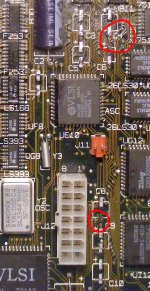
The areas in question are circled in red
c
I will try that.
Now I just have to figure out how to post them!
Edit: Here we go! Pictures!
Attached here is one that may be a good start:
The areas in question are circled in red
c
Has the board been cleaned? It looks like there is either still residual leaked fluid on the board, or the board has been severely damaged due to the leaked fluid. If you've not cleaned the board, you need to do so. Some people like the dishwasher, but I have no experience with that. I use dehydrated Ethanol made for electronics cleaning to clean my boards.
Also, is that a human hair I see going from "J12" to "Y2 OSC" to "8"? Or is that a deep scratch that cuts through traces? You really need a Digital Multi-Meter with Continuity Check mode to verify the integrity of your traces. To do that, you put both probes across a wire you want to check, and then the meter will usually emit a beep so long as continuity is being made.
Also, is that a human hair I see going from "J12" to "Y2 OSC" to "8"? Or is that a deep scratch that cuts through traces? You really need a Digital Multi-Meter with Continuity Check mode to verify the integrity of your traces. To do that, you put both probes across a wire you want to check, and then the meter will usually emit a beep so long as continuity is being made.
Hi,
The residue you see is the solder flux I used to remove the old capacitors, and the "human hair" thing you see is just that, a human hair!
I used the dishwasher method to clean it, so there shouldn't be any old capacitor fluid.
I am pretty sure the vast majority of traces are sound. Also, I doubt any serious damage to them has occurred due to capacitor fluid.
I do not have a continuity tester yet. I will see if I can get one soon.
I'll also try to get better pictures up here when I can.
c
The residue you see is the solder flux I used to remove the old capacitors, and the "human hair" thing you see is just that, a human hair!
I used the dishwasher method to clean it, so there shouldn't be any old capacitor fluid.
I am pretty sure the vast majority of traces are sound. Also, I doubt any serious damage to them has occurred due to capacitor fluid.
I do not have a continuity tester yet. I will see if I can get one soon.
I'll also try to get better pictures up here when I can.
c
Don't feel bad if you have these issues -- I lifted two pads on my current board in now (works fine now) and lifted a pad on C9 Positive (+) on my spare board, yet to be tested.
You have two lifted pads, both are completely fixable. C8 (-) goes to Pin 6 of Port J12, and C6 (+) goes to UB11 pin 2. You can just run a wire of the right wattage rating to those locations. See diagram below.
Most good/decent volt-ohm meters have a continuity test. You can use a ohm test also, just make sure you read something like 002mOhms or something like that. Something to indicate continuity. The continuity test beep is just for speed and convenience. You will need some sort of DMM. Period. (There's always a need for one of those around wherever you go.)
Clean the board again with something proper that won't isn't an aggressive attacker of delicate substances. I used 99% alcohol and a clean used toothbrush.

You have two lifted pads, both are completely fixable. C8 (-) goes to Pin 6 of Port J12, and C6 (+) goes to UB11 pin 2. You can just run a wire of the right wattage rating to those locations. See diagram below.
Most good/decent volt-ohm meters have a continuity test. You can use a ohm test also, just make sure you read something like 002mOhms or something like that. Something to indicate continuity. The continuity test beep is just for speed and convenience. You will need some sort of DMM. Period. (There's always a need for one of those around wherever you go.)
Clean the board again with something proper that won't isn't an aggressive attacker of delicate substances. I used 99% alcohol and a clean used toothbrush.
Here is the dehydrated 99.5% pure Ethanol (alcohol) I always use:
http://web.archive.org/web/20080131132706/http://chie.kenko.com/chie/product/item/itm_7731096072.html
(I live in Japan, which is why that page is in Japanese. I'm not even sure you can get it in the US due to the laws there. Some Americans are stupid enough to imbibe the stuff. The Japanese aren't.)
http://web.archive.org/web/20080131132706/http://chie.kenko.com/chie/product/item/itm_7731096072.html
(I live in Japan, which is why that page is in Japanese. I'm not even sure you can get it in the US due to the laws there. Some Americans are stupid enough to imbibe the stuff. The Japanese aren't.)
Mk. 558: Thank you for the wonderful diagram! I will find that quite useful, I'm sure.And thank you also for the support, though I don't feel too bad about it, I'm just stumped. I usually like to figure these things out myself, but I don't think I have the patience for this one (and I may cause more severe damage if I'm not careful).
JDW: Thank you about the ethanol, but I don't think I need it for now, but, incase I do in the future, would Denatured Alcohol work as a substitute? I think it should be similar enough, but it's proportion of alcohol to water might be slightly different. I'll continue to use the dishwasher method for now, because it seems to work for me (these old boards come out looking almost like new!)
I'll try your suggestions and will return with the results. It may take awhile, so please be patient...
c
JDW: Thank you about the ethanol, but I don't think I need it for now, but, incase I do in the future, would Denatured Alcohol work as a substitute? I think it should be similar enough, but it's proportion of alcohol to water might be slightly different. I'll continue to use the dishwasher method for now, because it seems to work for me (these old boards come out looking almost like new!)
I'll try your suggestions and will return with the results. It may take awhile, so please be patient...
c
Pretty much any good alcohol will do. The benefit of my Ethanol is that it leaves no residue on the board whatsoever.
That's good. Then 70% rubbing alcohol would work too, then?
c
c
70% rubbing alcohol will work. It just might leave a residue. You also will need to put a fan or hairdryer on your board a while before you connect it, to ensure all the water is dried up. My Ethanol is nearly 100% pure so it all dries up very fast even without a fan.
Get 91% over 70% if you can. It dries a good bit quicker.
OK,
JDW: I'm not too concerned about residue. However, will it do any harm? I would think not (unless, of course, it's corrosive, like the capacitor fluid, which, in the case of rubbing alcohol, I doubt).
theos911: I'm not too worried about drying time. As JDW said, I could just wave a hair dryer at it to speed up the drying process.
As I said earlier, I'll probably stick with the dishwasher method; it seems to work very well for me.
Thank you!
c
JDW: I'm not too concerned about residue. However, will it do any harm? I would think not (unless, of course, it's corrosive, like the capacitor fluid, which, in the case of rubbing alcohol, I doubt).
theos911: I'm not too worried about drying time. As JDW said, I could just wave a hair dryer at it to speed up the drying process.
As I said earlier, I'll probably stick with the dishwasher method; it seems to work very well for me.
Thank you!
c
Residue is unsightly, but it will do no harm.
Good! I don't really care if it's unsightly (it's hidden inside, after all...), as long as it doesn't do harm.
I'll probably clean it up, put on capacitors, and reroute the missing pads sometime soon.
Thank you all for your help! This is a very positive experience so far.
c
I'll probably clean it up, put on capacitors, and reroute the missing pads sometime soon.
Thank you all for your help! This is a very positive experience so far.
c
Mk.558,
I think there's an error on the pic of the SE/30 Trace-outs. C8 (-) does go to Pin #6 of J12, but C6 (+) actually connects with Pin #7 of UB11. And the UB11's pin-outs are not number counter-clockwise.
CC_333,
just so you know, the numbering of pins/legs on all ICs usually go in counter-clockwise rotation. So, for UB11, look for the little notch on the side of the IC (facing C4), the last leg/pin on the top right is Pin #1, then the one next to it is Pin #2, next one down the line is Pin #3, and so on. When you reach the furthest top left pin/leg (Pin # 8) , then move to the 1st bottom left pin (Pin #9), moving to the right, next in line is Pin #10, and so on.
73s de Phreakout. :rambo:
I think there's an error on the pic of the SE/30 Trace-outs. C8 (-) does go to Pin #6 of J12, but C6 (+) actually connects with Pin #7 of UB11. And the UB11's pin-outs are not number counter-clockwise.
CC_333,
just so you know, the numbering of pins/legs on all ICs usually go in counter-clockwise rotation. So, for UB11, look for the little notch on the side of the IC (facing C4), the last leg/pin on the top right is Pin #1, then the one next to it is Pin #2, next one down the line is Pin #3, and so on. When you reach the furthest top left pin/leg (Pin # 8) , then move to the 1st bottom left pin (Pin #9), moving to the right, next in line is Pin #10, and so on.
73s de Phreakout. :rambo:
Thank you for the correction, phreakout. I haven't done anything yet, so that saved me from causing more trouble.
c
c
I'll use this as an excuse to push out rev. 2.0 of that image with better labeling and probably functions for each capacitor.
Mk.558: OK. I look forward to your rev. 2.0! It would be nice to know the capacitor's functions, too. In the meantime, however, I think rev. 1.0 will do just fine.
c
c
Update:
I tried reworking C8 and C6, but without success. I soldered a jumper between C6 positive and pin 6 of UB11, which apparently worked (there is sound), but there's still no video (I suspect C8, but I'm not sure what it does exactly).
I got a multimeter, so I can test for shorts and stuff.
I don't know exactly what to test, so tell me what to check and I'll check it.
c
I tried reworking C8 and C6, but without success. I soldered a jumper between C6 positive and pin 6 of UB11, which apparently worked (there is sound), but there's still no video (I suspect C8, but I'm not sure what it does exactly).
I got a multimeter, so I can test for shorts and stuff.
I don't know exactly what to test, so tell me what to check and I'll check it.
c
phreakout is absolutely correct about the Postive (+) side of capacitor C6 routing to pin-7 of sound chip UB11. It does not route to pin-2. Therefore, whoever is responsible for maintaining the following graphic should update that part immediately:
http://i26.photobucket.com/albums/c113/Starofire/Random/2d9cbc05.jpg
http://i26.photobucket.com/albums/c113/Starofire/Random/2d9cbc05.jpg
Another Update:
I redid my work with C8 using smaller wire, checked everything with a continuity tester, and it still isn't working.
Would UC6, UE6, UG6, UI6, UC7, UE7 and UG7 have anything to do with video? If so, could a failure in any of those cause the symptoms I'm experiencing?
Or maybe there are other possibilities?
If anything, this is a good learning experience.
c
I redid my work with C8 using smaller wire, checked everything with a continuity tester, and it still isn't working.
Would UC6, UE6, UG6, UI6, UC7, UE7 and UG7 have anything to do with video? If so, could a failure in any of those cause the symptoms I'm experiencing?
Or maybe there are other possibilities?
If anything, this is a good learning experience.
c
Can you verify with us that C6 and C8 are connected right? C8 (-) goes to Pin #6 of J12, and C6 (+) connects with Pin #7 of UB11. UB10 and UB11 are the two sound chips on that board.
Position the board so that the notches on the top of those chips are facing to the right. The leg/contact on the top right-hand side of UB11 and UB10 is Pin #1, next to that leg (moving to the left) is Pin #2, next to that leg (moving to the left) is Pin #3, and so on. The last pin on the top left-hand side is Pin #8, then move down to the bottom row starting with the bottom left-hand side. The first pin on the left is #9, next to that is Pin #10, next to that is Pin #11, and so on. All chips, whether they are square or rectangle, surface mounted or not, have their legs/contacts/pins numbered counter-clockwise.
Regarding UC6, UE6, UG6, UI6, UC7, UE7 and UG7, if I recall correctly, those are part of the video circuitry. There are other smaller chips that sit in-between that group, C2 and C7, that might be part of that circuit as well. The problem is that there are at least 3 different revisions of the SE/30 logic boards in its nearly 2 year existence and each may be slightly changed. One revision is in regard to boards made in Ireland; those were in fact built more reliable through using some more stable parts and better quality control.
73s de Phreakout. :rambo:
Position the board so that the notches on the top of those chips are facing to the right. The leg/contact on the top right-hand side of UB11 and UB10 is Pin #1, next to that leg (moving to the left) is Pin #2, next to that leg (moving to the left) is Pin #3, and so on. The last pin on the top left-hand side is Pin #8, then move down to the bottom row starting with the bottom left-hand side. The first pin on the left is #9, next to that is Pin #10, next to that is Pin #11, and so on. All chips, whether they are square or rectangle, surface mounted or not, have their legs/contacts/pins numbered counter-clockwise.
Regarding UC6, UE6, UG6, UI6, UC7, UE7 and UG7, if I recall correctly, those are part of the video circuitry. There are other smaller chips that sit in-between that group, C2 and C7, that might be part of that circuit as well. The problem is that there are at least 3 different revisions of the SE/30 logic boards in its nearly 2 year existence and each may be slightly changed. One revision is in regard to boards made in Ireland; those were in fact built more reliable through using some more stable parts and better quality control.
73s de Phreakout. :rambo:
Hi, phreakout,
C6 and C8 are verified. I checked them time and time again with a continuity tester, probing each capacitor and the appropriate pin(s) on the components they're supposed to connect to. The tester beeped, which I assume means that there's good contact among all the parts in question. I doubt the capacitors are the problem at this point.
As for the UC6, UE6, etc., I tried reseating them with no change. Could a failed one of these cause this problem? Is there a way to test them?
Also, how do I tell which revision this board is? It has a socketed CPU, if that means anything.
I feel that we're getting somewhat closer to the solution (I think?).
c
C6 and C8 are verified. I checked them time and time again with a continuity tester, probing each capacitor and the appropriate pin(s) on the components they're supposed to connect to. The tester beeped, which I assume means that there's good contact among all the parts in question. I doubt the capacitors are the problem at this point.
As for the UC6, UE6, etc., I tried reseating them with no change. Could a failed one of these cause this problem? Is there a way to test them?
Also, how do I tell which revision this board is? It has a socketed CPU, if that means anything.
I feel that we're getting somewhat closer to the solution (I think?).
c
The boards made in Ireland are lighter in green color, have a white colored PDS slot and the Bourns network filters (RP2, RP3 and RP10) are white or thin black-white colored covers as well. Plus, obviously, there is a sticker near the ROM SIMM that says "Assembled in Ireland" plain as day.
The remaining 2 other board revisions are the darker color green, have a black colored PDS slot and the Bourns network filters (RP2, RP3 and RP10) are either dark tan/beige or brown colored. I think these boards were either assembled in Mexico, USA, China, Korea, maybe even Thailand, Philippines or Japan; it's hard to say.
Those video chips can be a real pain to extract, at least from my experience. Part of the problem I'm encountering are my soldering irons and the solder Apple used on the original parts. That solder was formulated for low temperature soldering and has silicon or not enough flux in the mixture; it turns grainy and cloudy after hardening and aging. I could really use a soldering iron tip designed to heat up and desolder those type of chips, without any damage, and fits 20 to 40 watt Weller and Radio Shack irons. After I get the chips removed and the salvaged replacements ready to go, I'll be installing chip sockets FIRST on the board, then plug the chips in their sockets. I can't stress it any further how much of a pet peeve it is for me to have chips without their sockets!! >

73s de Phreakout. :rambo:
The remaining 2 other board revisions are the darker color green, have a black colored PDS slot and the Bourns network filters (RP2, RP3 and RP10) are either dark tan/beige or brown colored. I think these boards were either assembled in Mexico, USA, China, Korea, maybe even Thailand, Philippines or Japan; it's hard to say.
Those video chips can be a real pain to extract, at least from my experience. Part of the problem I'm encountering are my soldering irons and the solder Apple used on the original parts. That solder was formulated for low temperature soldering and has silicon or not enough flux in the mixture; it turns grainy and cloudy after hardening and aging. I could really use a soldering iron tip designed to heat up and desolder those type of chips, without any damage, and fits 20 to 40 watt Weller and Radio Shack irons. After I get the chips removed and the salvaged replacements ready to go, I'll be installing chip sockets FIRST on the board, then plug the chips in their sockets. I can't stress it any further how much of a pet peeve it is for me to have chips without their sockets!! >
73s de Phreakout. :rambo:
Well,
As I was reseating the socketed ones, I noticed that one of them didn't mach the rest (UE6), it's thicker looking and the markings are different from the others.
I swapped it with the equivalent on the other dead board without change. By the way, the other dead board has the same exact problem.
What are the odds that both could've failed with the same problem?
Also, I actually have one of those Made in Ireland boards, except it needs to be bent a certain way in order to work (the symptoms are similar, except it's completely dead; no sound, no video). I assume it's a bad trace somewhere.
c
As I was reseating the socketed ones, I noticed that one of them didn't mach the rest (UE6), it's thicker looking and the markings are different from the others.
I swapped it with the equivalent on the other dead board without change. By the way, the other dead board has the same exact problem.
What are the odds that both could've failed with the same problem?
Also, I actually have one of those Made in Ireland boards, except it needs to be bent a certain way in order to work (the symptoms are similar, except it's completely dead; no sound, no video). I assume it's a bad trace somewhere.
c