

Thread
Outbound 125
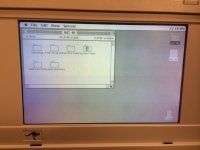
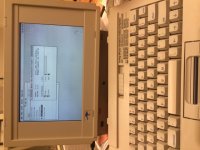
Ok so I grabbed that Outbound 125 a few months ago from ebay.. So glad I grabbed it.. I cleaned it all up!! Of course all the batteries were dead.. Replaced all three.. keyboard, pram, and main battery.. Couldn't figure out why the battery wasn't charging.. So I recapped the little board by where the power goes in.. no change.. recapped the main board… no change.. so I thought perhaps the power supply has issues.. well I noticed on the power supply it says input 230VAC… I am only putting in 120… so I am assuming this is a European power supply.. GRRRR….. So I am working on an alternative right now to find a 20V power supply.. going to get one exactly as spec'd so I don't fry it.. At any rate I've been working on it daily.. I bumped up all the RAM in it and when I powered it up it had me format the extra memory as 16MB of hard drive space.. This is such a cool feature!!!! Copied the System Folder to it and it booted like a champ at a fast speed! Especially since the hard drive is not sounding good.. I have appletalked it and backed up the data (no other easier way to do it).. I love this little guy!! Sorry my pic doesn't show the 16MB of space on the RAM HD.. I just wish I had accessories to it like the cable attachments and such..
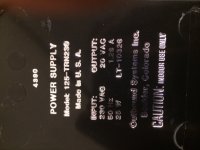
This was the little board where the power supply that connects that needed to be recapped… A board that could be missed during recap job.. 
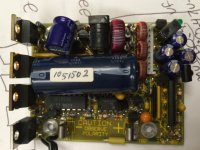
The larger cap had bubbled on the side… so she was doomed!
Gonna swap out the ROM chips tomorrow for SE ROM chips… right now it has got Mac Plus ROM chips… any advantage that anyone know's on this?? The only other advantage I would think is that they are bigger in size… but that doesn't really matter..
Great machine. I power mine up from time to time. It did not have the original power supply, so I hacked a DELL laptop supply to make it power up. Luckily I have had no cap issues. I too had to network it to backup all the data. Mine was owned by a popular writer/educator/columnist - so there was LOTS of cool content on the drive. The former owner now deceased.
a post
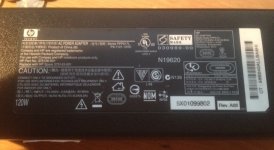
Ok so I bought a replacement!!! Let's see how it does.. In the meantime if anyone out there who needs an INTERNATIONAL OUTBOUND 125 adapter let me know...
Matt
Matt
Hey anyone an Outbound expert out there??? I have been trying to install 7.1 but it's just not working.. I am using my RAM DISK so that I am able to boot up from the hard drive when it fails… All I do is unplug all the batts and reset it so it boots off the HD!!! From what I gather the "System" file is somehow modified to boot in OS 7.1 for the outbound.. perhaps the machine id or something… Any help would be appreciated… Perhaps someone can send me a copy of their 7.1 "System" file… I would really appreciate any input..
I cannot get my Outbound 125 to boot a 7.1 installation.. I have even tried "System for any macintosh"
Thanks,
Matthew
I cannot get my Outbound 125 to boot a 7.1 installation.. I have even tried "System for any macintosh"
Thanks,
Matthew
Go back one version, 7.0.1 was the last version where one can make a truly universal boot disk that will boot any Mac made up until that version of System/Finder was created.
After that, it all goes to hell. The concept of a universal boot disk died with System 7.0.1, after that it just wasn't reasonable/possible to get everything necessary to fit on one single floppy. Even with 7.0.1 and nothing but System and Finder, there is only something like 168k left on the floppy.
After that, it all goes to hell. The concept of a universal boot disk died with System 7.0.1, after that it just wasn't reasonable/possible to get everything necessary to fit on one single floppy. Even with 7.0.1 and nothing but System and Finder, there is only something like 168k left on the floppy.
Thanks!!!! 7.0 installed fine... Appletalk doesn't work now... So gotta find a way to make that functional... I need it to get files in and out.. The original system 6.05 works fine off the other drive.. The error says your Appletalk connection may not function because it is missing drivers.. I assume it uses some weird drivers because its an outbound motherboard...
Matt
Matt
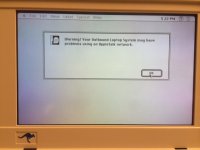
Ok more Outbound updates... Well the hard drive is sounding better since I have been using this little guy a lot... So about the only method I have to moving files in and out is Appletalk. I leave 6.0.5 on the hard drive because I cannot get Appletalk to work for me with 7.0 what so ever!!!!!! I have tried everything!!! Perhaps it's because System 6 has the chooser built in as an accessory?? Not sure.. I have managed to get it to the point of Appletalk working and you can see the computer you want to connect to but when you try to connect after a few minutes it says connection to the server can not be found.. I also get a warning that Appletalk may not work on the outbound.. It's an actual message titled Outbound: Your Appletalk connection may not work or something along those lines..
So at any rate.. I was able to get a CF Flash card adapter to plug into the motherboard.. the last 4 pins are the power to the old IDE drive.. I put external 5v on the CF card adapter.. Powers up fine.. and when you boot I get a read quick flash.. So it is seeing the IDE CF card!!!!!! Only trouble is that I cannot get it to format it and mount it.. Most of Apples formatting tools are for SCSI.. and the IDE versions won't work unless you have system 7.1 or 7.5 or higher installed!!! I have tried HDT Toolkit and various versions.. up to 1.8 it just see's SCSI.. and 2.5 will see IDE but it will not work under system 7.0.... So my issue is trying to format the first IDE drive ever created at 2.5 in size... I am sure there is a utility out there somewhere... I am going to try to connect it to a USB computer at home and format it with an IDE utility when in 8.0 or something... Cross your fingers!!! This is a royal pain in the @#@%..
Any suggestions are welcome!!!!!!!!! I hope to get this puppy running solid off a CF card so that I can get ready to store it and sleep resting knowing the next time I power it up it will work.. It should.. caps are all replaced and batts are all replaced.. I won't leave the batt's in it of course.. and if I open it up in 20 years or so I will probably need new batts.. If I can keep her wrapped up that long..
Matt
So at any rate.. I was able to get a CF Flash card adapter to plug into the motherboard.. the last 4 pins are the power to the old IDE drive.. I put external 5v on the CF card adapter.. Powers up fine.. and when you boot I get a read quick flash.. So it is seeing the IDE CF card!!!!!! Only trouble is that I cannot get it to format it and mount it.. Most of Apples formatting tools are for SCSI.. and the IDE versions won't work unless you have system 7.1 or 7.5 or higher installed!!! I have tried HDT Toolkit and various versions.. up to 1.8 it just see's SCSI.. and 2.5 will see IDE but it will not work under system 7.0.... So my issue is trying to format the first IDE drive ever created at 2.5 in size... I am sure there is a utility out there somewhere... I am going to try to connect it to a USB computer at home and format it with an IDE utility when in 8.0 or something... Cross your fingers!!! This is a royal pain in the @#@%..
Any suggestions are welcome!!!!!!!!! I hope to get this puppy running solid off a CF card so that I can get ready to store it and sleep resting knowing the next time I power it up it will work.. It should.. caps are all replaced and batts are all replaced.. I won't leave the batt's in it of course.. and if I open it up in 20 years or so I will probably need new batts..
If I can keep her wrapped up that long.. Matt
Updated Pics..
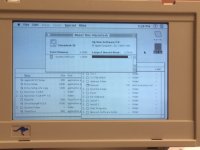
I think HardDisk Speedtools might work. I think you might just have to accept running System 7 until you can get the CF up and running, then install System 6
Great I'll try it!!! System 6 is what is working with Appletalk... 7 doesn't like Appletalk on the Outbound... Not sure if anyone else out there has gotten it to work or not??
Thanks Paralel for the tip!
Thanks Paralel for the tip!
I found APS PowerTools!!!!!!!!!! Gonna try it now!!!!!!! Says it works with System 6.0 and up!!! I got it to see IDE drives on another computer.. Wish me luck!!
I am giving up for now... I have tried and tried... I formatted a CF card with APS powertools and the machine still doesn't want to see it.. I see the activity light flicker when it boots up and I can tell it is looking to the drive for the boot partition... so it's working... These must have been formatted special... I suppose I can try cloning the original drive... It's a pain in the *#&(%...
If anyone else is able to do it please let me know!!!
Matt
If anyone else is able to do it please let me know!!!
Matt
Do you have the Outbound Installer disk?
If I remember correctly, the proper sequence to install the OS was install the OS to the hard drive, while booted from the floppy drive. Then run the Outbound Installer utility from the floppy disk. This modifies the Mac OS, adds Outbound DAs or Extensions and fixes, checks the Outbound configuration (hard drive or floppy internal, and hard drive size) and writes the built-in EEPROMs with configuration data.
After that, the new OS install works properly.
Also, IIRC, the last supported OS was 7.0.1. They never finished a fix for 7.1.
If you can get a CF working with the thing that would be amazing. Also nice would just be hackery that would let other 2.5" hard drives work with it. As far as I know, it was limited to certain models of 20, 40, 60 and 80 MB hard drives, because their drive parameters are the only ones available in the configuration software which loads the EEPROM.
I think this one will work with it, but I am not certain. I'm pretty sure I've used the Conner CP2060 and CP2080, but I'm not so sure about the 2061, 2067, etc. variants.
http://www.ebay.com/itm/CONNER-CP2061-60MB-2-5in-IDE-Drive-Tested-Warranty-Ship-International-/310232161335?pt=US_Internal_Hard_Disk_Drives&hash=item483b471c37
If I remember correctly, the proper sequence to install the OS was install the OS to the hard drive, while booted from the floppy drive. Then run the Outbound Installer utility from the floppy disk. This modifies the Mac OS, adds Outbound DAs or Extensions and fixes, checks the Outbound configuration (hard drive or floppy internal, and hard drive size) and writes the built-in EEPROMs with configuration data.
After that, the new OS install works properly.
Also, IIRC, the last supported OS was 7.0.1. They never finished a fix for 7.1.
If you can get a CF working with the thing that would be amazing. Also nice would just be hackery that would let other 2.5" hard drives work with it. As far as I know, it was limited to certain models of 20, 40, 60 and 80 MB hard drives, because their drive parameters are the only ones available in the configuration software which loads the EEPROM.
I think this one will work with it, but I am not certain. I'm pretty sure I've used the Conner CP2060 and CP2080, but I'm not so sure about the 2061, 2067, etc. variants.
http://www.ebay.com/itm/CONNER-CP2061-60MB-2-5in-IDE-Drive-Tested-Warranty-Ship-International-/310232161335?pt=US_Internal_Hard_Disk_Drives&hash=item483b471c37
Do you have the SCSI cables for it? You can always just mount the machine on another Mac by putting into drive mode. I did with an SE.
Thanks for the tips trag… Hap is sending me installation disks.. So I will try those out..
Unity no I don't have the scsi cable.. I'd rent it from someone if someone was willing to rent it just so I can play with this.. I think I am close but no cigar as of yet.. Perhaps what trag said applies here.. I have tried a 10mb, 16mb, and 32mb cf cards.. no luck.. I have formatted them on another machine with APC power tools.. I just know the machine is seeing the CF card.. I can just tell.. I have attached external 5v power so that is fine.. and i can see the read led flicker just once right before it launches the happy face mac off of the initialized drive… So it is looking for a boot partition I believe or seeing what is there..
Very close… I am taking break for now..
Matt
Unity no I don't have the scsi cable.. I'd rent it from someone if someone was willing to rent it just so I can play with this.. I think I am close but no cigar as of yet.. Perhaps what trag said applies here.. I have tried a 10mb, 16mb, and 32mb cf cards.. no luck.. I have formatted them on another machine with APC power tools.. I just know the machine is seeing the CF card.. I can just tell.. I have attached external 5v power so that is fine.. and i can see the read led flicker just once right before it launches the happy face mac off of the initialized drive… So it is looking for a boot partition I believe or seeing what is there..
Very close… I am taking break for now..
Matt
You may need to write to the EPROM directly
I think what I used to do, before I had a floppy drive was use Appletalk. Either the Outbound or the other Macintosh needed to be running System 7. Let's assume the other Macintosh is running System 7. Then use the Appleshare (IIRC) DA in System 6 on the Outbound (booted from Silicon drive) to mount a shared volume from the host Macintosh (can you share a mounted Disk Image? I think you can..).
It's been so long since I've done this. Anyway, it was fairly easy, using LocalTalk and AppleTalk File Sharing to boot the Outbound from the Silicon Disk, and then install the Mac OS to the hard drive, and then run the Outbound Installer on the hard drive. Then one could boot from the hard drive, and the installer should write the EEPROMs for the drive which is installed.
It's been so long since I've done this. Anyway, it was fairly easy, using LocalTalk and AppleTalk File Sharing to boot the Outbound from the Silicon Disk, and then install the Mac OS to the hard drive, and then run the Outbound Installer on the hard drive. Then one could boot from the hard drive, and the installer should write the EEPROMs for the drive which is installed.
Trag... Yes I have done all of this.. I've Appletalked it and ran 7.0 installers and so on.. I just got the installer disks from "haplain" today!!! So I am hoping the installation method will fix my Appletalk issue with System 7.. The thing is that with the CF card it just does not see the card at all... I think they must have had a special hard drive formatting to them.. something specific only to Outbound.. So I think my last resort is going to be using clonezilla and cloning the drive exactly like the original... This will duplicate the drive on the CF card exactly like the original IDE drive.. The CF card reader board emulates an IDE drive so I do not think it is that... It's gotta be in the boot blocks or something... As I said I am taking a break with this... more fooling around with it and I am going to break the machine... I've been swapping back and forth all week.... I put her back together and am taking a long break.. She's running like a champ!!! I just fear in the future the IDE drive is going to kick the bucket and unless I have had constant power to it I will loose the Silicon Disk boot... Then it will be just a showpiece with no functions...
I've been swapping back and forth all week.... I put her back together and am taking a long break.. She's running like a champ!!! I just fear in the future the IDE drive is going to kick the bucket and unless I have had constant power to it I will loose the Silicon Disk boot... Then it will be just a showpiece with no functions...
AHH!!! I see... When running the installer it has an option to install "EPROM Boot Code".... Well I'm not gonna take this all apart again.... Maybe next week... So I will connect it to a different mac and run the installer and install on the CF card the EPROM boot!!! Think it will work???
Out of curiosity, are you using the Outbound Installer floppies?
OK so I couldn't resist... I tried it... Nope... how can I write that EPROM directly on the HD (CF Card)...
Disregard writing it directly comment.. I was reading page one of this thread... OlePigeon I ran the Outbound 2.1 installer diskette on a different computer and was successful in installing the disk on the drive.. It has a system folder on it 6.0.7.. and I ran writing the EPROM again after the regular install... Still nothing!!! Sometimes it hangs... I plug the old IDE back in and whala the regular IDE works fine... I have no floppy drive for this unit or the SCSI interface module..
I think because CF cards technically arnt CHS compliant. Maybe thats the issue?
I bet some CF to IDE adapters are more standards compliant than others. You may need to try a bunch before you find one that works.
I'm going to be attempting something similar with an old 386 laptop, converting it from a mechanical platform to a CF -> IDE adapter. I expect I will have to go through quite a few adapters to find one that will work since the hardware on this old system is very, very picky about the drives it likes.
I'm going to be attempting something similar with an old 386 laptop, converting it from a mechanical platform to a CF -> IDE adapter. I expect I will have to go through quite a few adapters to find one that will work since the hardware on this old system is very, very picky about the drives it likes.
It's not a special book blocks thing, because I bought some old Conner or Maxtor 60 MB drives at a local store and installed them in the Outbound, with no special copying. However, the guy I dealt with years ago who was trying to hack larger drives into the Laptop said that there were a limited number of hard drive parameter choices (remember those? sectors, cylinders, etc.) in the installer. This is probably why only 20 - 80 MB drives were supported.
I would guess the trick is getting the CF to act like a hard drive in the sense that it should have blocks and sectors and cylinders, logically.
The "writing EEPROM" message you get is the Installer software writing the actual EEPROM chips inside the Outbound. The EEPROM code does not go on any hard drive. The installer detects the configuration of the Outbound and then writes supporting code to the intenral EEPROM chips on the Logic board. It's like a little bit of rewritable ROM. The chips are Atmel 28C064 (IIRC) in a PLCC package. So just 64 Kbits each, 16 KB total.
However, I'm concerned about this version 2.1 Outbound installer. I'm pretty sure it never went past 1.3. Are you sure you have the Outbound **Laptop** INstaller. OUtbound later sold a line of **Notebooks** and those had a somewhat different architecture and software.
I would guess the trick is getting the CF to act like a hard drive in the sense that it should have blocks and sectors and cylinders, logically.
The "writing EEPROM" message you get is the Installer software writing the actual EEPROM chips inside the Outbound. The EEPROM code does not go on any hard drive. The installer detects the configuration of the Outbound and then writes supporting code to the intenral EEPROM chips on the Logic board. It's like a little bit of rewritable ROM. The chips are Atmel 28C064 (IIRC) in a PLCC package. So just 64 Kbits each, 16 KB total.
However, I'm concerned about this version 2.1 Outbound installer. I'm pretty sure it never went past 1.3. Are you sure you have the Outbound **Laptop** INstaller. OUtbound later sold a line of **Notebooks** and those had a somewhat different architecture and software.
That's why I said to pull the EEPROM, and program it directly. Give it the information it needs in order to see the CF since the installer can't do it.