

Thread
Mac Classic giving me an unexpected checkerboard.
The hdd in my Classic died a few weeks ago. I've been so busy with other projects that I just haven't had the time to open it up and swap the drive. Last night I had to make some System 7 disks from some images on my external hdd. Since I was already doing something on my Color Classic, I figured for quickness I'd just connect the external to the Classic and do it on that since the external is bootable. I hooked it up and turned the Mac on.
It made a weird distorted beep sound and gave me this:
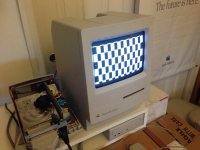
What?! Totally unexpected. This machine has been a sold performer since I got it. Now I'm wondering if the internal hard drive is dead after all or if it was just signs of things to come. Bummer.
I'll have to open it up and give it a cleaning and see if there's any leaky caps.
The HD20 I scored on eBay is "out for delivery" and should be on my doorstep when I get home from work. I was hoping to tinker with that. Hopefully the Classic isn't a disaster and I can tackle both. If not, there's always the weekend.
It made a weird distorted beep sound and gave me this:
What?! Totally unexpected. This machine has been a sold performer since I got it. Now I'm wondering if the internal hard drive is dead after all or if it was just signs of things to come. Bummer.
I'll have to open it up and give it a cleaning and see if there's any leaky caps.
The HD20 I scored on eBay is "out for delivery" and should be on my doorstep when I get home from work. I was hoping to tinker with that. Hopefully the Classic isn't a disaster and I can tackle both. If not, there's always the weekend.
I'm afraid it's recapping time for your Classic, both the logic board and analog board.
The capacitors on the logic board will definately all be dead ( high or infinite ESR reading ).
As for the Analog board: when I did mine a few months ago, I noticed there were several capacitors leaking at the bottom but one could only see the leakage after removal since they are so close to eachother.
The capacitors on the logic board will definately all be dead ( high or infinite ESR reading ).
As for the Analog board: when I did mine a few months ago, I noticed there were several capacitors leaking at the bottom but one could only see the leakage after removal since they are so close to eachother.
yeah it seems like the Classic and Classic II's they have the most cap issues.
maybe because apple was trying to shave off nickels and dimes when they made these.
i do like the "command-option-x-o" option, i thought that was slick!
maybe because apple was trying to shave off nickels and dimes when they made these.
i do like the "command-option-x-o" option, i thought that was slick!
Yeh, I wish that was an option on every model.
Well, maybe with Dougg's work ...
Cracked open the Classic ...and yes.....leaky caps galore!
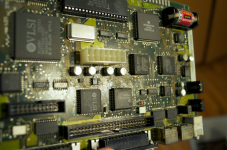
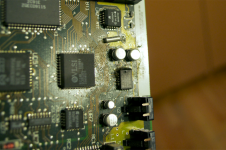
What a mess!
I took some Q tips with some alcohol and cleaned off the gunk. I put everythign back together and tried it out. The machine booted with a floppy.
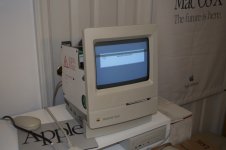
Seems to not want to pick up the hard drive. (But I think that is dead anyway.) It got to a desktop, but the keyboaed and mouse don't work. I powered cycled it and the checkerboard came back.
Looks like I'm going to have to replace all 7 of the 47 µf caps.
What a mess!
I took some Q tips with some alcohol and cleaned off the gunk. I put everythign back together and tried it out. The machine booted with a floppy.
Seems to not want to pick up the hard drive. (But I think that is dead anyway.) It got to a desktop, but the keyboaed and mouse don't work. I powered cycled it and the checkerboard came back.
Looks like I'm going to have to replace all 7 of the 47 µf caps.
Check the pram battery too. My c II gave me checkers and all it needed was a new battery.
That was part of the cleanup too. I did change the battery.
Get the tantalum caps... You can get them from Mouser for 37 cents each... I'd go ahead and replace every single capacitor you find, that way, you're good to go for a long time.
-J
-J
I just ordered the caps. I also picked up some for my Color Classic. I figured I'd do that too while I'm at it since it's also been giving me some trouble.
Got my caps in. I just finished recapping the whole board. I did a god job of cleaning all the gunk off the board too. Sadly, I still get a checkerboard:
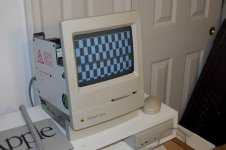
Any ideas?
Any ideas?
Ram trouble maybe ??
I thought of that. I pulled the 2 extra RAM sticks I have on the RAM board. Instead of getting the double high checkerboard you see up top, I get this one:
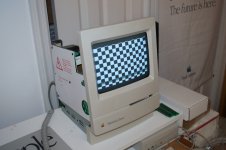
Unless it's the onboard RAM that's bad.
Unless it's the onboard RAM that's bad.
The caps are still suspect(or I should say solder joints). Also must rue lean solder areas of flux, it's a residue acting like the leaky cap stuff.
Good luck
Good luck
depending on the flux, flux is not conductive. ive seen flux messes on the boards and has done nothing. However, if the flux mixes with something, then.... and only then.... it could be bad.
Soldered looking joints can hold when not actually soldered and be "stuck" to the spot with flux is what I meant. I work the night shift and just didn't get the right explanation out. Sorry about that.
Did you try to wash the board ??
Have you recapped the Analog board as well ? The capacitors used on the Analog boards of the Classic I and II are from poorer quality than those of earlier Macs. They tend to leak at the bottom.
What are the voltages of the +5, +12 and -12v lines ?
I would test all the SMD capacitors on the logic board for shorts and trace back both leads of each soldered capacitor so there are no broken traces.
If you don't find any failures then the board is likely beyond repair.
What are the voltages of the +5, +12 and -12v lines ?
I would test all the SMD capacitors on the logic board for shorts and trace back both leads of each soldered capacitor so there are no broken traces.
If you don't find any failures then the board is likely beyond repair.
I'm reading voltage accross all the caps, so they're making contact with the board. However, I took a voltage measurement at the floppy connector and I'm only gettign 4.79V and 11.57V.
Also, if I power it up without the RAM board in, I get the slightest hint of a normal screen at the top.
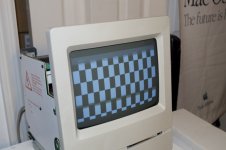
Any ideas?
Also, if I power it up without the RAM board in, I get the slightest hint of a normal screen at the top.
Any ideas?
The +5v and +12v are really way too low for a successfull boot.
These numbers show your Analog board needs recapping asap: the capacitors are definately degraded, probably most of them have already failed.
Try disconnecting the power of the HDD to reduce the load.
While it's not a solution in the long term you can increase the output voltage of your Analog board.
In the middle of the analog board ( component side ) there's a small white plastic screw. Turn it clockwise gently to increase the voltage.
However I strongly recommand this as a short term solution.
It's possible that adjusting the voltage pot isn't enough to get the voltage back in specs because too many capacitors are failing.
These numbers show your Analog board needs recapping asap: the capacitors are definately degraded, probably most of them have already failed.
Try disconnecting the power of the HDD to reduce the load.
While it's not a solution in the long term you can increase the output voltage of your Analog board.
In the middle of the analog board ( component side ) there's a small white plastic screw. Turn it clockwise gently to increase the voltage.
However I strongly recommand this as a short term solution.
It's possible that adjusting the voltage pot isn't enough to get the voltage back in specs because too many capacitors are failing.
Wow, you think it's the analog board too? I even pulled the analog board out and looked at it. There's no signs of any leaky caps.
Yes, probably not getting enough V's to get it working, have you removed the Floppy and Hard Drive to test at a minimum load ?
Yes, still does it.
Have you a spare analog board for a test ??
No. No spares.
I'm not too familiar with the Classic board, but if the ROM is socketed, try reseating the chips or any other socketed chips.
Did you try adjusting the voltage pot. on the analog board?
Replace the caps on the analog board as the guys in here are suggesting, it will do good. Don't rely on adjusting the voltage pot, the caps are getting worse and worse over time.
Replace with the same micro farad rating, and same voltage rating (or higher). Low ESR and 105 degrees celcius tolerance is recommended.
Replace with the same micro farad rating, and same voltage rating (or higher). Low ESR and 105 degrees celcius tolerance is recommended.
Not suggesting kyre "rely" on adjusting a pot, but if the voltages can be temporarily placed at closer to nominal and the checkerboard is still happening, it may indicate the problem is with the logic board.