

Thread
Mac Classic giving me an unexpected checkerboard.
I adjusted the pot until I got 12V and 5V and boom! It booted right up.
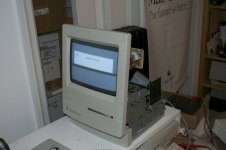
It did seem to take forever to boot off the System 7.5.3 floppy that I forgot was in the drive, but at least it works. Even the keyboard and mouse worked once it got to the Finder. I restarted it again and the screen went black. I shut it off and then attempted to try it again with a System 6.0.8 disk to see if that booted faster. I don't know if the painfully slow boot has something to do with the machine or if that's just how slow System 7.5.3 is.
In any case, the second attempt just gave me another checkerboard again. But I guess this proves that the logicboard is good and it is indeed a failing analog board?
It did seem to take forever to boot off the System 7.5.3 floppy that I forgot was in the drive, but at least it works. Even the keyboard and mouse worked once it got to the Finder. I restarted it again and the screen went black. I shut it off and then attempted to try it again with a System 6.0.8 disk to see if that booted faster. I don't know if the painfully slow boot has something to do with the machine or if that's just how slow System 7.5.3 is.
In any case, the second attempt just gave me another checkerboard again. But I guess this proves that the logicboard is good and it is indeed a failing analog board?
Not really. Caps heat up on board parts a they are the same age and cascade failure. My classic boots but no chime, I have 3 analog boards and 5 motherboards, only one motherboard boots.
Just have both recapped, one test then recap the other. That way you will know if one helps more than the other.
Cross your fingers as if I do we'll recapping mine ill flood the boards with classic motherboards lol, all with full ram cards.
Just have both recapped, one test then recap the other. That way you will know if one helps more than the other.
Cross your fingers as if I do we'll recapping mine ill flood the boards with classic motherboards lol, all with full ram cards.
Did you crack up the voltage as I suggested ? Gently turn the screw clockwise while you are measuring the +5 Volts line.
If you are unable to get +5V and +12V volts then you need to recap the Analog board first.
If you are unable to get +5V and +12V volts then you need to recap the Analog board first.
Yes, read two posts up for results.
Yes, please do recap both the analog and digital board. And by that I mean *all* the electrolytic caps. If you don't have the caps you need, get them.
And yes, System 7.5.x on a floppy boots extremely slow on a Classic (I've tried it before).
And yes, System 7.5.x on a floppy boots extremely slow on a Classic (I've tried it before).
I have a Plus which used to start-up to the checkerboard and if I left it alone for about five minutes or so, it would suddenly chime and boot properly. So heating up can definitely have an effect.
Yeah, I saw that trick in another thread. This doesn't fix itself once it's been on for a while.
Here's an update.
Macdrone sent me a new analog board. He tested it in his machine and it boots. Unfortunately, it doesn't work in mine. It's actually worse.
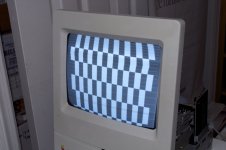
I was able to eliminate the horizontal lines by adjusting the brightness knob, but the display is seriously warped and there's a lot of scattered noisy pixels. The warping moves down the display.
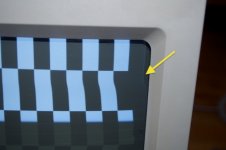
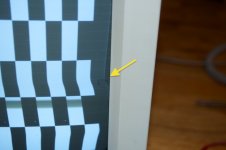
I tried adjusting the pot on the board to 12 and 5V, but it won't go that high. It maxes out at a little over 11 and 4 volts.
I'm already in the hole $30 for the caps and the board. I think I'll chalk this one up as a loss since I think it's a combination of the two boards not working. At this point, it might be easier (cheaper) to just keep my eye out for a new machine all together. Maybe finally get a Classic II or an SE/30.
Macdrone sent me a new analog board. He tested it in his machine and it boots. Unfortunately, it doesn't work in mine. It's actually worse.
I was able to eliminate the horizontal lines by adjusting the brightness knob, but the display is seriously warped and there's a lot of scattered noisy pixels. The warping moves down the display.
I tried adjusting the pot on the board to 12 and 5V, but it won't go that high. It maxes out at a little over 11 and 4 volts.
I'm already in the hole $30 for the caps and the board. I think I'll chalk this one up as a loss since I think it's a combination of the two boards not working. At this point, it might be easier (cheaper) to just keep my eye out for a new machine all together. Maybe finally get a Classic II or an SE/30.
Seriously the board didn't work? I did try it out, maybe the shipping did it in.
Good luck on finding a replacement Mac, I am truly sorry it didn't get the job done.
Good luck on finding a replacement Mac, I am truly sorry it didn't get the job done.
Hi,
My Classic II has similar symptoms, except it has solid vertical bars across the screen.
I tried recapping the analog board, and it didn't fix a thing-- I can get it to boot, however, if I disconnect the hard drive and floppy drive and let it warm up. The voltage slowly rises from about 4.2~4.35 volts until it chimes at about 4.6~4.75 volts, then it'll boot from an external, self-powered disk drive (a ZIP drive in this case), although the screen artifacts are still present, and things are very erratic and unstable. Have you tried disconnecting the drives? I saw that you did that before, but how about with the new analog board?
Good luck!
c
My Classic II has similar symptoms, except it has solid vertical bars across the screen.
I tried recapping the analog board, and it didn't fix a thing-- I can get it to boot, however, if I disconnect the hard drive and floppy drive and let it warm up. The voltage slowly rises from about 4.2~4.35 volts until it chimes at about 4.6~4.75 volts, then it'll boot from an external, self-powered disk drive (a ZIP drive in this case), although the screen artifacts are still present, and things are very erratic and unstable. Have you tried disconnecting the drives? I saw that you did that before, but how about with the new analog board?
Good luck!
c
He said my board that I sent him was way worse voltage wise than the one he had, and had artifacts so I'm sure it won't do that at all at this point.
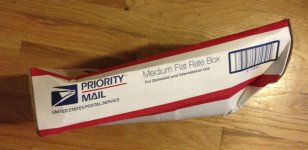
@macdrone. It could have very well been damaged in shipping. The box was trashed when I got it.
Measure your voltages directly on the PCB of the Analog board after recapping, the measurement at the external floppy drive connector isn't always reliable.
I see the picture is distorted: this is normal as you have to adjust brightness, contrast, V-size, H-size, V-centering, H-centering, focus on the Analog board.
Then probably the centering rings on the Yoke of the CRT. This is standard procedure after replacing the analog board.
However this will not solve your problem: if you tried a good recapped analog board where the voltages were within specs, your logic board is likely beyond repair. A short or wrongly positioned capacitor on the logic board can pull down the output voltage of the analog board.
Therefore it's best to measure voltages directly on the analog board with the logic board disconnected.
A simply test: disconnect the logic board and measure the +5 and +12 line at the HDD connector with a drive connected. What does this give ?
Forget fiddling with the voltage screw on the analog board: this is usefull for quick testing but not a solution.
After recapping the voltage of the analog board should be spot on. Don't waist your time with non-recapped analog boards as the capacitors used on the Classic I/II series are from very poor quality.
I see the picture is distorted: this is normal as you have to adjust brightness, contrast, V-size, H-size, V-centering, H-centering, focus on the Analog board.
Then probably the centering rings on the Yoke of the CRT. This is standard procedure after replacing the analog board.
However this will not solve your problem: if you tried a good recapped analog board where the voltages were within specs, your logic board is likely beyond repair. A short or wrongly positioned capacitor on the logic board can pull down the output voltage of the analog board.
Therefore it's best to measure voltages directly on the analog board with the logic board disconnected.
A simply test: disconnect the logic board and measure the +5 and +12 line at the HDD connector with a drive connected. What does this give ?
Forget fiddling with the voltage screw on the analog board: this is usefull for quick testing but not a solution.
After recapping the voltage of the analog board should be spot on. Don't waist your time with non-recapped analog boards as the capacitors used on the Classic I/II series are from very poor quality.
I am so sorry, when I get a paid again ill send that other board and you can just swap or pull off that plastic connector. Ill ups it.
Cool. Thanks.
have you poped the rom's out and poped them back in?
Hum. No. I'll have to try that when I get home.
I still suspect the logic board/ROM as well.
No dice. Not the ROM. Same behavior after being reseated.
look really close at your cap job,,, also look for solder bridges, little bits of solder can land and cause issues,
Might have to get real close with a bright light.
Also i think there are other caps on that board as well other then just 16v/47
i think its funny how you got it to work before the cap job… and after the cap job, no dice.
Might have to get real close with a bright light.
Also i think there are other caps on that board as well other then just 16v/47
i think its funny how you got it to work before the cap job… and after the cap job, no dice.
As I wrote earlier, there's probably a short circuit on the logic board, probably near the replaced capacitors.
If not, then the logic board is beyond repair. Long term undervoltage can cause other components to fail.
If not, then the logic board is beyond repair. Long term undervoltage can cause other components to fail.