
Thread
A Macintosh IIci and a Red Maxwell
Hello all,
Earlier this week a Macintosh IIci arrived from Ebay that was described as having 'some corrosion on the power supply and motherboard'.
I stripped the Mac down to check the the logic board's damage: a red Maxwell battery had leaked (thankfully the Mac was used on its side so the case bore the brunt of the acid damage) in such a way that the battery holder became detached from the logic board.
Other damage includes a few corroded components such as the ROM pins nearest the battery.
Also included was a IIci cache card, an E-Machines video card and a Farallon Ethernet card.
As a matter of course I washed the logic board and recapped it with eight 47uf 16v and two 10uf 16v capacitors.
When I turn on the Mac the power supply kicks in and the hard drive spins up. The green light on the logic board comes on.
But there is no chime! I think the battery leakage could have damaged the ROM.
I have tried a SE/30 (chimes of death) and IIfx (normal chime then chimes of death) ROM in the IIci but it did not work.
I cannot get anything to show up on the screen.
Any suggestions would be much appreciated!
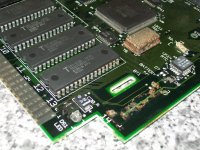
Earlier this week a Macintosh IIci arrived from Ebay that was described as having 'some corrosion on the power supply and motherboard'.
I stripped the Mac down to check the the logic board's damage: a red Maxwell battery had leaked (thankfully the Mac was used on its side so the case bore the brunt of the acid damage) in such a way that the battery holder became detached from the logic board.
Other damage includes a few corroded components such as the ROM pins nearest the battery.
Also included was a IIci cache card, an E-Machines video card and a Farallon Ethernet card.
As a matter of course I washed the logic board and recapped it with eight 47uf 16v and two 10uf 16v capacitors.
When I turn on the Mac the power supply kicks in and the hard drive spins up. The green light on the logic board comes on.
But there is no chime! I think the battery leakage could have damaged the ROM.
I have tried a SE/30 (chimes of death) and IIfx (normal chime then chimes of death) ROM in the IIci but it did not work.
I cannot get anything to show up on the screen.
Any suggestions would be much appreciated!
Those two oscillators(?) in the top right of the photo don't like at all right.
Well especially the RTC IC next to the watch crystal. Will that cause a no-post? Probably not. But the main clock oscillator would!
Your going to need to remove and replace that oscillator, Or remove it at least, as a good chunk of the ROM databus runs underneath it.
Your going to need to remove and replace that oscillator, Or remove it at least, as a good chunk of the ROM databus runs underneath it.
Hello all,
I removed the oscillator, a Saronix 9029 50MHz, then and tested the logic board. Without the oscillator the IIci does not chime/chimes of death no matter what ROM SIMM is present.
So I put it back under the assumption that it could be OK and any damage is only external.
Could the corrosion on the pins of the pictured ROM be enough to make the IIci not POST?
Thank you!
I removed the oscillator, a Saronix 9029 50MHz, then and tested the logic board. Without the oscillator the IIci does not chime/chimes of death no matter what ROM SIMM is present.
So I put it back under the assumption that it could be OK and any damage is only external.
Could the corrosion on the pins of the pictured ROM be enough to make the IIci not POST?
Thank you!
Out of curiousity, when you were testing the board without the ROM SIMMs, you did have the jumper installed next to the SIMM slot, right? If that's not installed, the computer will just sit there, doing nothing. I'm not 100% certain what would happen if the jumper is installed and a ROM SIMM is in the slot. It should ignore the slot, but, if the jumper was present at all times, that might be why the computer did the chimes of death with the various SIMMs.
Re: the corrosion, it might be a good idea to get some deoxit and clean the pins, just to see what happens. Who knows, it may just come back to life, in which case, you just need to get a new battery holder, or run some wires to a triple AA battery holder and use 1.2 volt rechargeables in that.
-J
Re: the corrosion, it might be a good idea to get some deoxit and clean the pins, just to see what happens. Who knows, it may just come back to life, in which case, you just need to get a new battery holder, or run some wires to a triple AA battery holder and use 1.2 volt rechargeables in that.
-J
Hi,
there seems to be a lot of corrosion around D8 (component labelled A6, a high speed diode IIRC). I suppose it's time to get the multimeter out and start checking for continuity, shorts, opens etc.
Also is the area in the picture the only place where corrosion took place? Via's are always something to check
Best of luck!
there seems to be a lot of corrosion around D8 (component labelled A6, a high speed diode IIRC). I suppose it's time to get the multimeter out and start checking for continuity, shorts, opens etc.
Also is the area in the picture the only place where corrosion took place? Via's are always something to check
Best of luck!
volvo242gt,
genie_mac,
Also, I have been testing continuity between ROM pins and vias on both sides of the logic board. They all check out!
I don't know how test for shorts and opens with a multimeter but I'll soon have a look.
Thanks for all the help!
When I tested the logic board without the ROM SIMMS I did have the jumper installed next to the SIMM slot. With the IIci ROM selected I don't get a chime when I turn the Mac on.
genie_mac,
I have been checking the continuity for all the components within the area pictured. D8 is quite corroded so I scraped some of it off so I could test continuity. My multimeter beeps so it must be OK!
Also, I have been testing continuity between ROM pins and vias on both sides of the logic board. They all check out!
I don't know how test for shorts and opens with a multimeter but I'll soon have a look.
Thanks for all the help!
Hello all,
When I turn the IIci on I cannot turn it off via the on/off button.
So I'll replace logic board capacitors under the PSU.
I'll report back when they've been replaced!
When I turn the IIci on I cannot turn it off via the on/off button.
So I'll replace logic board capacitors under the PSU.
I'll report back when they've been replaced!
Given that you get a chime with the SE/30 and IIfx ROMs, I think you might try one of Doug's custom ROM modules. Check the Hacks forum. You'll want it programmed with IIci code, and if you just need a usable IIci ROM, then you don't need the fancy 8 MB version. The version 1 boards, if he still has some, will do the trick.
I had a similar problem with IIci ROMs. The extracts I made to repair the problem are here:
http://www.prismnet.com/~trag/Firmware/IIci/
Maybe Doug can put the code on the chips for you.
Still, it's a good idea to replace the caps under the power supply in any event. Those are what killed my first IIci back in the mid-90s. Ate through a via and it was a bear tracking down the problem.
I had a similar problem with IIci ROMs. The extracts I made to repair the problem are here:
http://www.prismnet.com/~trag/Firmware/IIci/
Maybe Doug can put the code on the chips for you.
Still, it's a good idea to replace the caps under the power supply in any event. Those are what killed my first IIci back in the mid-90s. Ate through a via and it was a bear tracking down the problem.
I think he meant that he tried ROMs from machines that had chimes of death, etc.. and no chime on the IIci.
I am thinking damaged traces to the ROM address/data lines. If you look how bad that oscillator is, all the ROM traces run right underneath it. Even if it looks clean, the acid/corrosion could have been absorbed in the solder mask, or the PCB itself and causing a "leakage" current between all the traces in the bus, resulting in this system. And jumpering out the select line between DIPs/SIMM isnt going to fix that issue, as the databus is the databus.
I am thinking damaged traces to the ROM address/data lines. If you look how bad that oscillator is, all the ROM traces run right underneath it. Even if it looks clean, the acid/corrosion could have been absorbed in the solder mask, or the PCB itself and causing a "leakage" current between all the traces in the bus, resulting in this system. And jumpering out the select line between DIPs/SIMM isnt going to fix that issue, as the databus is the databus.
Hello all,
I don't think I explained the ROM SIMM situation this very well in my first post!
My IIfx works fine but when I use its ROM SIMM in the IIci it chimes normally, then it plays the chimes of death.
With the SE/30, which still suffers from 'Simasimac' after a recap and replacement Bourns filter, ROM SIMM the IIci will give the chimes of death.
I'll keep testing the traces and vias of the ROM (HH) to make sure continuity is OK. When I removed the oscillator to check underneath it the traces looked fine.
Thank you!
I don't think I explained the ROM SIMM situation this very well in my first post!
My IIfx works fine but when I use its ROM SIMM in the IIci it chimes normally, then it plays the chimes of death.
With the SE/30, which still suffers from 'Simasimac' after a recap and replacement Bourns filter, ROM SIMM the IIci will give the chimes of death.
I'll keep testing the traces and vias of the ROM (HH) to make sure continuity is OK. When I removed the oscillator to check underneath it the traces looked fine.
Thank you!
Hello all,
I've just came across a document on the 68kMLA Wiki about 'Macintosh IIci RAM and ROM Pathways'.
http://68kmla.org/wiki/index.php/Macintosh_IIci_RAM_and_ROM_Pathways
It looks quite helpful for diagnosing trace problems but I don't know how to use it!
Any help would be much appreciated!
I've just came across a document on the 68kMLA Wiki about 'Macintosh IIci RAM and ROM Pathways'.
http://68kmla.org/wiki/index.php/Macintosh_IIci_RAM_and_ROM_Pathways
It looks quite helpful for diagnosing trace problems but I don't know how to use it!
Any help would be much appreciated!
Hello all,
I have tried repairing damaged traces and wiring ROM IC pins to their corresponding via but alas the Macintosh still will not boot with its own ROM (or any other ROM for that matter).
I've now got the HH ROM in its own socket.
I think I'll call it a day with this Logic board and try and source a new one!
Thank you for all the help,
sadmanonatrain
I have tried repairing damaged traces and wiring ROM IC pins to their corresponding via but alas the Macintosh still will not boot with its own ROM (or any other ROM for that matter).
I've now got the HH ROM in its own socket.
I think I'll call it a day with this Logic board and try and source a new one!
Thank you for all the help,
sadmanonatrain
you do know once you install a rom simm in there you have to set a jumper… have you tried the se/30 rom simm?
uniserver,
Without jumper-Chimes of Death
With jumper- Nothing except for a quiet pop from the speaker
Thanks
When I use the SE/30 ROM:
Without jumper-Chimes of Death
With jumper- Nothing except for a quiet pop from the speaker
Thanks
my IIci does that too with an SE/30 rom and no jumper, so that behavior is to be expected.
Sounds to me like you need to change all the big radials.
the Iici and Iicx, even if those radials 220uf . 470uf caps don't look bad always change them anyways.
just hearing the chime of doom tells you a lot.
the Iici and Iicx, even if those radials 220uf . 470uf caps don't look bad always change them anyways.
just hearing the chime of doom tells you a lot.
but is an SE/30 rom actually supposed to work in a IIcx/IIci?
good question. i use dougg3's roms in my SI/CI/CX/SE-30 i think it works in the IIx as well? l dunno i never had a working one of those…
I have a dead II and a dead IIx, My buddy zack was going to send me a IIfx, but then this trip to Florida happened
ill try it for you right now in my CI.
- stock se/30 rom 32 bit (dirty)
I have a dead II and a dead IIx, My buddy zack was going to send me a IIfx, but then this trip to Florida happened
ill try it for you right now in my CI.
- stock se/30 rom 32 bit (dirty)
yeah i pulled dougg3's out and popped a stock se/30 in. and it gets the chime of death.
So it looks like because dougg3's is based off the IIsi 32 bit clean, that is why it works in everything
so looks like a IIsi or one of dougg3's might work… sounds like you might have some eaten traces over near your rom's.
are the roms removable or soldered… mine are soldered.
but doesn't matter because i have doug's rom simm in there.
he only charges 30 bucks. if it comes down to it.
So it looks like because dougg3's is based off the IIsi 32 bit clean, that is why it works in everything
so looks like a IIsi or one of dougg3's might work… sounds like you might have some eaten traces over near your rom's.
are the roms removable or soldered… mine are soldered.
but doesn't matter because i have doug's rom simm in there.
he only charges 30 bucks. if it comes down to it.
Uniserver,
For some reason I cannot turn the IIci off via its power switch; I always need to unplug it to turn it off.
Ike,
I have not been able to get a IIfx ROM working in the IIci. I'm sure that another member of this forum has has success with this.
Thanks
I've replaced all of the radial capacitors on this board and it did not change anything.
For some reason I cannot turn the IIci off via its power switch; I always need to unplug it to turn it off.
Ike,
Somewhere online there is a compatibility matrix that deals with ROMs that can be used with the IIci. I don't think it is supposed to work!
I have not been able to get a IIfx ROM working in the IIci. I'm sure that another member of this forum has has success with this.
Thanks
Ah thanks for taking the time to try Uniserver!
Reason I was trying to boot with SE/30 rom was to see if the IIci would give the same random floppy drive bus errors as the SE/30, to make sure the rom wasnt bad.
Reason I was trying to boot with SE/30 rom was to see if the IIci would give the same random floppy drive bus errors as the SE/30, to make sure the rom wasnt bad.
oh the IIfx rom gives you the chime of death as well?
i don't know how the IIfx rom would work in your Iici.
get a magnification glass and inspect the traces,
do you have the ability to remove your rom's?
like use a heat gun, if they are soldered… maybe that battery acid leaked under the roms.
maybe you could pull them out and you will see some eaten traces.
he has the same issue with this amiga 500, had to pull the IC, to do some repairs.
http://www.youtube.com/watch?v=Aj0Qbrs_3Gk
i don't know how the IIfx rom would work in your Iici.
get a magnification glass and inspect the traces,
do you have the ability to remove your rom's?
like use a heat gun, if they are soldered… maybe that battery acid leaked under the roms.
maybe you could pull them out and you will see some eaten traces.
he has the same issue with this amiga 500, had to pull the IC, to do some repairs.
http://www.youtube.com/watch?v=Aj0Qbrs_3Gk
Hello all,
I have removed the ROM and socket from the logic board. None of the traces look obviously eaten so I started to test continuity between where the ROM would be and vias.
All of these points test good for continuity apart from one. It is the fifth pin on the right side of the ROM if the ROM was closest to you.
I'll track down its corresponding via and solder a wire to where the fifth pin would be. Hopefully this will provide a solution.
Uniserver, thanks for the video link. It was quite informative!
I have removed the ROM and socket from the logic board. None of the traces look obviously eaten so I started to test continuity between where the ROM would be and vias.
All of these points test good for continuity apart from one. It is the fifth pin on the right side of the ROM if the ROM was closest to you.
I'll track down its corresponding via and solder a wire to where the fifth pin would be. Hopefully this will provide a solution.
Uniserver, thanks for the video link. It was quite informative!
Yeah i don't know why but I like that guy and his videos.
He is a little off the wall…
I feel like he not only cares, but he takes extra time to explain things, maybe he will become a college instructor some day?
He is a little off the wall…
I feel like he not only cares, but he takes extra time to explain things, maybe he will become a college instructor some day?
Hello all,
I've just fixed two points on the logic board that failed continuity testing. They test fine now.
If I try to boot the IIci off its own ROM I get no chime; as usual. But when I try the IIfx ROM I also get no chime; as opposed to the chime then chimes of death I used to get.
I don't know if I'm getting somewhere or not!
Thanks
I've just fixed two points on the logic board that failed continuity testing. They test fine now.
If I try to boot the IIci off its own ROM I get no chime; as usual. But when I try the IIfx ROM I also get no chime; as opposed to the chime then chimes of death I used to get.
I don't know if I'm getting somewhere or not!
Thanks
what do you have in there for ram?
is the ram known good?
is the ram known good?
There is a couple iici boards on ebay pretty cheap rigjt now.
Uniserver,
I have verified the traces and they test good for continuity. The ROM is receiving its 5v from pin 32.
Thanks
I've tried a few different RAM SIMMS, mostly 1Mb ones, that I know work. I put them in bank 1. But I still get the same result.
I have verified the traces and they test good for continuity. The ROM is receiving its 5v from pin 32.
Thanks
can you take a high resolution photo of the pcb where the battery explosion was?
the fact this SE/30 Rom gave you chime of death tells me your close!
i bet if you had a IIsi rom simm or one of dougg3's it would boot up.
but then again after reading this … the IIfx rom should work too..
http://lowendmac.com/1989/mac-se30/
i mean if you are hitting the power button and its coming on, that is half the battle.
the next thing you should hear this the start up chime.
if you don't get that then… usually a rom type thing… or ram.
if you turn it on and just let it sit with the monitor connected, does video eventually appear?
i do not think the Iici needs a pram battery to work.
https://groups.google.com/forum/#!topic/vintage-macs/inm32PEDyUA
these guys say it should work with out a pram battery.
the fact this SE/30 Rom gave you chime of death tells me your close!
i bet if you had a IIsi rom simm or one of dougg3's it would boot up.
but then again after reading this … the IIfx rom should work too..
http://lowendmac.com/1989/mac-se30/
i mean if you are hitting the power button and its coming on, that is half the battle.
the next thing you should hear this the start up chime.
if you don't get that then… usually a rom type thing… or ram.
if you turn it on and just let it sit with the monitor connected, does video eventually appear?
i do not think the Iici needs a pram battery to work.
https://groups.google.com/forum/#!topic/vintage-macs/inm32PEDyUA
these guys say it should work with out a pram battery.