

Thread
HELP! Noob Building a Parallel Port ROM HackStation . . .
. . . as if I didn't already have enough on my plate, now I'm trying hack a PC together for Mac ROM burning playtime! :
So far so good, almost. I had snagged an ATX MoBo on eBay a couple or three years back. I figured the very heatsink would come in handy even if nothing else worked, though it was purported to be good, IIRC. I have to search for the info on it here a/o pull what I've got together all apart and just read the friggin' board if it's not something basic I'm doing wrong.
I installed a new, when I bought it, unused 500W ATX PSU and plugged it in.
I hooked up the secondary exhaust fan in the case.
I located the power switch header by trial and error and powered it up.
No drives of any kind installed, just testing for RAM check, BIOS setup, etc.
Hooked it up to the Mutisync Trinitron, plugged in a wireless USB mouse nubbin and a wired USB KBD.
Hit the switch again . . . nothing but the noise of all the fans running, bopkes on the CRT. :-/
Anyway, it has PCI 1, PCIe X 1 and PCIe X 16 slots as well as a slot for a riser that I don't remember having.
A board with that kind of I/O shouldn't need a Floppy to poll in order to boot should it?
Could the missing riser card be the problem? :?:
I'll be hooking up PS/2 peripherals for a second try while waiting for feedback.
I haven't built a PC from scratch since the 386SX and CorelDraw box were waiting for the release of Windows 3.0.
TIA, gang,
jt
So far so good, almost. I had snagged an ATX MoBo on eBay a couple or three years back. I figured the very
heatsink would come in handy even if nothing else worked, though it was purported to be good, IIRC. I have to search for the info on it here a/o pull what I've got together all apart and just read the friggin' board if it's not something basic I'm doing wrong.I installed a new, when I bought it, unused 500W ATX PSU and plugged it in.
I hooked up the secondary exhaust fan in the case.
I located the power switch header by trial and error and powered it up.
No drives of any kind installed, just testing for RAM check, BIOS setup, etc.
Hooked it up to the Mutisync Trinitron, plugged in a wireless USB mouse nubbin and a wired USB KBD.
Hit the switch again . . . nothing but the noise of all the fans running, bopkes on the CRT. :-/
Anyway, it has PCI 1, PCIe X 1 and PCIe X 16 slots as well as a slot for a riser that I don't remember having.
A board with that kind of I/O shouldn't need a Floppy to poll in order to boot should it?
Could the missing riser card be the problem? :?:
I'll be hooking up PS/2 peripherals for a second try while waiting for feedback.
I haven't built a PC from scratch since the 386SX and CorelDraw box were waiting for the release of Windows 3.0.
TIA, gang,
jt
Are you sure you want a build a machine out of possibly non-working parts you're unsure about? Atom motherboards are cheap, CPU-included and often have parallel and serial included.
Older parts are not as builder-friendly. Get some new ones, really!
Older parts are not as builder-friendly. Get some new ones, really!
I would say it is more that random ebay-pulls are not very builder-friendly, but that is a different argument for a different time.
Did you plug in the 12v 4pin or 8pin power connector generally near the CPU socket?
I might also double check standoff positions on the motherboard tray to make sure there are no extras poking at the board from behind.
And do try to find a manual if the front panel header info is not shown on the PCB.
It is also sometimes helpful to have model numbers of parts you are playing with if you are going to be asking for help.
Did you plug in the 12v 4pin or 8pin power connector generally near the CPU socket?
I might also double check standoff positions on the motherboard tray to make sure there are no extras poking at the board from behind.
And do try to find a manual if the front panel header info is not shown on the PCB.
It is also sometimes helpful to have model numbers of parts you are playing with if you are going to be asking for help.
Yep, part numbers coming up along with a search for the manual. That was to be the next step, but I was out of time.
Had to see the grlf, it can't all be fun and games with the Macs, or frustration with PCs ya know! [] ]'>
There's a ton of crap I can't read printed on the mobo, so it's coming out in a few minutes for a photo-op on the copy stand.
I was hoping it was just going to be something simple, like the empty eight lug power socket near the CPU you just mentioned. I'll assume that's where the two four pin headers on the PSU harness ought to have been inserted.
Like I said: I'manoob! :I
Had to see the grlf, it can't all be fun and games with the Macs, or frustration with PCs ya know! [
] ]'>There's a ton of crap I can't read printed on the mobo, so it's coming out in a few minutes for a photo-op on the copy stand.
I was hoping it was just going to be something simple, like the empty eight lug power socket near the CPU you just mentioned. I'll assume that's where the two four pin headers on the PSU harness ought to have been inserted.
Like I said: I'manoob! :I
Yep, CPU power is my first guess, and then check if the RAM is seated correctly. Hell, see if the CPU is as well.
Grab one of the Pentium era Toshiba Satellites, slap on Windows 95 and hang your hardware off the parallel or serial port. Same thing I do for my Willem station and you are assured full compatibility and it's small. No need building a whole desktop.
Heck, a Dell Inspiron 8500 or early 8600 will do the job. Modern enough that you can hack Win 7 onto it, if you wanted to, but still with a parallel port.
-J
-J
Boxes of parts and time I've got, money I don't ATM, so I'm assaulting the objective with what I've got . . . on several fronts. [}] ]'>
It needs to be Win98, '95 is too old to run the burner. I've used 98 before, it's as solid a rock as I've used running windows and I've got a license for it.
Piccies are up! [] ]'>
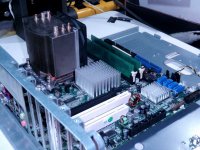
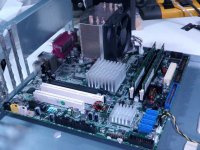
MoBo verbiage:
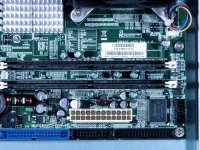
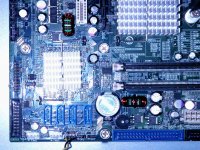
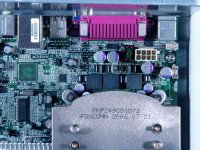
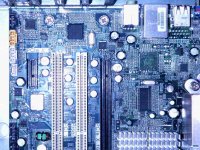
I'll link to the full size shots after I upload them on iFrog.
Does anyone have a clue as to what this might be? I'm googling for info in the AM. |)
] ]'>It needs to be Win98, '95 is too old to run the burner. I've used 98 before, it's as solid a rock as I've used running windows and I've got a license for it.
Piccies are up! [
] ]'>MoBo verbiage:
I'll link to the full size shots after I upload them on iFrog.
Does anyone have a clue as to what this might be? I'm googling for info in the AM. |)
DISK BOOT FAILURE, INSERT SYSTEM DISK AND PRESS ENTER.
Muahahahahahaaaaaaaaaaaaaaa!!!!!!!!!!!!!!!!!!!!!!!!!!!!!!!! :lol:
I gave up on the unknown quantity with the cool heatsink and weird slots I've never had cards for and dug through the MoBo Box. I came up with one that needed the spare old style power cord adapter, but it's happy as heck with the four lug CPU power cable. It has one AGP and three PCI slots, USB AND FireWire, IDE AND SATA, so I can't ask for much more out of a spare/castoff MoBo box.
It fires right up, the fans slow down, it thinks for a while and then tosses that lovely greeting across the CRT. Heck, it even powers down when I push the power button again.
Now I can look for that dratted Win95 HDD in the AM. [] ]'>
< decides he might just as well insall a DVD and see what this thing makes of an old ubuntu CD [}] ]'> >
Muahahahahahaaaaaaaaaaaaaaa!!!!!!!!!!!!!!!!!!!!!!!!!!!!!!!! :lol:
I gave up on the unknown quantity with the cool heatsink and weird slots I've never had cards for and dug through the MoBo Box. I came up with one that needed the spare old style power cord adapter, but it's happy as heck with the four lug CPU power cable. It has one AGP and three PCI slots, USB AND FireWire, IDE AND SATA, so I can't ask for much more out of a spare/castoff MoBo box.
It fires right up, the fans slow down, it thinks for a while and then tosses that lovely greeting across the CRT. Heck, it even powers down when I push the power button again.
Now I can look for that dratted Win95 HDD in the AM. [
] ]'>< decides he might just as well insall a DVD and see what this thing makes of an old ubuntu CD [}
] ]'> >
Well, it's booting to the account login for XP installed on a Presario I gutted. I'm in the process of chopping the poor Presario down as an assorted drive stack/card reader/hub/breakout box for the NetBooks, so it doesn't really need this drive any longer. [}] ]'>
ISTR reading something about removing a password to use a Windows install while leaving the user account data encrypted? There's even mention of password resetting on the MoBo. Any help freeing up XP temporarily would be nice. This is a bit newer MoBo than the Presario's so XP should work out fine. I can just wait until next payday as well, has anyone got an XP retail package they wanna let go for cheap or trade goods?
It's off to the Trading Post in the AM!
] ]'>ISTR reading something about removing a password to use a Windows install while leaving the user account data encrypted? There's even mention of password resetting on the MoBo. Any help freeing up XP temporarily would be nice. This is a bit newer MoBo than the Presario's so XP should work out fine. I can just wait until next payday as well, has anyone got an XP retail package they wanna let go for cheap or trade goods?
It's off to the Trading Post in the AM!
Windows does not take to hardware/computer changes every well - you're lucky it managed to boot.
Anyways, just reinstall Windows - it'll probably be a better idea. Gets rid of cruft and all.
Anyways, just reinstall Windows - it'll probably be a better idea. Gets rid of cruft and all.
Did you already find this PDF about the motherboard?
http://www.daito-me.com/product/maker/Radisys/Endura%20EM945G.pdf
It's only showing support for XP + later.
http://www.daito-me.com/product/maker/Radisys/Endura%20EM945G.pdf
It's only showing support for XP + later.
Didn't know that about windows, I've never done this kind of thing before, I've only really run 3.0/3.1 and '98. I did use XP for about six weeks on HP_Mini before it did a spectacular crash and burn. After a week long horror story working with HP's offshore tech support trying to get it back upl using the restore CD and elevating the case all the way back to California, it still wouldn't work. I'd been booting it off a full-on ubuntu desktop CD during that week, so I installed the NetBook remix and haven't had a problem with ubuntu for four and a half years running now.
Doing a clean install of '98 or XP is the third thing on my list for this setup. Those two bookend OS support for the ROM burner. This morning I'm reinstalling this MoBo in a more civilized case that even has a front bezel and everything! This is quite likely the case from which I'd removed this MoBo and the MIA Win95 HDD. *****
I'll be setting up one of the removable drive bays to make swapping HDDs a snap in my search for the fabled Win95 drive. This week I'll be installing ubuntu on another drive the carrier instead of messing around with XP password avoidance or Win95 for anything other than diagnostics and possible future gameplay. I don't expect ubuntu to run very quickly, if at all, on this board, but it may give me a chance to play around with the new removable SCSI drive bays. A fast SCSI II controller came with my Nikon CoolScan and one of the collection of little Ultra SCSI server drives and adapters should make that interesting. I've got an AGP VidCard or two and a stack of dual-head PCI VidCards to test as well.
This may becoming a fairly palatable way to introduce a black sheep WinPC ROM hacking station into the still growing Mac fold.
***** I've liberated three extra wide (front panel on the right) cases to match the stack Radius 8100/xxx front bezels I bought from macmetex. This wild one is slated to become a PEx sleeper in 81/110 clothing when and if I get the ROM SIMM a comrade is working on to boot my board. The first case I got is already halfway to becoming a wild, internally illuminated, clear cased Radius 81/110 ubuntu GIMPbox. The generic clone I'll be installing this board in will be the wildest hack of the three if all works out. When finished, these three and the actual 81/110/G3 will be the supports for the first two levels of a future Radius display/workstation . . .
. . . one day, Finagle willing. ;D
Doing a clean install of '98 or XP is the third thing on my list for this setup. Those two bookend OS support for the ROM burner. This morning I'm reinstalling this MoBo in a more civilized case that even has a front bezel and everything! This is quite likely the case from which I'd removed this MoBo and the MIA Win95 HDD. *****
I'll be setting up one of the removable drive bays to make swapping HDDs a snap in my search for the fabled Win95 drive. This week I'll be installing ubuntu on another drive the carrier instead of messing around with XP password avoidance or Win95 for anything other than diagnostics and possible future gameplay. I don't expect ubuntu to run very quickly, if at all, on this board, but it may give me a chance to play around with the new removable SCSI drive bays. A fast SCSI II controller came with my Nikon CoolScan and one of the collection of little Ultra SCSI server drives and adapters should make that interesting. I've got an AGP VidCard or two and a stack of dual-head PCI VidCards to test as well.
This may becoming a fairly palatable way to introduce a black sheep WinPC ROM hacking station into the still growing Mac fold.
***** I've liberated three extra wide (front panel on the right) cases to match the stack Radius 8100/xxx front bezels I bought from macmetex. This wild one is slated to become a PEx sleeper in 81/110 clothing when and if I get the ROM SIMM a comrade is working on to boot my board. The first case I got is already halfway to becoming a wild, internally illuminated, clear cased Radius 81/110 ubuntu GIMPbox. The generic clone I'll be installing this board in will be the wildest hack of the three if all works out. When finished, these three and the actual 81/110/G3 will be the supports for the first two levels of a future Radius display/workstation . . .
. . . one day, Finagle willing. ;D
Ubuntu should run decently on there, maybe one of the alternate DE versions like Xubuntu or Lubuntu would be better though. It's a Pentium 4, so it should be in the GHz range at least.
Nope, VERY interesting, thanks much for searching that out for me! :approve:
I've got thae alternate board up and runningalready, so bringing this crazy looking thing back to life will be another project! Now that I think about it, this crazy board may have to be the one for all the above playtime. I just realized that the alternate might only be up to running Win98 acceptably. It does boot into XP though. I only NEED it to run the ROM burner so dog slow XP may be just fine for that, gotta figure out what the alternate board actually is first of all.
Pics coming up during the case swap, so we'll see!
Before you install an OS be aware of the limitations of accessing low level hardware directly. From Win2000 on most hardware can't be accessed directly unless you want to write a device driver. So if you want to program the parallel port, use something like Win98 or you will need to get a 3rd party utility to allow access to LPT1 (the parallel port).
For my Win2000 machines I use the trial version of NTPort (http://www.zealsoftstudio.com/ntport/index.html. The only reason why I'm suggesting this is because I have used it and I know it works.
Happy days in Win98/DOS though, real easy to quickly write some I/O stuff in QBasic
Also my favourite resource for interfacing the parallel port is: http://retired.beyondlogic.org/spp/parallel.htm. Retired!
For my Win2000 machines I use the trial version of NTPort (http://www.zealsoftstudio.com/ntport/index.html. The only reason why I'm suggesting this is because I have used it and I know it works.
Happy days in Win98/DOS though, real easy to quickly write some I/O stuff in QBasic
Also my favourite resource for interfacing the parallel port is: http://retired.beyondlogic.org/spp/parallel.htm. Retired!
What awful burner are you using that won't work on 95 but will on 98?
Dunno, it's something that costs less for someone to buy outright and have sent to me from China rather than mail his real one back and forth, so I'm not lookin' a gift horse in the mouth.
It's cool, I've got one generic WinBox with all the ports and slots I really need up and running with zero funds spent, leads on all the documentation for that crazy eBay MoBo and I finally had a chance to spend some quality time poking around inside the BEAST from Tekelec.
I also learned a bunch of crap I'd missed out on over the years in the process.
In my book that's a great deal all around. :approve:
It's cool, I've got one generic WinBox with all the ports and slots I really need up and running with zero funds spent, leads on all the documentation for that crazy eBay MoBo and I finally had a chance to spend some quality time poking around inside the BEAST from Tekelec.
I also learned a bunch of crap I'd missed out on over the years in the process.
In my book that's a great deal all around. :approve:
DLPortIO works for windows XP/Vista/7 32-bit.
I have a sivava-willem eeprom burner, and my machine is running Windows 7 X64. Which, nothing that supports a parallel port via a driver will run on any x64 OS.
I did manage to find a driver that works as dlportio/winio.sys for x64, so i got my willem sivava programmer going on win7 x64.
I have a sivava-willem eeprom burner, and my machine is running Windows 7 X64. Which, nothing that supports a parallel port via a driver will run on any x64 OS.
I did manage to find a driver that works as dlportio/winio.sys for x64, so i got my willem sivava programmer going on win7 x64.
AHA! So the upper limit of OS support for the Burner makes sense. I wonder what the difference was between that aweful Win'95 release and the '98 bugfix for that earlier POS-OS to create the lower end OS support cutoff?
I'm leaning more toward trying to run '98 on the BEAST from Tekelec than XP on the board that's up and running now. Does '98 run on ATX/USB/FireWire/AGP/SATA/Gigabit architecture X86?
I'm leaning more toward trying to run '98 on the BEAST from Tekelec than XP on the board that's up and running now. Does '98 run on ATX/USB/FireWire/AGP/SATA/Gigabit architecture X86?
98 runs on anything that drivers were developed for.
98se did however have support for 1394 right out of the box and I've used video cards up to the Radeon 9600XT.
98se did however have support for 1394 right out of the box and I've used video cards up to the Radeon 9600XT.
Thanks, CelGen.
Well, I've narrowed the alternate board down to two possibilities, first here it is . . .
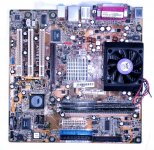
. . . and the possibilities, this . . . A7V8X-LA (Kelut)
. . . and this . . . A7V8X-LA (Kamet 2)
. . . and here's one on eBay, sans proc: COMPAQ HP PAVILION A7V8X-LA 5187-4913 MOTHERBOARD + I/O Shield
It's not a big surprise that the "Pavilion Drive" worked on this one at all! :lol:
I found another drive in the alternate case for the re-installation, here's hoping it's the functioning, password free Win95 drive! :approve:
It looks like '98 is out for this one, but XP is doable, if a stretch.
It sounds to me like this board is pretty much the dim-witted, evil X86 cousin of my dearly departed QS'02.
http://www.overclockersclub.com/reviews/asusa7v8x/
How well can XP run on a machine of this vintage?
Well, I've narrowed the alternate board down to two possibilities, first here it is . . .
. . . and the possibilities, this . . . A7V8X-LA (Kelut)
. . . and this . . . A7V8X-LA (Kamet 2)
. . . and here's one on eBay, sans proc: COMPAQ HP PAVILION A7V8X-LA 5187-4913 MOTHERBOARD + I/O Shield
It's not a big surprise that the "Pavilion Drive" worked on this one at all! :lol:
I found another drive in the alternate case for the re-installation, here's hoping it's the functioning, password free Win95 drive! :approve:
It looks like '98 is out for this one, but XP is doable, if a stretch.
I sure hope this is the right Manual: http://dlcdnet.asus.com/pub/ASUS/mb/socka/kt400/a7v8x-x/e1198_a7v8x-x.pdf
It sounds to me like this board is pretty much the dim-witted, evil X86 cousin of my dearly departed QS'02.
http://www.overclockersclub.com/reviews/asusa7v8x/
How well can XP run on a machine of this vintage?
Maybe not too badly, it appears to have an AMD Athlon XP 3000+ on a 400MHz front side bus . . .
. . . and the RAM appears to have been maxed out at 2GB. ;D
There's no Win'95 install on this HDD, there's apparently a kubuntu install askin' for a password . . .
. . . to the desktop of someone named Trash80! 8-o
I have not one single clue as to how that might have gotten onto this machine. :?:
. . . and the RAM appears to have been maxed out at 2GB. ;D
There's no Win'95 install on this HDD, there's apparently a kubuntu install askin' for a password . . .
. . . to the desktop of someone named Trash80! 8-o
I have not one single clue as to how that might have gotten onto this machine. :?:
After years, XP does not run well on the systems it was made to run on: XP SP0 might run on a Pentium with 64 MB RAM, but XP SP3 will be extremely unpleasant.
Crapdoodle! I've got more MoBos I can try setting up for Win'98 in that case. But this only has to run XP just well enough to run the ROM Burner. I've no intention to use a Windows Box for anything by that.
I emphatically refuse to deal with anything between '98 and XP. I've left 7 on HP_Maxi only because it's too much trouble to get ubuntu set up to run the 3g modem. It's a dedicated Browser/PDF machine, I use OpenOffice only rarely for simple spreadsheets an Notepad for the occasional .TXT assembly for import into to my very happy little OS9 world.
I've got three more PC-133 boards for taking a run at Win'98 if the (Lunchbox) BEAST from Tekelec isn't up to it:
My last resort is a cute cute little board: AGP, four PCI, three ISA slots and a PII CPU Card. It says 650B REV 1.2
Second choice is an ABIT-KT7: AGP, six PCI, one ISA and a CPO socket with which I'm unfamiliar.
The next one to go into testing seems to be a winner, Intel Desktop Board D815EEA2 / D815EPEA2
The specs I found has a Win98/WinME boot time performance chart: intel/tualatin/mobo.shtml
I think I have time to try this one before work, update soon . . .
. . . comments/suggestions will be much appreciated. :approve:
I emphatically refuse to deal with anything between '98 and XP. I've left 7 on HP_Maxi only because it's too much trouble to get ubuntu set up to run the 3g modem. It's a dedicated Browser/PDF machine, I use OpenOffice only rarely for simple spreadsheets an Notepad for the occasional .TXT assembly for import into to my very happy little OS9 world.
I've got three more PC-133 boards for taking a run at Win'98 if the (Lunchbox) BEAST from Tekelec isn't up to it:
My last resort is a cute cute little board: AGP, four PCI, three ISA slots and a PII CPU Card. It says 650B REV 1.2
Second choice is an ABIT-KT7: AGP, six PCI, one ISA and a CPO socket with which I'm unfamiliar.
The next one to go into testing seems to be a winner, Intel Desktop Board D815EEA2 / D815EPEA2
The specs I found has a Win98/WinME boot time performance chart: intel/tualatin/mobo.shtml
I think I have time to try this one before work, update soon . . .
. . . comments/suggestions will be much appreciated. :approve:
That sounds really familiar. I think my last Windows gaming rig may have been this exact board. Had it fitted with a 1.33Ghz Tbird and used the ISA slot for my scanner. (Until I ended up with a free Adaptec 2940, that is.) It'll run Windows 98, but it'll be sort of a bear to get going. (You'll need the chipset drivers from VIA/ABIT, and be *very careful* to install them in the right order.)
(Edit: Yeah, looked it up, that's it exactly. It's a good board... but I would recommend Windows XP for it. 98 was pain and a half. I mostly ran Windows 2000 on mine. Also, if yours has the "RAID" feature with the HPT370 chip I recommend *not* using it, either use the native IDE ports or use the HPT ports in just "plain disk" mode.)
I would probably pick this over the ABIT, only because the drivers for an Intel 815 will probably be easier to find and better written than the ones for the ABIT board.
You know, Trash, if you get *really* desperate I have a couple VIA C3 mini-ITX motherboards in (beat-up) micro cases. (They use a 12V wall wart for power.) I'm planning to set up one, coincidentally enough, to drive my new EPROM burner which requires *DOS*, but maybe I could part with one. I don't know if Windows 98 drivers for those exist, however.
I'd also note that there's much more reasonable options: You could get a USB Parallel doohickey and run 98/XP in a VM on your netbook. If you're persistent about building you can get a 2006-2009 era Core 2 mobo with a Parallel port, or just get any modern motherboard and slap a PCI Parallel car in.
Point being, you're making this more problematic and complex than needed.
Point being, you're making this more problematic and complex than needed.
For the record, USB->Parallel doohickies rarely if ever work for driving things like EPROM burners. They do *not* support the sort of manual bit-flipping on the port that those things require. (They're hardwired to drive *printers* and make a parallel printer look like a USB interfaced one. The EPROM burner software expects the parallel port to be an 8 bit hardware port at address 0x378/0x3BC/0x278 to which it can directly shove and read bits.)
Of course, there *are* those "straight from China" EPROM burners that sell for only $50 or so and *do* work with USB, so the point is still somewhat valid. (The only reason I'm bothering futzing with my old DOS driven one is it supports a few obscure old-style EPROMs that newer ones often don't, like the 2532, which happens to be useful for what I want an EPROM burner for.)
@ IPalindromeI: Thanks, those are great suggestions, but like I've said, I've got some boxes of neat junk saved up from cool PC case acquisitions and random curbside recycling projects. Lack of money and the experience necessary to do any kind of VM setup for this project preclude your far more sensible approach to the objective.
I've also got a couple of sensible approaches up my sleeve, but they cost money and this is a freebie campaign. Besides, Digital Junkyard Wars is way more my style! [}] ]'> I'm having a blast doing this that way as well. Putting Macs into quirky old PC boxen I've done already. Finding and populating PC Boxes that match my stack of Radius Clone front plates is an ongoing campaign and this little skirmish fits right in with the overall war plan. [] ]'>
@ g: I'm pretty sure that's the kind of burner that's headed my way, but HP_Maxi is out of spec being Win 7 and there's just no freakin' way XP will ever again touch HP_Mini. I've already done the repetitive head-desk thing for a full week trying to do that re-install and ubuntu rocks on that cute little sucker, thank you very much!
From the suggestions/information I've gotten so far for going the used XP Box approach, that's out of the question from a monetary standpoint.
I really need to get some PCB pattern digiflage fatigues for Digital Junkyard Wars, but austerity budget it is for a bit . . .
. . . I can't even afford that uber-cool Radius Color work smock oP found for me ATM. :-/
I've also got a couple of sensible approaches up my sleeve, but they cost money and this is a freebie campaign. Besides, Digital Junkyard Wars is way more my style! [}
] ]'> I'm having a blast doing this that way as well. Putting Macs into quirky old PC boxen I've done already. Finding and populating PC Boxes that match my stack of Radius Clone front plates is an ongoing campaign and this little skirmish fits right in with the overall war plan. [] ]'>@ g: I'm pretty sure that's the kind of burner that's headed my way, but HP_Maxi is out of spec being Win 7 and there's just no freakin' way XP will ever again touch HP_Mini. I've already done the repetitive head-desk thing for a full week trying to do that re-install and ubuntu rocks on that cute little sucker, thank you very much!
From the suggestions/information I've gotten so far for going the used XP Box approach, that's out of the question from a monetary standpoint.
I really need to get some PCB pattern digiflage fatigues for Digital Junkyard Wars, but austerity budget it is for a bit . . .
. . . I can't even afford that uber-cool Radius Color work smock oP found for me ATM. :-/
Yippee!!!!! [] ]'>
The Taulatin(?) D815EE2U is booted up to SETUP and running with a Pentium III/1GHz . . . time to go to work.
] ]'>The Taulatin(?) D815EE2U is booted up to SETUP and running with a Pentium III/1GHz . . . time to go to work.