

Thread
HELP! Noob Building a Parallel Port ROM HackStation . . .
XP SP0 required a minimum of a PII/233. IIRC, SP3 severely raised the bar.
Okay, ME was a bust, but 2000 Professional was pretty good.
Maybe, but I think I'll just stick with what I know(knew) and for which I just happen to have a 5lb. QUE Book sitting on the shelf! Windows 98 here we come! [ )] ]'>
It's just too bad that the $60 support manual has gone down the whirlpool of time.
)] ]'>It's just too bad that the $60 support manual has gone down the whirlpool of time.
"Honey, I blew up the DIMMs."
In this latest event in the saga of the elusive Parallel Port ROM HackStation i've managed to pull off a real boob noob event. I grabbed a couple of sticks that looked right to me in my befuddled stupor and they seemed to click into place correctly . . . but they were missing that extra divot on the PC-133 I should have been using. When I didn't here the usual two beeps and it didn't boot to setup as usual and didn't power back down from the front panel switch I flipped the switch on the PSU and removed a pair of very hot 1GB DDR sticks. OOPSIE!!!!!
When I pulled them out I also noticed that the taller of the PC-133 DIMMs wasn't completely seated completely, dunno if I knocked it loose installing or removing the (very likely ruined) 1GB DDR DIMMS or if it had been that way since I pulled the MoBo out of the anti-static bag.
I now get a near boot without the intervening beeps or winding up in the CMOS Setup.
PXE-E61: Media test failure, check cable error
PXE-MOF: Exiting Intel PXE ROM
Boot Failure: System Halted
IIRC, beeps in POST are usually bad, so am I better or worse off than before that BIG@$$ boo-boo?
Time to crack Upgrading and Repairing PCs 13th EDITION . . .
. . . and/or can somebody give me an answer to that offhand? :?:
In this latest event in the saga of the elusive Parallel Port ROM HackStation i've managed to pull off a real boob noob event. I grabbed a couple of sticks that looked right to me in my befuddled stupor and they seemed to click into place correctly . . . but they were missing that extra divot on the PC-133 I should have been using. When I didn't here the usual two beeps and it didn't boot to setup as usual and didn't power back down from the front panel switch I flipped the switch on the PSU and removed a pair of very hot 1GB DDR sticks. OOPSIE!!!!!
When I pulled them out I also noticed that the taller of the PC-133 DIMMs wasn't completely seated completely, dunno if I knocked it loose installing or removing the (very likely ruined) 1GB DDR DIMMS or if it had been that way since I pulled the MoBo out of the anti-static bag.
I now get a near boot without the intervening beeps or winding up in the CMOS Setup.
PXE-E61: Media test failure, check cable error
PXE-MOF: Exiting Intel PXE ROM
Boot Failure: System Halted
IIRC, beeps in POST are usually bad, so am I better or worse off than before that BIG@$$ boo-boo?
Time to crack Upgrading and Repairing PCs 13th EDITION . . .
. . . and/or can somebody give me an answer to that offhand? :?:
HRMMM...the Black 5.5 pounder says two beeps from the AMI BIOS means Parity Error, so maybe I'm better off? :?:
Apparently I'm better off, this thing is diggin' the Kubuntu 11.04 drive but just floats there in the "media failure, check cable" error like a dead fish with the Presario_XP drive attached. [ ] ]'>
] ]'>
] ]'>
Well, it's time to head for work again, but the "change but one thing at a time" theory has been paying off thus far. CD's up and running, Zip100 is second on the hardware install/test checklist, maxed 512MB PC-133 DIMM from the QS'02 is next. Most recently, the Ultra SCSI Controller, high quality terminated cable, Cheap@$$ Chinese SCA Adapter and one of my hoard of 2.5" U160 SCA drives is purring along happily, but unformatted.
Meanwhile, on the OS front, I tried the ubuntu NetBook 9.10 Remix CD and it popped right up ready to rock. So I tried the 10.10 Desktop CD that HP_Mini loved so much while XP was down and out for the count. As halfway expected, it took so long to come up that I just killed the power.
After the aforementioned hardware evolutions and probably installing a Floppy as well, it's OS playtime again. It's probably not gonna work and even if it does it'll likely be dog slow, but I'll give the Remix a shot at that cute little SCA drive . . .
. . . while I stand by with a fire extinguisher. :O
Meanwhile, on the OS front, I tried the ubuntu NetBook 9.10 Remix CD and it popped right up ready to rock. So I tried the 10.10 Desktop CD that HP_Mini loved so much while XP was down and out for the count. As halfway expected, it took so long to come up that I just killed the power.
After the aforementioned hardware evolutions and probably installing a Floppy as well, it's OS playtime again. It's probably not gonna work and even if it does it'll likely be dog slow, but I'll give the Remix a shot at that cute little SCA drive . . .
. . . while I stand by with a fire extinguisher. :O
jt, I've been down this road already....
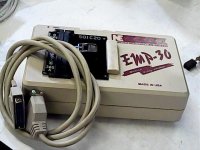
I have an old Needham EMP-30 chip programmer with parallel port and software which will run on, at the latest, Win XP -- maybe Win 7, XP mode.
http://www.ebay.com/itm/NE-Needham-Electornics-EMP-30-Device-Programmer-Flash-ROM-Writer-with-Module-/400530945439?pt=LH_DefaultDomain_0&hash=item5d4181359f
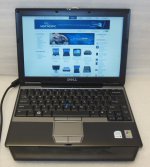
Did you ever buy one of those Dell D430s?
http://www.ebay.com/itm/LOT-OF-10-DELL-LATITUDE-D430-LAPTOP-CORE-2-DUO-1-33GHz-2GB-WIRELESS-/221312861917?pt=Laptops_Nov05&hash=item33874646dd
They have a docking station available:
http://www.ebay.com/itm/350664716706?ssPageName=STRK:MEWAX:IT&_trksid=p3984.m1423.l2649
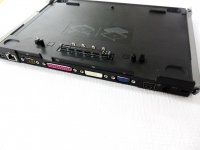
which includes a parallel port.
It works great with my old programmer. Probably works fine with others. And for a bonus, OSX can be nicely hacked onto this model of laptop.
That way you can have a nice compact laptop to drive your chip programmer, which doesn't take up much space and when it's not booted into Windows, it's about like a Macbook Air 13".
My chip programmer is the whole reason I bought a Dell Latitude D430 in the first place.
The only bad thing about it is the 1.8" ZIF IDE hard drive. If you buy one without a drive, have the hard drive solution figured out first. The 240GB Toshiba MK2431 has pretty well dried up. It got down to about $70 and then seems to have been discontinued. Sigh. Now it's up around $250. It's cheaper to get a 1.8" IDE to MSATA adapter and a 240 GB MSATA SSD now. Much better performance too, I imagine, but putting $200 into these old laptops seems kind of silly.
Incidentally, the parallel port on the docking station for the Latitude E4300 will also work, but the E4300 doesn't take OSX, so it is purely a Windows machine if you go that route. Almost twice as fast in the CPU though.
I think all those images will expire in 6 months. Is there a way to capture them to the forum space?
I have an old Needham EMP-30 chip programmer with parallel port and software which will run on, at the latest, Win XP -- maybe Win 7, XP mode.
http://www.ebay.com/itm/NE-Needham-Electornics-EMP-30-Device-Programmer-Flash-ROM-Writer-with-Module-/400530945439?pt=LH_DefaultDomain_0&hash=item5d4181359f
Did you ever buy one of those Dell D430s?
http://www.ebay.com/itm/LOT-OF-10-DELL-LATITUDE-D430-LAPTOP-CORE-2-DUO-1-33GHz-2GB-WIRELESS-/221312861917?pt=Laptops_Nov05&hash=item33874646dd
They have a docking station available:
http://www.ebay.com/itm/350664716706?ssPageName=STRK:MEWAX:IT&_trksid=p3984.m1423.l2649
which includes a parallel port.
It works great with my old programmer. Probably works fine with others. And for a bonus, OSX can be nicely hacked onto this model of laptop.
That way you can have a nice compact laptop to drive your chip programmer, which doesn't take up much space and when it's not booted into Windows, it's about like a Macbook Air 13".
My chip programmer is the whole reason I bought a Dell Latitude D430 in the first place.
The only bad thing about it is the 1.8" ZIF IDE hard drive. If you buy one without a drive, have the hard drive solution figured out first. The 240GB Toshiba MK2431 has pretty well dried up. It got down to about $70 and then seems to have been discontinued. Sigh. Now it's up around $250. It's cheaper to get a 1.8" IDE to MSATA adapter and a 240 GB MSATA SSD now. Much better performance too, I imagine, but putting $200 into these old laptops seems kind of silly.
Incidentally, the parallel port on the docking station for the Latitude E4300 will also work, but the E4300 doesn't take OSX, so it is purely a Windows machine if you go that route. Almost twice as fast in the CPU though.
I think all those images will expire in 6 months. Is there a way to capture them to the forum space?
Yep, if an image on eBay doesn't say all rights reserved, it's pretty much fair game for fair use. Folks watermark their auction shots and use hosting services (that don't really protect the images very well anyway) so lazy/less reputable sellers won't misuse their shots in any way. Just right-click & save image as to local disk and then upload it as any other attachment. If it's for documentation/educational use, not commercial use, that'd be fair use.
You're outside your edit window so I've done it for you. :beige:
. . . and nope, I never got one, I was going to let the grlf try OSX out on one, but she just went ahead and bought herself the bigger Air. After working in the industry at IBM and then Lenovo on ThinkPads and this last piece of Lenovo schlock for over 25 years, she's kissed off Windows for good and EVAH!!!! She L_O_V_E_S her Air and I think it's pretty cool too. That TrackPad is no rodent, but for using a laptop where it warms you lap, it seems more than just workable and certainly not dreadful.
My Digital Junkyard War is taking a very small toll on me, but I'm making steady progress and learning a bunch of new crap I'll likely not need to employ again, but learning is its own reward in my surreal little world. It's FUN!!!!! [ ] ]'> Everyone needs to remember that this is a zero sum campaign. All hardware must be built up from what I have on hand and be able to run whatever ROM Burner is sent my way. I can probably afford to buy '98, but not XP and there's no way in hades that I'm gonna fiddle-whatever with yet another version of Redmond schiznit in between, it just ain't gonna happen.
This P-III Intel board is looking better and better. At lunch I hooked up a 1.44MB FDD and nothing croaked, but it wasn't happy with the Zip100 I tried next, so I'm swapping that out tonight and will hopefully be maxing out the RAM as well.
Once more into the breach! :rambo:
You're outside your edit window so I've done it for you. :beige:
. . . and nope, I never got one, I was going to let the grlf try OSX out on one, but she just went ahead and bought herself the bigger Air. After working in the industry at IBM and then Lenovo on ThinkPads and this last piece of Lenovo schlock for over 25 years, she's kissed off Windows for good and EVAH!!!! She L_O_V_E_S her Air and I think it's pretty cool too. That TrackPad is no rodent, but for using a laptop where it warms you lap, it seems more than just workable and certainly not dreadful.
My Digital Junkyard War is taking a very small toll on me, but I'm making steady progress and learning a bunch of new crap I'll likely not need to employ again, but learning is its own reward in my surreal little world. It's FUN!!!!! [
] ]'> Everyone needs to remember that this is a zero sum campaign. All hardware must be built up from what I have on hand and be able to run whatever ROM Burner is sent my way. I can probably afford to buy '98, but not XP and there's no way in hades that I'm gonna fiddle-whatever with yet another version of Redmond schiznit in between, it just ain't gonna happen.This P-III Intel board is looking better and better. At lunch I hooked up a 1.44MB FDD and nothing croaked, but it wasn't happy with the Zip100 I tried next, so I'm swapping that out tonight and will hopefully be maxing out the RAM as well.
Once more into the breach! :rambo:
New (just out of the bag anyway) Iomega Zip100 replacement for the original NEC and the TEAC FDD installed where there wasn't one both seem to be getting along fine with the rest of the hardware. The 9.10 Remix CD is testing the (maxed out) 512MB PC-133 DIMM from the comatose QS'02. Memtest86 v.2.11 is 31% complete with no errors so far.
I'm off for a couple of days, so I might just let 'er rip in the AM. Watching the Remix CD try to install itself on that cute lil' Ultra160 while I drink my morning coffee is sounding good!
Feels good! ;D
I'm off for a couple of days, so I might just let 'er rip in the AM. Watching the Remix CD try to install itself on that cute lil' Ultra160 while I drink my morning coffee is sounding good!
Feels good! ;D
It's officially a computer! :b&w:
Well . . . maybe it's almost a computer. :-/
Ram test made it through pass one without any errors so I quit it and tried the the Remix install.
It got to step 4 of the install where partitioning is supposed to happen, but all options were grayed out.
Quit the install and figured I'd try booting it up. Surprise!!! It got the desktop with partial functionality so I knocked off for the night.
Fiddled a bit with the partial desktop and then tried the installer again while the coffee was dripping, same results.
Checked out the install options/help sections and found a SCSI controller setup.
Figured I'd pull the controller to see which one it is or which one it emulates after I wake up.
Ran the Disk error check and it passed while I was posting this update.
Warmed up the coffee and will scout controller ID when I'm a bit more awake.
Flanking attack on install routine to commence on second coffee warmup.
That is all.
Well . . . maybe it's almost a computer. :-/
Ram test made it through pass one without any errors so I quit it and tried the the Remix install.
It got to step 4 of the install where partitioning is supposed to happen, but all options were grayed out.
Quit the install and figured I'd try booting it up. Surprise!!! It got the desktop with partial functionality so I knocked off for the night.
Fiddled a bit with the partial desktop and then tried the installer again while the coffee was dripping, same results.
Checked out the install options/help sections and found a SCSI controller setup.
Figured I'd pull the controller to see which one it is or which one it emulates after I wake up.
Ran the Disk error check and it passed while I was posting this update.
Warmed up the coffee and will scout controller ID when I'm a bit more awake.
Flanking attack on install routine to commence on second coffee warmup.
That is all.
I'm not surprised you're having SCSI issues if you're using the Ubuntu Notebook Remix installer. In fact, I sort of have a vague memory in general about Ubuntu needing you to use the "Alternate/Server" installation images if you're using SCSI? (Hrm, googled it and found a number of threads that basically imply that the SCSI drivers are there on normal Ubuntu CDs but the installer is sort of borked and *sometimes* adding some kernel switches fixes it. This seems to be a problem unique to Ubuntu, Debian and other distributions don't have it.)
Not to lecture or anything, but of course if you actually want Linux on there for reals (instead of just to test the hardware) I'd definitely recommend using a newer version of Ubuntu than 9.10. 9.10 is *old*, wasn't an LTS release, and therefore isn't being updated anymore. (Heck, I ran into an annoying "surprise" recently on a machine with a 10.10 install on it after pulling it out of a box; all the repositories I've tried have pulled their update directories for versions that old so it's not even straightforwardly possible to step it up to a current release by upgrading through the intermediate versions. There a manual procedure I could *try* to force it up to 12.04 but it's likely enough to end in failure that the better bet is to just reinstall it from a disk.) Xubuntu 12.04 LTS would probably work okay on a 1Ghz Pentium III.
Of course, if the ultimate goal is Windows you'll probably want to wait until *after* you've installed Windows to install your "permanent" Linux as a dual-boot. It's technically *possible* to set up Linux first but it's agony.
Not to lecture or anything, but of course if you actually want Linux on there for reals (instead of just to test the hardware) I'd definitely recommend using a newer version of Ubuntu than 9.10. 9.10 is *old*, wasn't an LTS release, and therefore isn't being updated anymore. (Heck, I ran into an annoying "surprise" recently on a machine with a 10.10 install on it after pulling it out of a box; all the repositories I've tried have pulled their update directories for versions that old so it's not even straightforwardly possible to step it up to a current release by upgrading through the intermediate versions. There a manual procedure I could *try* to force it up to 12.04 but it's likely enough to end in failure that the better bet is to just reinstall it from a disk.) Xubuntu 12.04 LTS would probably work okay on a 1Ghz Pentium III.
Of course, if the ultimate goal is Windows you'll probably want to wait until *after* you've installed Windows to install your "permanent" Linux as a dual-boot. It's technically *possible* to set up Linux first but it's agony.
Great info, thanks for all your help, EudiG!
The 10.10 installer CD can't mount /dev/loop0 on something or other . . .
. . . typing in "help" yields a paragraph of friggin' Linux Boffin Greek to me. :-/
I'll try the SCSI controller ID/setup now, I've had almost enough coffee to play with hardware in non-borkage mode.
Alternate attacks:
Locate an IDE drive to nuke with the Remix installer.
Check all the notebooks for my Kubuntu password.
Snag a '98 install setup on eBay or in the TP.
Will Linux even dual boot with '98? :?:
Linux on one of the SCA drivelets is for "Real Computer Mode." I figured I'd just install '98 on second drivelet so I can swap it in for ROM burner playtime.
We'll see how it plays out, for now it's Linux playtime until I can place my grubby little paws upon a Win98 install CD. }
The 10.10 installer CD can't mount /dev/loop0 on something or other . . .
. . . typing in "help" yields a paragraph of friggin' Linux Boffin Greek to me. :-/
I'll try the SCSI controller ID/setup now, I've had almost enough coffee to play with hardware in non-borkage mode.
Alternate attacks:
Locate an IDE drive to nuke with the Remix installer.
Check all the notebooks for my Kubuntu password.
Snag a '98 install setup on eBay or in the TP.
Will Linux even dual boot with '98? :?:
Linux on one of the SCA drivelets is for "Real Computer Mode." I figured I'd just install '98 on second drivelet so I can swap it in for ROM burner playtime.
We'll see how it plays out, for now it's Linux playtime until I can place my grubby little paws upon a Win98 install CD. }
I'll look through my pile of CDs when I get a chance, I *might* have a 98 install CD with a key stuck in it. If I find it's all yours. (No guarantees, I've chucked a lot of stuff over the last few years.)
Easy Peasy. Just partition the drive when you install 98 to not use all of it. (Somewhere between 2 to 8 GB or so is more than enough for Windows 98.) Then run a linux installer, it should detect the Windows installation and offer to add it to the GRUB boot menu when you set that up. (Or, heck, even if you do give the whole drive to Windows initially most Linux installers are capable of resizing the partition to make room.) It gets complicated to do Linux first because even if you partition your drive correctly to leave space for the Windows install to go in Windows will want to blow away the MBR boot record on the hard disk and replace it with its own, thereby wiping out GRUB. To fix that you'd have to boot a Linux rescue CD, re-run the GRUB setup, deal with that screaming thing again, etc.
Note of course I mean *real* dual boot, not a Wubi install. Don't go there.
If you install an *NT* based system (not 98) then it's technically *possible* to install GRUB to the Linux /boot partition (which has to be a "primary" partition) and fiddle around with the NT boot manager to boot it that way instead of letting GRUB run the show, but it's substantial additional pain for zero gain. It's almost always best to just let the Microsoft OS think it's alone at install time and add Linux after the fact so Windows won't have to worry its pretty little head about it.
Cool beans, thanks much for the info and especially that contingent offer!
I pulled the Ultra SCSI Card and it's an adaptec AHA-2940W-2940UW next up is smackin' it back into the slot and a check to see if the Remix installer can deal with it.
Since I have absolutely no clue as to what the H-e-double toothpicks a friggin' Wubi might be, no worries there mate!
I pulled the Ultra SCSI Card and it's an adaptec AHA-2940W-2940UW next up is smackin' it back into the slot and a check to see if the Remix installer can deal with it.
Since I have absolutely no clue as to what the H-e-double toothpicks a friggin' Wubi might be, no worries there mate!
Kismat! :O The adaptek card wasn't on the list, so I decided to look for my 1996 InfoMagic LINUX TOOLBOX and found all my notes and the printed out docs, but no media, go figure. But hidden inside the supersizes Zip Loc file folder, concealed within that pile of printed docs, I found some great Linux article tearsheets from NEWSWEEK and PC Computing magazines.
Hidden next the tearsheets was the the Zip-Loc bag containing the complete 1999 debian GNU Linux package . . .
. . . the same version I gave up on due to SCSI Controller Card incompatibility back in the day . . . :lol:
. . . and now to find my copy of O'REILLY'S Learning DEBIAN.GNU lINUX
Hidden next the tearsheets was the the Zip-Loc bag containing the complete 1999 debian GNU Linux package . . .
. . . the same version I gave up on due to SCSI Controller Card incompatibility back in the day . . . :lol:
. . . and now to find my copy of O'REILLY'S Learning DEBIAN.GNU lINUX
That really surprises me, the 2940 was a dirt common card.
Maybe this would fix the problem? (It sounds like there's some motherboard incompatibility... thing?, maybe? that crops up with that card? I used a 2940UW in my AMD Tbird box (the one built using that K7 motherboard you mentioned having) and it always worked flawlessly for everything I asked it to do. Granted, the one thing it never was was the boot drive. (I used it to drive the scanner and to do weird hackery with drives from non-PC systems.)
Another reference to the same bug?
Gotta research those links you posted for me, thanks again.
Meanwhile, one of these *&^@%*#$ PC cases tried to bite a chunk out of my leg this morning, so I've buttoned them all up. They're lined up in the closet again waiting for me to determine which one of the Western Digitals to nuke with WD's EZ-Install software. Floppy(s) and Manual were found in the, you guessed it, Zip-Loc file folder with the remnants of the HDD box and the manual for my ACARD ATA-133 controller as a nice surprise.
If I set up a Western Digital for DOS/Win, should the Remix installer be able to deal with the formatted HDD?
If not, I can just reformat again and chuck the sucker into the Lunchbox for eventual Win98 installation. I'd like to keep Ankylosaurus my P-III ROMhacker all Ultra-SCSI with dedicated drivelets for ubuntu and Win98. The freakin' cable is about a yard long and with a MOLEX extension, drive swapping will be made a snap by hackin' a drive sled and blank bezel setup.
Dunno, it's all up in the air, at least I know that both Ankylosaurus and the lunchbox BEAST are ready to rock and roll. :approve:
I've got a bunch of Documentation to read before I get together enough shekels to buy a PSU for Megalodon, that first attempt at a Parallel Port build. The PSU I have has four and six contact CPU power plugs, but that hugemongous dead fish has an eight socket CPU power maw.
Meanwhile, one of these *&^@%*#$ PC cases tried to bite a chunk out of my leg this morning, so I've buttoned them all up. They're lined up in the closet again waiting for me to determine which one of the Western Digitals to nuke with WD's EZ-Install software. Floppy(s) and Manual were found in the, you guessed it, Zip-Loc file folder with the remnants of the HDD box and the manual for my ACARD ATA-133 controller as a nice surprise.
If I set up a Western Digital for DOS/Win, should the Remix installer be able to deal with the formatted HDD?
If not, I can just reformat again and chuck the sucker into the Lunchbox for eventual Win98 installation. I'd like to keep Ankylosaurus my P-III ROMhacker all Ultra-SCSI with dedicated drivelets for ubuntu and Win98. The freakin' cable is about a yard long and with a MOLEX extension, drive swapping will be made a snap by hackin' a drive sled and blank bezel setup.
Dunno, it's all up in the air, at least I know that both Ankylosaurus and the lunchbox BEAST are ready to rock and roll. :approve:
I've got a bunch of Documentation to read before I get together enough shekels to buy a PSU for Megalodon, that first attempt at a Parallel Port build. The PSU I have has four and six contact CPU power plugs, but that hugemongous dead fish has an eight socket CPU power maw.
While Megalosaurus awaits the arrival of the mother of all PSUs, and that Big@$$ case now sits empty, I think I'll take a whack at setting up the A7VBX-LA board.

From the product number on the hacked up backplane of the chassis, what I've been calling the "Pavilion" appears to be a Compaq Presario SR1000Z. It turns out it's the Kelut-GL6E version of the board an its Presario's specs look pretty good.
This info implies that I can even run Win98 on this board, that should really fly! ;D
Am I correct in thinking the ubuntu 10.10 desktop install CD might be happier with this board? :?:
From the product number on the hacked up backplane of the chassis, what I've been calling the "Pavilion" appears to be a Compaq Presario SR1000Z. It turns out it's the Kelut-GL6E version of the board an its Presario's specs look pretty good.
This info implies that I can even run Win98 on this board, that should really fly! ;D
Am I correct in thinking the ubuntu 10.10 desktop install CD might be happier with this board? :?:
If you have access to a CD burner you *really* should download a 12.4 LTS .iso and burn it. It is scheduled to keep receiving as late as 2017. (Or if you don't like the new Ubuntu desktop go with xubuntu 12.4, it's good until the end of 2015. ("Main" Ubuntu releases are on a 5 year LTS cycles, that doesn't necessarily apply to the alternate versions.)
The burner I've got, but the problem I've had with the newer revs of ubuntu is that they appear to require the computer to be online during installation. That's an insurmountable problem until I upgrade my droid and the contract to 8GB of Data shared between eight(?) different devices. Right now I've got only 5GB on HP-Maxi and 2GB on the current droid under the expired contracts.
IIRC I was trying to install a more current rev on the AtomicNetTop.
It's testbed testing time with the standalone 10.10 CD for now.
IIRC I was trying to install a more current rev on the AtomicNetTop.
It's testbed testing time with the standalone 10.10 CD for now.
No, they don't. It's recommended you do so for the sake of security and if you need any blobs like Flash or the proprietary Nvidia driver, but the base system is on disc.
If you use a netinstall disc, you will need a network connection - Ubuntu hides these away from the download page though.
If you use a netinstall disc, you will need a network connection - Ubuntu hides these away from the download page though.
And for the love the great netadmin in the sky and his disciple Cory, patch it! You don't need to download it all, but at least get the kernel, browser and small libraries.
Fuggedaboudit, I haven't patched anythin' but a pair of jeans in this Century! :lol:
I truly hope you're not being serious, it's hard to tell with you.
I truly am just a hardware hacker. I've made three false starts on learning to get under the hood of Linux . . .
. . . and never got past the safety lever . . . ever. :I
. . . and never got past the safety lever . . . ever. :I
Updating is as easy as just... you know, hitting update. No reason not to.
Hey jt,
Want me to burn a few different Ubuntu versions to DVD and send them over? Free?
I've been using LUbuntu which looks and feels like an older windows version, but is really snappy and completely up-to-date. I installed it for a family member, and besides "All of my programs have different icons", they haven't had any problems getting used to it.
I figure I could help out though, as I have a few different *.ISO's sitting around already, so they're already through the pipeline.
Want me to burn a few different Ubuntu versions to DVD and send them over? Free?
I've been using LUbuntu which looks and feels like an older windows version, but is really snappy and completely up-to-date. I installed it for a family member, and besides "All of my programs have different icons", they haven't had any problems getting used to it.
I figure I could help out though, as I have a few different *.ISO's sitting around already, so they're already through the pipeline.
That is a very kind and generous offer good sir, I will be much in your debt.
I'll PM you in the AM, I think I may have just hit the wall . . . time for a peanut butter and jelly infusion . . . got milk! :approve:
I'll PM you in the AM, I think I may have just hit the wall . . . time for a peanut butter and jelly infusion . . . got milk! :approve:
Well, I got a lot of cleaning, organizing and re-stuffing of a few toys back into their respective project boxen . . .
. . . so it was time to drag other stuff out and start the cycle all over again! [] ]'>
I'm in wait for it to get hereto try it mode because I ordered a tiny-bitty-bit-o-Win98 stuff for this project on payday.In celebration of the announcement that we'd be getting our quarterly bonus again, I figured I'd spend a little bit of it ahead of time for just for safekeeping . . .
. . . wouldn't wanna wind up wasting it all on food, shelter, gas or the like!
Anyhoo, I figured I'd try to fire up what I'd identified as a Kelut board and got it all put together nice and neat in the case from which I'd torn that crazy RadySys ENDURA EM945G P4 beast with the 2U cooling tower for want of a monster PSU. When I looked for the DIMMs for it I realized they were the two I'd tried to set fire to by halfway installing them in the Intel board . . . FEH! [ !] !]'>
I figured, what the heck and tried it anyway . . . it's silent and does nothing . . .
. . . but just once I got it to do the Award BIOS POST test smelly cat song:
Repeating (endless loop) - Memory error - Check for improperly seated or missing memory.
According to the 18 page User Manual, I've brazed a MaxMem config:
Are PC3200 & PC2700 1GB DDR400 really the same, compatible or just plain wrong for the Kelut board?
All is not lost, Dimetrodon (Kelut) is coming out of the case, back into its anti-static bag, back in the MoBo box and it's AtomicNetTop playtime! [] ]'>
. . . so it was time to drag other stuff out and start the cycle all over again! [
] ]'>I'm in wait for it to get hereto try it mode because I ordered a tiny-bitty-bit-o-Win98 stuff for this project on payday.In celebration of the announcement that we'd be getting our quarterly bonus again, I figured I'd spend a little bit of it ahead of time for just for safekeeping . . .
. . . wouldn't wanna wind up wasting it all on food, shelter, gas or the like!
Anyhoo, I figured I'd try to fire up what I'd identified as a Kelut board and got it all put together nice and neat in the case from which I'd torn that crazy RadySys ENDURA EM945G P4 beast with the 2U cooling tower for want of a monster PSU. When I looked for the DIMMs for it I realized they were the two I'd tried to set fire to by halfway installing them in the Intel board . . . FEH! [
!] !]'>I figured, what the heck and tried it anyway . . . it's silent and does nothing . . .
. . . but just once I got it to do the Award BIOS POST test smelly cat song:
Repeating (endless loop) - Memory error - Check for improperly seated or missing memory.
According to the 18 page User Manual, I've brazed a MaxMem config:
I'm not going to find this in any of may Macs, am I? Gotta head to the TP or cough up a few more PaPal $imoleon$
Are PC3200 & PC2700 1GB DDR400 really the same, compatible or just plain wrong for the Kelut board?
All is not lost, Dimetrodon (Kelut) is coming out of the case, back into its anti-static bag, back in the MoBo box and it's AtomicNetTop playtime! [
] ]'>