
Thread
SCSI Hard Disk ICON hack
With the Mac Plus I got external Microtech HD enclouser with Maxtor drive, I deleted the partion and reinstalled the drive with modified HD SC Setup 7.3.5 so it has original Apple drivers loaded.
Anyway I lost the HD's original icon wich I want to use again as I copied it on backup drive.
The question is how can I access the hidden parttion with driver to change that icon? Note that prior the System 7 you can not just copy the icon on HD's drive.
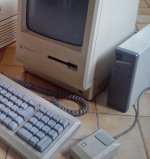

Anyway I lost the HD's original icon wich I want to use again as I copied it on backup drive.
The question is how can I access the hidden parttion with driver to change that icon? Note that prior the System 7 you can not just copy the icon on HD's drive.
Just an FYI, both Patrickool93 and I have just been royally screwed by him. We did some trades with him a few weeks ago, and he has yet to deliver on his ends while we have delivered on ours. Watch out for him and his trades.
This has been a 68k/PPC MLA public service announcement.
*EDIT/UPDATE*
Apparently, Macg4 is the one that has yet to deliver. I feel bad about posting this thread now...
My apologies to DeerSteak, and I will be contacting Macg4 to see if this can be resolved.
_________________
PPC Macs:
This has been a 68k/PPC MLA public service announcement.
*EDIT/UPDATE*
Apparently, Macg4 is the one that has yet to deliver. I feel bad about posting this thread now...
My apologies to DeerSteak, and I will be contacting Macg4 to see if this can be resolved.
_________________
PPC Macs:
- Power Macintosh G4
- B&W Power Macintosh G4
- Power Macintosh 6500/225
A custom firmware icon is usually applied by a 3rd party SCSI utility. Micronet or FWB can do custom icons. I don't know if there's specifically a tool for modifying the icon, though. That'd be pretty cool without having to reformat a drive.
You could also Get Info and copy/paste the icon, though I know that's not the same.
You could also Get Info and copy/paste the icon, though I know that's not the same.
 Wow, if he's really run off with your stuff that's terrible - he seemed a nice guy too, I'd never have been suspicious at all. Have you not heard from him at all then, it's not just that he can't contact you or get your details because the 68k site has been down? I guess you can't trust anyone
_________________
Main system: custom C2D 2.66GHz tower/4GB RAM/2600XT 512 MB/500GB HD/XP Pro x86+Vista Business x64
Main Mac: Beige G3 minitower (Sonnet G4 500MHz/640 MB DVD/USB/Radeon 32 MB/OS 9.2.2+10.4.11)
I'm really sorry to hear it - I would say I hope that it turns out to be explainable and gets sorted, but I guess that's looking unlikely. I feel your pain, I like the look of the 3400 and think it would be a nice one to have too, and I'd hate to lose money/trades in this way. Such a shame, I always felt that I could trust people at 68kmla too :'(
_________________
Main system: custom C2D 2.66GHz tower/4GB RAM/2600XT 512 MB/500GB HD/XP Pro x86+Vista Business x64
Main Mac: Beige G3 minitower (Sonnet G4 500MHz/640 MB DVD/USB/Radeon 32 MB/OS 9.2.2+10.4.11)
_________________
Main system: custom C2D 2.66GHz tower/4GB RAM/2600XT 512 MB/500GB HD/XP Pro x86+Vista Business x64
Main Mac: Beige G3 minitower (Sonnet G4 500MHz/640 MB DVD/USB/Radeon 32 MB/OS 9.2.2+10.4.11)
I found control panel for system software below 7 which can change your HD drive icon, it is called IconMaster.
Check the link below. I also included icons for System 7 which can be just copy/pasted on HD icon or folder.
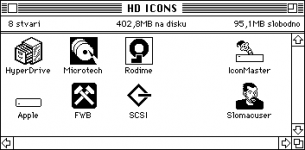
HDICONS.img.zip
Check the link below. I also included icons for System 7 which can be just copy/pasted on HD icon or folder.
HDICONS.img.zip
when did this happen? wish to break it down further?
well, at least i'll make Patrickool93 feel a little better, i'm sending him a 16mb ram card for a 1400, in trade for a AAUI adapter.
-digital
edit: just realised a 1400 was supposed to be recieved, unless the ram is for another one.
well, at least i'll make Patrickool93 feel a little better, i'm sending him a 16mb ram card for a 1400, in trade for a AAUI adapter.
-digital
edit: just realised a 1400 was supposed to be recieved, unless the ram is for another one.
I just got a PM from DeerSteak.
He stated that Macg4 hasn't delivered the Classic II yet. I am revoking the harsh things said about him earlier in this thread until further notice.
_________________
PPC Macs:
He stated that Macg4 hasn't delivered the Classic II yet. I am revoking the harsh things said about him earlier in this thread until further notice.
_________________
PPC Macs:
- Power Macintosh G4
- B&W Power Macintosh G4
- Power Macintosh 6500/225
wow wow...everyone. im not screwing anyone nor have i. i would have sent the classic out a long time ago. but since the 68kmls forums went down i dont have any way to get an address to send it to. the address was saved in my private messages on there. give me the address and i will send out tommaorw afternoon
if u dont wanna do the 3 way trade anymore i will be more than happy to refund the money. but dont think for 1 minute im not a good guy...i just have been busy with personal things. im intveriewing for jobs,working full time, and planning a wedding. plus since the forums went down i didnt have an address or anything. i even e-mailed multifinder back telling him this and got no response back