
Thread
512k Hyperdrive SSD hack... suggestions? Need to run power.
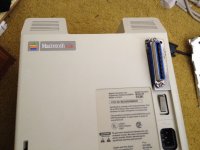
So I'm attempting to build a custom Hyperdrive style upgrade for a 512k using a Supermac SCSI upgrade. Found this in one of the machines we're going to sell, so I'm trying to pimp it out before I put it up on eBay. The upgrade is a tiny daughtercard with a Macintosh Plus ROM and SCSI controller. It sits where the 512k's ROMs used to be and runs a long SCSI ribbon cable to the battery compartment, providing an external SCSI BUS connector.
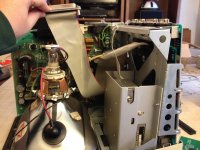
As you can see, the SCSI ribbon is really long, and I have a SCSI crimp-on IDC header that I can add to anywhere on the ribbon cable.
So what I'd like to do is add an internal SCSI drive. With the SCSI2SD, it's so small I can mount it pretty much anywhere. In fact, I already have an idea of where I want to mount it, utilizing the existing screws that already mount the floppy drive. You can see one of the screws from the left side, it's identical on the right side (two screws hold the floppy in place.) Should be really easy. Gonna make a custom adapter on the 3D printer, just screw it in along with the floppy like so:
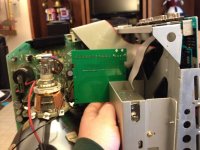
So mounting it and getting the ribbon cable is a snap. My only problem is the power to the SCSI2SD. How am I going to do that? Does anyone have any ideas? Is there a simple solution? I'd love to get this working. A 512k with a Hyperdrive style internal SSD would be awesome!
I remember reading somewhere that there could be a BUS powered SCSI2SD? Does that exist already? That'd solve my power problem.
As you can see, the SCSI ribbon is really long, and I have a SCSI crimp-on IDC header that I can add to anywhere on the ribbon cable.
So what I'd like to do is add an internal SCSI drive. With the SCSI2SD, it's so small I can mount it pretty much anywhere. In fact, I already have an idea of where I want to mount it, utilizing the existing screws that already mount the floppy drive. You can see one of the screws from the left side, it's identical on the right side (two screws hold the floppy in place.) Should be really easy. Gonna make a custom adapter on the 3D printer, just screw it in along with the floppy like so:
So mounting it and getting the ribbon cable is a snap. My only problem is the power to the SCSI2SD. How am I going to do that? Does anyone have any ideas? Is there a simple solution? I'd love to get this working. A 512k with a Hyperdrive style internal SSD would be awesome!
I remember reading somewhere that there could be a BUS powered SCSI2SD? Does that exist already? That'd solve my power problem.
requires ilok
Yeah. From what I've read, such hacks done with old, contemporary hard drives proved to be too much for the already overtaxed analog board/PSU, which is probably why they're somewhat rare (I suspect this is probably because most people found it simpler to upgrade to a proper Plus, whether by buying a whole new machine, or getting the logic board-hard drive-rear bucket upgrade kit).
With the SCSI2SD, though, it shouldn't be a problem since the power draw from it would be miniscule in comparison. Especially if it can be bus powered, which would make it a very clean and completely reversible enhancement (save for the extra SCSI connector, perhaps).
I do wish I could come see it before you sell it. Do you think you'll wait a couple weeks? I'll be out on summer vacation in about 1 1/2 weeks, and so might have an opportunity to come by.
c
With the SCSI2SD, though, it shouldn't be a problem since the power draw from it would be miniscule in comparison. Especially if it can be bus powered, which would make it a very clean and completely reversible enhancement (save for the extra SCSI connector, perhaps).
I do wish I could come see it before you sell it. Do you think you'll wait a couple weeks? I'll be out on summer vacation in about 1 1/2 weeks, and so might have an opportunity to come by.
c
Thank you.
"Beginning September 29, 2023, the only versions available for download from Avid directly will be 2023.8 (most recent) and forthcoming Long-Term Maintenance (LTM) versions of 2022.x and 2021.x series. All legacy versions from 2023.3.1 and older will be removed and will not be available from Avid. This also means that Avid's tech support staff will not have access to these legacy installers.
Why the change? These legacy versions contain code proprietary to Nexidia – the makers of the original ScriptSync and PhraseFind technology."
https://avid.secure.force.com/pkb/articles/en_US/Knowledge/Media-Composer-Versions-on-the-Download-Center
if Avid woudl have continued to host the legacy versions, they would be at risk of getting sued by Nexidia. It would be illegal for them to continue to host the installers.
so they say . ..
Why the change? These legacy versions contain code proprietary to Nexidia – the makers of the original ScriptSync and PhraseFind technology."
https://avid.secure.force.com/pkb/articles/en_US/Knowledge/Media-Composer-Versions-on-the-Download-Center
if Avid woudl have continued to host the legacy versions, they would be at risk of getting sued by Nexidia. It would be illegal for them to continue to host the installers.
so they say . ..
As I remember - Black is always ground. which is why there are several on the connector. Red is 5V and yellow is 12V, or both should be. The colors do not always line up but that is what it should the be on the color scheme. You can check it with a multimeter - checking the header with the chips set on resistance without the machine being on. Most Chips have a 5V on the first couple pins and ground on the opposite end/side.
CC- the upgrade is simple with Mac 512Ke/Plus ROMs so it it is a 512Ke, then the ROMs do not need to be upgraded. The problem is how the address & data pins go to the SCSI Chip. I'm sure if there is a memory map of the Mac 128K/512K/Plus, one can figure it out. From this, you can build a daughter board with three sockets that goes on to the ROM Sockets with two for the ROMS and the third for the SCSI Chip.
CC- the upgrade is simple with Mac 512Ke/Plus ROMs so it it is a 512Ke, then the ROMs do not need to be upgraded. The problem is how the address & data pins go to the SCSI Chip. I'm sure if there is a memory map of the Mac 128K/512K/Plus, one can figure it out. From this, you can build a daughter board with three sockets that goes on to the ROM Sockets with two for the ROMS and the third for the SCSI Chip.
The +5V wire pin on the Plus's Analog board connector is position 6 (there are eleven positions so you can count from either side, but technically pin 1 is next to the empty pin 2 position: 1 _ 3 4 5 6 7 8 9 10 11). Pins 7 and 9 are ground. Page 10 of http://home.earthlink.net/~gamba2/images/plus_analog.PDF for more detail.
You should be able to use T-Tap connectors (of the appropriate gauge) and make it easily removable too!
You should be able to use T-Tap connectors (of the appropriate gauge) and make it easily removable too!
I'v been considering doing this doing this with my 512k with a MacGusto II upgrade for a while, the only reason i haven't done it so far was that the theoretical current draw of the SCSI2SD was surprising high, possibly up to 700ma during writes and i wasn't sure how much spare capacity is in the macs PSU (especially with the extra draw from my upgrade board, which adds scsi, 2mb more ram and a 68881 (when i get around to installing one))
I have been planning to measure the actual current draw for a while, but I haven't got around to it yet...
I have been planning to measure the actual current draw for a while, but I haven't got around to it yet...
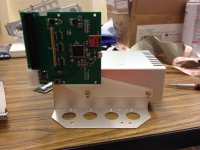
Indeed!
Too bad we don't have more of these SCSI-upgraded 512k's, or else I'd suggest doing this to all of them!
By the way, did you assemble a disk image for putting on the SCSI2SD? I'm too slow getting to mine, so I think if you'd send me what you have somehow, I could proceed much faster with getting the 5 SCSI2SDs I have operational.
c
Too bad we don't have more of these SCSI-upgraded 512k's, or else I'd suggest doing this to all of them!
By the way, did you assemble a disk image for putting on the SCSI2SD? I'm too slow getting to mine, so I think if you'd send me what you have somehow, I could proceed much faster with getting the 5 SCSI2SDs I have operational.
c
And the cable reaches.  There's about 2 inches of play with the cable after the bucket is on, so it's a much tighter fit obviously than before, but there's room to thread the cable without any strain. Though, you still have to be careful. There's room, but not much.
Just need some minor repair on the SCSI board itself and I'll be able to test it.
I'm wondering if it'd be any easier to just flip the board around. I'll have to experiment.
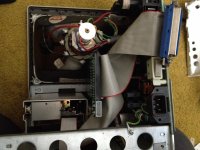
There's about 2 inches of play with the cable after the bucket is on, so it's a much tighter fit obviously than before, but there's room to thread the cable without any strain. Though, you still have to be careful. There's room, but not much.Just need some minor repair on the SCSI board itself and I'll be able to test it.
I'm wondering if it'd be any easier to just flip the board around. I'll have to experiment.
OK. Maybe when we meet up, you could give me a copy of them on a spare SD card?
Also, what are we going to do with the Pluses? We could conceivably hack a SCSI2HD in those as well, and the best part would be that the hardware already has SCSI support, so most of the work has been done.
Combine that with a ROM-Inator, and we have a SuperPlus!
As for the Classic II's, well, they're harmless

c

Perhaps new upgrade boards could be manufactured.... I have the schematics for the MacGusto II board in my 512k (but we would have to ask ddenowh (one of the original creators of the board, who sent me the parts for mine) if we made a carbon copy of it) However as that requires substantial modification of the 512k's logic board most purists would disagree with it
But I would think it would be possible to make a MacSnap style solderless upgrade (assuming the macsnap scsi cards don't require any soldering? I know their ram cards don't) providing the NCR5380 scsi chips can still be got hold of
View attachment 6597
Almost! Unfortunately that's as far as it gets. I did a System 6.0.8 install for Macintosh Plus. I may try System 6.0.8 for Any Macintosh, see if that works. I assumed it was a Macintosh Plus ROM (must be, since it's using the SCSI.)
In any event, at least it sees the drive, which is promising.
Almost! Unfortunately that's as far as it gets. I did a System 6.0.8 install for Macintosh Plus. I may try System 6.0.8 for Any Macintosh, see if that works. I assumed it was a Macintosh Plus ROM (must be, since it's using the SCSI.)
In any event, at least it sees the drive, which is promising.
A 512K with Mac Plus ROMs makes it a 512Ke. Memory permitting, you can have it run from system 3.2/Finder 4.0 to 7.1. System 7.1 will not run on a 512Ke unless you expanded the RAM with an extra RAM Card like the Dove Board. I used to have System 7 on a 512Ke with a 2MB Dove Board, giving the Mac 2.5MB!
Otherwise, you can run up to System 6.08 on a Mac 512K provided the system is trimmed down to fit into RAM.
Somewhere I have a System 1.0 disk, and it won't run on a 512Ke or Plus, it always crashes on Boot- Happy Mac and then Sad Mac. It will run on a 512K and 128K with the older ROMs.
Somewhere I remember, anything before System 3.2/Finder 4.0, you need the disk (floppy or hard drive) to be formatted in MFS and not HFS, or else it will also crash on Boot.
I swapped the SCSI cable and it booted right up.
However, when I restarted it, it crashed at the Welcome to Macintosh screen.
I can get it to boot at random times. Not entirely sure what's going on when it does successfully boot.
(It is is crazy fast when it does, though. Maybe 8 seconds to boot the 512k to System 2.1. Pretty insane.)
However, when I restarted it, it crashed at the Welcome to Macintosh screen.
I can get it to boot at random times. Not entirely sure what's going on when it does successfully boot.
(It is is crazy fast when it does, though. Maybe 8 seconds to boot the 512k to System 2.1. Pretty insane.)
Well, then I guess the SCSI cable was part of the problem, and there's still some troubleshooting to do.
Either that, or maybe it's just System 2.1. The Plus needs System 3.0 or later, so maybe a 512k with Plus ROMs has the same requirement?
Techknight might also be on to something. It'd probably be good to examine the SCSI2SD closely for errors. Perhaps check for new firmware updates also?
c
Either that, or maybe it's just System 2.1. The Plus needs System 3.0 or later, so maybe a 512k with Plus ROMs has the same requirement?
Techknight might also be on to something. It'd probably be good to examine the SCSI2SD closely for errors. Perhaps check for new firmware updates also?
c
I don't know if the cable was part of the problem, or just coincidence. I'll need to test that further.
In any event, I can attempt to rule out the SCSI2SD if I attach a real hard drive. I'll give that a try this weekend.
Also, I have no way of updating the SCSI2SD, nor do I know how.
In any event, I can attempt to rule out the SCSI2SD if I attach a real hard drive. I'll give that a try this weekend.
Also, I have no way of updating the SCSI2SD, nor do I know how.
When you use an SD card, or any flash memory for that matter, you need to align the partition on the 1024 boundary. Most formatting software pre-SSD doesnt do this, and you will suffer serious performance issues, and possible corruption/errors if you dont!
So mounting it on a modern mac using some disk utilities may let you do this.
So mounting it on a modern mac using some disk utilities may let you do this.
Well, I'm happy to report that both the SCSI upgrade that I repaired and my home made cable work perfectly fine with a regular older Apple ROM HDD.
So it looks like it's the SCSI2SD that's causing the problem.
It's still pretty darn fast even with an old HDD. Booted just as fast as the SCSI2SD with System 2.1 as far as I could tell.
So it looks like it's the SCSI2SD that's causing the problem.
Do what now? I have FWB Hard Disk Toolkit 2.1, Lido, and Anubis Utilities. If any of those can do that, then I'm all set. If not, then I can't.
It's still pretty darn fast even with an old HDD. Booted just as fast as the SCSI2SD with System 2.1 as far as I could tell.
Could you format the SD card on a modern Mac using Apple Partition Map with the HFS+ filesystem, and then simply take it to an older Mac and reformat the existing partition as HFS standard via Finder's "Format..." command? That shouldn't mess up the alignment of the partitions, should it?
I'm tempted to try this myself (though I first need to get around to setting up a SCSI2SD for an SE/30 I've been working on. Slowly.)
c
I'm tempted to try this myself (though I first need to get around to setting up a SCSI2SD for an SE/30 I've been working on. Slowly.)
c
Hmm, maybe it's a manifestation of the problem techknight was describing?
Try partitioning and formatting the SD card on a modern Mac in HFS Extended, and then go over to an older Mac and reformat (but not repartition) it in HFS Standard using Finder's format command.
I don't have the slightest clue if it would work (and probably won't because it needs drivers), but it's worth a try?
Also try to align the partition on the 1024 boundary manually. That might work.
Another thing is that the Plus (and presumably any SCSI upgraded 512k as well) needed an interleave of like 2:1 or 3:1, or something like that.
This is weird!
c
Try partitioning and formatting the SD card on a modern Mac in HFS Extended, and then go over to an older Mac and reformat (but not repartition) it in HFS Standard using Finder's format command.
I don't have the slightest clue if it would work (and probably won't because it needs drivers), but it's worth a try?
Also try to align the partition on the 1024 boundary manually. That might work.
Another thing is that the Plus (and presumably any SCSI upgraded 512k as well) needed an interleave of like 2:1 or 3:1, or something like that.
This is weird!
c
Michael McMasters got back to me. He doesn't know anyone who's used it with a 512k or a Plus. Unfortunately it was my last one and I already stuck it into and SE/30 that's going to be shipped out.
In any event, when I get another one, he said I can hook it up via USB and while it's connected to the 512k simultaneously, then run a utility to capture the data in real time and save it to a log.
I'll send him the log and he's going to analyze it, see what's going on.
In any event, when I get another one, he said I can hook it up via USB and while it's connected to the 512k simultaneously, then run a utility to capture the data in real time and save it to a log.
I'll send him the log and he's going to analyze it, see what's going on.