

Thread
VLC 0.5.0 TRUE brushed appearance
I'm willing to bet M-Audio is responsible for VLC's new appearance as well as for most of the improvements. Honestly, I don't understand it's preferences and I don't like the new gui too much...so I changed it a bit so that it looks more like a brushed app.
Here's a preview of what I made it look like:

Download Here
Anyone know how to make the counter text black instead of blue? Also, has anyone tried out the new Revolution 7.1 soundcard?
Here's a preview of what I made it look like:
Download Here
Anyone know how to make the counter text black instead of blue? Also, has anyone tried out the new Revolution 7.1 soundcard?
LOL yah beat me 2 it, thanx for the time saver. 
I also use VLC and also hate the new interface... here's what I did with it:

I de-brushed the interface and made it smaller, rearranged the buttons, and re-did the resource graphics.
Anyway, that's my 2�
-Carbon
I de-brushed the interface and made it smaller, rearranged the buttons, and re-did the resource graphics.
Anyway, that's my 2�
-Carbon
Quote:
|
Originally posted by CarbonG4: I also use VLC and also hate the new interface... here's what I did with it: I de-brushed the interface and made it smaller, rearranged the buttons, and re-did the resource graphics. Anyway, that's my 2� -Carbon |
That looks badass, could you email me or post your nib file?
Thanks.
Sure thing, here's my modded Resource folder from inside vlc.app:
http://www.621.org/~carbon/files/vlc/Resources.zip
This is not very tested and isn't a perfect interface mod... so feel free to do whatever you want with it, like making changes and reposting, etc.
Also, it was designed to look right in FatalE, so I don't know how it will look in other themes, but here it is anyway.
edit: one more thing, I used Unsanitys metallifizer to de-brush it... I'm sure it can be toggled off in Interface Builder but I didn't care to look around ;P
-Carbon
(to install you just have to right-click on vlc.app and navigate to the Resources folder and replace it w/ my Resources folder.)
http://www.621.org/~carbon/files/vlc/Resources.zip
This is not very tested and isn't a perfect interface mod... so feel free to do whatever you want with it, like making changes and reposting, etc.
Also, it was designed to look right in FatalE, so I don't know how it will look in other themes, but here it is anyway.
edit: one more thing, I used Unsanitys metallifizer to de-brush it... I'm sure it can be toggled off in Interface Builder but I didn't care to look around ;P
-Carbon
(to install you just have to right-click on vlc.app and navigate to the Resources folder and replace it w/ my Resources folder.)
Here's mine:
Clean and simple. I'm thinking of adding a background picture too, with volume symbols.. But I dunno. I rather like it like this
Clean and simple. I'm thinking of adding a background picture too, with volume symbols.. But I dunno. I rather like it like this
That's cool Cerbero... I like the the solid gray button graphics better than mine as well.
Quote:
|
Originally posted by Cerbero: Here's mine: Clean and simple. I'm thinking of adding a background picture too, with volume symbols.. But I dunno. I rather like it like this
|
make it available to the masses....
Ok, here it is.
Just put the Resources folder contained within in vlc.app/Contents/.
Just put the Resources folder contained within in vlc.app/Contents/.
Mine:

Use it the same way. Sure took along time to make, 42!
-Owl
Use it the same way. Sure took along time to make
, 42!-Owl
Quote:
|
Originally posted by OwlBoy: Mine: Use it the same way. Sure took along time to make , 42!-Owl |
sweet dude, i like yers, can i get it? I wanan tweak it a bit and make it more aquay when I get home on monday, email it to me will yah? thanx!
Shure I guess you could make it more aqua, I'm not too good at that, click the image in the forum for the file.
-Owl
-Owl
Quote:
|
Originally posted by Cerbero: Here's mine: Clean and simple. I'm thinking of adding a background picture too, with volume symbols.. But I dunno. I rather like it like this
|
very nice! specialy with the Milk theme.
can some one make one for the mmx mecury theme? as that is the theme that i use plz???
Quote:
|
Originally posted by pixeljunky: can some one make one for the mmx mecury theme? as that is the theme that i use plz??? |
Cerbero's theme uses your currently installed buttons and etc.
For example, I'm using the milk theme:

Has anyone considered changing that horrible non standard font back to Lucida? It's not that hard, just select the text field and do command-t.
Quote:
|
Originally posted by Synotic: Has anyone considered changing that horrible non standard font back to Lucida? It's not that hard, just select the text field and do command-t. |
Um, it is Lucida...
-Owl
Quote:
|
Originally posted by OwlBoy: Um, it is Lucida... -Owl |

P.S. Liquidity and I are also working on cleaner brushed look, more in line with the current iApps.
Quote:
|
Originally posted by Cerbero: Ok, here it is. Just put the Resources folder contained within in vlc.app/Contents/. |
I've modified the nib file from this to make it work with vlc 0.5.3. Just replace it in Resources/English.lproj/
It's here.
Cool, I didn't like the interface it comes with.

can you guys make the timer font way smaller? it's nasty big!
Quote:
|
Originally posted by brainchild2b: can you guys make the timer font way smaller? it's nasty big! |
This is something simple you can do for yourself by opening the nib file.
Quote:
|
Originally posted by mrbiiggy2: This is something simple you can do for yourself by opening the nib file. |
I have to have developer tools for this or what program should I be opening the nib file with?
Quote:
|
Originally posted by brainchild2b: I have to have developer tools for this or what program should I be opening the nib file with? |
Anyone that have made some progress on customizing VLC Media player? Especially the slider..
How do i change the buttons, and how do i chanhe lenght of the "default" duration slider? (when i change the lenght in the .nib file it's getting messed up)
What do i do with this?
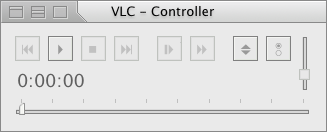
The VLC (0.6) controller in IB
Sorry, lot's of questions..
I'm not so used to IB.. So...
Cheers
How do i change the buttons, and how do i chanhe lenght of the "default" duration slider? (when i change the lenght in the .nib file it's getting messed up)
What do i do with this?
The VLC (0.6) controller in IB
Sorry, lot's of questions..
I'm not so used to IB.. So...
Cheers
Wow guys. nice work
Actually we have been wanting to get a new interface for some time. Though this one was a huge improvement over the lack of a real interface earlier, it's definelty not professional.
However we lack true graphic artitst, so if someone could help out that would be wonderful and this all shows quite some promise.
If you want to change the icons, that's cool too. we just got new ones, but we are not satisfied about those either.
(remember the Apple guidelines and use the traffic cone since it's the official VideoLAN logo)
However some pointers for the real stuff.
- the interface will be used by 30000 people keep it a tad generic. We currently want a combo between iTunes and DVD player and then in a Panther style (flat buttons etc)
- keep in mind the playlist. the current one slides under the controller, but this has the nasty effect of not being able to resize the playlist (at least larger then the controller). We need a better solution, either in an iTunes like style or in it has to get it's own window (xmms style ?)
it will also have random/repeat etc. controls soon. keep those in mind as well.
- custom controls require custom programming of controls (sliders can be done however).
- we also want a mini controller (to show during pause in fullscreen for instance) mini means as small or preferred even smaller than the iTunes mini controller. a mini controller doesn't need a titlebar
- Don't use a background with elements drawn onto it. This makes it hard to reposition elements when this might be required.
every single element has to have it's own picture (multiple states etc)
- simplicity is key.
- we want previous/rewind, play/pause, stop, next/ff buttons and a way to show the playlist. When you can fit it in nicely a fullscreen button might be nice. The prefs button will probably go. A scrolling text area might be cool too (iTunes or xmms style i don't care).
- a nicer integration of the DVD specific control stuff would be nice. try to fit them in a drawer or something like that, so users of files are not bothered by useless controls.
I will take care of implementing everything, if I can just get some talented people to do the artwork please, i'm terrible at that.
Actually we have been wanting to get a new interface for some time. Though this one was a huge improvement over the lack of a real interface earlier, it's definelty not professional.
However we lack true graphic artitst, so if someone could help out that would be wonderful and this all shows quite some promise.
If you want to change the icons, that's cool too. we just got new ones, but we are not satisfied about those either.
(remember the Apple guidelines and use the traffic cone since it's the official VideoLAN logo)
However some pointers for the real stuff.
- the interface will be used by 30000 people keep it a tad generic. We currently want a combo between iTunes and DVD player and then in a Panther style (flat buttons etc)
- keep in mind the playlist. the current one slides under the controller, but this has the nasty effect of not being able to resize the playlist (at least larger then the controller). We need a better solution, either in an iTunes like style or in it has to get it's own window (xmms style ?)
it will also have random/repeat etc. controls soon. keep those in mind as well.
- custom controls require custom programming of controls (sliders can be done however).
- we also want a mini controller (to show during pause in fullscreen for instance) mini means as small or preferred even smaller than the iTunes mini controller. a mini controller doesn't need a titlebar
- Don't use a background with elements drawn onto it. This makes it hard to reposition elements when this might be required.
every single element has to have it's own picture (multiple states etc)
- simplicity is key.
- we want previous/rewind, play/pause, stop, next/ff buttons and a way to show the playlist. When you can fit it in nicely a fullscreen button might be nice. The prefs button will probably go. A scrolling text area might be cool too (iTunes or xmms style i don't care).
- a nicer integration of the DVD specific control stuff would be nice. try to fit them in a drawer or something like that, so users of files are not bothered by useless controls.
I will take care of implementing everything, if I can just get some talented people to do the artwork please, i'm terrible at that.
I would LOVE to see a iTunes like VLC player. One that has the flat iTunes widgets.