
Thats not a ROM and no mine does not. Like all production TAMs the ROMs are soldered in.
TAM
Thats not a ROM and no mine does not. Like all production TAMs the ROMs are soldered in.
how we doing people - finally got home to have a go at starting this thing up
-
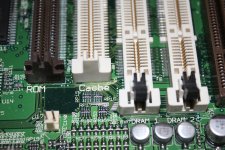
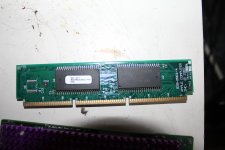
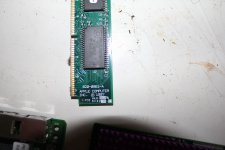
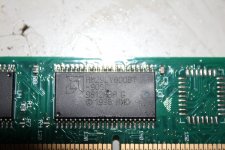
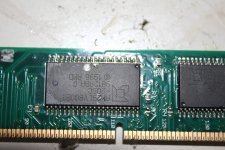
as for the rom's etc etc ....heres a few snaps of the board.
-
Ive never had a tam before so I make no claims. But the board says rom , cache, and drams - I don't know!
-
anyway will try to put it together and see what happens. If it powers up ill try it with and without the rom.....just to see if there is a difference.
-
all I can think is that there must be some reason apple put a separate rom in this
-
oh...the guy I bought it from in Dublin told me that he bought it while over in the states, and was so impressed with the sound he shipped it back home to Ireland. So its a TAM from America and not a European version. Best find in ages...I bought the TAM and the classic 2 from him for 200 euro - weh hey!
-
as for the rom's etc etc ....heres a few snaps of the board.
-
Ive never had a tam before so I make no claims. But the board says rom , cache, and drams - I don't know!
-
anyway will try to put it together and see what happens. If it powers up ill try it with and without the rom.....just to see if there is a difference.
-
all I can think is that there must be some reason apple put a separate rom in this
-
oh...the guy I bought it from in Dublin told me that he bought it while over in the states, and was so impressed with the sound he shipped it back home to Ireland. So its a TAM from America and not a European version. Best find in ages...I bought the TAM and the classic 2 from him for 200 euro - weh hey!
The part number shows its a G3 ROM? I wonder if someone thought it was or is needed for the upgrade card? I never heard of that if so. And like I said, the TAM never shipped with its own ROM card.
Check to make sure the Bose unit has the appropriate power voltage selected. Sounds like it probably does but always good to check. Keep us posted and my fingers are crossed for you.
first thing I checked haplain..............don't want any explosions
-
still some 'green' on the main board - my eyes are going bad...quickly...I only see the green in the pictures.
-
will give the board a wash in acetone, dry it out, and plug it in
-
fingers crossed
-
still some 'green' on the main board - my eyes are going bad...quickly...I only see the green in the pictures.
-
will give the board a wash in acetone, dry it out, and plug it in
-
fingers crossed
And the plot thickens... The funny thing is that the 6500 board has the pads for the rom but not the socket?
Ya, the 5500 & 6500 are the same board as the TAM, just with modifications. My guess for the TAM having the ROM slot installed is given the unique nature of the machine. Its pretty common for Macs, even the PowerPCs, to have a ROM slot but no ROM intended for it. Being what the TAM was, it may have been a safety net thing.
Yeah, I mean... I would say keep it in since it came with it 
Nearly all of my TAM's which is a gaggle at this point, came with the chip but I don't have them in. They work without any issues. Given the corrosion, I wouldn't install it as it could cause more issues than doing anything positive.
just tried to power it up ........no joy
-
zip!!
-
tried it with / without rom and cache card....nothing
-
im flying blind here people.............how do I turn it on!!!!!!!!!
-
I have no pram battery installed. I found the power button on the rear, left hand side, next to the main cable from the subwoffer
-
I see no activity of any kind, no led's, no sounds.............
-
what is the correct start up procedure.............hit the power button on the rear and then hit the top right key on keyboard
-
mmmmmmmmmmm...................will it even start without a pram battery at all??
-
I didn't bother connecting the cd drive , the hard drive or the network card ......im pretty sure ive connected everything else
-
should there be an led on somewhere to show life...anything.............it is as dead as my hairline!
-
heelllppppp
-
zip!!
-
tried it with / without rom and cache card....nothing
-
im flying blind here people.............how do I turn it on!!!!!!!!!
-
I have no pram battery installed. I found the power button on the rear, left hand side, next to the main cable from the subwoffer
-
I see no activity of any kind, no led's, no sounds.............
-
what is the correct start up procedure.............hit the power button on the rear and then hit the top right key on keyboard
-
mmmmmmmmmmm...................will it even start without a pram battery at all??
-
I didn't bother connecting the cd drive , the hard drive or the network card ......im pretty sure ive connected everything else
-
should there be an led on somewhere to show life...anything.............it is as dead as my hairline!
-
heelllppppp
found a similar battery from a lciii or something - same connector
-
tired it....still nothing
-
caps don't look good...........many have an upwards pointing dimple in the top...........
-
can I test the subwoffer for power on that big round connector?.....surely there would be 5 ,7 or 12 volts coming from it ?
-
tired it....still nothing
-
caps don't look good...........many have an upwards pointing dimple in the top...........
-
can I test the subwoffer for power on that big round connector?.....surely there would be 5 ,7 or 12 volts coming from it ?
Doesn't need a PRAM battery to work/start. You can just press the power button on the back of the unit OR on the keyboard.
There is a CUDA reset button on the board you should press before you try to start it up. Sounds like it has a cap issue which might be the culprit.
There is a CUDA reset button on the board you should press before you try to start it up. Sounds like it has a cap issue which might be the culprit.
just metered out the subwoofer cable and nothing -
-
should there be some signal coming from the powersupply to the machine ?
-
ive tried the reset and nothing
-
think ill just do a full recap before anything else
-
later
-
should there be some signal coming from the powersupply to the machine ?
-
ive tried the reset and nothing
-
think ill just do a full recap before anything else
-
later
I never got around to re-capping mine yet. You might be the first to re-cap one if you do.
I would check the power supply first, its fuse, etc...
I would check the power supply first, its fuse, etc...
By the way, the power supply is not auto-switching. Maybe I missed where you said you checked it, but if not check it.
edit: There should be 5v standby power from the supply I would think. I can check mine later if needed.
edit: There should be 5v standby power from the supply I would think. I can check mine later if needed.
hi unity. Yep I made sure its on 230 volts - the guy I bought it from told me about that as well.
-
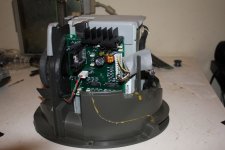
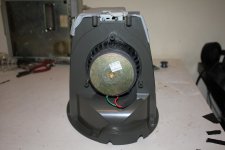
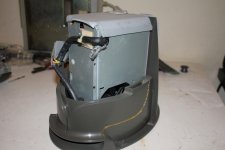
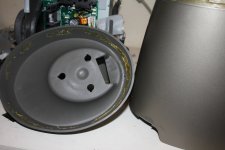
ive opened up the subwoffer.......dam difficult......its held together with screws and double sided sticky tape
-
the sticky tape is all around top rubber and all the inside is lined with some other soft tape - avoid rattels from the bass I guess.
-
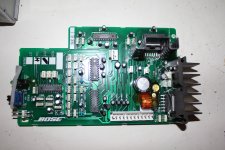
it looks like a standard power supply with a audio amp board on the side.
-
this subwoffer was dropped at some stage of its life. There is a 2 inch crack in the plastic cover on one side, and as I began to open it 2 of the screws turned, but the plastic they were screwed into was broken off inside and was turning with the screw.
-
I got it open without any futher damage.
-
-
there is no sound from the power supply of any kind when I plug it in. usually there is a quit hum or something. I know the thing is in sleep mode waiting for the computer to switch it on......bit this thing looks dead to me
-
there must be a fuse inside that power supply, and seems it has obviously had a knock... im thinking the fuse has been dislodged
-
heres a few pics
-
whats your thoughts people
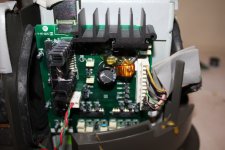
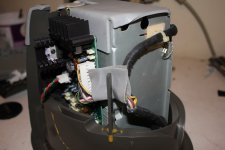
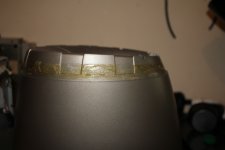
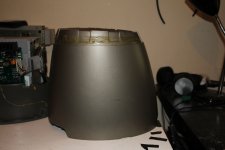
-
ive opened up the subwoffer.......dam difficult......its held together with screws and double sided sticky tape
-
the sticky tape is all around top rubber and all the inside is lined with some other soft tape - avoid rattels from the bass I guess.
-
it looks like a standard power supply with a audio amp board on the side.
-
this subwoffer was dropped at some stage of its life. There is a 2 inch crack in the plastic cover on one side, and as I began to open it 2 of the screws turned, but the plastic they were screwed into was broken off inside and was turning with the screw.
-
I got it open without any futher damage.
-
-
there is no sound from the power supply of any kind when I plug it in. usually there is a quit hum or something. I know the thing is in sleep mode waiting for the computer to switch it on......bit this thing looks dead to me
-
there must be a fuse inside that power supply, and seems it has obviously had a knock... im thinking the fuse has been dislodged
-
heres a few pics
-
whats your thoughts people
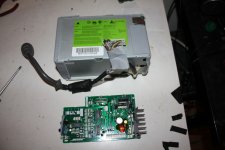
took out the powersupply and the bose audio board
-
not really much to it - looks like a standard powersupply with a output to plug in your monitor
-
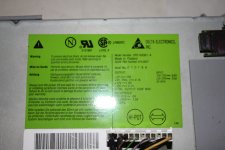
ha ha ......caught ya apple... hiding power ports!!! be jasus
-
gonna open the powersupply to see if there is a loose or blown fuse
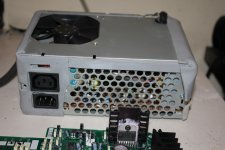
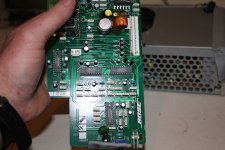
-
not really much to it - looks like a standard powersupply with a output to plug in your monitor
-
ha ha ......caught ya apple... hiding power ports!!! be jasus
-
gonna open the powersupply to see if there is a loose or blown fuse
Yeah check the fuse and there isn't much on the Bose board to go wrong with from my understanding.
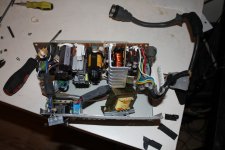
finally got into the powersupply - was covered with some foamy tape crap - had to cut through it
-
but anyway............found the fuse....6.3 amp 250 volt
-
and its dead!!!!!!!!!!!!
-
great stuff
-
in with a good one and slap this thing back together!!!
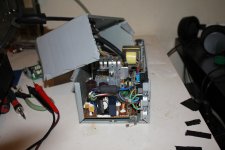
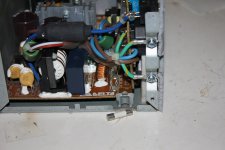
-
but anyway............found the fuse....6.3 amp 250 volt
-
and its dead!!!!!!!!!!!!
-
great stuff
-
in with a good one and slap this thing back together!!!
found a 250volt 8amp fuse in my external scsi.........that would be ok yeh?
Good finding - no, I'd match the fuse with same. Note there is a green LED on the underside of the sub that'll tell you if powered
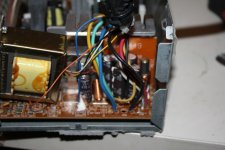
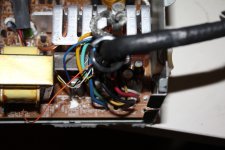
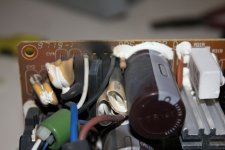
just had an explosion from the power supply......holy %^^%$£
-
8 amp fuse ...black and dead.
-
a few caps black and dead
-
at least I didn't have the tam plugged into it
-
-
8 amp fuse ...black and dead.
-
a few caps black and dead
-
at least I didn't have the tam plugged into it
-
darn
new plan.......new power supply......ive blown the hell out of the old one
-
just checked and there are simmilar powersupplys on ebay.....but with different wiring
-
seems I have this blown powersupply with the correct wiring......I could just get a new one and move over the wiring
-
heres a link to one for sale
-
http://www.ebay.ie/itm/Delta-Electronics-DPS-150GB-A-Apple-614-0039-150W-Power-Supply-150-Watt-/141661288905?pt=LH_DefaultDomain_0&hash=item20fbabb9c9
-
different apms........
-
dam it!!!!!!!!
-
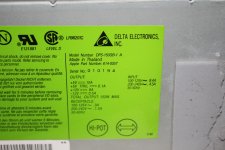
-
just checked and there are simmilar powersupplys on ebay.....but with different wiring
-
seems I have this blown powersupply with the correct wiring......I could just get a new one and move over the wiring
-
heres a link to one for sale
-
http://www.ebay.ie/itm/Delta-Electronics-DPS-150GB-A-Apple-614-0039-150W-Power-Supply-150-Watt-/141661288905?pt=LH_DefaultDomain_0&hash=item20fbabb9c9
-
different apms........
-
dam it!!!!!!!!
-
YIKES! Good luck man. I've got some of those PSU's out to be looked at and they are pretty special. Let me know what you can do with a swap as I might need that here at some point.
people..............im depressed
-
im gonna talk to the lepracauns.......................
-
as father jack would say........FECK!!!!
-
im gonna talk to the lepracauns.......................
-
as father jack would say........FECK!!!!
Well, Usually when a fuse blows. 90% of the time that doesnt mean stick a new one in it and try again.
they blow for a reason. Well, now you found out the hard way. Think twice!
Most likely had a shorted FET, or bridge or something. coulda found it before swapping the fuse.
they blow for a reason. Well, now you found out the hard way. Think twice!
Most likely had a shorted FET, or bridge or something. coulda found it before swapping the fuse.
In my opinion, the Power supply is a modified 6500 unit.
I was given a Powermac 6500 and only kept the Logic board, wiring and PSU because they all were close to the TAM's one.
I think the plug and wiring from the PSU should be the only difference.
I was given a Powermac 6500 and only kept the Logic board, wiring and PSU because they all were close to the TAM's one.
I think the plug and wiring from the PSU should be the only difference.
Damn! Sorry to hear that. As technight said there is a reason. I am just surprised the fuse did not simply blow again.
The guy with all the parts in The Netherlands is on this site: http://www.xs4trade.net/index.php?cPath=1_5_22. I refurbished 2 TAM's in my time. I've got a lot of software and manuals, did a lot of research but I always worked on TAM's that worked. What you're doing is a whole different ball game. Good luck. If you ever get it to work and if you need software: just contact me. You need a driver for the crescendo card i.e. I've got it. And whatever you do; don't try to install OSX. It will damage your TAM.