Home Forums TAM
TAM
· Hardware · 119 posts · May 18, 2015 — Jun 7, 2015 View original thread ↗
hey falcon

check both ends of display cable - checked connectors - all look good and clean.

with that rom installed I get no display at all just the green light

I have not heard this machine chime at all

-

there is something critically wrong and all I can see is the missing c113

Do not install that ROM or upgrade processor card.

hey unity. Why would that rom of been in it anyway. It will only show a display with one ram simm installed and nothing else. Will try the 2 rams but cant see it making any difference. Wont be trying the rom again

-

theres allot of green decay from acid on there

-

today I removed the big board that the power supply feeds into. It has allot of connections, checked them all, couldn't see any signs of damage/decay on anything. Removed all the other boards as well ......couldn't find anything wrong. Thinking of removing everything from the plastic housing so it would be easier to work on. Its difficult having to reassemble so much , everytime you want to test it.

-

there is no consistency in powering up..........different sounds, sometimes no display etc etc

-

tams are dam difficult

I can find no reason for that ROM to be in there. As far as I know, its not needed for the upgrade card.

So keep it as basic as you can to see if you can get it going. By the way, I never heard of a TAM yet with bad caps. That is not saying they do not exist, they are rare machines, but I have yet to hear about one needing a re-cap. Mine works fine with no re-cap. Although I want to get it done. So I think maybe your issue is more with corrosion than anything. Which is not bad news since you can cob together a replacement board.

I did quickly check your caps. Polarity seems good. I wish you had another board to test in it.

have to agree with you unity. When I began removing the caps there was plenty of electrolyte coming out of them. And after the full recap the machine was exactly the same

it made no difference what so ever. Pretty disappointed after the 4 hours I spent doing it

-

that missing c113...........I take it , its a  capacitor ........I could take a cap that looks the same from a dead board and see what it does.....but I have no idea of the values ..........probally not a good idea

-

other than that im thinking acid corrosion.............all I can do with that is meter it out and with no similar board or schematic.....im done for

-

have to get another board ...........till then im stuck!!

just uploaded the recap video

Some info on the ROM slot.

http://appletam.ning.com/forum/topics/rom-slot-on-tam

Also I will go check mine, C113 may not be populated.

Also I wonder if a L2 cache is needed to boot. When one upgrades, one takes out that cache.

I will go try all this out now and let you know.

cheers unity - appreciate it. I know nothing of the tam, its upgrades......I don't even know what cpu is in this thing.

-

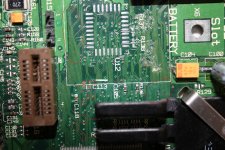
ment to say...the pictures I posted above... the missing c113 is in the first picture - center of the shot. It looks like the pads are gone, and on the left it looks like part of the trace all crushed up

-

this thing is very very small.........don't know if I would even be able to install a replacement

C113 is indeed populated. Its ceramic, like others, so I can not say the value. Apple seems to stick to a common group though on boards.  So it may be like others such as C118. It does look like the pads are gone. Scratch the material to verify if its copper. Usually when pads are gone the substrate is more of a tan color. Those look darker. The only good thing is that I dont see traces from it, just two via. If so, one could glue a cap in place then use small wire to reach the vias. Would not have to even be covered wire.

I pulled the cache, it still booted without it. So in your case, make sure the ROM and cache are empty. At least you can rule them out.

I would also try just one DIMM slot at a time, which I think you did.

If you are getting a green light, I think your power supply is fine.

Also for the record, and verification, mine did boot with no battery. Which I now pulled and will toss after seeing this :(

I am not well versed on checking stuff on boards, but if you need me to check anything else I am more than willing to do so.

hey unity - thanks for the helpful info.

again I agree with all you say.

Im thinking of removing c118, measuring its value, finding something similar , and as you said glue it in situ and run wires to the 2 vias

-

cant honestly see 1 cap causing such problems.........then again I change fuses and plug things in without checking !!

-

cant think of anything else to check.....except the voltages coming from the power supply.

-

maybey there was more damage done than it appears.

-

and yes - swap that battery out...........I didn't think the plastic batteries leaked..........but this one did and with more time there would of been nothing left

-

ill post some pictures of the battery that came out of it .............

-

cheers people

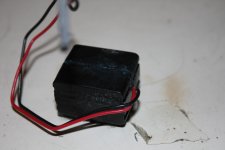
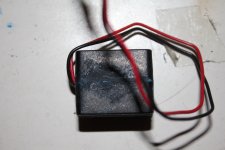
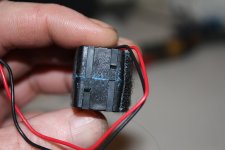
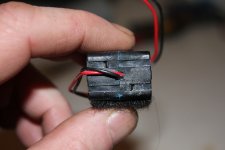
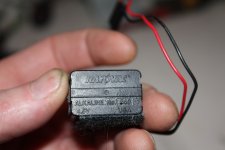
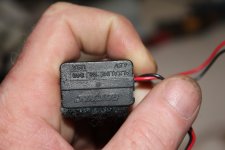
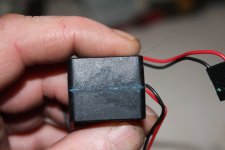
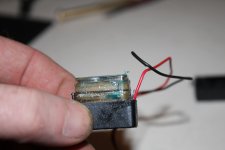
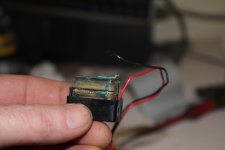
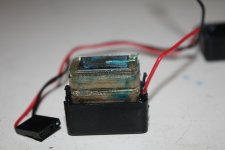
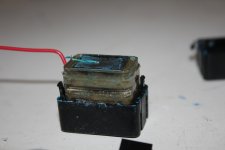
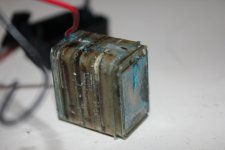
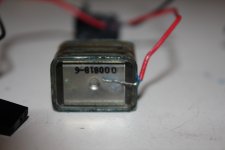
Heres a few pictures people of the battery that leaked all over this TAM

-

I opened it up and you can clearly see the acid.... its all over the place. My fingers were covered with the stuff!


This battery is called a Rayvac or RayOvac.................................................but if this one leaked........**********BE WARNED**********

-

cheers

IMG_6445.JPG

IMG_6447.JPG

IMG_6448.JPG

IMG_6449.JPG

IMG_6450.JPG

IMG_6451.JPG

IMG_6452.JPG

IMG_6453.JPG

IMG_6454.JPG

IMG_6455.JPG

IMG_6456.JPG

IMG_6457.JPG

IMG_6460.JPG

Mine is the same brand. I think all the black boxed batteries in Macs are Rayovac.

One cap maybe could. Until ruled out, hard to say if its the issue or now. You could try to trace where it goes but you may have a better chance winning a plane ticket to Mars.

You dont have a 5500/6500 laying around do you?

Question. You mentioned the light comes on.

Do you get a startup chime?

After pressing power, how long until it comes on?

I just noticed that my light comes on but not right away. The TAM chimes then its still about a second before it comes on. Like the light is almost a hardware check indicator more than an actual power light.

edit: After pulling the cache again my TAM failed to boot. I had to re-seat the RAM and it boots fine now.

With the battery pulled, I can get 2-10 seconds between the chime and the light coming on on my TAM. 

Hey falen: 

Take a look at my photo. I circled areas that need tested for continuity checks. Especially the ones in the bottom corner coming from that IC. 

Also the capacitor is an 0.1 UF. 

post-2246-0-49075400-1432493371.jpg

have had no chime to date..........just strange sounds, clicks, noise, static...when floppy inserted noise matches the floppys activity

-

power/green light comes on sometimes, other times, I get green light, and display, sometimes no display

-

the green led on the sub woffer only comes on when the tam is turned on

-

when I hit the power I get no light for about 4 or 5 seconds.... will check it tomorow

-

head wrecked from tam.......enough for now....time for beer......work tomorrow.......dam!!

techknight - good call. Will have a look at them tomorrow. Just a continuity test between 2 via's on a single trace - will do

-

0.1uf - that's great to know - will install new one tomorow

-

that chip at the bottom of the picture is the rage ii graphics chip. The legs of the chip were coated in some corrosion from the acid. With a magnifying glass allot of them looked to be shorting

-

I have spent a hell of allot of time cleaning that chips legs with acetone, a toothbrush and flushing the legs clean. Spent 30min with a magnifying glass and a pin going between each leg

.

But the display has not changed one bit since the first time I got it going.

-

nothing has changed ...even after a full recap

-

but ill have another look tomorrow............what ever it is it has to be 1 or 2 or 3 small problems for the machine to be flashing the disc icon

If thats the RAGE IC, thats why your video is scrambled. 

those traces I pointed out, there are some opens. 

You need to go over all of the traces that show "discoloration" wiht a magnifier. Youll find one or two open. 

I deal with this consistently on the macintosh portables. The traces that are super light green as I had pointed out, are almost always 100% open circuit. 

well it says Ati 3d Rage II techknight........but from now on its the 20th anniversary UE8 by the looks of things

thinking and googleing about it, im going to take out the board and cover the acid damaged area with 3to1 baking soda mixture to kill any remaining acid.  let it soak into it for a day or 2

-

even though I have washed this board over and over I rekon there is still some active acid there......eating at the traces

-

it kills me to see these beautiful machines dying such stupid deaths!

Well I cant advise that being a good idea or not... 

But, I do know that the trace damage will need patch wires on the ones that are open circuit. 

If all else fails, sourcing a 6500/300 board, desoldering various connectors to make it fit, etc, would be a good project.  The baking sode mixture sounds like a bad idea IMO, and for three days?  Just clean the board with isopropyl alcohol spray + contact cleaner.

Hearing buzzing matching system functions is the TAM buzz. Means your audio isn't toast, but something is stopping it from producing sound.

You dont have a 5500/6500 laying around do you?
I agree, those are pretty cheap are not really sought after, will try at least for testing purposes.

an update people

First off- ive created a new profile as I couldn't change my name falen5.

I have done nothing with the TAM   since last Tuesday week.......because I packed up the new job in the multi national after 4 weeks......too old for all that stress....so not very popular with herself!!!!

-

instead ive decided to go fulltime at the Macs for the simple reason I love working on these machines and at this stage I have every Mac except the apple 1 and Lisa

-

as for the TAM I have a 6500 board on the way thanks to the kind help of one of the users on the forum here.

-

Still building the website and im not good with websites at all......but its getting there.

-

hopefully by the time the 6500 arrives herself will let me play with my Macs again!

Fair play to you! Stress is bad alright...hope it works out for you...what's your job description now? Messing around with Macs...nice one!

well im a fulltime musician for the last 15 years - I gig fri,sat and sun usually. that's a nice job..you get paid for doing something you love and people thank you........that never happens in a factory...to them you are as good as your last mistake and all you do is make someone else rich......no thanks!!!

-

yeh genie  now im a fulltime mac messer....well I have been for that last few years anyway......just get such a kick when I hear that chime

mp.ls