

Fun Keys 1.5

Fun Keys
Configuration · v1.5
| Filename | fun-keys-15.hqx |
|---|---|
| Size | 172.9 KB (177067 bytes) |
| Year | 1996 |
| Developer | AOL |
| Mac OS | System 7 |
| Downloads | 16 |
Enjoying MacTrove?
Anonymous downloads are free and unlimited.
Create a free account to track favorites,
contribute metadata corrections, and join the
community chat.
About
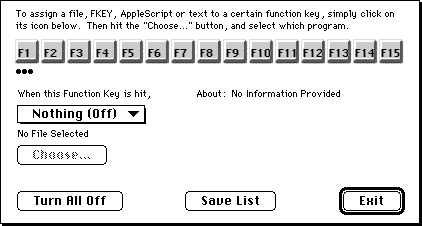
FunKeys Version 1.5 Copyright (C) 1996-97 by Alex Rampell FunKeys is an incredibly useful utility for the Macintosh. What FunKeys allows you to do, basically, is "program" those function keys on the top of your keyboard to do things. (The keys F1, F2, F3, F4, etc. They are only on extended keyboards, which most Macs have). Most of us Mac users never even use those things, as they are unsupported by many programs; FunKeys not only gives them a use, but it also makes them really useful.
With FunKeys installed, you can program all 15 of them to either open files/applications, execute AppleScripts, envoke macros (FKEYs), or even type text.
For example, F1 can open America On-Line, F2 can open Microsoft Word, F3 can turn off the sound, F4 can quit all open applications, and F5 can type "Sincererely yours." It's entirely up to you.
In order to take advantage of the AppleScript functions, you will need to have System 7.5 or later installed; otherwise, you can simply use FunKeys to open your favorite applications and FKEYs at a blast. Hundreds of FKEYs are freely available from sources such as America On-Line, Info-Mac, and other Mac software sites. FKEYs have normally been installed to Command-Shift-x keys.
FunKeys can also switch over to a certain application if it is already running.
And, best of all, you can still use the Function Keys for their regular uses, at the same time that FunKeys is running.
Screenshots
File Info
Original Source: info-mac
This file is part of the MacTrove archive. See the Thank You page for the upstream mirrors we rely on. It is BinHex encoded. Use The Unarchiver to decode it.


