Home Documents Lisa Applenet Hardware Background And Current Status
Applenet Hardware Background And Current Status

Applenet Hardware Background And Current Status
Lisa · PDF
FilenameApplenet_Hardware_Background_and_Current_Status.pdf
Size1.13 MB
Subsection appleNet
Downloads4
Enjoying MacTrove? Anonymous downloads are free and unlimited. Create a free account to track favorites, contribute metadata corrections, and join the community chat.
Reader
Applenet Hardware Background And Current Status
/
Loading…
OCR / Text contents
Applenet Hardware: Background and Current Status CO NFID ENT1AL Authors: Bob Paratore/Jan Sheehan Preface This document presents the current status of and thoughts about the Applenet hardware. Chapter 1 explains local area computer networks, and Chapter 2 describes the current hardware design and implementation of Apple's version of a local network, Applenet. Chapter 3 ends the discussion of current thoughts and designs with an explanation of the personality module, a low-cost way of emulating certain devices. The last chapter of this document, Chapter 4, discusses what developments and user needs future versions of Applenet must consider. 1. Network Concept& ~omputer netw~rks connect computers and related resources together so that 'they can communicate with one another. Each se"parate connection to the communications" medium, called a node, att~ches one or "more computers and related resources to the network. Long-haul computer networks, such as ARPANET, connect computers that are more than a few miles apart; local area computer networks, such as Applenet, connect computers that are only a few thousand feet apart. Networks, whether local or long-haul, need to control how and when the connected computers sommunicate with one another. Networks control communication through choice of structure (topoiogy) and through rules (protocols) implemented in the system's hardware and software. The structure of a network defines how nodes are physically connected to one another. The system protocols are divided into sets of rules for each level of the communication process, and define the structure of packets, how and when a node can transmit or receive a message, and how the network and user software forms and interprets packets. Communication between nodes in a network is either circuit-switched or packet-switched. Circuit-switched networks dedicate a communication line for the duration of a communication. However, packet-switched networks do not dedicate a line. Instead, computers connected to packet-switched networks transmit packets, small envelopes of information. The advantage of packet switching is that many nodes can share the same communication line and transmit virtually simultaneously due to the short length and transmission time of the packet. Usually, local networks are packet-switched rather than circuit-switched. 1.1 Local Network Topologies Some local networks have centralized control. In these networks, one node receives and routes all messages. Common topologies for such networks are the loop and the star (see Figure 1-1). In a star network, all computers connect directly to the controller and send/receive messages only through the controller. In a loop network, the connections of the nodes form a circ~e. A message travels around the loop to the controller and the contrJller routes the message around the loop to its intended destination. These two topologies have one major disadvantage: their dependency on the controller node. …

Showing first 3,000 characters of 20,344 total. Open the full document →
Home Documents Macintosh An Introduction To Copland
An Introduction To Copland

An Introduction To Copland

Macintosh · 1984 · PDF
FilenameAn_Introduction_to_Copland_199510.pdf
Size0.25 MB
Year1984
Subsection developer / Copland / D9_19950530
Downloads4
Enjoying MacTrove? Anonymous downloads are free and unlimited. Create a free account to track favorites, contribute metadata corrections, and join the community chat.
Reader
An Introduction To Copland
/
Loading…
OCR / Text contents
An Introduction to Copland The Mac™OS Foundation for the Next Generation of Personal Computers TM Copland is the development name for the next major release of the Mac™ OS from Apple® Computer, Inc. This document introduces Copland’s new architecture, its capabilities, and the benefits it will deliver to individuals and organizations. Product Primer Tech Terms Explained Active assistance Features of the Mac OS that allow the computer to guide the user and assist them in accomplishing tasks. Copland will include capabilities that allow the computer to perform activities automatically; for example, backing up files on a scheduled basis or assisting a user with installing software. Component software Self-contained, reusable software modules. Copland will support component software written for the industry-standard OpenDoc architecture. Microkernel The set of lowest-level operating system services that arbitrate system resources such as the CPU and memory. Copland will deliver a microkernel-based OS, which will improve system performance and stability, and make its users more efficient in accomplishing their work. OpenDoc The most widely compatible software architecture for component software. Copland will integrate support for OpenDoc as part of the Mac OS. Open Transport A communications architecture, based on open computer industry standards, that can be used to implement any number of networking and other communications systems. QuickDraw™ 3D Apple’s cross-platform application programming interface (API) for creating and rendering real-time, workstation-class 3D graphics. Scalable user interface The ability in Copland to control the extent of a user’s access to system and application features. TM i Contents Welcome ..............................................................................................................................................................................................1 Introducing Copland: Foundation for the Future ......................................................................................2 Copland: The Next Step Toward Apple’s Vision for the Mac OS ..........................................................2 Creating Copland: Apple’s Four-Point Plan for the Mac OS ..................................................................2 The Copland Advantage ............................................................................................................................3 Summary ....................................................................................................................................................3 Setting New Standards for Ease of Use: The Copland User Interface ....................................4 Automating Routine Tasks: From “Show Me” to “Do It for Me” ............................................................4 Managing Information Overload .........................................................................................................…

Showing first 3,000 characters of 52,975 total. Open the full document →

Home Documents NuBus Daffy
Daffy

Daffy

NuBus · PDF
Filenamedaffy.pdf
Size0.08 MB
Subsection rasterops / docs
Downloads5
Enjoying MacTrove? Anonymous downloads are free and unlimited. Create a free account to track favorites, contribute metadata corrections, and join the community chat.
Reader
Daffy
/
Loading…
OCR / Text contents
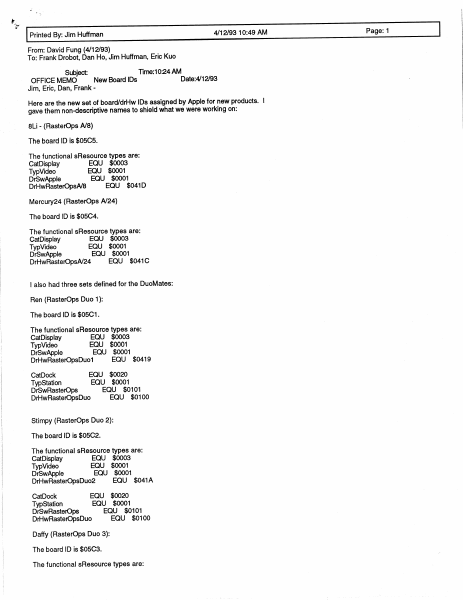
“ Printed By: Jim Huffman 4/12/93 10:49 AM Page: 1 From: David Fung (4/12/93) To: Frank Drobot, Dan Ho, Jim Huffman, Eric Kuo Subject: Time:10:24 AM OFFICE MEMO New Board IDs Date:4/12/93 Jim, Eric, Dan, Frank - Here are the new set of board/drHw IDs assigned by Apple for new products. | gave them non-descriptive names to shield what we were working on: 8Li - (RasterOps A/8) The board ID is $05C5. The functional sResource types are: CatDisplay EQU $0003 TypVideo EQU $0001 DrSwApple EQU $0001 DrHwRasterOpsA/8 EQU $041D Mercury24 (RasterOps A/24) The board ID is $05C4. The functional sResource types are: CatDisplay EQU $0003 TypVideo EQU $0001 DrSwApple EQU $0001 DrHwRasterOpsA/24 EQU $041C | also had three sets defined for the DuoMates: Ren (RasterOps Duo 1): The board ID is $05C1. The functional sResource types are: CatDisplay EQU $0003 TypVideo EQU $0001 DrSwApple EQU $0001 DrHwRasterOpsDuo1 EQU $0419 CatDock EQU $0020 TypStation EQU $0001 DrSwRasterOps EQU $0101 DrHwRasterOpsDuo EQU $0100 Stimpy (RasterOps Duo 2): The board ID is $05C2. The functional sResource types are: CatDisplay EQU $0003 TypVideo EQU $0001 DrSwApple EQU $0001 DrHwRasterOpsDuo2 EQU $041A CatDock EQU $0020 TypStation EQU $0001 DrSwRasterOps EQU $0101 DrHwRasterOpsDuo EQU $0100 Daffy (RasterOps Duo 3): The board ID is $05C3. The functional sResource types are: Printed By: Jim Huffman 4/12/93 10:49 AM Page: 2 CatDisplay EQU $0003 TypVideo EQU $0001 DrSwApple EQU $0001 DrHwRasterOpsDuo3 EQU $041B CatDock EQU $0020 TypStation EQU $0001 DrSwRasterOps EQU $0101 DrHwRasterOpsDuo EQU $0100 | may combine Ren and Stimpy into the same drHwID... Please stop by if you have questions, David Fung, x388
Home Documents Macintosh AUX 1.0 Programming Languages And Tools Volume 2
AUX 1.0 Programming Languages And Tools Volume 2

AUX 1.0 Programming Languages And Tools Volume 2

Macintosh · 1987 · PDF
FilenameAUX_1.0_Programming_Languages_and_Tools_Volume_2_1987.pdf
Size14.82 MB
Year1987
Subsection a_ux / aux_1.0
Downloads4
Enjoying MacTrove? Anonymous downloads are free and unlimited. Create a free account to track favorites, contribute metadata corrections, and join the community chat.
Reader
AUX 1.0 Programming Languages And Tools Volume 2
/
Loading…
OCR / Text contents
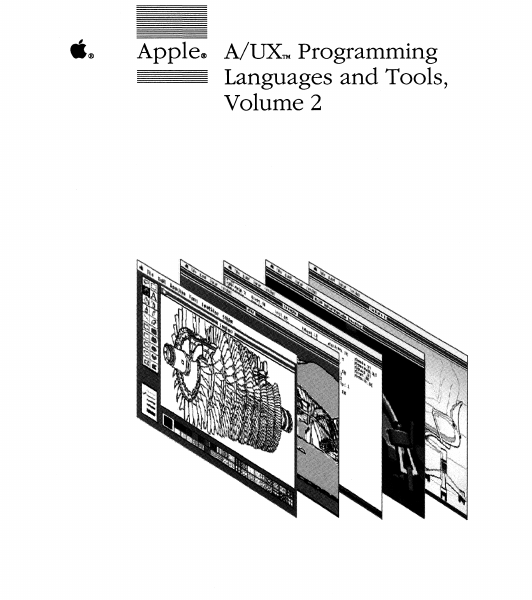
ti® Apple® A/UX™ Programming Languages and Tools, Volume 2 Copyright This material contains trade secrets and confidential and proprietary information of Apple Computer, Inc., and UniSoft Coiporation. Use of this copyright notice is precautionary only and does not imply publication. Copyright© 1985, 1986, 1987, Apple Computer, Inc., and UniSoft Coiporation. All rights reserved. Portions of this document have been previously copyrighted by AT&T Information Systems and the Regents of the University of California and are reproduced with permission. Under the copyright laws, this manual or the software may not be copied, in whole or part, without written consent of Apple or UniSoft, except in the normal use of the software or to make a backup copy of the software. The same proprietary and copyright notices must be affixed to any permitted copies as were affixed to the original. This exception does not allow copies to be made for others, whether or not sold, but all of the material purchased (with all backup copies) may be sold, given, or loaned to another person. Under the law, copying includes translating into another language or format. You may use the software on any computer owned by you, but extra copies cannot be made for this puipose. Apple Computer, Inc. 20525 Mariani Ave. Cupertino, California 95014 (408) 996-1010 Apple, the Apple logo, ImageWriter, LaserWriter, and Macintosh are registered trademarks of Apple Computer, Inc. A/UX is a trademark of Apple Computer, Inc. UNIX is a registered trademark of AT&T Information Systems. Limited Warranty on Media and Replacement If you discover physical defects in the manuals distributed with an Apple product or in the media on which a software product is distributed, Apple will replace the media or manuals at no charge to you, provided you return the item to be replaced with proof of purchase to Apple or an authorized Apple dealer during the 90-day period after you purchased the software. In addition, Apple will replace damaged software media and manuals for as long as the software product is included in Apple's Media Exchange Program. While not an upgrade or update method, this program offers additional protection for up to two years or more from the date of your original purchase. See your authorized Apple dealer for program coverage and details. In some countries the replacement period may be different; check with your authorized Apple dealer. ALL IMPLIED WARRANTIES ON THE MEDIA AND MANUALS, INCLUDING IMPLIED WARRANTIES OF MERCHANTABILITY AND FITNESS FOR A PARTICULAR PURPOSE, ARE LIMITED IN DURATION TO NINETY (90) DAYS FROM THE DATE OF THE ORIGINAL RETAIL PURCHASE OF THIS PRODUCT. Even though Apple has tested the software and reviewed the documentation, APPLE AND ITS SOFTWARE SUPPLIER MAKE NO WARRANTIES OR REPRESENTATIONS, EITHER EXPRESS OR IMPLIED, WITH RESPECT TO SOFTWARE, ITS QUALITY, PERFORMANCE, MERCHANTABILITY, OR FITNESS FOR A PARTICULAR PURPOSE. AS A RESULT, THIS SOFTWARE IS SOLD AS …

Showing first 3,000 characters of 483,743 total. Open the full document →

Home Documents NuBus EtherTalk And Alternate AppleTalk Reference
EtherTalk And Alternate AppleTalk Reference

EtherTalk And Alternate AppleTalk Reference

NuBus · 1987 · PDF
FilenameEtherTalk_and_Alternate_AppleTalk_Reference_19871211.pdf
Size4.55 MB
Year1987
Subsection apple / 670-0205_3Com_Ethernet
Downloads4
Enjoying MacTrove? Anonymous downloads are free and unlimited. Create a free account to track favorites, contribute metadata corrections, and join the community chat.
Reader
EtherTalk And Alternate AppleTalk Reference
/
Loading…
OCR / Text contents
•~ MacintoshTll EtherTalk and Alte~ate AppleTalk Reference . Alpha Draft; Working Draft 1 - December 11, 1987 Communications & Networking Apple Technical Publications Engineering Part No. 6588279 - ·. · ·-~ 'T f . :. _:_;..,~ ! ;_'. S APPLE COMPUTER, INC. This manual is copyrighted by Apple, with all right reserved. Under the copyright laws, tlUs manual may not be copied, in whole or in pait, without the written consent of Apple Computer, Inc. This exception does not allow copies to be made for others, whether or not sold, but all of the material purchased may be sold, given or lent to another person. Under the law, copying includes tramlation into another language. C App1e Computer, Inc.. 1987 20525 Mariani Avenue Cupertino, California 95014 (408) 996-1010 Apple and the Apple logo are registered trademarks of Apple Computer, Inc. AppleTalk is a registered trademark of Apple Computer, Inc. NuBusn1 is a trademark of Texas Instruments. Ethernet® is a registered trademark of Xerox. Simultaneously published in the United States and Canada. Contents Flgur• and tabl• v Radio and televlslon Interference xx Preface You Should Know... vii Document Contents vii Suggested Reading vii Chapter 1 lntroducHon 1 AppleTalk 2 AppleTalk Implementations 3 LAP Punaions 3 Using EtherTalk 4 Possible Applications 5 Chapter 2 EtherTalk Overview 7 Block Diagram 8 Devic.e riles 'adev' and 'cdev' 9 Control Panel Device File 9 AppleTalk Device File 11 1be 'adev' and 'atlk' Resources 11 1be LAP Manager INIT Resource 12 Calls to the 1adeV' Resource 12 1be GetADEV Call 13 1be SelectADEV Call 14 Calls lO the 'atlk' Resource 15 The Alnstall and LWrtlnsert Calls 15 1be LWrtGet, AShutdown, and LWrtRemove Calls 17 The LAP Manager 18 AppleTalk Seleaion 19 Installing the AppleTalk Seleaion 19 Intranode Delivery 19 Packet Reception 19 AppleTalk Address Resolution Protocol (AA.RP) 20 MRP Functions 20 The Ethernet Driver 20 Opening the Ethernet Driver 21 Transmission and Reception 21 Chapter 3 Coll to th• 'adev' AJe 23 The 'adev' File Contents 24 The 'adev' and 'atlk' Resources 25 Calls to the 'adev' Resource 25 T<e GetADEV Call (DO• 101) 26 Status-flag Byte 27 The Select.A.DEV Call (DO• 102) 28 Calls to the 'atlk' Resow'c:e 28 The Aimta1l Call (DO • 1) 29 The AShutdown Call (DO • 2) 29 Chapter 4 Calla to th• LAP Manager 31 Calling the LAP Manager 32 LAP Manager Functions 33 LWrtinsert (DO • 2) 33 LWltRemove (DO • 3) 34 LWrtGet (DO • 4) 35 LSetlnUse (DO - 5) 35 LGetSeUSend (DO • 6) 35 LRdDispatch (DO • 1) 36 LGetATalklnfo (DO• 9) 36 LAARPAttach (DO • 1) 37 LAA.R.PDetach (DO - 8) 37 Chapter 5 MRP and Data Packets 39 AboutMRP 40 Protocol sets 40 Hardware Addresses 41 Protocol Addresses 41 Obtaining an Addres,, 42 MRP Functions 42 Packet Categories 42 EtherTalk Addresses 43 A.ARP Operation 43 The Address Mapping Table 43 II Contents Choosing an Address 44 Random Address Selection 44 Probe Pac:kefs 44 Response to Probe Packets 45 Avoiding Duplicate Tentative…

Showing first 3,000 characters of 115,107 total. Open the full document →

Home Documents Lisa Baumwell Macintosh XL Hardware Information
Baumwell Macintosh XL Hardware Information

Baumwell Macintosh XL Hardware Information

Lisa · 1985 · PDF
FilenameBaumwell_-_Macintosh_XL_Hardware_Information_19850616.pdf
Size0.13 MB
Year1985
Subsection hardware
Downloads4
Enjoying MacTrove? Anonymous downloads are free and unlimited. Create a free account to track favorites, contribute metadata corrections, and join the community chat.
Reader
Baumwell Macintosh XL Hardware Information
/
Loading…
OCR / Text contents
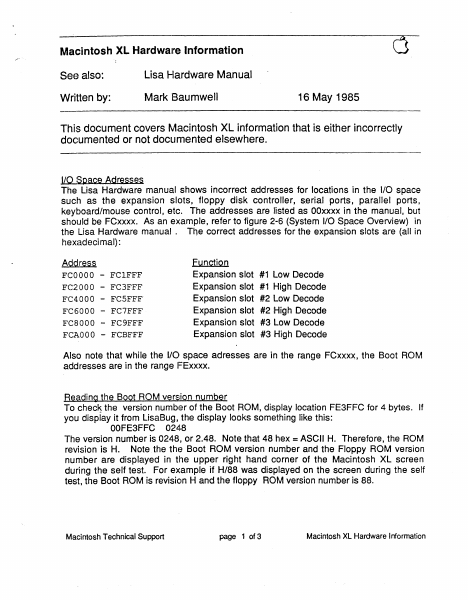
Macintosh XL Hardwaire Information See also: Lisa r.lardware Manual Written by: Mark 13aumwell 16 May 1985 This document covers Macintosh XL information that is either incorrectly documented or not documented elsewhere . .ILQ_Space Adresses The Lisa Hardware manual shows incorrect addresses for locations in the 1/0 space such as the expansion slots, floppy disk controller, serial ports, parallel ports, keyboard/mouse control, etc. The addresses are listed as OOxxxx in the manual, but should be FCxxxx. As an example, refer to figure 2-6 (System 1/0 Space Overview} in the lisa Hardware manual . The correct addresses for the expansion slots are (all in hexadecimal}: AQQr~~§ FCOOOO FC2000 FC4000 FC6000 FC8000 FCAOOO - FClFFF FC3FFF FCSFFF FC7FFF FC9FFF FCBFFF Function Expansion slot #1 Low Decode Expansion slot #1 High Decode Expansion slot #2 Low Decode Expansion slot #2 High Decode Expansion slot #3 Low Decode Expansion slot #3 High Decode Also note that while the 1/0 space adresses are in the range FCxxxx, the Boot ROM addresses are in the range IFExxxx. Reading the Boot ROM version number To checJs the version numb1er of the Boot ROM, display location FE3FFC for 4 bytes. If you display it from LisaBug, the display looks something like this: OOFE3FFC 0248 The version number is 0248, or 2.48. Note that 48 hex =ASCII H. Therefore, the ROM revision is H. Note the thE~ Boot ROM version number and the Floppy ROM version number are displayed in the upper right hand corner of the Macintosh XL screen during the self test. For example if H/88 was displayed on the screen during the self test, the Boot ROM is revision H and the floppy ROM version number is 88. Macintosh Technical Support page 1 of 3 Macintosh XL Hardware Information ,,,...- '·. Bfiading Parallel Interface Gard ROM version numbers Note that if a Parallel lnt1arface Card is installed, you can check its ROM version number by adding FF8 to the start of the Low Decode address of the slot the card is in and then displaying the resulting location for 4 bytes. To interpret the version number, look at the low order byte, of each word. For example, to check the ROM version number of a Parallel Interface Card in slot 2, display location FC4FF8 for 4 bytes. If you display it fr9m LisaBug, the display looks something like this: OOFC4FF8 0001 0007 Since the ROM is on the lower half of the data bus, the upper half of the data bus should be interpreted as don't cares. Therefore, the version number is 0107, or 1.07. Parallel Interface Card VIA offsets Each Parallel Interface Card has two 6522 Versatile Interface Adapters (VIAs}, one for each parallel port. The address of the VIAs is found by adding constants to the Expansion slot decodes as described below. Add 2000 hex to the slot low decode to get to the lower VIA base address. Add 2800 hex to the slot low decode to get to the upper VIA base address. For example: FC2000 is the slot 1 lower VIA base address. FC2800 is the slot 1 upper VIA …

Showing first 3,000 characters of 4,329 total. Open the full document →

Home Documents Lisa Baker Whopper Memos
Baker Whopper Memos

Baker Whopper Memos

Lisa · 1983 · PDF
FilenameBaker_-_Whopper_Memos_1983.pdf
Size0.32 MB
Year1983
Subsection hardware / 1983_Whopper
Downloads4
Enjoying MacTrove? Anonymous downloads are free and unlimited. Create a free account to track favorites, contribute metadata corrections, and join the community chat.
Reader
Baker Whopper Memos
/
Loading…
OCR / Text contents
To: Lisa 1.75-Meeting Attendee$ From: Paul Baker Date: May 26, 198~ Stbject: Minutes of ?15/l~3 rreet1ng cc: IJJ. Rosing The following issues were discussed at the Lisa 1.75 rreeting on May 5, 1~83: 1 - Next Meeting would. be• 5/26., sane time sane place . .• i . 2 - The ERS was discussed.. clari ficatiqn -on the: lack of battery backup was · suggested, it will be adde~d in the third draft. More discussion of the ERS fallows below. . 3 - The operating assurrpti.on for the design is that the current apps and bigh level OS parts will work oin both machines without changes. "' to discuss the Widget/l.75 interface was formed . . minutes of 4 - A working group the first meeting are attaiched.. · s - The location of the serial nunt>er is still .an open issue. 6 - The cornnent was made that due to the fact that the 68K 1s doing the rroto~ stepping, it is 1f1llortant to service the Timer 1 interrupt pro~~ly. 7~- A question was raised regarding parity checking on OMA. In addition some questions were asked about the use of the two new expansion slots. The new ERS addresses these issues. a·- Questions were asked aJoout the COPS/NMI/Reset ideas. The new ERS addresses this issue. · 9 - The twiggy use light 'is still an issue. 10 - Issues of corrpat1b111ty between Lisa 1 and Lisa l.75 I/O expansion cards were raised. Engineering conmitted to writ-e an application note so designers caulcl design cards that will work 1n both systems. 11 - Service indicated that they would like nDckups to evaluate servicability aspects of the system and that they would like to be involved in production philosophy discussions. S•~rvice indicated that ·they also need a PIP so they can scheaule their activ1t1es.· They indicated that they would need schematics by 7/28, 2 systems with socketed C°""30nents by 10/~8 and 3 final systems by 11/28. 12 - A remaining open issue~ is ~he relationship .between Lisa 1. 75 and the file server. · • I ii; •/I To: Ken Okin · From: Paul Baker Date: May 6, 1983 SUbject: First Widget t1eet1ng minutes cc: w. Dirks, R. Mohme G. Marten, B .' Lee, llL Henry, O. Offen, M. Urqhart, C. Twyman The first Widget/Lisa 1.75 meet1ng·was held May Sand the following issues were raised: 1 - Current status is: 30 drives on test using 16 sector controller, about 70 drives total have been ttuilt, build rate is now about 50/roonth, going to 100/roonth soon, 500/roonth in August and 3000/roonth (maybe) in October. The nineteen sector controller is working now, still waiting for ECC gate array, still waiting for seconcl pass main gate array. We can expect a working drive/controller with f].rmware on 7/1. 2 - The drive was desigrted with performance in mind, average access is 55 ms vs 180 ms on the Seagate,. track to track is 7 ms vs 20ms. Latency is higher at 19 ms max vs 16 ms. The delta rate is 5 'MHz. The 20 MB widget will have higher latency of about 25 ms max and a slightly higher data rate of about 6.5 MHz. The 40 MB widget will helVe still higher latenc…

Showing first 3,000 characters of 8,074 total. Open the full document →
Home Documents Macintosh AUX 1.0 Text Processing Tools
AUX 1.0 Text Processing Tools

AUX 1.0 Text Processing Tools

Macintosh · 1987 · PDF
FilenameAUX_1.0_Text_Processing_Tools_1987.pdf
Size16.44 MB
Year1987
Subsection a_ux / aux_1.0
Downloads4
Enjoying MacTrove? Anonymous downloads are free and unlimited. Create a free account to track favorites, contribute metadata corrections, and join the community chat.
Reader
AUX 1.0 Text Processing Tools
/
Loading…
OCR / Text contents
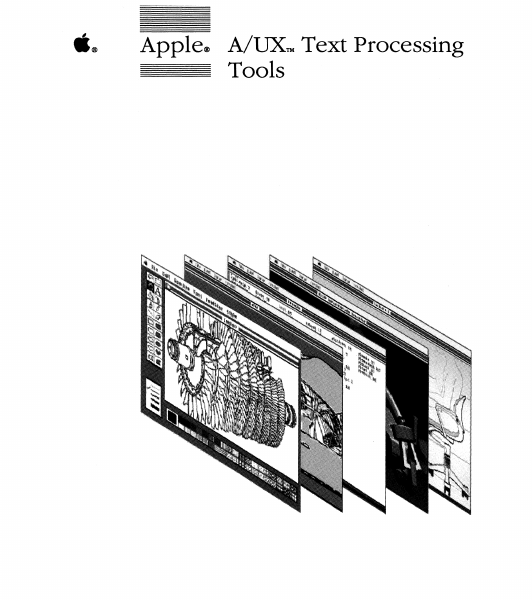
- - - -- - ti® ------- Apple® A/UX™ Text Processing Tools Copyright Information Systems. This material contains trade secrets and confidential and proprietary infonnation of Apple Computer, Inc., and UniSoft Corporation. Use of this copyright notice is precautionary only and does not imply publication. Copyright © 1985, 1986, 1987, Apple Computer, Inc., and UniSoft Corporation. All rights reserved. Portions of this document have been previously copyrighted by AT&T Information Systems, the Regents of the University of California, Motorola, Inc., Adobe Systems, Inc., and Sun Microsystems, Inc., and are reproduced with permission. Under the copyright laws, this manual or the software may not be copied, in whole or part, without written consent of Apple or UniSoft, except in the normal use of the software or to make a backup copy of the software. The same proprietary and copyright notices must be affixed to any permitted copies as were affixed to the original. This exception does not allow copies to be made for others, whether or not sold, but all of the material purchased (with all backup copies) may be sold, given, or loaned to another person. Under the law, copying includes translating into another language or format. You may use the software on any computer owned by you, but extra copies cannot be made for this purpose. Teletype is a registered trademark of AT&T. Apple Computer, Inc. 20525 Mariani Ave. Cupertino, California 95014 (408) 996-1010 Apple, the Apple logo, ImageWriter, LaserWriter, and Macintosh are registered trademarks of Apple Computer, Inc. A/UX is a trademark of Apple Computer, Inc. UNIX is a registered trademark of AT&T Diablo is a registered trademark of Xerox Corporation. PosTSCRIPT and TRANSCRIPT are trademarks of Adobe Systems, Inc.© 1984 Adobe Systems, Inc. All rights reserved. DEC is a trademark of Digital Equipment Corporation. APS-5 is a trademark of Autologic. Wang C/A/T is a trademark of Wang Laboratories. Hewlett-Packard 2631 is a trademark of Hewlett-Packard. TermiNet is a trademark of General Electric. Versatec is a registered trademark of Versatec. Limited Warranty on Media and Replacement If you discover physical defects in the manu- als distributed with an Apple product or in the media on which a software product is distributed, Apple will replace the media or manuals at no charge to you, provided you return the item to be replaced with proof of purchase to Apple or an authorized Apple dealer during the 90-day period after you purchased the software. In addition, Apple will replace damaged software media and manuals for as long as the software product is included in Apple's Media Exchange Program. While not an upgrade or update method, this program offers additional protection for up to two years or more from the date of your original purchase. See your authorized Apple dealer for program coverage and details. In some countries the replacement period may be dif- IN LIEU OF ALL OTHERS, ORAL OR fere…

Showing first 3,000 characters of 500,000 total. Open the full document →
Home Documents Lisa Workshop Users Guide Beta Apr83
Workshop Users Guide Beta Apr83

Workshop Users Guide Beta Apr83

Lisa · 1983 · PDF
FilenameWorkshop_Users_Guide_Beta_Apr83.pdf
Size8.44 MB
Year1983
Subsection workshop_beta
Downloads5
Enjoying MacTrove? Anonymous downloads are free and unlimited. Create a free account to track favorites, contribute metadata corrections, and join the community chat.
Reader
Workshop Users Guide Beta Apr83
/
Loading…
OCR / Text contents
WORKSHOP USER'S GUIDE for the Lisa - Beta Dmft ApriJ 1983 CO ....... TENTS 1. INTRODUCTION The WorKshop proll i des tool s for program delJe 1opmen t. It proll ides fac iIi ties for ed it i ng, 1 anguage process i ng, and debugg i og, as we 11 as commands for managing files and configuring the system. The system al so i ncl udes many other ut iIi ties. 2. THE Fl LE MANAGER The FileManager allowsyou tomanage andmanipulate files and volumes. 3. THE SYSTEM MANAGER The System Manager allows you to set default parameters for the Lisa, and manage processes. and configuration 4. THE EDITOR The Editor allows you to create andmodif>' text files. These text file,:. are used as input to the Comp i leI' and the Assembl er. 5. THE PASCAL Cct1PI LER The Compiler translates Pascal source code into object code. Translation requires two steps: first the compiler translates Pascal into I-code; then the code Generator translates the I-code into obj«Ct code •. 6 • THE ASSEMBLER The Assembl er trans 1a tes assembl y J anguage programs into obj ect code. 7. THE LINKER The Linker combines object code fi les into executable programs. 8. THE DEBUGGER The Debugger allows you to examine memory, set breaKpoints, other run-time debugging functions. 9. USlNG EXEC FILES e:xec files allow you to execute automatically. a series of commands and perform and programs 10. THE UTI LITI ES Util ity programs are provided for debugging, configuring the system, and man i pul at i ng files. APPENDICES A. ERROR MESSAGES WorKshop· User's Guide for the Lisa Introdudion Cha.pter 1 INTRODUCTION 1.1 The Workshop •••••••••••••••••••••••••••••.••••••••••••••••••••••• 1-1 The WorKshop provides the functions necessary to develop and run programs on the Lisa. The WorKshop can be booted from either a disKette or a. Profile. 1.2 Starting the Work$hop •. . . . . . • • • • • . . . . • . . . • . . . . . . . . . . . . . . . . ... . • . . .• 1-1 The WorKshop is started by booting the Lisa from a disK· containing the WorKshop software. You can use the e:nvironments window to select one of several available environments. 1.3 The WorKshop User Interface • • • • • • • • • • • • • • • • • • • • • • • • • • • • • • • • • • • • •• 1-3 The WorKshop user interface consists of three command lines: the WorKshop command line, the File Manager, and the System Manager. 1.4 File System Organization and Naming •••••••••••••••••••••••••••••• 1-4 Files are stored on disk volumes and are accessed by specifying the volume name and the file name. 1.5 Using Utility Programs • • • • • • • • • • • • • • • •• • • • • • • • • • • • • • • • • • • • • • • • • • •• 1-7 Utility programs provide additional functions for the WorKshop. A· utility program is started by choosing the RUN command from the WorKshop command line. 1.6 How do I Write and Run a Pascal Program? .......................... 1-8 A Pascal program is written with the e:ditor. The source file must be compiled and linKed before it can be run. 1.7 How …

Showing first 3,000 characters of 217,953 total. Open the full document →
Home Documents Macintosh AUX 2.0.1 Release Notes
AUX 2.0.1 Release Notes

AUX 2.0.1 Release Notes

Macintosh · 1990 · PDF
FilenameAUX_2.0.1_Release_Notes_199002.pdf
Size7.93 MB
Year1990
Subsection a_ux / aux_2.0.1
Downloads4
Enjoying MacTrove? Anonymous downloads are free and unlimited. Create a free account to track favorites, contribute metadata corrections, and join the community chat.
Reader
AUX 2.0.1 Release Notes
/
Loading…
OCR / Text contents
- - - · - ·- - - L .® A/UX® 2.0.1 Release Notes With MacX® 1.1 Release Notes Final Draft - nnn-nnnn -.--..- --· ·- Ir L S APPLE COMPUl'ER, INC. e 1990, Massachuseus Instlute of Tec:hnology and Apple Computer, Inc. All rights reserved No part cl dm publication may be reproduced, stored in a retrieval system, or transmitted, in any form or by any means, mechanical, electronic, photocopying, recording, or otherwise, w:idx>ut prior written permission of Apple Computer, Inc. Printed in the United States cl America. The Apple logo is a registered trademark cl Apple Computer, Inc. Use of the "keyboard" logo (OptionShift-10 for commercial purposes without the prior written consent of Apple may constitute trademark infringement and unfair competition in violation d federal and state laws. Apple Computer, Inc. 20525 Mariani Ave. Cupertino, California 95014 (408) 996-1010 Apple, the Apple logo, A/UX, and Macintosh are registered trademarks of Apple Computer, Inc. APDA and EtherTalk are trademarks of Apple Computer, Inc. 8-NET is a registered trademark of UniSoft Corporation. DEC, VAX, and vr102 are trademarks of Digital Equipment Corporation. Ethetnet is a registered trademark of Xerox Corporation. HP-lOC is a trademark ofHewlettPackard Business Computing Systems. IBM, IN03, and LAlOO are trademarks of International Business Machines, Inc. nnn-nnnn rrc Avant Garde Gothic, rrc Garamond, and rrc Zapf Dingbats are registered trademarks of International Typeface Corporation. MacPaint is a registered trademark of Claris Corporation. Microsoft is a registered trademark of Microsoft Corporation. NFS is a registered trademark of Sun M~ystems, Inc. POSTSCRIPT is a registered trademark, and lllustrator is a trademark of Adobe Systems, Incorporated. Tektronix 4014 is a registered trademark of Tektronix, Inc. UNIX is a registered trademark of AT&T Information Systems. Varityper is a registered trademark, and vr600 is a trademark, of AM International, Inc. Simultaneously published in the United States and Canada. ~ ( ~ .. ·· (. L LIMITED WARRANTY ON MEDIA AND REPLACEMENT If you discover physical defects in the manual or in the media on which a software produa is dWributed, Apple will replace the media or manual at no charge to you provided you return the item to be replaced with proof of purchase to Apple or an authorized Apple dealer during the 90-day period after you purchased the software. Jn addlion, Apple will replace damaged software media and manuals for as long as the software product is included in Apple's Media Exchange Program. While not an upgrade or update method, this program offers additional protection for up to two years or more from the date of your original purchase. See your authorized Apple dealer for program coverage and details. In some countries the replacement period may be different; check with your authorized Apple dealer. AU. IMPUED WARRANTIES ON THIS MANUAL, INCUJDING IMPLIED WARRANTIF.S OF MERCHANTABIUTY AND FITNW FO…

Showing first 3,000 characters of 201,141 total. Open the full document →

Subscribe to PDF
mp.ls