Home Documents Macintosh AUX 1.1 Installation Guide Draft
AUX 1.1 Installation Guide Draft

AUX 1.1 Installation Guide Draft
Macintosh · 1988 · PDF
FilenameAUX_1.1_Installation_Guide_draft_19890131.pdf
Size16.39 MB
Year1988
Subsection a_ux / aux_1.1
Downloads5
Enjoying MacTrove? Anonymous downloads are free and unlimited. Create a free account to track favorites, contribute metadata corrections, and join the community chat.
Reader
AUX 1.1 Installation Guide Draft
/
Loading…
OCR / Text contents
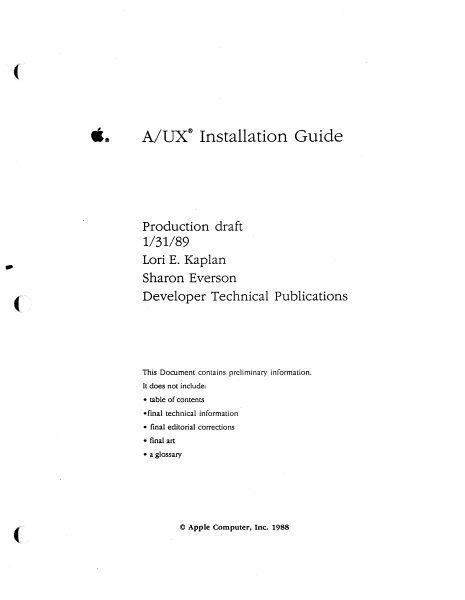
( ti® A!UX® Installation Guide Production draft - 1/31/89 Lori E. Kaplan Sharon Everson Developer Technical Publications This Document contains preliminary information. It does not include: • table of contents •final technical information • final editorial corrections • final art •a glossary © Apple Computer, Inc. 1988 S APPLE COMPlITER, INC. This manual is copyrighted by Apple or by Apple's suppliers, with all rights reserved. Under the copyright laws, chis manual may not be copied, in whole or in part, without the written consent of Apple Computer, Inc. This exception does not allow copies to be made for ochers, whether or not sold, but all of the material purchased may be sold, given, or lent co another person. Under the law, copying includes translating into another language. c The Apple logo is a registered trademark of Apple Computer, Inc. Use of the •keyboard" logo (Option-Shift-K) for commercial purposes without the prior written consent of Apple may constitute trademark infringement and unfair competition in violation of federal and state laws. © Apple Computer, Inc., 1988 20525 Mariani Avenue Cupertino,CA 95014 (408) 996-1010 Apple, the Apple logo, LaserWriter, and Macintosh are registered trademarks of Apple Computer, Inc. ITC Avant Garde Gochie, ITC Garamond, and ITC Zapf Dingbats are registered trademarks of International Typeface Corporation. Microsoft is a registered trademark of Microsoft Corporation. POSTSCRIPT is a registered trademark of Adobe Systems Incorporated. Varityper is a registered trademark, and vr600 is a trademark, of AM International, Inc. Simultaneously published in the United States and Canada. 9/12/88 LIMITED WARRANTY ON MEDIA AND REPLACEMENT If you discover physical defects in the manuals distributed with an Apple product or in the media on which a software product is distributed, Apple will replace the media or manuals at no charge to you, provided you return the item to be replaced with proof of purchase to Apple or an authorized Apple dealer during the 90-day period after you purchased the software. In addition, Apple will replace damaged software media and manuals for as long as the software product is included in Apple's Media Exchange Program. While not an upgrade or update method, this program offers additional protection for up to two years or more from the date of your original purchase. See your authorized Apple dealer for program coverage and details. In some countries the replacement period may be different; check with your authorized Apple dealer. AU. IMPLIED WARRANI1ES ON TIIE MEDIA AND MANUAIS, INCLUDING IMPUED WARRANTIES OF MERCHANT· ABIUTY AND FITNESS FOR A PARTIC-ULAR PURPOSE, ARE UMlTED IN DURATION TO NINE1Y (90) DAYS FROM TIIE DATE OF TIIE ORIGINAL RETAIL PURCHASE OF THIS PRODUCT. Even though Apple ha5 tested the software and reviewed the documentation, APPLE MAKES NO WARKA.NTY OR REPRESENTA· TION, EITHER EXPRESS OR IMPLIED, WITH RESPECT TO SOFTWARE, ITS QUALITY, PERFORMANC…

Showing first 3,000 characters of 336,501 total. Open the full document →
Home Documents Lisa A6L0141 LisaCalc
A6L0141 LisaCalc

A6L0141 LisaCalc

Lisa · 1983 · PDF
FilenameA6L0141_LisaCalc_1983.pdf
Size9.00 MB
Year1983
Subsection office_system
Downloads4
Enjoying MacTrove? Anonymous downloads are free and unlimited. Create a free account to track favorites, contribute metadata corrections, and join the community chat.
Reader
A6L0141 LisaCalc
/
Loading…
OCR / Text contents
LisaCalc A6L0141 LisaCa/c 029-0118-A Guide to Lisa Manuals Set up your Lisa following the setup procedures in the Lisa accessories box or in Appendix 1, Setup Procedures, in the Lisa Owner's Guide. Go through Section A, LisaGuide, in the Lisa Owner's Guide, for an introduction to the Lisa. If your dealer or service representative did not set your system Preferences so that the Lisa knows what external devices are attached, follow the instructions in Section D, Desktop Manager Reference Guide, under Set, in the Lisa Owner's Guide. ~ Go to Section A, Getting Started, in the manual for each office tool that you want to learn, for the essentials of using that tool. Go to Section B, Lisa Fundamentals, in the Lisa Owner's Guide, for the background information you need before beginning long-term work on the Lisa. You are now ready to start doing your own work on the Lisa: .If you want self-paced instructions for using a tool, go to Section B, Tutorial, in that tool manual. • If you want instructions for performing specific tasks with a tool, go to Section C, Reference Guide, in that tool manual. For specific instructions on filing and desktop management, go to Section D, Desktop Manager Reference Guide, in the Lisa Owner's Guide. For more information on the Lisa hardware, tips on caring for the Lisa, and suggestions for troubleshooting when the system isn't working properly, go to the other sections of the Lisa Owner's Guide. LisaCa/c 029-0117-A () Customer Satisfaction If you discover physical defects in the manuals distributed with a Lisa product or in the media on which a software product is distributed, Apple will replace the documentation or media at no charge to you during the 90-day period after you purchased the product. quality, performance, merchantability, or fitness for any particular purpose. As a result, this software is sold "as is," and you the purchase are assuming the entire risk as to its quality and performance. In no event will Apple or its software suppliers be liable for direct, indirect, special, incidental, or consequential In addition, if Apple releases a damages resulting from any defect in corrective update to a software product the software or manual, even if they during the gO-day period after you have been advised of the possibility of purchased the software, Apple will such damages. In particular, they shall replace the applicable diskettes and have no liability for any programs or documentation with the revised version data stored in or used with Apple at no charge to you during the six products, including the costs of months after the date of purchase. recovering or reproducing these programs or data. In some countries the replacement period may be different; check with The warranty and remedies set forth your authorized Lisa dealer. Return any above are exclusive and in lieu of all item to be replaced with proof of others, oral or written, express or purchase to Apple or to an authorized implied. No Appl…

Showing first 3,000 characters of 299,936 total. Open the full document →

Home Documents Lisa IO ROM 88 Listing Dec83
IO ROM 88 Listing Dec83

IO ROM 88 Listing Dec83

Lisa · PDF
FilenameIO_ROM_88_Listing_Dec83.pdf
Size5.18 MB
Subsection firmware
Downloads3
Enjoying MacTrove? Anonymous downloads are free and unlimited. Create a free account to track favorites, contribute metadata corrections, and join the community chat.
Reader
IO ROM 88 Listing Dec83
/
Loading…
OCR / Text contents
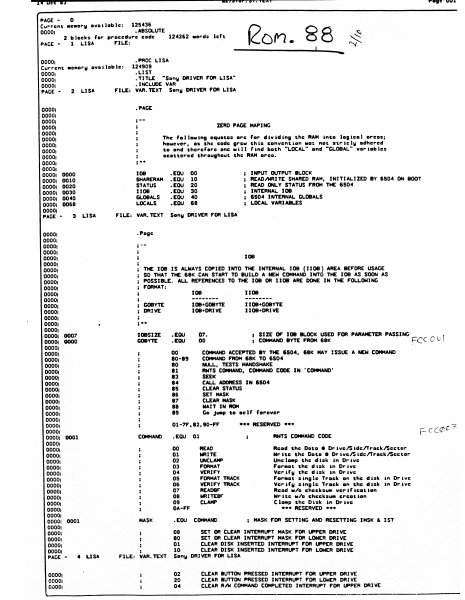
i4 beE 83 PAGE - 6&';I'W' • ., ••• .,Ai 0 eon. 88 , Cu~~eftt oe.o~y oVDilDble: 125436 • ABSOLUTE 2 blocks 'o~ procedure code 124262 .ord= leh PAGE 1 ~ISA rILE: 0000, 0000, Cu~reftt 0000, 0000, DODO' PAGE - .PROC LISA 124909 .LlST .TITLE -SOfty DRIVER rOR LISA• INCLUDE VAR rILE: VAR. TEXT SOfty DRIVER rOR LISA oe.o"y ovollDble: 2 DODO' 0000, 0000, DODO' 0000, 00001 00001 00001 00001 00001 00001 00001 0000 00001 0010 00001 0020 00001 0030 00001 0040 00001 0068 00001 PAGE 3 LISA • PACE ;-- ZERO PACE MAPING ,.. ; The '0110.1"1 equote. ore '01" dividi"1 the RAM I"to 101leol oreo.; ho.ever. os the code Irew this eo"ve"t$oft .0: not otrlely odhered to o"d there lore one will 'iftd both "LOCAL" o"d -GLOBAL- vo"iobles .eDttered throulhout the RAM oreo. lOB SHARERAM STATUS IJOB GLOBALS LOCALS LISA rILE: VAR.TEXT .EOU .EOU .EOU ; INPUT OUTPUT BLOCK READIWRITE SHARED RAM. INITIALIZED BY 6504 ON BOOT READ ONLY STATUS rROM THE 6504 INTERNAL lOB 6504 INTERNAL GLOBALS ; LOCAL VARIABLES 00 10 20 30 40 18 Sony DRIVER rOR LISA lOB THE lOB IS ALWAYS COPIED INTO THE INTERNAL lOB (IJOB) AREA BUOAE USACE SO THAT THE 68K CAN STAAT TO BUILD A NEW COMMAND INTO THE lOB AS SOON AS POSSIBLE. ALL RErERENC£S TO THE lOB OR nOB ARE DONE IN THE rou.OWING FORMAT: IJOB lOB GOBYTt DRIVE , DODO' DODO! 0007 00001 0000 OOOO! OOOO! DODO! OOOOJ DODO! .. IOBSIZE GOBYTt • [QU .EOU 07. 00 80-89 80 COMMAND ACCEPTED BY THE 6504. 68K MAY ISSUE A NEW COMMAND COMMAND FROM 18K TO 1504 . NULL. TESTS HANDSHAKE RWTS COMMAND, COMMAND CCIDE IN • COMMAND' SEEK CALL ADORESS IN 1504 CLEAR STATUS SET MASK CLEAR MASK WAIT IN 110M Go Juap to oel' 'orever 84 85 II 87 88 89 01-7r,82,90-" CCMtAND • EQU 00 01 02 03 04 05 06 07 08 09 OA-" OOOO! 00001 0000, 0000, 00001 0000, 00001 0000, 0000, 0000, 0000, OOOO! HASK ; USA ; FILE: VAR. TEXT • EOU , SIZE OF' lOB BLOCK USED FOR PARAMETER PASSING . \ FCC 0 v ; COMMAND BYTE F'AOM 68K 00 ..31 00001 00001 00001 00001 00001 0000, 0000, 0000, 00001 0000, 0000, 0001 0000, 0000! 00001 000.01 .EOU .IOU .EOU • POle 00001 00001 00001 00001 00001 00001 00001 00001 000.01 00001 00001 00001 00001 00001 00001 00001 0000: 0001 0000, 00001 00001 00001 00001 PACE .. - ••• RESERVED ••• AWlS COMMAND CODE 01 READ NUTE UNCLAMP FORMAT VDUrv rORMAT TRACK VERIFY TRACK READBF WRlTE8F' CLAMP COMMAND Reod the Ooto • DrlvelSidelTroeklSeetor Wr'te the Doto • ~ivelSldclTr.cklSeetor Unci . ., the eli.k I" Orlve Foroot the eI,_k in Drive Veri'y the eI,.k 1ft ~Ive For.Dt .'n91c Trock Oft the di.k 1ft ~Ive Vcri'y .'n91c Trock on the eI'ok 'n ~'ve Reod w/o eheek.... vcr,ficotlon WI" Ite .hI check.... o,.eot lOft Cl . ., the Oloktn ~ive ••• RESERVED ••• MASK FDA SETTINGAND.RESETT1NCi IMSK & 1ST 08 SET OR CLEAR I~RuPT MASK FOR uPPER DRIVE 80 SET. OR CLEAR INTERRUPT MASK FOR LONER DRIVE 01 CLEAR OISK INSERTED I~AUPTFOR UPPER DRIVE 10 CLEAR DISK INSERTED INTERRuPT FOR LOWER DRIVE SOfty DRIVER FOR LISA 02 20 04 CLEAR tUTTON PRESSEDfNTERRuPT "DA~E…

Showing first 3,000 characters of 138,296 total. Open the full document →

Home Documents Lisa Guide To The Operating System 5.2 Jul82
Guide To The Operating System 5.2 Jul82

Guide To The Operating System 5.2 Jul82

Lisa · 1982 · PDF
FilenameGuide_to_the_Operating_System_5.2_Jul82.pdf
Size2.81 MB
Year1982
Subsection os
Downloads3
Enjoying MacTrove? Anonymous downloads are free and unlimited. Create a free account to track favorites, contribute metadata corrections, and join the community chat.
Reader
Guide To The Operating System 5.2 Jul82
/
Loading…
OCR / Text contents
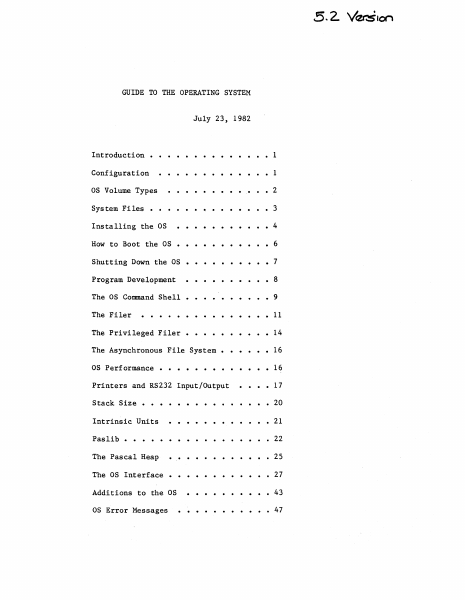
GUIDE TO THE OPERATING SYSTEM July 23, 1982 ..... Introduction • 1 Configuration 1 as Volume Types • 2 System Files • • • • • • Installing the as How to Boot the as 3 • • • •• 4 • 6 Shutting Down the as • • • • • • 7 Program Development 8 The as Command Shell • • • • • • 9 The Filer 11 The Privileged Filer • 14 The Asynchronous File System • 16 as Performance • • 16 Printers and RS232 Input/Output 17 Stack Size • Intrinsic Units . . . . 20 21 Paslib • • • 22 The Pascal Heap • 25 The as Interface 27 Additions to the as 43 as Error Messages 47 Guide to OS Confidential INTRODUCTION This document explains how to use the 5.2 release of the Operating System. It includes all relevant material from prior releases and also describes the new features of this release. The User's Guide does not explain each feature of the OS in detail; instead, it explains operations such as installing and booting the system, and presents the details of the Command Shell and Filer commands (see the Operating System Reference Manual for a complete description of the Operating system). Because the Operating System Reference Manual is not updated for each new release, the User's Guide also contains explanations of any new features or calls that may not fit into the above topics. The User's Guide assumes that the Operating System Reference Manual that you have is dated March 1, 1982. This release of the Operating System boots from a Profile or Twiggy rather than the'Apple II. The standalone OS is installed and operates differently than the as that boots from the Apple in several ways. Please read the paragraphs below that explain the environment that this version of the OS supports before attempting to install and run it. CONFIGURATION The standalone OS boots from either a Profile or a Twiggy. Most people will boot the standalone OS from a Profile, and use another hard disk for the Monitor. The standalone as restricts how you can use the various devices. The OS treats the Corvus as a source of Monitor files, not as an OS volume; the Apple, the Disk-II floppies and the Sanyo screen are totally inaccessible from the OS; the Lisa screen and keyboard are reserved for Applications. Therefore, readlns and writelns can only be seen on your Soroc~ WARNING: YOU NEED A SOROC, TO USE THE STANDALONE OS! Attach the So roc to channel A of the Lisa; this channel is the second from the left when you are standing in front of the system. When the OS boots from a Profile, that Profile must be attached to the parallel port (the connector farthest to the right when viewed from the front). This port is 'PARAPORT' to the OS and '&3' to the Monitor. Your other hard disks are attached to the N-Port card, which must (for now) be in Slot 2 (the middle slot). Starting from the bottom of the N-Port card, the ports are named '&4', '&5', and '&6' by the monitor, and 'SLOT2CHANl', 'SLOT2CHAN2', and 'SLOT2CHAN3' by the as. The monitor gives preference to disks attach…

Showing first 3,000 characters of 112,670 total. Open the full document →

Home Documents Lisa Lisa 1.75 Boot ROM
Lisa 1.75 Boot ROM

Lisa 1.75 Boot ROM

Lisa · PDF
FilenameLisa_1.75_Boot_ROM_19830802.pdf
Size0.38 MB
Subsection hardware / 1983_Whopper
Downloads3
Enjoying MacTrove? Anonymous downloads are free and unlimited. Create a free account to track favorites, contribute metadata corrections, and join the community chat.
Reader
Lisa 1.75 Boot ROM
/
Loading…
OCR / Text contents
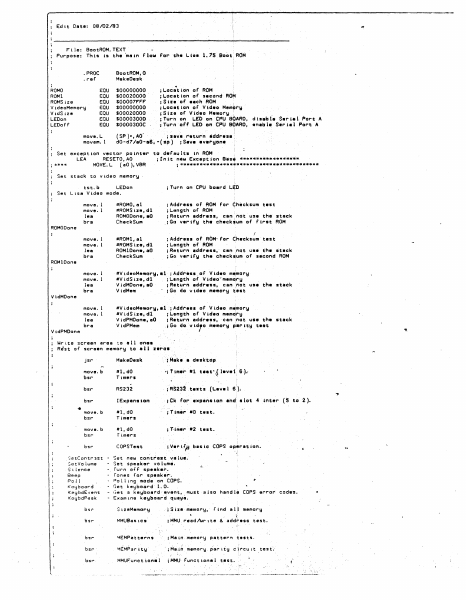
Edit Date: 08/02/83 File: BootROM.TEXT Purpose: rti is is the ·ma in flow for th• L ht• 1.15 Boot. ROM .PROC BootROM,0 MakeOesk . raf' ROMO ROMl ROMSize VideoMemory VidSize LED on LEDof f' EQU EOU EQU e:au EQU e:au EOU move.L movem. 1 $00000000 $00020000 $00007F"FF" $00000000 $00020000 $00003000 S0000300C . ;Location of ROM ;Location of second RO~ ;Size of each ROM . ;Locatton of Vtdeo Mem~ry 1Siz• of Video Memo~y • ; Turin on LEO on CPU BQAFm, disab(e Serial Port A ; Turin oft LEO on CPU BOARD, enable Serial Port A (SP)+ 1 AO" ;s•v• return •ddrasa: d0-d7/a0-a6,·(sp) ;Save everyone Set exception vector pointer to def~ults lft ROM LEA RESETO,AO ;tnit new E•c•ption Bas; ****************** ; **** MOVE.L (aO),VBR ; ****************************************** Set stack to video memory LED on tst.b Set Lisa Video mode. ; T1Jrn on CPU board LltD move. 1 move. 1 lea bra ttROMO,al #ROMSize,dl ROMOOone,aO Check Sum ;Address of ROM for dh~cksum test ;L1tngth of' ROM ;Return address, can riot use the stack _;Gu verify the check~um of First ROM move. l move. I lea bra #ROMl,al #RQMSize,dl ROMlOone,aO Check Sum ;Address or ROM-for Checksum test ; Lttngth of ROM ; Re1turn address, can ,not use the stack ;Ga verify the check~um of second ROM move. l move. I lea bra #VideoMemory,al ;Address.of Video m~mory #V idS iZ•, dl ; L11ngth of Video'·mem~ry VidMOone,aO ;Return address, can ~ot use ihe stack VidMem ;G~ do video memory ~est move. l move. 1 lea bra #V ideoMemarf:h al. ; .A,ddl"'ess of V idea me',mory #V idS ize, dl ; Le1ngth of V idea memoiry VidPMOone,aO ;Return address, can not usa the stack V idPMem ; Go1 do v id'o memory par" tty test ROMODone I ROMlOone VidMOone VidPMOontS Write ~creen area ~o ell ones Rest of screen memory to all zero• jsr MakeOesk ; Make a duktop move.b bsr #l,dO Timers •;timer #l Ust",{ leva·1. 6 -).· bsr RS232 ; RS232 tests (Level 6 ). bsr IE>epansion ;Ck for e>Cpansion end slot 4 inter (5 to 2). '* move.b #l,dO Timers ;Ttmer •0 test. bsr move.b bsr ttl,dO Timers ; T·imer •2 test. bsr COPSTest ; Vel" trµ basic COPS op.rat ion. •J e t Cont r l s t ~etVolume Si Lenee Beep Po 11 K'eybo;:ird Ke':jbdEvent KeybdPeek · .. Set ne~ co~trast value. - Set speaker volume. - furn of F speaker. - rones for speaker~ - ?cll1ng mode on COPS. - Get keyboard t.O. - Get a keyboard event, must also handle COPS error codes. - Examine keyboard que\le. . r Ind all memory bsr SizeMemory . ; $ i:1e memory, bsr MMUBas 1cs ; MMIJ rl!lad/\ir 1te & address test. bsr ~EMPatterns ;Main memor~ pattern tests. bsr ~~M~artty ;M•in memory ~artiy clrcu1t test' bsr MMUFunct1.onal ;.MMU ~unctional test. Floppy dr-tverF'lappy dr-tver Floppy driver Flopp!:I dr-iver bsr -·Read • sect.or. - Eject a disk. - Sae if disk t• tn. - Debug commends r-equired by ~ield.Service. IWMChip ;;IWM, floppy drive~ chip, t.est. I Built-in hard disW dr-tver - Re~d stet~s or selft•st. Built-in hard disk driver • See if disk…

Showing first 3,000 characters of 15,417 total. Open the full document →

Home Documents Macintosh BugDesk Users Guide
BugDesk Users Guide

BugDesk Users Guide

Macintosh · 1989 · PDF
FilenameBugDesk_Users_Guide_1989.pdf
Size2.01 MB
Year1989
Subsection developer / Hypercard
Downloads4
Enjoying MacTrove? Anonymous downloads are free and unlimited. Create a free account to track favorites, contribute metadata corrections, and join the community chat.
Reader
BugDesk Users Guide
/
Loading…
OCR / Text contents
- • ·sugDesk User's Guide By Bonnie Collier Mike Chiang ti Apple Confidential ti ti APPLE COMVTER, INC. This manual and the software described within and the X-CMD used in it are CONFIDENTIAL with all rights reserved. c Apple Computer, Inc., 1988 20525 Mariani Avenue Cupertino, CA 95014 ( 408) 996-1010 Thanks to Gary Bond for thehardcopy X-CMD. If you wish to use this, please contact him directly. Apple, the Apple logo, LaserWriter, and Macintosh are registered trademarks of Apple Computer, Inc. BugDesk User's Guide t& Apple Confidential t& BugDesk User Guide................................................................................................. 1 A bout This User Guide ............................................................................... 1 Getting Started With BugDesk............................................................................. 1 How Does It Work? ...................................................................................... 1 Installation .................................................................................................................. 3 What do you need? ...................................................................................... 3 Setting Up Your BugDesk........................................................................... 3 Using BugDesk............................................................................................................ 6 Navigating Within BugDesk ...................................................................... 6 About Bug Sheets .........................................................................................? Customizing the Template ........................................................................ 9 Writing Bug Reports .................................................................................... 9 Making a White Copy of Your Bug Sheet. .......................................... .1 0 Sending Bug Reports ................................................................................... 1 1 Receiving Reports ......................................................................................... 1 1 Searching .......................................................................................................... 1 1 Printing ............................................................................................................. l 2 Sorting ............................................................................................................... 1 2 Generating Bug Summaries ...................................................................... 12 Maintenance ............................................................................................................... 1 4 Sta.ck Compaction .......................................................................................... 1 4 Upgrading ........................................................................................................ …

Showing first 3,000 characters of 43,470 total. Open the full document →

Home Documents Lisa LabeList
LabeList

LabeList

Lisa · 1985 · PDF
FilenameLabeList_1985.pdf
Size1.09 MB
Year1985
Subsection office_system
Downloads3
Enjoying MacTrove? Anonymous downloads are free and unlimited. Create a free account to track favorites, contribute metadata corrections, and join the community chat.
Reader
LabeList
/
Loading…
OCR / Text contents
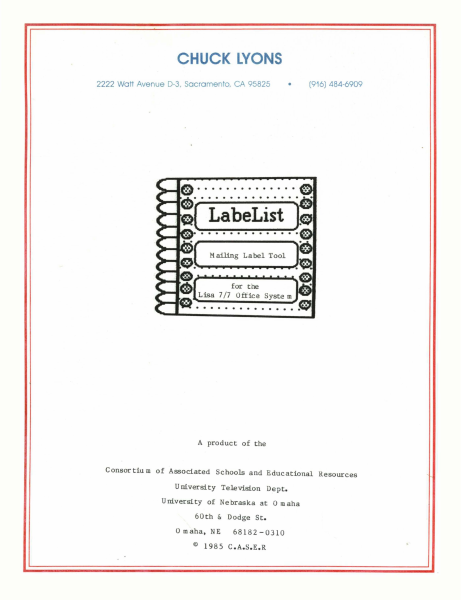
CHUCK LYONS • 2222 Watt Avenue D-3, Sacramento, CA 95825 (916) 484-6909 A product of the C onsor tiu m of Associated Schools and Educational Resources University Television Dept. University of Nebraska at a m aha 60th & Dodge St. a maha, NE © 68182 -0310 1985 C.A.S.E.R ........... Mailing Label Tool ....... ,.------------------'~ A product of the C onsor tiu m of Associated Schools and Educational Resources University Television Dept. University of Nebraska at 0 m aha 60th & Dodge St. Omaha, NE © 68182 -0310 1985 C.A.S.E.R Cop yright Notice: This manual is copyrighted. All rights are reserved. This docu m ent may be copied and reproduced for the purchaser's own use. Limited Warranty: The Consortiu m of Associated Schools and Educational Resources warrants this product to be free fro m defects in material and work m anship for a period of ninety (90) days fro m the date of original purchase. The Consortiu m of Associated Schools and Educational Resources agrees to repair or, at our option, replace any defective unit without charge. Other than the above, the Consortiu m of Associated Schools and Educational Resources makes no warranties, either express or implied, regarding the enclosed co m puter software package, its m erchanta bility or its fitness for any particular purpose. In no event will the Consortiu m of Associated Schools and Educational Resources be liable for direct, indirect, incidental, or consequential da mages resulting fro m any defect or the possibility of such da m ages. The exclusion of implied warranties is not per mitted by so me states. The above exclusion may not apply to you. This warrany provides you with specific legal rights. There may be other rights that you may have which vary fro m state to state. ® "APPLE COMPUTER, INC. MAKES NO WARRANTIES, EITHER EXPRESS OR IMPLIED, REGARDING THE ENCLOSED COMPUTER SOFTW ARE PAC K AGE, IT S MER C HAN TAB IL IT Y 0 R IT S FIT N E S S FOR ANY PARTICULAR PURPOSE. THE EXCLUSION OF IMPLIED WARRANTIES IS NOT PERMITTED BY SOME STATES. THE ABOVE EXCLUSION MAY NOT A P PLY TOY 0 U. THIS WAR RAN TY PRO VID E S YOU WIT H S PE C IFI C LEG A L RIG H T S. THE REM A Y BE 0 THE R RIG H T S T HAT YOU MAY HAVE WHICH VARY FROM STATE TO STATE." Quickdraw, hardware interface for mouse control, all OS files necessary for a bootable diskette, the workshop shell, and special diskette manufacturing routines are copyrighted progra m s of Apple Com puter, Inc. licensed to the Consortiu m of Associated Schools and Educational Resources to distribute for use only in co m bination with LabeList. Apple Software shall not be copied onto another diskette (except for archive purposes) or into me m ory unless as par t of the execution of LabeList. When LabeList has co m pleted execution Apple Software shall not be used by any other program. Apple, Lisa, and the Apple logo are trade marks of Apple Computer, Inc. Rolodex is a trade m ark of Rolodex Corp. S Y ste m Re q uir e me nts .The LabeLi…

Showing first 3,000 characters of 33,445 total. Open the full document →

Home Documents Macintosh BIGMAC MMU
BIGMAC MMU

BIGMAC MMU

Macintosh · 1985 · PDF
FilenameBIGMAC_MMU.pdf
Size0.30 MB
Year1985
Subsection prototypes / 1985_Big_Mac
Downloads4
Enjoying MacTrove? Anonymous downloads are free and unlimited. Create a free account to track favorites, contribute metadata corrections, and join the community chat.
Reader
BIGMAC MMU
/
Loading…
OCR / Text contents
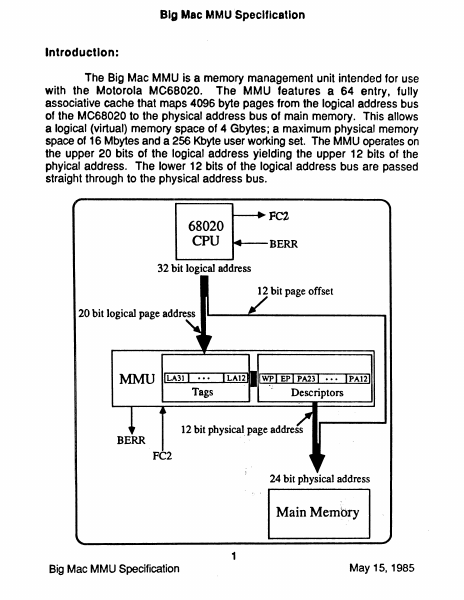
Big Mac MMUSpeclflcation Introduction: The Big Mac MMU is a memory management unit intended for use with the Motorola MC68020. The MMU features a 64 entry, fully associative cache that maps 4096 byte pages from the logical address bus of the MC68020 to the physical address bus of main memory. This allows a logical (virtual) memory space of 4 Gbytes; a maximum physical memory space of 16 Mbytes and a 256 Kbyte user working set. The MMU operates on the upper 20 bits of the logical address yielding the upper 12 bits of the phyical address. The lower 12 bits of the logical address bus are passed straight through to the physical address bus. 68020 CPU BERR 32 bit logical address 12 bit page offset 20 bit logical page address ....- -..........- - - - - - - -... 12 bit physical. page address BERR 24 bit physical address Main Membry 1 Big Mac MMU Specification May 15,1985 If the upper 20 bits of the logical address are contained in any of the 64 entries in the MMU, the upper 12 bits of the physical address are provided within 65ns. This permits the MMU to function without wait states. If the page Is resident In the MMU. the access control bits associated with that page are also checked to see H write protection and or execute only protection is in effect. If the upper 20 bits of the logical address are DQ1 contained in any of the 64 entries in the MMU, a Bus Error (BERR) signal will be asserted. This will suspend the execution of the instruction that caused the "miss", and system software can then load the MMU with the correct physical address of the page that caused the miss. The suspended instruction can then be restarted. If the logical address is contained in the MMU and a write protection or execute only protection violation is detected, a Bus Error is also generated. Ten 16 bit status registers are implemented within the MMU to allow access to the following information: Page Accessed (status registers 0 through 3 for use in generating LRU info), Page Dirty (status registers 4 through 7), Exception Cause and MMU mode (status register 8) and Logical Address Latch (status register 9). Operation: Supervisor and user states are defined by the function code 2 bit (FC2) of the CPU (with FC2-=1 --> supervisor and FC2-=O _..> user). The CPU and MMU combination operate with Supervisor state addresses always unmapped. User state can operate either mapped (by clearing the MODE bit in status register 8), or unmapped. The unmapped state is entered by setting the MODE bit in register 8. In the unmapped state the MMU presents logical address bits LA23 through LA 12 directly to the physical address bits PA23 through PA12. Independent of the mapping of User state, the registers of the MMU are accessible for reading or writing ~ from Supervisor state. The registers LARO through LAR63 (located at byte offsets $00000 through $3FOOO) contain the logical addresses of the 64 pages to be mapped into the physical pages. The registers PARO through PAR63 (located at…

Showing first 3,000 characters of 8,464 total. Open the full document →

Home Documents Lisa Lisa 2 Intrinsic Unit Interfaces Summary
Lisa 2 Intrinsic Unit Interfaces Summary

Lisa 2 Intrinsic Unit Interfaces Summary

Lisa · PDF
FilenameLisa_2_Intrinsic_Unit_Interfaces_Summary.pdf
Size0.28 MB
Subsection workshop_3.0
Downloads3
Enjoying MacTrove? Anonymous downloads are free and unlimited. Create a free account to track favorites, contribute metadata corrections, and join the community chat.
Reader
Lisa 2 Intrinsic Unit Interfaces Summary
/
Loading…
OCR / Text contents
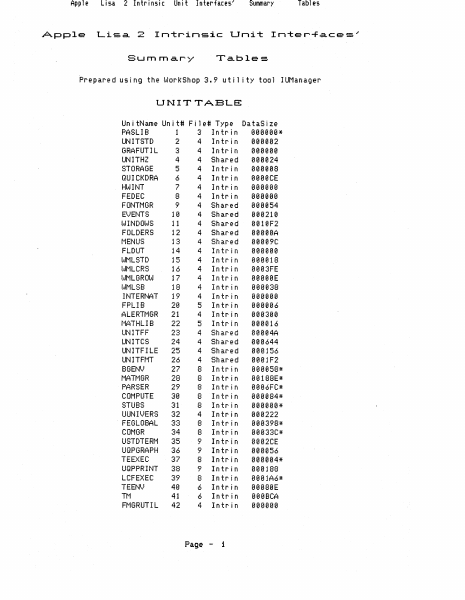
Apple Apple Li!:.a 2 Intrin~oic Lisa 2 Unit Interface!:o' Summary Tables Intrinsic Unit Inter-F.a.ces . .· Summar)-' Tables Prepared using the WorkShop 3.9 util ity tool IUManager UNITTABLB: UnitName Unit# File# Type DataSize PASL I B 1 3 In t roi n 000000 * UNITSTD 2 4 In tr i n 000002 GRAFUTIL 3 4 lntrin 000000 UNITH2 4 4 Shared 000024 STORAGE 5 4 Intrin 000008 QUICKDRA 6 4 Intrin 0000CE HL~INT 7 4 1 n tro in 000000 FEDEC 8 4 Intrin 000000 FONTMGR 9 4 Shared 000054 EVENTS 10 4 Shared 000210 1,~INDOllJS 11 4 Shared 0010F2 FOLDERS 12 4 Shared 00000A MENUS 13 4 Shared 00009C FLDUT 14 4 Intrin 000000 WMLSTD 15 4 Intrin 000018 loo~t1LCRS 16 4 Intrin 0003FE IAIMLGROIlJ 17 4 In tro in 00000E WMLSB 18 4 lntrin 000038 I NT ERNAT 19 4 1 n t roi n 000000 FPLIB 20 5 Intrin 000006 ALERTMGR 21 4 lntrin 000300 NATHLIB 22 5 Intrin 000016 UNITFF 23 4 Shared 00004A UNITCS 24 4 Shared 000644 UNITFILE 25 4 Shared 000156 UN I TFt1T 26 4 Sharoed 0001 F2 BGENV 27 8 Intrin 000058* t1ATt1GR 28 8 lntrin 00188E* 8 lntroin PARSER 29 0006FC* COt1PUTE 30 8 Intrin 000084* STUBS 31 8Introin 000000* UUNJI·.)ERS 4 Intrin 000222 8 Introin FEGLOBAL 33 000398* COMGR 34 8 Intrin 00033C* USTDTERt1 35 9 Intrin 0002CE 9 Introin UQPGRAPH 36 000056 --'7 ..:>, TEEXEC 8 Introin 000004* UQPPRINT 38 9 Intrin 000188 3)' 8 Introin LCFEXEC 0001A6* TEEN!oo) 40 6 Intrin 00080E Tt1 6 lntroin 41 000BCA 4 Introin Ft1GRUTI L 42 000000 Page - 1 Apple Lisa 2 Intrinsic Pt1t1 Pt'tDECL UNITFIGA SYS1LOCK UCLASCAL UTKUNI\..JE UOBJECT UTEXT UDRA'"J UABC UDIALOG LCUT IOPRH1IT SHELLCOt1 PROGCOt-1t1 RECO~}ERY Lm~LEVEL DBDECL1 POOLER DBENV HEAP ~}LTREE C2Cot1PAC LABSCAN SCHEt1A SCAN FIELDEDI SCRAP FI LERCOt1 PRPU8LIC PRSTDINF PRSTDPRO PRFILEPR PR8UF PRSPOOL QUEUES PRE')ENTS PRDLGt1GR PRt1GR U'v'T100 USOROC STDUNIT I Ut'lAN OBJIO FILEIO GRAPHS TREES REFS PARTS LISTS t1Et-1t1AN PASDEFS r'1PASLI8 Unit Interfaces'" 43 44 45 46 47 49 50 51 52 53 54 55 56 4 4 4 4 3 57 58 59 60 61 6'j k. 63 64 65 66 68 69 70 71 73 75 76 77 78 7'1 80 81 E:2 83 84 85 86 87 88 'i0 91 9'j .k. 94 95 96 97 98 9$' 100 101 11 1e 11 1e 19 11 6 12 12 12 6 6 6 6 4 6 6 6 6 6 6 4 4 4 ., " 4 7 7 7 7 7 ., " 7 7 9 9 12 1 1 1 1 1 1 1 1 1 2 Shar'ed Intrin Shar'ed In tr' n Intr n Intr n In tr' n Intr n Intr n Intrln Intr·in Intrin Intrin Shared Intrin Intrin Intrin Intr·in Intr'in Intrin Intrin Intrin Intr'in Intrin Intrin Intrin Intrin Shar'ed Shar'ed Intrin Shar'ed Intr'in Intr'in Intrin Intrin Intrin Intrin Intrin Intr'in Intrin Intr'in Intrin Intrin Intr'in Intrin Intrin Intr'in Intr'in Intr'in Intrin Intr'in Intr'in Intr'in Page - 2 Summary 000042 000000 00002A 000000 00004E* 0001 CA* 000164* 00027C* 000182* 0009F2* 000564* 00002C* 00057E 00070C 000006 000000 000126 000000 000052 000000 000000 000000 00001C 000000 000000 000000 0000CA 000250 0002E8 000000 0005D0 000002 000000 000010 000346 000000 000000 00008A 000026 00001C* 00001C* 000580 00008C 00011C 000000 000008 000000 000004 000004 000000 0000…

Showing first 3,000 characters of 8,501 total. Open the full document →
Home Documents Lisa Language Specification Lisa Pascal Feb82
Language Specification Lisa Pascal Feb82

Language Specification Lisa Pascal Feb82

Lisa · 1982 · PDF
FilenameLanguage_Specification_Lisa_Pascal_Feb82.pdf
Size4.01 MB
Year1982
Subsection pascal_monitor
Downloads3
Enjoying MacTrove? Anonymous downloads are free and unlimited. Create a free account to track favorites, contribute metadata corrections, and join the community chat.
Reader
Language Specification Lisa Pascal Feb82
/
Loading…
OCR / Text contents
LANGUAGE SPECIFICATION LISA PASCAL 19 February 1982 Rich Page / David Cas seres {file pas:pO; date 2/19/82] [file pas:pO; date 2/19/82] DATE: 19 February 1982 TO: Lis t FROM: Rich Page & David Cas seres SUBJECT: Lisa Pascal Language Specification -----------------,------ Here is the new Language Specification for Lisa Pascal. direct your comments to Rich Page. Please ,This Language Specification attempts to describe both the eventual definition of the Language and the current implementation. Inevitably, there are a few places where the two do not match. and these points are spelled out in the text. {file pas:pO; date 2/19/82} [file pas:pO; date 2/19/82] CONTENTS 1. IN'!RODUCTION •••••••••• ~ ••••• 0 ••••••••••••••••••••••••••••• ••• 1 1.1 Product Name and Number ••••••••••••••••••••••••••••••••••• l 1.2 Related Documents •• ~ •••••••••••••••••••••••••••••••••••••• l 1.3 Novel or Unusual Features ••••••••••••••••••••••••••••••••• l 1.4 Relation to Other Products •••••••••••••••••••••••••••••••• 2 1.5 Use Environment ••••••••••••••••••••••••••••••••••••••••••• 2 1.5.1 Hardware Environment •••••••••••••••••••••••••••••••••• 2 1.5.2 Software Environment •••••••••••••••••••••••••••••••••• 2 2 DEFINITIONS ••••••••••••••••••••••••••••••••••••••••••••••••••• 3 3 METALA.NGUAGE •••••••••••••••••••••••••••••••••••••••••••••••••• 5 4 'LEXICAL TOKEN'S •••••••••••••••• 0 ••••••••••••••••••••••••••••••• 7 4.1 General ••••••••••••••••••••••••••••••••••••••••••••••••••• 7 4.2 Special Symbols ••••••••••••••••••••••••••••••••••••••••••• 7 4.3 Identifiers ••••••••••••••••••••••••••••••••••••••••••••••• 8 4.4 Directives •••••.•••••••••.•••••••••••••••••••••••••••.•.•• 8 4. 5 Numbe rs • • • • • • • • • • • • • • • • • • • • • • • • • • • • • • • • • • • • • • • • • • • • • • • • • • • 8 4.6 Labels •••••••••••.•••.••••••••••••••••••...•••.••••••••••• 9 4.7 Quoted String Constants ••••••••••••••••••••••••••••••••••• 9 4.7 •. 1 Character Constants ••••••••••••••••••••••••••••••••.•• 10 4.8 Comments. Spaces. and Ends of Lines •••••••••••••••••••••• 10 5. BLOCKS. LOCALITY, AND SCOPE •••••••••••••••••••••••• ~ •••••••• 13 5. 1 Block. •••••••••••••••••••••••••••••••.••.•••••••••.••••.•• 13 5.2 Scope •••••••••••••••••••••••••••••••••••••••••••••••••••• 14 5.2.1 Defining Occurrence ••••••••••••••••••••••••••• : •••••• 14 5.2.2 Redefinition ••••••••••••••••••••••••••••••••••••••••• 14 5.2.3 Position of Defining Occurrence •••••••••••••••••••••• 15 6 CONSTANT-DEFINITIONS •••••••••••••••••• ~ •••••••••••••••••••••• 17 7 TyPE-DEFINITIONS ••••••••••••••••••••••••••••••••••••••••••••• 19 7.1 General •••••••••••••••••••••••••••••••••••••••••••••••••• 19 7.2 Simple-Types."•••••••••...••••••.•..••.•••••••.•.•.••.•••• 19 7.2.1 General •••••••••••••••••••••••••••••••••••••••••••••• l9 7.2.2 Standard Simple-Types •••••••••••••••••••••••••••••••• 20 7.2.3 Enumerated-Types ••••••••••••••••••••••••••••••••••••• 23 7.2.4 Subrange-Types ••••••••••••••••••••••••••••…

Showing first 3,000 characters of 171,566 total. Open the full document →
Subscribe to PDF
mp.ls