Home Documents Macintosh Classic Mac Tech Info
Classic Mac Tech Info
Classic Mac Tech Info

Macintosh · 2002 · PDF
FilenameClassic_Mac_Tech_Info_2002.pdf
Size0.10 MB
Year2002
Subsection schematic
Downloads4
Enjoying MacTrove? Anonymous downloads are free and unlimited. Create a free account to track favorites, contribute metadata corrections, and join the community chat.
Reader
Classic Mac Tech Info
/
Loading…
OCR / Text contents
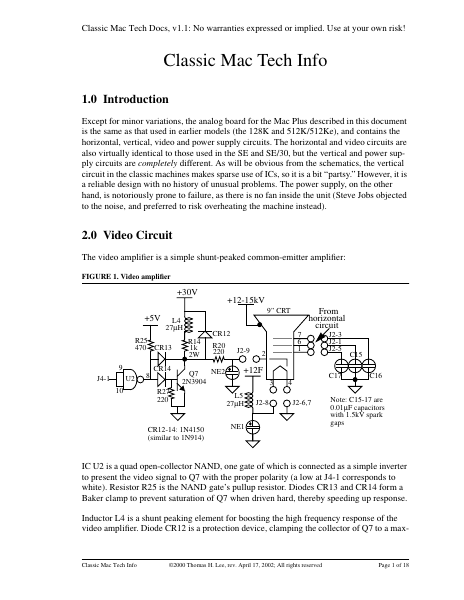
Classic Mac Tech Docs, v1.1: No warranties expressed or implied. Use at your own risk! Classic Mac Tech Info 1.0 Introduction Except for minor variations, the analog board for the Mac Plus described in this document is the same as that used in earlier models (the 128K and 512K/512Ke), and contains the horizontal, vertical, video and power supply circuits. The horizontal and video circuits are also virtually identical to those used in the SE and SE/30, but the vertical and power supply circuits are completely different. As will be obvious from the schematics, the vertical circuit in the classic machines makes sparse use of ICs, so it is a bit “partsy.” However, it is a reliable design with no history of unusual problems. The power supply, on the other hand, is notoriously prone to failure, as there is no fan inside the unit (Steve Jobs objected to the noise, and preferred to risk overheating the machine instead). 2.0 Video Circuit The video amplifier is a simple shunt-peaked common-emitter amplifier: FIGURE 1. Video amplifier +30V +12-15kV From horizontal circuit 9” CRT +5V L4 27µH R25 470 CR13 9 U2 J4-1 10 8 CR14 CR12 R14 1k 2W R20 220 NE2 Q7 2N3904 R27 220 CR12-14: 1N4150 (similar to 1N914) J2-9 7 6 1 2 +12F 3 L5 27µH J2-8 J2-3 J2-1 J2-5 C15 C17 4 J2-6,7 NE1 C16 Note: C15-17 are 0.01µF capacitors with 1.5kV spark gaps IC U2 is a quad open-collector NAND, one gate of which is connected as a simple inverter to present the video signal to Q7 with the proper polarity (a low at J4-1 corresponds to white). Resistor R25 is the NAND gate’s pullup resistor. Diodes CR13 and CR14 form a Baker clamp to prevent saturation of Q7 when driven hard, thereby speeding up response. Inductor L4 is a shunt peaking element for boosting the high frequency response of the video amplifier. Diode CR12 is a protection device, clamping the collector of Q7 to a max- Classic Mac Tech Info ©2000 Thomas H. Lee, rev. April 17, 2002; All rights reserved Page 1 of 18 Classic Mac Tech Docs, v1.1: No warranties expressed or implied. Use at your own risk! imum of a diode drop above 30V, despite inductive kickback from L4, and even if some CRT fault occurs. Resistor R20 limits the current under the latter fault condition. The two neon bulbs act as voltage clamping devices to prevent serious overvoltages on the filament and cathode terminals of the CRT. Similarly, the 1.5kV spark gaps integral with C15-C17 act to protect the CRT under transient fault conditions. Finally, inductor L5 provides ac isolation between the CRT and the 12V filament supply. 3.0 Horizontal Circuit The high voltages in this circuit are all byproducts of horizontal deflection. The TTL-level horizontal drive signal from the main logic board is inverted by open-collector NAND U2 (here connected as a simple inverter, with pullup resistor R26). The inverted signal then feeds a small driver transistor Q6, whose output couples to the horizontal output transistor Q3 through isolation tran…

Showing first 3,000 characters of 45,436 total. Open the full document →
Home Documents Macintosh AUX Network System Administration Final Draft
AUX Network System Administration Final Draft

AUX Network System Administration Final Draft

Macintosh · 1988 · PDF
FilenameAUX_Network_System_Administration_final_draft_19880912.pdf
Size14.73 MB
Year1988
Subsection a_ux / aux_1.1
Downloads3
Enjoying MacTrove? Anonymous downloads are free and unlimited. Create a free account to track favorites, contribute metadata corrections, and join the community chat.
Reader
AUX Network System Administration Final Draft
/
Loading…
OCR / Text contents
Apple.M A/UX Network System Administration Final Draft 09/12/88 Sharon Everson Developer Technical Publications { ,..,.,._ "'-, This document contains preliminary , _.,..,,! • information. It does not include: • final technical information • final editorial corrections • Final art © Apple Computer, Inc. 1988 (/ ti APPLE COMPlITER, INC. Copyright © 1988 by Apple Computer, Inc. All rights reserved. No part of this publication may be reproduced, stored in a retrieval system, or transmitted, in any form or by any means, mechanical, electronic, photocopying, recording, or otherwise, without prior written permission of Apple Computer, Inc. Printed in the United States of America. Apple, the Apple logo, LaserWriter, and Macintosh are registered trademarks of Apple Computer, Inc. ITC Avant Garde Gothic, ITC Garamond, and ITC Zapf Dingbats are registered trademarks of International Typeface Corporation. Microsoft is a registered trademark of Microsoft Corporation. POSTSCRIPT is a registered trademark of Adobe Systems Incorporated. Varityper is a registered trademark, and vr6oo is a trademark, of AM International, Inc. Simultaneously published in the United States and Canada. ISBN 0-201-xxx:xx-x ABCDEFGHIJ-D0-898 First printing, Nnnn 1988 2/21/88 / (·- A/UX Network System Administration .. Contents Preface ('' Chapter 1 Introduction Chapter 2 Establishing a Two-System Network Chapter3 Initializing NFS Chapter4 Adding Yellow Pages Service Chapter 5 Adding Systems to a Network Chapter 6 Network Design Issues Chapter 7 Network Management Chapter a Tools for Checking System Status Chapter9 Troubleshooting Chapter 10 Installing and Adminstering Apple Talk Appendix A Implementing a sendmai1 Facility Appendix B Name Server Operations Guide for BIND AppendixC Additional Reading Preface Conventions Used in This Manual Throughout the A/UX manuals, words that must be typed exactly as shown or that would actually appear on the screen are in Courier type. Words that you must replace with actual values appear in italics (for example, user-name might have an actual value of j oe). Key names appear in CAPS (for example, RETURN). Special terms are in bold type when they are introduced; many of these terms are also defined in the glossary in AJUX System Overview. Syntax notation All A/UX manuals use the following conventions to represent command syntax. A typical A/UX command has the form command r.flag-option] [argument] ... where: command is a command name (the name of an executable file). flag-option represents one or more flag options. Historically, flag options have the form -[opt ... ] where opt is a letter representing an option. The form of flag options varies from program to program. Note that with respect to flag options, the notation [-a][-b][-c] means you can select one or more letters from the list enclosed in brackets. If you select more than one letter, you use only one hyphen, for example, -ab. argu…

Showing first 3,000 characters of 403,092 total. Open the full document →

Home Documents Macintosh AUX 3.0 Setting Up Accounts And Peripherals For AUX
AUX 3.0 Setting Up Accounts And Peripherals For AUX

AUX 3.0 Setting Up Accounts And Peripherals For AUX

Macintosh · 1992 · PDF
FilenameAUX_3.0_Setting_Up_Accounts_and_Peripherals_for_AUX_1992.pdf
Size6.77 MB
Year1992
Subsection a_ux / aux_3.0
Downloads4
Enjoying MacTrove? Anonymous downloads are free and unlimited. Create a free account to track favorites, contribute metadata corrections, and join the community chat.
Reader
AUX 3.0 Setting Up Accounts And Peripherals For AUX
/
Loading…
OCR / Text contents
Setting Up Accounts and Peripfierals for A/UX Release 3.0 LiMITED WARRANTY ON MEDIA AND REl'IACEMENT If you discover physical defects in the manuals distributed with an Apple product or in the media on which a software product is distributed, Apple will replace the media or manuals at no charge to you, provided you return the item to be replaced with proof of purchase to Apple or an authorized Apple dealer during the 90day period after you purchased the software. In addition, Apple will replace damaged software media and manuals for as long as the software product is included in Apple's Media Exchange Program. While not an upgrade or update method, this program offers additional protection for up to two years or more from the date of your original purchase. See your authorized Apple dealer for program coverage and details. In some countries the replacement period may be different; check with your authorized Apple dealer. ALL IMPLIED WARRANTIES ON THE MEDIA AND MANUALS, INCLUDING IMPLIED WARRANTIES OF MERCHANTABIIITY AND FITNESS FOR A PARTICULAR PURPOSE, ARE LIMITED IN DURATION TO NINE1Y (90) DAYS FROM THE DATE OF THE ORIGINAL RETAIL PURCHASE OF THIS PRODUCT. Even though Apple has tested the software and reviewed the documentation, APPLE MAKES NO WARRANTY OR REPRESENTATION, EITIIER EXPRESS, OR IMPLIED, WITII RESPECT TO SOFTWARE, ITS QUALITY, PERFORMANCE, MERCHANTABII11Y, OR FITNESS FOR A PARTICULAR PURPOSE. AS A RESULT, THIS SOFTWARE IS SOLD "AS IS," AND YOU, THE PURCHASER, ARE ASSUMING THE ENTIRE RISK AS TO ITS QUALITY AND PERFORMANCE. IN NO EVENT Will APPLE BE LIABLE FOR DIRECT, INDIRECT, SPECIAL, INCIDENTAL, OR CONSEQUENTIAL DAMAGES RESULTING FROM ANY DEFECT IN THE SOFTWARE OR ITS DOCUMENTATION, even if advised of the possibility of such damages. In particular, Apple shall have no liability for any programs or data stored in or used with Apple products, including the costs of recovering such programs or data. THEWARRANTY AND REMEDIES SET FORTH ABOVE ARE EXCLUSIVE AND IN LIEU OF ALL OTHERS, ORAL OR WRITTEN, EXPRESS, OR IMPLIED. No Apple dealer, agent, or employee is authorized to make any modification, extension, or addition to this warranty. Some states do not allow the exclusion or limitation of implied warranties or liability for incidental or consequential damages, so the above limitation or exclusion may not apply to you. This warranty gives you specific legal rights, and you may also have other rights which vary from state to state. S Apple Computer, Inc. This manual and the software described in it are copyrighted, with all rights reserved. Under the copyright laws, this manual or the software may not be copied, in whole or part, without written consent of Apple, except in the normal use of the software or to make a backup copy of the software. The same proprietary and copyright notices must be affixed to any permitted copies as were affixed to the original. This exception does not allow copies to be made for others, whether or not…

Showing first 3,000 characters of 182,140 total. Open the full document →

Home Documents Macintosh AUX 3.0 Command Reference Sections 1 Q Z And 6
AUX 3.0 Command Reference Sections 1 Q Z And 6

AUX 3.0 Command Reference Sections 1 Q Z And 6

Macintosh · 1992 · PDF
FilenameAUX_3.0_Command_Reference_Sections_1_Q-Z_and_6_1992.pdf
Size9.54 MB
Year1992
Subsection a_ux / aux_3.0
Downloads3
Enjoying MacTrove? Anonymous downloads are free and unlimited. Create a free account to track favorites, contribute metadata corrections, and join the community chat.
Reader
AUX 3.0 Command Reference Sections 1 Q Z And 6
/
Loading…
OCR / Text contents
, A/UX Command Reference Sections l(Q-Z) and 6 Release 3.0 LIMITED WARRANTY ON MEDIA AND REPLACEMENT If you discover physical defects in the manuals distributed with an Apple product or in the media on which a software product is distributed, Apple will replace the media or manuals at no charge to you, provided you return the item to be replaced with proof of purchase to Apple or an authorized Apple dealer during the 90-day period after you purchased the software. In addition, Apple will replace damaged -' software media and manuals for as long as the software product is included in Apple's Media Exchange .,;,._ Program. While not an upgrade or update method, this program offers additional protection for up to two years or more from the date of your original purchase. See your authorized Apple dealer for program coverage and details. In some countries the replacement period may be different; check with your authorized Apple dealer. All IMPLIED WARRANTIES ON THE MEDIA AND MANUM5, INCLUDING IMPLIED WARRANTIES OF MERCHANTABILITY AND FITNESS FOR A PARTICULAR PURPOSE, ARE LIMITED IN DURATION TO NINETY (90) DAYS FROM THE DATE OF THE ORIGINAL RETAIL PURCHASE OF THIS PRODUCT. Even though Apple has tested the software and reviewed the documentation, APPLE MAKES NO WARRANTY OR REPRESENTATION, EITHER EXPRESS, OR IMPLIED, WITH RESPECT TO SOFTWARE, ITS QUALITY, PERFORMANCE, MERCHANTABILITY, OR FITNESS FOR A PARTICULAR PURPOSE. AS A RESULT, THIS SOFTWARE IS SOLD "AS IS," AND YOU, THE PURCHASER, ARE ASSUMING THE ENTIRE RISK AS TO ITS QUALITY AND PERFORMANCE. IN NO EVENT WILL APPLE BE LIABLE FOR DIRECT, INDIRECT, SPECIAL, INCIDENTAL, OR CONSEQUENTIAL DAMAGES RESULTING FROM ANY DEFECT IN THE SOFTWARE OR ITS DOCUMENTATION, even if advised of the possibility of such damages. In particular, Apple shall have no liability for any programs or data stored in or used with Apple products, including the costs of recovering such programs or data. THEWARRANTY AND REMEDIES SET FORTH ABOVE ARE EXCLUSIVE AND IN LIEU OF All OTHERS, ORAL OR WRITTEN, EXPRESS, OR IMPLIED. No Apple dealer, agent, or employee is authorized to make any modification, extension, or addition to this warranty. Some states do not allow the exclusion or limitation of implied warranties or liability for incidental or consequential damages, so the above limitation or exclusion may not apply to you. This warranty gives you specific legal rights, and you may also have other rights which vary from state to state. S Apple Computer, Inc. © 1992, Apple Computer, Inc., and UniSoft Corporation. All rights reserved. Portions of this document have been previously copyrighted by AT&T Information Systems and the Regents of the University of California, and are reproduced with permission. Under the copyright laws, this manual may not be copied, in whole or part, without the written consent of Apple or UniSoft. The same proprietary and copyright notices must be affixed to any permitted copies as were affixed to the…

Showing first 3,000 characters of 498,042 total. Open the full document →

Home Documents Macintosh BIGMAC Data Sheet 6 85
BIGMAC Data Sheet 6 85

BIGMAC Data Sheet 6 85

Macintosh · PDF
FilenameBIGMAC_Data_Sheet_6-85.pdf
Size0.14 MB
Subsection prototypes / 1985_Big_Mac
Downloads4
Enjoying MacTrove? Anonymous downloads are free and unlimited. Create a free account to track favorites, contribute metadata corrections, and join the community chat.
Reader
BIGMAC Data Sheet 6 85
/
Loading…
OCR / Text contents
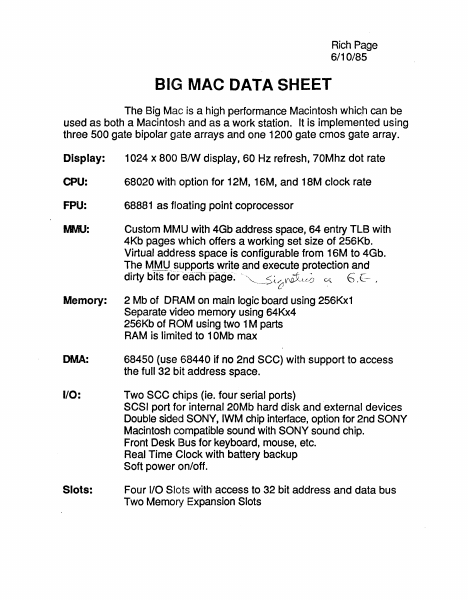
Rich Page 6/10/85 BIG MAC DATA SHEET The Big Mac is a high performance Macintosh whic.h can be used as both a Macintosh and as a work station. It is implemented using three 500 gate bipolar ~Jate arrays and one 1200 gate cmos gate array. Display: 1024 x 800 8IW display, 60 Hz refresh, 70Mhz dot rate CPU: 68020 with option for 12M, 16M, and IBM clock rate FPU: 68881 as floating point !coprocessor NIJIU: Custom M~I1U with 4Gb ,address space, 64 entry TLB with 4Kb pages which offers a working set size of 256Kb. Virtual address space is configurable from 16M to 4Gb. The MMU~ supports write and execute protection and <{/ V'iJ;,-u_~ ~ 6 dirty bits for ea-ch-page. - ~"~----./ U . ,c-- I Memory: 2 Mb of DRAM on main logic board using 256Kx1 Separate video memory using 64Kx4 256Kb of ROM using two 1M parts RAM is limited to 10Mb max DMA: 68450 (use 68440 if no 2nd SCC) with support to access the full 32 bit address space. 1/0: Two see chips (ie. four serial ports) SCSI port for internal 20Mb hard disk and external devices Double sided SONY, IWM chip interface, option for 2nd SONY Macintosh compatible sound with SONY sound chip. Front Desk Bus for keyboard, mouse, etc. Real Time ()Iock with battery backup Soft power on/off. Slots: Four 1/0 Slots with access to 32 bit address and data bus Two Memory Expansion Slots Rich Poge 61G MAC LOGIC BLOCK DIAGRAM 6/2/85 68440 CPU DMA 68020 OR 68450 1\1-1\4 FPU FOUR I/O SLOTS 68881 GATE ARRAV-3 SOUND &. VIDEO TIMING 0, 031-D24 ROM'256Kb GATE ARRAV-1A NUX 16 TO 8 VIDEO COUNTER SCC IWM SCSI CLOCK FRONT DESK MMU WITH 64 ENTRV TLB VIDEO RAM (8 - 64Kx4) , GATE ARRAV-1B NUX 1B TO 9 SND COUNTER . . CSC :F109 :F161 70M CPU 7.8M -_ MODE = 1 ~---.. .... GATE ARRAV-4 NUX 20 TO 10 SND COUNTER 35M GATE ARRAV-2 CLOCK GENERATOR MAIN RAM EXPANSION RAM (32 - :>56KxO (32 - 1Mx1)
Home Documents Macintosh Dbg Io
Dbg Io

Dbg Io

Macintosh · PDF
Filenamedbg-io.pdf
Size0.56 MB
Subsection prototypes / 1985_YACC / firmware / yaccsbug
Downloads6
Enjoying MacTrove? Anonymous downloads are free and unlimited. Create a free account to track favorites, contribute metadata corrections, and join the community chat.
Reader
Dbg Io
/
Loading…
OCR / Text contents
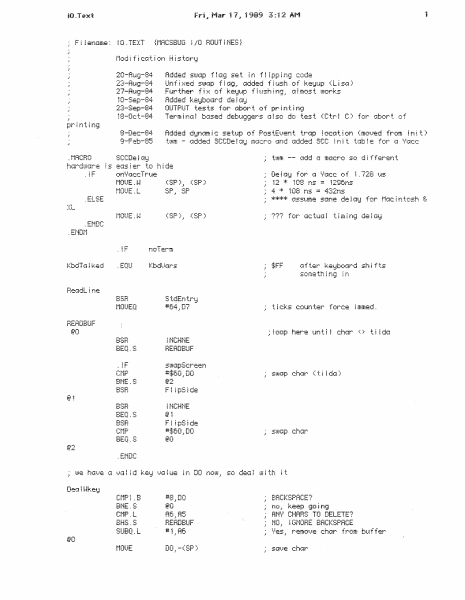
{MRCSBUG 1/0 HOUTiNES} Filename: 10.TEXT 20-Rt49-84 23-Au:;!-a4 27-Aui;,i-84 10-Sep-84 23-Sep-84 18-0c:t-84 Added SUhJP f f G9 set i r! f ~ i pp i n9 code Un f i ::-::ed ss..aJGP f ~ G';i .· 1::;dded f ~ t.ish of keiJup ( L i sG > Ft~r ther f i ::{ of kei:::t~p f ~ ush i n9 .: G i m::1s t uJor·ks Added ke!JboGrd de ! Gi:J OUTPUT tests for..- abort.. of pr i n;:. t r-ig Term i t""iG j bc~sed debuggers 1J l so de; test (Ctr I C ) for Gbc~r t er f 8-Dec-84 :..J.-e.-•. -. 1:.•.•;:_}'_ .~F (SP)l· •-·u .._:t ' <SP) CC• ._:; 1296ns 12 * 108 ns 4 108 ns = 4:32ns * .ELSE } .. L (SP)_, <SP) !F ncT:rm .EQU Kbd!.);~rs after keyboard shifts some th ~ ni;l ; r~ S tdEri tr!:i #64.:D7 t i cks c:ot~n t..er..· f orc:e i mmed . REAOBUF BSH !MCHNE HERDBUF swGpSc:reeri *$60.~DO swap char Ctilda) 8ME . S F ~ ipS ~de *$C=0 .=DD BEQ . S @2 .amc #8 .• DO BACKSPACE? . . BNE.S ~;o no.: Keep go i r-u;} A6.:A5 BHS.S BEADBUF SUBQ.L #1.,Ati ANii CHAH~:; TO DELETE? NO·' i GNOHE BACKSPACE :/es.: remc::.}e c:hcu-· f r·om buffer DO_: -(SP) BSB M01...'E C:!"lPI .B BACKSPACE? •8_,DO BEADBUF k;:::epi t ~ s ! t =:1 C:~rr j ct:~e Beturr1? no, stuff into 10 buffer #' otherwise stuff a space ±£::!·f""! iUi ~· •.j._Z!...,l .t !....~::_,: UpLoop res tore post e 1...=en t s tJJ ff pos tE 5......=er1 t ~ HU #:t;2F .~DO _Set Trc1pAddre:ss (SP)+ .: $28 (SP )+} DO-D7 /RO-A~3 restore RTS 'r~ r ; wait for al~ keys to be up (kwk) TBAPTO __J~·=OLL i;je t CLB. i-J DO set up for ~:.et:JCZ:n:Je TRAP TO TST. ~-~ BME.S pend i ni~ ke;~ e1.}en ts *$48 .=DO BETUBN kei:JC:ode = :i;4f! _r:. _e!:1 ! SUOUJn test the keiJ i s the r·e turn kei.J st j !Jes; keep test i ri=~ :: ..- : r-. 01 t~pLoop THAPTO now f !ush the key up event no r-epeci ts - ch:!r; : t !J.h:.i i t... for e ._h::r-d:. 1 TRAP TO the _ELSE BSH.S ~nchNE wait for post up •KeyOwnEvt,keyEvt i_IJ(4S ~!G no, keep checking i +.. Ci keydCdlin? MULH-! *4~: SP BRA Deci ! i-i~:.ei::1 SUBQ #Ke!JUpE :.} +.. .• ke1::1Et} t upLi:•i:ip no, keep looping DO~, (Afi )+ stuff into buffer BNE.S ilh~S j t G kei:JUP? .ENDC keepit BSB.S Uploop 17 - - ..:.. BBA ~NPUT HEAD8UF A CHAH (NO ECHO) iF t·1Dt)E. L .. .-. onLiSi:Jirue=u : ~ ,-= .-,, -i ! : i :...,..: ! n.~ n z did 24/60ths sec rol BEQ . S r~1cn}E. B #02 .~ t} i FH(A 1) RDDQ ii; n- ; n'? _,~·; DDBG .EMDC BLT.S 9c:Ke!J *O.tD7 KbdT::A I ked fiAke the keyboGrd non-t::~ Jk i omem ;.}ee:tc1r .EMDC CLFi. i·i iF THRPTO _f 0LL r·iOi..JEO t·Kli..JEQ TF!RPTG #0 . ~ DO iiO .: D1 1 TST.B DO p;::-n .::: :;._•,,_·-:. ·-· Got.Ke!:4 TST.B BEQ.S Ct1P. B Got..Ke1::1 #1 .rD2 BEQ . S D2 s s nee ~ nterrt~pts off.= poi key repeG ts n1) t. okc~u:J dor-;: t ?.!J!:-4 ! t for e;. .;er-!t_ QE: t_ the ~:. ei:Jboard ei.}en t has cu··11::: th i ng hc1ppened? no e!.}en t. d i sk ilpouJer e=.}en t ~? ( Gsc: i 0) iJes .: i 9nore i) GotJ:~e!:i from CLH D2.; ke!JH it .ELSE <ki.uk) ~.}~A.=R1 BTST…

Showing first 3,000 characters of 11,785 total. Open the full document →

Home Documents Macintosh BIGMAC Pgmrs Model 8 85
BIGMAC Pgmrs Model 8 85

BIGMAC Pgmrs Model 8 85

Macintosh · PDF
FilenameBIGMAC_Pgmrs_Model_8-85.pdf
Size0.26 MB
Subsection prototypes / 1985_Big_Mac
Downloads4
Enjoying MacTrove? Anonymous downloads are free and unlimited. Create a free account to track favorites, contribute metadata corrections, and join the community chat.
Reader
BIGMAC Pgmrs Model 8 85
/
Loading…
OCR / Text contents
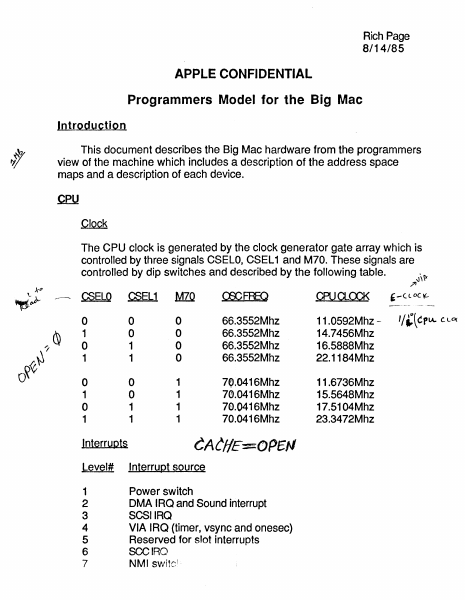
Rich Page 8/14/85 APPLE CONFIDENTIAL Programmers Model for the Big Mac Introduction This document describes the Big Mac hardware from the programmers view of the machine which includes a description of the address space maps and a description of each device. The CPU clock is generated by the clock generator gate array which is controlled by three signals CSELO, CSEL 1 and M70. These signals are controlled by dip switches and described by the following table. x" ~ELQ \.~ ~ ,~ / rr} O~ ~EL1 MIQ ~FREQ ®a...CCK 0 1 0 1 0 0 1 1 0 0 0 0 66.3552Mhz 66.3552Mhz 66.3552Mhz 66.3552Mhz 11.0592Mhz 14.7456Mhz 16.5888Mhz 22.1184Mhz 0 1 0 1 0 0 1 1 1 1 1 1 70.0416Mhz 70.0416Mhz 70.0416Mhz 70.0416Mhz 11.6736Mhz 15.5648Mhz 17.5104Mhz 23.3472Mhz CACHE:50PE# lnterrupts Level# Interrupt source 1 2 3 4 5 Power sW'itch DMA IRQ and Sound interrupt SCSI IRQ VIA IRQ (timer, vsync and onesec) Reserved for slot interrupts SCCIRO NMI SVJitc 6 7 l , , - ( L DC \l.- -_. -~"-- .. __ ."- '/~\CPlA. C.LD( Rich Poge 8/14/85 Big Moe Address Spoce Mop (Supervisor Stet e) --. - ~ XXF9000 0 XXEOOOOO XXDOOOOO XXCOOOo"O I/O SLOTS XXAOOOOO XX900000 XX800000 XX700000 XX600000 XX500000 XX400000 XX300000 XX200000 XX100000 XXOOOOOO XXFEOOOO XXFDOOOO MMU ROM high i XXBOOOOO XXFFOOOO reserved (" ""\ xx~pooo XXFBOOOO XXFAOOOO XXF90000 reserved ---,-"-- DMA VTG ---- IWM VIA SCC RAM RAM RAM RAM RAM or ROM low RAM RAM RAM RAM or ROM zero XXFOOOOO --'-.--- SCSI SCREEN RAM -- reserved ---- Rich Poge 8/14/85 Big Moe Address Spoce Mnp (User stote) r I/O Frrooooo FFFFOOOO FFEOOOOO DMA MMU (no 6ccess) FFCOOOOO ROM high - VIA FFFBOOOO reserved FFBOOOOO ...,,-----.-.--- - FFF90000 SCC ,----==--- SCSI _. - SCREEN FF AOOODO FFFOOOOO L I I 0070000 0 - RAM _. RAM 00600000 - RAM 00500000 RAM or ROM low 00400000 0030000'0 -, IWM FFFCOOOO FFFAOOOO -, VTG FFFDOOOO FFDOOOOO reserved I- FFFEOOOO SLOTS - RAM I- 00200000 00100000 00000000 I - RAM RAM RAM or ROM zero ...J reserved - cpu (continued) Bus Error A bus error can be generated by either the AS watchdog or the MMU. The AS watchdog will generate a bus error for bus cycles longer than 2us. Hjgh Decode Map Register There exists a 4 bit register (located on the VIA) which controls the position of the ROM and provides a mechanism to limit the number of address bits used for decoding logical addresses. This register can \~~ programmed to cause the high address bits (those above A23) to be significant to the decoding hardware. This allows a range of address space sizes from 24 to 32 bits. In the smallest configuration, the address space is limited to 16Mb and the upper eight bits are insignificant to decoding which will allow software to use the upper eight bits as tags. In the largest configuration, the address space is 4Gb and none of upper bits are available. Address Space Map The address space map is determined by the High Decode Map reg…

Showing first 3,000 characters of 6,366 total. Open the full document →
Home Documents Macintosh AUX Network Applications Programming
AUX Network Applications Programming

AUX Network Applications Programming

Macintosh · 1988 · PDF
FilenameAUX_Network_Applications_Programming_198809.pdf
Size5.05 MB
Year1988
Subsection a_ux
Downloads4
Enjoying MacTrove? Anonymous downloads are free and unlimited. Create a free account to track favorites, contribute metadata corrections, and join the community chat.
Reader
AUX Network Applications Programming
/
Loading…
OCR / Text contents
--A!UX® Network Applications Programming Beta/Final Draft 09/19/88 Michael Hinkson Developer Technical Publications This document contains preliminary information. It does not include: • final technical information • final editorial corrections •an index •Final art ©Apple Computer, Inc. 1988 ti APPLE COMPUTER, INC. This manual and the software described in it are copyrighted, with all rights reserved. Under the copyright laws, this manual or the software may not be copied, in whole or part, without wrinen consent of Apple, except in the normal use of the software or to make a backup copy of the software. The same proprietary and copyright notices must be affixed to any permitted copies as were affixed to the original. This exception does not allow copies to be made for others, whether or not sold, but all of the material purchased (with all backup copies) may be sold, given, or loaned to another person. Under the law, copying includes translating into another language or format. :( You may use the software on any computer owned by you, but extra copies cannot be made for this purpose. © Apple Computer, Inc., 1987 20525 Mariani Ave. Cupertino, California 95014 (408) 996-1010 Apple, the Apple logo, AppleTalk, Macintosh, MacTerminal, ImageWriter, and LaserWriter are registered trademarks of Apple Computer, Inc. Apple Desktop Bus, EtherTalk, and A/UX are trademarks of Apple Computer, Inc. ITC Avant Garde Gothic, ITC Garamond, and ITC Zapf Dingbats are registered trademarks of International Typeface Corporation. Microsoft is a registered trademark of Microsoft Corporation. II PostScript is a registered trademark, and Illustrator is a trademark, of Adobe Systems Incorporated. DEC and VflOO are trademarks of Digital Equipment Corporation. UNIX is a registered trademark of AT&T Information Systems. Simultaneously published in the United States and Canada. LIMITED WARRANTY ON MEDIA AND REPLACEMENT If you discover physical defects in the manuals distributed with an Apple product or in the media on which a software produc.t is distributed, Apple will replace the media or manuals at no charge to you, provided you return the item to be replaced with proof of purchase to Apple or an authorized Apple dealer during the ~day period after you purchased the software. In addition, Apple will replace damaged software media and manuals for as long as the software produc.t is included in Apple's Media Exchange Program. While not an upgrade or update method, this program offers additional protection for up to two years or more from the date of your original purchase. See your authorized Apple dealer for program coverage and details. In some countries the replacement period may be different; check whh your authorized Apple dealer. ALL IMPLIED WARRANTIES ON THE MEDIA AND MANUALS, INCLUDING IMPLIED WAR-RANTIES OF MERCHANTABIL-ITY AND FITNESS FOR A PARTICULAR PURPOSE, ARE LIMITED IN DURATION TO NINETY (90) DAYS FROM THE DATE OF THE ORIGINAL RETAIL PURCHASE OF THI…

Showing first 3,000 characters of 132,370 total. Open the full document →
Home Documents Macintosh BIGMAC Pgmrs Model 6 85
BIGMAC Pgmrs Model 6 85

BIGMAC Pgmrs Model 6 85

Macintosh · PDF
FilenameBIGMAC_Pgmrs_Model_6-85.pdf
Size0.26 MB
Subsection prototypes / 1985_Big_Mac
Downloads3
Enjoying MacTrove? Anonymous downloads are free and unlimited. Create a free account to track favorites, contribute metadata corrections, and join the community chat.
Reader
BIGMAC Pgmrs Model 6 85
/
Loading…
OCR / Text contents
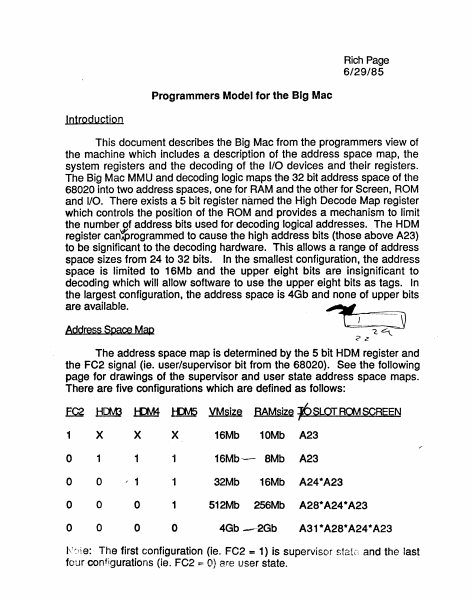
Rich Page 6/29/85 Programmers Model for the Big Mac Introduction This document describes the Big Mac from the programmers view of the machine which includes a description of the address space map, the system registers and the decoding of the I/O devices and their registers. The Big Mac MMU and decoding logic maps the 32 bit address space of the 68020 into two address spaces, one for RAM and the other for Screen, ROM and I/O. There exists a 5 bit register named the High Decode Map register which controls the position of the ROM and provides a mechanism to limit the number of address bits used for decoding logical addresses. The HOM register can'$rogrammed to cause the high address bits (those above A23) to be significant to the decoding hardware. This allows a range of address space sizes from 24 to 32 bits. In the smallest configuration, the address space is limited to 16Mb and the upper eight bits are insignificant to decoding which will allow software to use the upper eight bits as tags. In the largest configuration, the address space is 4Gb and none of upper bits ~ __--==:::::::::::::==-:-- are available. CJ (. ~:J Address S pace Map <z The address space map is determined by the 5 bit HOM register and the FC2 signal (ie. user/supervisor bit from the 68020). See the following page for drawings of the supervisor and user state address space maps. There are five configurations which are defined as follows: .EQg HOO !-Dy14 tpv15 VMsize RAMsize t>S.LQr RaJ! SCREEN 1 x x x 16Mb 10Mb A23 o 1 1 16Mb -- 8Mb A23 o o ,. 1 '1 32Mb 16Mb A24 *A23 o o o 1 512Mb 256Mb A28* A24 * A23 o o o o I\\~~te: 4Gb ---·2Gb A31 *A28* A24 * A23 The first configuration (ie. FC2 = 1) is supervisor state and the last four configurations (ie . FC2 == 0) are user state. Rich Pege 6/21/85 - Big Moc Address Spoce Map (~upervisor Stcte) r I/O XXFOOOOO SLOTS XXFFOOO XXFEOOO System Regi ster-- ~-l _.- ° ° DMA ~T G.,S NO., RT XXFDOOOO XXDOOOOO XXCOOOOO XXBOOOOO reserved I--~--~ ROM h1gh L----=~--~ re s erv ed r--~--~ , XXFCOOOO XXFBOOOO IWM L.. SCC2 ..... SCC1 XXFAOOOO "-- XXF90000 L....- SCSI SCREEN XX90qOOO XXSOOOOO XX700000 XX60qooO RAM .:sou C.l \'=c> I...-- - ]- -".- -'-..J RAM I---'--~ RAM I----~ RAM RAM )()(SOO,OOO I---'-~ XX40QPOO RAM or ROM! low I--=~~~ XX300POO I---'-~ RAM RAM RAM )()(OOOOOO MMU XFOOOOO I~ \ .c., F.D.B _I\fi RAM or ROM zero -.....,/.---~~~- - : ~ -~~~ Q<~~~~ -- / R1Ch Page 6/21/85 Big M8C Address Sp8ce M8P (User State) .,......... FFFOOOOO FFEOOOOO FFDOOOOO FFCOOOOO FFBOOOOO FFAOOOOO . I/O SLOTS FFFFOOOO FFFEOOOO FFFDOOOO reserved ROM high reserved FFFCOOOO FFFBOOOO FFFAOOOO FFF90000 00600000 00500000 00400000 00300000 00200000 00100000 00000000 DMA VTG,SND ,RTC,FDB IWM SCC2 SCCl SCSI ._---,- SCREEN FFFOOOOO 00700000 System Regi ster RAM RAM RAM RAM or ROM low RAM RAM RAM RAM or ROM zero MMU -- Note: The bi ts HDM3, HDM4 and HDM5 define t…

Showing first 3,000 characters of 6,241 total. Open the full document →
Home Documents Macintosh AUX 3.0 Networking Essentials
AUX 3.0 Networking Essentials

AUX 3.0 Networking Essentials

Macintosh · 1992 · PDF
FilenameAUX_3.0_Networking_Essentials_1992.pdf
Size7.91 MB
Year1992
Subsection a_ux / aux_3.0
Downloads3
Enjoying MacTrove? Anonymous downloads are free and unlimited. Create a free account to track favorites, contribute metadata corrections, and join the community chat.
Reader
AUX 3.0 Networking Essentials
/
Loading…
OCR / Text contents
A/UX Networking Essentials Release 3.0 limited Warranty on Media and Replacement If you discover physical defects in the manuals distributed with an Apple product or in the media on which a software product is distributed, Apple will replace the media or manuals at no charge to you, provided you return the item to be replaced with proof of purchase to Apple or an authorized Apple dealer during the 90-day period after you purchased the software. In addition, Apple will replace damaged software media and manuals for as long as the software product is included in Apple's Media Exchange Program. While not an upgrade or update method, this program offers additional protection for up to two years or more from the date of your original purchase. See your authorized Apple dealer for program coverage and details. In some countries the replacement period may be different; check with your authorized Apple dealer. All IMPLIED WARRANTIES ON THE MEDIA AND MANUMS, INCLUDING IMPLIED WARRANTIES OF MERCHANTABIIJTY AND FITNESS FOR A PARTICUIAR PURPOSE, ARE LIMITED IN DURATION TO NINETY (90) DAYS FROM THE DATE OF THE ORIGINAL RETAIL PURCHASE OF nns PRODUCT. Even though Apple has tested the software and reviewed the documentation, APPLE MAKES NO WARRANTY OR REPRESENTATION, EITHER EXPRESS, OR IMPLIED, WITH RESPECT TO SOFTWARE, ITS QUALITY, PERFORMANCE, MERCHANTABIIJTY, OR FITNESS FOR A PARTICUIAR PURPOSE. AS A RESULT, nns SOFTWARE IS SOID "AS IS," AND YOU, THE PURCHASER, ARE ASSUMING THE ENTIRE RISK AS TO ITS QUALITY AND PERFORMANCE. IN NO EVENT WILL APPLE BE IJABLE FOR DIRECT, INDIRECT, SPECIAL, INCIDENTAL, OR CONSEQUENTIAL DAMAGES RESULTING FROM ANY DEFECT IN THE SOFTWARE OR ITS DOCUMENTATION, even if advised of the possibility of such damages. In particular, Apple shall have no liability for any programs or data stored in or used with Apple products, including the costs of recovering such programs or data. THEWARRANTY AND REMEDIES SET FORTII ABOVE ARE EXCLUSIVE AND IN LIEU OF All OTHERS, ORAL OR WRITTEN, EXPRESS, OR IMPLIED. No Apple dealer, agent, or employee is authorized to make any modification, extension, or addition to this warranty. Some states do not allow the exclusion or limitation of implied warranties or liability for incidental or consequential damages, so the above limitation or exclusion may not apply to you. This warranty gives you specific legal rights, and you may also have other rights which vary from state to state. 9 Apple Computer, Inc. © 1992, Massachusetts Institute of Technology and Apple Computer, Inc. All rights reserved. No part of this publication may be reproduced, stored in a retrieval system, or transmitted, in any form or by any means, mechanical, electronic, photocopying, recording, or otherwise, without prior written permission of Apple Computer, Inc. Printed in the United States of America. The Apple logo is a registered trademark of Apple Computer, Inc. Use of the "keyboard" logo (OptionShift-K) for commercial purposes w…

Showing first 3,000 characters of 337,225 total. Open the full document →

Subscribe to Macintosh
mp.ls