Home Documents Macintosh MPW 3.0 Reference Volume 2
MPW 3.0 Reference Volume 2

MPW 3.0 Reference Volume 2
Macintosh · 1988 · PDF
FilenameMPW_3.0_Reference_Volume_2_1988.pdf
Size13.41 MB
Year1988
Subsection developer / MPW
Downloads2
Enjoying MacTrove? Anonymous downloads are free and unlimited. Create a free account to track favorites, contribute metadata corrections, and join the community chat.
Reader
MPW 3.0 Reference Volume 2
/
Loading…
OCR / Text contents
Part II Command Reference Part II Command Reference Part II is a conunand dictionary that describes each of the tools, scripts, and built-in conunands of the Macintosh Programmer's Workshop 3.0. When you have become sufficiently familiar with the material in Part I, you can move Part II to a smaller separate binder for convenient desktop reference. (You may also want to include frequently used appendixes or tables in the separate binder.) Please be sure to read the next section, "Conunand Prototype," which explains the format for all conunand deSCriptions and defines the basic behavior of all conunands .• Contents Conunand Prototype 6 AddMenu-add menu item 9 Adjust-adjust lines 13 Alert---display an alert box 14 Alias---define or write conunand aliases 15 Align-align text to left margin 17 Asm-MC68xxx Macro Assembler 18 Backup-folder file backup 25 Beep-generate tones 34 Begin ... End-group conunands 36 Break-break from For or Loop 38 BuildConunands-show Build commands 40 BuildMenu-create the Build menu 42 BuildProgram-build the specified program 43 C-C Compiler 45 Canon-canonical spelling tool 49 Catenate-concatenate files 52 CheckIn-check in files to a project 54 CheckOut-check out files from a project 57 CheckOutDir-set checkout directory 61 Choose-choose or list network volumes and printers 64 Clear-clear the selection 68 Close-close specified windows 69 1 Conunando-display dialog for a command 71 Compare-compare text files 73 CompareFiles-show file differences 79 CompareRevisions-compare revisions 81 Confirm-display confirmation dialog box 83 Continue-continue with next iteration of For or Loop 85 Copy-copy selection to Clipboard 87 Count-count lines and characters 89 CPlus-C++ compiling system 91 CreateMake-create a simple makefile 96 Cut-copy selection to Clipboard and delete it 99 Date-write the date and time 100 Delete-delete files and directories 102 DeleteMenu-delete user-defined menus and items 104 DeleteNames--delete symbolic names 105 DeleteRevisions--delete revisions and branches 107 DeRez-Resource decompiler 109 Directory-set or write the default directory 113 DirectoryMenu-create the Directory menu 115 Dolt-highlight and execute a series of conunands 117 DumpCode-write formatted resources 119 DumpFile-display contents of an arbitrary file 122 DumpObj-write formatted object file 125 Duplicate-duplicate files and directories 128 Echo-echo parameters 130 Eject-eject volumes 132 Entab-<:onvert runs of spaces to tabs 133 Equa1-compare files and directories 136 Erase-initialize volumes 139 Evaluate-evaluate an expression 140 Execute-execute a script in the current scope 145 Exists-<onfirm the existence of a file or directory 146 Exit-exit from a script 147 Export-make variables available to programs 148 FileDiv-divide a file into several smaller files 150 Files-list files and directories 152 Find-find and select a text pattern 155 Flush-<:lear the conunand cache 157 For...-repeat conunands once per parameter 158 2 MPW 3.0 Refer…

Showing first 3,000 characters of 443,907 total. Open the full document →
Home Documents Macintosh Presenting Macaroni Draft
Presenting Macaroni Draft

Presenting Macaroni Draft

Macintosh · 1989 · PDF
FilenamePresenting_Macaroni_draft_198905.pdf
Size5.76 MB
Year1989
Subsection developer / Hypercard
Downloads3
Enjoying MacTrove? Anonymous downloads are free and unlimited. Create a free account to track favorites, contribute metadata corrections, and join the community chat.
Reader
Presenting Macaroni Draft
/
Loading…
OCR / Text contents
Macaroni Presenting Macaroni Abstract Macaroni is an im.eractive training tool for helping people learn the Macintosh Toolbox. It gives curriculum developers a medium for writing interactive courseware about Macintosh programming. This manual presents Macaroni and shows how it works. ( ti Apple Computer, Inc. DISCLAIMER AND LIMIT ATION OF LIABILITY (' This manual describes preliminary software that has not been fully tested or documented and is provided early in the development process for your convenience and comment. As a result, TIDS MANUAL AND THE SOFTWARE WIDCH IT DESCRIBES ARE PROVIDED "AS-IS", AND YOU ARE ASSUMING THE ENTIRE RISK AS TO ITS QUALITY OR PERFORMANCE. APPLE EXPRESSLY DISCLAIMS ALL WARRANTIES, EXPRESS OR IMPLIED, INCLUDING, BUT NOT LIMITED TO, THE IMPLIED WARRANTIES OF MERCHANTABil.ITY AND FITNESS FOR A PARTICULAR PURPOSE. APPLE DOES NOT WARRANT THAT THE FUNCTIONS CONTAINED IN THE SOFIWARE Wil.L MEET YOUR REQUIREMENTS, OR THAT THE OPERATION OF THE SOFIWARE Wil.L BE UNINTERRUPTED OR ERROR-FREE, OR THAT DEFECTS IN THE SOFl'WARE Wil.L BE CORRECTED. FURTHERMORE. APPLE DOES NOT WARRANT OR MAKE ANY REPRESENTATIONS REGARDING THE USE OR THE RESULTS OF THE USE OF THE SOFTWARE OR RELATED DOCUMENTATION IN TERMS OF THEIR CORRECTNESS, ACCURACY, RELIABil.ITY, OR OTHERWISE. NO ORAL OR WRITTEN INFORMATION OR ADVICE GIVEN BY APPLE OR AN APPLE AUTHORIZED REPRESENTATIVE SHALL CREATE OR ENLARGE ANY WARRANTY. SHOULD THE SOFl'WARE PROVE DEFECTIVE, YOU ALONE ASSUME THE ENTIRE COST OF ALL NECESSARY SERVICING, REPAIR OR CORRECTION. ALL IMPLIED WARRANTIES ON THE SOFIWARE, THIS MANUAL OR THE MEDIA ON WHICH THEY ARE WRITTEN OR RECORDED. INCLUDING ANY IMPLIED WARRANTIES OF MERCHANTABil.ITY AND/OR FITNESS FOR A PARTICULAR PURPOSE, ARE LIMITED IN DURATION TO NINETY (90) DAYS FROM THE DATE OF THE ORIGINAL LICENSING FROM APPLE. If you discover a physical defect in the media on which the Software is recorded and you obtained your copy of the defective media directly from APDA, please contact APDA customer service at once (by calling (800) 282-2732) to request a replacement of the media. IN NO EVENT Wil.L APPLE BE LIABLE FOR DIRECT, INDIRECT, SPECIAL, INCIDENTAL, OR CONSEQUENTIAL DAMAGES RESULTING FROM ANY DEFECT IN THE SOFTWARE, even if advised of the possibility of such damages. In particular, Apple shall have no liability for any programs or dala stored or used with Apple products, including the costs of recovering such programs or data. In no event shall Apple's total liability to you for all damages, losses, and causes of action (whether in conttact. tort (including negligence) or otherwise) exceed the amount paid by you for the Software. Back up your entire hard disk before using the Software. THEWARRANTY AND REMEDIES SET FORTH ABOVE ARE EXCLUSIVE AND IN LIEU OF ALL OTHERS, ORAL OR WRITTEN, EXPRESS OR IMPLIED. SOME STATES DO NOT ALLOW THE EXCLUSION OR LIMITATION OF IMPLIED WARRANTIES OR INCIDENTAL OR CONSEQUENTIAL DAMAGES SO THE ABOVE LIMITATION OR…

Showing first 3,000 characters of 65,095 total. Open the full document →

Home Documents Macintosh Hypertalk Beginners Guide
Hypertalk Beginners Guide

Hypertalk Beginners Guide

Macintosh · 1989 · PDF
FilenameHypertalk_Beginners_Guide_198902.pdf
Size7.04 MB
Year1989
Subsection developer / Hypercard
Downloads4
Enjoying MacTrove? Anonymous downloads are free and unlimited. Create a free account to track favorites, contribute metadata corrections, and join the community chat.
Reader
Hypertalk Beginners Guide
/
Loading…
OCR / Text contents
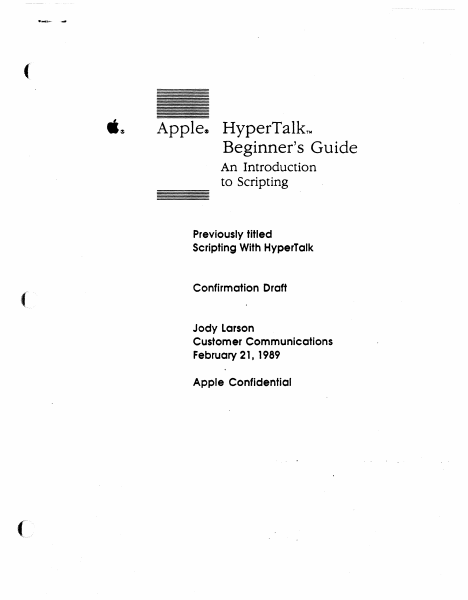
( .~ Apple~ HyperTalkTM Beginner's Guide An Introduction to Scripting Previously titled Scripting With HyperTalk ( Confirmation Draft Jody Larson Customer Communications February 21, 1989 Apple Confidential or It APPLE COMPLIER, INC Copyright e 1989 by Apple Computer, Inc. All rights reserved. No part of this publication may be reproduced, stored in a retrieval system, or transmitted, in any form or by any means, mechanical, electronic, photocopying, recording, or otherwise, without prior written permission of Apple Computer, Inc. Primed in the United States of America. © Apple Computer, Inc., 1989 20525 Mariani Avenue Cupertino, CA 950]4-6299 (408) 996-1010 Apple, the Apple logo, HyperCard, and Macintosh, are registered uademarks of Apple Computer, Inc. HyperTalk is a trademark of Apple Computer, Inc. ITC Zapf Dingbats is a registered trademark of International Typeface Corporation. Linotronic is a registered trademark of Linotype Co. POSTSCRIPT is a registered trademark, and Illustrator is a trademark, of Adobe Systems Incorpora ted. Varityper is a registered trademark, and VT600 is a trademark, of AM International, Inc. Simultaneously published III the Cniled Slates and Canada • • ( Contents Preface About This Guide vii What you need to know viii How to use this guide viii Conventions used in this guide ix For more information x Chapter 1 ( ( Getting Started 1 Start up HyperCard 2 Set your user level 3 Create a practice stack 4 Set up the background 6 Putting a title on the stack 7 Home, sweet Home 8 Making a button 9 Customizing the button 9 And now, a little scriptmg 11 Trying it out 13 Buttons for traveling 14 Making two new buttons 14 Customizing the button on the right 1S Customizing the button on the left 1S Completing the scripts 16 Fill out the stack 17 Adding a label field 17 Typing a label 18 Adding five new cards 18 A script to label all cards 19 Add a button to the Home card 21 What you've done so far 22 iii ) Chapter 2 Special Effects 25 Some visual effects 26 Adding graphics 27 The Visual command 28 Adding effects to the arrow buttons 28 Adding an effect to the Home button 30 Adding the same effect to the button on the Home card 31 More experiments with visual effects 32 Barn Door 33 Dissolve 34 The syntax of the Visual command 35 Some sound effects 32 The syntax of the Play command 33 Specifying the notes 37 Dealing with long lines 39 \X'hat you've done in this chapter 39 Chapter 3 More About Message, 41 Sending messages 42 Create a "Receiver" button 43 Send a message with the Message box 44 Create a "Sender" button 45 Action at a distance 43 Remove the handler from the button script 48 Move the handler to the card level 48 Move the handler to the background level 49 Change the handler 50 Confirming actions 53 A disappearing act 53 A command to put up an alert box 54 An additional action 56 If structures 51 Syntax summaries 59 Answer 59 Click 60 Hide 61 Send 61 Set 61 Show 62 Wait 62 \X'hat you've …

Showing first 3,000 characters of 198,742 total. Open the full document →

Home Documents Macintosh ResEdit 3.0d1 Users Guide
ResEdit 3.0d1 Users Guide

ResEdit 3.0d1 Users Guide

Macintosh · 1996 · PDF
FilenameResEdit_3.0d1_Users_Guide_19960419.pdf
Size0.28 MB
Year1996
Subsection developer / Resedit
Downloads3
Enjoying MacTrove? Anonymous downloads are free and unlimited. Create a free account to track favorites, contribute metadata corrections, and join the community chat.
Reader
ResEdit 3.0d1 Users Guide
/
Loading…
OCR / Text contents
ResEdit 3.0 User’s Guide For version 3.0d1 WWDC Release May 1996 © Apple Computer, Inc. 1984–1996 ð Apple Computer, Inc. © 1996 Apple Computer, Inc. All rights reserved. No part of this publication may be reproduced, stored in a retrieval system, or transmitted, in any form or by any means, mechanical, electronic, photocopying, recording, or otherwise, without prior written permission of Apple Computer, Inc., except to make a backup copy of any documentation provided on CD-ROM. The Apple logo is a trademark of Apple Computer, Inc. Use of the “keyboard” Apple logo (Option-Shift-K) for commercial purposes without the prior written consent of Apple may constitute trademark infringement and unfair competition in violation of federal and state laws. No licenses, express or implied, are granted with respect to any of the technology described in this book. Apple retains all intellectual property rights associated with the technology described in this book. This book is intended to assist application developers to develop applications only for Apple-labeled or Apple-licensed computers. Every effort has been made to ensure that the information in this manual is accurate. Apple is not responsible for typographical errors. Apple Computer, Inc. 1 Infinite Loop Cupertino, CA 95014 408-996-1010 Apple, the Apple logo, and Macintosh are trademarks of Apple Computer, Inc., registered in the United States and other countries. Geneva, Mac, Monaco, and ResEdit are trademarks of Apple Computer, Inc. Adobe, Acrobat, and PostScript are trademarks of Adobe Systems Incorporated or its subsidiaries and may be registered in certain jurisdictions. Helvetica and Palatino are registered trademarks of Linotype-Hell AG and/or its subsidiaries. ITC Zapf Dingbats is a registered trademark of International Typeface Corporation. QuickView™ is licensed from Altura Software, Inc. Simultaneously published in the United States and Canada. Even though Apple has reviewed this manual, APPLE MAKES NO WARRANTY OR REPRESENTATION, EITHER EXPRESS OR IMPLIED, WITH RESPECT TO THIS MANUAL, ITS QUALITY, ACCURACY, MERCHANTABILITY, OR FITNESS FOR A PARTICULAR PURPOSE. AS A RESULT, THIS MANUAL IS SOLD “AS IS,” AND YOU, THE PURCHASER, ARE ASSUMING THE ENTIRE RISK AS TO ITS QUALITY AND ACCURACY. IN NO EVENT WILL APPLE BE LIABLE FOR DIRECT, INDIRECT, SPECIAL, INCIDENTAL, OR CONSEQUENTIAL DAMAGES RESULTING FROM ANY DEFECT OR INACCURACY IN THIS MANUAL, even if advised of the possibility of such damages. THE WARRANTY AND REMEDIES SET FORTH ABOVE ARE EXCLUSIVE AND IN LIEU OF ALL OTHERS, ORAL OR WRITTEN, EXPRESS OR IMPLIED. No Apple dealer, agent, or employee is authorized to make any modification, extension, or addition to this warranty. Some states do not allow the exclusion or limitation of implied warranties or liability for incidental or consequential damages, so the above limitation or exclusion may not apply to you. This warranty gives you specific legal rights, and you may also have other rights…

Showing first 3,000 characters of 21,012 total. Open the full document →

Home Documents Macintosh Resedit 1.2 Reference
Resedit 1.2 Reference

Resedit 1.2 Reference

Macintosh · 1989 · PDF
FilenameResedit_1.2_Reference_198902.pdf
Size7.92 MB
Year1989
Subsection developer / Resedit
Downloads3
Enjoying MacTrove? Anonymous downloads are free and unlimited. Create a free account to track favorites, contribute metadata corrections, and join the community chat.
Reader
Resedit 1.2 Reference
/
Loading…
OCR / Text contents
( •. Macintosh~ Macintos~ ResEdit 1.2 Reference ( Final Draft. caution! This book is NOT a release version! It is for the Apple Computer Technical Library only! Do not distribute this book, or we will fmd "you, and you won't like it! (/ '* APPLE COMPUTER, INC. This manual and the © Apple Computer, Inc., 1989 software described in it are copyrighted, 20525 Mariani Avenue with all rights reselVed. UnGer . Cupertino, CA 95014-6299 the copyrJght laws, this manual (408) 996-1010 or the softWare may not be Apple and the Apple logo are cOp'ied, in whole or part, re~tered trademarks of without written consent of Apple Computer, Inc. App'le, except in the normal use APDA is a trademark of of the software or to make a Apple Computer, Inc. backup copy of the software. The same proprietary and ITC Zapf Dingbats is a copyright notices must be registered traaemark of affIxecf to any ~rmitted International Typeface copies as were affixed to the Corporation. original. This exception does not allow copies to be made for POSTSCRIPT is a registered others, whether or not sold, but trademark, and Illustrator is a trademark, of Adobe Systems all of the material purchased Incorporated. (with all backup copies) may be sold, given, or loaned to MacDraw®, MacWrite®, and another person. Under the law; MacPaint@ are registered copying includes translating trademarks of Claris into another language or Corporation. format. Simultaneously published in the You may use the software on United States and Canada. any computer owned by you, but extra copies cannot be made for this purpose. . The Apple logo is a registered 2123/89 trademark orApple Computer, Inc. Use of the "keyboard" Apple logo (Option-Shift-K) for commercIal purposes without the prior written consent of Apple may constitute trademark infringement and unfair competition in violation of federal and state laws. Table of Contents 1 .~ .' \ ( ResEdit Overview 3 Resources 5 Resource categories in ResEdit Uses 7 Extensibility 8 The resource development cycle 6 8 2 Gettlng Started 7 Invoking ResEdit 9 Working with ftIes 10 Working within a ftIe 12 Working within a resource type 14 Resource ID numbers 18 3 Editing Individual Resources Bit editors 21 Using the general editor 22 'WIND' resources 22 'ALR!' and 'DLOG' resources 'Dffi' resources 26 'CURS' resources 29 'ICON'resources 31 'ICN#' resources 32 'SICN' resources 33 'FONT' resources 34 Editing 'FONT' resources 'PAT' resources 39 'PAT#' resources 40 'INTI', 'itlO', and 'itll' resources 'KCHR' resources 42 The main 'KCHR' editor The character chart 43 The table chart 43 The virtual keycode chart The keyboard region The information region Editing dead keys 45 The dead key editor 45 The character chart 46 19 25 36 40 42 44 44 44 Table of Contents i The nomatch character 46 The completion and substitution character pair list The trashcan 46 The information region 46 The menus 46 The 'KCHR' menu 47 The Font menu 48 The Size menu 48 4 Using ResE…

Showing first 3,000 characters of 160,840 total. Open the full document →

Home Documents Macintosh ResEdit 1.2 Reference
ResEdit 1.2 Reference

ResEdit 1.2 Reference

Macintosh · 1989 · PDF
FilenameResEdit_1.2_Reference_19890223.pdf
Size8.32 MB
Year1989
Subsection developer / Resedit
Downloads3
Enjoying MacTrove? Anonymous downloads are free and unlimited. Create a free account to track favorites, contribute metadata corrections, and join the community chat.
Reader
ResEdit 1.2 Reference
/
Loading…
OCR / Text contents
ti . Macintosh~ Macintos~ ResEdit 1.2 Reference Final Draft. Caution! This book is NOT a release version! It is for the Apple Computer Technical Library only! Do not distribute this book, or we will find you, and you won't like it! ti APPLE COMPUTER, INC. This manual and the software described in it are copyri~ted, with all rights reserved. Unaer the copyrJght laws, this manual or the softWare may not be copied, in whole or part, without written consent of Apple, except in the normal use of the soft:Ware or to make a backup copy of the software. The same proprietary and copyri1dit notices must be affixecf to any permitted copies as were affixed to the original. This exception does not allow copies to be made for others, whether or not sold, but all of the material purchased (with ~II backup copies) may be sold, given, or loaned to another person. Under the law,· copying includes translating into another language or format. You may use the software on any computer owned by you, but extra copies cannot be made for this purpose. The Apple logo is a registered trademark of Apple Computer, Inc. Use of the "keyboard" Apple 10$0 (Option-Shift-K) for commercial purposes without the prior wntten consent of Apple may constitute trademark infringement and · unfair competition in violation of federal and state laws. ©Apple Computer, Inc., 1989 20525 Mariani Avenue Cupertino, CA 95014-6299 (468) m.:1010 Apple and the Apple logo are re~tered trademarks of Apple Computer, Inc. APDA is a trademark of Apple Computer, Inc. ITC Zapf Dingbats is a registered traaemark of International Typeface Corporation. POSTSCRIPT is a registered trademark, and Illustrator is a trademark, of Adobe Systems Incorporated. MacDraw®, MacWrite®, and MacPaint@ are registered trademarks of Claris Corporation. Simultaneously published in the United States and Canada. 2/23/89 ( --"'. I ' ;I ' ' ( Table of Contents 1 ResEdit Overview 3 Resources 5 Resource categories in ResEdit Uses 7 Extensibility 8 The resource development cycle ( ( 6 8 2 Getting Started 7 Invoking ResEdit 9 Working with files 10 Working within a file 12 Working within a resource type 14 Resource ID numbers 18 3 Editing Individual Resources Bit editors 21 Using the general editor 22 'WIND' resources 22 'ALRT' and 'DLOG' resources 'DITT' resources 26 'CURS' resources 29 'ICON' resources 31 'ICN#' resources 32 'SICN' resources 33 'FONT' resources 34 Editing 'FONT' resources 'PAT ' resources 39 'PAT#' resources 40 'IN11', 1itl01, and 'itll' resources 'KCHR' resources 42 The main 'KCHR' editor The character chart 43 The table chart 43 The virtual keycode chart The keyboard region The information region Editing dead keys 45 The dead key editor 45 The character chart 46 19 25 36 40 42 44 44 44 Table of Contents i The nomatch character 46 The completion and substitution character pair list 46 The trashcan The information region 46 The menus 46 The 'KCHR' menu 47 The Font menu 48 The Size menu 48…

Showing first 3,000 characters of 162,105 total. Open the full document →

Home Documents Macintosh Resedit 2.1 Reference
Resedit 2.1 Reference

Resedit 2.1 Reference

Macintosh · 1990 · PDF
FilenameResedit_2.1_Reference_199009.pdf
Size10.91 MB
Year1990
Subsection developer / Resedit
Downloads3
Enjoying MacTrove? Anonymous downloads are free and unlimited. Create a free account to track favorites, contribute metadata corrections, and join the community chat.
Reader
Resedit 2.1 Reference
/
Loading…
OCR / Text contents
• It. For ResEdit 2.1 ResEdit Reference ,, ti. Beta Draft 1990 September 24 Developer Technical Publications @ Apple Computer, Inc. 1990 • • APPLE COMPUTER, INC. This manual is copyrighted by Apple or by Apple's suppliers, with all rights reserved. Under the copyright laws, this manual may not be copied, in whole or in part, without the written consent of Apple Computer, Inc. This exception does not allow copies to be made for others, whether or not sold, but all of the material purchased may be sold, given, or lent to another person. Under the law, copying includes translating into another language. The Apple logo is a registered trademark of Apple Computer, Inc. Use of the "keyboard- Apple logo (OptionShift-K) for commercial purposes without the prior written consent of Apple may constitute trademark infringement and unfair competition in violation of federal and state laws. Umited Warranty on MedJa and RepJacement If you discover physical defects in the manual or in the media on which a software product is distributed, APDA will replace the media or manual at no charge to you provided you return the item to be replaced with proof of purchase to APDA. AU IMPLIED WARBANTIES ON TIm MANUAL, INCLUDING IMPLIED WARBANTIES OF MERCHANrABIUI'Y AND Ffl'NESS FORA PAmctJLAR PURPOSE, ARE LIM1l'ED IN DURATION TO NINETY (90) DAYS FROM THE DATE OF THE ORIGINAL RETAIL PUROIASE OF TIm PRODUO. Apple Computer, Inc. Even though Apple has reviewed this manual, APPLE MAKFS NO WARRANTY OR REPRESENTATION, EIl'HER EXPRESS OR IMPLIED, wrm RESPECT TO THIS MANUAL, rrs QUAUI'Y, ACCURACY, MERCHANrABIUI'Y, OR Ffl'NESS FOR A PAmctJLAR PURPOSE. AS ARESULT, TIm MANUAL IS SOlD -AS IS," AND YOU, THE PURCHASER, ARE ASSUMING THE ENTIRE RISK AS TO ITS QUAUfY AND ACCURACY. ITC Zapf Dingbats is a registered trademark of International Typeface Corporation. IN NO EVENT WUl.APPLE BE IlABLE FOR DIRECT, INDIREO, SPEOAL, INaDENTAL, OR © Apple Computer, Inc., 199C~ 20525 Mariani Avenue Cupertino, CA 95014-6299 (408) 996-1010 Apple, the Apple logo, AIUX, HyperCard, MacApp, LaserWriter, and Macintosh are registered trademarks of Apple Computer, Inc. APDA, MPW, MultiFinder, and Switcher are trademarks of POsrscRIPT is a registefed trademark, and Illustrator is a trademark, of Adobe Systems Incorporated. Simultaneously published in the United States and Canada. CONSEQUEN11AL DAMAGES RESULTING FROM ANY DEFEO OR INACCURACY IN TIm MANUAL, even if advised of the possibility of such damages. THE WARRANTY AND REMEDIES SET FOIml ABOVE ARE EXOllSlVE AND IN LIEU OF AU OI'HERS, ORAL OR WRIlTEN, EXPRESS OR IMPLIED. No Apple dealer, agent, or employee is authorized to make any modification, extension, or addition to this warranty. Some states do not allow the exclusion or limitation of implied warranties or liability for incidental or consequential damages, SO the above limitation or exclusion may not apply to you. This warranty gives you specific legal rights, and you may also have ot…

Showing first 3,000 characters of 234,764 total. Open the full document →

Home Documents Macintosh MacApp 2.0b5 UTEView Release Notes
MacApp 2.0b5 UTEView Release Notes

MacApp 2.0b5 UTEView Release Notes

Macintosh · 1988 · PDF
FilenameMacApp_2.0b5_UTEView_Release_Notes.pdf
Size0.96 MB
Year1988
Subsection developer / MacApp / MacApp_2.0b5
Downloads2
Enjoying MacTrove? Anonymous downloads are free and unlimited. Create a free account to track favorites, contribute metadata corrections, and join the community chat.
Reader
MacApp 2.0b5 UTEView Release Notes
/
Loading…
OCR / Text contents
MacApp 2.0b5 UTEView Release Notes Russ Wetmore Overview This document documents changes and additions to the UTEView unit of MacApp. There are several reasons why these changes were desirable: • • • • To support the new MacApp 2.0 display architecture To add support for the new, "styled" TextEdit To simplify the unit and add consistency To improve its (already substantial) memory management facilities There are a couple of limitations which prevent TTEView from fully conforming to the new MacApp 2.0 display architecture. They are: • The text in a TextEdit record (TERec. hText) is limited to 32K characters • The height of the entire record must be less than 32K pixels tall. For these reasons, TIEView objects cannot take advantage of MacApp's 32-bit view coordinates The new TextEdit stresses memory management with more relocatable data structures, and many more temporary objects. TIEView tries its best to assure that any TIECommand is undoable. With version 1.0/1.1, however even with the precautions taken it is still possible to run into out-of-memory conditions that prevent undoing commands. The addition of extra data structures/objects just intensifies the need for new algorithms to assure that any command will be undoable. Note: In the descriptions that follow, new or changed methods, fields, and parameters are underlined. Global Constants cStyleChange kUnlimited kWithStyle kWithoutStyle kSaveCurrentChars (= 130) (= MAXINT) (= TRUE) (= FALSE) (= TRUE) "Menu" command for style change. The maximum number of characters in the fText of a TTEView object. Parameter to TTEView . ITEView. Parameter to TTEView. ITEView . Parameter to TTECommand. ITECommand. The TTEView Class The following changes have been made for TTEView: • fFont. fSize and fStyle have been replaced by a single fTextStyle record of type TextStyle. TextStyle is a data structure used by the new TextEdit. and is defined as TextStyle = RECORD tsFont tsFace tsSize tsColor END; INTEGER; Style; INTEGER; RGBColor; • TTEView. ITEView has been simplified. Some rarely used parameters have been removed (such as itsKeyCmdNumber and itsMaxChars) and others have been bunched together. A new parameter itsStyleType signifies whether the TERecord is "styled" or not. • TTEView. Inspect and TTEView. ShowDebugInfo have been replaced by the new Inspector-supported TTEView. Fields. Fields fHTE fText fSavedTEHandle fInset fKeyCmdNumber fMaxChars fTypingCommand fTextStyle fJust ificat ion fAcceptsChanges fStyleType fAutoWrap fFreeText fSpecsChang-ed fLastHeig-ht fScrol1er fLastPag-eBreak fLastLine Wed. Aug 3.1988 Handle to the actual TextEdit object. The text in the TEHandle. Saved handle from TENew. A rectangle defining the amount of pixels to inset the TERecord's viewRect from view's extent Thus, fInset defines margins around the edges of the view. Views whose text autowraps should have a bottom margin of zero. Will be used as the string number for "Undo Typing." Maximum number of cha…

Showing first 3,000 characters of 22,941 total. Open the full document →

Home Documents Macintosh MacApp 2.0b5 UDialog Release Notes
MacApp 2.0b5 UDialog Release Notes

MacApp 2.0b5 UDialog Release Notes

Macintosh · 1988 · PDF
FilenameMacApp_2.0b5_UDialog_Release_Notes.pdf
Size2.04 MB
Year1988
Subsection developer / MacApp / MacApp_2.0b5
Downloads2
Enjoying MacTrove? Anonymous downloads are free and unlimited. Create a free account to track favorites, contribute metadata corrections, and join the community chat.
Reader
MacApp 2.0b5 UDialog Release Notes
/
Loading…
OCR / Text contents
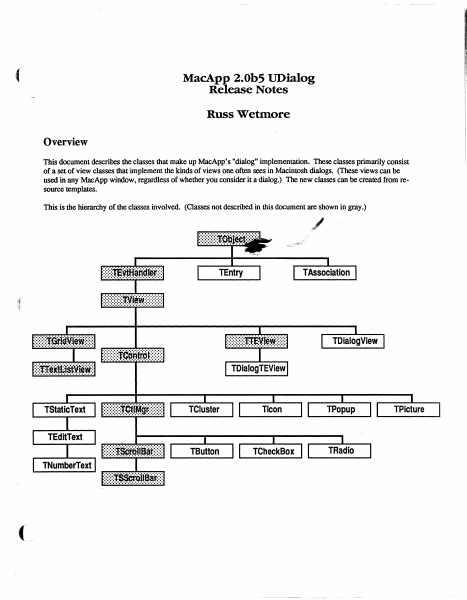
MacApp 2.0b5 UDialog Release Notes Russ Wetmore Overview This document describes the classes that make up MacApp's "dialog" implementation. These classes primarily consist of a set of view classes that implement the kinds of views one often sees in Macintosh dialogs. (These views can be used in any MacApp window, regardless of whether you consider it a dialog.) The new classes can be created from resource templates. This is the hierarchy of the classes involved. (Classes not described in this document are shown in gray.) TEntry Global Constants Choices mOKHit mCancelHit mButtonHit mCheckBoxHit mClusterHit mEditTextHit mIconHit mListItemHit mListScrollBarHit mPictureHit mPopupHit '.i~adioHit !>1hStaticTextHit .III l!lIJiiGcrollBarHit ~VSCrOllBarHit mEditTabKey mEditReturnKey mEditEnterKey mPatternHit mControlHit 1: 2: 3: 4: 5: 6: 7: = 8: = 9: = 10: = 11; = 12; 13; 14; 15: 16; = 17: 18; 19; = 20: View Template Identifiers kNoIdentifier kNoTemplate kNoResource .. , = -1; -1; Miscellaneous kYesButton kNoButton kPreferColor kControlOn kRedraw kDontRedraw kFrame ChrOO Chr1F kMaxTEWidth Wed, Aug 3,1988 = 1: = 3: = TRUE; TRUE: = TRUE: = FALSE: [adnLineTop, adnLineLeft, adnLineBottom, adnLineRight): CHR(O): CHR($lF): $2BO; ©1988 Ii Apple Computer 2 ,t Global Types IDType = ResType; adornPieces adnLineTop, adnLineLeft, adnLineBottom, adnLineRight, adnDummy, adnOval, adnRRect, adnShadow ) ; Draw a line at the top of the extent. Draw a line on the left side of the extent. Draw a line at the bottom of the extent Draw a line on the right side of the extent. Placeholder (replaces adnPatFill). Do a FrameOval using the extent Do a FrameRoundRect using the extent Draw drop-shadows against framed selections. CntlAdornment SET OF adornPieces; ControlCharSet SET OF ChrO 0 .. ChrlF ; Used by TEdi t Text for allowable control chars. Global Routines PROCEDURE InitUDialog; This routine initializes the UDialog unit. It must be called before any of the view classes in this unit can be created from • view' resources. FUNCTION NewTemplateWindow (viewRsrcID: INTEGER; itsDocument: TDocument): TWindow; This routine creates a new Twindow (or descendant) from the • view' template with the given resource ID. PROCEDURE RegisterType (typeName: Str255; protoObj: TObject); This routine registers the given object (which can be an instance of any descendant of TObject) for use by TEvtHandler and its descendants when creating views from a template. The TEntry Class This class is used by TAssociation to form a very basic and cheap text item dictionary mechanism whose main use will be substitution of text in dialog-type window items. This class will be instantiated for each key string and its replacement that is desired in a dialog. A list of these entries is kept by a TAssociation. It is a simple subclass of TObject. To duplicate the present function of ParamText, you'd use ." 0 '. f " 1 '. ." 2 f • and ." 3 • for the fIrst four key strings. ( Wed. Au…

Showing first 3,000 characters of 50,912 total. Open the full document →

Home Documents Macintosh MacApp 2.0 ViewEdit Users Guide
MacApp 2.0 ViewEdit Users Guide

MacApp 2.0 ViewEdit Users Guide

Macintosh · 1988 · PDF
FilenameMacApp_2.0_ViewEdit_Users_Guide_198808.pdf
Size3.08 MB
Year1988
Subsection developer / MacApp / MacApp_2.0b5
Downloads2
Enjoying MacTrove? Anonymous downloads are free and unlimited. Create a free account to track favorites, contribute metadata corrections, and join the community chat.
Reader
MacApp 2.0 ViewEdit Users Guide
/
Loading…
OCR / Text contents
MacApp 2.0 ViewEdit User's Guide ViewEdit User's Guide preliminary draft 1 -WARNING - This is the first alpha release of ViewEdit. It is untested and not yet beta quality. It should be used with extreme caution: it may crash your system or even erase fIles from your hard disk. Save your work often and don't use ViewEdit when a system crash would cause you to lose data. Preface Welcome to the ViewEdit User's Guide, and to the power of ViewEdit. ViewEdit is a MacApp utility program that allows you to create view hierarchies in a what-you-see-is-what-you-get editing environment, rather than in a compiled resource file. ViewEdit gives you as much view-editing power as Rez but provides Commando-like dialogs for entering values into each 'view' resource field. This relieves you of having to remember which fields and values are associated with which 'view' types. ViewEdit also allows you to draw, resize, and move your views using the standard Macintosh interface. It even creates and rearranges your view hierarchies as you go! Before you read this document, you should understand these concepts: • View hierarchies. These are introduced in the "Architecture" section of Chapter 4 of the MacApp 2.x Manual (Interim Version). - View classes. These are described in the MacApp® 2.0B5 Display Architecture Release Notes. • View resources. These are explained in the "Creating View Templates" recipe in Chapter 7, "The CookBook", in the MacApp 2.x Manual (Interim Version). This guide is divided into two parts: a step-by-step tutorial and a command reference. ViewEdit is simple enough to use that you may find you won't need to refer to this manual frequently. However, you should read through this manual at least once, for there are many shortcuts and features hidden in ViewEdit, as well as a few eccentricities. 1 © 1988 Apple Computer August 31, 1988 MacApp 2.0 ViewEdil User's Guide A first look at ViewEdit This section shows you how to use ViewEdit to edit the view resources in the DemoDialogs sample application. Before you begin this tutorial, you should build the DemoDialogs sample. If you are new to MacApp and the MPW environment, Chapter 6, of the MacApp 2.x Manual (Interim Version), "How to Install and Use MacApp", will show you how to build the sample applications. . After building DemoDialogs, open the ViewEd it application by double-clicking on its icon. The resource file window The fIrst thing that you will see after starting ViewEdit is the empty "Untitled-I" window. Close this window and choose the Open command from the File menu. Then select the DemoDialogs application from the Standard File dialog. The window that appears is reminiscent of the resource file window in ResEdit. There is an icon for each type of resource in DemoDialogs. The icon for 'view' resources is always in the upper-left hand comer (and if you have a color screen, you will see it is also the only colored icon). Here is the resource file window from DemoDialogs: DemoDialo …

Showing first 3,000 characters of 63,947 total. Open the full document →
Subscribe to developer
mp.ls