
Thread
IDE > SD
I got this (http://www.amazon.com/gp/product/B00H3CRJNY) IDE > SD adapter. It recognizes through USB on Windows 7. It doesn't read at all from the 8.5 Install CD (which I tried to format it from). Is this just gonna just be a basic incompatibility?
What machine you have it on?
I can see this working on a G3/G4 iBook or PowerBook but not on anything older than a Wallstreet. What is the Master/Slave switch set for? Set it to Master if you can an see it is works. There are problems with IDE->SD and CF->SD converters on older Macs, because the IDE on the older Mac is not a perfect IDE as in a PC.
This is why I prefer a IDE SSDs, CF->IDE converters, CF->PCMCIA converters and PCMCIA FlashRAM cards, they do work on the older Macs. I've only heard of 1 SSD not working on an old Mac. It's posted somewhere on the forum.
I can see this working on a G3/G4 iBook or PowerBook but not on anything older than a Wallstreet. What is the Master/Slave switch set for? Set it to Master if you can an see it is works. There are problems with IDE->SD and CF->SD converters on older Macs, because the IDE on the older Mac is not a perfect IDE as in a PC.
This is why I prefer a IDE SSDs, CF->IDE converters, CF->PCMCIA converters and PCMCIA FlashRAM cards, they do work on the older Macs. I've only heard of 1 SSD not working on an old Mac. It's posted somewhere on the forum.
If the SD -> IDE Adapter does not work on any Pre OSX Mac, then what good are they for those machines?
But I know that CF -> IDE does work for anything with an IDE Interface on a Mac PowerBook - From the 190/5300/2300c to the Wallstreet/Pismo G3s, and even the 180PB (or is it the PB150 that has the IDE Interface?) all work with the CF -> IDE Adapter. And those machines with PCMCIA, the CF -> PCMCIA also work as a bootable drive. PCMCIA Flash Memory cards also work as a bootable Drive. The only drawback is the Powerbook 520/540/550 PCMCIA Adapter does not work as a bootable drive but does as a storage drive. These 500s series Powerbook also work with the CF -> IDE Adapter if they have the IDE interface in them.
Here is my 1400 booting from a CF on a CF -> !DE Adapter.
https://68kmla.org/forums/index.php?/topic/23406-booting-from-a-compact-flash-drive/?p=244873
You can get these CF -> IDE adapters from ebay for $3 or so. More details on how is on that forum thread. IDE SSD also work but not all, I know KingSpec SSDs do work on the older Macs. And like I stated above, the CF -> PCMCIA adapters also work but this adapter is more expensive on ebay, about $10 a piece.
But I know that CF -> IDE does work for anything with an IDE Interface on a Mac PowerBook - From the 190/5300/2300c to the Wallstreet/Pismo G3s, and even the 180PB (or is it the PB150 that has the IDE Interface?) all work with the CF -> IDE Adapter. And those machines with PCMCIA, the CF -> PCMCIA also work as a bootable drive. PCMCIA Flash Memory cards also work as a bootable Drive. The only drawback is the Powerbook 520/540/550 PCMCIA Adapter does not work as a bootable drive but does as a storage drive. These 500s series Powerbook also work with the CF -> IDE Adapter if they have the IDE interface in them.
Here is my 1400 booting from a CF on a CF -> !DE Adapter.
https://68kmla.org/forums/index.php?/topic/23406-booting-from-a-compact-flash-drive/?p=244873
You can get these CF -> IDE adapters from ebay for $3 or so. More details on how is on that forum thread. IDE SSD also work but not all, I know KingSpec SSDs do work on the older Macs. And like I stated above, the CF -> PCMCIA adapters also work but this adapter is more expensive on ebay, about $10 a piece.
FYI, in addition (this is partially off-topic, by the way...) in addition to SD cards being way cheaper overall, they are also (as far as I can tell) objectively faster than CF cards. In other words, one cannot find CF cards as fast as the fastest SD cards - and those SD cards are still generally cheaper than slower CF cards. They're also smaller. I really don't understand the preference for CF cards - though I have had better luck with them so far on Macs.
That would depend on the interface and the SD and CF speeds. There are 1000X Speed CF Cards (used in high speed motion photography) that can out perform any SD card out there. But it still remains - the speed of the IDE Interface is the maximum allowable speed possible.
On older Macs, the IDE can be 33MB/s, 66MB/s, and you wont see 100MB/s until you reach G4 systems. Thus the fastest CFs you can put on these machines are 200x, 400x and 500x. Another problem is that the CF>IDE interface may have some issues of missing lines. For the fix, see: http://www.fccps.cz/download/adv/frr/cf.html
But this is only for DMA/UDMA support on IDE. This is not supported on an IDE that is 33MBs in speed; which on Macs is all the 040 Powerbook. It is also on the PowerPC PowerBooks up to the 1400. So you are stuck at 33MB/s when CF > IDE on these machines, that means that putting a 200X CF is the fastest you can put in as anything faster is just a waste as the higher speed will not be seen. (This applies to PCs as well as Macs.)
Using an SD card, even if it is faster an CF, you will hit this brick wall head on - it will never be faster than the interface speed allows. So you will be stuck in the same place I am. At least I can get from a CF Boot times of under 15 seconds on a G3 with OSX, and under 30 with my 190 and Wallstreet G3 but that is because there is a long pause of over 15 seconds between the Happy Mac icon and the loading of the first icon. Once it passes that pause, the extensions load up rapidly!
The SD > IDE should work on the Macs with IDE. Though there are a few rare cases when adapters do not work, in those I tried they do (Note: I have not used an SD > IDE Adapter yet). 90% of the stuff I used work. There is an occasional bad unit in the group, which is why I buy more than one.
You should see if that SD > IDE adapter you works on a PC before moving it to a Mac. And if your Mac has PCMCIA, you should have a SD>PCMCIA to try out as well. Macs can boot from PCMCIA. PCs cant without some difficulty.
Lastly, it's an IDE Interface adapter. There should be no driver and be plug & play. When did you had to install a driver for hard drive?
On older Macs, the IDE can be 33MB/s, 66MB/s, and you wont see 100MB/s until you reach G4 systems. Thus the fastest CFs you can put on these machines are 200x, 400x and 500x. Another problem is that the CF>IDE interface may have some issues of missing lines. For the fix, see: http://www.fccps.cz/download/adv/frr/cf.html
But this is only for DMA/UDMA support on IDE. This is not supported on an IDE that is 33MBs in speed; which on Macs is all the 040 Powerbook. It is also on the PowerPC PowerBooks up to the 1400. So you are stuck at 33MB/s when CF > IDE on these machines, that means that putting a 200X CF is the fastest you can put in as anything faster is just a waste as the higher speed will not be seen. (This applies to PCs as well as Macs.)
Using an SD card, even if it is faster an CF, you will hit this brick wall head on - it will never be faster than the interface speed allows. So you will be stuck in the same place I am. At least I can get from a CF Boot times of under 15 seconds on a G3 with OSX, and under 30 with my 190 and Wallstreet G3 but that is because there is a long pause of over 15 seconds between the Happy Mac icon and the loading of the first icon. Once it passes that pause, the extensions load up rapidly!
The SD > IDE should work on the Macs with IDE. Though there are a few rare cases when adapters do not work, in those I tried they do (Note: I have not used an SD > IDE Adapter yet). 90% of the stuff I used work. There is an occasional bad unit in the group, which is why I buy more than one.
You should see if that SD > IDE adapter you works on a PC before moving it to a Mac. And if your Mac has PCMCIA, you should have a SD>PCMCIA to try out as well. Macs can boot from PCMCIA. PCs cant without some difficulty.
Lastly, it's an IDE Interface adapter. There should be no driver and be plug & play. When did you had to install a driver for hard drive?
I was referring to modern SATA standards. Either at II or III speeds, I believe no CF card currently on the [consumer] market [*]can perform a comparably priced SD card. But it's possible there are a few exceptions. The $50 32gb 300MB/s SD card I got can outperform any other CF card currently on the market (there's a 64gb and 128gb model but they're prohibitively expensive).
But either way, I think my point still stands - any SD card that could max out any of those bus speeds (to switch back to IDE and old Powerbooks) is cheaper than a comparable CF card.
[Also, I've found that a $10 SD > CF adapter works perfectly in that respect - giving both the benefits of cost for the SD card and compatibility for the CF adapter (i.e. you use the CF adapter on the Powerbook, but the SD card adapted to that adapter - sorry if that's not clear).]
[* SSDs can outperform retail-market flash memory.]
But either way, I think my point still stands - any SD card that could max out any of those bus speeds (to switch back to IDE and old Powerbooks) is cheaper than a comparable CF card.
[Also, I've found that a $10 SD > CF adapter works perfectly in that respect - giving both the benefits of cost for the SD card and compatibility for the CF adapter (i.e. you use the CF adapter on the Powerbook, but the SD card adapted to that adapter - sorry if that's not clear).]
[* SSDs can outperform retail-market flash memory.]
I'll take a guess that the bridge chip in some of these adapters aren't so friendly to non-x86 implementations of IDE, which would be all the pre-PCI Macs equipped with IDE. There is zero reason for needing faster cards when working with old machines. They are all going to be bottlenecked by a slow interface, most of which are PIO Mode 0 (its doubtful Apple went any higher on 630 series machines) and top out at 3.3MB/sec. Almost all of the speedup comes from the near-zero seek times that flash media has compared to hard drives.
Maximal Performance? Its like driving an Indy/F1 Car in a 20MPH Zone and you can't break the Speed Barrier!
It depends on where you get the SD Card. I get 8GB CF cards for under $10, and 8GB is all I need on a Powerbook laptop. For OSX laptops, 32GB or 64GB which I can get for under $50. Might be higher than a SD Card but it works for me.
I know people who went out and brought the largest hard drives and down loaded all the software they could get, and never used any of the crap. One I know had all the Photoshops for the Mac and PC from 2.5 to CS-3 on his hard drive, and does not use it because he does not know how too. When I asked why he had it, he say, "Just in case, maybe one day I'll use it. But right now it's there... doing nothing."
It depends on where you get the SD Card. I get 8GB CF cards for under $10, and 8GB is all I need on a Powerbook laptop. For OSX laptops, 32GB or 64GB which I can get for under $50. Might be higher than a SD Card but it works for me.
I know people who went out and brought the largest hard drives and down loaded all the software they could get, and never used any of the crap. One I know had all the Photoshops for the Mac and PC from 2.5 to CS-3 on his hard drive, and does not use it because he does not know how too. When I asked why he had it, he say, "Just in case, maybe one day I'll use it. But right now it's there... doing nothing."
Right... So per your analogy ("Might be higher than a SD Card but it works for me.") it's not at all like driving an Indy/F1 car in a 20... or rather it is, except you're arguing for the Indy/F1* and I'm arguing for anything that goes 20mph or higher but costs considerably less... Per your friend... you seem to be arguing he bought stuff he didn't need. I'm saying I think SD cards basically give better bang-for-the-buck and otherwise satisfy the same needs. (Cheapest 8gb SD I found via Buy It Now on eBay was $4 btw.)
I was just trying to point out something I'd observed, though. I didn't realize I was entering such contentious ground lol.
*I'm not only saying go out and get a 300MB/s card - I'm saying that per transfer rate, SD is considerably cheaper.
I was just trying to point out something I'd observed, though. I didn't realize I was entering such contentious ground lol.
*I'm not only saying go out and get a 300MB/s card - I'm saying that per transfer rate, SD is considerably cheaper.
I'm happy with the set ups I have and the money I spent to get there.
The question is, what other options are you looking into to. If SD > IDE does not work for your Mac, what other SD > IDE options are you looking into? I've seen a SD > CF which in theory can be used in CF > IDE Adapters and CF > PCMCIA Adapters. If they work on the Mac, this would be just an option.
The question is, are SDs more reliable than CFs? I got CFs that are over 5 years old and a couple approaching 10 and they are still up and running. And I had SDs die months after use in my camera. At the same time I'm using SDs in the Raspberry Pis that I have and so far they are holding strong. Though SDs have improved and now uses the same Flash RAM technology as CFs, there is no argument here. It's more of a preference.
Now I stated how it should be with SD through what I know with CFs. If your SD > IDE Adapter is not working, then you need to find out why. Theories and points of known facts have been posted. Your only option if you still what SDs in your IDE Mac is to get a couple more IDE Adapters of different kinds/builds/name brands and experiment to see what works and what does not.
Except for the SSB Computers like the Raspberry Pi and Beagle Bone, the only computers using Solid State Devices are in China; they are the biggest producers of SSD Equipment, Media and Adapters; mostly for their on market!
Now, I think SD > IDE should work on a Mac. There is SD2SCSI and that works for Mac. So the IDE version should work. But there are problems one needs to iron out.
The question is, what other options are you looking into to. If SD > IDE does not work for your Mac, what other SD > IDE options are you looking into? I've seen a SD > CF which in theory can be used in CF > IDE Adapters and CF > PCMCIA Adapters. If they work on the Mac, this would be just an option.
The question is, are SDs more reliable than CFs? I got CFs that are over 5 years old and a couple approaching 10 and they are still up and running. And I had SDs die months after use in my camera. At the same time I'm using SDs in the Raspberry Pis that I have and so far they are holding strong. Though SDs have improved and now uses the same Flash RAM technology as CFs, there is no argument here. It's more of a preference.
Now I stated how it should be with SD through what I know with CFs. If your SD > IDE Adapter is not working, then you need to find out why. Theories and points of known facts have been posted. Your only option if you still what SDs in your IDE Mac is to get a couple more IDE Adapters of different kinds/builds/name brands and experiment to see what works and what does not.
Except for the SSB Computers like the Raspberry Pi and Beagle Bone, the only computers using Solid State Devices are in China; they are the biggest producers of SSD Equipment, Media and Adapters; mostly for their on market!
Now, I think SD > IDE should work on a Mac. There is SD2SCSI and that works for Mac. So the IDE version should work. But there are problems one needs to iron out.
I will actually look into SD2SCSI. I've heard of that before. A lot of my SCSI drives have failed recently. The CF adapters I have work for IDE. Fair point on reliability though. I don't know. I have one SD card from before last month or so. It's 10 years old or more from a camera. Still works fine but overall who knows.?
Couple things, compact flash is IDE. Any vintage computer running CompactFlash as a hard drive will be fast. Vintage I/O is slow. CF CompactFlash to IDE adapters are nothing more than a pin to pin . CompactFlash adapters should only be a dollar or maybe slightly more. Also keep in mind there are various speeds of CompactFlash. If you'd like to obtain some inexpensive CompactFlash , then go to the bay and type in compact flash lot . I bought like 10 CompactFlash cards for next to nothing . They were used but they all formatted and tested perfectly .
Performance from CF and SD cards on vintage machines can be slow even if they are rated ridiculously fast speeds. Reading is almost always quick, its the writing speeds that suffer. Flash media is designed for large blocks of linear writes, not small blocks of randomized writes that a computer typically uses. I have a "x133" CF card here that appears to be slower at writes on a Windows 98 machine then a mechanical hard drive from 15 years ago.

Correct Uniserver. I use the adapter pictured here from another thread on this forum and it only cost me about $1.50 with free shipping: https://68kmla.org/forums/index.php?/topic/23406-booting-from-a-compact-flash-drive/&do=findComment&comment=243936
The CF > SD adapters with computer chips on it used for buffering are not needed and slows down the CF and the machine. A lot of these will not even work on a Mac. But some adapters I seen (the one on Amazon Rick uses a couple posts under that link) has a transistor on it which looks like a voltage regulator. I can only guess why it is there. But he had problems with it and went with the one I have which has no electronics on it.
Again, it just shows that not all adapters will work on a Mac, even with CF.
And NJRoadfan. A lot of CF will write slow. Most of it is because of the size of the blocks it needs to write. For me I found an increase in writes if you shut down Virtual Memory. I understand why Virtual memory is needed but I never liked it as it slows down the machine and hogs up the hard drive. For OSX I also shut down most of the logging that the system goes through. But if you are going to shut down VM, you need to max the Mac's RAM as much as possible. It helps out a lot.
OH!!! Almost forgot!
CF Adapters that allows 2 CF to runs as separate IDE drives (one Master, one Slave) will not work on the Macs! Even if you leave the other slot empty, it will not work! They do work on PCs but for some reason not Macs. Using them on a Mac, you get a grey Boot Screen and the system just hangs there. No death Chimes, nothing!
I have to say that since it will not work on Dual CF Adapters, it will also not work on dual SD Adapters (adapters that allow one to use 2 SDs on a single card). This is a problem with the Mac's IDE implementation, not of the device.
The CF > SD adapters with computer chips on it used for buffering are not needed and slows down the CF and the machine. A lot of these will not even work on a Mac. But some adapters I seen (the one on Amazon Rick uses a couple posts under that link) has a transistor on it which looks like a voltage regulator. I can only guess why it is there. But he had problems with it and went with the one I have which has no electronics on it.
Again, it just shows that not all adapters will work on a Mac, even with CF.
And NJRoadfan. A lot of CF will write slow. Most of it is because of the size of the blocks it needs to write. For me I found an increase in writes if you shut down Virtual Memory. I understand why Virtual memory is needed but I never liked it as it slows down the machine and hogs up the hard drive. For OSX I also shut down most of the logging that the system goes through. But if you are going to shut down VM, you need to max the Mac's RAM as much as possible. It helps out a lot.
OH!!! Almost forgot!
CF Adapters that allows 2 CF to runs as separate IDE drives (one Master, one Slave) will not work on the Macs! Even if you leave the other slot empty, it will not work! They do work on PCs but for some reason not Macs. Using them on a Mac, you get a grey Boot Screen and the system just hangs there. No death Chimes, nothing!
I have to say that since it will not work on Dual CF Adapters, it will also not work on dual SD Adapters (adapters that allow one to use 2 SDs on a single card). This is a problem with the Mac's IDE implementation, not of the device.
Sorry fellas, Dual CF Adapters do not work on Macs. Never did. And I do not know why either though the problem lies with the Mac IDE Controller. Like I said on the last post, even if you only use 1 slot and leave the other empty, it will not work. You will get a blank grey screen after the bong and it will just hang there.
I just finished my work for my first semester of law school. I cleaned off my desk yesterday and cataloged a bunch of stuff including basically all my flash media. I'm going to go make shelves for my closet to stack (like with bookends, vertically) various Powerbooks. Then I'm going to start doing more systematic tests of all my flashmedia; and I think I'm also going to get a dual-flash adapter to test the theory that Macs won't read them. On hackbooks I think that can't possibly be true; on Powerbooks, I don't know.
Would somebody please send me a copy of patched Drive Setup or refer me to a tool that will work better than regular Drive Setup for trying to read/format these things? Or refer me to anywhere online where there's a ready-patched version. I cannot patch it myself. Referring me to the patch instructions will not be so helpful. Likewise Silverlining and SCSI Probe are obviously not that helpful.
Thanks very much.
I actually gave up and installed 7.6 to a virtual drive via Sheepshaver (literally finished as I was seeing this - I had to tab to the forum with keyboard because sheepshaver restricts mouse movement). I'm going to use Transmac to restore it to an SD card using a USB cardreader on my desktop. I've never tried that before; I'm curious.
But I need Drive Setup patched more generally. Thanks again.
I actually gave up and installed 7.6 to a virtual drive via Sheepshaver (literally finished as I was seeing this - I had to tab to the forum with keyboard because sheepshaver restricts mouse movement). I'm going to use Transmac to restore it to an SD card using a USB cardreader on my desktop. I've never tried that before; I'm curious.
But I need Drive Setup patched more generally. Thanks again.
If I had to guess, the problem with the SD > IDE adapter was a cable issue. It booted although the build itself doesn't seem to work. Got an error type 10.
And then it recognized perfectly once disk tools had started. I must have had a cable issue the first time I tried it also. Seems there's no issue using SD to IDE adapters.
And then it recognized perfectly once disk tools had started. I must have had a cable issue the first time I tried it also. Seems there's no issue using SD to IDE adapters.
I use 2-sided tape for a "permanent" set up. The two sided foam tape, not the thin clear one used in gift wrapping.
Use 2 or 3 pieces to make sure the solder contacts on the back side you are taping is covered. You do not want it shorting out against the metal casing. The HD Casing would be a great place for it.
Use 2 or 3 pieces to make sure the solder contacts on the back side you are taping is covered. You do not want it shorting out against the metal casing. The HD Casing would be a great place for it.
Is it possible that OS 8 at some point won't boot properly (or let's say might not) if formatted with HFS - or (I assume) vice versa, pre-OS 8.1 won't boot properly if formatted with HFS+.
Presuming the option remains default, my setup with 8.5.1 formats as HFS by default. And 7.6(.1?) I installed and booted (sort of); whereas whatever probably 8.5/9 and possibly 8.1 didn't. But 8 might not have worked either. I'll try 7.5.something next.
Presuming the option remains default, my setup with 8.5.1 formats as HFS by default. And 7.6(.1?) I installed and booted (sort of); whereas whatever probably 8.5/9 and possibly 8.1 didn't. But 8 might not have worked either. I'll try 7.5.something next.
Using an emulator may cause odd behavior. Why? Because many of them do some pretty bizarre things in terms of storage, like presenting disk images as giant floppy disks to the emulated system instead of real hard drives. Generally a classic MacOS hard drive has an Apple Partition Map layout with a driver partition for the controller you are using followed by data partitions. Drive Setup is supposed to install it when a drive is initialized, but emulators may trip it up.
What versions of Drive Setup are you trying? You should be able to patch 1.x under an emulator using ResEdit although I would give un-patched 1.7.3 a shot first.
http://download.info.apple.com/Apple_Support_Area/Apple_Software_Updates/English-North_American/Macintosh/Utilities/Drive_Setup/Drive_Setup_1.7.3.smi.bin
Also, I would stick to SD cards 8GB and under. Apple's IDE implementation is more brain dead then you think. Somehow the PC specific Int 13h limit of 8.4GB shows up in early Apple IDE hardware. It may be flipping out dealing with a larger drive (variables are likely overflowing)
https://groups.google.com/forum/#!topic/comp.sys.mac.hardware.storage/LdK3lWqVFGw
What versions of Drive Setup are you trying? You should be able to patch 1.x under an emulator using ResEdit although I would give un-patched 1.7.3 a shot first.
http://download.info.apple.com/Apple_Support_Area/Apple_Software_Updates/English-North_American/Macintosh/Utilities/Drive_Setup/Drive_Setup_1.7.3.smi.bin
Also, I would stick to SD cards 8GB and under. Apple's IDE implementation is more brain dead then you think. Somehow the PC specific Int 13h limit of 8.4GB shows up in early Apple IDE hardware. It may be flipping out dealing with a larger drive (variables are likely overflowing)
https://groups.google.com/forum/#!topic/comp.sys.mac.hardware.storage/LdK3lWqVFGw
yeah - HFS+ will not work on 8.0 or before, they require HFS. From 8.1 to 9.22, HFS+ is needed if you are using a Hard drive larger than 2GB.
NJRoadFan is right, Apple's IDE implementation is really brain dead and this affects machines up to the G4 Laptops (up to the G3 Blue&White Tower with desktops).
NJRoadFan is right, Apple's IDE implementation is really brain dead and this affects machines up to the G4 Laptops (up to the G3 Blue&White Tower with desktops).
Fully agree.They work in old Amiga 1200 immediately, but never in my PowerBooks.
I also tried a microSD to Compact Flash adapter, whereas the microSDs can be formatted on a PC, they didn't work PROPERLY in PowerBooks (and Amiga 1200): always read/write errors later on.
BTW: interesting thread!

You bought 100 CF's? Damn! Depending on the system, it might not fit on 128MB. I know System 7 will not fit on 64Megs without some trimming of the system and removal of a lot of extensions and control panels. I have 3 PCMCIA flash memory cards as emergency boot disks if the hard drive fails on some of my laptops.
The PCMCIA Cards is like this (I seen SanDisk make up to a 1.2GB Unit):

The CF > PCMCIA Adapter (works with most CF's I tried, though the CFs have to be properly partitioned and formatted):

On most Mac Laptops, I find that the PCMCIA boots faster than on the IDE, even with the same CF Cards. This is because the PCMCIA is connected directly to the Databus while the IDE has to go through a series of buffers that slows things down.
You can check out this link, it was for a 1400 > CF/IDE set up and I helped out with a few details:
https://68kmla.org/forums/index.php?/topic/23406-booting-from-a-compact-flash-drive/page-2&do=findComment&comment=244873
The 5300 and others set up the same way.
Glad you like it. I like to know what others are doing with Macs, PCs and others with various forms of SSDs. This information is great to pass down to others.Fully agree.
They work in old Amiga 1200 immediately, but never in my PowerBooks.
I also tried a microSD to Compact Flash adapter, whereas the microSDs can be formatted on a PC, they didn't work PROPERLY in PowerBooks (and Amiga 1200): always read/write errors later on.
BTW: interesting thread!
Thanks!
A month ago I posted a little CF/SSD/HD test here:
http://forums.macrumors.com/threads/powerbook-g3-compare-harddisk-compact-flash-ssd.1879029/
http://forums.macrumors.com/threads/powerbook-g3-compare-harddisk-compact-flash-ssd.1879029/
Those are some interesting numbers. But at the same time, the tests says one thing and how the powerbook behaves is another. As I seen it, the SSD (Cf or SSD) is a lot faster than the HD, in all cases. I think it is because the tests are using short data blocks and SSDs prefer large data blocks.
Care to post those graphs up here?
Care to post those graphs up here?
Here it is,
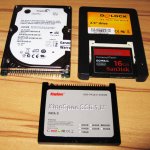
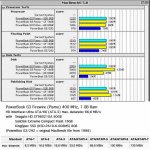
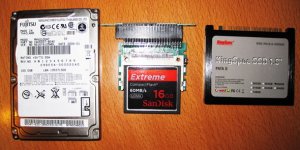
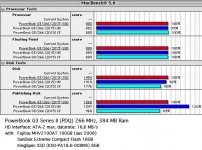
I‘ve compared Harddisk, Compact Flash and SSD in two different PowerBooks G3.
First (pic 1+2)
PowerBook G3 Firewire (Pismo) 400 MHz, 1 GB Ram (ATA-5 HD interface)
with 3 data-storages, which still are available at this time:
Seagate HD ST980210A 80GB
SanDisk Extreme Compact Flash 16GB
KingSpec SSD (KSD-PA18.6-008MS) 8GB
*
The second test (pic 3+4) is different, because of the ATA interface:
PowerBook G3 Series II (PDQ) 266 MHz, 384 MB Ram (ATA-2 HD interface)
Same CF and SSD but older harddisk from 2006: Fujitsu MHV2100AT 100GB
Mike
That makes a lot sense now! LOL!
100X Speed is just a bit faster than a hard drive. A 200X would be the best for anything up to a G3-WallStreet, that is from a PB 520 to a G3 Wallstreet. 133X and 150X are good, but not as fast as a 200X. 400X are best for the G3 Prismo/Lombards and on, though a 200X is comfortable in those machines - all of these will be faster than hard drive.
Price and Speed is a factor.
Technically 100X is supposed be as fast as a hard drive but I find an old 75X to be equal to a hard drive; the data speed might be the same but the hard drive is doing a lot of buffering before sending and that slows it down, especially with the old hard drives. Thus 200X is a bit more than double the hard drive speed, and 400X about 4 times. Just drop the 00's.
Thing is, because many adapters wont have True IDE/DMA/UDMA support without a bit of hacking to the interface, but as is, it should be fine up to a G3 Wallstreet.
See: http://www.fccps.cz/download/adv/frr/cf.html
In my older PowerBooks - I own about 20 working PowerBooks now - I mostly use 4GB normal SanDisk CF cards and I'm very satisfied with them.
For one of my PB 540c I would like to get this:
http://pages.ebay.com/link/?nav=item.view&alt=web&id=261922955509
CF PowerMonster II CF-2.5" SCSI Converter Card
but they are so expensive and the old SCSI harddisk still works.
For one of my PB 540c I would like to get this:
http://pages.ebay.com/link/?nav=item.view&alt=web&id=261922955509
CF PowerMonster II CF-2.5" SCSI Converter Card
but they are so expensive and the old SCSI harddisk still works.
I did some similar testing using a Powermac 6400 and a few drives I had on hand, Sandisk Ultra CF card, 1.2 gig Fireball HDD and a 60 gig 7.2k IBM Deskstar. In my test the CF card was the worst of the bunch, but that might be from me using a precreated image and dding it to the drives, not sure.
Here's a link to the graphs. I might redo it later using another system, such as the Powerbook 1400 or see if I can get the Mactel working.
http://imgur.com/a/JxMVa
Here's a link to the graphs. I might redo it later using another system, such as the Powerbook 1400 or see if I can get the Mactel working.
http://imgur.com/a/JxMVa
That's because of this, Compgeke:
http://www.fccps.cz/download/adv/frr/cf.html
Though Apple IDE is brain dead on many levels, it does try to cheat in access DMA in the drive. Also, like I stated, these tests tend to use short blocks of data and SSDs, especially CFs, want large data blocks.
My tests is this: How fast does it boot from Happy Mac to Desktop, how fast does it load an app, how fast does it load a large file, how fast does it take to save that file, how fast does it quit the app, and how fast it shuts down. Using a ThinkPad 190E (a 20 year old MMX 120MHz Pentium (1) Laptop loading Win 98, MS Word, it takes seconds. 12 seconds to boot - DAMN! It is faster than my i5 PC and Laptop! OSX on a G3 Dual USB takes 30 seconds, and System 7.6 on a 1400 takes 25 second. Though there is a long pause in the System 7.6 1400 from "Welcome to Macintosh" to the first extension loading up; I figure that without that pause the 1400 could boot in 15 seconds or less. Using a hard drive on these systems then the numbers of wait is in the minutes.
But I'm glad to see those numbers.
http://www.fccps.cz/download/adv/frr/cf.html
Though Apple IDE is brain dead on many levels, it does try to cheat in access DMA in the drive. Also, like I stated, these tests tend to use short blocks of data and SSDs, especially CFs, want large data blocks.
My tests is this: How fast does it boot from Happy Mac to Desktop, how fast does it load an app, how fast does it load a large file, how fast does it take to save that file, how fast does it quit the app, and how fast it shuts down. Using a ThinkPad 190E (a 20 year old MMX 120MHz Pentium (1) Laptop loading Win 98, MS Word, it takes seconds. 12 seconds to boot - DAMN! It is faster than my i5 PC and Laptop! OSX on a G3 Dual USB takes 30 seconds, and System 7.6 on a 1400 takes 25 second. Though there is a long pause in the System 7.6 1400 from "Welcome to Macintosh" to the first extension loading up; I figure that without that pause the 1400 could boot in 15 seconds or less. Using a hard drive on these systems then the numbers of wait is in the minutes.
But I'm glad to see those numbers.
Short of laboriously (and dangerously, considering the fragile case plastics) opening my 540c to see what kind of hard drive it has, is there any way to tell whether it has an IDE or a SCSI hard drive? I vaguely recall that the earliest Mac IDE implementations masqueraded as SCSI to the system software, so I don’t believe the machine could tell me from its own knowledge, even if I were to find a System Profiler workalike that old.
I had to scour the net and the forum. The 520 - 550c uses SCSI hard drives. This I have to apologize for. Sorry for the screw up.
But here is the basis of that screw up, there are a couple of old posts of members using the Aztec CF Monster Laptop SCSI Adapter to use a CF in a powerbook. CFs are IDE in nature.
I've seen these adapters on Ebay go for $120 or so from a couple of Japanese sellers.