

Thread
IIsiColorPivotII_PDS_Card_HackProject™
so i can buy this video card, and use it as long as i make my own cable?
sounds like a pain in the butt
http://www.ebay.com/itm/Radius-Color-Pivot-IIsi-Video-Interface-Card-Apple-Mac-/150933000786?pt=US_Vintage_Computing_Parts_Accessories&hash=item23244ed252
and again does this card get some kind of spectacular resolutions?
sounds like a pain in the butt
http://www.ebay.com/itm/Radius-Color-Pivot-IIsi-Video-Interface-Card-Apple-Mac-/150933000786?pt=US_Vintage_Computing_Parts_Accessories&hash=item23244ed252
and again does this card get some kind of spectacular resolutions?
Not sure about resolution, but I think it is 8-bit color, same as the SE/30 version. There is a Radius mirror somewhere that has specs...
I don't think I'd call it spectacular, but 16" @ 8bit Color is bigger, better and doesn't screw around with Bank A like the Vampire Video setup on the MoBo. That bit of nastiness only gives you 12" RGB or 640 x 480 in 8bit and Portrait at I'm not sure how many bits, but I'll bet it's not 8. If no monitor is sensed on the MoBo Video Connector at startup, none of the Meg of RAM in Bank A gets buffered for use as makeshift VRAM.
p.s. check out the first page, it lists all the resolutions tested.
p.s. check out the first page, it lists all the resolutions tested.
JT:
640x870 on a IIsi or IIci will give 4-bit. I remembered that from my freshman year in college, when taking a college chemistry class - small computer lab next to the main chemistry labs - contained an Apple IIgs ROM 3 that was pretty loaded, a Mac 512, a IIsi with Sony CPD-1304S hooked up, and another IIsi with a regular Color Pivot hooked up to the VampireVid port.
Interesting thread, btw.
-J
640x870 on a IIsi or IIci will give 4-bit. I remembered that from my freshman year in college, when taking a college chemistry class - small computer lab next to the main chemistry labs - contained an Apple IIgs ROM 3 that was pretty loaded, a Mac 512, a IIsi with Sony CPD-1304S hooked up, and another IIsi with a regular Color Pivot hooked up to the VampireVid port.
Interesting thread, btw.
-J
THX, J. I figured as much with the tiny amount of blood-sucked DRAM available as ersatz VRAM.
I went back to the IP and had to fix some of the connector specs that I'd fumbled while reporting the initial test results. :I
I went back to the IP and had to fix some of the connector specs that I'd fumbled while reporting the initial test results. :I
Cool. Not a problem.
OBTW: with respect to the SuperVideo control panel, didn't notice much improvement in video acceleration. Seems the same. Main issue seems to be the drawing of windows, etc. While playing Super Tetris or Apeiron, it seems function at a normal rate for a IIci. There is a separate Accelerator INIT used with the 2.07 control panel, which was rolled into the control panel for version 2.7... For now, I've upgraded back to 2.7.5.
-J
OBTW: with respect to the SuperVideo control panel, didn't notice much improvement in video acceleration. Seems the same. Main issue seems to be the drawing of windows, etc. While playing Super Tetris or Apeiron, it seems function at a normal rate for a IIci. There is a separate Accelerator INIT used with the 2.07 control panel, which was rolled into the control panel for version 2.7... For now, I've upgraded back to 2.7.5.
-J
Most of the MoBo Video systems are as, or faster than, NuBus Video for most purposes, but limited to lower resolutions. Cards like the RCPII/IIsi run at the system bus speed as opposed to the 10MHz NuBus. Higher resolutions a/o DSP acceleration for doing transformations in pro level software like CAD Systems and filters in PhotoShop would be the realm of NuBus VidCards. Back in the Day, it was the standard DTP config to have a 13" RGB running off the IIci's MoBo Video and a grayscale TPD or FPD running off a NuBus Card.
For gaming, you're probably not going to see any improvement in speed because gaming resolutions are typically in the low range where MoBo video shined in that rime period. A NuBus Card with DSP Support would have been the winner hands down if gaming had ever taken off on the Mac.
As an interesting side note: by the time Dual Voodoo IIs were the cat's meow for supporting gaming engines in the PC world, the Mac had lost any chance at competing in the gaming market. My friends who are serious (read as obsessed) gamers are impatiently waiting for the development of gaming engines for Linux, Windows having become a serious limitation for them in terms of reliability in today's world.
The RCPII/IIsi, along with its competitors, are a special case. Overcoming one of the IIsi's purposely implemented system bottlenecks and giving a bit smaller bump in resolution/Color Depth/adding second screen support for FPDs and Pivots being their strong suit.
The IIsi was the combination of an upgraded/lamed SE/30 and a lamed IIci, having most of the features of both, but intentionally limited to keep it at the third tier of the Mac II line. Requiring a NuBus Chipset and Math CoPro to take up the expansion slot as well as soldering a severely limited amount of RAM in Bank A made it a pro-sumer IIci. Adding color/GS support, 4 MHz of bus speed and support for NuBus improved upon the SE/30 spec. Removing the L2 cache, support for more than a single NuBus Card, reducing FPD g/s bit depth and shaving 5MHz off the IIci's system bus knocked it down a peg in the Mac_II lineup. Limiting system RAM kept it from competing with either system for the Professional Graphic Art/DTP/CAD Workstation market segment.
I hope this makes some kind of sense . . .
p.s. I also appreciate your feedback, J. It's encouraging, this project gets a lot of views, but very few replies. :-/
For gaming, you're probably not going to see any improvement in speed because gaming resolutions are typically in the low range where MoBo video shined in that rime period. A NuBus Card with DSP Support would have been the winner hands down if gaming had ever taken off on the Mac.
As an interesting side note: by the time Dual Voodoo IIs were the cat's meow for supporting gaming engines in the PC world, the Mac had lost any chance at competing in the gaming market. My friends who are serious (read as obsessed) gamers are impatiently waiting for the development of gaming engines for Linux, Windows having become a serious limitation for them in terms of reliability in today's world.
The RCPII/IIsi, along with its competitors, are a special case. Overcoming one of the IIsi's purposely implemented system bottlenecks and giving a bit smaller bump in resolution/Color Depth/adding second screen support for FPDs and Pivots being their strong suit.
The IIsi was the combination of an upgraded/lamed SE/30 and a lamed IIci, having most of the features of both, but intentionally limited to keep it at the third tier of the Mac II line. Requiring a NuBus Chipset and Math CoPro to take up the expansion slot as well as soldering a severely limited amount of RAM in Bank A made it a pro-sumer IIci. Adding color/GS support, 4 MHz of bus speed and support for NuBus improved upon the SE/30 spec. Removing the L2 cache, support for more than a single NuBus Card, reducing FPD g/s bit depth and shaving 5MHz off the IIci's system bus knocked it down a peg in the Mac_II lineup. Limiting system RAM kept it from competing with either system for the Professional Graphic Art/DTP/CAD Workstation market segment.
I hope this makes some kind of sense . . .
p.s. I also appreciate your feedback, J. It's encouraging, this project gets a lot of views, but very few replies. :-/
Actually it's not too bad, it's a fabulous deal, buy two in case you mess up the first one or we get it working in the SE/30. :approve:
Desolder the connector and then solder your wires directly into the thru-holes. I've got the cable so I haven't bothered to source thin co-ax like that used for stand-alone WiFi antennas.
Find that and a solder cup DA-19 connector and you'll be able to make a cable consistent with the original Radius spec. Dunno about RFI interference or possible crosstalk problems for video a/o the rest of the system if you don't use co-ax. The boffins in the 68kMLA Tech Support Division will need to chime in on that one, I'm just a knuckle draggin" hardware hacker in the SpecOps teams.
Eventually, I'd like to noodle out the wiring diagram to just throw 16" 8bit Color directly out of an HD-15 connector at the backplane.
So many hacks . . . so little time . . . :-/
Phew... After a long time with tons of work, I'm back again 
Glead to hear the discussion going on. I've had little time to keep twinkering on it, but here's an update/remainder of the state of my research:
•The card supplies a 640x870 (portrait) signal, no matter the sense code applied (from the limited selection I tried, that is) with the usual Radius logo on startup.
•The card doesn't show up on the Monitors control panel, thus the OS isn't supporting it Most likely I'm not supplying it the proper sense code, as you suggested. Anyway, the card keeps the Radius logo output, as if an unsupported monitor was detected :?:
•My LCD monitor does sync OK with this default output (although being a wide screen, the card's portrait output look awfully stretched!)
•I have been able to put the card's "default" output on the real RFI genera... I mean, Apple's Portrait Display but with a sense code manually suplied thru my adapters -- same results, only the Radius startup screen, not detected by the OS.
About the adapters I used: here's a pic of all I have:
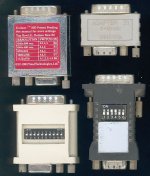
•The one at the top right has no switches -- came with a surprisingly short-lasting Sony 19" monitor and set ("modern") Macs to the highest-res Multiscan mode.
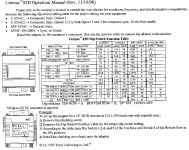
•The one at the top left seems pretty much the same as the one at bottom right on the picture of yours -- two rows of 8 DIPs (not shown). The original leaflet was lost long ago, but I found this which seems to be correct for it:
•Bottom right is my very first Mac-to-VGA adapter. It had a small mode table printed, but it's now rubbed off However, I did try each one of its 64 combinations on the Quadra 700, and wrote the results somewhere :-/
•Bottom left came as a freeby in another deal, and never had any instructions for it. However, I think I found its manual on the web:
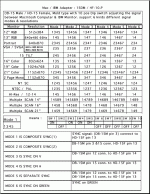
But still haven't cycled thru all the settings in order to find a compatible mode for the IIsiColorPivot :I
Since you have the original cable for it... may I ask you to check continuity on the three sense lines in order to determine the full sense code expected by the card? You know: check each line against ground, and then between each pair of them, both ways -- some sense codes use diodes and thus are polarity-dependant. That way, at least we could try with one less variable...
All the best,
Glead to hear the discussion going on. I've had little time to keep twinkering on it, but here's an update/remainder of the state of my research:
•The card supplies a 640x870 (portrait) signal, no matter the sense code applied (from the limited selection I tried, that is) with the usual Radius logo on startup.
•The card doesn't show up on the Monitors control panel, thus the OS isn't supporting it
Most likely I'm not supplying it the proper sense code, as you suggested. Anyway, the card keeps the Radius logo output, as if an unsupported monitor was detected :?: •My LCD monitor does sync OK with this default output (although being a wide screen, the card's portrait output look awfully stretched!)
•I have been able to put the card's "default" output on the real RFI genera... I mean, Apple's Portrait Display
but with a sense code manually suplied thru my adapters -- same results, only the Radius startup screen, not detected by the OS.About the adapters I used: here's a pic of all I have:
•The one at the top right has no switches -- came with a surprisingly short-lasting Sony 19" monitor and set ("modern") Macs to the highest-res Multiscan mode.
•The one at the top left seems pretty much the same as the one at bottom right on the picture of yours -- two rows of 8 DIPs (not shown). The original leaflet was lost long ago, but I found this which seems to be correct for it:
•Bottom right is my very first Mac-to-VGA adapter. It had a small mode table printed, but it's now rubbed off
However, I did try each one of its 64 combinations on the Quadra 700, and wrote the results somewhere :-/ •Bottom left came as a freeby in another deal, and never had any instructions for it. However, I think I found its manual on the web:
But still haven't cycled thru all the settings in order to find a compatible mode for the IIsiColorPivot :I
Since you have the original cable for it... may I ask you to check continuity on the three sense lines in order to determine the full sense code expected by the card? You know: check each line against ground, and then between each pair of them, both ways -- some sense codes use diodes and thus are polarity-dependant. That way, at least we could try with one less variable...
All the best,
Sorry, forgot about your request, Z. I've got to sort out all the hacks in progress and put a few away so I can get to it . . .
. . . it looks like a computer recycling bin exploded in my apartment. :-/
I think I'll dig through the Mac Video Drawer for the VGA adapters I have that match yours and test drive them.
Speaking of RFI Generation Units, I put a grounded, galvanized steel plate between my MPD and the PecisionView 2150.
. . . it looks like a computer recycling bin exploded in my apartment. :-/
I think I'll dig through the Mac Video Drawer for the VGA adapters I have that match yours and test drive them.
Speaking of RFI Generation Units, I put a grounded, galvanized steel plate between my MPD and the PecisionView 2150.
Z, where have you been?
Meanwhile:
Found a very interesting page googling for info on my NuBus Pivot card.
http://maclassic.com/wiki/Radius_Pivot_030_Video_Card
It seems as if someone has already done all this work for us! :lol:
The bottom line is interesting, is that new info . . . :?:
. . . forgot to mention that nice piccie . . .
. . . at least they linked to some connector possibilities!
http://www.digikey.com/scripts/DkSearch/dksus.dll?WT.z_header=search_go&lang=en&keywords=4-640620-5&x=0&y=0&cur=USD
http://www.digikey.com/scripts/DkSearch/dksus.dll?WT.z_header=search_go&lang=en&keywords=A30965-ND&x=0&y=0&cur=USD
Be that as it may: someone linked to an adapter pinout somewhere and there is one component to add between two of the lines, so there is progress to be made on this cable cloning project.
Meanwhile:
Found a very interesting page googling for info on my NuBus Pivot card.
http://maclassic.com/wiki/Radius_Pivot_030_Video_Card
It seems as if someone has already done all this work for us! :lol:
The bottom line is interesting, is that new info . . . :?:
. . . I'm wondering how they managed the 60 Hz timing conversion for VGA . . .
. . . forgot to mention that nice piccie . . .
. . . at least they linked to some connector possibilities!
http://www.digikey.com/scripts/DkSearch/dksus.dll?WT.z_header=search_go&lang=en&keywords=4-640620-5&x=0&y=0&cur=USD
http://www.digikey.com/scripts/DkSearch/dksus.dll?WT.z_header=search_go&lang=en&keywords=A30965-ND&x=0&y=0&cur=USD
Be that as it may: someone linked to an adapter pinout somewhere and there is one component to add between two of the lines, so there is progress to be made on this cable cloning project.
Found it: ;D

http://pinouts.ru/VideoCables/MacVideoToVGA_pinout.shtml
I've gotta get my @$$ in gear and order a pile of hackin'crap from DigiKey! :I
http://pinouts.ru/VideoCables/MacVideoToVGA_pinout.shtml
I've gotta get my @$$ in gear and order a pile of hackin'crap from DigiKey! :I
Nice to know that someone finally found that goddamn pinout. The way old-world mac monitor port sense lines work can make that sort of thing really difficult to beep out.
Hi,
I have one of these cards from eBay in my IIsi and DIY cable† from the card to a Mac DB15 monitor connector I added to the back of the IIsi. One reason why I got the card was to get a higher resolution than 640×480. Since I couldn't find this info on the net, I decided to test all possible combinations of sense codes supported by my Mac to VGA adapter. The adapter is “Unimacfly” (looks similar to the one pictured top left above). It has 8 DIP switches, but of them 5 and 8 seem to toggle sync on green, so the remaining switches 1-4 and 6-7 had only 64 different combinations, all of which I tried.
To cut the long story short, the combination of switches 2 and 4 on (together with the always-on 5 and 8 to disable sync on green) I can get 832×624, and Radius DynamicDesktop also allows me to switch to two other modes on the fly: 640×480, and "Full Page" which is apparently a higher resolution mode but my TFT won't display it correctly. In any case, that seems to be the highest resolution mode available with this card, and this combination of switches is the only that allows using it (and the only one that allows switching between three resolutions with Dynamic Desktop).
To help find the same mode on other Apple->VGA adapters, this combination of switch is called the 16" Color display in the manual of the adapter.
An additional discovery I made that toggling switch 1 on the adapter on the fly causes the display to pivot, i.e., the monitor will see the same resolution but the image is rotated 90°. The computer won't boot with switch 1 on, however, so if this pivot method is used it seems it can only be pivoted after booting.
† My cable from the IIsi card to the DB15 connector is basically just straight through, pin 1 on the card goes to pin 1 on the display connector, etc. Pin 8 was left unconnected but I doubt it matters.
I have one of these cards from eBay in my IIsi and DIY cable† from the card to a Mac DB15 monitor connector I added to the back of the IIsi. One reason why I got the card was to get a higher resolution than 640×480. Since I couldn't find this info on the net, I decided to test all possible combinations of sense codes supported by my Mac to VGA adapter. The adapter is “Unimacfly” (looks similar to the one pictured top left above). It has 8 DIP switches, but of them 5 and 8 seem to toggle sync on green, so the remaining switches 1-4 and 6-7 had only 64 different combinations, all of which I tried.
To cut the long story short, the combination of switches 2 and 4 on (together with the always-on 5 and 8 to disable sync on green) I can get 832×624, and Radius DynamicDesktop also allows me to switch to two other modes on the fly: 640×480, and "Full Page" which is apparently a higher resolution mode but my TFT won't display it correctly. In any case, that seems to be the highest resolution mode available with this card, and this combination of switches is the only that allows using it (and the only one that allows switching between three resolutions with Dynamic Desktop).
To help find the same mode on other Apple->VGA adapters, this combination of switch is called the 16" Color display in the manual of the adapter.
An additional discovery I made that toggling switch 1 on the adapter on the fly causes the display to pivot, i.e., the monitor will see the same resolution but the image is rotated 90°. The computer won't boot with switch 1 on, however, so if this pivot method is used it seems it can only be pivoted after booting.
† My cable from the IIsi card to the DB15 connector is basically just straight through, pin 1 on the card goes to pin 1 on the display connector, etc. Pin 8 was left unconnected but I doubt it matters.
Interesting, does your monitor display a stretched image in the Portrait mode? Is your TFT 4:5 or widescreen? Have you tried it in the pivoted mode? It might just work, since your TFT seems to be vintage Mac tolerant. It's dealing nicely with the offbeat output frequency of that card rather nicely.
Welcome aboard and nice work, BTW. It's nice to see another VidCard hacker has joined the ranks of the MLA! :approve:
@z: hi, I seen you've been back recently, still to busy to play around with this? ;D
Welcome aboard and nice work, BTW. It's nice to see another VidCard hacker has joined the ranks of the MLA! :approve:
@z: hi, I seen you've been back recently, still to busy to play around with this? ;D
If the "full page" resolution is selected, the TFT (Dell 2405FPW) incorrectly detects the resolution and the image is both squashed and cropped, i.e., not all of the desktop is visible and computer pixels are not correctly mapped to TFT pixels. Too bad, since it would probably have been the highest resolution available with this card, but I'm quite happy since 832×624 is already a big improvement over 640×480.
In the pivoted mode at 640×480 or 832×624 everything works perfectly since the pivoting is done by the video card, i.e., the TFT does not even see a resolution change occur. So if one wished to use the portrait mode at 480×640 or 624×832, it can be done, but it cannot be invoked in software and the computer does not boot correctly in pivoted mode, so it must first be booted with the monitor sense lines indicating the 16" RGB display and then one of the sense lines (the switch one of my adapter is connected to) toggled to rotate the image afterwards. Of course this means that the TFT/monitor must also be physically pivoted to be usable…
So for using the pivoted mode one might want to wire an external switch to that line (easy to do either from the adapter or from the header on the card itself), but personally I think I'll stick with the landscape. =)
As for TFT compatibility with vintage Macs, it does not actually wake up from power saving mode automatically when the 832×624 resolution is used, but pressing one of the screen buttons turns it on and the image will then be correctly detected. My other TFT, Fujitsu P27T-7 does not seem to like 832×624 (the image shows but is offset so that part of it is cropped and not fixable by adjustments available)… Both displays can do 1152×870 perfectly with the Quadra 800, however, and of course the standard 640×480 and 1024×768 with every vintage computer I've tried.
In the pivoted mode at 640×480 or 832×624 everything works perfectly since the pivoting is done by the video card, i.e., the TFT does not even see a resolution change occur. So if one wished to use the portrait mode at 480×640 or 624×832, it can be done, but it cannot be invoked in software and the computer does not boot correctly in pivoted mode, so it must first be booted with the monitor sense lines indicating the 16" RGB display and then one of the sense lines (the switch one of my adapter is connected to) toggled to rotate the image afterwards. Of course this means that the TFT/monitor must also be physically pivoted to be usable…
So for using the pivoted mode one might want to wire an external switch to that line (easy to do either from the adapter or from the header on the card itself), but personally I think I'll stick with the landscape. =)
As for TFT compatibility with vintage Macs, it does not actually wake up from power saving mode automatically when the 832×624 resolution is used, but pressing one of the screen buttons turns it on and the image will then be correctly detected. My other TFT, Fujitsu P27T-7 does not seem to like 832×624 (the image shows but is offset so that part of it is cropped and not fixable by adjustments available)… Both displays can do 1152×870 perfectly with the Quadra 800, however, and of course the standard 640×480 and 1024×768 with every vintage computer I've tried.
Phew! Hi again! Sorry for being absent all this time... life's got rather complicated and, among other things, I've been giving birth to my very-own-designed 6502 computer -- now that's retro!
Fortunately, things are starting to settle down now, so I'll be back into the delicious world of 68k Macs real soon... currently, the IIsi is sort-of buried below a lot if stuff, I'll try to clean up that as soon as possible.
I've seen the schematic of the connection a few posts above... while I was already aware of extended sense codes, it's worth noting the diode placed between the sense lines; I'll definitely try that on my IIsiColorPivot, probably with the diode directly soldered to the board in order to eliminate the risk of some bad connection.
One the other hand, I can't rule out the possibility of my card not being in working order... this was purchased you-know-where in untested state, and the other RadiusPivot I have (for NuBus interface, but I assume it's pretty much the same thing otherwise) does work perfect with my Acer monitor and most (if not all) of the sense codes I try.
Hopefully, you'll hear soon from me with the results of the diode hack... thanks again to all for your contributions!
Fortunately, things are starting to settle down now, so I'll be back into the delicious world of 68k Macs real soon... currently, the IIsi is sort-of buried below a lot if stuff, I'll try to clean up that as soon as possible.
I've seen the schematic of the connection a few posts above... while I was already aware of extended sense codes, it's worth noting the diode placed between the sense lines; I'll definitely try that on my IIsiColorPivot, probably with the diode directly soldered to the board in order to eliminate the risk of some bad connection.
One the other hand, I can't rule out the possibility of my card not being in working order... this was purchased you-know-where in untested state, and the other RadiusPivot I have (for NuBus interface, but I assume it's pretty much the same thing otherwise) does work perfect with my Acer monitor and most (if not all) of the sense codes I try.
Hopefully, you'll hear soon from me with the results of the diode hack... thanks again to all for your contributions!
Welcome back! The 6502 sounds like fun, I hope the other complications aren't too, too difficult.
I'm thinking the card is fine and the cable needs the diode. I got several of those cards (the price was right) and am planning to desolder the connectors and hardwire the cable. All (three?) of my boards tested good. I don't think I've ever gotten anything from Rob that wasn't fine, though everything he sells is pretty much as is/untested.
I'm looking forward to hearing your results.
I'm thinking the card is fine and the cable needs the diode. I got several of those cards (the price was right) and am planning to desolder the connectors and hardwire the cable. All (three?) of my boards tested good. I don't think I've ever gotten anything from Rob that wasn't fine, though everything he sells is pretty much as is/untested.
I'm looking forward to hearing your results.
Hi and thanks (again) for the warm welcome... Things aren't that complicated, just more/new tasks at work with less pay :-/ but still can afford some hobbies anyway.
Back to our thread, I've been experimenting a bit with the IIsi and the Radius Pivot PDS card... first of all, after this period of inactivity, the PSU is misbehaving a bit -- things like firing up on just plugging and then not powering off (yes, the power button is not at the stuck "server" position) so it's asking for a recap at some point... however, after some warm up period it seems to do just fine for the testing.
To summarize, here are the test conditions:
Now, the bad news I can only get the IIsi (with the Radius) to boot after a really cold start (powering off for a couple of minutes won't do), otherwise after the RAM test (takes some time for 33 MiB :I ) the dreaded Death Chimes are heard (with just a standard pattern on the 12") xx( The few times it boots (from cold) no card is detected by SlotInfo, or the Monitors control panel. In this state, the Radius card itself seems to output some signal (64 kHz horizontal and a rather odd 69 Hz vertical, as stated by the Acer monitor and confirmed by the 'scope) but the image itself mostly consisting of a dot pattern, sometimes moving in a randomly fashion -- but somehow affected by user interaction :?: Tried on another working IIsi I have (9 MiB RAM) but got the very same behaviour...
Then I tried what I suppose to be a very similar card, except for the interface: the Radius Pivut NuBus -- same big chips, same VRAM, even the declaration ROM has exactly the same contents (have read both with my EPROM programmer). But this card has the usual DA-15 monitor connector, making things much easier. This goes of course thru the NuBus/FPU adapter I have, tested good with many other cards.
No boot problems here... but regardless of the sense code applied (tried the whole list above) this card always output the aforementioned 64 kHz horiz./ 69 Hz vert. sync signal, which my Acer monitor mistakenly identifies as "1440x900" and the auto-adjust feature can't center properly -- but the image is definitely present and readable. However, with some DIP settings the 640 x 864 (as Monitors indicate) desktop looks heavily stretched as expected for a portrait mode on a wide screen; but some others give the same sync signals but a tilted desktop, this time identified as 864 x 640.
Further investigation makes me think that the only sense line checked by the card is Sense Line 0, that is, pin 4. And it only switches between "regular" portrait mode and the tilted one, but no other modes are generated -- somehow reasonable because of the only Xtal on board. However, my previous testing with that very same card revealed the availability of a few "standard" screen modes, which I can't get right now -- most likely because I used another adapter back then, which (if memory serves) is currently installed on Dad's 7500 and thus far of my reach...
Anyway, if we assume both cards (Pivot IIsi and Pivot NuBus) are the same with just a different interface (which seems reasonable) then that very different behaviour is highly suspicious... maybe I had the bad luck of getting the only malfunctioning unit of these PDS cards, or simply I broke it at some point :I However, I won't rule out that hte card's hardware is fine except for those !"$%&@# PLCC sockets for the decl. ROM, which I know to be "temperamental", to say the least... I did have some troubles reading the ROM, in fact. Will try to clean & tighten that.
Or maybe they're not the same and I'm doing something wrong with the PDS version... or some software incompatibility (?)... I'm not using any specific extension, but I was hoping the card would be accesible for the desktop, if not getting all of its capabilities.
After I get the PLCC ROM socket revised, I'll check again and let you know.
Back to our thread, I've been experimenting a bit with the IIsi and the Radius Pivot PDS card... first of all, after this period of inactivity, the PSU is misbehaving a bit -- things like firing up on just plugging and then not powering off (yes, the power button is not at the stuck "server" position) so it's asking for a recap at some point... however, after some warm up period it seems to do just fine for the testing.
To summarize, here are the test conditions:
- Mac IIsi with 33 MiB of RAM, 250 MB HD (stock ROM)
- System 7.5.5 (pretty barebones)
- Apple 12" RGB monitor connected to the built-in video port (to see what's happening!)
- Acer LCD wide-monitor (vintage Mac friendly)
- My Radius ColorPivot IIsi PDS card
- My crude connector (but continuity checked out OK) now with all relevant lines
- 10-dip VGA adapter (the best documented one I have, see my previously posted bottom-left adapter)
Now, the bad news
I can only get the IIsi (with the Radius) to boot after a really cold start (powering off for a couple of minutes won't do), otherwise after the RAM test (takes some time for 33 MiB :I ) the dreaded Death Chimes are heard (with just a standard pattern on the 12") xx( The few times it boots (from cold) no card is detected by SlotInfo, or the Monitors control panel. In this state, the Radius card itself seems to output some signal (64 kHz horizontal and a rather odd 69 Hz vertical, as stated by the Acer monitor and confirmed by the 'scope) but the image itself mostly consisting of a dot pattern, sometimes moving in a randomly fashion -- but somehow affected by user interaction :?: Tried on another working IIsi I have (9 MiB RAM) but got the very same behaviour...Then I tried what I suppose to be a very similar card, except for the interface: the Radius Pivut NuBus -- same big chips, same VRAM, even the declaration ROM has exactly the same contents (have read both with my EPROM programmer). But this card has the usual DA-15 monitor connector, making things much easier. This goes of course thru the NuBus/FPU adapter I have, tested good with many other cards.
No boot problems here... but regardless of the sense code applied (tried the whole list above) this card always output the aforementioned 64 kHz horiz./ 69 Hz vert. sync signal, which my Acer monitor mistakenly identifies as "1440x900" and the auto-adjust feature can't center properly -- but the image is definitely present and readable. However, with some DIP settings the 640 x 864 (as Monitors indicate) desktop looks heavily stretched as expected for a portrait mode on a wide screen; but some others give the same sync signals but a tilted desktop, this time identified as 864 x 640.
Further investigation makes me think that the only sense line checked by the card is Sense Line 0, that is, pin 4. And it only switches between "regular" portrait mode and the tilted one, but no other modes are generated -- somehow reasonable because of the only Xtal on board. However, my previous testing with that very same card revealed the availability of a few "standard" screen modes, which I can't get right now -- most likely because I used another adapter back then, which (if memory serves) is currently installed on Dad's 7500 and thus far of my reach...
Anyway, if we assume both cards (Pivot IIsi and Pivot NuBus) are the same with just a different interface (which seems reasonable) then that very different behaviour is highly suspicious... maybe I had the bad luck of getting the only malfunctioning unit of these PDS cards, or simply I broke it at some point :I However, I won't rule out that hte card's hardware is fine except for those !"$%&@# PLCC sockets for the decl. ROM, which I know to be "temperamental", to say the least... I did have some troubles reading the ROM, in fact. Will try to clean & tighten that.
Or maybe they're not the same and I'm doing something wrong with the PDS version... or some software incompatibility (?)... I'm not using any specific extension, but I was hoping the card would be accesible for the desktop, if not getting all of its capabilities.
After I get the PLCC ROM socket revised, I'll check again and let you know.
As a new IIsi owner, after reading through this whole thread, I'm interested but confused. The card is only $3.00! But from what I can tell, Trash80 is the *only* person who's actually gotten one to work? And that was using an adapter cable pulled from some SE/30 video card? I'm also not sure how to build a DIY adapter cable. There's some discussion of a "straight through" cable, but Trash80 mentioned something about using coax cables? I also think there's some overlap between discussions of how to build a Pivot-to-Mac monitor adapter cable, vs a Pivot-to-VGA cable. Has anyone succeeded in building a simple DIY adapter cable that actually works?
Possibly dumb question, but if you build a DIY cable, where do you physically mount the video connector on the IIsi? Do you build some kind bracket that fits the opening on the back? If so, then wouldn't that prevent using the pass-through PDS slot on the Pivot card to add something like ethernet? Since there's only a single opening in the case, but you'd need both a video connector and an ethernet connector there?
Possibly dumb question, but if you build a DIY cable, where do you physically mount the video connector on the IIsi? Do you build some kind bracket that fits the opening on the back? If so, then wouldn't that prevent using the pass-through PDS slot on the Pivot card to add something like ethernet? Since there's only a single opening in the case, but you'd need both a video connector and an ethernet connector there?
De nada, it's great to have you back. I feel for you, real life feels like it gets harder and harder sometimes. I'm in the middle of yet another financial meltdown myself. Luckily, I've got enough projects in progress, parts and toys to keep me busy almost indefinitely at a near zero cost level. Both my G4s have crapped out on me and just getting one of the moldy oldies up and running as my main workstation has been a trip. I've learned a bunch of new stuff (lots of borkage and serious deborking involved [
 ] ]'> ) in the processI
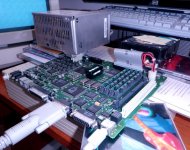
Sorry to hear about your PSU difficulties. Have you got anything in the IIcx/IIci form factor available? I've got my IIsi testbed running off a Q700 PSU. The fugly final setup is here: IIsi PSU: Catastrophic Failure! = 8-o However my test setup should be easy enough for you to bolt up to a scrap piece of plywood. That way everything will be handy to your scope probes, but you won't get to bend, spindle and mutilate the two PSUs. [}
] ]'>
Very strange behavior from your card, are you saying it's putting out Portrait resolution that's stretched on the monitor, but otherwise the output is correct? If so, then your card probably isn't at fault. Did you try putting the diode into your cable lashup yet?
I've got some time off coming up and no money to do anything but play with the toys, so I'll try to get a cable built on this side of the pond for us to compare notes. No scope, but the monitor in the pic above has a resolution/frequency readout. Dunno if it's H or V offhand, but I'll give that a shot. I still haven't sourced the thin shielded co-ax I wanted for my cable build, but I've got plenty of wire to build one like yours. I'll need some help with the diode implementation though, hopefully I can pick a suitable one up at CrapShack.
Best of luck IRL and in this surreal world as well. I'm really looking forward to resuming this collaborative project. :approve:
Heh! Welcome to one of my hack threads! Apparently, they confuse the crap out of everyone. :
Time for a recap, this page rollover is the perfect place for it:
Page 1 covers noodling out the card's resolution capabilities and signal assignments of the SE/30 card's cable.
Page 2 covers z's entry into the fray, we've been collaborating on development of the straight thru cable.
The price is right, the Vampire Video subsystem of the IIsi is seriously Road Appled and building the cable necessary to use these bargain basement beauties is really what the thread is about. I anted up some fairly serious chips on an eBay Card Lot just to get that particular SE'30 version of the card/cable combo for this portion of my SuperIIsi™ hack . . .
. . . and a bunch of other goodies!
R, G, & B signals are carried on thin co-ax cables with the shrouds connected to their respective ground lines on the the standard Mac Video Cable connections. The buzzed connection table is here on page 1.
So far, z is the only one putting soldering iron to wire, which is one reason I'm so glad to see him return to the forums. He's building the straight thru cable which is the first step in the project. As is my habit, I'm taking the Rube Goldberg approach by combining the straight thru cable with an in-cable VGA adaptation for the card's optimal resolution, but after we nail down the basic cable..
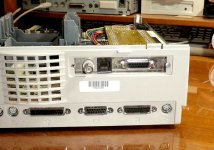
Not dumb at all and you've com up with the solution. Asante's Mac Con 30ie NIC has Thick, Thin and 10bT connectors on the backplane. The ThickNet subsystem is on an easily removable passthru card so its removing it frees up the ThickNet DA-15 punch in the backplane bracket for bolting up the DA-15 Mac Video connector. Neat & sweet. I'll post pics of this setup ASAP.
I'm glad you've jumped in here, BMOW, it's great to have you on board. I've got a couple of notions for your IIsi and its Bad@$$ adapter card, but I'll confuse you with that after you get up to speed (decipher my cryptic attempts to get my thoughts into .TXT) on the project. :lol:
BTW, it's been "trash" or "jt" (lower case) since about day two around here, which is much easier on the carpal tunnel than my username.
I assume you're talking about the cable you took from the SE/30 video card, since there is no cable included with this IIsi Pivot? In that case, is there really any reason to use coax when building your own DIY cable, vs just regular wire? The coax probably provides slightly better suppression of video noise, but I think it should still work fine with normal wire.
Cool, I'd love to see it! I never owned a Mac II during their heyday, and never put an expansion card inside any Mac, so I'm pretty clueless about how things are supposed to be mounted. :-(
Shouldn't be a problem, I'm planning to do a twisted pair deal until I can afford a spool of micro co-ax. I need that for a couple of other hacks as well. I'm also planning to desolder the connector and solder the wires straight into the thru-holes.
Well, now you get to start playing with the real goodies. I'll get pics up tonight if I get a chance. The lashup is pretty cool, if not altogether neat. [}
] ]'>
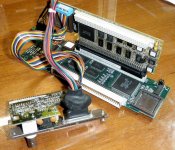
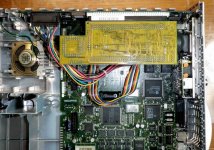
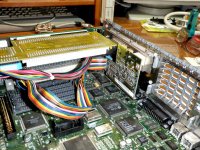
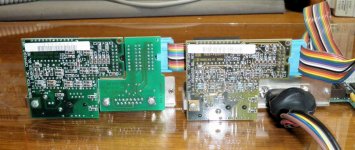
Any questions? :?:
This will work for the vast majority of IIsi hot-rodders after we work the kinks out of the cable. However your Twin-Slot adapter opens up a possible hack almost as radical as my Radius Rocketized IIsi, Mr.B! [}
] ]'>
Wow! That's quite a setup!
So you've got the Pivot card in the PDS slot, and PDS ethernet card in the Pivot's pass-through slot, with the ethernet back panel mounted at the rear of the case. Then the thick net portion of the ethernet back panel is removed, and the video cable from the Pivot fills the resulting hole.
What are the two smaller, dark green cards at the left in your 4th photo? They don't seem to appear in the other photos. I'm guessing maybe you have two PDS ethernet cards, and that's meant to show a side-by-side comparison of what it looks like with and without the thick net piece?
I've ordered one of these cards, so I'll see what I can do with it.
So you've got the Pivot card in the PDS slot, and PDS ethernet card in the Pivot's pass-through slot, with the ethernet back panel mounted at the rear of the case. Then the thick net portion of the ethernet back panel is removed, and the video cable from the Pivot fills the resulting hole.
What are the two smaller, dark green cards at the left in your 4th photo? They don't seem to appear in the other photos. I'm guessing maybe you have two PDS ethernet cards, and that's meant to show a side-by-side comparison of what it looks like with and without the thick net piece?
I've ordered one of these cards, so I'll see what I can do with it.
Hehe, what have you got in mind?However your Twin-Slot adapter opens up a possible hack almost as radical as my Radius Rocketized IIsi, Mr.B! [}
Thank you, and yup, got two so that pic illustrates he NIC's breakout card w & w/o the ThickNet section.
] ]'> I thought you'd never ask!
Take a somewhat less demented (if you should so choose) run at doing this . . .

. . . procure a "wrong angle" EuroDin connector from trag and solder it onto your inexpensive RCPII/IIsi card to do this . . .
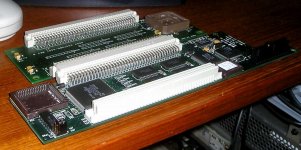
. . . then install the flat-stacked pair of PDS cards into your twin-slot adapter like this . . .

. . . so the shorter NIC probably interferes with the stock exhaust fan housing . . .
. . . then replace the stock muffin fan with a more modern, thinner profile, quieter, higher CFM muffin fan . . .
. . . using the notched stock fan's housing as your card support. [}] ]'>
Any questions? [ ] ]'>
] ]'>
edit: oopsie! . . . forgot to mention the part where you install the fastest accelerator you can lay your mits upon into that lovely twin-slot adapter. [] ]'>
HEH! [}
] ]'> I thought you'd never ask!Take a somewhat less demented (if you should so choose) run at doing this . . .
. . . procure a "wrong angle" EuroDin connector from trag and solder it onto your inexpensive RCPII/IIsi card to do this . . .
. . . then install the flat-stacked pair of PDS cards into your twin-slot adapter like this . . .
. . . so the shorter NIC probably interferes with the stock exhaust fan housing . . .
. . . then replace the stock muffin fan with a more modern, thinner profile, quieter, higher CFM muffin fan . . .
. . . using the notched stock fan's housing as your card support. [}
] ]'>Any questions? [
] ]'>edit: oopsie! . . . forgot to mention the part where you install the fastest accelerator you can lay your mits upon into that lovely twin-slot adapter. [
] ]'>
Gah! There will be several questions. I wrote that in a hurry before work today. :-I
You'll be modding the inexpensive RCPII/IIsi (for obvious reasons) replacing the "straight -up" passthru connector with the "wrong angle" adapter.The modified RCPII/IIsi Card will plug normally into the Twin-Slot Adapter along with your accelerator or cache card in the bridged IIci PDS Slot underneath.
The stock NIC (obviously, the expensive card remains safe from mad modification) plugs straight onto the modified RCPII/IIsi so that the two boards are in the same plane (as in the pic above) extending straight across. My guess is that the NIC, while shorter than the VidCard, will still conflict with the fan/shroud. But that's an easy mod that can very likely enhance cooling. The stock shroud should be retained either as ductwork for a larger fan located further inside the case or the housing for a same diameter, thinner, more efficient unit.
Anyway, that's it, whatcha think? :?:
You'll be modding the inexpensive RCPII/IIsi (for obvious reasons) replacing the "straight -up" passthru connector with the "wrong angle" adapter.The modified RCPII/IIsi Card will plug normally into the Twin-Slot Adapter along with your accelerator or cache card in the bridged IIci PDS Slot underneath.
The stock NIC (obviously, the expensive card remains safe from mad modification) plugs straight onto the modified RCPII/IIsi so that the two boards are in the same plane (as in the pic above) extending straight across. My guess is that the NIC, while shorter than the VidCard, will still conflict with the fan/shroud. But that's an easy mod that can very likely enhance cooling. The stock shroud should be retained either as ductwork for a larger fan located further inside the case or the housing for a same diameter, thinner, more efficient unit.
Anyway, that's it, whatcha think? :?:
That makes sense, but is probably a little crazier than I'm likely to attempt any time soon. Maybe you want to try it? Those cards are probably just going to gather dust if I hold on to them.
Maybe you want to try it? Those cards are probably just going to gather dust if I hold on to them.