

Thread
IIsiColorPivotII_PDS_Card_HackProject™
My cards will be splayed across the basement underneath the MoBo because the Radius Rocket/SCSI II Daughtercard will be in the NuBus Adapter topside. Like I said, your hack would be almost as radical as the Rocketized SuperIIsi™ [} ] ]'> so I've got several of the RCPII/IIsi cards and an extra wrong angle connector or two on hand for my project.
Any help you can give on the cable building project will be much appreciated, I wouldn't know a diode from my elbow . . .
. . . meanwhile I'll practice my soldering on one of the Radius cards for you. [] ]'>
] ]'> so I've got several of the RCPII/IIsi cards and an extra wrong angle connector or two on hand for my project.Any help you can give on the cable building project will be much appreciated, I wouldn't know a diode from my elbow . . .
. . . meanwhile I'll practice my soldering on one of the Radius cards for you. [
] ]'>Wait ... you have a working example?
You and me both. This mess is unreadable.
Of the IIsi version, several, they all work great with the SE/30 card's cable. The SE/30 card itself is untested, no SE/30 ATM, but it's not really an interesting card anyway, it's basically a full height PDS card with no passthru connector, you can't even install it on top of a NIC.
One day I'd like to get an SE/30, mainly just to try lopping off the connector section of the IIsi Card. By jumpering the few components on that section and wiring the cable connections to vias nearer the source, I think I might be able to get it to fit and maybe even to work.
I also have NuBus and LC PDS varieties in different revisions of the Pivot Cards, but I haven't spent any quality time with any of them as yet.
As for the thread being confusing, like I said when bigmess came on board: the first page covers my tests to establish the card's capabilities, on the second page zuiko chimed in and we started trying to figure out how to build his clone of my SE/30 cable and I said something about wanting to do the VGA conversion In-Cable.
Now we're discussing some of the installation options for the card(s) on this third page.
That's about all there is to it so far, the devil is in the details I presume. :-/
Surprise the thread/auction link from almost two years ago is gone, but I found the main pic and blew it up a bit, it was a tad tiny at half this size.
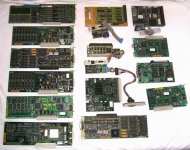
The tall "L shaped" card sitting next to my precious cable is the SE/30 card, but I didn't find it in the the Magic Shoe Boxen just now so I can't confirm which version it is. mcd said it was color in the trading post thread. ISTR it being an RCPII and I have a vague memory of testing it as good sticking straight up out of the IIsi.
Maybe this thread seems a bit disjointed because the project has been creeping along since July of 2011? It has pretty much been conversations between Z and myself, it'd be nice if the two of you stick around for some fun. I can get back on this part of the overall project now that the IIsi has successfully been Rocketized! [ ] ]'>
] ]'>
The tall "L shaped" card sitting next to my precious cable is the SE/30 card, but I didn't find it in the the Magic Shoe Boxen just now so I can't confirm which version it is. mcd said it was color in the trading post thread. ISTR it being an RCPII and I have a vague memory of testing it as good sticking straight up out of the IIsi.
Maybe this thread seems a bit disjointed because the project has been creeping along since July of 2011? It has pretty much been conversations between Z and myself, it'd be nice if the two of you stick around for some fun. I can get back on this part of the overall project now that the IIsi has successfully been Rocketized! [
] ]'>
Got my IIsi Color Pivot card today. It came in what appeared to be the original anti-static bag, with serial number stickers attached. I plugged it in and booted the IIsi, but nothing new appears in the Monitors control panel. I guess that's expected, because I don't actually have a monitor connected to the Pivot card? What's the normal behavior in a Mac with two video cards, where there's only a monitor plugged into one of them?
The monitor connector is just a plain 15-pin 0.1 inch header, so it should be easy to build a cable to match. It's actually got some kind of keying so the connector can only be inserted one way, I'm not sure if that's a standard of some kind, or something custom. At any rate it should be possible to plug in a plain 0.1 inch female header and ignore the keying, but it would be cool to use the correct keyed header if I can find it at a parts supplier.
I assume there's a 1-to-1 correspondence between the pins on that 15-pin internal header, and the pins on a Mac DB-15 monitor connector. Exactly which pins go to which is probably described in those docs you linked - haven't looked at those yet. But I'm assuming it's just a straight-through connection of wires (a big mess of wires, if you will) with no other electronics needed.
I just realized I don't actually have two monitors I can use with the IIsi, only one. So testing this may be interesting!
Here's a close-up of the video connector. It's got two narrow grooves at either end of one side, and a large notch in the middle of the other side.
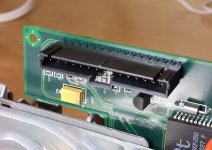
The monitor connector is just a plain 15-pin 0.1 inch header, so it should be easy to build a cable to match. It's actually got some kind of keying so the connector can only be inserted one way, I'm not sure if that's a standard of some kind, or something custom. At any rate it should be possible to plug in a plain 0.1 inch female header and ignore the keying, but it would be cool to use the correct keyed header if I can find it at a parts supplier.
I assume there's a 1-to-1 correspondence between the pins on that 15-pin internal header, and the pins on a Mac DB-15 monitor connector. Exactly which pins go to which is probably described in those docs you linked - haven't looked at those yet. But I'm assuming it's just a straight-through connection of wires (a big mess of wires, if you will) with no other electronics needed.
I just realized I don't actually have two monitors I can use with the IIsi, only one. So testing this may be interesting!
Here's a close-up of the video connector. It's got two narrow grooves at either end of one side, and a large notch in the middle of the other side.
At a quick glance, I'd guess this DB-15 breakout board plus 15 female-to-female jumper wires should make an easy no-solder solution for $6. Then you can play "musical pins" with the jumper wires until you figure out which one goes where. I'm going to order these, and see what I can do.
http://www.ebay.com/itm/like/121110063236?lpid=82
http://www.ebay.com/itm/like/171106109778?lpid=82
http://www.ebay.com/itm/like/121110063236?lpid=82
http://www.ebay.com/itm/like/171106109778?lpid=82
I like that prototyping hardware, especially the extra wires available on that jumper harness for alternate ground lines. As far as swapping anything around goes, we've pretty much got the cable figured out except for the diode.
Now that I've got Illustrator up and running under OS9 on the Pismo, I'll see if I can pull the pinouts and diagrams together into a graphic for when your ProtoTypin'Toys arrive. We can mark it up for revision as we make progress.
If you know about diodes and crystals, please check into what we'll need for the cable build and the underclocking project, respectively.
Very glad to have you aboard Bigmess! :approve:
Now that I've got Illustrator up and running under OS9 on the Pismo, I'll see if I can pull the pinouts and diagrams together into a graphic for when your ProtoTypin'Toys arrive. We can mark it up for revision as we make progress.
If you know about diodes and crystals, please check into what we'll need for the cable build and the underclocking project, respectively.
Very glad to have you aboard Bigmess! :approve:
I think the diode is only necessary if you're trying to build a cable that simultaneously converts from the Pivot connector to Mac video, *and* from Mac video to VGA video. IMHO that's not a great idea, since it means you could never use it with a vintage Mac monitor that doesn't have a VGA connector. It also means you wouldn't have any switches to change the sense lines, in order to pretend to be different monitor resolutions. Mac to VGA monitor adapters are cheap and plentiful, so why not use one?
But if you want to try it, pretty much any diode should work. Here's one: http://www.jameco.com/webapp/wcs/stores/servlet/Product_10001_10001_36038_-1 The little stripe on the diode body shows you which way to orient it. The diode's triangle in the schematic diagram points in the direction of the stripe. I don't really understand the theory behind why there's a diode - it seems to contradict the sense code table below the diagram, on the page you linked to. But I'll assume whoever made the diagram knew what he was talking about.
Unfortunately I doubt it's possible to "underclock" the card with a crystal swap, even if you could find the right crystal and swap it with a slower one. I don't know about other modes, but at least for standard 640 x 480, the 75 Hz standard isn't just a 25% faster version of the 60 Hz standard. Compare http://tinyvga.com/vga-timing/640x480@75Hz with http://tinyvga.com/vga-timing/640x480@60Hz. The number of lines per frame is different, and some of the timing parameters aren't just a factor of 25% different between the two.
I'm not sure you could find the right speed crystal anyway. You've got a 14.316 MHz crystal now, it looks like a HC-49 package. Here's a list of potential replacements from DigiKey:
http://www.digikey.com/product-search/en?pv69=3&pv16=10079&pv16=318&pv16=319&FV=fff4000d%2Cfff8016d&mnonly=0&newproducts=0&ColumnSort=0&page=1&stock=1&quantity=0&ptm=0&fid=0&pageSize=25
If 14.316 MHz is giving you 75 Hz vertical, then to get 60 Hz vertical you'd need 11.4544 MHz. That's not a standard crystal frequency. The closest I see in that list from DigiKey is 11.52 MHz.
But if you want to try it, pretty much any diode should work. Here's one: http://www.jameco.com/webapp/wcs/stores/servlet/Product_10001_10001_36038_-1 The little stripe on the diode body shows you which way to orient it. The diode's triangle in the schematic diagram points in the direction of the stripe. I don't really understand the theory behind why there's a diode - it seems to contradict the sense code table below the diagram, on the page you linked to. But I'll assume whoever made the diagram knew what he was talking about.
Unfortunately I doubt it's possible to "underclock" the card with a crystal swap, even if you could find the right crystal and swap it with a slower one. I don't know about other modes, but at least for standard 640 x 480, the 75 Hz standard isn't just a 25% faster version of the 60 Hz standard. Compare http://tinyvga.com/vga-timing/640x480@75Hz with http://tinyvga.com/vga-timing/640x480@60Hz. The number of lines per frame is different, and some of the timing parameters aren't just a factor of 25% different between the two.
I'm not sure you could find the right speed crystal anyway. You've got a 14.316 MHz crystal now, it looks like a HC-49 package. Here's a list of potential replacements from DigiKey:
http://www.digikey.com/product-search/en?pv69=3&pv16=10079&pv16=318&pv16=319&FV=fff4000d%2Cfff8016d&mnonly=0&newproducts=0&ColumnSort=0&page=1&stock=1&quantity=0&ptm=0&fid=0&pageSize=25
If 14.316 MHz is giving you 75 Hz vertical, then to get 60 Hz vertical you'd need 11.4544 MHz. That's not a standard crystal frequency. The closest I see in that list from DigiKey is 11.52 MHz.
Ah, I understand the diode now. http://support.apple.com/kb/TA21618 has a good explanation. By building a cable with a diode in it, oriented as per the diagram, you're sending the sense code for an Apple Multiple Scan 21 monitor, good for resolutions up to 1152 x 870. Reversing the diode gives you the sense code for an Apple Multiple Scan 16 Monitor (1024 x 768), and replacing the diode with a plain wire gives you the code for an Apple Multiple Scan 14 (832 x 624).
< WAG mode >
I think diode juju probably has something to do with Mac Monitor ID from sense line indications, which are modified in hardware switches on the VGA adapters.
As I understand it; the Mac's resolution "switching" is done by toolbox routines, the Monitors Control Panel would be the UI for doing so.
The reason z only sees "activity" on one sense line would be the indicator for the Pivot's orientation. Sense lines are otherwise static configurations. Multiple resolutions on the Pivot would be handled in the Monitors Control Panel.
< /WAG mode >
If underclocking the card ain't gonna work, all that means is that we're stuck with using MultiScan VGA CRTs and LCDs because "standard" 60Hz LCDs won't sync. Available Pivot Card resolutions will work fine with fixed scan rate Mac Monitors at said resolutions set on the monitor's cable/cable connector. I'll re-test that with my 12" RGB and 15" Hi-Res Mac CRTs.
edit: HEH! you beat me to it!
I think diode juju probably has something to do with Mac Monitor ID from sense line indications, which are modified in hardware switches on the VGA adapters.
As I understand it; the Mac's resolution "switching" is done by toolbox routines, the Monitors Control Panel would be the UI for doing so.
The reason z only sees "activity" on one sense line would be the indicator for the Pivot's orientation. Sense lines are otherwise static configurations. Multiple resolutions on the Pivot would be handled in the Monitors Control Panel.
< /WAG mode >
If underclocking the card ain't gonna work, all that means is that we're stuck with using MultiScan VGA CRTs and LCDs because "standard" 60Hz LCDs won't sync. Available Pivot Card resolutions will work fine with fixed scan rate Mac Monitors at said resolutions set on the monitor's cable/cable connector. I'll re-test that with my 12" RGB and 15" Hi-Res Mac CRTs.
edit: HEH! you beat me to it!
Unsuccessful test #1. I put a jumper between pins 10 (sense line 2) and 11 (GND), which should make the Pivot card think there's an 1152 x 870 Apple 2-page display connected. But in the monitors control panel, it still only shows one monitor. Jt, does yours "just work" when you plug it in to your IIsi, or did you have to install some Radius software? Does your monitors control panel show two monitors, and let you position them relative to each other on the desktop?
Edit: also tried a jumper between 6 and 7, which should identify as either 832 x 624 or 640 x 870, depending on which source you believe. Same result, monitors control panel gives no hint of a second monitor.
Edit: also tried a jumper between 6 and 7, which should identify as either 832 x 624 or 640 x 870, depending on which source you believe. Same result, monitors control panel gives no hint of a second monitor.
I just noticed you appear to have two different Pivot cards, and they're different!
Look at the area between that rectangular yellow capacitor C4 and the video connector. This post shows a card with CR8 and R14 between the capacitor and the connector, but this post shows a card with only CR6 in that space. Those aren't the same card.
Mine looks like the first example, with CR8 and R14. I don't know if that's an important difference or just a minor board rev. Do both of your cards actually work?
Look at the area between that rectangular yellow capacitor C4 and the video connector. This post shows a card with CR8 and R14 between the capacitor and the connector, but this post shows a card with only CR6 in that space. Those aren't the same card.
Mine looks like the first example, with CR8 and R14. I don't know if that's an important difference or just a minor board rev. Do both of your cards actually work?
Another unsuccessful test. Based on Arkku's report that his card only worked with the sense codes for a 832x624 16" color display, I tried another test with pins 4 and 10 connected together (sense 0 and sense 2). According to this Apple doc, that's the correct sense code for the 16" color display. Got the same result, nothing in the monitors control panel.
Third unsuccessful test, and now I'm doubting that this card works at all. I bit the bullet, and hand-made a complete connector from the Pivot card to VGA, with the sense code hard-wired to appear as an 832 x 624 Apple 16" color monitor (pins 4 and 10 tied together).
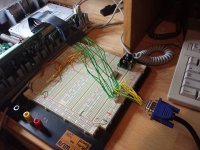
I got nothing. No response from the monitor connected to the Pivot card, nothing in the Monitors control panel, just a big fat zero all around.
I got nothing. No response from the monitor connected to the Pivot card, nothing in the Monitors control panel, just a big fat zero all around.
It looks like the two different versions of this card have the 15-pin video connector reversed.
I used your photo to determine which side was pin 1, but after a closer look, I realized my connector appears to be flipped from yours. Testing with a multimeter seems to confirm this. But when I connect the NEW pins 4 and 10, I still get nothing. I fear I may have fried the card by running it with the wrong pins shorted, while I thought pin 1 was on the wrong end.
I used your photo to determine which side was pin 1, but after a closer look, I realized my connector appears to be flipped from yours. Testing with a multimeter seems to confirm this. But when I connect the NEW pins 4 and 10, I still get nothing. I fear I may have fried the card by running it with the wrong pins shorted, while I thought pin 1 was on the wrong end.
I doubt you killed anything on the card, there's no appreciable voltage (any?) coming from the Monitor to the card or vice versa and mixing up the wires shouldn't do it either AFAIK. Dunno much though, I leave that stuff to you electron pushers, I'm just a lowly electron plumber.
RCPII/IIsi Playtime is up next, I'm going to try one (all?) of my cards on all four Apple CRTs in the collection. It's been a long time . . .
. . . 8-o exactly TWO friggin' years and four months ago tomorrow, since I started this hack!
My card(s?) just work when I hook them up. I've had a slew of Radius CRTs, now LCDs and almost a drawer full of Radius VidCards, VidCap cards, Accelerators, etc. IIRC I've never installed any software, everything just worked.
Sometimes I wonder if I'm a really Macintosh collector or a radius junkie? :?:
I'll report back real soon now, just gotta clean up some space so I can fill it back up again with this stuff after one or two more tests on the current project setups.
RCPII/IIsi Playtime is up next, I'm going to try one (all?) of my cards on all four Apple CRTs in the collection. It's been a long time . . .
. . . 8-o exactly TWO friggin' years and four months ago tomorrow, since I started this hack!
My card(s?) just work when I hook them up. I've had a slew of Radius CRTs, now LCDs and almost a drawer full of Radius VidCards, VidCap cards, Accelerators, etc. IIRC I've never installed any software, everything just worked.
Sometimes I wonder if I'm a really Macintosh collector or a radius junkie? :?:
I'll report back real soon now, just gotta clean up some space so I can fill it back up again with this stuff after one or two more tests on the current project setups.
Oh snap, I got it to work! I had to connect a real monitor to the Pivot card before I could see anything - simply putting jumpers on the sense lines and then looking in the monitors control panel didn't seem to be enough. I haven't been able to test a dual-head setup yet, since I only have one monitor, but I was able to boot and run at 832 x 624 x 256 colors @ 75 Hz with the Pivot card as the sole video card.
For future reference, pin 1 on the Pivot card is the pin adjacent to the "J2" text on the board's silkscreen. The pins are:
If you want to build a video cable to connect to a Mac-standard DB-15 monitor, then just wire those pins straight to the DB-15, matching them up pin for pin. Pivot card pin 1 connects to DB-15 pin 1, Pivot pin 2 connects to DB-15 pin 2, etc.
If you want to build a combo video cable and VGA adapter with a hard-coded 832 x 624 sense code (which seems to be the highest possible Pivot resolution that's also supported by modern LCD monitors), here's the pin mapping:
For future reference, pin 1 on the Pivot card is the pin adjacent to the "J2" text on the board's silkscreen. The pins are:
Code:
1        RED GND
2        RED
3        C SYNC
4        SENSE[0]
5        GREEN
6        GREEN GND
7        SENSE[1]
8        N.C.
9        BLUE
10       SENSE[2]
11       C & V SYNC GND
12       V SYNC
13       BLUE GND
14       H SYNC GND
15       H SYNC
If you want to build a combo video cable and VGA adapter with a hard-coded 832 x 624 sense code (which seems to be the highest possible Pivot resolution that's also supported by modern LCD monitors), here's the pin mapping:
Code:
PIVOT   VGA

1,6,13  4,5,6,7,8  VIDEO GND
2       1          RED VIDEO
4,10    NC         PINS 4 & 10 JUMPERED TOGETHER ON PIVOT END OF CABLE
5       2          GREEN VIDEO
9       3          BLUE VIDEO
11     11          C & V SYNC GND
12     14          V SYNC
14     10          H SYNC GND
15     13          H SYNC
Dynamite! Way to go bigmess! :approve:
You'll not want to use the onboard video, if the IIsi senses that no monitor is hooked up to its DA-15, all of Bank A's lifeblood stays in place, none of it gets sucked into the Vampire Video buffering setup. Better performance, more Pixels a/o higher bit levels.
Now I don't have to pull the Rocket out of the IIsi or haul out all the Mac Monitors! [] ]'>
You'll not want to use the onboard video, if the IIsi senses that no monitor is hooked up to its DA-15, all of Bank A's lifeblood stays in place, none of it gets sucked into the Vampire Video buffering setup. Better performance, more Pixels a/o higher bit levels.
Now I don't have to pull the Rocket out of the IIsi or haul out all the Mac Monitors! [
] ]'>
OK, I scrounged up a second monitor. Here's my victory photo, showing the IIsi with dual monitors.
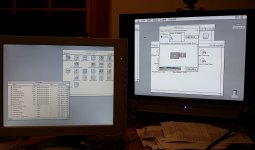
That's with onboard video running 640 x 480 x 256 colors, Pivot running 832 x 624 x 256 colors. The image from the Pivot card is somewhat washed out compared to the onboard video, but I'm not sure if that's because of my jury-rigged wiring setup, my old junky monitor, or the Pivot card itself.
That's with onboard video running 640 x 480 x 256 colors, Pivot running 832 x 624 x 256 colors. The image from the Pivot card is somewhat washed out compared to the onboard video, but I'm not sure if that's because of my jury-rigged wiring setup, my old junky monitor, or the Pivot card itself.
Shorter, grounded Co-Axial cables for RGB! 
'grats, buddy, you've done in a couple of days something that's been puzzling for quite some time! :approve:
I think all my cards are identical, at least they're all keyed the same for the cable.
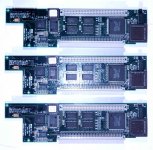
Meanwhile, snag another card and a wrong angle connector for a "two cards across the attic" hack.
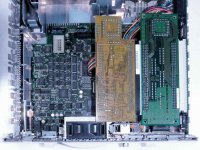
The RCPII/IIsi card is the same size/configuration as the modified SuperMac Riser in the piccie. The NIC so close to fitting that you'll only need to cut away part of the white fan cage for clearance and file a dado into the muffin fan's grille/edge for support. "Stack" the two cards onto your twin-Slot riser and then add a PowerCache Accelerator plug 'er in and power it up and let 'er rip! [}] ]'>
'grats, buddy, you've done in a couple of days something that's been puzzling for quite some time! :approve:
I think all my cards are identical, at least they're all keyed the same for the cable.
Meanwhile, snag another card and a wrong angle connector for a "two cards across the attic" hack.
The RCPII/IIsi card is the same size/configuration as the modified SuperMac Riser in the piccie. The NIC so close to fitting that you'll only need to cut away part of the white fan cage for clearance and file a dado into the muffin fan's grille/edge for support. "Stack" the two cards onto your twin-Slot riser and then add a PowerCache Accelerator plug 'er in and power it up and let 'er rip! [}
] ]'>
Aughh! The second pinout I posted for the combo video cable and VGA adapter was completely wrong, and doesn't describe what I built. Copy-paste error! Can Trash or another mod please replace it with this one?
And thanks trash, it was fun tinkering around to get it working!
Code:
PIVOT   VGA

1,6,13  4,5,6,7,8  VIDEO GND
2       1          RED VIDEO
4,10    NC         PINS 4 & 10 JUMPERED TOGETHER ON PIVOT END OF CABLE
5       2          GREEN VIDEO
9       3          BLUE VIDEO
11     11          C & V SYNC GND
12     14          V SYNC
14     10          H SYNC GND
15     13          H SYNC
Like, so? :?: I'm lovin' the way you've done the VGA conversions in-cable. :approve: I freakin' HATE how far VGA adapters stick out the back of Macs. That's almost as stupid as Apple's cable adapter for that lame@$$ video connector on the X100 series.
I'm glad you enjoyed the puzzle. The next brain teaser for you and your breadboard setup would be to noodle out how to implement the pivoting feature. Changing the resolutions from 16" landscape res to Portrait res on the fly at the flip of a switch would be fabulous for pivoting LCDs. [] ]'>
I'm guessing that's what the Pivot signal does or the card could be outputting an as yet undiscovered resolution in both orientations? Gotta check the resolution specs on the Color Pivot CRTs. Dunno if we could do it in real time or if it would require a re-boot? I'm guessing the former, especially if it's a custom resolution, but it could be either way. Only the card needs to know what to do I would think. That ThinNet connector on the NIC's I/O board is just begging to be de-soldered and replaced with a switch sticking out its nice round hole in the backplane plate. [] ]'> Building a short little M->F mercury switch(?) for the VGA connector on the LCD would be even better.
Is there an unused line on the HD-15 VGA cable available to throw 5V at such an adapter? zuiko appears to have found the on-off signal line from the monitor, so with power applied to the VGA cable . . . maybe hijack one of the ground lines . . . hrmmm????
Besides the co-ax upgrade, check your cable collection/junk bin for a ferrite ring about 30mm in diameter. RFI within the IIsi's metal lining could be dissipating some of the signal if I understand it correctly. That could be the reason the ring is positioned as closely to the DA-19 connector as radius could possibly put it?
Dunno, those are only WAGs from this electron plumber, I don't really understand the workings of this crap as well as I'd like. :-/
I'm glad you enjoyed the puzzle. The next brain teaser for you and your breadboard setup would be to noodle out how to implement the pivoting feature. Changing the resolutions from 16" landscape res to Portrait res on the fly at the flip of a switch would be fabulous for pivoting LCDs. [
] ]'>I'm guessing that's what the Pivot signal does or the card could be outputting an as yet undiscovered resolution in both orientations? Gotta check the resolution specs on the Color Pivot CRTs. Dunno if we could do it in real time or if it would require a re-boot? I'm guessing the former, especially if it's a custom resolution, but it could be either way. Only the card needs to know what to do I would think. That ThinNet connector on the NIC's I/O board is just begging to be de-soldered and replaced with a switch sticking out its nice round hole in the backplane plate. [
] ]'> Building a short little M->F mercury switch(?) for the VGA connector on the LCD would be even better.Is there an unused line on the HD-15 VGA cable available to throw 5V at such an adapter? zuiko appears to have found the on-off signal line from the monitor, so with power applied to the VGA cable . . . maybe hijack one of the ground lines . . . hrmmm????
Besides the co-ax upgrade, check your cable collection/junk bin for a ferrite ring about 30mm in diameter. RFI within the IIsi's metal lining could be dissipating some of the signal if I understand it correctly. That could be the reason the ring is positioned as closely to the DA-19 connector as radius could possibly put it?
Dunno, those are only WAGs from this electron plumber, I don't really understand the workings of this crap as well as I'd like. :-/
I'll see if I can figure out how to trigger the pivoting feature, once the other parts arrive. From what Arkku described, it sounds like it's just another one of the sense lines, but I'm not sure which one. From my understanding of the Pivot, the resolution doesn't actually change, it just rotates everything 90 degrees in software. I like the idea of putting a tilt switch in there somewhere, to automatically trigger the pivot feature if you turn your LCD on its side.
I was able to make the Pivot display come out sideways by disconnecting pins 4 and 10, and connecting pin 7 to ground, then rebooting. That's the sense code for a Pivot display, according to the pinouts.ru page you linked earlier. It doesn't change the display on the fly when you change the sense code, though - you have to reboot. The sideways display also came out looking kind of squashed on my monitor, and the monitor showed an error about the display being out of XGA range.
I'm not sure what you mean about throwing 5V at the video adapter. Which of zuiko's posts are you referring to?
I'm sure my image quality isn't helped by all those breadboard wires sticking out everywhere, so I'm not going to worry about it much until I have a chance to build a better cable. I'll probably just use twisted pair wire for the three video signals and their associated grounds, not coax. Even regular individual wires would probably be fine, if I kept them short and held them all bunched together with a couple of cable ties. That's what I did for BMOW's video, and the quality was fine.
I still need to figure out where to mount the video connector. Your solution of using the thicknet hole in your network card is great, but I don't have one of those cards.
I was able to make the Pivot display come out sideways by disconnecting pins 4 and 10, and connecting pin 7 to ground, then rebooting. That's the sense code for a Pivot display, according to the pinouts.ru page you linked earlier. It doesn't change the display on the fly when you change the sense code, though - you have to reboot. The sideways display also came out looking kind of squashed on my monitor, and the monitor showed an error about the display being out of XGA range.
I'm not sure what you mean about throwing 5V at the video adapter. Which of zuiko's posts are you referring to?
I'm sure my image quality isn't helped by all those breadboard wires sticking out everywhere, so I'm not going to worry about it much until I have a chance to build a better cable. I'll probably just use twisted pair wire for the three video signals and their associated grounds, not coax. Even regular individual wires would probably be fine, if I kept them short and held them all bunched together with a couple of cable ties. That's what I did for BMOW's video, and the quality was fine.
I still need to figure out where to mount the video connector. Your solution of using the thicknet hole in your network card is great, but I don't have one of those cards.
Just get one, I know somebody who needs to test a pair of them. He's open to barter arrangements . . .
. . . for sweat equity or VGA adapter switcharoothingamajigger type stuff from a real electron pusher. :lol:
The 5V line from the Mac end of the VGA Cable would be to power the mercury switch(?) module doohickie's circuit board on the pivoting LCD's VGA connector at the end of the cable.
I think I've figured a way to use all three interrupts for a double monitor setup that doesn't bork Bank A . . .
. . . unless running a third monitor would be useful. }
. . . for sweat equity or VGA adapter switcharoothingamajigger type stuff from a real electron pusher. :lol:
The 5V line from the Mac end of the VGA Cable would be to power the mercury switch(?) module doohickie's circuit board on the pivoting LCD's VGA connector at the end of the cable.
I think I've figured a way to use all three interrupts for a double monitor setup that doesn't bork Bank A . . .
. . . unless running a third monitor would be useful. }
Good news. The washed-out image was entirely due to the cruddy second monitor that I scavenged. When I connected the Pivot card to my primary monitor, the image was clear and colorful. It really looks very nice, which is amazing considering that my breadboard video wiring hookup is about as bad as you can get for signal quality.
I also installed the Radius DynamicDesktop control panel, which allows for on-the-fly switching between 640x480, 832x624, and "Full Page Display", the last of which comes out all goofy on my LCD monitor. So I agree with everyone who's said 832 x 624 is as high as you can go, unless you have a real Radius monitor to connect to this beast.
I'll see if I can figure out how to trigger the pivoting action - so far it's eluding me.
I also installed the Radius DynamicDesktop control panel, which allows for on-the-fly switching between 640x480, 832x624, and "Full Page Display", the last of which comes out all goofy on my LCD monitor. So I agree with everyone who's said 832 x 624 is as high as you can go, unless you have a real Radius monitor to connect to this beast.
Ah, I understand. I don't think you'll need 5V. Depending on the monitor type, the sense lines are variously connected to ground, to each other (sometimes with a diode and sometimes not), or left unconnected, but you never need to connect them to 5V. The mercury switch would probably be a tilt switch, which does the same thing but with a rolling ball instead of a blob of mercury. It's just a switch and doesn't need any power.
I'll see if I can figure out how to trigger the pivoting action - so far it's eluding me.Maybe the close-up photo of the connector wiring that you posted here is actually a photo of the SE/30 card?
Pivoting success! The on-the-fly pivoting feature doesn't work unless you have the Radius DynamicDesktop software installed. Once you've got that, grounding Pivot pins 4 & 10 will cause the display to rotate to portrait mode. Disconnecting ground will cause it to rotate back to landscape mode. The monitor never sees a change in resolution - the pivoting is all done in software.
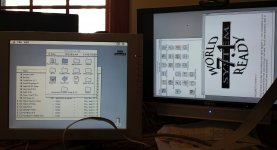
One big drawback, though - it only works if you boot in landscape mode, and then switch to portrait mode. If you boot in portrait mode, the Mac thinks you've got a 512 x 384 12" display. It boots OK, but my LCD monitor won't display that resolution. There are some hints about this issue in this old Radius doc, but not much detail. Possibly real Pivot monitors always identify themselves as a landscape display at first, then change their sense code to indicate portrait mode only after the Mac has booted - but how would they know when that is?
With this information, it should be easy to build a video cable with a "pivot now" switch, but you'd have to make sure the switch was initially off whenever you booted up.
So to recap: connecting sense code pins 4 and 10 on the Pivot side will give you 832 x 624 landscape video. You need to boot with that sense code. After booting, grounding either pin (while still keeping them connected to each other as well) will pivot the display to portrait mode, but this is a software feature and the video signal remains 832 x 624. The pivoting to portrait mode only works if the Radius software is installed on your Mac.
One big drawback, though - it only works if you boot in landscape mode, and then switch to portrait mode. If you boot in portrait mode, the Mac thinks you've got a 512 x 384 12" display. It boots OK, but my LCD monitor won't display that resolution. There are some hints about this issue in this old Radius doc, but not much detail. Possibly real Pivot monitors always identify themselves as a landscape display at first, then change their sense code to indicate portrait mode only after the Mac has booted - but how would they know when that is?
With this information, it should be easy to build a video cable with a "pivot now" switch, but you'd have to make sure the switch was initially off whenever you booted up.
So to recap: connecting sense code pins 4 and 10 on the Pivot side will give you 832 x 624 landscape video. You need to boot with that sense code. After booting, grounding either pin (while still keeping them connected to each other as well) will pivot the display to portrait mode, but this is a software feature and the video signal remains 832 x 624. The pivoting to portrait mode only works if the Radius software is installed on your Mac.
Woohoo! [] ]'> Props, bigmess, you are a W-I-L-D Man!
Looks like I've gotta test the three IIsi NICs a lot sooner than anticipated, how long will it take to whip up a couple of those HD-15 ball switch doohickies for me? I know you've got the soldering skills, if you have a good de-soldering rig I'll send you a pair of Pivot cards and the connectors to mod them for flat stacking, one card for you and one for me. Meanwhile I'll hack one of my fans/housings for a swap so you can install the NIC and the flat stacker RCPII/IIsi on your twin-slot adapter. [] ]'>
I'm not worried about the bonus pixels, though I really should try them on for size with the 20" 1600 x 1200 Multisync Pivoting LCD. For now I run them upright on the Portrait, that thing is a friggin' beyotch to pivot.
Now if someone would just build a USB KM(only) converter to ADB, we could get the IIsi hooked up to a main workstation's KVM switch. [}] ]'>
] ]'> Props, bigmess, you are a W-I-L-D Man!Looks like I've gotta test the three IIsi NICs a lot sooner than anticipated, how long will it take to whip up a couple of those HD-15 ball switch doohickies for me? I know you've got the soldering skills, if you have a good de-soldering rig I'll send you a pair of Pivot cards and the connectors to mod them for flat stacking, one card for you and one for me. Meanwhile I'll hack one of my fans/housings for a swap so you can install the NIC and the flat stacker RCPII/IIsi on your twin-slot adapter. [
] ]'>I'm not worried about the bonus pixels, though I really should try them on for size with the 20" 1600 x 1200 Multisync Pivoting LCD. For now I run them upright on the Portrait, that thing is a friggin' beyotch to pivot.
Now if someone would just build a USB KM(only) converter to ADB, we could get the IIsi hooked up to a main workstation's KVM switch. [}
] ]'>
Ah well, it was good while it lasted... for all of about an hour. :-(
After fiddling more with the sense lines, I'm now permanently stuck in a state where the Pivot card puts out an 1152 x 870 video signal while the Mac thinks it has a 832 x 624 (?) display, and everything looks garbled. The Radius DynamicDesktop software no longer offers any resolution-switching options either.
- I put all my wiring back how it was originally, and rechecked it several times, even beeped it out with the multimeter.
- I tried changing the sense codes to many other values, even tried leaving the sense lines entirely disconnected, but it always comes out with a 1152 x 870 video signal.
- The video is wrong at the first moment of booting, before the Happy Mac appears, so it can't be a software problem.
- I thought maybe some monitor setting in PRAM got messed up, but zapping PRAM didn't help either.
I am really stumped. If it's not a wiring problem, or a software problem, or a PRAM problem, what is it? It seems unlikely that the card broke somehow, but I'm out of ideas for other things to try to get it working again.
After fiddling more with the sense lines, I'm now permanently stuck in a state where the Pivot card puts out an 1152 x 870 video signal while the Mac thinks it has a 832 x 624 (?) display, and everything looks garbled. The Radius DynamicDesktop software no longer offers any resolution-switching options either.
- I put all my wiring back how it was originally, and rechecked it several times, even beeped it out with the multimeter.
- I tried changing the sense codes to many other values, even tried leaving the sense lines entirely disconnected, but it always comes out with a 1152 x 870 video signal.
- The video is wrong at the first moment of booting, before the Happy Mac appears, so it can't be a software problem.
- I thought maybe some monitor setting in PRAM got messed up, but zapping PRAM didn't help either.
I am really stumped. If it's not a wiring problem, or a software problem, or a PRAM problem, what is it? It seems unlikely that the card broke somehow, but I'm out of ideas for other things to try to get it working again.
Drop back ten and . . . pop a root beer open! Just walk away for today, you're too close to it.