

Thread
Using Modern Hard Drives on Old Macs?
Hi All,
Recently, I've had a few hard drive failures. I have done some reading online and people all over have been saying that hard drive failures are at an all time high. I guess it makes sense since most of these hard drives are around 20 years old. I know that you can usually find mac compatible hard drives online, but I am just thinking if there is any way to use a modern hard drive such as a SATA drive in a mac? Even an IDE hard drive would be great. I know there are some constraints with the old OS systems not being able to utilize hard drives over a certain size. I think someone once said the largest hard drive size you could use is somewhere around 2 gigs? I'm sure many have asked this question before, but I am just curious if anyone has been able to use a newer hard drive on macs such as an LC? If so, where could I get more information on how to do this myself?
Thanks everyone!
Recently, I've had a few hard drive failures. I have done some reading online and people all over have been saying that hard drive failures are at an all time high. I guess it makes sense since most of these hard drives are around 20 years old. I know that you can usually find mac compatible hard drives online, but I am just thinking if there is any way to use a modern hard drive such as a SATA drive in a mac? Even an IDE hard drive would be great. I know there are some constraints with the old OS systems not being able to utilize hard drives over a certain size. I think someone once said the largest hard drive size you could use is somewhere around 2 gigs? I'm sure many have asked this question before, but I am just curious if anyone has been able to use a newer hard drive on macs such as an LC? If so, where could I get more information on how to do this myself?
Thanks everyone!
You can use modern IDE/SATA HDs with the correct adapters, but they're (almost) invariably expensive nowadays due to the demand of 50-pin SCSI replacements for AKAI/Roland samplers as well as vintage computers.
This is the one SATA-SCSI converter I know of:
http://www.ebay.com/itm/AztecMonster-II-SATA-SSD-SCSI-Converter-for-Mac-AKAI-Emu-Sampler-/261195671570?pt=LH_DefaultDomain_0&hash=item3cd079a812
Your best bet would be finding a 68-pin SCSI hard drive or certain specific 80-pin SCSI drives (which are often very inexpensive... I can get multiple 9.1 GB 68-pin/80-pin drives for $5 locally) and getting the appropriate adapter, which are very inexpensive in comparison to the IDE/SCSI solutions.
Under 7.1, the limit is at 2 GB. 7.5-7.5.3 will let you use 4 GB drives, and after 7.6 on 68040-based Macs, I believe the limit is up to 2 TB.
This is the one SATA-SCSI converter I know of:
http://www.ebay.com/itm/AztecMonster-II-SATA-SSD-SCSI-Converter-for-Mac-AKAI-Emu-Sampler-/261195671570?pt=LH_DefaultDomain_0&hash=item3cd079a812
Your best bet would be finding a 68-pin SCSI hard drive or certain specific 80-pin SCSI drives (which are often very inexpensive... I can get multiple 9.1 GB 68-pin/80-pin drives for $5 locally) and getting the appropriate adapter, which are very inexpensive in comparison to the IDE/SCSI solutions.
Under 7.1, the limit is at 2 GB. 7.5-7.5.3 will let you use 4 GB drives, and after 7.6 on 68040-based Macs, I believe the limit is up to 2 TB.
were on it buddy!
SCSI to IDE, z-80 conv rototype, looking for a project lead
viewtopic.php?f=29&t=19623
they are almost done,,, the board will be able to accept SD cards or IDE hard drives.
SCSI to IDE, z-80 conv
rototype, looking for a project leadviewtopic.php?f=29&t=19623
they are almost done,,, the board will be able to accept SD cards or IDE hard drives.
I've been using SCA server drives, the 2.5" Seagate Savvio models are my current favorite as they're very quiet and reasonably low power despite being 10K RPM drives. The adapter PCBs to connect them to a 50 pin SCSI bus are only a few bucks and the drives are currently plentiful enough that I've stopped looking for SCSI to IDE solutions for the time being.
The partition size is limited to 2GB but you can have multiple partitions. I'm running a 72GB Savvio in my SE/30 with a pair of 2GB partitions. The rest of the space is wasted currently but the drive and adapter board were under $20.
It's worth noting that most of the 3.5" 10K drives are extremely noisy. Most of the 15K RPM models have fluid bearings and are much quieter, although the hissing sound they make may be more annoying, especially to those young enough to hear it well.
The partition size is limited to 2GB but you can have multiple partitions. I'm running a 72GB Savvio in my SE/30 with a pair of 2GB partitions. The rest of the space is wasted currently but the drive and adapter board were under $20.
It's worth noting that most of the 3.5" 10K drives are extremely noisy. Most of the 15K RPM models have fluid bearings and are much quieter, although the hissing sound they make may be more annoying, especially to those young enough to hear it well.
Snagaroonies! ;D Just got a Lot of 10 for $2 ea! There's a Lot of 11/free shipping for $39.99 OBO, that was my backup plan.
Got linkage for the adapters?
Not bloody likely, but are there 2.5" SCSI 1 adapters available that'll fit in a PB? :?:
Got linkage for the adapters?
Not bloody likely, but are there 2.5" SCSI 1 adapters available that'll fit in a PB? :?:
Thanks for the link Uniserver! That was a really nice thread to read. It is nice to know that the path is already laid down for this task. I have had some bad luck in the past with SATA to IDE converters on a pc i was using. The BIOS wouldn't detect the sata hard drive with the connector I was using. But this will work for me. I will also look into getting a 68 pin SCSI drive and making that work as it seems like the less complicated route for now. On a side note, I just think it would be amazing to run an old mac with an SSD!!
http://www.ebay.com/itm/SCSI-SCA-80-Pin-F-to-50-Pin-M-Internal-Adapter-/330436901004?pt=US_Drive_Cables_dapters&hash=item4cef92f88cSCSI SCA 80-Pin F to 50-Pin M Internal Adapter
Thanks, uni. Apparently, I've got some adapters that will work in stock. That looks like the outline of a 2.5' drive on the solder side.
Just checked, there's plenty of room for the standard SCA adapter on the 2.5" HDD form factor . . .
. . . they must have planned it that way. Du'oh! :
James, if a Chinese Mfr. could be persuaded to make up flex cables with SCA on one end and Apple's internal SCSI connector on the other, would there be room for these drives in PowerBooks?
Just checked, there's plenty of room for the standard SCA adapter on the 2.5" HDD form factor . . .
. . . they must have planned it that way. Du'oh! :
James, if a Chinese Mfr. could be persuaded to make up flex cables with SCA on one end and Apple's internal SCSI connector on the other, would there be room for these drives in PowerBooks?
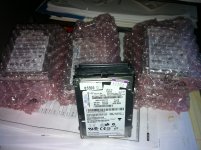
ok so i bought a mess of 2.5" scsi SCA sever drives from one of the links trash posted.
(11) total.
alright, what was is the process you used to format and partition these bad boys?
these hd's are 10k rpm and 73.4 gb
i hear that mac os 8.1 can handle larger partitions, but mac os 7.5.5 is really capped at around 4gb
and i would assume anything less then 7.5.3, is probably limited to a 2gb partition.
http://lowendmac.com/sable/06/0911.html
so i will be able to try a drive tonight.
(11) total.
alright, what was is the process you used to format and partition these bad boys?
these hd's are 10k rpm and 73.4 gb
i hear that mac os 8.1 can handle larger partitions, but mac os 7.5.5 is really capped at around 4gb
and i would assume anything less then 7.5.3, is probably limited to a 2gb partition.
http://lowendmac.com/sable/06/0911.html
let me know sir. my 11 sca to 50 pin adaptors are coming from china, i think i have one or 2 already laying around at home,
so i will be able to try a drive tonight.
Let mek now how it works out. I've been curious about those drives.
I use one in a G4 and it works well. Maybe ill get a converter as free geek has a milk crate filled with them at a dollar a piece. Most of them cheetah drives.
These drives are the right form factor for the original BrickOven concept study. I don't even need to make up a 2.5" laptop drive to 3.5" converter PCB the way I'd planned originally. They're small enough physically for a perfect fit and large enough in capacity that I don't even need to have an A/B/C/D/E/F switched 3.5" drive in the base unit! Hopefully they'll arrive tomorrow.
ok this is what i have.
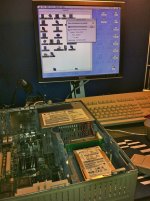
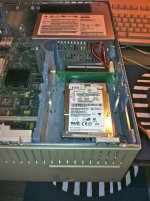
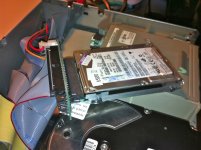
Disksetup in Mac OS9 will see the HD and allow you to Format and partition the drive.
So I made a 2gb and a 4gb, and the rest 8gb partitions.
then slapped it in my Quadra 700.
boot off mac os 8.1 from zip disk.
Re formated all the partitions as Mac OS Standard, for 68k macs.
Then all i did was copy mac OS 7.1 and Mac OS 8.1 to their partitions from the zip disks.
( reboot )
and presto, it works! the Hard Drive is super quiet, you cant even hear the darned thing run.
Thanks for the tip these scsi hard drives seem to be 100% backwards compatible.
Disksetup in Mac OS9 will see the HD and allow you to Format and partition the drive.
So I made a 2gb and a 4gb, and the rest 8gb partitions.
then slapped it in my Quadra 700.
boot off mac os 8.1 from zip disk.
Re formated all the partitions as Mac OS Standard, for 68k macs.
Then all i did was copy mac OS 7.1 and Mac OS 8.1 to their partitions from the zip disks.
( reboot )
and presto, it works! the Hard Drive is super quiet, you cant even hear the darned thing run.
Thanks for the tip these scsi hard drives seem to be 100% backwards compatible.
ok, let the Quadra 700 sit on all night.
these little 10k drives do make some heat!
they are hot to the touch...
however its working, rebooted it a few times. now its powered down and back on the shelf.
Put a couple small daps of GOOP on the corners, just so this new hd setup stays put!
It's good to go!
Now I have this rather large full height , IBM 160 mb HD from the Quadra 700 sitting here.
This is a rare sight! I'v never had spare scsi mac HD's laying around. Good times!
Charles
these little 10k drives do make some heat!
they are hot to the touch...
however its working, rebooted it a few times. now its powered down and back on the shelf.
Put a couple small daps of GOOP on the corners, just so this new hd setup stays put!
It's good to go!
Now I have this rather large full height , IBM 160 mb HD from the Quadra 700 sitting here.
This is a rare sight! I'v never had spare scsi mac HD's laying around. Good times!
Charles
Uniserver: are you going to put a heat sink on that hard drive?
no way.
all though i could…. hummm
Naaahhhhhh.
all though i could…. hummm
Naaahhhhhh.
If anyone one wants one of these pm me.
I will sell you one that comes with the drive(73gig) and the standard 50 pin scsi adaptor for 25 bucks.
It will come partitioned so you don't have to do anything other then install it, and use it.
This will work in any mac that has SCSI.
Even the PLUS if you manage to solder on the SCSI cable properly and beef up the PSU slightly
All the SE line, Mac II's, Classic's, LC's
The only issue you might have is installing this in like a LC520/550/575, you would have to get creative with the funny HD adaptor thingie.
Any mac that uses that HD adaptor thingie will require some creativity. It's totally possible though.
I will sell you one that comes with the drive(73gig) and the standard 50 pin scsi adaptor for 25 bucks.
It will come partitioned so you don't have to do anything other then install it, and use it.
This will work in any mac that has SCSI.
Even the PLUS if you manage to solder on the SCSI cable properly and beef up the PSU slightly
All the SE line, Mac II's, Classic's, LC's
The only issue you might have is installing this in like a LC520/550/575, you would have to get creative with the funny HD adaptor thingie.
Any mac that uses that HD adaptor thingie will require some creativity. It's totally possible though.
sounds like something I might want to snag from you in the future if you still have some next month. :b&w:
I just started playing with my set of ten that arrived today. VERY quiet drives, downside is that even with a Flex Cable, the SCA connector on the drives extends beyond the drive, making them too long to use in PowerBooks . . .
. . . but a cinch to adapt to the Luggable. }
The three-way adapter IDC50 SCSI1/68pin SCSIII/SCA as in uni's picture equals the vertical dimension of a full height 3.5" device/half height 5.25" device, so it'll work in the Mac II series just fine. The lower profile adapters in uni's link above should be a much better fit for anything later, looks like it ought to work with the compacts and 'zaBoxen just fine.
I'll have to wait for the low profile adapters, The Rocket doesn't fit into the SuperIIsi™ with a full height 3.5" drive on board. Using a lower profile HDD makes room for all that lovely RAM.
This looks very promising.
. . . but a cinch to adapt to the Luggable. }
The three-way adapter IDC50 SCSI1/68pin SCSIII/SCA as in uni's picture equals the vertical dimension of a full height 3.5" device/half height 5.25" device, so it'll work in the Mac II series just fine. The lower profile adapters in uni's link above should be a much better fit for anything later, looks like it ought to work with the compacts and 'zaBoxen just fine.
I'll have to wait for the low profile adapters, The Rocket doesn't fit into the SuperIIsi™ with a full height 3.5" drive on board. Using a lower profile HDD makes room for all that lovely RAM.
This looks very promising.
Indeed!
I plan on getting one of these and putting it in an external enclosure so that I can lug it around, sort of like a super giant JAZ disk (but more reliable in the long term; I've read (albeit very little) that JAZ disks don't wear extremely well compared to other kinds of disks).
Next up is to figure out a way to cheaply and reliably interface a modern SATA drive to 50 pin SCSI.
c
Not positive about this, but like their 3.5" SCA brethren they're probably meant to be used in well ventilated, hot swappable arrays for servers. A cooling fan may be necessary for long term use in the marginally ventilated cubbyholes of these ancient Macs. Beige and Platinum may be beautiful, but the power and cooling budgets always left a lot to be desired.
Thinking about cooling - the Mac stock approach to cooling would be to ensure a good thermal bond to some heat-sinking structural element. In Uni's Quadra, that unit is sitting on a pretty substantial metal case element. Maybe as well as his beloved "goop" the drive could sit on some of that heat-conductive pad that you find in G* series, located at hotspots that are at GND potential. Stock ventilation might then be enough. Just guessing. :-/
Rick
Rick
Goooooooop :-D
:O I initialized one of these puppies with HDT under 7.1 in the IIsi and the info box said HDT 2 GB would be ready to use in a few minutes . . .
. . . I pulled the plug because it wouldn't finish and looked like it was caught in a loop . . .
. . . it was, I had to rename all those volumes HDT 2.00 GB thru HDT 2.11 GB when I restarted.
They're scattered all over the friggin' desktop! :lol:
. . . I pulled the plug because it wouldn't finish and looked like it was caught in a loop . . .
. . . it was, I had to rename all those volumes HDT 2.00 GB thru HDT 2.11 GB when I restarted.
They're scattered all over the friggin' desktop! :lol:
LOL at least on that machine you have a little more screen real estate to have them scattered all over the desktop haha
Some hard disk drivers (Silverling comes to mind) will let you set a volume to not appear automatically, but only when you say so via a special DA.
That's cool, never tried that one, I've always used HDT, IDK if I've ever used Apple's formatting tools . . .
. . . of course I've never actually had a need to cut down on volume clutter before this! :lol:
. . . of course I've never actually had a need to cut down on volume clutter before this! :lol:
I have got one of those myself, a Seagate 18 Gb coming from a server, including the small board, never got it working until today.
I connected the HD to my Powermac 7600, used Disk Setup to format and partition the drive and nothing else...
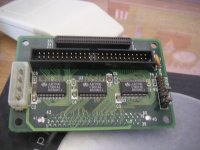
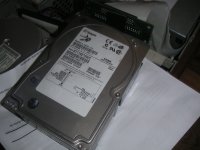
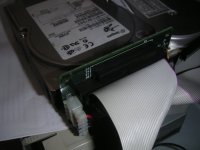
The HD was then put in a spare enclosure, for a test...working great but running hot !! }
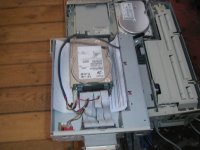
I connected the HD to my Powermac 7600, used Disk Setup to format and partition the drive and nothing else...
The HD was then put in a spare enclosure, for a test...working great but running hot !! }
I've gathered there is a 2GB size limit per partition, but is there a limit to how many partitions the Mac will "see"?
good question, so far with this 73 gig hd i am using, all partitions for all the space show up.
another question is mac os 6.0.8?, or Mac Portable?
using the same drive, still waiting on my (10)SCA to 50 pin adaptors from china.