

Thread
Using Modern Hard Drives on Old Macs?
The Apple HD20SC enclosure is designed to accommodate a 3.5" or 5.25" hard disk. There is bucket loads of space.
Right, I know that, but will termination (or lack thereof) preclude this particular drive from working?
c
c
The HD-20 has no termination, it has the passthru, baled Centronics 50 Connector pair found on any properly designed external SCSI enclosure for use with a standard (Centronics 50) external terminator when it's positioned end of the chain.
I've never opened mine up, but it's likely that even the ID setting cable of the HD20SC will work with the "problematic" low profile adapters. If so, you'll have no jumpers on the adapter's headers, just the cable connecting the three ID select headers to the switch on the back.
It should work great. Matter of fact, avoid terminated adapters if the resistor packs aren't removable or powered from a jumper or switch.
I've never opened mine up, but it's likely that even the ID setting cable of the HD20SC will work with the "problematic" low profile adapters. If so, you'll have no jumpers on the adapter's headers, just the cable connecting the three ID select headers to the switch on the back.
It should work great. Matter of fact, avoid terminated adapters if the resistor packs aren't removable or powered from a jumper or switch.
OK, great!
I got one of Uniserver's hard drives and adapter, and I was planning on using it in a Apple HD20SC enclosure. It sounds like it should work just fine.
If I want to use it on the end of the chain, I plug one of those Centronics terminators into the empty jack on back (with the other connected to the Mac, of course), correct?
Otherwise, it's plug and play?
c
I got one of Uniserver's hard drives and adapter, and I was planning on using it in a Apple HD20SC enclosure. It sounds like it should work just fine.
If I want to use it on the end of the chain, I plug one of those Centronics terminators into the empty jack on back (with the other connected to the Mac, of course), correct?
Otherwise, it's plug and play?
c
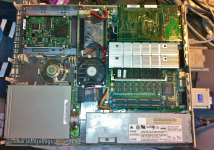
You got me . . . had to crack it open and try it . . . :
. . . yep, almost plug-n-play . . . there's enough slack in the MOLEX and IDC50 cables and beacoups slack in the SCSI ID cable . . .
. . . just gotta nip off the bottom (extra/useless) SYNC header pair for SCSI ID cable connector clearance and make an extension "cable" for the LED . . . ;D
The PSU outputs 2A @ 5V and 1.5A @ 12V and the cooling budget is for the original half-height 5.25" HDD. Mine has (had?) a functional full-height 3.5" MiniScribe/Adapter in it.
Gotta check the specs, but you should be able to put at least two of these things in there with no problems. I think I'll stow the original connector/cable harness inside my HD20SC and reversibly hack it into a stealth, end of chain, duplex HDD unit (one at a fixed ID, both terminated) with drives formatted and partitioned for multiple OS configurations. [}] ]'>
Just checked, hack's halfway done, I've unbolted the top Centronics50 connector and bent it back about 45 degrees on its cable. There's plenty of room to snake in another connector for the duplexed drive, leaving the original daisy-chain cable assembly intact and in place. Heck, I've probably got almost enough junk, cables and adapters on hand to make the new topside connector fast/wide! :approve:
YO, mcd! One functional MinisSribe incoming for your restoration projects!
. . . yep, almost plug-n-play . . . there's enough slack in the MOLEX and IDC50 cables and beacoups slack in the SCSI ID cable . . .
. . . just gotta nip off the bottom (extra/useless) SYNC header pair for SCSI ID cable connector clearance and make an extension "cable" for the LED . . . ;D
The PSU outputs 2A @ 5V and 1.5A @ 12V and the cooling budget is for the original half-height 5.25" HDD. Mine has (had?) a functional full-height 3.5" MiniScribe/Adapter in it.
Gotta check the specs, but you should be able to put at least two of these things in there with no problems. I think I'll stow the original connector/cable harness inside my HD20SC and reversibly hack it into a stealth, end of chain, duplex HDD unit (one at a fixed ID, both terminated) with drives formatted and partitioned for multiple OS configurations. [}
] ]'>Just checked, hack's halfway done, I've unbolted the top Centronics50 connector and bent it back about 45 degrees on its cable. There's plenty of room to snake in another connector for the duplexed drive, leaving the original daisy-chain cable assembly intact and in place. Heck, I've probably got almost enough junk, cables and adapters on hand to make the new topside connector fast/wide! :approve:
YO, mcd! One functional MinisSribe incoming for your restoration projects!
Ah, great find, uniserver. The only similar adapter I have found is the $22 one on Ebay. This is a much nicer price, unless the shipping kills it.
10-6=4 and counting . . . piccie to follow . . .
. . . these not only work flawlessly so far, the're MOLEX side correct! T-7 days to ZERO, get 'em before . . . }
uni, I assume you snagged the other three, if nobody else wants 'em, how's about we split the last two?
. . . these not only work flawlessly so far, the're MOLEX side correct! T-7 days to ZERO, get 'em before . . . }
uni, I assume you snagged the other three, if nobody else wants 'em, how's about we split the last two?
lol, I don't need them, didn't order any, they do seem quite desirable though.
I'm trying to run one of Uniserver's SCA>scsi50 deals using a external jaz enclosure. The jaz itself is a dud but the power/centronics/scsi50 board still works.
I can't seem to find a working combination of jumpers to boot it.
The jaz enclosure has enough juice as it's 12v line is .75a and the 5v line is 1.0a. the SCA drive just needs .5 and .8 respectively.
I wired an LED to the led header on the adapter to see if there was any activity when powered on. Is the jaz enclosure too much power to run it? or just some more scsi voodoo?
btw: big 'LSI LOGIC' chip on hdd gets hot to the touch
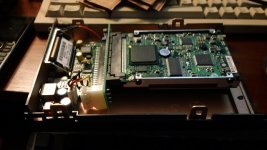
I can't seem to find a working combination of jumpers to boot it.
The jaz enclosure has enough juice as it's 12v line is .75a and the 5v line is 1.0a. the SCA drive just needs .5 and .8 respectively.
I wired an LED to the led header on the adapter to see if there was any activity when powered on. Is the jaz enclosure too much power to run it? or just some more scsi voodoo?
btw: big 'LSI LOGIC' chip on hdd gets hot to the touch
That looks particularly evil, especially if that Jaz drive's connector is unkeyed. It looks to me like you have the SCSI connector on the HDD plugged into the connector on the Jaz Drive's PCB backwards/upside-down.
Check for ground to ground and signal to signal continuity between connectors . . .
. . . before firing that contraption up again! :O
Check for ground to ground and signal to signal continuity between connectors . . .
. . . before firing that contraption up again! :O
Wow, I really can't utilize most of my brain these days... You are very right on that.. I don't know why I @$$umed that it would just work the way it fit... oh brother I hope it isn't fried.
Steroid-mutilated-memory-loss-rookie mistake I guess?
Report back after I check it the correct orientation.
Steroid-mutilated-memory-loss-rookie mistake I guess?
Report back after I check it the correct orientation.
looks like that mess will have to wait until I get an ribbon extension cord or something....
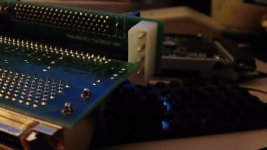
or you could unscrew the PCB out of the enclosure and just hook the board properly that way
I did in that pic, check out the molex connector on it.. lol. no access.
I'm going to solder it to the other side later or tomorrow. and then add longer power cable and see how it goes.
I'm going to solder it to the other side later or tomorrow. and then add longer power cable and see how it goes.
pretty hard core
lol I just wanna get it working and see what you guys are so excited about haha
well throw that drive in a mac, and just use the jazz as a terminator. should just work.
i just upgraded my LC475
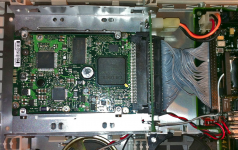
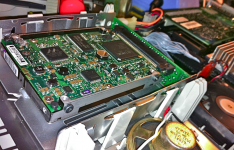
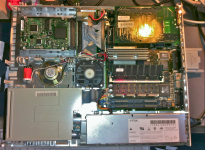
It appears that won't do, uni. First he was talking about putting it into his HD20SC Now it looks like he's putting it into a Fast SCSI II enclosure for some reason or other? I just popped my external Jaz drive, unencumbered by disk or A/C adapter, open to see what the heck marky is up to . . .
. . . interesting board in there . . . why the fast SCSI II angle? :?:
. . . interesting board in there . . . why the fast SCSI II angle? :?:
Oh that was CC_333 doing the HD20, I was just trying this so I didn't have to open the SE again, (and remove it's internal zip ((I don't have any double SCSI cable ATM..))
But I did make it work just now.
I moved the molex to the opposite side of the board, got a longer power cable, and the configuration that booted the SE was:
No TPR jumper on the adapter, actually the only jumper on there is ID2. (that leaves the ZIP at 1 I presume)
Then on the Jaz board the Term switch is on 1 for on rather than Auto or 0.
It booted the SE very quick, and the only caveat is something is still off... the screen is a little jumpy, only with HDD activity I think.
Does anyone know what voltage LED the LED jumper can use? I pulled a PC HDD activity light but there was no light.
Also jt, I thought the Jaz would be an easier option since the Jaz portion isn't working like it should.
But it's still a pain in the butt. I don't know how you guys solder all the time (you especially uniserver.. heheh ) )
) )
BTW thanks uniserver for configuring the drive and loading it up!
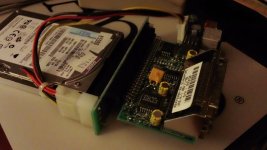
But I did make it work just now.
I moved the molex to the opposite side of the board, got a longer power cable, and the configuration that booted the SE was:
No TPR jumper on the adapter, actually the only jumper on there is ID2. (that leaves the ZIP at 1 I presume)
Then on the Jaz board the Term switch is on 1 for on rather than Auto or 0.
It booted the SE very quick, and the only caveat is something is still off... the screen is a little jumpy, only with HDD activity I think.
Does anyone know what voltage LED the LED jumper can use? I pulled a PC HDD activity light but there was no light.
Also jt, I thought the Jaz would be an easier option since the Jaz portion isn't working like it should.
But it's still a pain in the butt. I don't know how you guys solder all the time (you especially uniserver.. heheh
) )BTW thanks uniserver for configuring the drive and loading it up!
I take it back!
it works perfectly!
The wobbly screen just needed a tap to the side of the SE, and it stopped!
(Figured this out since I booted from zip to try something else network related)
Much happier now.
(prob going to need an a/b recap sooner than I thought) > :'( :'(
it works perfectly!
The wobbly screen just needed a tap to the side of the SE, and it stopped!
(Figured this out since I booted from zip to try something else network related)
Much happier now.
(prob going to need an a/b recap sooner than I thought) >
:'( :'(
good job mac-gyver!

I'm glad it's working, the evil apparent in that first pic looked like a good way to vent some magic smoke! 8-o
I'm very glad it didn't poof on me. I need to be more careful.
Now back to the real topic at hand 'What termination or terminator is required".
I'm going to chime in that active at the end of the chain works.
If you use one of those internal type active terminators, do you still need to terminate the external port?
Now back to the real topic at hand 'What termination or terminator is required".
I'm going to chime in that active at the end of the chain works.
If you use one of those internal type active terminators, do you still need to terminate the external port?
man i am on a Roll, i got the IIsi done, had to swap the scsi cable from one of my lc's - works good.
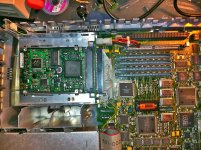
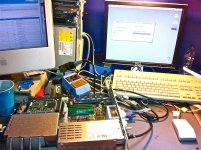
How are you terminating those adapters?
(Also I laugh every time I see AMD chips in macs)
(Also I laugh every time I see AMD chips in macs)
its almost 3am, i shot the moon, and did the q605, that wraps up my forth and final terminator, and my last drive as well.
term pwr on
I use the external passive terminator, the one for 5 bucks in my above posts. - workin great in these machines.
term pwr on
I use the external passive terminator, the one for 5 bucks in my above posts. - workin great in these machines.
http://www.ebay.com/itm/Lot-of-100-IBM-2-5-73-4GB-10K-U320-SCSI-Hard-Drives-90P1316-/181141315047?pt=US_Internal_Hard_Disk_Drives&hash=item2a2cdd1de7
i hate my self, i made a offer of 200.00 i hope he doesn't accept it.
i hate my self, i made a offer of 200.00 i hope he doesn't accept it.
whoa that's going to be one heavy parcel...
ha Yeah it is a little late to be tinkering, but now that you mention it,
wonder if anyone ever hooked up a 73gb to a Plus yet.
if not they have now :-D
ha Yeah it is a little late to be tinkering, but now that you mention it,
wonder if anyone ever hooked up a 73gb to a Plus yet.
if not they have now :-D