

Thread
Using Modern Hard Drives on Old Macs?
Alliance Power Tools from APS Technologies (was once quite a fine seller of external hard drives to the Mac community) also has that feature. It will also allow one to password protect a volume. So you can have volumes which mount automatically, volumes which try to mount automatically, but ask you for a password before mounting, volumes which will only mount when you use a utility to manually mount them and volumes which require manual mounting and will ask you for a password when you try to mount them.
Snagged one of Uni's tiny/giant drives. He partitioned it for me, and I moved an OS 8.1 sys folder over from a Zip drive. Boots up nicely and I can see the 2, 4, and 8 GB partitions on the drive. Works great. Moving my whole library onto it for safe keeping. It'll wind up in an ancient zero footprint SCSI external enclosure as a file vault/emergency boot disk. The ZFP case has a fan, which is good, because it gets warm. Not dangerously warm, but needs-a-fan warm.
It's been accidentally on with my Q605 for 72 hours now, and is functioning smoovly.
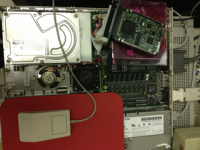
It's been accidentally on with my Q605 for 72 hours now, and is functioning smoovly.
Groothy!  )
)
)
One of these would not fit in the tight confines of a Duo, presumably, but what about the more generous proportions of a 180 or 540c? Obviously some way to supply power would also be needed. Possible?
The standard PB HDD SCSI Cable already supplies power. 
But don't forget these come out of server arrays with active cooling, Dunno if the drive would bork before it melted the wrist rest or add some interesting texture to the PB's plastics first?
But don't forget these come out of server arrays with active cooling, Dunno if the drive would bork before it melted the wrist rest or add some interesting texture to the PB's plastics first?
Crap, I probably just single-handedly quadrupled the price of these things, I guess I should have bought a few more for myself first

I've never had to replace a Powerbook drive so I don't know. As someone else mentioned, the length may be an issue although with enough determination one could probably remove the connector and solder on a cable directly. Power consumption might be an issue too. They are low power relative to server drives, and about on par with the old 3.5" SCSI drives most of us are looking to replace, but likely a bit high compared to laptop drives.
That's ok your still the man.
I think the users of this forum underestimate just how much traffic 68kmla gets.
More will get posted, the price will stay low on these trust me, There is thousands and thousands of these little guys out there just waiting to be posted on ebay and sold.
my adaptors came in today.
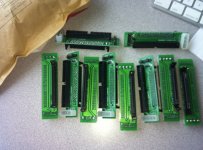
My bag of SCSI jewelry arrived from China today as well, very quick service, that. I'm looking forward to installing the little space heating [}] ]'> in the IIsi correctly. [] ]'>
] ]'> in the IIsi correctly. [] ]'>
I found some HD heat sinks, it keeps the HD "touchable"
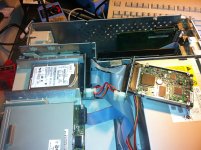
These little drives are great.
These little drives are great.
Hey that drive's to small for the drive bay!!! 
WT . . . :?:
3.5" to 2.5" drive rails:Hey that drive's to small for the drive bay!!!
http://www.geeks.com/details.asp?invtid=HD-108&cat=HDD

One may be able to find a similar item on Ebay for less, but I know about these.
The electrical adapter shown is for IDE drives, and so not relevant to this thread's discussion, but it might come in handy for something.
if anyone gets those rails and doesn't know what to do with the adapter... This guy over here could use one )
)
Personally I prefer the pan-style brackets that mount the drive from the bottom over the bracket style. The advantage is that there's room for rubber noise isolation bushings to make the drive really quiet. If you enlarge the holes in the pan slightly, you can fit rubber grommets in them and run the screws through those.
i just select 6 or 8 partitions and just waste the extra space, leave the extra un allocated.
no big deal.
no big deal.
I guess it has the advantage of LOTS of spare sectors in case they start going bad
.I got mine yesterday, and I'm eager to try it out!
Thanks!
c
haha you can partition it any way you like
Toss it in, fire it up, let me know how you like it...
Personally,
I think they are awesome.
Toss it in, fire it up, let me know how you like it...
Personally,
I think they are awesome.
Yeah, it looks like a pretty heavy duty drive.
If it were put on a faster, more modern bus, it would probably just fly!
This is my first 10k RPM drive, by the way!
I also like that the date of manufacture is 2006. That means is shouldn't succumb to age related deterioration just yet.
c
If it were put on a faster, more modern bus, it would probably just fly!
This is my first 10k RPM drive, by the way!
I also like that the date of manufacture is 2006. That means is shouldn't succumb to age related deterioration just yet.
c
While too hot can cause problems, you don't want to go nuts with the cooling, too cold can apparently reduce life as well. I read a very interesting study a few years ago, just found a link to it. It's a study of hard drive failure statistics in very large server farms.
http://static.googleusercontent.com/external_content/untrusted_dlcp/research.google.com/en/us/archive/disk_failures.pdf
I imagine I would be putting an old gfx card heatsink (thin little guy) and fan on one and call it a day.
Interesting looking article about HDD failure, but I'm just playing today and that looks like a serious read. :
These new adapters I got don't work so well with the standard IIsi power cable, it wionds up being too short because the Molex socket on the adapter is on the opposite side as a standard SCSI HDD's. I was right about these adapters being exactly the same form factor as the @$$end of a low profile 3.5" HDD though, fits the profile of the HDD carrier like a charm, with just a tad of room for airflow left over.
Do SCA drives have active termination built in? For my only pair of 68pin SCSI II HDDs I have just one adapter with active termination.
I don't think I've had to deal with one little bit of SCSI voodoo using any of the Ultra Drives. :O
These new adapters I got don't work so well with the standard IIsi power cable, it wionds up being too short because the Molex socket on the adapter is on the opposite side as a standard SCSI HDD's. I was right about these adapters being exactly the same form factor as the @$$end of a low profile 3.5" HDD though, fits the profile of the HDD carrier like a charm, with just a tad of room for airflow left over.
Do SCA drives have active termination built in? For my only pair of 68pin SCSI II HDDs I have just one adapter with active termination.
I don't think I've had to deal with one little bit of SCSI voodoo using any of the Ultra Drives. :O
i may have discovered something funny with with these drives, seems like the termination from the external port is something these HD's need in order to boot. in some machines.
i Really Really thought i was booting my q700 /wo my external zip connected to the scsi port...
for the time being i cant get my q605 to boot /wo my external zip connected , Zip disk in or not.
like wise with the q700
gotta do more testing... = time ,
i Really Really thought i was booting my q700 /wo my external zip connected to the scsi port...
for the time being i cant get my q605 to boot /wo my external zip connected , Zip disk in or not.
like wise with the q700
gotta do more testing... = time ,
I also! I tried the new, low profile adapter as the internal drive in the SuperIIsi™ and got no joy. I had it on an internal cable along with the boot drive, dunno in which order, but that worked fine. Gotta look for my IDC50 passthru terminator for testing. I'll hang a DB-25 terminator off the @$$end and see what that does as well.
I'm looking into hacking one underneath the FDD, it fits great but for height and one rib interfering with the adapter card overhang on the PSU side.
Have you changed any of the default jumper settings on the adapter?
I'm looking into hacking one underneath the FDD, it fits great but for height and one rib interfering with the adapter card overhang on the PSU side.
Have you changed any of the default jumper settings on the adapter?
Yeah sure have .
I gotta play with it more. Need more time!
I gotta play with it more. Need more time!
I wonder if its because I am dragging and dropping the OS'es, the HD Drivers never get installed, Maybe that is a issue?
Or heck maybe the term power jumper on the adaptor doesn't acutely do anything?
Or heck maybe the term power jumper on the adaptor doesn't acutely do anything?
http://www.ebay.com/itm/Passive-SCSI-Terminator-DB25-Male-/140943145282?pt=US_Drive_Cables_dapters&hash=item20d0ddb942
Passive SCSI Terminator, DB25 Male
wonder if one of these would help?
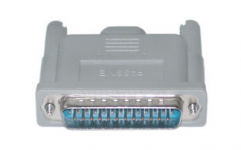
Passive SCSI Terminator, DB25 Male
wonder if one of these would help?
I'm looking for mine ATM!
edit: I found one that looks just like that, didn't help. I think the drive end needs to be terminated. If I can find my test harness, I'll give that a quick try tonight.
edit: I found one that looks just like that, didn't help. I think the drive end needs to be terminated. If I can find my test harness, I'll give that a quick try tonight.
Well, it's not the usual termination type SCSI voodoo as far as I can tell. I haven't found the active termination kluge cable, but I found the one with just an external connector on the multiple position cable.
Passive terminator on the external port = :?:
Passive terminator on the internal chain = :?:
Passive terminator on the external port and on the internal chain = :?:
In none of these termination configurations did the HDD spin up.
I'm guessing jumpers, there's something wrong with the default settings.
______________________________________________________________________________________
I've got way too many adapters and one too many (both unmarked, one unformatted) drives laying about . . . :-/
______________________________________________________________________________________
Yep, pulling the jumper off the REM header enables drive spin up, so it's jumpers or something inherently wrong with the adapter. I remember trag mentioning something about adapters that he couldn't see provision for something or other to work. ISTR it being termination. These have a jumper labeled "TPR" and two more headers (10) than the ( 8) taller 8/16bit SCA adapters, so they should be fine. Given the correct settings for the two missing signals that must be(?) hardwired on the 8/16 SCA adapters, and any others that may be tweaked, we should be able to work this out. No docs came with the low profile, 8bit only SCA adapters we bought, but I've got the pinouts for SCA, Docs for the 8/16s . . .
. . . and a continuity tester!
I haven't actually gotten these low profile adapters to work yet, but the 8/16 definitely worked on the IIsi. ;D
Though I don't recall if I got the drive to work as the only drive in the system or not. :-/
Passive terminator on the external port = :?:
Passive terminator on the internal chain = :?:
Passive terminator on the external port and on the internal chain = :?:
In none of these termination configurations did the HDD spin up.
I'm guessing jumpers, there's something wrong with the default settings.
______________________________________________________________________________________
I've got way too many adapters and one too many (both unmarked, one unformatted) drives laying about . . . :-/
______________________________________________________________________________________
Yep, pulling the jumper off the REM header enables drive spin up, so it's jumpers or something inherently wrong with the adapter. I remember trag mentioning something about adapters that he couldn't see provision for something or other to work. ISTR it being termination. These have a jumper labeled "TPR" and two more headers (10) than the ( 8) taller 8/16bit SCA adapters, so they should be fine. Given the correct settings for the two missing signals that must be(?) hardwired on the 8/16 SCA adapters, and any others that may be tweaked, we should be able to work this out. No docs came with the low profile, 8bit only SCA adapters we bought, but I've got the pinouts for SCA, Docs for the 8/16s . . .
. . . and a continuity tester!
I haven't actually gotten these low profile adapters to work yet, but the 8/16 definitely worked on the IIsi. ;D
Though I don't recall if I got the drive to work as the only drive in the system or not. :-/
I woke up early, did some research and played in AI8 for a bit. I just did this by eye, I'll have to break out the continuity tester to check accuracy and buzz connections on the problem child . . .
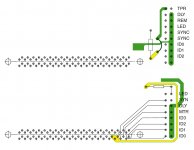
. . . it's a start.
. . . it's a start.
I'm pretty much finished, but still confused: miscellaneous weirdness about both adapters . . .

. . . I'll try to explain . . .
The adapter on top is the one we're trying to debug/set up correctly:
What the heck is TPR :?: It's not on the SCA pinout, and missing on the bottom adapter . . .
. . . my guess is that it's a power line for an active terminator?
Why does the 3-way adapter (on the bottom) provide power to 77- Active LED out out line when jumpered . . .
. . . while the problematic 2-way adapter connects 77- Active LED out to ground?
______________________________________________________________________________________
Just pulled the docs for the 8 jumpered 3-way adapter and it has the diagram and info for the 10 jumpers on their SCA8050 and SCA8068 adapters, so of course, on the SCA80_8&16bit adapters that the documentation came with, NOTHING MATCHES! See above!
Meanwhile this documentation EXACTLY matches the 10 jumpers on the problematic 50 pin adapters! Go figure! :
TPR = Termination Power
DLY = Start Delay
REM = Remote-Start
LED = LED
SNC = Synchronous
SNC = Synchronous
SCSI ID 0
SCSI ID 1
SCSI ID 2
SCSI ID 3
The bottom jumper, 80 - SCSI ID (3) is unimplemented because only three address bits are needed for IDs 0-7.
I'm still curious as to why the two 37 - Spindle Sync headers appear to be tied together under the header of the problematic adapter when there is only one header for SYNC on the SCA80 50&68bit adapter?
Most curious of all: why does the other side (ground?) of 37 - Spindle Sync SCA80 50&68bit adapter appear to be swinging in the breeze?
. . . I'll try to explain . . .
The adapter on top is the one we're trying to debug/set up correctly:
What the heck is TPR :?: It's not on the SCA pinout, and missing on the bottom adapter . . .
. . . my guess is that it's a power line for an active terminator?
Why does the 3-way adapter (on the bottom) provide power to 77- Active LED out out line when jumpered . . .
. . . while the problematic 2-way adapter connects 77- Active LED out to ground?
______________________________________________________________________________________
Just pulled the docs for the 8 jumpered 3-way adapter and it has the diagram and info for the 10 jumpers on their SCA8050 and SCA8068 adapters, so of course, on the SCA80_8&16bit adapters that the documentation came with, NOTHING MATCHES! See above!
Meanwhile this documentation EXACTLY matches the 10 jumpers on the problematic 50 pin adapters! Go figure! :
TPR = Termination Power
DLY = Start Delay
REM = Remote-Start
LED = LED
SNC = Synchronous
SNC = Synchronous
SCSI ID 0
SCSI ID 1
SCSI ID 2
SCSI ID 3
The bottom jumper, 80 - SCSI ID (3) is unimplemented because only three address bits are needed for IDs 0-7.
I'm still curious as to why the two 37 - Spindle Sync headers appear to be tied together under the header of the problematic adapter when there is only one header for SYNC on the SCA80 50&68bit adapter?
Most curious of all: why does the other side (ground?) of 37 - Spindle Sync SCA80 50&68bit adapter appear to be swinging in the breeze?