

Thread
Designing a portable RAM card
Here's something that should be useful.
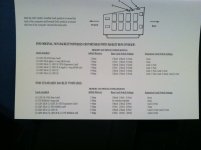
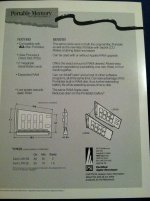
Wow! Excellently cool progress, Techknight.
What does /AS do? Is that Address Strobe? Still don't know what it does, even if that's the correct name. It seems bizarre that putting a load on that wire could cause the backlight to switch off and on.
What does /AS do? Is that Address Strobe? Still don't know what it does, even if that's the correct name. It seems bizarre that putting a load on that wire could cause the backlight to switch off and on.
the /AS is the address strobe, yes...
Starting with the Backlit portable, they removed the /AS in the RAM connector and replaced it with a signal, known as /RAM.CS
This signal is controlled by an external address decoder network, which actually sits between the ROM socket, and the RAM itself. a series of 74 series gates. but I digress...
This /RAM.CS will only assert within the first 5MB of address space. After that, the signal no longer gets asserted. Therefore, on the M5126, you have a RAM ceiling of 5MB in the RAM slot. PDS is an exception though because you have access to the entire bus so these limitations dont exist.
but since I didnt feel like dealing with the Eurocard connectors, or the PDS, I designed the card to fit in the existing RAM slot.
So.... In order to gain full addressing on the backlit portable via the RAM slot, you have to pick off the /AS address strobe signal either from the PDS, or from the ROM slot. Since ROM is still attached directly to the bus, and not isolated through an external decoder.
The catch is, after 5+MB the RAM decoder network no longer generates a /DTACK signal to tell the processor that the data transfer was successful.
So, I am thinking that since I didnt hook the DTACK line up, it was causing a ton of bus errors even though the system information was showing the full 8MB of RAM.
If I use the /RAM.CS signal instead of /AS, everything works great. But only sees 5MB as expected. If I remove the jumper that connects to /RAM.CS and replace it with a wire that goes to /AS instead, It shows the full 8MB of RAM. But every time an application launches and uses the extended RAM (RAM past 1MB), the backlight flickers on and off extremely rapidly, at the same pace as the RAM accessing occurs.
so i think the DTACK connection not being made is an issue, OR, since my /AS wire clip lead was so long and coiled, it was distorting the signal to the RAM card causing issues with data transfers in and out of RAM.
Funny thing though... no bombs, or system errors/sad macs. Just kept right on chugging with backlight flickering. Soon as I exited microsoft word 5.1, it quit. backlight stayed on.
Starting with the Backlit portable, they removed the /AS in the RAM connector and replaced it with a signal, known as /RAM.CS
This signal is controlled by an external address decoder network, which actually sits between the ROM socket, and the RAM itself. a series of 74 series gates. but I digress...
This /RAM.CS will only assert within the first 5MB of address space. After that, the signal no longer gets asserted. Therefore, on the M5126, you have a RAM ceiling of 5MB in the RAM slot. PDS is an exception though because you have access to the entire bus so these limitations dont exist.
but since I didnt feel like dealing with the Eurocard connectors, or the PDS, I designed the card to fit in the existing RAM slot.
So.... In order to gain full addressing on the backlit portable via the RAM slot, you have to pick off the /AS address strobe signal either from the PDS, or from the ROM slot. Since ROM is still attached directly to the bus, and not isolated through an external decoder.
The catch is, after 5+MB the RAM decoder network no longer generates a /DTACK signal to tell the processor that the data transfer was successful.
So, I am thinking that since I didnt hook the DTACK line up, it was causing a ton of bus errors even though the system information was showing the full 8MB of RAM.
If I use the /RAM.CS signal instead of /AS, everything works great. But only sees 5MB as expected. If I remove the jumper that connects to /RAM.CS and replace it with a wire that goes to /AS instead, It shows the full 8MB of RAM. But every time an application launches and uses the extended RAM (RAM past 1MB), the backlight flickers on and off extremely rapidly, at the same pace as the RAM accessing occurs.
so i think the DTACK connection not being made is an issue, OR, since my /AS wire clip lead was so long and coiled, it was distorting the signal to the RAM card causing issues with data transfers in and out of RAM.
Funny thing though... no bombs, or system errors/sad macs. Just kept right on chugging with backlight flickering. Soon as I exited microsoft word 5.1, it quit. backlight stayed on.
My 5126 has 9mb I'll double check but it's an 8 meg card using the 1 meg on the motherboard.
Nope 8 megs
With a 7 meg card with 2 open spots.
So I guess I should find two matching chips and see if I can get 9 huh?
you can try it, but i doubt itll work.
So what I did was setup 2 CPLD firmwares, one for 9MB, and one for 8MB. I built my 2nd card, and flashed it with 9MB.
But its giving me a chime loop so I think one of the RAM ICs trag sent is bad. my connections are ok.
So once I get that fixed, I can dick around and see if I can max the backlit model to 9MB. the non-backlit cannot exceed 8MB ever. unless ROM is moved.
Trying to do this without using the PDS slot, because my next goal is to attach a 68020 to the PDS.
So what I did was setup 2 CPLD firmwares, one for 9MB, and one for 8MB. I built my 2nd card, and flashed it with 9MB.
But its giving me a chime loop so I think one of the RAM ICs trag sent is bad. my connections are ok.
So once I get that fixed, I can dick around and see if I can max the backlit model to 9MB. the non-backlit cannot exceed 8MB ever. unless ROM is moved.
Trying to do this without using the PDS slot, because my next goal is to attach a 68020 to the PDS.
A 68020 with math co pro? Both memory cards I have are PDS so put me on the list for a couple of these I think.
Soon as I learn how to do it.. cant find any reading materials out there for how to tie two processors together and busmaster them, which is how accelerators work.
Not to mention the bus incompatibilities. 68000 is a 16bit cpu with 16bit bus while 020+ is 32bit. So how do you run a 32 bit proc on a 16 bit bus? Im sure designers figured all this out 20+ years ago. But I havent.
Not to mention the bus incompatibilities. 68000 is a 16bit cpu with 16bit bus while 020+ is 32bit. So how do you run a 32 bit proc on a 16 bit bus? Im sure designers figured all this out 20+ years ago. But I havent.
I fixed my 2nd RAM card. One of the solder joints didnt take.
I ran the /AS line to the 2nd card on the backlit. Worked perfect no flickering.
My 1st card still flickered. Ironically this is the same card giving me problems in the non-backlit acessing 9MB. I think one of the RAM ics is bad.
Ill try my 2nd card tonight in the non backlit.
I ran the /AS line to the 2nd card on the backlit. Worked perfect no flickering.
My 1st card still flickered. Ironically this is the same card giving me problems in the non-backlit acessing 9MB. I think one of the RAM ics is bad.
Ill try my 2nd card tonight in the non backlit.
You're doing god's work Techknight
I couldn't wait. I grabbed haplain's non backlit and tried out my 2nd card.
Worked perfectly. All 9MB.
That tells me I have bad RAM on my first card.
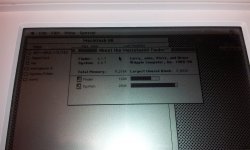
Worked perfectly. All 9MB.
That tells me I have bad RAM on my first card.

Will you have to remove all the RAM on the first card to figure out which is bad?
Nope. Thats the cool thing about diag LEDS. I can see which one lit before the crash.
Very nice! Looks like my portable is going to be costing me yet more money....
Also, surely the bad chip has to be the last chip on the card? As it works when you have it set to 7mb and that's wasting half the last chip, or have i misunderstood something here?
Also, surely the bad chip has to be the last chip on the card? As it works when you have it set to 7mb and that's wasting half the last chip, or have i misunderstood something here?
Yup your correct.
Ok I need 2 how much? We need prices !
Replacing the RAM IC fixed it. So out of a handful from trag, only one was bad. Turns out I did not need DTACK so ill omit that in the next PCB revision.
Thats pretty good.
BTW. I only ordered 5 PCBs to make sure it all worked. First come first served.
Your looking at $75 per board for one without the LEDs. Or $80 if you want the LEDs for the cool factor.
I need to know how many are interested and qty so I can order all the correct parts.
Thats pretty good.
BTW. I only ordered 5 PCBs to make sure it all worked. First come first served.
Your looking at $75 per board for one without the LEDs. Or $80 if you want the LEDs for the cool factor.
I need to know how many are interested and qty so I can order all the correct parts.
I am definitely interested, But currently I just don't have the money.
When I do i'll be after 1 with LED's
When I do i'll be after 1 with LED's
Ok. I started a new thread in the trading post for pricing and orders.
Hmmm. That's a 1 out of 9 failure rate on the chips so far. That's not so good. I hope you just happened across the bad apple and that's not typical.
Have you tried running something like NewerTech's RAMometer memory test (also available in Guages) or some of the memory tests in TechToolPro? Check the chips bitwise...
Fabulously excellent work.
Hmmm, browsed the thread again, rereading your progress.
I also suggest you test RAM performance (RAMometer will give you a MB/S tested indicator) with and without your DTACK wire connected. Is it possible that without DTACK, the CPU is timing out and assuming the data is on the bus at some point, but that with DTACK, the transaction might complete several cycles sooner?
If there's some logical reason why the above paragraph is misdirected, feel free to ignore it.
Have you tried running something like NewerTech's RAMometer memory test (also available in Guages) or some of the memory tests in TechToolPro? Check the chips bitwise...
Fabulously excellent work.
Hmmm, browsed the thread again, rereading your progress.
I also suggest you test RAM performance (RAMometer will give you a MB/S tested indicator) with and without your DTACK wire connected. Is it possible that without DTACK, the CPU is timing out and assuming the data is on the bus at some point, but that with DTACK, the transaction might complete several cycles sooner?
If there's some logical reason why the above paragraph is misdirected, feel free to ignore it.
DTACK is generated automatically by the GLU. So i dont need to worry about it. The backlit portable has no wait states. So the speed is literally as fast as the RAM access time.
The non-backlit has wait states, I present the data available instantly, but the machine can only accept it within a certain amount of wait-states.
Its hard to say why the chip was bad. I could have killed it for all i know. I dont have any ESD matting or anything.
Also, do you have a link to any of those utilities?
The non-backlit has wait states, I present the data available instantly, but the machine can only accept it within a certain amount of wait-states.
Its hard to say why the chip was bad. I could have killed it for all i know. I dont have any ESD matting or anything.
Also, do you have a link to any of those utilities?
This is sooooo awesome!!!!! And especially awesome of Techknight makes a 68020 to drop in it!!! Everyone will be in portable heaven.. Here is a song that I thought when it came out was awesome… Makes me think of my macs… lol!!!
Now thats odd.
I got 9MB on haplains board, at the shop with my portable HDD.
Since I dont have an HDD solution yet on my non-backlit portable at home, I am booting off a 6.0.7 disk tools disk. Well same thing. Memory manager error and address error when using 9MB....
Do you have to have a full install of 6.0.7? or a system enabler I am not aware of?
I got 9MB on haplains board, at the shop with my portable HDD.
Since I dont have an HDD solution yet on my non-backlit portable at home, I am booting off a 6.0.7 disk tools disk. Well same thing. Memory manager error and address error when using 9MB....
Do you have to have a full install of 6.0.7? or a system enabler I am not aware of?
The Mac LC should be your inspiration because this is exactly what Apple did with it: The LC has a 16-bit bus and it's running a '020.
On the PC side of the fence Intel released the 386SX which was the low cost version of the 386DX. The 386DX had a full 32-bit external bus and the 386SX had a 16-bit external bus and fewer pins. The actual core of the two chips were effectively the same. (In the 1980s and early 1990s it was a lot more expensive to make a 32-bit system because your bus had to have many more traces.) I know that for Intel, they solved the problem by using 2 clock cycles to load a complete instruction. That is, every other clock cycle would either be the "high 16" or the "low 16."
Since the '020 doesn't have a shorter bus variant I do wonder how Apple made it work. At least we know it is possible to do.
Simply amazing, what you can do with these machines simply astounds me!
I am not going to say what techknight has done in the past as far as High-Tech electronics. SW / HW
I'm sure this portable card wasn't no big thing for him
I'm sure this portable card wasn't no big thing for him