Thread
Designing a portable RAM card
nice work Technight,
depending on final price, i might be interested if you sell any :ii:
depending on final price, i might be interested if you sell any :ii:
Oh, they are going to be for sale once I know they work.
Each day is excruciatingly painful waiting for the parts... lol
Finally! Sheesh...... Was getting worried as it kept showing delivery status not updated on USPS.
But its good, they came.
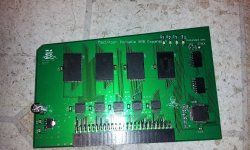
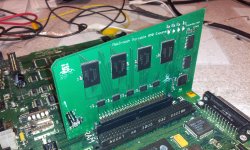
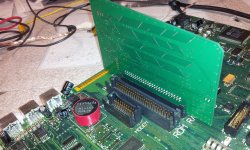
Got some finished pictures below. any thoughts so far? All that basically has to be done now is the CPLD jtagged and then tested!
But its good, they came.
Got some finished pictures below. any thoughts so far? All that basically has to be done now is the CPLD jtagged and then tested!
A very nice, very clean design. I like it. You hardly every see anything done so nice and clean these days.
Techknight's work is the best!!! He really does a nice job on anything he works on!!!
Flashed it. Almost worked first try.
Passes no sad macs.
But something is wrong in my CPLD code I think. it bombs with memory manager error when I go to about the finder.
or if i do a get info on anything, itll crash with address error....
Passes no sad macs.
But something is wrong in my CPLD code I think. it bombs with memory manager error when I go to about the finder.
or if i do a get info on anything, itll crash with address error....
I'm impressed you got that far on the first try. If you'd actually gotten it 100% off the bat I would have needed to say something about the devil and selling of souls...
I did some more work on the CPLD code.
I removed all decoding logic except the very basic stuff, hooking up only the lower half of the first chip to the 4-to-16 decoder.
Tried it again, boom 2MB.
So... at least i know my board configuration is good! I didnt have any doubts about that. At least I got the hardware perfect right off the bat.
I removed all decoding logic except the very basic stuff, hooking up only the lower half of the first chip to the 4-to-16 decoder.
Tried it again, boom 2MB.
So... at least i know my board configuration is good! I didnt have any doubts about that.
At least I got the hardware perfect right off the bat.
Adding one select line at a time, added bank switching A20 line.
Now I am seeing up to 5MB so far, NICE... I will keep doing this for each 1MB block at a time until I figure out where my issue was.
Now I am seeing up to 5MB so far, NICE... I will keep doing this for each 1MB block at a time until I figure out where my issue was.
I found the problem. Not the solution yet...
Soon as I tie in the last MB of RAM, to take it up to 9MB is when it goes haywire. I'm thinking its running into ROM somehow. odd... As long as I stay at 8MB and under, it all works beautifully.
Soon as I add the last MB, spectacular failures
My original CPLD design is perfect. Just didnt like the last MB.
Soon as I tie in the last MB of RAM, to take it up to 9MB is when it goes haywire. I'm thinking its running into ROM somehow. odd... As long as I stay at 8MB and under, it all works beautifully.
Soon as I add the last MB, spectacular failures
My original CPLD design is perfect. Just didnt like the last MB.
Nevermind. I am an idiot. I had to re-read the notes, I can only go to 8MB. Not 9MB..
So my card actually works perfectly. I just tried to expand it past limits.
So my card actually works perfectly. I just tried to expand it past limits.
Techknight.. from what I recall they could only go up to a certain size depending on the model.. I think the limit was 9 on one of them.. the other 8MB.. I remember seeing this.. Perhaps this is why my PDS was missing the last chip so it only had 8MB total.. and that was a card from a 5120.. I wish i could remember.. but the max was 8MB on one and 9 on the other..
This is also including the 1MB of onboard memory of course…. so 7MB on one card for one model and 8MB total for the other.
YOU DID IT!!!!! HORRAY!!!!!
So can you add the last chip for a total of 8MB on the card and make a jumper depending on the model??? So you can flip between 7MB and 8MB.. Get the order forms ready.. LOL!!!!
There... All good now. Its awesome, you can actually watch the diagnostic LEDs switch between banks as the mac starts up and tests RAM.
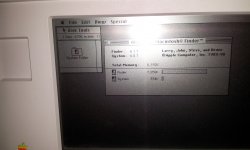
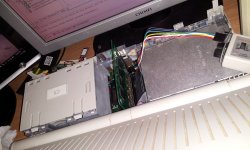
No jumper needed. its right at 8MB. I just turned off the last MB, so it stays at 8MB instead of 9MB. So basically we are wasting half of the last chip. doing nothing.
I could remap it in the expansion ROM area, but then we would need a special driver to tell the Mac OS to use it as RAM.
The last thing I need to do is toss it in a Backlit model and see if it works. In theory, it should be universal. I actually did NOT need the DTACK connection on the non-backlit. So, we will see on the Backlit whether I need it or not.
I could remap it in the expansion ROM area, but then we would need a special driver to tell the Mac OS to use it as RAM.
The last thing I need to do is toss it in a Backlit model and see if it works. In theory, it should be universal. I actually did NOT need the DTACK connection on the non-backlit. So, we will see on the Backlit whether I need it or not.
So I think the 5120 can go up to 8MB MAX but the 5126 can take a total of 9MB...
I dont know. depends on where ROM is. if ROM is sitting at &H900000, then its stuck at 8MB as well.
Found this...
NAME
MACINTOSH Portable M5126
MANUFACTURER
Apple
TYPE
Portable Computer
ORIGIN
U.S.A.
YEAR
1990
END OF PRODUCTION
1991
BUILT IN LANGUAGE
None
KEYBOARD
Typewriter style, 80-key with numeric keypad
CPU
Low power version of Motorola 68000
SPEED
16 MHz
RAM
1 MB (up to 9 MB)
ROM
256 KB
GRAPHIC MODES
640 x 400
COLORS
Monochrome
SOUND
8-bit stereo
SIZE / WEIGHT
33.8 x 37.7 x 10.3 cm / 7.1 kg
I/O PORTS
Serial, Parallel, SCSI, ADBx2
BUILT IN MEDIA
One 3.5'' FDD 40 MB HDD (optional)
OS
MAC OS 6.0.4 to 7.5.5
POWER SUPPLY
Internal lead-acid battery 6.5V
PRICE
$4200
NAME
MACINTOSH Portable M5126
MANUFACTURER
Apple
TYPE
Portable Computer
ORIGIN
U.S.A.
YEAR
1990
END OF PRODUCTION
1991
BUILT IN LANGUAGE
None
KEYBOARD
Typewriter style, 80-key with numeric keypad
CPU
Low power version of Motorola 68000
SPEED
16 MHz
RAM
1 MB (up to 9 MB)
ROM
256 KB
GRAPHIC MODES
640 x 400
COLORS
Monochrome
SOUND
8-bit stereo
SIZE / WEIGHT
33.8 x 37.7 x 10.3 cm / 7.1 kg
I/O PORTS
Serial, Parallel, SCSI, ADBx2
BUILT IN MEDIA
One 3.5'' FDD 40 MB HDD (optional)
OS
MAC OS 6.0.4 to 7.5.5
POWER SUPPLY
Internal lead-acid battery 6.5V
PRICE
$4200
So 5120 can only go to 8MB total and 5126 to 9MB total.. You are testing on a 5120.. You should test on a 5126 board and bring it up… Perhaps my 5126 board.. heeee….
That means I need two different CPLD firmwares. One for backlit, one for not...
Maybe the next PCB i need to add a jumper to enable/disable the 9th MB.
On my machine, that 9th MB will overlap ROM and she falls flat on its ass. lol.
I only ordered 5 PCBs on the first run to make sure I didnt have any hardware bugs. And I didnt, as I figured i wouldnt. I looked over that thing time and time again proofreading it.
New PCB will have the jumper. I need to see if the fab house has solder paste stencils. that will make things so much easier and faster. I did my first board all by hand.
Maybe the next PCB i need to add a jumper to enable/disable the 9th MB.
On my machine, that 9th MB will overlap ROM and she falls flat on its ass. lol.
I only ordered 5 PCBs on the first run to make sure I didnt have any hardware bugs. And I didnt, as I figured i wouldnt. I looked over that thing time and time again proofreading it.
New PCB will have the jumper. I need to see if the fab house has solder paste stencils. that will make things so much easier and faster. I did my first board all by hand.
I'm sure everyone is cool with just getting 8MB's… I just thought there might be a way to just use that little extra ram… Yeah next design throw a jumper scenario on it if possible to flip back and forth.. 
According to the Backlit developer note, it has an 8MB ceiling as well...
You did a freakin awesome job!!!!!!!
good job dude!
The plot thickens, the Service Source also says there is a 9 MB ceiling:
http://tim.id.au/laptops/apple/legacy/macintosh_portable.pdf
http://tim.id.au/laptops/apple/legacy/macintosh_portable.pdf
Well, I know for a fact that the M5120 I have here on my desk, ROM starts at &H900000 which is the 9Megabyte marker. So yea I cant go past 9MB.
Unless I add the last MB of RAM to the ROM Expansion address location, but that would require a special extension to tell System 6/7 to use that as RAM. That is something I dont know how to do.
Unless I add the last MB of RAM to the ROM Expansion address location, but that would require a special extension to tell System 6/7 to use that as RAM. That is something I dont know how to do.
Backlit needs the /AS jumper. Without it it only sees 5MB. with it I can get all 8MB.
However there is an odd bug. When an application goes into expanded RAM the backlight flickers on and off rapidly with RAM accesses.
If I dont use the /AS wire and cap it at 5mb its perfectly fine.
But my /AS wire was a horrendously long clip lead plus I didnt have /DTACK hooked up either, so that could have been an issue.