

Thread
Another IIci ROM hack
That sounds like a great utility, might it work for the DeclROMs on cards or inside DuoDocks?


 )
)
I'm going to try to fire up my IIsi and run the test listing tonight, BTW! :approve:
:lol: Look again! If you'll notice, most of the pagecount comments are addenda tacked onto real posts as edits, and therefore, do not add any padding to the pagecount, nor the replycount!
) I'm going to try to fire up my IIsi and run the test listing tonight, BTW! :approve:
Great! Now that I've found some interesting stuff in where the Daystar ROM maps itself, I'm very interested in how the IIsi's memory is laid out...
Meanwhile, I'm in the middle of laying out the SIMM programmer board. I actually have everything laid out and routed (thanks to the EAGLE autorouter!) but some of the autorouted traces are ridiculous so I'm making them better.
Meanwhile, I'm in the middle of laying out the SIMM programmer board. I actually have everything laid out and routed (thanks to the EAGLE autorouter!) but some of the autorouted traces are ridiculous so I'm making them better.
8-o Does ANY of that mess of concrete and re-bar actually lead ANYWHERE? That looks like a friggin' Möbius band on acid! :O
Wooo, working ROM disk.
It's getting late (for me), but I thought I'd share my progress so far.
I'm using a IIx with a IIsi ROM image in the ROM SIMM. The IIsi ROM image is 512KB, but the IIx maps a full 1MB of ROM SIMM into the address space starting at 0x40800000. This leaves 512KB available to play with (the original IIx ROM is 256KB, so even more space if you want IIx ROMs). I've placed a disk image from the 512KB to 1MB section of my ROM SIMM. The disk image was created on OSX with dd(1), and initialized with a filesystem and populated with stuff using minivmac.
I then modified my memdrv driver to point to 0x40880000 where the disk image resides in ROM. So, I now have a mountable ROM disk.
My modified driver & loading app, along with source, are at: http://synack.net/~bbraun/romdrv0.1.sit.hqx
At the top of romdrv.c are two constants controlling the location of the disk image, and the size, so if you've got a different setup, hack away!
Once again, don't quit the loaddrv app with the ROM image mounted, if you do, it unloads the driver from memory and you now have a disk without a driver. I plan to convert this to an INIT soon to avoid that problem.
It's getting late (for me), but I thought I'd share my progress so far.
I'm using a IIx with a IIsi ROM image in the ROM SIMM. The IIsi ROM image is 512KB, but the IIx maps a full 1MB of ROM SIMM into the address space starting at 0x40800000. This leaves 512KB available to play with (the original IIx ROM is 256KB, so even more space if you want IIx ROMs). I've placed a disk image from the 512KB to 1MB section of my ROM SIMM. The disk image was created on OSX with dd(1), and initialized with a filesystem and populated with stuff using minivmac.
I then modified my memdrv driver to point to 0x40880000 where the disk image resides in ROM. So, I now have a mountable ROM disk.
My modified driver & loading app, along with source, are at: http://synack.net/~bbraun/romdrv0.1.sit.hqx
At the top of romdrv.c are two constants controlling the location of the disk image, and the size, so if you've got a different setup, hack away!
Once again, don't quit the loaddrv app with the ROM image mounted, if you do, it unloads the driver from memory and you now have a disk without a driver. I plan to convert this to an INIT soon to avoid that problem.
WOW, cool stuff bbraun! I love it!
8-o Wooo? :lol: Nicely done understatement! I think it's time for another Chapter to be added to the index.
This thread is turning into a nice outline for a MacHackinBook!
Now I'm confused, imagine that . . . :

Have you got the IIx ROM disabled or is it still active on the MoBo? Are you using the ROM SIMM in expansion mode or boot mode?
I was under the impression that if you have the MoBo ROM disabled that the Memory Mapping would come from the Code on the ROM SIMM.
I'll have to delve back into GttMFH2E to noodle out the differences between the Macs using a ROM SIMM for Boot ROM Replacement Only and those that are also listed as using the ROM SIMM (?) as Firmware Memory Expansion/Storage.
:?:
AFAIK, the IIx does not have mobo rom, and works exclusively off the SIMM. I removed a stock SIMM to use dougg3's SIMM. It appears 1mb is mapped in by default, although only 256k is used by the stock IIx rom and 512k is used by the IIsi rom. I literally just concatenated the disk image to the end of the IIsi rom, burned it, and stuck the SIMM in the mobo.
That's really odd, check to see if more than the IIsi's three addresses for PseudoSlots are available.
How many NuBus Cards are in your IIx now, in which slots, and are they all functional? :?:
You may have just downgraded your IIx to a 32 bit clean IIcx which of the IIx's NuBus slots are enabled and which are disabled ought to be a match to the three addresses available to the stock IIsi.
My guess is that there is something on the II, IIx, IIcx and SE/30 MoBos that causes them to require MODE 32 which they bought/ransomed from Connectix for an undisclosed quantity of MEGABUCK$ and added it to all later Mac ROMs. In this scenario, giving away MODE 32 at no charge for running on all those machines as a software patch of the existing firmware, which of course, saved Apple some of those MEGABUCK$ in the form of new ROM SIMMs they didn't need to supply for all those, pruportedly 32 bit computers in the field, that were 24 bit limited by the ROM BooBoo fiasco.
The alternate scenario would be . . . :?:
Way to go, Connectix! Stick it to the man! (Apple) :lol:
Interesting questions!
< trots off to make coffee . . . xx( >
How many NuBus Cards are in your IIx now, in which slots, and are they all functional? :?:
You may have just downgraded your IIx to a 32 bit clean IIcx which of the IIx's NuBus slots are enabled and which are disabled ought to be a match to the three addresses available to the stock IIsi.
My guess is that there is something on the II, IIx, IIcx and SE/30 MoBos that causes them to require MODE 32 which they bought/ransomed from Connectix for an undisclosed quantity of MEGABUCK$ and added it to all later Mac ROMs. In this scenario, giving away MODE 32 at no charge for running on all those machines as a software patch of the existing firmware, which of course, saved Apple some of those MEGABUCK$ in the form of new ROM SIMMs they didn't need to supply for all those, pruportedly 32 bit computers in the field, that were 24 bit limited by the ROM BooBoo fiasco.
The alternate scenario would be . . . :?:
Way to go, Connectix! Stick it to the man! (Apple) :lol:
Interesting questions!
< trots off to make coffee . . . xx( >
Huh, I thought the IIsi ROM in the IIx was a common thing.
I've got all slots filled, ethernet and video on opposite outer extremes and I use those constantly. 2 Rockets and a 2 slot Mac286 card fill out the rest. I've noted the oddities with the Rockets in the Peripherals forum, but RocketShare is up and working fine at this point. The Mac286 requires 24bit addressing though, so :/
I've got all slots filled, ethernet and video on opposite outer extremes and I use those constantly. 2 Rockets and a 2 slot Mac286 card fill out the rest. I've noted the oddities with the Rockets in the Peripherals forum, but RocketShare is up and working fine at this point. The Mac286 requires 24bit addressing though, so :/
Wow! 8-o That is really cool! I haven't looked at your code yet, but I'm wondering if it could be adapted to mount larger/more floppy images using the floppy emulator I've been building.
Great job!
< . . . slurp . . . >
I don't know, that's why I'm curious!
The backwards compatibility built into the 32 bit clean Mac ROM SIMMs would be explained by the scenario I mentioned. If MODE 32 had been ineffective for any given Dirty ROM Mac due to some oddball configuration of Memory, Expansion Cards or any of a multitude of variables, all Apple would need do to fix the issue for those owners would be to ship them a ROM SIMM that was already in production or excess stock after the Mac it was intended for went out of production.
Curiouser & curiouser . . . :?:
< . . . slurp . . . >
I don't know, that's why I'm curious!
The backwards compatibility built into the 32 bit clean Mac ROM SIMMs would be explained by the scenario I mentioned. If MODE 32 had been ineffective for any given Dirty ROM Mac due to some oddball configuration of Memory, Expansion Cards or any of a multitude of variables, all Apple would need do to fix the issue for those owners would be to ship them a ROM SIMM that was already in production or excess stock after the Mac it was intended for went out of production.
Curiouser & curiouser . . . :?:
< . . . slurp . . . >
It's practically a stubbed out driver, since the only real work it has to do is copy memory when a read operation is performed. Everything else is just glue. It took a while initially to figure out all the glue of how to create a driver, how to load a driver, and how to get a disk mounted, but hopefully it's something that can be built on.
For the floppy emulator, I suspect you'll need to do actual work in the driver, talking directly to the hardware. Which also means coexisting with or replacing the existing floppy driver. Replacing a driver in RAM is pretty easy to do, you just hijack its entry in the unit table, which can be done from the driver loading code, the trick is making sure it's not already in use when you steal its entry. Once stolen, you can keep a reference to the old driver, and try to pass through calls to it if needed.
So you're only getting access to the first 1 MB of the SIMM from the IIx, too? That's interesting...
What version of the system are you running it on? When I boot from my "ultra-long startup chime" ROM that fills up most of the 2 MB address space, and try to dump $40900000 with MicroBug in System 7.0.1 on my IIci, it crashes. And I get weird results in other locations where the ROM is supposed to be mapped other than at $40800000 (like $40000000). But when I do it in System 7.6, it shows the correct data. Could the installed OS version be playing a part in this?
What version of the system are you running it on? When I boot from my "ultra-long startup chime" ROM that fills up most of the 2 MB address space, and try to dump $40900000 with MicroBug in System 7.0.1 on my IIci, it crashes. And I get weird results in other locations where the ROM is supposed to be mapped other than at $40800000 (like $40000000). But when I do it in System 7.6, it shows the correct data. Could the installed OS version be playing a part in this?
Me too!
I seem to recall that there's a key combo on one of the older Macs that'll actually boot a System from ROM.
Is that something we could do here? If we put a big enough chip on the ROM, could we put a full System 7 install on ROM and add (if possible) a key combo to boot from that address space?
Is that something we could do here? If we put a big enough chip on the ROM, could we put a full System 7 install on ROM and add (if possible) a key combo to boot from that address space?
You're thinking of the Classic, and it has been discussed in this thread. Ultimately, it would be fun to have something similar. But, one step at a time. I've been banging my head on this INIT thing.
On the IIx I've got 7.1.1Pro. On the Q700, I've got 7.1 (it's what A/UX 3 uses, so hey). The OS could definitely be changing things here, since it sets up the MMU for these machines.
I tried Command & Power Button, no DeGubber appeared on my IIsi. Id there a reset button somewhere inside the box . . . forgot to look on the front, nothing shows on the sides on a cursory inspection. I'll hit the DevNote, etc.
Looks like the IIsi does not even have MicroBug, so you need MacsBug for command-power to work. Sorry, I didn't realize it was so different. It's not a big deal if you don't want to bother--I thought it was going to be a quick and easy test but the IIsi has foiled me once again!
http://support.apple.com/kb/TA44702
http://support.apple.com/kb/TA44702
Here is what my programmer PCB layout looks like right now. I've fixed many ridiculous traces and there may be other ones I can make better too:
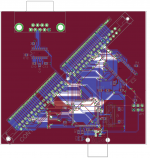
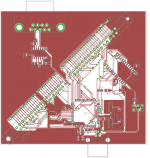
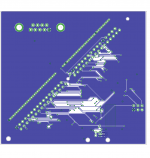
Suggestions/criticisms are welcome!
Suggestions/criticisms are welcome!
Nice! I look forward to the programmer board, although I can't make any useful comments in that area.
On the other hand, I've INITified the ROM disk driver, so you can just drop it in your system extensions and mount your ROM disk (assuming you have a 512KB disk image located at 0x40880000). In addition to just INITifying it, I've fixed some things about the driver: it correctly identifies the volume as locked and it claims to be "unmountable" (meaning you get a dialog saying it won't come back until you reboot if you try to eject it, same as other "fixed" disks).
It looks like file extensions of ".hqx" aren't allowed to be attached to posts, so I'll keep it on my machine: http://synack.net/~bbraun/romdrv0.2.sit.hqx
On the other hand, I've INITified the ROM disk driver, so you can just drop it in your system extensions and mount your ROM disk (assuming you have a 512KB disk image located at 0x40880000). In addition to just INITifying it, I've fixed some things about the driver: it correctly identifies the volume as locked and it claims to be "unmountable" (meaning you get a dialog saying it won't come back until you reboot if you try to eject it, same as other "fixed" disks).
It looks like file extensions of ".hqx" aren't allowed to be attached to posts, so I'll keep it on my machine: http://synack.net/~bbraun/romdrv0.2.sit.hqx
dougg3,
I would suggest to move some vias here and there (away from each other, place them between pins, not directly at the pin they're not connected to) and reroute some traces manually. I marked some examples in red in the picture.
I'm not nitpicking..
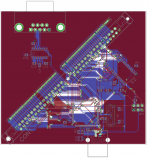
I have dumps of the Daystar 4.01 and 4.11 at:
http://www.prismnet.com/~trag/Daystar/Turbo040/
It's been years since I experimented with these, but IIRC, the 4.01 worked with the LC version and the 4.11 worked with the version with an FP unit. There was an 'i' version of the Turbo040, Turbo040i, which had a 68040 with no floating point unit. and the regular version in which the 68040 came with the floating point unit.
These dumps are from pulling the chips out of the socket and reading them on a programmer.
http://www.prismnet.com/~trag/Daystar/Turbo040/
It's been years since I experimented with these, but IIRC, the 4.01 worked with the LC version and the 4.11 worked with the version with an FP unit. There was an 'i' version of the Turbo040, Turbo040i, which had a 68040 with no floating point unit. and the regular version in which the 68040 came with the floating point unit.
These dumps are from pulling the chips out of the socket and reading them on a programmer.
Nice work! That's cool! I'm having a heck of a time downloading the file from your machine...is all your bandwidth taken up, or is something else weird going on? I haven't been able to download either file. They all stall at like 1% or 3%.
I appreciate it ojfd! Thanks! Those traces you highlighted near the bottom are examples of what I've been fixing. I just missed those two, so thanks for pointing that out! I also see what you did in the mid-right and will implement those ideas too--it'll look much better after doing that!I would suggest to move some vias here and there (away from each other, place them between pins, not directly at the pin they're not connected to) and reroute some traces manually. I marked some examples in red in the picture.I'm not nitpicking..
I may have to mess around with the design near the crystal oscillator. Apparently those can be pretty sensitive and I might want to make sure everything stays away from it. Luckily the two lines near it are not ones that will be toggling much (reset and chip select).
Interesting, trag! Your dump of the 4.01 chip does not match olePigeon's in-system dump of 4.01. I wonder how that works...maybe there is some kind of in-between hardware layer that decrypts the contents of the chip on the fly or something? After a quick glance I don't see a simple relationship between the two.
I was just going through olePigeon's 4.01 dump and found this gem:
Code:
--- Does your mother know you're reading our ROM code? ---
Yeah, sorry about the hosting, I need to have a word with my sysadmin.
It should be better, at least for the moment.
It should be better, at least for the moment.
Wow, I've missed a lot of action in the past week or so...
dougg3, how are you finding the strings in the DayStar ROM?
Did anyone see how the DayStar ROM patches the part of the host ROM that does the memory check? :b&w:
Does the DayStar incompatibility happen if you don't change the icons?
The ROM/RAM disk sounds very promising. I'm looking forward to Mac Classic boot capability, if possible. Is there a tutorial on how to properly add the disk image to the ROM?
Great job guys!!
dougg3, how are you finding the strings in the DayStar ROM?
Did anyone see how the DayStar ROM patches the part of the host ROM that does the memory check? :b&w:
Does the DayStar incompatibility happen if you don't change the icons?
The ROM/RAM disk sounds very promising. I'm looking forward to Mac Classic boot capability, if possible. Is there a tutorial on how to properly add the disk image to the ROM?
Great job guys!!
I checked the spacing on the 64-pin SIMMs today. My ROM SIMM fit in all of them, so I guess they're the right size. I did discover that some of them are 45° angle, and some are 90° angle. There appears to be plenty of each. I wouldn't recommend the slotted one, it would be difficult to pull the SIMM out.
For the ROM disk, this is what I did for my setup (IIx w/IIsi ROM):
Create the empty disk image:
Code:
dd if=/dev/zero of=diskimage bs=524288 count=1Then concatenate it with the IIsi ROM image:
Code:
cat IIsi.ROM diskimage > awesome.rom
Code:
gcc -o splitter splitter.c
./splitter awesome.rom awesome_{1,2,3,4}.binPut the SIMM in your machine, and boot! It should boot normally since the IIsi ROM image is unmodified. Next, grab the ROMDisk driver, extract, and throw the ROMDisk extension in your Extensions folder. Reboot. You should now have the disk image you created in minivmac mounted on your desktop.
If you install the ROMDisk extension without the modified ROM, it will present a dialog saying the disk is unrecognized, do you want to initialize it? Even if you say Initialize here, it'll fail since it's ROM.
Keep in mind this is kind of hardware specific and should work on a IIx, SE/30, IIcx, and IIsi, but I've only tested on the IIx.
Cool, thanks! Got it!
I'm finding the strings using the "strings" command built-in to Linux (and available with cygwin on WIndows). It should also come with OS X, I believe.
I just type:
Code:
strings romdump.binI haven't found that part yet. Only found the ROM checksum test. But my understanding is that since it can be disabled or enabled in software, it probably patches the code to jump to a routine in its own ROM that checks a special PRAM value or something.
We will know more soon
Excellent! By 45°, are you meaning the kind like our motherboards have, where you put it in at 45 and then push and it "clicks" at 90°? I totally agree, the ones where you just push it down would be a pain in the butt to get out, especially with the small programmer board.
I may have to ask if you can pick some of those up pretty soon. I'd like to have one of the sockets in my hand before I have the board manufactured, just to make sure the holes are correct (I imagine they are fine).
Once I send it off to manufacturing, I can move away from the hard stuff and into my area of expertise, software
I'll probably start by getting it working completely over RS232 serial, with USB only used for powering. Once that works and I've verified all my flashing routines, I can move over to getting the USB communication working. Finally, I'll make a bootloader so that its firmware can be updated in case I discover a bug after I've started shipping them out, or if I have to add support for additional chips. Fun, fun, fun! And I mean that sincerely! And it'll be completely open-source
Progress on the ROMDisk booting thread:
I've got a slightly modified version of the driver that I just slapped down on top of the .Sony floppy disk driver in ROM. It attempts to boot the ROMDisk, but once the System starts loading, it hangs at the Welcome to Macintosh screen. It looks like the System needs to reinit the driver when control transfers from the ROM to the OS or something.
Also, when you do a Minimal OS install for a particular machine, it apparently checks the machine type and ROM version in bytes 8 & 9 of the ROM. I can only get a minimal install of 6.0.8 for 1 machine type in the 512KB disk image, and I'm on a IIx with a IIsi ROM, so it gets very confused. Changing bytes 8 & 9 of the ROM to match the IIx ROM seem to fool it.
I'm really looking forward to the SIMM programmer! Removing the SIMM, and then removing, programming, reinserting each of the 4 chips, and then putting the SIMM back in is tedious business.
I've got a slightly modified version of the driver that I just slapped down on top of the .Sony floppy disk driver in ROM. It attempts to boot the ROMDisk, but once the System starts loading, it hangs at the Welcome to Macintosh screen. It looks like the System needs to reinit the driver when control transfers from the ROM to the OS or something.
Also, when you do a Minimal OS install for a particular machine, it apparently checks the machine type and ROM version in bytes 8 & 9 of the ROM. I can only get a minimal install of 6.0.8 for 1 machine type in the 512KB disk image, and I'm on a IIx with a IIsi ROM, so it gets very confused. Changing bytes 8 & 9 of the ROM to match the IIx ROM seem to fool it.
I'm really looking forward to the SIMM programmer! Removing the SIMM, and then removing, programming, reinserting each of the 4 chips, and then putting the SIMM back in is tedious business.
Those are the 90° sockets. The 45° sockets you stick the SIMM in at about 70°, then push it down and clicks in at 45°. Hmm, well, maybe it's closer to 30°. Anyway, it's like the Quadra 605's RAM. I guess I shoulda described it as a low-profile socket.
Edit: Are you gonna screen the Jolly Roger on the board?
Doesn't need LEDs or anything.